Reclaiming a chunk of desk space used to feel like an optional luxury. Now, for anyone running a work-from-home setup, sharing a small apartment, or simply wanting a cleaner daily workspace, lifting the monitor off the surface has become a small but meaningful upgrade. The right wall mount also dials in sight height, which helps long days feel less like a slow neck cramp.
I’ve gone through ten solid contenders and broken them down by screen size, weight capacity, VESA pattern (the four-hole spacing on the back of your monitor that the bracket attaches to), and real-world installation scenarios. The picks below lean into different setups, so whether you run one small screen or a wider multi-monitor station, there’s a fit here worth considering.
A Snapshot Of The Selections

HP EliteDesk/ProDesk Mini Wall Mount

WALI Dual Monitor Wall Mount 13-27″
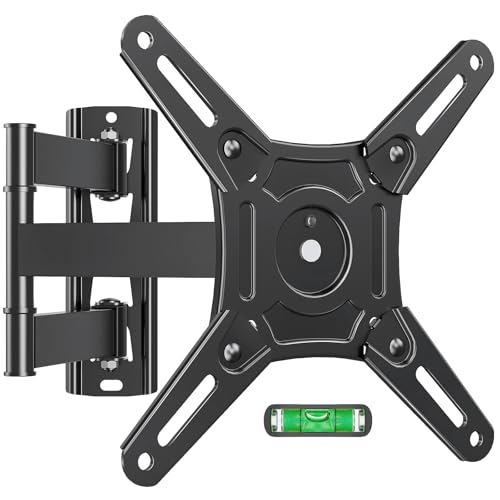
ELIVED Full Motion Wall Mount 14-42″

WALI Full Motion Monitor Wall Mount 13-32″

WALI Single Monitor Wall Mount 17-34″

VIVO Quick Release VESA Adapter Kit

Silverstone NUC VESA Extension Bracket

AVF Tilt and Turn Monitor Wall Mount

Digitus 90350 Universal Monitor Wall Mount

monTEK Dual Monitor Wall Mount 17-32″
More On The Choices That Made The List
This mount exists for one specific job: getting an HP Mini PC off the desk and tucked neatly behind a monitor or under a surface. It’s a niche piece of hardware, but for the people who need it, it solves a frustrating clutter problem without much fuss.
The bracket is sized for the HP Mini Desktop form factor, roughly 7 inches tall by 1.6 inches deep, and fits a wide range of EliteDesk and ProDesk Mini models. Owners commonly mount it behind a VESA-compatible monitor, on a wall, or even under a desk. If your setup is built around an HP Mini, this is the cleanest mount-by-name option I’ve come across.
Practical Advantages
- Custom-fit for HP Mini PCs, which removes guesswork on sizing
- Multiple mounting options: behind monitor, on wall, or under desk
- Frees up meaningful desk space for keyboards, notebooks, and coffee mugs
- Broad HP model compatibility covers ProDesk, EliteDesk, and Elite Mini lines
Worth Noting
- Useful only if you own one of the listed HP Mini models
- Doesn’t support full-sized desktops or non-HP hardware
- Installation hardware depends on your mounting surface
Right Fit For
Anyone running an HP Mini PC and wanting a tidy, branded mounting solution that keeps the small form factor off the desk.
Look Elsewhere When
Standard monitor setups will be better served by the WALI Single Monitor Wall Mount 17-34″, which actually holds a screen.
For a two-screen workstation that needs to stay anchored to the wall rather than the desk, this WALI model covers the bases most people need. The dual arms handle screens up to 27 inches and 22 pounds each, which suits the bulk of mid-sized office monitors.
The wall plate is built for concrete or brick, so installation requires the right kind of wall to feel solid. There’s also a horizontal adapter plate that converts a single-arm mount into a dual setup, giving the product a bit of flexibility. Compared to the JINGCHENGMEI mini-PC bracket above, this one focuses purely on the monitors themselves.
What Works In Its Favor
- Handles two screens without dominating desk real estate
- Curved arm geometry widens the usable viewing area between screens
- Adapter plate offers a single-to-dual upgrade path
Trade Offs
- Limited to masonry walls, which rules out standard drywall studs
- 27-inch ceiling may feel tight for ultrawide displays
- 22-pound-per-arm limit excludes heavier 27-inch gaming screens
Built With In Mind
Office workers running two mid-sized monitors on a brick or concrete wall in a permanent setup.
Swap It Out When
Drywall users wanting a wider size range should consider the WALI Single Monitor Wall Mount 17-34″, which supports larger screens and wood-stud mounting.
When I see a mount that handles screens up to 42 inches and rotates ±90 degrees, I think of people who want their monitor to do more than just sit there. The ELIVED full-motion mount is built for that kind of flexibility, including pairing it with a Samsung Smart Monitor M7 or M70D as a casual living-room display.
With a 44-pound weight limit and VESA support from 75x75mm up to 200x200mm, it covers most monitor sizes short of true televisions. The articulating arm design pulls the screen out from the wall and swivels it sideways, which is great for shared viewing or repositioning throughout the day. Where the WALI dual mount above stays fixed, this one moves with you.
The Value In It
- Wide 14 to 42-inch size range covers most monitor and small-TV setups
- ±90° rotation lets the screen face any direction in the room
- VESA range up to 200x200mm handles larger display patterns
- Works on both single wood stud and concrete walls
Points To Note
- Full-motion arms can introduce slight wobble at full extension
- Installation on a single stud requires careful centering for heavier screens
- Some owners report the included hardware needs supplementing for masonry
Quick Facts
Made For
People who want a monitor that pivots between desk work, casual streaming, and shared viewing in a multi-use space.
Consider Something Else When
Static single-monitor setups in tight spaces may be better served by the AVF Tilt and Turn Monitor Wall Mount, which uses a simpler mechanism.
Pulling a monitor out from the wall and rotating it freely is one of those small upgrades that changes how a room feels. The WALI full-motion mount handles 13 to 32-inch screens up to 33 pounds and extends 15 inches from the wall.
It tilts ±15 degrees, swivels 180 degrees, and rotates a full 360 degrees for portrait mode. That last one matters for anyone reading long documents or code. Mounting holes support 75x75mm and 100x100mm VESA patterns, which covers the overwhelming majority of mid-sized monitors.
Good Reasons To Consider
- 360° rotation supports portrait orientation for reading-heavy workflows
- 15-inch extension reach makes the screen easy to share across a room
- 33-pound capacity handles most 27 to 32-inch monitors comfortably
Honest Caveats
- At full extension, slight screen movement during typing is widely reported
- Limited to VESA 75 and 100 patterns, which excludes larger 200×200 displays
- Requires solid wall anchoring to feel stable at full reach
Who It Suits Best
Bedroom, office, or gaming-room users with a 13 to 32-inch monitor who want maximum repositioning flexibility.
A Better Fit Elsewhere
Users with larger displays above 32 inches should consider the ELIVED Full Motion Wall Mount 14-42″, which covers a wider size range.
This WALI single-arm mount handles larger screens, up to 34 inches and 22 pounds, while staying slim against the wall when retracted. It’s the kind of mount that disappears into the setup until you actually need to adjust it.
The arm extends 19.3 inches, tilts +70°/-45°, swivels +90°/-90°, and rotates 360° for landscape-to-portrait switching. A heavy-duty wall plate accepts both brick and wood-stud mounting, which is more versatile than the masonry-only WALI dual mount. The VESA support covers 75x75mm and 100x100mm via a detachable plate.
Useful Touches
- Generous 19.3-inch extension for pulling the screen close or pushing it back
- Wide tilt range of +70°/-45° suits reading and standing-desk transitions
- Detachable VESA plate simplifies screen attachment and removal
- Wood-stud and brick compatibility widens installation options
Things To Consider
- 22-pound capacity caps out below some 34-inch ultrawide options
- No dual-screen configuration for users wanting two monitors
Feature Snapshot
Best Suited To
Single-screen users with 17 to 34-inch displays who want flexibility and a sturdy single-arm build.
Not Your Match When
Two-monitor workstations are better handled by the monTEK Dual Monitor Wall Mount 17-32″, which holds two screens at once.
Not every monitor problem needs a new mount. Sometimes the screen already has a stand with a non-standard mount, and the goal is to make it wall-mount friendly. The VIVO quick-release adapter kit handles exactly that.
It comes with a removable VESA plate that attaches to monitors or TVs with VESA holes at 75x75mm or 100x100mm. Tested to hold up to 22 pounds, it’s a small accessory that opens up wall mounting to displays that wouldn’t otherwise fit. Unlike the WALI and ELIVED mounts reviewed above, this isn’t a mount itself, it’s the missing piece that lets a wall mount work.
Useful Strengths
- Quick-release plate simplifies screen removal for cleaning or transport
- Includes all screws and mounting hardware out of the box
- 22-pound tested capacity matches typical office monitor weights
Points To Keep In Mind
- It’s an accessory, not a standalone wall mount solution
- Doesn’t fit larger VESA patterns above 100x100mm
- Adds a small bracket depth behind the screen
Whose Shelf It Belongs On
Anyone with an existing VESA-compatible mount who wants faster screen swaps or compatibility with non-standard stands.
Reach For A Different Pick When
Shoppers needing an actual mount from scratch should pick the WALI Single Monitor Wall Mount 17-34″ instead, since this kit doesn’t hold a screen on its own.
Intel NUC owners have a specific kind of mess to clean up: a small brick of a computer that needs to live somewhere without dominating the desk. The Silverstone SST-mva01 bracket solves that by attaching the NUC directly to a VESA mount, behind or beside the monitor.
Built from 2.0mm SECC steel (a zinc-coated steel commonly used in electronics enclosures), it’s a sturdy little plate that supports 75x75mm and 100x100mm VESA patterns. Unlike the JINGCHENGMEI mount earlier, which targets HP Mini PCs, this one is purpose-built for the NUC form factor. It’s a niche product, but for the right owner, it pulls everything together.
Positive Points
- Enables NUC and monitor arm to share a single VESA mounting point
- 2.0mm SECC steel construction resists flex under the NUC’s weight
- Standard 75x75mm and 100x100mm VESA compatibility
Small Caveats
- Only useful for Intel NUC owners and similar small-form-factor PCs
- Requires an existing VESA mount to function as intended
- Limited documentation on newer NUC models
Perfect Match For
NUC owners who already use a monitor arm and want to tuck the computer behind the display.
Where Another Pick Suits Better
HP Mini PC owners should pick the HP EliteDesk/ProDesk Mini Wall Mount, which is custom-fit for those machines.
The AVF MRL13-A is a no-fuss wall mount that tilts and turns without a complicated arm system. For compact offices or bedrooms running 13 to 27-inch screens, it’s a tidy middle-ground option.
The mount supports up to 22 pounds, tilts 14 degrees, and turns left and right for shared viewing. The wall-mounted configuration clears desk space and lets you set the monitor at eye level, which can genuinely reduce neck strain over long days. Compared to the heavier articulating arms above, this one stays close to the wall and feels more like a fixed installation.
Positive Takeaways
- Compact form factor suits smaller workspaces and bedrooms
- Raises monitor to eye level, which helps reduce neck strain over time
- 22-pound capacity covers typical 24-inch office monitors
Potential Drawbacks
- Tilt range limited to 14 degrees, which restricts downward viewing angles
- No full extension arm, so the screen stays close to the wall
Who Should Grab It
Compact-office and home users wanting a simple, fixed-position mount that clears desk space without complexity.
Skip It When
Anyone wanting to pull the monitor out toward them should consider the WALI Full Motion Monitor Wall Mount 13-32″, which extends 15 inches.
The Digitus 90350 is built for people who don’t want to think about brand-specific compatibility. It supports LCD and LED monitors up to 42 inches with VESA 100×100, and the swivel and rotation adjustments cover everyday repositioning needs.
The mount swivels ±15 degrees and rotates a full 360 degrees, which is enough to reorient the screen between landscape tasks and casual viewing. With a 15 kg (roughly 33 lbs) maximum load, it handles most standard monitors comfortably. Where the WALI dual mount above focuses on two screens, this one is a single-screen universal option that prioritizes compatibility.
The Case For It
- Universal fit covers a wide range of monitor brands and models
- 360° rotation handles landscape and portrait orientations
- ±15° swivel allows repositioning without unmounting
- VESA 100×100 covers most modern monitors
Some Limits To Know
- 15 kg load rating excludes heavier 34-inch ultrawides
- European brand with documentation that may feel thin for some users
Feature Rundown
Who Will Love This
Mixed-brand households or office refreshes where a single mount needs to fit different monitors over time.
Another Choice May Suit
Users wanting a U.S.-documented mount with a wider VESA range should consider the ELIVED Full Motion Wall Mount 14-42″ instead.
Screen wobble from typing is a real annoyance on dual-monitor wall setups, and monTEK leans into solving it with an integrated mechanical spring structure. The arms are thickened high-grade steel, and each holds up to 20 pounds reliably.
The mount handles 17 to 32-inch monitors per arm and aims to reduce the visible shake that comes from desk movement or heavy keystrokes. For anyone who has watched their second monitor wiggle during a fast typing session, that stability focus matters. Compared to the WALI dual mount earlier, which is built for masonry only, this one is designed with daily-use stability as the headline feature.
Bright Spots
- Steel spring structure reduces screen shake during typing
- 20-pound-per-arm capacity handles standard 27-inch productivity monitors
- Thickened steel arms feel solid under daily use
- Wide compatibility across VESA patterns for 17 to 32-inch screens
A Few Limitations
- 20-pound limit excludes heavier 32-inch displays with thick bezels
- Spring tension may need periodic readjustment over time
Spec Overview
The Right Fit
Heavy typists and remote workers running two monitors who want a wall setup that stays still during long sessions.
Where A Sibling Pick Shines
Shoppers needing heavier-duty 27-inch gaming monitors may prefer the WALI Full Motion Monitor Wall Mount 13-32″, which supports up to 33 pounds per screen.
Getting The Right Wall Mount For Your Setup
Picking a desktop monitor wall mount comes down to four honest questions: how big is the screen, how heavy is it, what’s the wall made of, and how much do you want it to move?
Screen size and weight are non-negotiable. A mount rated for 22 pounds can’t safely hold a 34-inch ultrawide, and a 13-inch mount won’t accept a 32-inch display even if the weight is fine. VESA pattern matters just as much; 75x75mm and 100x100mm cover most modern monitors, but larger displays often need 200x200mm support.
Wall type decides installation. Concrete and brick handle heavier loads with standard anchors, while wood studs require a mount specifically rated for stud mounting. Drywall alone is generally not safe for any monitor wall mount.
Movement is where personal preference takes over. Fixed mounts stay slim against the wall, full-motion mounts pull out and swivel, and tilt-and-turn mounts sit between the two. Think about how often you’ll reposition the screen before choosing.
Common Slip Ups Worth Skirting
Pitfalls Shoppers Hit
The biggest mistake is matching screen size without checking weight. A 27-inch monitor can weigh anywhere from 8 to 15 pounds depending on the panel, and budget mounts often list generous size ranges but tight weight limits. Always cross-check both numbers against your specific display.
Where The Extra Money Goes
Premium mounts typically use thicker gauge steel, smoother articulating joints, and better cable management channels. The spring-loaded mechanisms on dual-arm mounts like the monTEK model exist specifically to address the wobble problem cheaper mounts ignore. For a screen you’ll adjust daily, that smoother motion adds up over months of use.
Frequently Asked Questions
How do I know which VESA pattern my monitor uses?
Measure the horizontal and vertical distance between the four mounting holes on the back of your monitor in millimeters. Most monitors under 32 inches use 75x75mm or 100x100mm patterns, which the spec sheet usually lists.
Can I mount a monitor on drywall without a stud?
For light screens under 10 pounds, specialized hollow-wall anchors can work, but for anything heavier, mounting into a wood stud or masonry is strongly recommended for safety and stability.
Do full-motion mounts wobble more than fixed mounts?
They can, especially at full extension or during heavy typing. Spring-loaded arms and thicker steel construction help, but fixed mounts will always feel more stable because they don’t move.
What’s the difference between swivel and rotation?
Swivel moves the screen left or right on a horizontal plane, while rotation turns the screen between landscape and portrait orientations. Many full-motion mounts support both.
Is installation hardware usually included?
Most wall mounts include screws and basic anchors, but masonry-specific hardware often needs to be purchased separately for concrete or brick installations.
Closing Thoughts
The right wall mount quietly changes how a workspace feels. Pick one that matches your screen’s size and weight, suits your wall type, and gives you the movement you’ll actually use. Anything beyond that is paying for features that will sit unused.