A reliable desktop sits at the heart of any serious home setup, whether the day means juggling spreadsheets, late-night gaming, or just keeping a household’s photos and projects tidy. Picking a new machine has gotten complicated, with options ranging from compact mini PCs that hide behind a monitor to full tower builds with dedicated graphics and enough storage to swallow a media library. I put together this roundup to cut through the noise and match common use cases to the right hardware, so anyone can find a confident fit without overbuying on flash they won’t actually use.
A Quick View Of The Lineup

STORMCRAFT Sirius AI Gaming Desktop Intel i5 14400F Arc B570

HP OmniDesk Desktop AMD Ryzen 5 16GB DDR5 1.5TB Storage
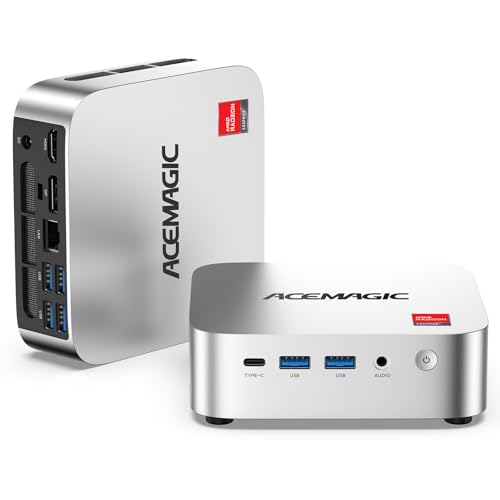
ACEMAGIC K1 Mini PC AMD Ryzen R2544 8GB DDR4 256GB SSD

ACEMAGIC K1 Mini PC Windows 11 Pro Ryzen R2544 8GB 256GB
HP OmniDesk Desktop AMD Ryzen 5 64GB DDR5 3TB Storage

HP OmniDesk Desktop AMD Ryzen 5 32GB DDR5 2TB Storage
HP OmniDesk Desktop AMD Ryzen 5 64GB DDR5 5TB Storage

ACEMAGIC Mini PC Ryzen 7330U 16GB DDR4 Triple 4K Display
HP OmniDesk Desktop AMD Ryzen 5 32GB DDR5 3TB Storage

HP EliteDesk 800 G5 SFF Intel Core i5 32GB DDR4 1TB SSD
A Breakdown Of The Leading Choices
The STORMCRAFT Sirius lands first because it’s the only machine on this list built around a true dedicated graphics card, the Intel Arc B570 with 10GB of GDDR6 video memory. That dedicated VRAM (video RAM, separate memory the GPU uses for textures and frames) matters because it lets the system push pixels at 1440p resolution without leaning on the CPU. Pair that with the 14th-gen Core i5 14400F, which runs 10 cores and 16 threads, and you get a tower that handles esports titles at high refresh rates alongside the multitasking habits of a streamer who keeps Discord and browser tabs open.
For a mid-tower build, the chassis leaves room for future upgrades, which seasoned owners tend to appreciate. The 16GB of DDR4 RGB memory and the 1TB NVMe SSD (NVMe is a fast storage interface that loads games and apps in seconds) round out a configuration that boots fast and keeps load times short. This is the obvious pick for anyone who games first and works second.
A Favorable Mix
- Dedicated Arc B570 graphics with 10GB GDDR6, comfortable for 1440p in most modern titles
- 10-core, 16-thread i5 14400F handles gaming plus streaming and chat apps at once
- 1TB NVMe SSD cuts load screens down to seconds for large open-world games
- RGB DDR4 memory adds visual flair and runs at speeds that match modern gaming needs
- VR-ready build, so owners can plug in a headset without swapping parts
Points To Keep In Mind
- A mid-tower footprint demands more desk space than any of the mini PCs later in this list
- Airflow and dust management matter more here than in smaller sealed units
- Higher sustained loads mean the fans will be audible during long gaming sessions
Feature Snapshot
Whose Setup It Belongs On
Esports players and indie game fans who want a dedicated GPU without overspending on a flagship card.
A Better Fit Elsewhere
The HP EliteDesk 800 G5 SFF makes more sense for office-only environments where gaming horsepower is wasted spend.
The HP OmniDesk leans into a different strength: productivity. The Ryzen 5 chip pairs with Radeon 740M integrated graphics, which is fine for everyday tasks but not for serious gaming. What it does offer is quad-monitor support, which makes it the right call for anyone running spreadsheets on one panel, a chat window on another, and a browser on a third.
16GB of DDR5 is the new generation of system memory, faster than DDR4 and better at juggling many tabs at once. Combined with the 512GB SSD for fast boot and a 1TB HDD for bulk file storage, the configuration covers most home office needs out of the box. Wi-Fi 6 keeps the wireless connection stable, and the included keyboard and mouse keep the setup simple for someone replacing an aging family PC.
Bright Spots
- Quad-monitor support lets owners run a real multi-screen workstation
- 16GB DDR5 handles dozens of browser tabs without slowdown
- Dual storage gives quick SSD response plus roomy HDD archiving
- Wi-Fi 6 connection stays solid in busy household networks
- Included wireless keyboard and mouse cut setup time to minutes
Honest Caveats
- Integrated Radeon 740M graphics are limited for modern gaming or rendering work
- The included peripherals feel basic and most users replace them eventually
The Right Fit
Home offices, students, and remote workers who run multiple monitors and lots of browser tabs each day.
Swap It Out When
Gamers should look at the STORMCRAFT Sirius AI Gaming Desktop for dedicated graphics muscle instead.
Shrinking a desktop down to something that fits behind a monitor changes how a room feels. The ACEMAGIC K1 Mini PC delivers that kind of freedom with an AMD Ryzen R2544 processor that uses 4 cores and 8 threads to handle office work, browser sessions, and light creative apps. The integrated Radeon graphics keep video playback smooth at 4K, which matters for anyone using the box as a media hub.
Where this unit really wins is the footprint. Owners commonly tuck it behind a screen using a VESA mount (the standard mounting holes on the back of most monitors) and forget it’s there. The 256GB SSD is modest, but it suits someone whose work lives in the cloud rather than on a local drive. Compared to the larger HP OmniDesk, this trades expandability for desk real estate, which is exactly the right swap for tight setups.
Where It Excels
- Tiny chassis tucks behind a monitor and frees the entire desk
- Ryzen R2544 handles documents, browsers, and 4K video with no drama
- Low power draw means quiet operation in living spaces
- Solid pick for anyone working mostly in cloud-based apps
Less Ideal Details
- 256GB storage fills quickly with large local media libraries
- Limited RAM headroom for heavy multitasking or creative workloads
- No optical drive, which matters for anyone with disc-based archives
Best Suited To
Anyone working from a small apartment desk or a bedroom setup where space matters more than expandability.
Look Elsewhere When
The HP OmniDesk with 64GB DDR5 serves heavy multitaskers better when storage and RAM matter more than size.
This second ACEMAGIC K1 configuration looks nearly identical on paper to the third pick, but it ships with Windows 11 Pro instead of the standard Home edition. That single change matters for anyone managing company devices, since Pro adds features like BitLocker encryption (disk-level encryption that protects data if a laptop is stolen), remote desktop access, and group policy controls that IT folks expect.
The Ryzen R2544 chip and 8GB of DDR4 memory keep the everyday experience consistent with the standard K1. Freelancers and remote workers who need Pro features for client work but want the same compact footprint get a useful middle ground here. Where it differs from the third pick is really about software, not silicon, so the buyer profile drives the decision.
Useful Touches
- Windows 11 Pro unlocks BitLocker, Remote Desktop, and group policy tools
- Same compact chassis keeps desks clean and uncluttered
- Quad-core Ryzen chip handles day-to-day office apps with ease
- 256GB SSD boots the system in seconds and keeps app launches snappy
Practical Considerations
- Pro features only matter to users who actually need them, otherwise the standard K1 is the smarter pick
- Small storage fills up quickly with project files and downloads
Who It Suits Best
Freelancers, consultants, and remote workers who need Pro features for client-facing work.
Skip It When
Casual home users get more value from the standard ACEMAGIC K1 without paying for Pro features they won’t touch.
The 64GB tier of the HP OmniDesk doubles down on what makes this line useful for serious work. 64GB of DDR5 is more than most people need for everyday browsing, but for anyone running virtual machines, editing large photos, or keeping dozens of browser tabs and chat apps open, it removes the ceiling that usually trips up mid-tier machines. The 2TB SSD paired with a 1TB HDD gives fast storage for active projects and slower bulk space for archives.
Like the other OmniDesk configurations, this one supports up to four monitors through the available outputs, which keeps it firmly in the productivity corner rather than the gaming one. Creators running Photoshop, Premiere, or other resource-hungry tools will appreciate the breathing room. Compared to the second pick on this list, the jump from 16GB to 64GB is the meaningful upgrade, and for the right workload it changes the whole feel of ownership.
What It Does Well
- 64GB DDR5 handles heavy multitasking without breaking a sweat
- 2TB SSD plus 1TB HDD gives fast and spacious storage in one box
- Quad-monitor support fits serious workstation layouts
- Wi-Fi 6 and Bluetooth 5.4 keep wireless peripherals and networks responsive
- Ryzen 5 processor with integrated Radeon graphics handles everyday creative work
Things To Weigh Up
- 64GB of RAM is wasted on users who only browse and stream
- Integrated graphics limit serious gaming or GPU-accelerated rendering
Feature Snapshot
Who Will Love This
Freelance creators, analysts, and anyone running virtual machines or heavy multitasking workflows.
Where A Sibling Pick Shines
Gamers are better served by the STORMCRAFT Sirius AI Gaming Desktop and its dedicated GPU.
The 32GB OmniDesk sits in the sweet spot for households that need more than the basics but don’t want to pay for headroom they’ll never use. The 1TB SSD handles active projects and apps, while the 1TB HDD swallows photo libraries, downloaded media, and backup files. The Ryzen 5 chip with integrated Radeon graphics is fine for schoolwork, family streaming, and casual photo editing.
The quad-monitor support is a quiet win for families. One screen for schoolwork, one for a video call, one for a shared document, and the fourth for entertainment means the whole household can work and play on the same machine. Owners who have tried to stretch a 16GB system across this kind of workload will feel the upgrade immediately.
The Upside
- 32GB DDR5 is generous for family use without overspending
- SSD plus HDD hybrid gives both speed and storage room
- Quad-monitor setup supports shared family workspaces
- Wireless peripherals included for fast setup out of the box
A Few Limitations
- Integrated Radeon graphics are not suited to modern gaming
- Mid-size chassis needs more space than a mini PC option
Perfect Match For
Families and hybrid households that juggle schoolwork, remote jobs, and entertainment on the same machine.
Consider Something Else When
Tight apartment dwellers may prefer the ACEMAGIC K1 Mini PC for its smaller footprint and easier mounting.
The 5TB OmniDesk configuration is the storage heavyweight of the lineup. With a 4TB SSD and 1TB HDD working together, owners can keep an entire photo archive, music library, and video project folder on the same machine without juggling external drives. For content creators working with raw 4K footage or households archiving decades of family media, that capacity alone justifies the price jump.
The 64GB of DDR5 memory keeps the rest of the system responsive even when storage operations are running in the background. The Ryzen 5 processor still leans on integrated graphics, so this stays firmly in the productivity lane rather than the gaming lane. For the right workload, though, the storage headroom is genuinely liberating.
Everyday Perks
- 5TB total storage swallows large media libraries without external drives
- 64GB DDR5 keeps multitasking smooth during heavy file operations
- Quad-monitor support fits ambitious workstation layouts
- Wi-Fi 6 keeps the connection stable in busy networks
Trade-Offs To Consider
- Storage headroom is wasted for users who lean on cloud services
- Integrated graphics rule out serious gaming or GPU rendering
- Bulk drives can generate more audible seek noise under heavy load
Built With In Mind
Video editors, photographers, and power users with large local media collections who want everything on one machine.
Another Choice May Suit
Cloud-first users will find the standard HP OmniDesk with 16GB more than enough for everyday work.
The ACEMAGIC Mini PC with the Ryzen 7330U is the quietest machine on this list. Drawing only 28 watts, it sips power compared to a full desktop and runs cool enough that the fan rarely spins up under normal use. For a home office in a shared bedroom or a studio where silence matters, that low thermal profile is the headline feature.
The 7330U chip is also faster than the R2544 in the other ACEMAGIC entries, with higher boost clocks that help in multitasking bursts. Triple 4K display output through HDMI and other ports makes this a serious option for signage, stock-trading desks, or anyone running a multi-screen setup from a tiny box. The 256GB SSD is on the smaller side, so most users pair this with cloud storage or a NAS (network-attached storage, a separate box on the home network that holds shared files).
A Strong Showing
- 28-watt power draw keeps the system cool and quiet in living spaces
- Triple 4K display output enables serious multi-screen workstations
- Ryzen 7330U handles daily productivity with comfortable headroom
- Compact chassis fits behind monitors or on crowded shelves
Smaller Caveats
- 256GB SSD fills fast with local files, so external storage is often needed
- Compact cooling means sustained heavy loads can throttle performance
Feature Snapshot
Who Should Grab It
Home office users and studio professionals who need a quiet, multi-display setup without a tower taking up floor space.
Reach For A Different Pick When
Large local media collections fit better with the HP OmniDesk 5TB configuration and its bigger internal drives.
Stepping up from the 32GB/2TB version, this OmniDesk configuration adds another terabyte of SSD storage while keeping the rest of the spec sheet the same. For small business owners running point-of-sale software, inventory spreadsheets, and customer databases on one machine, that extra SSD space is real working capacity rather than marketing filler.
The Ryzen 5 with Radeon 740M integrated graphics is consistent with the rest of the OmniDesk line, and the quad-monitor support lets owners keep reference screens open at all times. Compared to the sixth pick, the upgrade feels modest, but for the right workload that extra SSD is exactly what pushes the box from adequate to genuinely comfortable.
Benefits That Matter
- 3TB total storage gives active SSD space plus a reliable HDD backup drive
- 32GB DDR5 handles multitasking across business apps without slowdown
- Quad-monitor support fits busy front-desk or back-office layouts
- Wireless peripherals included to get the workstation running fast
Honest Caveats
- Integrated graphics limit any GPU-heavy software or modern gaming
- Higher capacity costs more than the 2TB version without changing the processor
The Right Fit
Small businesses and side hustles that need reliable storage headroom for daily operations.
Not Your Match When
Casual home users will find the 32GB/2TB OmniDesk delivers similar performance for less outlay.
The HP EliteDesk 800 G5 takes the small-form-factor approach and wraps it in a business-grade chassis. SFF means Small Form Factor, so the case is much shorter than a standard mid-tower while still accepting serious internal components. The included keyboard, mouse, and DisplayPort output make it a turnkey workstation for an office or reception desk, and the 1TB SSD boots Windows in seconds.
The Intel Core i5 chip with 32GB of DDR4 memory handles office software, browser sessions, and video calls with consistent performance. Where this machine stands apart from the OmniDesk line is its compact case, which fits under a monitor or inside a small cabinet where a tower would be awkward. For traditional offices that need reliability over flash, it earns its place on this list.
Why It Works Well
- Compact SFF chassis fits under monitors and inside small cabinets
- 32GB DDR4 handles office multitasking with consistent speed
- 1TB SSD boots Windows and loads apps in seconds
- DisplayPort output supports modern office monitors at full resolution
Things To Consider
- Business-grade chassis means limited room for future expansion
- Integrated graphics rule out modern gaming or GPU-accelerated workflows
Who It Suits Best
Office managers and small business owners outfitting reception desks or back-office workstations on a tight footprint.
Consider Something Else When
Anyone who needs heavy multitasking and lots of storage should consider the HP OmniDesk 64GB/3TB instead.
Choosing The Right Desktop Pc For Your Daily Routine
Start With The Workload, Not The Spec Sheet
The smartest desktop decision starts by asking what the machine actually has to do each day. Browsing, email, and document work run fine on chips like the AMD Ryzen R2544 or Intel Core i5 with modest memory. Gaming, video editing, and large creative files demand dedicated graphics, more RAM, and faster SSD storage. Buyers who match their workload to the right tier usually end up happier than those chasing the biggest number on the box.
Consider a week of real usage before deciding. Running a video call while editing a spreadsheet while keeping a browser open sounds easy, but it adds up fast. Anything beyond light multitasking benefits from 16GB of RAM or more, and any kind of photo or video work pushes toward 32GB as a starting point.
Decide Between Compact And Full-Size
Mini PCs like the ACEMAGIC K1 fit anywhere a monitor lives, but they trade expandability for that footprint. Mid-towers like the STORMCRAFT Sirius and HP OmniDesk leave room for future upgrades, more storage, and better cooling. Small-form-factor machines like the HP EliteDesk 800 G5 sit in the middle, with smaller cases but full desktop components inside. Apartment dwellers and remote workers usually prize the compact side; gamers and power users usually need the larger cases.
Owners of mini PCs commonly report that fan noise stays low and the system disappears into the background. Mid-tower owners appreciate the headroom but need to plan for dust buildup over the years, since more airflow means more particles pulled through the case.
Storage Is About More Than Size
SSDs deliver the snappy boot and load times people expect from a modern desktop. HDDs add bulk storage at lower cost per gigabyte, which suits photo archives and video files. The smartest configurations pair a smaller SSD for the operating system and active apps with a larger HDD for older files that don’t need instant access. Anyone leaning on cloud storage can usually skip the HDD entirely.
Wi-Fi 6 (the latest mainstream Wi-Fi standard) and Bluetooth 5.4 have become table stakes for modern desktops, since they keep wireless peripherals responsive and stable in busy home networks. Quad-monitor support matters most for traders, editors, and anyone who genuinely uses more than two screens at once.
What Most People Get Wrong
Pitfalls Shoppers Hit
The most common mistake is buying more machine than the workload needs. A 64GB RAM configuration looks impressive on paper, but anyone who only browses and streams will never use that headroom. The opposite error is buying a tight mini PC and then trying to load it with video projects that overwhelm the storage and memory. Matching the system to real daily habits beats chasing top-tier specs every time.
Where The Extra Money Goes
Higher tiers in this category cost more for two main reasons: dedicated graphics cards and large SSD storage. Dedicated GPUs like the Arc B570 unlock gaming and GPU-accelerated creative work that integrated graphics can’t touch. Big SSDs speed up everything, from boot times to project loads. The upgrade is worth it for gamers, editors, and anyone whose time is billable; everyone else gets more value from a balanced mid-tier machine.
Frequently Asked Questions
How much RAM do I actually need in a desktop?
16GB of RAM is the comfortable minimum for most home and office use in 2026, handling dozens of browser tabs and standard productivity apps without slowdown. 32GB makes sense for creators and multitaskers, while 64GB only matters for heavy professional workloads.
Is a dedicated graphics card necessary?
Dedicated graphics are essential for modern gaming, video editing, and 3D work, but unnecessary for everyday browsing, office software, and streaming. Integrated Radeon graphics handle the basics comfortably.
What is the difference between an SSD and an HDD?
An SSD (solid-state drive) uses flash memory and delivers much faster boot and load times, while an HDD (hard disk drive) uses spinning platters and offers more storage capacity at lower cost. Most modern desktops pair both for the best balance.
Are mini PCs powerful enough for daily work?
Mini PCs handle browsing, office software, video calls, and 4K streaming with ease, but they lack the expandability of full-size desktops. Owners working with large local files may want a tower instead.
How long should a desktop PC last?
Most desktops remain useful for five to seven years with routine maintenance, though storage and memory upgrades can extend that window. Gaming rigs tend to age faster as new titles push hardware harder.
Wrap Up
The right desktop depends less on chasing top specs and more on matching the machine to a real routine. Gamers and editors gravitate toward the STORMCRAFT Sirius for its dedicated graphics. Households and home offices find their stride with the HP OmniDesk line, scaling storage and memory to fit the workload. Compact spaces and quiet environments belong to the ACEMAGIC mini PCs, while traditional offices often settle on the HP EliteDesk for its small-form-factor chassis. Pick the one that matches daily habits, and the upgrade pays off for years.