Workdays look different now. Some folks run spreadsheets across four monitors from a kitchen table, others push 3D renders while streaming, and plenty just want something quiet and reliable for video calls and docs. Picking the right machine matters more than chasing spec sheets, because the best work PC is the one that matches what you actually do on it. I put together this lineup of nine desktop PCs that span everything from feather-light mini boxes to full-on workstations with serious graphics muscle.
Your Options, Compared

Ultra 50 V3 RTX 5080 Ryzen 7 9800X3D Workstation
GMKtec K13 Mini PC Intel Ultra 7 256V

GMKtec K15 AI Mini PC Intel Ultra 5 125U

GMKtec T1 AI Mini PC Intel Ultra 9 285H

Lenovo Legion Tower 5i Intel Ultra 7 RTX 5070 Ti
GMKtec EVO-T1 Mini PC Ultra 9 285H 64GB

GMKtec T2S AI Mini PC Intel X7 358H

HP OmniDesk Ryzen 5 Radeon 740M Desktop

GMKtec K17 Mini PC Intel Ultra 226V
A Deeper Look At The Lineup
Andromeda Insights built the Ultra 50 V3 for people who refuse to wait on their machine. The Ryzen 7 9800X3D (a CPU with a large stacked cache that speeds up game-style and creator workloads) turbos up to 5.2 GHz, paired with an RTX 5080 delivering 16GB of GDDR7 memory, the latest ultra-fast video RAM standard. Storage comes from a 2TB Gen4 NVMe drive, and the 32GB of DDR5 RAM runs at 6000MHz. Power delivery goes through an 850W Gold-rated PSU (an efficiency-certified power supply that wastes less energy as heat), with Wi-Fi and Bluetooth on board.
Engineers running CAD, video editors cutting 4K timelines, or 3D artists juggling scenes with heavy textures will appreciate the headroom. Unlike the smaller mini PCs on this list, the V3 trades desk footprint for serious thermal capacity and expansion. The ARGB fan lighting is a fun touch if the case lives in an open studio setup.
Notable Upsides
- RTX 5080 graphics crush 4K timelines, GPU-accelerated renders, and modern creative suites without breaking a sweat.
- The Ryzen 7 9800X3D’s stacked cache gives a real edge in simulation, compile, and gaming-adjacent workflows.
- 2TB Gen4 SSD means large project libraries load quickly and there is breathing room for archives.
- 32GB DDR5 at 6000MHz handles dozens of browser tabs alongside editing software.
- 850W Gold PSU leaves room for future GPU upgrades without swapping the power supply.
Things To Consider
- The full tower takes up meaningful desk or floor space, unlike the mini PCs later in this list.
- Owners commonly report ARGB software can be finicky to sync across brands of fans.
Key Specs
Right Fit For
Creative professionals and engineers handling GPU-accelerated workloads who want a tower that stays quiet under sustained load.
Consider Something Else When
The Lenovo Legion Tower 5i is the smarter call for shoppers who prefer Lenovo’s warranty ecosystem and a slightly quieter chassis.
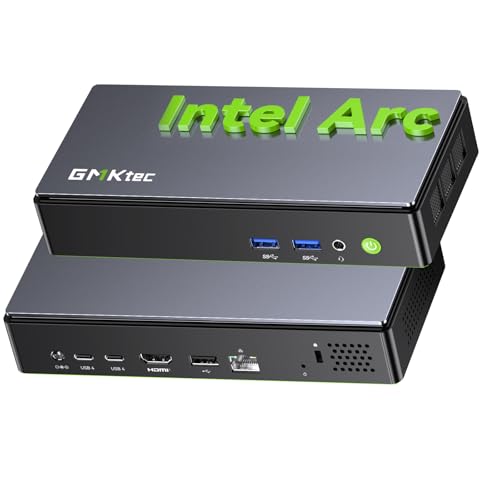
The K13 takes everything appealing about a modern ultrabook and stuffs it into a desktop shell small enough to sit behind a monitor. The Intel Core Ultra 7 256V packs an NPU (neural processing unit, a chip dedicated to AI tasks) rated for 47 TOPS (trillions of operations per second, the standard way to measure AI throughput), and SK Hynix LPDDR5 memory hits 8533 MT/s, faster than typical DDR5 in larger towers. It runs cool and quiet, which matters in shared workspaces.
Anyone setting up a clean desk with a single cable running to a monitor will love this form factor. It compares well to the larger Ultra 50 V3 above by trading outright GPU power for AI efficiency and silent operation. For document work, video calls, and on-device AI tools like transcription, the K13 quietly handles it all.
Positive Takeaways
- The 47 TOPS NPU runs local AI assistants and transcription without leaning on cloud servers.
- LPDDR5X at 8533 MT/s keeps multitasking snappy even with dozens of tabs open.
- Footprint vanishes behind a monitor or under a monitor arm.
- Low fan noise makes it suitable for recording calls or focused writing sessions.
Honest Caveats
- Integrated graphics limit serious gaming or 3D work.
- LPDDR5 is soldered, so memory upgrades later are not on the table.
- Storage expansion options are tighter than in a full-size tower like the Ultra 50 V3.
Made For
Knowledge workers and remote employees who want a near-silent, clutter-free workstation for office apps and AI-assisted tasks.
Look Elsewhere When
Anyone needing serious GPU horsepower should jump to the Ultra 50 V3 reviewed above, or to the Lenovo Legion Tower 5i further down.
The K15 strikes a balance for offices that need real capability without flagship pricing. The Intel Core Ultra 5 125U brings 14 threads across efficiency and performance cores, paired with 32GB of DDR5 RAM and a 512GB SSD. Three M.2 2280 slots (small internal slots that accept stick-shaped NVMe SSDs) make storage expansion painless, and dual 2.5GbE ports handle faster networking than typical office setups. HDMI 2.1 and USB4 outputs drive up to four 8K displays.
It’s a different category of machine than the Ultra 50 V3: smaller, cheaper, but built for productivity rather than rendering. Quad-monitor traders, analysts, and project managers running dashboards on every screen will find this little box quietly capable. The Oculink port (a high-bandwidth external connection standard) is a thoughtful extra for adding an external GPU later.
Useful Highlights
- Quad 8K display support via HDMI 2.1 and USB4 makes multi-screen trading or analytics desks easy to wire up.
- Three M.2 slots give genuine storage flexibility for growing project files.
- Dual 2.5GbE LAN (network ports rated for 2.5 gigabits per second) is a rare perk in this price range.
- Oculink allows an external GPU add-on down the road if creative needs grow.
Minor Gripes
- The 125U’s integrated graphics struggle with sustained 3D loads.
- 512GB base storage fills up quickly with large media archives.
- Setup with four displays may require active adapters depending on monitor inputs.
Feature Snapshot
Best Suited To
Small businesses and home offices that want strong productivity specs at a modest cost, especially those running multi-monitor setups.
A Better Fit Elsewhere
Shoppers who need more memory and storage out of the box should look at the GMKtec EVO-T1 with 64GB of DDR5 and 1TB SSD.
The T1 squeezes desktop-class Intel silicon into a mini chassis. The Core Ultra 9 285H pairs six performance cores with eight efficiency cores and two low-power cores, hitting a 5.4GHz turbo on the right threads. 32GB of dual-channel DDR5, a 1TB PCIe 4.0 SSD, three M.2 expansion slots, Oculink, USB4, and dual 2.5GbE round out the connectivity. Quad 8K display support is included.
Compared to the K15 above, the T1 swaps modest efficiency for serious muscle. Developers compiling code, researchers running local models, or analysts crunching data benefit from the extra cores. It’s a workstation that happens to fit behind a monitor, an appealing mix for cramped home offices.
Strong Points
- The 16-core, 5.4GHz turbo Ultra 9 chip handles compilation, data analysis, and large spreadsheets with room to spare.
- Three M.2 slots plus Oculink give meaningful room for storage and GPU growth.
- Dual 2.5GbE ports are practical for NAS (network-attached storage) users or fast LAN transfers.
- Quad 8K display support handles dense information layouts.
Worth Noting
- Sustained loads can push fan noise up under extended renders.
- The mini form factor limits internal GPU upgrades beyond the Oculink external route.
Who Should Grab It
Developers, analysts, and AI-curious power users who want desktop-class CPU performance without giving up desk space.
Skip It When
The HP OmniDesk is a smarter pick for traditional offices that need quad monitor support in a familiar tower with bundled peripherals.
Lenovo built the Legion Tower 5i for people who care about more than raw parts. The Intel Core Ultra 7 265F and an NVIDIA RTX 5070 Ti deliver strong real-time ray tracing (realistic lighting simulation in 3D scenes) and DLSS (AI-driven frame generation that boosts performance) for design and rendering work. The Coldfront cooling system, Lenovo’s branded airflow setup, keeps thermals steady and fan noise modest. 32GB of memory and a 1TB SSD cover typical pro workloads.
Think of this tower as the grown-up alternative to the Ultra 50 V3 above: similar capability, more refined chassis, and the kind of polish that comes from a major OEM. It suits video editors, 3D modelers, and streamers running production pipelines. A three-month PC GamePass is bundled for downtime.
Notable Gains
- DLSS and ray tracing accelerate rendering and 3D previews in supported creative apps.
- Coldfront cooling helps the tower stay quiet under long renders or streaming sessions.
- Lenovo’s OEM (original equipment manufacturer, meaning a major brand-built system) warranty and support network add confidence for business buyers.
- 1TB SSD balances speed and storage for typical project libraries.
Softer Spots
- Bundled GamePass may not interest professional-only buyers.
- Lenovo’s tower is larger than the mini PCs elsewhere on this list.
- Internal expansion paths depend on the specific case revision and may limit drive bays.
Quick Facts
Whose Shelf It Belongs On
Working creatives and streamers who want a polished tower with quiet thermals and a major-brand warranty.
Where A Sibling Pick Shines
The Ultra 50 V3 makes more sense for buyers chasing the absolute newest GPU silicon and Ryzen 3D-cache advantage.
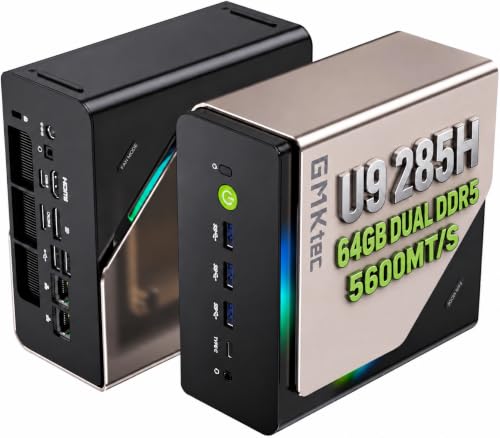
The EVO-T1 takes the same Ultra 9 285H silicon as the T1 reviewed above and doubles the memory to 64GB of DDR5, all in a mini PC body. The 1TB PCIe 4.0 SSD, three M.2 expansion slots, Oculink port, and quad 8K display support all carry over. For users whose bottleneck is RAM rather than CPU cycles, this is a meaningful step up.
Anyone running virtual machines, large datasets in memory, or browser-heavy workflows with hundreds of tabs benefits from that extra headroom. The trade-off shows up in the chassis thermals, where sustained all-core loads can warm things up more than the K15 below would.
Strengths Worth Knowing
- 64GB of DDR5 is rare in a mini PC and removes memory bottlenecks for pro workloads.
- The Ultra 9 285H’s 5.4GHz turbo still handles threaded compilation and data jobs with ease.
- Oculink gives an upgrade path to external GPU enclosures for heavier graphics work.
Points To Keep In Mind
- The mini chassis can run warm under prolonged all-core loads.
- Higher memory configuration pushes the cost above the T1’s pricing tier.
- Integrated graphics still cap 3D performance without an external GPU.
Perfect Match For
Engineers, researchers, and power multitaskers who want max RAM in the smallest possible footprint.
Reach For A Different Pick When
The Ultra 50 V3 is the stronger match for workloads that depend on a discrete GPU rather than memory size.
The T2S leans into forward-looking silicon. The Intel Core Ultra X7 358H runs 16 cores at speeds up to 4.8GHz, paired with 64GB of LPDDR5 at 8533 MT/s and a 1TB PCIe 5.0 SSD. PCIe 5.0 doubles the bandwidth of PCIe 4.0, cutting load times for large project files and databases. The upgraded Arc B390 graphics deliver 122 GPU TOPS for AI workloads, useful for on-device assistants and content generation.
Where most mini PCs still ride PCIe 4.0, this one hedges against the next few years of storage demands. It’s a more future-resistant alternative to the EVO-T1 above, trading a slightly lower turbo clock for cutting-edge I/O (input/output bandwidth). Buyers who keep machines for five-plus years will appreciate that longevity.
Where It Excels
- PCIe 5.0 storage gives a real-world speed edge on large file loads and exports.
- 122 GPU TOPS handles AI content tools and local inference with surprising ease.
- 64GB of fast LPDDR5 removes RAM as a constraint for most workflows.
Room For Improvement
- LPDDR5 is soldered, so future memory upgrades are not possible.
- Newer silicon can take longer to receive driver and software updates across niche apps.
Technical Highlights
Who Will Love This
Long-term owners and data-heavy pros who want the most future-resistant mini PC in this lineup.
Swap It Out When
The Ultra 50 V3 is the smarter choice for creative pros whose workloads lean on a true discrete GPU rather than AI TOPS.
The OmniDesk covers the traditional office scenario without fuss. AMD’s Ryzen 5 8500G runs eight cores (six threads active), with Radeon 740M graphics built in. 32GB of DDR5 RAM, a combined 3TB storage pool (2TB SSD plus 1TB HDD), Wi-Fi 6, and a wireless keyboard and mouse come in the box. Quad monitor support is included for spread-out dashboards.
This is a different machine class from the AMD-powered Ultra 50 V3 at the top of the list, more about stable productivity than creative horsepower. The included peripherals save a setup trip, and the dual-drive storage makes archiving painless. It runs quiet enough for shared office floors.
The Value In It
- 3TB of combined storage (2TB SSD + 1TB HDD) covers active work and archive needs out of the box.
- Bundled wireless keyboard and mouse simplify setup for first-time buyers.
- Quad monitor support via Radeon 740M handles typical office layouts.
- Wi-Fi 6 keeps wireless connections modern and stable.
Trade-Offs To Consider
- Radeon 740M integrated graphics limit gaming and GPU-accelerated creative apps.
- The included peripherals are functional rather than premium.
- CPU performance trails the Ultra 9 and Ultra 7 chips in earlier picks for heavy threaded work.
Built With In Mind
Traditional offices and home users who need a reliable multi-monitor workstation without complex setup.
Not Your Match When
Creative professionals handling video or 3D should reach for the Lenovo Legion Tower 5i or Ultra 50 V3 instead.
The K17 is the quiet overachiever of this roundup. Intel’s Core Ultra 5 226V delivers 97 TOPS of AI performance from its NPU, paired with LPDDR5X at 8533 MT/s. Intel Arc 130V graphics bring up to 53 GPU TOPS, enough for light creative work and AI-assisted tasks. The whole package fits into a mini chassis that barely makes a whisper under load.
Compared to the K13 earlier in this list, the K17 leans further into AI throughput while keeping the same quiet office personality. For researchers, analysts, and productivity workers curious about running local AI assistants without disturbing a shared workspace, this one fits the bill. The trade-off is the same integrated-graphics ceiling that limits gaming.
The Good Stuff
- 97 TOPS NPU performance handles local AI inference for transcription, summarization, and assistants.
- Low-noise operation suits recording studios and quiet offices alike.
- LPDDR5X at 8533 MT/s keeps multitasking responsive even under heavy workloads.
- Compact size disappears behind any monitor or under a monitor arm.
A Few Limitations
- Integrated Arc graphics cap 3D and gaming potential.
- Soldered memory means no future RAM upgrades.
The Right Fit
AI-curious productivity workers and remote employees who value silence and on-device intelligence over raw graphics power.
Another Choice May Suit
Buyers wanting more memory and storage out of the box should pivot to the GMKtec EVO-T1 with 64GB of DDR5.
Picking The Desktop PC That Actually Matches Your Work
Choosing the right work PC comes down to honest self-assessment. Start with your daily software load: browsers, Office apps, and video calls barely stress modern silicon, while CAD, video editing, or local AI tools demand serious CPU and GPU power. The size of your desk matters more than most people realize, and a mini PC that disappears behind a monitor changes how a workspace feels.
Connectivity is the second filter. Quad-monitor traders need the HDMI 2.1 and USB4 outputs found on the K15, T1, and T2S. Wired networkers will appreciate dual 2.5GbE on the K15, T1, and EVO-T1. Bundled peripherals on the HP OmniDesk save a separate purchase for traditional offices. And if you keep machines for years, PCIe 5.0 storage on the T2S offers meaningful headroom.
CPU Choices That Matter
AMD’s Ryzen 7 9800X3D in the Ultra 50 V3 brings stacked cache (extra fast memory layered directly on the processor die) that accelerates threaded creative work. Intel’s Core Ultra 9 285H in the T1 and EVO-T1 balances performance and efficiency cores for mixed workloads. The Core Ultra X7 358H in the T2S pairs high core counts with PCIe 5.0 bandwidth. For pure office productivity, the Ryzen 5 8500G in the OmniDesk handles typical tasks comfortably.
Memory And Storage Trade-Offs
32GB of DDR5 covers most office and creative workflows, while 64GB opens doors for virtual machines and large datasets. LPDDR5 and LPDDR5X run faster but are soldered, so memory cannot be upgraded later. Storage expansion matters too: three M.2 slots on the K15, T1, EVO-T1, and T2S let you grow into larger SSDs over time. A traditional HDD plus SSD combo on the OmniDesk handles bulk archiving out of the box.
Graphics And AI Acceleration
Discrete GPUs (the RTX 5080 and RTX 5070 Ti in the Ultra 50 V3 and Legion Tower 5i) handle 3D rendering and GPU-accelerated exports. Integrated graphics on the mini PCs limit gaming but pair with NPUs that run on-device AI tools efficiently. TOPS ratings, 47 on the K13, 97 on the K17, and 122 on the T2S, give a rough sense of AI throughput for local assistants and inference workloads.
Key Considerations Across These Picks
Pitfalls Shoppers Hit
The most common mistake is over-buying on GPU power that office work never uses. A second trap is ignoring thermal acoustics: a tower that’s quiet on day one may ramp fans under sustained all-core loads. Finally, shoppers sometimes forget to check display outputs against their monitor setup, leading to surprise adapter purchases.
Where The Extra Money Goes
Higher-tier models in this category bring discrete GPUs, faster storage standards like PCIe 5.0, and larger memory pools. The Ultra 50 V3 and Legion Tower 5i earn their cost through rendering capability and quiet cooling. The T2S earns its premium through future-resistant I/O. For pure office work, the lower tiers deliver what most people actually need without the extra spend.
Frequently Asked Questions
How much RAM do I actually need for office work? Most office users run fine on 16GB, but 32GB has become the comfortable standard for multitasking across browsers and creative apps.
Is a mini PC powerful enough for serious work? For productivity, AI tools, and even light creative tasks, modern mini PCs handle the load. Heavy 3D or video work still wants a discrete GPU like in the Ultra 50 V3 or Legion Tower 5i.
Do I need a dedicated GPU for video calls? No, integrated graphics on every pick here handle video conferencing comfortably. A discrete GPU matters for rendering and creative pipelines.
What does TOPS actually measure? TOPS stands for trillions of operations per second, used to rate AI chip throughput. Higher TOPS means faster local AI inference, useful for on-device assistants and transcription.
Are these desktops upgradable later? The towers offer the most expansion paths. Mini PCs typically allow storage upgrades through M.2 slots, but RAM is often soldered and cannot be replaced.
The Takeaway
The best work PC is the one that disappears into your routine rather than dominating it. Match the machine to your actual workload, give yourself a little headroom for where your job might head next, and pay attention to the desk space and noise level you can live with day after day.