Spending serious money on a desktop used to mean dropping two grand minimum. That math has changed. Real 1080p gaming rigs, AI-ready workstations, and quiet mini PCs now sit comfortably below the $1000 mark, and I put together this roundup to map the best options across the most common scenarios: competitive 1080p gaming, office productivity, small-space setups, and content creation.
Whether you’re a student furnishing a dorm, a remote worker who needs muscle for video calls and spreadsheets, or a parent hunting for a family PC that won’t choke on homework and Roblox, the shortlist below covers the categories I see asked about most. I leaned on the published specs and the real-world trade-offs of each form factor, so you can match the hardware to your day, not the other way around.
The Main Contenders

Skytech Gaming Edge Gaming PC, Ryzen 5 5500, RTX 5050

Skytech Gaming PC Azure 3, Ultra 7, RTX 5060
CyberPowerPC Gamer Xtreme VR, i5-13400F, RTX 4060
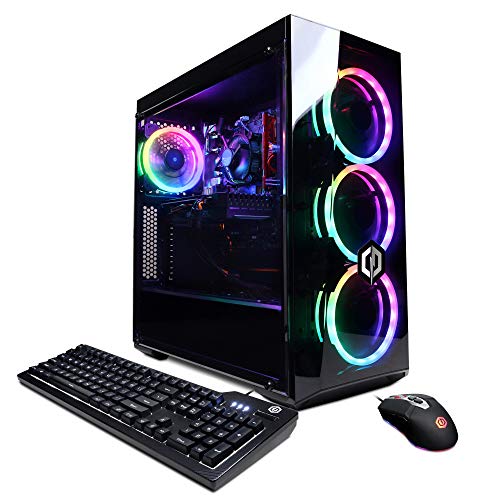
CyberpowerPC Gamer Xtreme VR, i5-10400F, GTX 1660 Super
HP Pro Tower 290 G9, i3-13100, 16GB RAM

KAMRUI Hyper H2 Mini PC, i5-14500HX, 16GB RAM

MINISFORUM AI X1 Pro-370 Mini PC, Ryzen AI 9 HX 370

MINISFORUM M1 Pro Mini PC, Core Ultra 5 125H

ASUS ROG G700 (2025), Ultra 7 265F, RTX 5070

MINISFORUM X1-255 Mini PC, Ryzen 7 255, Barebone
The Strengths Of Each Pick
Skytech’s Edge is the kind of tower I think about when someone asks me for a real gaming PC without a custom build. It pairs an AMD Ryzen 5 5500 with an NVIDIA RTX 5050, which puts it firmly in modern 1080p territory where most new releases run smoothly.
You also get a 1TB NVMe boot drive, which means Windows 11, a few launchers, and your first library of games all fit without juggling external storage. The 650W Gold-rated PSU leaves a little headroom for future GPU bumps, and the front-panel Wi-Fi card spares you from a PCIe slot fight.
A Few Strong Suits
- RTX 5050 supports DLSS upscaling and ray tracing at 1080p, so newer titles stay playable.
- 1TB NVMe SSD loads Windows in seconds and skips the spinning-disk bottleneck entirely.
- 16GB of DDR4-3200 with a heat spreader keeps memory thermals reasonable under long sessions.
- 650W Gold PSU (Gold-rated means 87%+ efficiency at typical loads, saving on power and heat) covers a mid-range GPU with room to grow.
Things To Consider
- The Ryzen 5 5500 has no integrated graphics, so a failing discrete GPU means no display at all.
- DDR4 rather than DDR5 will feel dated within a couple of platform generations.
Built With In Mind
Esports players, new PC builders, and anyone stepping up from console gaming who wants 1080p headroom.
Look Elsewhere When
Pick the CyberPowerPC Gamer Xtreme VR with RTX 4060 if you value DDR5 memory and broader driver support over raw ray-tracing frame rates.
The Azure 3 is where Skytech stops being a budget box and starts feeling like a serious enthusiast rig. Intel’s Core Ultra 7 270K handles heavy multitasking, and the 360mm AIO liquid cooler keeps boost clocks pinned without fan roar.
Pair that with an RTX 5060 and 32GB of DDR5-5200, and the rig handles 1440p gaming, content creation, and streaming without breaking a sweat. The 1TB NVMe and Wi-Fi 6 round out a build I’d hand to a Twitch streamer in a heartbeat.
Where It Helps
- Core Ultra 7 270K with 5.4GHz turbo headroom makes compiling and rendering noticeably faster.
- 360mm AIO liquid cooling sustains boost clocks through long gaming sessions without thermal throttling.
- RTX 5060 with 8GB GDDR7 memory pushes smooth frame rates at 1440p in most modern titles.
- 32GB of DDR5-5200 RAM leaves room for browser tabs, OBS, and games running simultaneously.
Points To Note
- Higher-tier parts push thermals up, so case airflow and dust management become real concerns over time.
- The 1TB SSD fills fast once you install three or four modern AAA games.
Feature Card
Right Fit For
Serious 1440p gamers, streamers, and creators who want one rig that handles games and content work in parallel.
Swap It Out When
Pick the ASUS ROG G700 if you want the absolute newest RTX 5070 GPU and care about future-proofing over cooling budget.
CyberPowerPC’s Gamer Xtreme VR slots into the sweet spot most shoppers actually want: fast enough for 1080p ultra, modern enough to last a few years, and quiet enough to live in a bedroom. The i5-13400F handles modern games with room to spare, and the RTX 4060 brings DLSS 3 frame generation into the mix.
Where this build surprised me is the memory. 16GB of DDR5 at PCIe Gen 4 SSD speeds is a real step up from older DDR4 kits in this price band. Wi-Fi is built in, so setup is just plug, monitor, go.
Useful Touches
- RTX 4060 supports DLSS 3 frame generation, which lifts frame rates in supported titles noticeably.
- DDR5 RAM and PCIe Gen 4 storage keep the platform feeling current for years.
- 1TB SSD swallows a sizable Steam library without juggling drives.
- Windows 11 Home arrives clean, without trial software slowing boot times.
Trade Offs
- The “F” suffix on the i5-13400F means no integrated graphics, so the dedicated GPU is mandatory.
- Stock cooling handles gaming fine but tends to ramp up under sustained all-core loads.
Quick Facts
Best Suited To
Mainstream gamers who want a clean, no-fuss 1080p rig with a sensible upgrade path.
Consider Something Else When
Grab the Skytech Gaming Edge with RTX 5050 if you want slightly newer ray-tracing hardware for the same money.
This is the older sibling in CyberPowerPC’s Gamer Xtreme lineup, and it still earns a mention because the GTX 1660 Super punches above its weight in esports titles. If a household PC just needs to handle Fortnite, Valorant, and homework without drama, this is a sensible starting point.
The i5-10400F is a 6-core chip that runs cool, and 8GB of DDR4 plus a 500GB NVMe drive are fine for a starter setup. Wi-Fi comes built in, and Windows 10 Home is included.
Everyday Perks
- GTX 1660 Super 6GB delivers high frame rates in competitive shooters at 1080p.
- i5-10400F is a proven 6-core chip that stays cool under load.
- 500GB NVMe SSD boots fast and holds a reasonable starter library.
A Few Limitations
- No ray tracing or DLSS support on the GTX 1660 Super, which limits long-term value.
- 8GB of RAM feels tight when running Discord, a browser, and a game together.
- Windows 10 Home will eventually need a Windows 11 upgrade path.
Perfect Match For
First-time PC owners and parents buying a starter gaming tower for a teen.
Reach For A Different Pick When
Pick the HP Pro Tower 290 G9 if the goal is office productivity rather than gaming.
The HP Pro Tower 290 G9 is what I’d call an honest office PC. It doesn’t pretend to be a gaming rig, and that’s the point. The 13th-gen i3-13100 is a 4-core chip that’s plenty for spreadsheets, browser tabs, and Zoom calls.
What sets it apart for office work is dual monitor support through HDMI and VGA, a wired keyboard and mouse in the box, and Windows 11 Pro for proper business management. The 16GB RAM is generous for the category.
Well-Handled Touches
- 16GB RAM handles Office, email, and browser multitasking without swap-file slowdowns.
- Windows 11 Pro includes BitLocker, Remote Desktop, and Group Policy tools.
- Wired keyboard and mouse ship in the box, removing extra accessory purchases.
- Built-in Wi-Fi and an RJ-45 port cover both wireless and wired network setups.
Where It Is Less Suited
- The i3-13100 lacks cores for heavy video editing or large compiles.
- No dedicated GPU means modern games are off the table.
- 512GB storage fills quickly once Teams caches and Outlook archives grow.
Feature Card
Whose Shelf It Belongs On
Home offices, school staff rooms, and remote-work setups that need reliability over raw speed.
Skip It When
Pick the KAMRUI Hyper H2 Mini PC if desk space matters more than the Pro OS features.
The KAMRUI Hyper H2 is a small box with a desktop-class chip inside. The i5-14500HX is a 14-core, 20-thread mobile processor that hits 4.9GHz when pushed, which is unusual in a chassis this small. It’s roughly the footprint of a paperback book.
For a kitchen counter, dorm desk, or retail counter, this kind of power in a tiny body changes how a PC fits into a room. The catch is that without a dedicated GPU, heavy 3D work falls on integrated graphics.
Notable Upsides
- 14-core, 20-thread CPU chews through spreadsheets, code compiles, and browser tabs.
- Mini-PC footprint fits on a shelf, behind a monitor, or in a small office nook.
- Lower power draw than a full tower means quieter operation and cheaper running costs.
- 16GB RAM is comfortable for productivity multitasking.
Honest Caveats
- No discrete GPU means modern gaming and 3D rendering are off the table.
- Compact cases trap heat, so placement behind curtains or in enclosed shelves can throttle performance.
Made For
Minimalist home offices, dorm rooms, and anyone who values desk space over expandability.
Another Choice May Suit
Pick the MINISFORUM M1 Pro Mini PC if you need dual 2.5G networking for a home server setup.
The MINISFORUM AI X1 Pro-370 is what happens when a mini PC maker chases the AI-PC trend with serious silicon. The Ryzen AI 9 HX 370 has 12 cores, 24 threads, and a neural processing unit (NPU) that accelerates on-device AI tasks. The integrated Radeon 890M graphics handle light creative work without a discrete GPU.
You also get 32GB of DDR5, a 1TB SSD, Wi-Fi 7, and dual 2.5G Ethernet for fast networking. For a creator workstation on a small desk, it’s a lot of capability in a tight box.
Bright Spots
- 12-core CPU plus an NPU accelerates local AI workflows like image upscaling and transcription.
- 32GB DDR5 RAM keeps heavy editing timelines responsive.
- Wi-Fi 7 and dual 2.5G Ethernet future-proof the networking for years.
- USB4, HDMI, and DisplayPort outputs support multiple high-resolution monitors.
Practical Considerations
- Integrated Radeon graphics cap serious 3D or heavy gaming performance.
- Mini-PC chassis mean less room for aftermarket cooling or storage expansion.
Who Should Grab It
Creators, AI hobbyists, and small-office workers who need modern connectivity in a small footprint.
A Better Fit Elsewhere
Pick the Skytech Gaming PC Azure 3 if you need a dedicated GPU for video editing or 3D work.
The MINISFORUM M1 Pro reads like a connectivity wishlist. Intel’s Core Ultra 5 125H brings 14 cores and integrated Arc graphics, and the chassis packs an Oculink port (a high-bandwidth external PCIe connector for eGPUs), two USB4 outputs, dual 2.5G Ethernet, and Wi-Fi 7.
It’s clearly aimed at people who want a small box that doesn’t feel limiting. 32GB of DDR5 at 5600MHz and a 1TB SSD round out a build that handles editing, light gaming, and home-server duties with room to grow.
Standout Benefits
- Oculink port lets you add an external GPU when you need more graphics horsepower later.
- Dual 2.5G Ethernet is ideal for NAS setups or network-bound workloads.
- Integrated Arc graphics handle ray tracing in lighter titles without a discrete card.
- USB4 outputs support high-refresh monitors and fast external storage.
Factors To Consider
- External GPU enclosures via Oculink are an extra purchase beyond the mini PC itself.
- Integrated graphics still trail a dedicated mid-range GPU by a wide margin in 3D work.
Who It Suits Best
Tinkerers, home-lab enthusiasts, and small-office workers who value ports and expandability over raw GPU power.
Where Another Pick Suits Better
Pick the MINISFORUM AI X1 Pro-370 if a stronger NPU matters more than external GPU support.
ASUS’s ROG G700 is the heavyweight of the roundup. Intel’s Core Ultra 7 265F and NVIDIA’s RTX 5070 push 1440p and entry-level 4K gaming with frame generation turned on. The dual-glass chassis and Aura Sync RGB lighting are built for people who want a tower that looks the part.
Inside, you get 32GB of DDR5, a 1TB PCIe 4.0 NVMe, and Windows 11 Home ready to go. It’s the rig I’d recommend to someone who games competitively and doesn’t want to compromise on modern silicon.
Real-World Strengths
- RTX 5070 brings the newest NVIDIA architecture and DLSS 4 features.
- 32GB of DDR5 handles modern games and creative apps in parallel.
- Dual-glass chassis with Aura Sync lighting appeals to RGB enthusiasts.
- ROG build quality typically includes better airflow and cable management than generic towers.
Small Caveats
- Premium pricing within the under-$1000 category means fewer dollars for peripherals.
- RGB lighting and glass panels attract dust, which means more frequent cleaning.
Feature Card
Perfect Match For
Enthusiast gamers and content creators who want the freshest GPU without going custom.
Not Your Match When
Pick the Skytech Gaming PC Azure 3 if you’d rather save money and prioritize cooling budget over the newest GPU.
The MINISFORUM X1-255 is a barebones kit, which means it ships without RAM or storage. That sounds like a downside, but for hobbyists it’s a feature: you pick the memory and SSD that match your workload, and you save money by skipping the bundled parts you’d swap out anyway.
The AMD Ryzen 7 255 is an 8-core, 16-thread chip, and the chassis includes HDMI 2.1, DisplayPort 2.0, dual USB4, and an Oculink port for external GPUs. It’s a tiny tinkerer’s playground.
What Pays Off
- Barebones format lets you choose exactly the RAM and SSD you want.
- 8-core, 16-thread Ryzen chip handles productivity tasks smoothly.
- Oculink support opens the door to external GPU upgrades later.
- Compact chassis fits anywhere a small form factor works.
Practical Considerations
- No RAM or storage means extra purchases and setup time before the PC is usable.
- Integrated graphics only, so gaming requires an external GPU enclosure.
Made For
DIY builders, hobbyists, and anyone who wants full control over memory and storage choices.
Look Elsewhere When
Pick the KAMRUI Hyper H2 if you want a turnkey mini PC that boots straight out of the box.
What Matters Most Before Choosing Desktop Pcs Under 1000
Match the CPU to your actual workload
The processor is the engine of any desktop, and the right pick depends on what you’ll actually run. For office work and browsing, a modern 4-core chip like the i3-13100 in the HP Pro Tower is plenty. For gaming and content creation, I’d look at 6 cores or more, ideally 10 or 12, like the i5-13400F in the CyberPowerPC Gamer Xtreme or the Ryzen AI 9 in the MINISFORUM X1 Pro-370.
Decide on a graphics card before anything else
If gaming matters, the GPU will eat most of your budget. NVIDIA’s RTX 4060 and 5050 are the sweet spots for 1080p, while the RTX 5060 and 5070 stretch into 1440p territory. If gaming doesn’t matter, integrated graphics on chips like the Core Ultra 5 125H or Ryzen 7 255 will save you money and reduce heat output.
Mind the form factor
A full tower gives you room to upgrade later, more airflow, and easier cleaning. A mini PC keeps your desk clear and looks tidy in a living room, but you’ll be more limited on cooling and expansion. The right answer depends on where the PC will live and how long you plan to keep it.
Don’t overlook memory and storage type
DDR5 is the current standard and will outlast DDR4 in terms of future compatibility. PCIe Gen 4 NVMe SSDs feel dramatically faster than older SATA drives when booting Windows or loading games. If a system ships with DDR4, factor in the shorter upgrade runway.
Key Considerations Across These Picks
Pitfalls Shoppers Hit
Under-$1000 desktops sometimes cut corners in places that hurt later. RAM soldered to the board can’t be upgraded, single-stick memory cripples bandwidth, and small SSDs force constant drive management. Check whether the system uses standard SO-DIMM or DIMM slots (industry-standard slots that accept replacement or upgrade sticks) before you commit, especially on mini PCs.
Where The Extra Money Goes
Stepping up to a premium-tier desktop like the ASUS ROG G700 brings the newest GPU architecture, more robust cooling, and better case quality. That extra spend mostly buys you a longer useful life, since GPUs age faster than CPUs. For shoppers who keep a PC five years or longer, the premium tier tends to pay off. For shoppers who replace hardware every two or three years, a mid-range build usually makes more sense.
Frequently Asked Questions
Is a desktop PC under $1000 good for gaming?
Yes. Systems with an RTX 4060 or RTX 5050 handle most modern games at 1080p with high settings, and an RTX 5060 or 5070 stretches into smooth 1440p. Look for at least 16GB of RAM and a six-core or better CPU for the smoothest experience.
How much RAM do I really need in 2026?
16GB remains the practical minimum for general use and gaming. For content creation, AI workloads, or running many browser tabs at once, 32GB is the more comfortable choice. Anything below 16GB will feel tight within a year.
Are mini PCs as powerful as full towers?
In raw CPU performance, modern mini PCs like the KAMRUI Hyper H2 or MINISFORUM AI X1 Pro-370 keep pace with many full towers. The trade-off is graphics power, since dedicated GPUs are rare in mini PCs, and cooling headroom under sustained loads.
Should I buy a prebuilt or build my own?
Prebuilt desktops under $1000 usually include a warranty, Windows preinstalled, and tested components, which lowers friction. Building your own saves money on parts and lets you pick exact components, but requires time and a comfort level with assembly. Either path works; it depends on your priorities.
How long will an under-$1000 desktop last?
Realistically, three to five years for comfortable gaming use, longer for office and productivity work. The GPU tends to be the first bottleneck as new games demand more. Upgrading the graphics card mid-cycle can extend a tower’s useful life.
The Takeaway
The right desktop under $1000 depends less on chasing specs and more on matching hardware to your real day. Pick the gaming rigs if frame rates matter, the mini PCs if desk space is tight, and the office towers if work and school are the priority. Take a look at the shortlist, weigh the trade-offs, and go with the build that fits your routine rather than the one with the loudest spec sheet.