Picking a desktop for graphic design is rarely about chasing one flashy spec. The real workload is layered: massive Photoshop files, vector art in Illustrator, color-managed multi-monitor setups, and the occasional 3D mockup or video timeline that sneaks into a Friday afternoon. I’ve spent years watching creative teams wrestle with machines that feel fast in benchmarks but bog down the moment a 2GB layered file lands on them. The nine desktops below cover the realistic spectrum, from a budget tower that handles social-media graphics comfortably to workstations with serious headroom for agency-level production. Each one earns its slot for a specific kind of designer, and I’ll flag where the trade-offs bite.
Your Options, Compared

HP OmniDesk Ryzen 5 16GB DDR5 1.5TB Storage Desktop

CYBERPOWERPC Gamer Master Ryzen 5 RTX 4060 Desktop

ASUS V500 Mini Tower Core i7 64GB RAM Desktop

CyberpowerPC Gamer Xtreme VR i5-10400F GTX 1660 Super
HP OmniDesk Ryzen 5 64GB DDR5 3TB Storage Desktop

HP OmniDesk Ryzen 5 32GB DDR5 2TB Storage Desktop
HP OmniDesk Ryzen 5 32GB DDR5 3TB Storage Desktop

Dell Pro Tower Plus QBT1250 Core Ultra 5 235
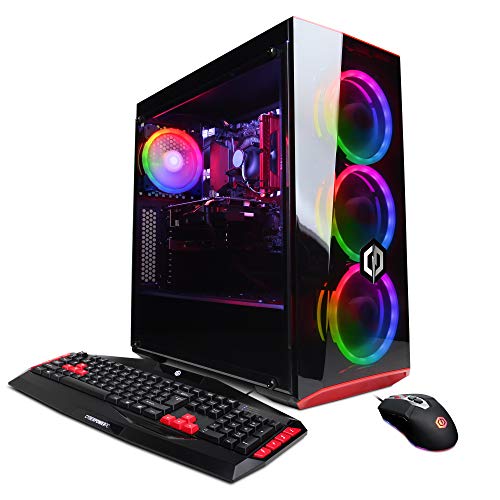
CyberpowerPC Gamer Xtreme VR i5-9400F GTX 1660
Taking A Closer Look At The Options
HP’s OmniDesk with the Ryzen 5 8500G is the sensible starting point if you’re building a design setup without draining the budget. The processor uses a six-core, twelve-thread design (threads are virtual cores that let the CPU juggle more tasks at once), and integrated Radeon 740M graphics handle 2D work in Photoshop, Illustrator, and Canva-class web tools without flinching. You also get 16GB of DDR5 RAM, which is the bare minimum I’d want open for modern design software in 2026.
Storage is split between a 512GB SSD (a fast solid-state drive that boots programs in seconds) for the OS and applications, plus a 1TB HDD (a slower, higher-capacity hard disk drive) for finished project archives. Quad-monitor support is unusual at this tier and helps anyone running reference boards alongside the main canvas. Wi-Fi 6 keeps the desk cable-light.
What Helps Most
- Quad-monitor support out of the box, rare at this tier and useful for reference-heavy design work.
- 16GB DDR5 handles layered Photoshop files more comfortably than the older DDR4 standard found in budget towers.
- 1.5TB total storage means finished client work can stay on the HDD while the SSD focuses on active projects.
- Wireless keyboard and mouse included, so there’s no peripheral shopping list to start.
Things To Consider
- Integrated Radeon graphics will struggle once 3D work or 4K video timelines enter the workflow.
- 16GB RAM feels tight when running Figma, Photoshop, and a browser full of design references simultaneously.
Key Specs
Made For
Design students, social-media creators, and hobbyists working primarily in 2D apps who want a stable starter machine.
Consider Something Else When
Designers juggling motion graphics or 3D mockups should reach for the CYBERPOWERPC Gamer Master Ryzen 5 RTX 4060 Desktop instead.
The Gamer Master stands out from the HP OmniDesk above by swapping integrated graphics for a dedicated NVIDIA RTX 4060 with 8GB of VRAM (video memory reserved for the GPU). That changes the equation for designers who dabble in After Effects, Blender, or DaVinci Resolve, because GPU-accelerated effects and 3D viewports finally have real horsepower behind them. The Ryzen 5 7600 (six cores, twelve threads) keeps the CPU side modern, and the AM5 platform leaves headroom for future upgrades.
A 500GB PCIe Gen4 NVMe SSD (the fastest consumer storage interface, using the PCIe bus for direct CPU communication) means project files open almost instantly. The tempered-glass side panel and RGB lighting are aesthetic choices that won’t matter to everyone, but the cooling airflow is genuinely useful for sustained rendering sessions.
Real-World Strengths
- RTX 4060 GPU accelerates GPU-rendered effects in After Effects, Blender Cycles, and DaVinci Resolve.
- PCIe Gen4 NVMe SSD delivers noticeably faster project load times than SATA SSDs (an older storage interface capped at slower speeds).
- 16GB DDR5 on a current AM5 motherboard gives a clean upgrade path to 32GB or 64GB later.
- Three display outputs (one HDMI, two DisplayPort) cover a triple-monitor design canvas without adapters.
Trade Offs
- The gaming-oriented case lighting and tempered glass collect dust and fingerprints in studio environments.
- 16GB RAM is the bottleneck for heavy multitasking; 32GB matches this GPU better for serious work.
- Bundled peripherals are functional but unremarkable for designers used to mechanical keyboards.
Right Fit For
Motion designers, illustrators experimenting with 3D, and freelancers who split time between 2D work and short-form video.
Look Elsewhere When
Pure 2D print and branding designers who never touch 3D or video will overpay for the GPU and get more value from the HP OmniDesk Ryzen 5 32GB DDR5 2TB Storage Desktop.
The ASUS V500 is the workstation-flavored option for designers who treat their machine like a production tool rather than a toy. A 13th-gen Intel Core i7 reaching up to 4.9GHz pairs with a generous 64GB of RAM, which is the kind of headroom that lets you keep a 2GB PSD, an Illustrator file, three browser tabs of inspiration, and Slack running without the system dipping into swap memory (when RAM fills up and the OS borrows slower disk space as a backup). That’s the practical difference between designing and waiting.
The 512GB PCIe SSD handles the OS and active project files, while a 500GB external drive ships in the box for backup or scratch space. Dual-monitor 4K support via HDMI and DisplayPort covers most studio layouts. Wi-Fi 6 keeps networking current.
Noteworthy Benefits
- 64GB RAM is overkill for solo social-media design but ideal for multi-app agency workflows.
- Intel Core i7 with boost speeds to 4.9GHz shortens export times in Photoshop and Lightroom.
- Mini-tower footprint fits under a standing desk without dominating the floor plan.
- Front-mounted USB ports simplify connecting external SSDs or drawing tablets mid-session.
Minor Gripes
- Integrated graphics limit any future 3D ambitions; an external GPU enclosure is the only upgrade path.
- 500GB SSD feels modest once RAW photo libraries and project archives accumulate.
Feature Snapshot
Best Suited To
Working designers, agency creatives, and studio leads running Photoshop, Illustrator, and InDesign simultaneously across demanding client deadlines.
Skip It When
Motion or 3D specialists who need a dedicated GPU should consider the CYBERPOWERPC Gamer Master Ryzen 5 RTX 4060 Desktop for similar money.
The Gamer Xtreme VR with the i5-10400F and GTX 1660 Super sits in legacy territory, and that’s both its weakness and its quiet strength. The six-core, twelve-thread Intel chip is two generations behind current silicon but still handles Photoshop, Illustrator, and Canva-class web tools reliably. The GTX 1660 Super with 6GB of VRAM (video memory on the graphics card) holds its own for lighter 2D work and very modest 3D, though it lacks the ray-tracing cores (dedicated hardware for realistic lighting simulation) of newer RTX cards.
The 500GB NVMe SSD is fast enough that file load times won’t feel sluggish. This is a sensible pick if you can find it well below the price of current-gen alternatives and you don’t mind a slightly older Windows 10 Home baseline.
Key Advantages
- GTX 1660 Super delivers smoother Photoshop canvas rotation and basic video editing than integrated graphics.
- 500GB NVMe SSD keeps boot and app launch times competitive with newer budget machines.
- Solid build with reliable CyberpowerPC construction and straightforward internals for future upgrades.
- Wi-Fi ready out of the box with no extra adapter required.
Worth Noting
- 8GB DDR4 RAM is the limiting factor for modern multitasking and should be upgraded to 16GB or 32GB quickly.
- Comes with Windows 10 Home, which may require an upgrade cycle to Windows 11 for full current software support.
- No dedicated NVMe slots beyond the primary drive may constrain future storage expansion.
Built With In Mind
Budget-conscious designers building a multi-monitor setup and willing to add RAM later for heavier workloads.
Swap It Out When
Anyone needing longer software support and more modern connectivity should pick the HP OmniDesk Ryzen 5 32GB DDR5 2TB Storage Desktop instead.
This is the OmniDesk turned up to its logical max: 64GB of DDR5 paired with a 2TB SSD plus a 1TB HDD, on the same Ryzen 5 8500G platform as the entry-level model. Compared to the 16GB version I covered first, this configuration targets photo and print professionals whose RAW libraries and InDesign master files eat storage for breakfast. The 2TB SSD is the standout, since most desktops at this tier cap out at 1TB and force early archiving.
Quad-monitor support, Wi-Fi 6, and the wireless keyboard and mouse bundle carry over. The Radeon 740M integrated graphics remain the same, so this is still a 2D-first machine.
A Few Strong Suits
- 64GB DDR5 keeps massive multi-layer Photoshop files, Lightroom catalogs, and design tools responsive simultaneously.
- 2TB SSD plus 1TB HDD means years of project archives without external drive juggling.
- Quad-monitor support is genuinely rare in the integrated-graphics tier and ideal for reference-heavy workflows.
- Modern Wi-Fi 6 and Bluetooth 5.4 keep the desk wireless-friendly for stylus tablets and external storage.
Room For Improvement
- Same integrated Radeon 740M GPU as the lower-tier OmniDesk means no headroom for 3D or video work.
- The price-to-performance jump from the 32GB model is significant for designers who won’t fully use 64GB.
Whose Shelf It Belongs On
Photo retouchers, print-production designers, and catalog publishers running multi-hundred-MB layered files daily.
Another Choice May Suit
Creators wanting comparable memory but also serious GPU power should pivot to the ASUS V500 Mini Tower Core i7 64GB RAM Desktop.
The 32GB OmniDesk strikes what I think is the practical middle of this lineup. 32GB of DDR5 is the comfortable zone for most working designers running multiple Adobe apps and a browser full of design references, and the 1TB SSD plus 1TB HDD gives you room to grow without juggling external drives immediately. It uses the same Ryzen 5 8500G and Radeon 740M foundation as the other OmniDesk models covered here.
If you remember from pick 1, the entry-level model has the same CPU and GPU but less RAM and storage. The case for this model is simple: more working memory and bigger SSD for less friction day to day.
The Value In It
- 32GB DDR5 hits the sweet spot for multitasking across Photoshop, Illustrator, and browser reference tabs.
- 1TB SSD keeps active projects fast; the 1TB HDD swallows finished archives.
- Quad-monitor support is unusual at this tier and lifts it above typical mid-range home-office towers.
- Wireless peripherals included means a one-box setup out of the carton.
Honest Caveats
- Radeon 740M integrated graphics limit this to 2D-focused workflows.
- Buyers running heavier 3D or video workloads should budget for a discrete GPU upgrade or look elsewhere.
Feature Card
Perfect Match For
Freelance designers and small-studio creatives upgrading from a laptop who want a stable 2D workstation without overspending.
Where A Sibling Pick Shines
Power users who need 64GB for massive catalogs will get better long-term value from the HP OmniDesk Ryzen 5 64GB DDR5 3TB Storage Desktop.
The other 32GB OmniDesk trades the 1TB SSD from pick 6 for a roomier 2TB SSD, while keeping the 1TB HDD in the mix. For designers whose working project libraries keep growing, that extra terabyte of SSD space is the difference between staying nimble and starting to clean up files weekly. The CPU and GPU foundations stay identical, so this is a storage-tier choice for buyers who don’t need 64GB of RAM.
If your workflow revolves around massive InDesign documents, hundreds of brand assets, or RAW photo sessions that you want to keep fast on the primary drive, the extra SSD room earns its keep quickly.
What Makes Sense
- 2TB SSD is unusual at this price and accommodates years of working project files without external drives.
- 32GB DDR5 covers typical multi-app design sessions comfortably.
- Quad-monitor support lifts this above the average mid-range home-office tower.
- Front USB-C and multiple rear ports simplify connecting drawing tablets, cameras, and external SSDs.
Softer Spots
- Integrated Radeon graphics keep this a 2D-only workstation.
- Buyers who won’t use the extra SSD space may find better value in the lower-cost 32GB OmniDesk.
Who Should Grab It
Designers managing large brand asset libraries, video producers storing raw footage, and studios that hate archiving constantly.
Reach For A Different Pick When
Teams that need serious CPU horsepower for export-heavy work should consider the ASUS V500 Mini Tower Core i7 64GB RAM Desktop.
Dell’s Pro Tower Plus leans corporate, and that’s not a bad thing for designers who want a machine that fits a managed office environment. The Intel Core Ultra 5 235 with 14 cores (six performance cores for heavy lifting plus eight efficiency cores for background tasks) is a current-generation chip with a neural processing unit (NPU, a dedicated AI accelerator chip) built in, which means AI-assisted features in Photoshop and other design tools can run locally instead of depending on cloud round-trips. It also gives Dell Pro-class manageability for IT departments.
Integrated Intel Graphics handle 2D work cleanly, though designers eyeing GPU-accelerated pipelines should plan around the limitation. The Pro Tower Plus chassis tends to be quieter than consumer gaming towers, which matters in shared office settings.
Where It Delivers
- 14-core Core Ultra 5 235 handles complex filters and exports faster than older 6-core chips.
- Built-in NPU accelerates on-device AI tools in Photoshop, Illustrator, and design plugins.
- Quieter thermals than gaming towers make it office-friendly.
- Dell’s Pro platform offers IT-friendly manageability for design teams in larger organizations.
Some Limits To Know
- Integrated Intel Graphics will not satisfy motion graphics or 3D rendering workloads.
- Pro-class pricing typically runs higher than consumer towers with similar core counts.
Spec Overview
Who Will Love This
Office-based design teams and IT-managed environments that need a quiet, current-generation workstation with local AI capability.
A Better Fit Elsewhere
Solo creators or small studios who don’t need enterprise manageability should look at the HP OmniDesk Ryzen 5 32GB DDR5 2TB Storage Desktop for similar power at lower cost.
This is the oldest machine in the roundup, and that’s the entire pitch. The i5-9400F is a six-core chip from a previous Intel generation, paired with a GTX 1660 6GB and a hybrid 120GB SSD plus 1TB HDD boot-and-storage combo. It still drives Photoshop and Illustrator at acceptable speeds for hobby and light freelance work, especially with an 8GB RAM upgrade to 16GB being a common first move for any new owner.
Where this build earns its slot is for designers who want a dedicated GPU at the lowest possible cost and don’t mind older silicon. The 120GB SSD is small, so expect to lean on the HDD for project storage early on.
Points In Its Favor
- GTX 1660 GPU is far better than integrated graphics for any 3D or GPU-accelerated design work.
- Wi-Fi ready and Windows 10 Home pre-installed for plug-and-play setup.
- Lower market price compared to newer RTX-equipped towers, especially on the secondary market.
Potential Drawbacks
- 8GB DDR4 RAM is the obvious bottleneck and should be the first upgrade.
- 120GB SSD fills up fast; the HDD handles overflow but at slower speeds.
- Older CPU architecture limits long-term software compatibility compared to current Ryzen or Core Ultra chips.
Best Suited To
Hobbyist designers, students, and anyone building a starter workstation on a tight budget who can upgrade RAM themselves.
Not Your Match When
Working designers expecting years of reliable performance should invest in the HP OmniDesk Ryzen 5 32GB DDR5 2TB Storage Desktop instead.
What To Weigh Before Picking A Design Desktop
A desktop for graphic design earns its keep through three working attributes: enough RAM to keep layered files responsive, a color-accurate multi-monitor setup, and storage that won’t bottleneck daily work. RAM is the first thing I’d protect, because once you cross into multi-app workflows, 16GB becomes a hard ceiling and 32GB becomes the comfort zone.
Graphics processing matters more than designers expect. Integrated graphics handle 2D apps fine, but GPU-accelerated filters in Photoshop, smooth 3D viewports in Blender, and accelerated export in Premiere or DaVinci Resolve all want a dedicated GPU. The CYBERPOWERPC Gamer Master Ryzen 5 RTX 4060 Desktop is the clearest GPU value in this list.
CPU Cores And Daily App Speed
Modern design software spreads work across multiple cores, and the Ryzen 5 8500G and Core Ultra 5 235 cover that well for typical 2D work. For heavy batch exports or complex Illustrator artboards, more cores reduce wait times noticeably.
RAM Headroom For Real Workloads
32GB has become the realistic minimum for designers running Photoshop, Illustrator, and a reference-heavy browser together. Power users with massive catalogs or print files benefit from the 64GB configurations on the OmniDesk and ASUS V500.
Storage Architecture And Backup
A small SSD for the OS and active projects, paired with a larger HDD or external drive for archives, keeps things fast and affordable. The hybrid configurations in this roundup follow that pattern, which is the smart approach for designers with growing file libraries.
Display Connectivity And Color Workflows
Quad-monitor support is rare outside workstations, and the OmniDesk lineup stands out for offering it across multiple tiers. Designers running color-calibrated reference panels alongside a main canvas should prioritize video output count first.
Key Considerations Across These Picks
Where Shoppers Go Wrong
Picking by raw CPU speed is the most common mistake I see. Design software leans heavily on RAM and GPU once files get complex, so a six-core chip with 32GB of RAM and an SSD beats an eight-core chip with 8GB and a hard drive every time. The other slip-up is ignoring display outputs: many buyers discover their new tower only supports two monitors, which limits reference-heavy workflows on day one.
What The Higher Tier Buys
Stepping up to the 64GB OmniDesk or the ASUS V500 pays for memory headroom and faster storage rather than flashy benchmarks. For working designers running multi-app sessions all day, that translates directly into less waiting and fewer crashes on large files. The GPU upgrade on the CYBERPOWERPC Gamer Master, by contrast, buys entry into motion graphics and 3D workflows, which is a different kind of productivity entirely.
Frequently Asked Questions
How much RAM do I really need for graphic design?
32GB is the comfortable minimum for most working designers running multiple Adobe apps, with 16GB acceptable for hobby and student work and 64GB useful for catalog-level workflows.
Is a dedicated GPU required for design work?
Not for 2D apps like Photoshop and Illustrator, but a dedicated GPU becomes valuable the moment you add After Effects, Blender, or 4K video editing to the workload.
What storage setup makes sense for designers?
An SSD for the operating system and active projects paired with a larger HDD or external drive for archives keeps performance high without overspending on storage you rarely touch.
Are gaming PCs good for graphic design?
Yes, because the GPU and fast SSD that benefit games also accelerate design software, though gaming aesthetics and noise levels don’t always suit a studio environment.
How important is multi-monitor support?
It’s a quiet productivity multiplier: a main canvas, reference panel, and communication window each on their own display removes a lot of tab-switching friction during long sessions.
The Takeaway
The right desktop depends on whether your design work stays in 2D or stretches into 3D and video, and on how much storage and memory your files actually demand. The 32GB OmniDesk is the most balanced choice for most working designers, while the CYBERPOWERPC Gamer Master with the RTX 4060 is the smart pick once GPU-accelerated work enters the picture. Match the machine to the workload, and the rest of the setup tends to follow.