Picking a desktop for coding means balancing raw thread count, memory headroom, and how quietly a machine disappears into your daily workflow. I see a lot of shoppers land on a flashy spec sheet and miss the boring details that decide whether a setup actually holds up across long compile sessions, multiple containers, and a stack of browser tabs. The lineup below spans all-in-one workstations, compact micro towers, and full-size business desktops, so there’s a fit whether you code in a corner of the living room or run a multi-monitor rig from a small office.
A Closer Look At The Lineup

Apple 2024 iMac All-in-One with M4 Chip

Dell 23.8″ All-in-One Touchscreen Copilot+ Desktop

HP ProDesk 400 G9 Business SFF Desktop
Dell 23.8″ All-in-One Copilot+ Desktop (64GB, 2TB)
Dell 23.8″ All-in-One Copilot+ Desktop (32GB, 1TB)
Dell 23.8″ All-in-One Copilot+ Desktop (32GB, 2TB)
Dell 23.8″ All-in-One Copilot+ Desktop (64GB, 1TB)
Dell 23.8″ All-in-One Copilot+ Desktop (64GB, 4TB)
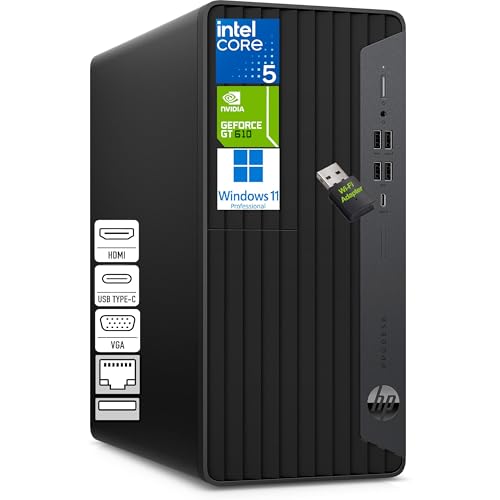
HP Tower Desktop with Intel i5-10400F

Dell Pro Micro Plus Desktop with Intel Ultra 7 265
More On The Choices That Made The List
The M4 iMac is built for developers who live inside Apple’s toolchain. The 10-core CPU and 10-core GPU handle Xcode builds, containerized microservices, and local LLM experiments without the cooling noise that bigger workstations tend to throw off. 16GB of unified memory treats CPU and GPU as a single pool, which is the small detail that makes a coding machine feel fast rather than merely capable.
The 24-inch Retina display gives you enough real estate to keep documentation, terminal, and editor on screen at once. For macOS-first teams, the integrated form factor removes the tower-from-the-desk problem entirely.
A Strong Showing
- Unified memory architecture keeps build chains responsive even with several services running.
- The 24-inch 4.5K Retina panel is comfortable for long sessions of code review.
- Apple silicon efficiency means you can push through long compiles without a fan that shouts.
- The all-in-one chassis leaves desk space for notebooks, reference books, or a second portable screen.
Worth Noting
- The 256GB SSD fills up fast if you keep multiple large simulator folders or local datasets.
- Sticking with macOS limits direct compatibility for some Linux-leaning server stacks.
Quick Facts
Made For
macOS and iOS developers who want a clean desk and quiet machine that handles daily builds without complaint.
Consider Something Else When
The HP ProDesk 400 G9 Business SFF Desktop is a stronger fit for engineers who need Windows-native toolchains and dedicated multi-monitor output.
Dell’s 23.8-inch all-in-one brings an Intel Core Ultra 7 Series 3 chip into a screen-first design that suits hybrid coding and writing workflows. The Copilot+ label means a dedicated NPU (neural processing unit, a chip that handles AI tasks without taxing the main CPU) is on board, so local AI helpers and code completion features run without dragging on your compile queue. Windows 11 Pro keeps the enterprise-grade bits like BitLocker and Remote Desktop close at hand.
For someone working from a small apartment office, the touchscreen adds a nice secondary way to mark up diagrams or scribble notes during code reviews. Pair it with a mechanical keyboard and you’ve got a setup that handles pair programming sessions without taking over the room.
Practical Advantages
- Wi-Fi 6E and Bluetooth 5.3 make for clean wireless peripheral setups.
- The 1TB PCIe SSD swallows source repos, container images, and node_modules folders with room to spare.
- 16GB DDR5 RAM is the right starting tier for VS Code, Docker, and a few browser tabs.
- Wireless keyboard and mouse ship in the box, so setup is genuinely plug-and-go.
Small Caveats
- 16GB can tighten up fast if you run multiple virtual machines alongside your editor.
- All-in-one designs are harder to upgrade later than a traditional tower.
Right Fit For
Hybrid developers who split time between writing code, reviewing pull requests, and reading documentation in Windows.
Look Elsewhere When
The Dell 23.8″ All-in-One Copilot+ Desktop (64GB, 2TB) is a stronger match for engineers running several virtual machines or large monorepos in parallel.
The ProDesk 400 G9 leans on Intel’s i7-14700, which puts 20 cores and 28 threads at your disposal. For compile-heavy workflows like Unreal builds, large TypeScript monorepos, or parallel test runners, that thread count pays for itself quickly. The small form factor (SFF) chassis slips behind a monitor or under a standing desk converter without complaint.
Dual DisplayPort and HDMI outputs let you run a pair of 4K monitors side by side, which matters once you start juggling terminals, profilers, and design files in parallel. The wired peripherals are simple but reliable, and Windows 11 Pro is preinstalled with sensible defaults for shop-floor IT management.
What Stands Out
- 20-core i7 chews through parallel build steps and CI-like local runs.
- Dual 4K output keeps documentation, IDE, and terminal simultaneously visible.
- Compact SFF chassis fits office cubicles and shared workspaces.
Honest Caveats
- No dedicated GPU means heavy GPU compute or local LLM training is out of reach.
- The wired keyboard and mouse are functional but feel dated next to a mechanical setup.
- Upgrading inside SFF cases is more fiddly than mid-towers, a common owner complaint.
Best Suited To
Backend developers and QA engineers who run many concurrent services and want a tidy desk footprint.
Not Your Match When
The Dell Pro Micro Plus Desktop with Intel Ultra 7 265 is the better swap for minimalist setups that still need serious multi-core muscle.
This Dell config trades up to 64GB of DDR5 RAM and a 2TB PCIe SSD while keeping the same Core Ultra 7 Series 3 processor as the rest of the lineup. For engineers running several virtual machines, spinning up Kubernetes clusters, or compiling game builds locally, that memory headroom removes the swap-file stutter that haunts 16GB machines.
The 2TB drive is a quieter win. Game assets, video project caches, and Docker image layers all stop competing for space, which is the kind of detail you only appreciate after living with a smaller boot drive for a year.
Features That Help
- 64GB RAM keeps IDE, browser, and a stack of VMs responsive at the same time.
- 2TB SSD cuts the daily ritual of clearing caches and old project folders.
- Same Copilot+ NPU means local AI tooling runs without taxing the CPU.
Points To Keep In Mind
- You pay a premium for memory and storage headroom you may not fully use on day one.
- The all-in-one form factor still limits future GPU upgrades.
Quick Facts
Perfect Match For
Senior developers and DevOps engineers juggling containers, large monorepos, and parallel test suites on Windows.
Skip It When
The HP Tower Desktop with Intel i5-10400F is plenty for students or hobbyists who don’t need 64GB of RAM.
The 32GB, 1TB version of the Dell all-in-one hits the sweet spot most full-stack developers actually need. VS Code, a Docker daemon, a Postgres container, and a browser with fifteen tabs won’t push this machine into swap territory, and the 1TB SSD covers a year or two of project growth before you start pruning.
It shares the same chassis and screen as the rest of the Dell Copilot+ family, so the upgrade path between this and the 64GB versions is more about memory than anything else. For most working developers, this is the version I’d point to first.
Benefits That Matter
- 32GB DDR5 handles everyday containers and IDE indexing without breaking a sweat.
- Touchscreen and Windows 11 Pro simplify pen-and-ink code reviews and remote sessions.
- Clean wireless setup with the included keyboard and mouse.
Trade-Offs To Consider
- 1TB can feel tight once you keep several game engines or video project folders.
- The Core Ultra 7 is solid but not the highest-clocking chip in this roundup.
Who Should Grab It
Mid-level full-stack developers building web apps, services, and the occasional mobile project in Windows.
A Better Fit Elsewhere
The HP ProDesk 400 G9 Business SFF Desktop suits developers who need to drive dual 4K monitors and want more raw multi-core throughput.
This variant keeps the 32GB of DDR5 RAM but doubles the SSD to 2TB, which suits developers whose work involves heavy local datasets. Data scientists prototyping on CSVs, indie game developers juggling engine builds, or anyone keeping several large media repositories will appreciate not having to micromanage drive space.
For most people, the jump from 1TB to 2TB is the kind of thing that pays off over years rather than weeks, but if your typical workflow means juggling gigabytes at a time, you’ll notice immediately.
Standout Benefits
- 2TB SSD removes the daily juggle between project folders and external drives.
- 32GB RAM keeps IDE and container workflows responsive.
- Copilot+ NPU support for AI-assisted coding tools.
Possible Compromises
- Same screen and CPU as the 1TB sibling, so the only real win is storage.
- All-in-one chassis means storage upgrades later aren’t user-friendly.
Built With In Mind
Developers working with large datasets, game builds, or media pipelines who don’t want to babysit disk space.
Reach For A Different Pick When
The Apple 2024 iMac All-in-One with M4 Chip makes more sense for macOS-first developers who care more about display quality than storage volume.
This 64GB, 1TB config sits in an interesting middle ground: plenty of RAM for AI-assisted code completion and parallel agents, but a more conservative SSD size. If your work leans on cloud repos and external drives, that’s a sensible trade.
The Copilot+ classification puts a dedicated NPU on the chip, which is the kind of thing that starts to matter once you lean on local AI pair programmers and don’t want them eating into your compile budget.
Useful Strengths
- 64GB RAM gives AI tooling and concurrent builds room to breathe.
- Copilot+ NPU offloads model inference from the main CPU.
- All-in-one form factor keeps the desk uncluttered.
Factors To Consider
- 1TB SSD fills up faster than you’d think with multiple large repos.
- You may end up paying for memory tiers you only tap during heavy weeks.
Feature Snapshot
Whose Shelf It Belongs On
Developers integrating AI assistants into their workflow who mostly keep code in the cloud rather than locally.
Swap It Out When
The Dell 23.8″ All-in-One Copilot+ Desktop (64GB, 4TB) is the better pick when local storage volume matters as much as memory.
This is the top-tier storage config in the Dell Copilot+ family. For engineers working with large datasets, ML model checkpoints, or simply years of accumulated project history, 4TB of SSD capacity means the kind of headroom that turns external drive management into a once-a-year chore instead of a weekly ritual.
64GB of RAM and the same Copilot+ NPU carry over from the other 64GB configurations, so you’re paying for storage real estate here, not new CPU performance. Whether that’s worth it depends entirely on how much local data you actually keep.
Strong Points
- 4TB SSD is enough for serious local datasets and project archives.
- 64GB RAM pairs well with memory-heavy AI tooling.
- Same Copilot+ AI acceleration as the rest of the lineup.
Where It Is Less Suited
- The price premium reflects storage, which most hobbyists won’t fully use.
- All-in-one design still caps you at integrated graphics.
Who It Suits Best
Data engineers and ML-adjacent developers with large local corpora who want zero compromise on memory or storage.
Where A Sibling Pick Shines
The Dell Pro Micro Plus Desktop with Intel Ultra 7 265 is a smarter match if you’d rather have a small tower and external storage than an all-in-one with a huge SSD.
The HP tower with the i5-10400F is the honest workhorse of this roundup. Six cores and twelve threads won’t break speed records next to the i7-14700 or the Core Ultra 7 chips elsewhere in the list, but for learning Python, building simple web apps, or running VS Code with a handful of services, it gets the job done without fuss.
The tower format is the quiet advantage here. Unlike the all-in-one options, a traditional tower leaves room for adding RAM, swapping in a discrete GPU later, or sticking in an extra SSD once your projects grow. That’s a meaningful path for students who expect their setup to evolve.
Everyday Wins
- Tower chassis makes future upgrades straightforward.
- Six-core i5 is enough headroom for beginner to intermediate workloads.
- Solid choice for learning new languages and frameworks.
Room For Improvement
- The “F” suffix means no integrated graphics, so you’ll need a discrete GPU for any display output.
- Older-generation CPU compared to the rest of the lineup.
Perfect Match For
Students, bootcamp grads, and self-taught developers building their first serious coding workstation.
Another Choice May Suit
The Dell Pro Micro Plus Desktop with Intel Ultra 7 265 fits better for developers who want newer silicon in a similarly compact footprint.
The Pro Micro Plus is Dell’s answer to the small-but-serious question. It packs a 20-core Intel Ultra 7 265 into a chassis small enough to hide behind a monitor or bolt under a desk. For developers who care about clean aesthetics but won’t compromise on multi-core muscle, this is the most interesting shape in the roundup.
16GB of RAM and a 512GB SSD are the conservative side of the configuration, so this works best as a hub connected to fast external storage or as a daily driver paired with cloud-based repositories. The dedicated NPU handles AI workloads without dragging down compile performance.
Where It Delivers
- Tiny footprint with serious 20-core performance.
- Built-in NPU supports AI-assisted coding workflows.
- Stays out of the way in minimalist desk setups.
Worth Bearing In Mind
- 512GB SSD is the smallest boot drive in this roundup.
- 16GB RAM limits how many heavy services you can run side by side.
Feature Card
The Right Fit
Developers who prize a tidy desk and a small machine but still want current-generation multi-core performance for everyday coding.
A Better Fit Elsewhere
The HP ProDesk 400 G9 Business SFF Desktop makes more sense if you need dual 4K display outputs from the same compact form factor.
What Matters Most Before Choosing Desktops For Coding
CPU Cores And Threads For Real Workloads
A coding desktop lives or dies by its processor. Single-thread speed still matters for IDE responsiveness, but parallel threads pay off the moment you run tests, build assets, or compile multiple services. Most modern web and app development wants at least eight threads for a comfortable experience, and serious backend or game work scales nicely toward sixteen or twenty.
Memory Headroom Beyond 16GB
Eight gigabytes was fine a decade ago. Sixteen gigabytes covers most modern workflows, but 32GB is where things start feeling genuinely relaxed, especially with Docker, databases, and browser tabs all open. Heavy users running virtual machines or local AI models should treat 64GB as the practical floor rather than a luxury.
Storage That Won’t Make You Prune Every Month
SSDs (solid-state drives, which load files dramatically faster than older spinning hard drives) have shifted storage expectations. A 256GB boot drive fills up fast once you add project folders, Docker volumes, and tooling. For most working developers, a 1TB SSD is the realistic starting point, and 2TB or more removes the constant juggling that interrupts flow state.
Form Factor And Future Upgrades
All-in-one machines look great on a desk and save space, but they’re notoriously hard to upgrade later. Traditional towers and small form factor PCs accept new RAM, GPUs, and storage as your needs grow. The right choice depends on whether you value a clean setup today or flexibility years from now.
Operating System And Ecosystem Fit
macOS, Windows, and Linux each shape which tools feel natural. Apple Silicon machines excel at iOS and macOS development with strong battery-like efficiency. Windows machines cover enterprise stacks and the widest software compatibility. Linux-friendly hardware often means checking for driver support up front.
Common Ground Worth Knowing
Where Shoppers Go Wrong
Picking a desktop based on the largest number on the spec sheet is the most common trap. Raw thread count means less if memory runs short or storage fills up in the first month. Another mistake is assuming an all-in-one is automatically upgradeable later; in practice, RAM and storage are usually soldered or locked behind non-standard parts. Skim the upgrade path before falling in love with a slim profile.
Where The Extra Money Goes
The premium tiers in this lineup buy you dedicated NPUs for AI workloads, more memory for parallel services, and storage configurations that match how data-heavy your work actually is. For most developers, stepping up from 16GB to 32GB pays back faster than a faster CPU, because memory bottlenecks are the ones you feel every single day. Higher storage tiers make sense when your repos, datasets, or container images genuinely need the room.