Picking a desktop for a home setup feels different than shopping for a work laptop. You want enough horsepower for your everyday routines, a footprint that fits the desk you actually have, and quiet enough fans that the living room doesn’t sound like a server closet. I looked at nine current options across gaming towers, slim all-in-ones, and compact business machines, then matched each one to the kind of home it’s really built for.
A Snapshot Of The Selections

STORMCRAFT Sirius AI Gaming Desktop, Intel i5 14400F, Arc B570 10GB

HP 24-inch All-in-One Desktop, AMD Athlon Silver, 8 GB RAM
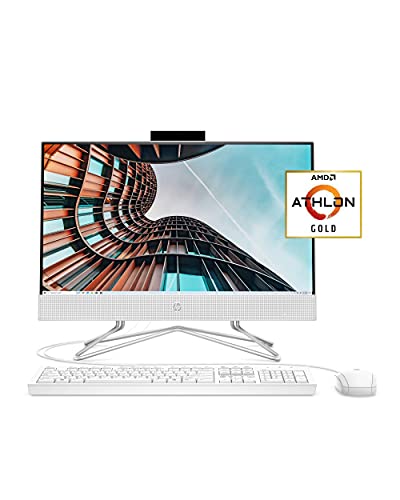
HP 22 All-in-One PC, AMD Athlon Gold, Full HD IPS 21.5-inch

Apple 2024 iMac M4 All-in-One, 24-inch Retina, Blue

Apple 2024 iMac M4 All-in-One, 24-inch Retina, Pink

Apple 2024 iMac M4 All-in-One, 24-inch Retina, Silver

Lenovo ThinkCentre Tiny M70q, i5-14400T, 16GB DDR5, 512GB SSD
Lenovo ThinkCentre Tiny M70q, i5-14400T, 16GB DDR5, 256GB SSD
Lenovo ThinkCentre Tiny M70q, i5-14400T, 32GB DDR5, 1TB SSD
Taking A Closer Look At The Options
If your home doubles as a game room after the kids go to bed, the STORMCRAFT Sirius is built for exactly that shift. The Intel i5-14400F is a 10-core chip, meaning it splits work between performance and efficiency cores, so a game running in the foreground doesn’t choke when Discord, a browser, and a streaming tool all share the same machine. Pair that with the Arc B570 graphics card carrying 10GB of GDDR6 video memory, and you’ve got enough frame buffer to push modern titles at 1440P without leaning on cloud gaming.
Compared to the slim all-in-ones that follow on this list, this is a real mid-tower with airflow to spare. The 1TB NVMe SSD (a fast solid-state drive that loads games in seconds rather than the spinning-platter minute of older drives) keeps load times short, and the 16GB of DDR4 RGB memory gives casual content creators room to edit short clips. It’s louder than a mini PC and it won’t blend into a Scandinavian reading nook, but for a den or a dedicated desk, the trade-off is fair.
Key Advantages
- 10-core CPU handles modern games plus background apps without breaking a sweat.
- 10GB GDDR6 graphics card targets 1440P, the sweet spot between sharp detail and high frame rates.
- 1TB NVMe SSD holds a sizeable game library while cutting boot and load times down to seconds.
- Mid-tower chassis allows for future component swaps, useful if your gaming appetite grows.
Trade Offs
- Bigger footprint than any all-in-one on this list, so it claims real desk or floor space.
- Cooling fans ramp up under load; in a quiet living room you may hear it during late-night sessions.
- The “F” in i5-14400F means there’s no integrated graphics, so a graphics card failure means no display until repaired.
Built With In Mind
Households with a dedicated desk, monitor, and headset who want console-quality PC gaming in the living room.
Where Another Pick Suits Better
For a near-silent setup that disappears on a kitchen counter, the Apple 2024 iMac M4 All-in-One, 24-inch Retina, Blue is a calmer fit.
An all-in-one is a desktop where the computer lives inside the monitor, which is why the HP 24-inch fits so well in homes where clutter is the enemy. The AMD Athlon Silver 3050U is a modest dual-core chip aimed at browsing, email, schoolwork, and streaming, not at video editing or modern gaming. With 8GB of RAM and a 256GB SSD, it has enough breathing room for a household that keeps a dozen browser tabs open while a video call runs in another window.
Where this machine earns its place is the form factor. The white chassis, three-sided micro-edge display, and tilt stand let it slide into a kitchen counter, a homework nook, or a guest-room corner without dragging a tower and a mess of cables behind it. There’s an HD camera with a physical privacy slider, which is a small but meaningful touch for anyone concerned about accidental video calls. It runs Windows 10 Home out of the box.
Where It Helps
- All-in-one design cuts cable clutter and keeps the footprint similar to a single monitor.
- 8GB RAM comfortably handles video calls plus typical browser multitasking.
- Privacy slider over the webcam reassures anyone wary of accidental video.
- White finish and slim bezels blend into bright, family-friendly rooms.
Worth Noting
- 256GB SSD fills up quickly if a household stores photos and video locally.
- AMD Athlon Silver 3050U is a basic chip; intensive software will run, but slowly.
- Built-in speakers are functional for calls, thin for music or movies at higher volumes.
Feature Snapshot
Right Fit For
Busy families who need one shared computer for homework, video calls, and streaming, all without a tangle of cables.
Swap It Out When
If you want a louder, more colorful design statement, the Apple 2024 iMac M4 All-in-One, 24-inch Retina, Pink is a brighter alternative.
The HP 22 All-in-One is the entry-level machine on this list, and it leans into that role with confidence. The 21.5-inch Full HD IPS panel is the same resolution as a much pricier monitor, and IPS means wide viewing angles, so kids watching cartoons on the right side of the desk see the same colors as a parent on the left. The AMD Athlon Gold 3150U is a step up from the Athlon Silver in the previous HP, with slightly better multitasking thanks to higher clock speeds, though it’s still firmly an everyday-use chip.
The included USB mouse and keyboard mean a new owner can plug in and go, which is exactly the appeal. The HP True Vision HD privacy camera and dual array microphones handle video calls, while dual front-facing speakers keep things simple for a quick show in the kitchen. With only 4GB of RAM, owners commonly report feeling the squeeze when more than a few browser tabs are open. The anti-glare coating on the display is a thoughtful touch for brightly lit rooms.
The Helpful Details
- Full HD IPS display at this size offers sharp text and true colors from wide angles.
- Anti-glare coating keeps reflections down in sunlit home offices or kitchen counters.
- Bundled USB mouse and keyboard remove the accessory shopping step.
- Compact 21.5-inch footprint fits on smaller desks and side tables.
Points To Note
- 4GB of RAM limits how many apps can run smoothly at the same time.
- Not suited for modern gaming beyond very light or browser-based titles.
- 256GB SSD is the same capacity as the larger HP above, which may run out for media-heavy homes.
Best Suited To
First-time desktop owners, students, or anyone setting up a simple second computer in a small room.
Look Elsewhere When
Anyone doing regular photo editing or large file work will find the Lenovo ThinkCentre Tiny M70q, i5-14400T, 16GB DDR5, 512GB SSD a far more capable step up.
The 24-inch iMac is the kind of machine that earns its place in a home because of how it looks as much as what it does. The M4 chip pairs a 10-core CPU with a 10-core GPU on a single piece of silicon, which is Apple’s term for unified memory, where the CPU and GPU share the same RAM pool rather than working in separate banks. That architecture is why the slim chassis stays cool and quiet even when a video export is running, and it’s why the 16GB unified memory feels more generous than the number alone suggests.
The Blue finish turns the iMac into a piece of furniture, which matters more in a living room than in a corporate office. The 24-inch Retina display (Apple’s branding for a high pixel-density panel) renders photos and video with the kind of accuracy that side-by-side with the HP all-in-ones reveals immediately. It runs macOS, so households embedded in the Apple ecosystem, with iPhones, iPads, and AirPods, will find continuity features that just work. The 256GB SSD is the one trade-off worth flagging.
What Works In Its Favor
- M4 chip with 10-core CPU and GPU handles creative work while staying remarkably quiet.
- Color-saturated chassis doubles as a design object for visible living spaces.
- 24-inch Retina panel shows real depth in photos, video, and design apps.
- macOS continuity with iPhone and iPad makes shared households feel connected.
Honest Caveats
- 256GB SSD fills up fast with a media library; external storage may become necessary.
- macOS has a learning curve for anyone transitioning from Windows, which is worth budgeting time for.
- Limited ports on some configurations mean a dock or hub is helpful for several accessories.
Feature Card
Perfect Match For
Households that want a beautiful, quiet creative hub in a visible room, especially those already using iPhones.
A Better Fit Elsewhere
Strict Windows-only households will be happier with the HP 24-inch All-in-One Desktop, AMD Athlon Silver, 8 GB RAM for the same clean aesthetic.
The Pink iMac is identical in every technical respect to the Blue version above, but the color changes the conversation in a home. In a craft room, a child’s homework station, or a sunlit breakfast nook, pink reads as warm rather than corporate, and that matters when a machine sits where guests can see it. Inside, the M4 chip and 16GB unified memory deliver the same responsive performance that makes this generation feel like a real leap over the M1 iMacs that came before.
The 256GB SSD is the same compromise every iMac in this configuration shares, so a household with a big local photo library may need to plan for external storage from day one. macOS handles iPhone mirroring, AirDrop, and Universal Clipboard smoothly, which is the hidden value of buying Apple for a household already invested in iPhones. For an open-plan living area, the all-in-one form factor means no tower hides under the side table.
Points In Its Favor
- Pink finish brings warmth to a room the way a piece of decor would.
- M4 silicon handles photo and video projects without taxing the cooling system.
- Same 24-inch Retina panel as the other iMacs on this list, so color accuracy is consistent across the family.
- All-in-one keeps cable management to a single power cord plus a couple of accessories.
Soft Spots
- Color preference is highly personal; buyers may prefer one of the other iMac hues.
- 256GB SSD is tight for video collections without external storage.
- No touchscreen, which some users expect from a modern all-in-one.
Whose Shelf It Belongs On
Anyone furnishing a craft room, design studio at home, or playful creative corner who wants real performance with personality.
Consider Something Else When
For pure productivity without color theatrics, the Lenovo ThinkCentre Tiny M70q, i5-14400T, 32GB DDR5, 1TB SSD is a more businesslike alternative.
The Silver iMac is the conservative choice in the lineup, the one that disappears into a study, a den, or a lawyer’s home office without making a statement. It carries the same M4 chip with a 10-core CPU and 10-core GPU as its colorful siblings, which is the whole point: performance doesn’t change with the paint color. For a household that has been on Intel Macs for years, this generation is where the responsiveness jump becomes obvious, especially on big spreadsheets and photo libraries.
The 24-inch Retina display keeps text crisp enough that long reading sessions don’t strain the eyes, and the color-accurate panel matters for anyone doing serious photo edits at home. macOS Sonoma and later versions also extend the desktop with iPhone mirroring, so an iPhone screen can sit next to the Mac for cross-device work. Compared to the HP all-in-ones earlier on the list, the iMac costs more per inch of screen, but the longevity of macOS support and the unified-memory performance are part of what you pay for.
Strengths Worth Knowing
- Silver finish blends into traditional or minimalist home offices.
- M4 chip’s efficiency means the fan rarely ramps up under normal home workloads.
- macOS receives long software support, extending the useful life of the purchase.
- Retina display reduces eye fatigue during long sessions of reading or writing.
Factors To Consider
- 256GB SSD is the same across the iMac configuration range, which can pinch heavy users.
- Pricing runs higher than Windows all-in-ones with comparable screen sizes.
- RAM and storage are not user-upgradable later, so spec the configuration carefully at purchase.
Spec Overview
Made For
Long-term households who want a quiet, dependable Mac that ages well and looks at home in a study.
Reach For A Different Pick When
For a sharper look at a similar price point with more storage headroom, the Lenovo ThinkCentre Tiny M70q, i5-14400T, 16GB DDR5, 512GB SSD is worth a look.
The ThinkCentre Tiny M70q is the smallest desktop on this list, a 1-liter-class machine that disappears behind a monitor or tucks into a bookshelf cubby. Inside that tiny shell sits an Intel i5-14400T, a 10-core chip designed for low power draw (the T suffix marks Intel’s lower-wattage variants), paired with 16GB of DDR5 memory. DDR5 is the newest generation of system RAM, faster and more efficient than the DDR4 used in the gaming tower earlier. For spreadsheets, browser-based work, and Office apps, the result feels snappy without producing noticeable heat.
The 512GB NVMe SSD is a sensible middle ground for a household that wants breathing room beyond the 256GB iMacs and HPs. Connectivity is generous for a small box: WiFi 6 for modern wireless networks, Bluetooth for accessories, RJ-45 for a wired home network, plus DisplayPort and HDMI for one or two monitors. It ships with Windows 11 Pro, which adds features like BitLocker drive encryption that matter for households working with sensitive documents at home.
A Few Strong Suits
- Tiny chassis fits behind a monitor, freeing the desk for actual work.
- 16GB DDR5 memory handles Office, browsers, and light photo editing comfortably.
- 512GB SSD offers twice the storage of the 256GB all-in-ones on this list.
- Windows 11 Pro adds business-grade security features for home-based professionals.
Small Caveats
- No display included, so a monitor is a separate purchase to plan for.
- Integrated graphics cap modern gaming ambitions to light or older titles.
- Small form factor can run warm under sustained heavy workloads.
Quick Facts
Who Should Grab It
Home-office pros and minimalists who want a fast, quiet box hidden behind a screen with no tower on the floor.
Not Your Match When
Anyone needing a screen and speakers in a single box will prefer the HP 24-inch All-in-One Desktop, AMD Athlon Silver, 8 GB RAM for its all-in-one convenience.
This configuration of the ThinkCentre Tiny M70q trims storage to 256GB but keeps everything else that makes the line appealing. The i5-14400T still offers ten cores and the same WiFi 6, Bluetooth, and dual-display output through DisplayPort and HDMI. The trade is straightforward: less room for locally stored photos and video, in exchange for a lower entry cost for households who mostly work in the cloud or on a network drive.
For a home that runs a NAS (a Network Attached Storage device that holds files for every computer on the home network) or relies on Google Drive and OneDrive, the smaller SSD stops being a problem. Windows 11 Pro keeps the encryption and remote desktop features that make this little box practical for hybrid workers who occasionally bring work home. It runs cool enough to live behind a monitor without active cooling concerns, depending on your workload.
Practical Pluses
- Same 16GB DDR5 RAM and 10-core CPU as the larger-storage sibling.
- Lower entry cost makes it friendlier for households working mostly in the cloud.
- WiFi 6 and Bluetooth keep wireless accessories responsive.
- Compact size means the box can mount behind a VESA-compatible monitor.
Where It May Fall Short
- 256GB SSD is tight without cloud storage or an external drive in the mix.
- DisplayPort and HDMI both present, but a monitor is still a separate purchase.
- No dedicated GPU, so creative apps rely on integrated graphics.
Who It Suits Best
Cloud-first households and hybrid workers who don’t keep large local files but want a fast, quiet desktop at home.
Where A Sibling Pick Shines
The Lenovo ThinkCentre Tiny M70q, i5-14400T, 32GB DDR5, 1TB SSD suits households that need local storage and heavier multitasking in the same small box.
This is the maxed-out M70q, the configuration aimed at households running virtual machines, large datasets, or serious multitasking with a dozen browser tabs plus Office apps plus a creative tool. The 32GB of DDR5 RAM is double the amount in the previous two Tiny configurations, and 1TB of NVMe storage gives local space for project files without leaning on external drives. The i5-14400T still pulls low wattage, so this much memory and storage doesn’t turn the tiny chassis into a space heater.
For a power user working from home, the math is straightforward. The same small box that disappears behind a monitor can now run Lightroom catalogs, a local development environment, or a Plex media server without breaking a sweat. Compared to the gaming tower earlier on the list, it trades dedicated graphics for silence and a tiny footprint. Owners commonly report that this kind of configuration pays off when the household includes remote workers and students sharing one machine.
Real-World Strengths
- 32GB DDR5 handles dozens of browser tabs plus creative apps at once.
- 1TB SSD leaves room for project files, photo libraries, and local backups.
- Tiny chassis still runs cool thanks to the low-wattage CPU.
- Same WiFi 6 and Bluetooth convenience as the other M70q configurations.
Things To Weigh
- Costs more than the smaller-storage siblings for capacity many households won’t fully use.
- No dedicated graphics card, so 3D rendering or modern gaming is not its strength.
- Still requires a separate monitor purchase to complete the setup.
Best Suited To
Home-based power users, developers, and creative professionals who need serious memory and storage in a quiet, small package.
Skip It When
Anyone prioritizing 1440P gaming will find the STORMCRAFT Sirius AI Gaming Desktop, Intel i5 14400F, Arc B570 10GB a better fit for the same budget.
What Matters Most Before Choosing Desktops For Home
The right machine depends less on the spec sheet than on where it lives and what you ask it to do. A family computer parked in a kitchen corner has different priorities than a creative workstation tucked into a quiet study.
Form Factor And Room Layout
All-in-one designs collapse the computer into the display, which keeps desks clear and removes the cable mess behind a separate tower. They tend to cost more per unit of performance because the engineering crams everything into a thin chassis. Traditional towers, like the STORMCRAFT Sirius, trade desk space for cooling headroom, future expansion, and stronger graphics. Tiny desktops like the ThinkCentre M70q split the difference, vanishing behind a monitor while still leaving the door open for external drives and accessories.
For homes with limited surfaces, the all-in-one or tiny-PC form factor usually wins. For homes where the machine already has a designated desk and the household wants raw performance, a tower is hard to beat. Pick the shape first, then the specs inside it.
Processor, Memory, And Real Workloads
The CPU (central processing unit) and RAM determine how many things a computer can do at once without slowing down. For browsing, email, and streaming, an entry-level chip with 8GB of RAM is enough. For Office apps running alongside a video call and a cloud-synced workspace, 16GB is the comfortable minimum. Households that edit photos or video locally benefit from 32GB.
The chips in this roundup range from the AMD Athlon Silver 3050U at the modest end to the Apple M4 and Intel i5-14400T in the middle, up to the gaming-focused i5-14400F. Stepping up means smoother multitasking, but most home users won’t notice the jump from a 10-core chip to a 12-core chip the way they would notice the jump from 8GB to 16GB of RAM.
Graphics, Storage, And The Quiet Details
Dedicated graphics matter for gaming, 3D work, and video editing. The Arc B570 in the STORMCRAFT is the only true gaming card on this list. The integrated graphics in the iMac, the HPs, and the ThinkCentre handle video playback and creative apps well, but not modern games at high settings. Storage matters more than people expect: 256GB runs out quickly once a household starts saving photos and videos locally, while 512GB to 1TB offers room to breathe.
Connectivity is the quiet detail. WiFi 6 is now standard on newer machines and helps in homes with many connected devices. Multiple display outputs (HDMI, DisplayPort) let a household add a second monitor for remote work without buying a dock. Bluetooth keeps keyboards and mice wire-free.
Operating System And Ecosystem
macOS on the iMacs fits households that already use iPhones and iPads, with features like Universal Clipboard and iPhone mirroring that work without setup. Windows 11 on the HPs and ThinkCentre offers the broadest software compatibility, including games and niche utilities. Choosing an operating system is often a personal habit decision more than a technical one, and that’s worth respecting.
Key Considerations Across These Picks
Common Buying Mistakes
The most common slip is shopping by raw clock speed, or the GHz number on a chip, rather than by what the household actually runs day to day. A 4.7GHz chip means nothing if the software bottleneck is memory or storage. Equally common is underestimating storage: 256GB sounds generous until a household starts saving family videos locally. Plan for more storage than the spec sheet feels like it needs.
Another trap is buying an all-in-one for its clean look, then discovering later that the screen size or stand doesn’t suit the room. Measure the desk and the viewing distance before choosing a display size. Finally, ignoring the operating system and ecosystem leads to friction. Picking a Mac for a Windows-only household, or a Windows PC for a tight Apple ecosystem, creates daily small annoyances that compound.
Why Higher-Tier Models Cost More
Stepping up from the HP 22 to the HP 24, or from the 256GB iMac to the 32GB ThinkCentre, brings more than a single component. It brings more RAM for multitasking, more storage for files, and a chip that won’t feel slow two years from now. Software ages, background processes grow, and operating systems add features that slowly demand more from the hardware.
For households that keep a computer four years or longer, paying for extra memory and storage up front usually pays off in smoother years three and four. For households that replace machines more often, a mid-tier configuration is often the smarter move, leaving budget for accessories like a good monitor or external storage. The honest read is that “worth the upgrade” depends entirely on how long the machine needs to last and what the household expects to do with it.
Frequently Asked Questions
How much RAM do most households actually need in a home desktop?
For browsing, email, streaming, and schoolwork, 8GB is enough but tight. 16GB is the comfortable sweet spot for households that keep many browser tabs open, run video calls, and switch between Office apps. 32GB matters mostly for users editing large photos, video, or running developer tools at home.
Is an all-in-one desktop a good choice for a small home office?
Yes, especially when desk space is limited. The computer lives inside the display, so cable clutter shrinks to a single power cord and a few accessories. The trade-off is that all-in-ones are harder to upgrade later, so choose the screen size and storage carefully at purchase.
Do I need a dedicated graphics card for home use?
Most households do not. Integrated graphics in modern chips handle video calls, streaming, photo editing, and even casual games well. A dedicated graphics card becomes important for modern PC gaming at higher resolutions, 3D work, or video editing with effects, which is what the STORMCRAFT Sirius is built for.
How important is SSD storage versus a traditional hard drive?
Very important for everyday feel. An SSD (Solid State Drive) loads the operating system in seconds, opens apps almost instantly, and stays quiet because there are no spinning parts. A traditional hard drive is slower and more prone to mechanical failure over time. For most home users, an SSD is worth prioritizing over extra capacity.
Can a tiny desktop like the ThinkCentre M70q handle serious work?
Yes, within the limits of integrated graphics. The 10-core CPU and 16GB to 32GB of DDR5 RAM in these machines handle Office, browser-heavy workloads, programming, and light creative work comfortably. They are not suited for modern 3D gaming or heavy video rendering, which is where a tower with a dedicated graphics card becomes the right tool.
Bottom Line
The right desktop for your home depends on the room it’ll live in and the work it’ll do day to day. All-in-ones win on simplicity and style, towers win on raw power and quiet expansion, and tiny PCs split the difference for minimalists. Match the machine to the household, not the other way around, and the choice gets a lot easier.