A dependable desktop changes how a student works at home. Research papers, video lectures, group calls, and a few games on the side all run better when the machine is matched to the workload. I put together ten student-friendly options that span compact mini PCs, full-size towers, and all-in-one designs, so you can match hardware to your real study routine.
A Closer Look At The Lineup

HP OmniDesk Desktop PC Ryzen 5 16GB DDR5 1.5TB Storage

HP 24-inch All-in-One Desktop Athlon Silver 8GB 256GB SSD
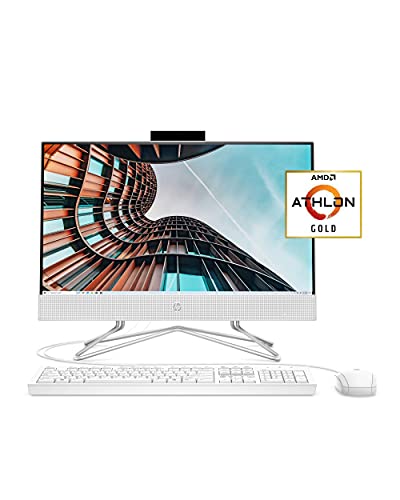
HP 22 All-in-One PC Athlon Gold 4GB 256GB SSD 21.5-inch

BOSGAME P4 Ultra Mini PC Ryzen 7 7730U 16GB 1TB SSD

Dell 23.8-inch All-in-One Core Ultra 7 16GB DDR5 1TB SSD
Dell 23.8-inch All-in-One Core Ultra 7 64GB DDR5 2TB SSD
Dell 23.8-inch All-in-One Core Ultra 7 32GB DDR5 1TB SSD
Dell 23.8-inch All-in-One Core Ultra 7 32GB DDR5 2TB SSD
Dell 23.8-inch All-in-One Core Ultra 7 64GB DDR5 1TB SSD
Dell 23.8-inch All-in-One Core Ultra 7 64GB DDR5 4TB SSD
A Closer Look At Each Pick
The HP OmniDesk arrives as a traditional tower PC built for students who treat their machine like a workstation. Inside, an AMD Ryzen 5 processor with eight cores handles dozens of browser tabs, lecture recordings, and a Python IDE without breaking a sweat. Sixteen gigabytes of DDR5 memory is generous for the price, leaving headroom for heavier projects down the line.
The 1.5TB of combined storage, a 512GB SSD paired with a 1TB hard drive, gives fast boot times plus room for years of coursework. Quad-monitor support via Radeon 740M integrated graphics means a writing setup, reference tabs, and a video call window can all stay visible. Wireless keyboard and mouse come in the box, so day-one setup is mostly plugging in the power cable.
Strengths Worth Knowing
- Eight-core Ryzen 5 handles modern multitasking with reserve headroom for future coursework.
- DDR5 memory at 16GB keeps things snappy when switching between a word processor, browser, and Zoom call.
- Quad-monitor support makes research, note-taking, and meetings easier to manage side by side.
- Wi-Fi 6 and Bluetooth 5.4 give stable, modern wireless without needing adapters.
- Wireless keyboard and mouse in the box removes two items from the shopping list.
Trade Offs
- The tower form factor takes more floor space than the mini PC and all-in-one options later in this list.
- Integrated Radeon 740M graphics are fine for coursework but not a serious gaming engine.
Key Specs
Built With In Mind
STEM students juggling browsers, IDEs, and lab software benefit most from the OmniDesk’s eight-core muscle and quad-monitor support.
Look Elsewhere When
Students working from a tiny dorm desk get a cleaner footprint from the BOSGAME P4 Ultra Mini PC later in this lineup.
Unlike the tower PC in pick one, this HP 24-inch all-in-one crams the display and computer into a single unit. The result is a clean, minimalist desk that suits a dorm room or a shared apartment where clutter matters. The Athlon Silver 3050U processor is modest, but paired with 8GB of RAM, it keeps word processing, browser research, and video calls running smoothly.
The three-sided micro-edge display feels modern, and the adjustable tilt stand helps dial in a comfortable viewing angle. Owners commonly appreciate the built-in HD camera with a privacy slider, since video calls are a daily part of academic life. The 256GB SSD is tight but workable for anyone who leans on cloud storage for files.
A Strong Showing
- Single-cable simplicity clears cable clutter on small study desks.
- Privacy slider on the webcam is a small but useful detail for shared spaces.
- Tilt stand and slim bezels give a more flexible, modern setup than older monitor-and-tower pairings.
- 256GB SSD delivers noticeably faster boot and load times than a traditional hard drive.
Worth Noting
- The Athlon Silver 3050U is light-duty, so heavy code compilation or video editing will feel slow.
- 8GB of RAM is enough for notes and basic browsing, but multitasking with many tabs may push the limits.
- Internal storage tops out at 256GB, which fills up fast with lecture recordings and project files.
The Right Fit
Light-use students focused on writing, presentations, and web research get the cleanest setup from this HP all-in-one.
Skip It When
Anyone running demanding software like video editing or large datasets should step up to the Dell 23.8-inch all-in-one with Core Ultra 7 later in this list.
The HP 22 keeps the all-in-one idea simple, pairing a 21.5-inch Full HD IPS anti-glare display with the computer built right into the back. The anti-glare coating is a genuine comfort during late-night study sessions under a desk lamp. Athlon Gold 3150U and 4GB of RAM form a modest engine aimed at writing, email, and basic coursework.
Compared to the 24-inch model above, the smaller display saves a few inches of depth, which matters on shallow dorm desks. The 256GB SSD again means relying on cloud storage for big files. Built-in speakers, a True Vision HD privacy camera, and dual microphones cover the essentials for video lectures and group meetings.
Notable Upsides
- Anti-glare IPS panel reduces eye strain during long reading sessions.
- Smaller 21.5-inch footprint fits shallow desks and tight corners.
- Built-in camera and dual microphones remove the need for extra accessories.
- SSD boot drive speeds up start-up and app launches compared to older hard-drive designs.
Points To Note
- 4GB of RAM is the floor for modern Windows use and will feel tight with more than a few open tabs.
- Internal storage at 256GB fills up quickly with recorded lectures and project files.
Who Will Love This
Students who mostly type papers, take video calls, and stream lectures in a tight space get an easy, tidy setup here.
A Better Fit Elsewhere
Heavy multitaskers juggling dozens of browser tabs should consider the HP 24-inch all-in-one in pick two, which doubles the memory.
The BOSGAME P4 Ultra Mini PC is the smallest box on this list, yet it carries an AMD Ryzen 7 7730U with eight cores and sixteen threads. That is real workstation-class muscle in a chassis smaller than a paperback book. Sixteen gigabytes of DDR4 memory and a 1TB NVMe SSD round out a setup that punches well above its physical size.
Compared to the HP tower earlier, this PC gives up expandability and a built-in display in exchange for a footprint you can tuck behind a monitor. It pairs well with any HDMI screen, which makes it a flexible choice for a second study spot. The trade-off is needing to bring your own monitor, keyboard, and mouse.
Standout Benefits
- Ryzen 7 7730U delivers eight cores that handle spreadsheets, code, and large research files easily.
- Tiny chassis fits anywhere, from a cramped dorm shelf to a monitor arm mount.
- 1TB NVMe SSD holds years of coursework with fast read and write speeds.
- 16GB DDR4 memory is solid headroom for browser-heavy research workflows.
Things To Consider
- No display, keyboard, or mouse included, so the total cost rises once those are added.
- Mini PCs run warm under sustained load, so a small clearance gap matters for cooling.
Quick Facts
Whose Shelf It Belongs On
Students who already own a monitor and want a powerful, portable PC get the best balance of size and speed from the BOSGAME P4 Ultra.
Reach For A Different Pick When
Anyone wanting a complete setup out of the box should consider the HP 24-inch all-in-one in pick two instead.
The first Dell in this roundup trades the HP all-in-one’s modest Athlon chip for an Intel Core Ultra 7 Series 3 with a 48 TOPS NPU, a dedicated neural processing unit that speeds up on-device AI tasks. Copilot+ features, like real-time transcription and intelligent search, lean on that NPU. Sixteen gigabytes of DDR5 memory and a 1TB PCIe SSD give the platform plenty of breathing room.
The 23.8-inch FHD touchscreen invites a different working style: tapping to mark up PDFs, sketching diagrams, or dragging files feels natural. Windows 11 PRO gives a few extras over Home, like BitLocker device encryption. Wi-Fi 6E and Bluetooth 5.3 keep wireless connections fast and stable for crowded dorm Wi-Fi.
Practical Pluses
- Core Ultra 7 with 48 TOPS NPU accelerates on-device AI tools students increasingly rely on.
- Touchscreen makes markup, sketching, and dragging through lecture notes easier.
- 1TB PCIe SSD gives fast access to a large working library.
- Windows 11 PRO adds encryption and remote desktop, useful for protecting coursework.
- Wireless keyboard and mouse included for a true out-of-box setup.
Some Limits To Know
- The Core Ultra 7 Series 3 is mid-tier, so sustained 3D rendering or large simulations will still feel modest.
- 23.8-inch FHD resolution is sharp, but pixel-dense 4K work may want an external monitor.
Perfect Match For
Undergraduates balancing essays, group projects, and light creative work get a future-leaning all-in-one with this Dell.
Swap It Out When
Power users running virtual machines or large datasets should step up to the Dell all-in-one with 32GB or 64GB later in this list.
The same Dell 23.8-inch all-in-one chassis, but with much heavier memory and storage: 64GB of DDR5 RAM and a 2TB PCIe SSD. Where the previous Dell handles typical coursework comfortably, this one targets students who keep dozens of browser tabs, several IDEs, and large project files open at once. For design or engineering majors, that headroom pays off quickly.
The Core Ultra 7 with its dedicated NPU still drives the AI features in Windows 11 PRO, while the larger SSD stores project archives without juggling external drives. Wi-Fi 6E and Bluetooth 5.3 maintain strong wireless links, and the included wireless keyboard and mouse keep desk clutter down. Compared to the BOSGAME mini PC, the trade-off here is a less portable, but more self-contained, package.
Real-World Strengths
- 64GB DDR5 lets heavy users run virtual machines, simulations, or dozens of research tabs without slowing down.
- 2TB SSD holds years of large project files, videos, and datasets without external drives.
- Touchscreen with Copilot+ features streamlines note-taking and AI-assisted research.
- All-in-one design means one cable to plug in and a tidy workspace.
Points To Keep In Mind
- The premium spec list means a higher cost that may be hard to justify for lighter study loads.
- All-in-one displays are not user-replaceable, so any panel issue means service rather than a quick swap.
Feature Snapshot
Best Suited To
Design, engineering, and data-focused students who need serious memory and storage in a single tidy machine will appreciate this spec sheet.
Not Your Match When
Students on tighter budgets and lighter workloads get more practical value from the Dell all-in-one with 16GB RAM in pick five.
Stepping back from the 64GB powerhouse, this Dell slots in with 32GB of DDR5 memory and a 1TB SSD. That memory size is the sweet spot for most students running a modern browser, an Office suite, and a few research or design apps side by side. The 1TB SSD matches what most people need for local files plus cloud-synced projects.
Compared to the 16GB Dell above, the extra RAM keeps things stable when juggling lecture capture, Zoom, and a stats package all at once. The same Core Ultra 7 Series 3 chip with its 48 TOPS NPU powers Copilot+ features and helps with on-device AI tasks. The 23.8-inch touchscreen stays the same, so the daily experience is familiar.
Where It Helps
- 32GB DDR5 covers the multitasking needs of most coursework without breaking the budget.
- 1TB SSD balances fast storage with enough room for active projects.
- Core Ultra 7 with 48 TOPS NPU future-proofs the machine for on-device AI tools.
- Wireless keyboard and mouse in the box simplify the unboxing.
Worth Bearing In Mind
- 1TB storage can fill up with video projects, so heavy media makers may need an external drive.
- The all-in-one form factor makes repairs more involved than a traditional tower.
Who Should Grab It
Multi-tab researchers and light creative students find this Dell’s spec balance matches their real day-to-day load.
Another Choice May Suit
Heavy video editors or anyone storing massive archives should consider the Dell with 2TB or 4TB later in this list.
Identical to the 32GB Dell in pick seven, except the SSD doubles to 2TB. For students producing video, archiving large lab datasets, or saving raw photo libraries, that extra terabyte matters. The 32GB of RAM is still plenty for typical research and creative workflows.
The Core Ultra 7 with its dedicated NPU continues to drive Copilot+ AI features, and Windows 11 PRO adds enterprise-style security tools. The touchscreen supports active stylus use, which helps with diagramming or handwritten notes. Compared to the HP 24-inch all-in-one, the storage and processing gap is significant for serious academic work.
What Pays Off
- 2TB SSD holds years of media projects, archives, and backups without juggling external drives.
- Core Ultra 7 NPU speeds up transcription, search, and other AI-assisted study tools.
- Touchscreen with stylus support adds flexibility for diagram-heavy classes.
Possible Compromises
- 2TB SSD is generous but still finite, so long-term media pros may eventually add external storage.
Right Fit For
Film, photography, and design students who accumulate large local files benefit most from the doubled SSD.
Skip It When
Anyone satisfied with 1TB and a lighter budget should save by going with the 32GB Dell in pick seven.
This configuration prioritizes memory over storage, fitting 64GB of DDR5 RAM alongside a 1TB SSD. Engineering and research students running virtual machines, large statistical models, or memory-hungry simulators fall into the target audience. The 1TB SSD is enough for active projects, with bulk archives kept on external drives or the cloud.
Beyond the heavy spec sheet, the experience matches the other Dell 23.8-inch all-in-ones: a touchscreen, the Core Ultra 7 with a 48 TOPS NPU, Wi-Fi 6E, and Bluetooth 5.3. Owners commonly find that the 64GB ceiling keeps the machine feeling quick even years into a degree program, when older laptops tend to bog down.
Notable Gains
- 64GB DDR5 supports virtual machines, simulations, and heavy IDE workflows without choking.
- Touchscreen plus Copilot+ features simplify note-taking and AI-assisted study tasks.
- Wi-Fi 6E and Bluetooth 5.3 deliver strong, modern wireless performance on crowded networks.
A Few Limitations
- 1TB SSD fills up quickly with large media projects and simulations.
- The all-in-one display cannot be swapped, so a future panel upgrade means replacing the whole unit.
Made For
Engineering and computational science students running memory-heavy simulations will find this Dell the smoothest option on the list.
Consider Something Else When
Students needing both heavy RAM and large storage should compare against the Dell 64GB/2TB model in pick six.
The top spec on this list pairs 64GB of DDR5 memory with a 4TB PCIe SSD. For grad students or creative professionals juggling years of footage, raw photos, or massive research datasets, that combination is hard to beat. The Core Ultra 7 with its 48 TOPS NPU keeps Copilot+ features fast, while Windows 11 PRO layers in encryption and remote access.
This Dell shares the same 23.8-inch FHD touchscreen chassis and wireless keyboard and mouse as its siblings, so daily ergonomics stay consistent. Compared to the HP OmniDesk tower in pick one, the form factor is tidier but less expandable. If your workload spans an entire degree or a multi-year creative project, the storage headroom removes a recurring hassle.
Why It Works Well
- 4TB SSD swallows years of coursework, footage, and research files without external drives.
- 64GB DDR5 keeps heavy multitasking, virtual machines, and AI tools responsive.
- Touchscreen with Copilot+ support speeds up note-taking and study workflows.
Trade-Offs To Consider
- The high storage spec raises the cost well above the 16GB and 32GB Dell models.
- All-in-one designs are harder to repair than traditional desktops if something goes wrong with the display.
At A Glance
Whose Shelf It Belongs On
Grad students and creative professionals who treat their PC as a multi-year workstation will appreciate the long-term storage headroom.
A Better Fit Elsewhere
Undergraduates on tighter budgets get most of the practical value from the 16GB Dell in pick five.
What Matters Most Before Choosing Desktops For Students
A few decisions shape the right desktop more than any other. The first is whether to go with a traditional tower, an all-in-one, or a mini PC. Towers offer expandability and tend to deliver more performance per dollar, but they eat desk and floor space. All-in-ones trade expandability for a clean, single-cable setup that fits dorm rooms. Mini PCs are the smallest option and pair well with an existing monitor, but they often skip included accessories.
Memory and storage are the next big call. For light writing and browsing, 8GB of RAM and a 256GB SSD handle the basics. Most undergraduates benefit from 16GB and a 1TB SSD, which leaves room for many open browser tabs and a healthy project folder. Graduate students working with simulations, large media files, or virtual machines gain real headroom from 32GB or 64GB of RAM. DDR5 is the current standard and brings meaningful speed gains over older DDR4 memory in day-to-day responsiveness.
The processor matters, but not as much as memory for typical coursework. A modern AMD Ryzen 5 or Intel Core Ultra 5 covers the average student well. AI-equipped chips like the Core Ultra 7 with an NPU bring on-device Copilot+ features that are becoming more useful each semester. Storage type matters more than raw capacity: an SSD, a solid-state drive, makes boot times and app launches dramatically faster than a traditional hard drive, even when capacity looks small.
Finally, peripherals and ports shape the daily experience. Wireless keyboards and mice cut cable clutter. Built-in webcams with privacy sliders cover video calls without extra hardware. A mix of USB-C, USB-A, and HDMI ports lets you connect external drives, monitors, and accessories without hunting for adapters. Wi-Fi 6 or 6E support keeps wireless stable in crowded dorm networks, while Bluetooth 5.3 handles headphones and speakers reliably.
Key Considerations Across These Picks
Where Shoppers Go Wrong
A common trap is shopping by raw spec numbers without considering real usage. A 4TB SSD sounds great, but most undergraduates rarely use that space and pay for capacity they do not need. On the flip side, picking the cheapest all-in-one with 4GB of RAM often leads to frustrating slowdowns within a semester, since modern browsers and Office suites are memory-hungry. Match the spec to your typical day, not the highest number on the box.
Another misstep is forgetting the peripherals. All-in-ones and mini PCs vary widely on what comes in the box, so the listed price is not always the total cost. Towers usually include a keyboard and mouse, but budget all-in-ones sometimes skip them. Factor in a monitor, keyboard, mouse, and any needed adapters before committing to a pick.
The Case For Spending Up
Higher-tier models in this lineup, like the Dell all-in-ones with 32GB or 64GB of RAM, cost more but buy meaningful future headroom. A machine that comfortably handles today’s coursework will keep feeling quick two or three years later, when software demands inevitably rise. For students on multi-year programs like engineering or medicine, that longevity matters more than saving on day one.
Spending up also brings benefits that are easy to underestimate. A Core Ultra 7 with a 48 TOPS NPU accelerates on-device AI tools that are increasingly woven into study apps. Larger SSDs remove the constant task of pruning old files. More RAM means running virtual machines or simulations without juggling windows. For anyone planning to keep the same machine through graduation, the upgrade often pays for itself in saved frustration.
Frequently Asked Questions
How much RAM does a student desktop really need?
For most undergraduates, 16GB of RAM covers writing, browsing, and group calls smoothly. Students running simulations, large datasets, or virtual machines should aim for 32GB or more for comfortable headroom.
Are all-in-one desktops good for college students?
All-in-ones are a strong fit for dorm rooms because they cut cable clutter and combine the display with the computer. They trade expandability for simplicity, which suits students who do not plan to swap components later.
Is a mini PC powerful enough for student work?
Modern mini PCs like the BOSGAME P4 Ultra carry eight-core processors and 16GB of RAM, which handles most coursework well. They pair nicely with an existing monitor and travel easily between home and campus.
Do I need a dedicated graphics card for student tasks?
Most coursework, including research, writing, and light design, runs fine on integrated graphics. A dedicated GPU becomes important for 3D rendering, serious gaming, or machine learning workloads, which is beyond this roundup’s scope.
How important is SSD storage for a student PC?
SSDs make a noticeable difference in boot time, app launches, and overall responsiveness. Most students benefit from at least a 512GB SSD, with 1TB or more helpful for those storing video projects or large datasets locally.
Wrap Up
Picking the right desktop comes down to matching hardware to your actual study routine, your space, and how long you plan to keep the machine. Light writers and presenters do well with the HP all-in-ones, power users find the Dell 64GB configurations hard to beat, and tight dorm desks favor the BOSGAME mini PC. Whichever route you choose, focus on memory, SSD storage, and a recent processor, and the machine should carry you comfortably through the semester and beyond.