Picking a detachable TV mount matters more than most shoppers expect. The wrong bracket can sag, leave a gap behind the screen, or lock your viewing angle into one uncomfortable spot. I put together this list to help anyone mounting a new flat panel skip the guesswork, whether you’re working with drywall, plaster, stubborn studs, or a layout that needs the screen to swivel, tilt, or pull out toward the seating area. These ten options cover full-motion arms, low-profile tilts, no-stud drywall mounts, and fixed brackets for straightforward installs, so there’s a fit for nearly every room and skill level.
The Picks In Brief

Mounting Dream Full Motion TV Wall Mount 42-90 Inch

Mounting Dream TV Wall Mount Swivel and Tilt 26-55 Inch

KAMIWI No Drill Studless TV Wall Mount 32-75 Inch

Perlegear Long Arm Full Motion TV Mount 42-97 Inch

Mounting Dream Full Motion TV Wall Mount 32-70 Inch
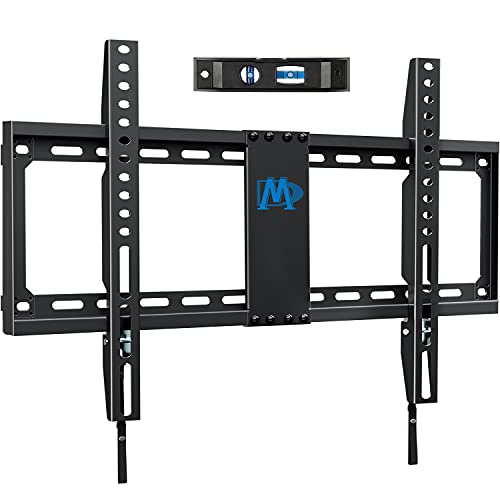
Mounting Dream Fixed TV Wall Mount 42-84 Inch

ECHOGEAR No Stud TV Mount for Drywall 100lbs

Perlegear Long Arm TV Wall Mount 26-70 Inch

Mounting Dream Tilting TV Wall Mount 37-90 Inch

Studless Drywall TV Wall Mount 32-75 Inch 150lbs
The Picks, Examined More Closely
For most living rooms with a mid-to-large flat panel, the Mounting Dream Full Motion TV Wall Mount handles the awkward parts of mounting day. It fits 42 to 90 inch screens weighing up to 100 lbs, which covers the bulk of today’s mainstream TVs. The articulating arm extends the screen about 16.6 inches out from the wall and retracts to roughly 2.5 inches when you push it flat.
Versus the smaller Mounting Dream swivel-tilt I’ll cover in a moment, this model pushes the weight ceiling higher and reaches further, making it the more comfortable pick when the couch sits off-center or you want to angle the screen toward a kitchen island. You also get a 5° upward tilt and a 15° downward tilt, which helps when the TV ends up a bit higher than eye level after install.
Strengths Worth Knowing
- Generous 16.6 inch arm reach lets the screen swing around corners or clear soundbars.
- Tilt range plus post-install leveling adjustment helps with glare from windows.
- Wide 42 to 90 inch compatibility means the same bracket survives a TV upgrade.
- Solid build for screens up to 100 lbs, so newer OLEDs and QLEDs stay secure.
Things To Consider
- Owners commonly report that the hardware bag includes many similar-looking bolts, so a clear workspace and a parts list save time.
- Full retraction depth is around 2.5 inches, so it sits a bit further from the wall than a fixed bracket.
- Stud spacing outside 16 inches requires extra care during layout.
Key Specs
Who It Suits Best
Anyone mounting a 55 to 75 inch screen in a room where viewers sit at different angles, or anyone who wants one bracket that survives their next TV upgrade.
Consider Something Else When
The Mounting Dream Fixed TV Mount fits better when the goal is a flush, low-profile install with no movement.
Smaller screens deserve a bracket sized for them, and the Mounting Dream TV Wall Mount Swivel and Tilt handles 26 to 55 inch TVs up to 60 lbs with a centered VESA plate up to 400 by 400 mm. The unit suits a bedroom, guest room, or office where the screen is lighter but the viewing angles still shift through the day.
Compared to the larger Mounting Dream Full Motion above, this version trims the weight ceiling down to 60 lbs and drops the VESA max to 400 mm, which keeps the bracket itself lighter on the wall. For most sub-50 inch panels, that ceiling is generous. Buyers wanting to pull the screen far out from the wall might find the arm less dramatic than bigger articulating models, but the swivel range still serves off-center seating areas.
Strong Points
- Centered design supports symmetrical viewing from multiple seats.
- Handles 26 to 55 inch screens, perfect for smaller rooms and offices.
- Full-motion swivel and tilt in a compact wall footprint.
- Compatible with most OLED, LED, and plasma panels in the size range.
Trade Offs
- 60 lb ceiling rules out heavier OLEDs above 55 inches.
- VESA cap of 400 by 400 mm won’t match extra-large mounting patterns.
- Owners commonly note that stud placement must match the included template.
Right Fit For
Anyone hanging a mid-size screen in a bedroom or small apartment where full-motion range still matters but weight and bulk should stay modest.
Look Elsewhere When
The Mounting Dream Full Motion TV Wall Mount for 42-90 Inch screens fits larger panels better when you want the same swivel-tilt feel.
Renters and anyone facing a no-stud wall finally have a real option with the KAMIWI No Drill Studless TV Wall Mount. The bracket supports 32 to 75 inch screens up to 150 lbs and works across VESA patterns from 100 by 100 mm to 600 by 400 mm. Instead of chasing studs, the install uses picture-hanging nails pressed into drywall.
Compared to the Perlegear long-arm model, this mount sacrifices reach and swivel range for a far easier setup. There’s no stud finder required and no drill holes left behind, which matters when a deposit hangs in the balance. The 150 lb capacity is genuinely surprising for a no-stud design, though you should always confirm your drywall thickness is above the minimum called out in the listing.
The Value In It
- Installs without a drill, which means no hole patches later.
- 150 lb weight capacity is unusually high for a no-stud bracket.
- Broad VESA range covers most mid-size to large flat panels.
- Removes cleanly at move-out, which protects security deposits.
Things To Consider
- Drywall thickness has to clear a minimum threshold; older plaster walls may not qualify.
- Fixed position only, so no swivel or extension once hung.
- Owners commonly recommend checking TV weight against the bracket rating before committing.
Who Should Grab It
Apartment dwellers, dorm renters, and anyone who wants a flush-mounted look without punching into studs.
A Better Fit Elsewhere
The Perlegear Long Arm Full Motion TV Mount suits anyone who wants real swivel and reach from a wood-stud wall.
For rooms with 97 inch screens or unusual stud spacing, the Perlegear Long Arm Full Motion TV Mount handles the spread. The PGXLF02 fits TVs from 42 up to 97 inches and up to 150 lbs, with mounting holes covering 8, 12, 16, and 24 inch stud centers. Maximum VESA reaches 800 by 400 mm, which is rare outside commercial brackets.
Versus the KAMIWI no-stud mount, this model demands a real wood-stud wall and gives back a generous articulating arm and solid construction. Pre-assembly out of the box trims time during install, and the cold-rolled steel frame looks ready for daily articulation. For anyone mounting in a corner or above a fireplace, the reach is the real headline.
Useful Highlights
- Wide VESA support up to 800 by 400 mm handles massive flat panels.
- Fits 8, 12, 16, and 24 inch stud spacing for unusual framing.
- Pre-assembled design speeds up installation day.
- 150 lb weight capacity supports heavy flagship TVs.
Soft Spots
- Heavy steel frame requires two people during install.
- Long arm pushes the TV further from the wall than shorter brackets.
- Owners commonly note that a stud finder with deep-scan helps on older homes.
Best Suited To
Anyone mounting a large 75 to 97 inch screen on a wide stud span or a corner wall, and who plans to swivel the TV often.
Not Your Match When
The Mounting Dream Tilting TV Wall Mount fits better when you only need downward tilt and a tighter wall profile.
The Mounting Dream Full Motion TV Wall Mount in the 32 to 70 inch trim is the bracket most family rooms actually need. It fits up to 99 lbs and a maximum VESA of 400 by 400 mm, designed around standard 16 inch studs. A 5° upward and 15° downward tilt makes glare from morning windows easier to manage.
Compared to the larger 42 to 90 inch Mounting Dream Full Motion earlier in this list, this version trades weight capacity and size range for a more compact arm and easier handling. For a typical 55 or 65 inch family-room TV, that feels like a comfortable middle ground. The swivel-tilt range covers the angles most viewers want without the bulk of heavier articulating arms.
Real Benefits
- Covers the 32 to 70 inch range that fits most living rooms.
- 99 lb weight ceiling handles mainstream flat panels comfortably.
- Tilt range reduces window glare without complex adjustment.
- Standard 16 inch stud compatibility fits typical US framing.
A Few Limitations
- Stud spacing over 16 inches requires a different model.
- 99 lb ceiling rules out some heavier 70 inch flagship sets.
- Owners commonly recommend a second pair of hands for the bigger end of the size range.
Perfect Match For
Family rooms with a 55 or 65 inch TV and standard 16 inch stud spacing where viewers sit across a sectional.
Swap It Out When
The Perlegear Long Arm TV Wall Mount suits setups needing a tighter fit on 26 to 70 inch screens with extra reach.
Not every wall needs an articulating arm. The Mounting Dream Fixed TV Wall Mount locks the screen flush against the wall for a clean, low-profile look. It fits 42 to 84 inch TVs up to 132 lbs, with broad VESA support including 600 by 400 mm, 400 by 400 mm, 300 by 300 mm, and smaller patterns. The flat profile suits galleries, offices, and main viewing spots where the seating position is set.
Versus the Mounting Dream Full Motion earlier in this list, the fixed design trades swivel and extension for a slimmer wall gap and an easier install. With no moving parts to chase torque on, a single-person install is realistic for most panels. Buyers should expect to commit to the final viewing angle before hanging, since there’s no easy adjustment later.
What Earns Its Place
- Holds up to 132 lbs, suiting many 75 inch plus flagships.
- Wide VESA coverage across common mounting patterns.
- Low-profile flush fit suits clean, modern rooms.
- UL Listed construction adds a baseline of safety testing.
Honest Caveats
- No swivel, tilt, or extension once installed.
- Requires accurate pilot holes for level alignment.
- Owners commonly report needing a second person to lift the screen onto the bracket.
Whose Shelf It Belongs On
Anyone who wants a flush, no-movement install for a single viewing position, especially above a fireplace console or media cabinet.
Reach For A Different Pick When
The Mounting Dream Full Motion TV Wall Mount for 42-90 Inch screens fits better when swivel range is part of the plan.
The ECHOGEAR No Stud TV Mount for Drywall pushes the no-drill concept further with an even slimmer 1.18 inch low-profile depth. It mounts using 32 nails driven directly into drywall and holds TVs up to 77 inches and 100 lbs. A tilt feature plus magnetic standoff options rounds out the install.
Versus the KAMIWI No Drill mount, this ECHOGEAR focuses on a tighter wall gap and slightly different mount hardware. Both skip stud work, but ECHOGEAR’s lower profile suits tight spaces like narrow living rooms or behind-door walls. You give up the 150 lb rating for the slimmer fit, so heavier 75 inch flagship panels are worth double-checking against the bracket spec.
Positive Points
- Ultra-slim 1.18 inch profile gives a near-flush gallery look.
- No drill and no stud finding required for install.
- Tilt feature helps with glare without permanent adjustment.
- Magnetic standoff options simplify cable access behind the screen.
Practical Considerations
- 100 lb weight cap is lower than some competing no-stud mounts.
- Drywall-only install rules out masonry or concrete walls.
- Owners commonly report needing to verify drywall thickness before hanging.
Feature Snapshot
Built With In Mind
Apartment renters, dorm setups, and anyone after a near-flush drywall look without committing to drill holes.
Skip It When
The KAMIWI No Drill Studless TV Wall Mount serves heavier 75 inch screens better on drywall.
The Perlegear Long Arm TV Wall Mount handles 26 to 70 inch TVs up to 100 lbs with VESA patterns from 100 by 100 to 400 by 400 mm. The corner-friendly design installs on a single wood stud or solid concrete wall, and the thicker heavy-duty steel frame supports an articulating arm without obvious flex.
Versus the larger Perlegear 42 to 97 inch model earlier in this list, this version drops the upper screen size and trades some weight capacity for a friendlier install in tighter corners. Drywall alone won’t cut it here, so plan for a real wood stud or concrete anchor. For L-shaped living rooms and kitchen-viewing angles, the swivel range earns its keep.
Good Reasons To Consider
- Corner-friendly design swings the screen around walls.
- Reinforced steel frame handles daily articulation.
- Single-stud or concrete install opens up tricky wall layouts.
- Compatible with flat or curved screens across 26 to 70 inches.
Less Ideal Details
- Not suitable for drywall-only installs.
- VESA cap of 400 by 400 mm rules out some larger mounting plates.
- Owners commonly recommend confirming stud position with a deep-scan finder.
The Right Fit
Anyone mounting a mid-size TV in a corner or open-concept space where swivel and reach are part of the daily routine.
Where A Sibling Pick Shines
The Perlegear Long Arm Full Motion TV Mount fits larger 42 to 97 inch screens on wider stud spacing.
When glare is the only complaint and swivel isn’t necessary, the Mounting Dream Tilting TV Wall Mount answers with a low-profile tilt-only bracket. It fits 37 to 90 inch TVs up to 132 lbs, with a maximum VESA of 600 by 400 mm. The unit supports up to 24 inch wood stud spacing, which is unusual for a tilting bracket.
Versus the Mounting Dream Fixed TV Mount earlier in this list, the tilting version adds a downward angle for screens hung higher than eye level. Above a fireplace, mantel, or tall console, the tilt helps the screen face the seating without forcing the viewer to crane their neck. It’s a focused tool, not a multi-angle mount.
Everyday Advantages
- 132 lb capacity handles 75 inch plus flagships comfortably.
- Supports up to 24 inch wood stud spacing for wider framing.
- Low profile suits high-mounted screens above mantels.
- Wide VESA range covers most large flat panels.
Where It May Fall Short
- Tilt-only design offers no swivel or extension.
- Higher mounted screens may still feel a bit off-angle for short viewers.
- Owners commonly report double-checking stud layout before drilling the pilot holes.
Who Will Love This
Anyone mounting a 55 to 85 inch screen above a fireplace or tall console where downward tilt is the main need.
Reach For A Different Pick When
The Mounting Dream Full Motion TV Wall Mount for 42-90 Inch screens fits better when full swivel and extension matter.
The Studless Drywall TV Wall Mount rounds out this list with another no-drill option for large screens. It fits 32 to 75 inch TVs up to 150 lbs and supports VESA patterns from 100 by 100 mm to 600 by 400 mm. Compatibility includes LG, Samsung, Sony, TCL, Hisense, Vizio, Panasonic, and Philips panels across the listed sizes.
Versus the ECHOGEAR No Stud mount, this model raises the weight ceiling to 150 lbs at the cost of a slightly thicker profile. For drywall-only renters with a 65 or 75 inch flat panel who want fewer restrictions on screen weight, that trade-off feels reasonable. The included hardware is engineered for clean removal, which matters at move-out.
Points In Its Favor
- 150 lb capacity covers heavier 70 plus inch screens on drywall.
- Broad VESA range works with most mainstream TV brands.
- No-stud install keeps walls intact at move-out.
- Compatible with curved and flat panels across the size range.
Some Limits To Know
- Drywall thickness minimum applies, so older plaster walls may not qualify.
- No swivel or extension after install.
- Owners commonly recommend checking total TV weight against the bracket rating.
Made For
Renters and homeowners with drywall walls who want a heavy-capacity mount without chasing studs or drilling holes.
Where Another Pick Suits Better
The Perlegear Long Arm TV Wall Mount fits anyone who wants real swivel and reach on a wood-stud wall.
What Matters Most Before Choosing Detachable Tv Mounts
Wall Type and Mounting Surface
The wall behind the TV dictates almost every other decision. Drywall, plaster, brick, and concrete each accept different hardware, and a bracket rated for wood studs may not work on masonry without an upgrade. VESA is the horizontal and vertical spacing of the mounting holes on the back of the TV, measured in millimeters, and matching it to the bracket is non-negotiable.
For drywall-only rentals, no-stud mounts like the KAMIWI or ECHOGEAR simplify install. For homes with accessible studs, full-motion and tilting brackets deliver more adjustment range.
Screen Size, Weight, and VESA Pattern
A bracket’s weight ceiling and VESA maximum should always exceed the TV’s actual numbers. A 65 inch panel weighing 55 lbs sits comfortably under any bracket rated for 100 lbs or more, but a heavier 75 inch flagship can push the lower-rated models past their limit.
VESA compatibility matters as much as weight. Most 32 to 55 inch TVs use 100 by 100 mm to 400 by 400 mm patterns, while 65 to 85 inch screens often use 400 by 400 mm or 600 by 400 mm. Brackets that support wider stud spacing open up more wall positions.
Movement and Viewing Angles
A fixed bracket gives the cleanest profile and the easiest install, but the viewing angle locks in once the TV is hung. Tilting brackets add downward angle control, which suits screens mounted above eye level. Full-motion arms extend and swivel, which suits open layouts, kitchens, and corner seating.
For most living rooms with one primary couch, tilt or fixed is enough. For multi-angle setups, full-motion earns the extra install effort.
Quick Considerations Across These Picks
Common Slip Ups
Buyers often skip measuring stud spacing before ordering, which leads to a bracket that simply doesn’t fit the wall. Others buy by screen size alone and ignore weight, ending up with a 99 lb ceiling for a 130 lb panel. Confirming VESA, weight, stud spacing, and wall material before checkout saves a return trip.
What The Higher Tier Buys
Premium full-motion mounts add longer reach, broader VESA support, and heavier steel frames, which matters when the screen is large, the wall spacing is unusual, or daily articulation is part of the routine. For most sub-55 inch screens in standard layouts, a mid-tier mount handles the job. For 75 inch flagships on wide studs, the upgrade pays off in long-term confidence.
Frequently Asked Questions
Do detachable TV mounts damage drywall?
No-stud mounts use nail-style hardware designed to leave minimal marks and come out cleanly with basic tools. Stud-mounted brackets leave screw holes that patch easily with spackle. Either way, drywall damage is minimal when the bracket is properly rated.
Can a no-stud mount really hold a 75 inch TV?
Some can, when the drywall thickness and TV weight both fall within the bracket’s rating. Heavier 75 inch panels work with mounts rated for 150 lbs on drywall. Always check the actual TV weight before buying.
What is VESA and why does it matter?
VESA is the horizontal and vertical spacing of the mounting holes on the back of the TV. Matching the TV’s VESA pattern to the bracket’s supported range is essential, since a mismatch prevents install entirely.
Are full-motion mounts safe over a fireplace?
They can be, when the bracket is rated for the TV’s weight and the wall framing is solid. Heat from the fireplace can shorten electronics life, so screen placement above a working fireplace is a separate decision from the mount itself.
Do I need a professional to install a TV mount?
Many homeowners install mid-size mounts themselves with a stud finder, level, and a helper. Larger articulating arms, heavier screens, and concrete or brick walls benefit from professional help.
Closing Remarks
The right detachable TV mount comes down to your wall, your screen, and how you actually watch. A renter with drywall and a 55 inch TV has different needs than a homeowner mounting a 75 inch panel on wide studs above a fireplace. Match the bracket to those three factors, and the install day tends to go smoothly. Pick the bracket that fits your room, not the one with the most movement, and the result will feel like it belongs there.