Building a mechanical keyboard from scratch sounds intimidating until I break it into pieces. I focus on switches, lube, the case, and the small tools that turn a pile of parts into something worth typing on every day. The picks below cover each step of that journey, from figuring out which switch type your fingers prefer to assembling a full aluminum kit. Each one solves a specific problem in the hobby, and pairing them thoughtfully creates a smoother build than grabbing random parts off a shelf.
The Lineup, Simplified

Cherry MX Switch Tester Mechanical Keyboards 9-Key Switch Testing Tool

Glorious Lube Station Mechanical Keyboard Lubing Organizer

GLORIOUS G-Lube Keyboard Switch Lubricant

Akko V3 Pro Cream Yellow Linear Switches 5-Pin 50gf (45 Pcs)

Akko V3 Pro Cream Blue Tactile Switches 5-Pin 45gf (45pcs)
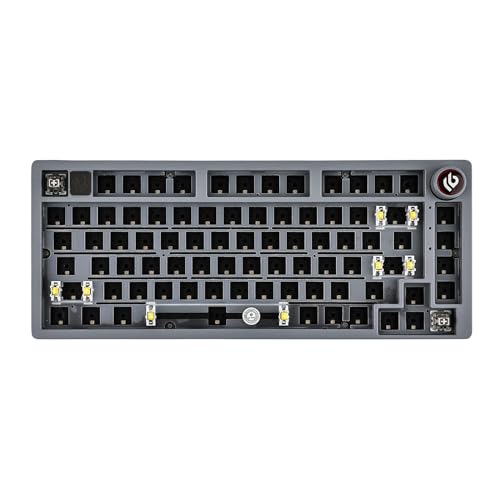
EPOMAKER x LEOBOG Hi75 Aluminum Alloy Mechanical Kit (Grey)

GLORIOUS GMMK 60% Compact Barebone Keyboard Kit

GLORIOUS GMMK 2 96% Barebones Keyboard (Black)
The Picks, Examined More Closely
Anyone dipping a toe into mechanical keyboards hits the same wall: descriptions of “linear,” “tactile,” and “clicky” mean nothing until your fingers actually press them. This 9-key sampler solves that instantly. Each switch sits on a clear acrylic plate under a translucent cap, so the color-coded stem reveals the variant at a glance. I find the included keycap puller and O-rings make it easy to experiment with dampening without committing to a full set.
The tool covers the full spectrum from light linear reds to chunky clicky blues, giving a realistic feel of what a finished keyboard offers. For first-timers choosing switches for their first DIY build, this is the cheapest way to avoid the regret of buying ninety switches you end up hating.
Good Reasons To Consider
- Nine genuine Cherry MX-style switches let you test nine typing personalities in one compact block
- Translucent caps and clear acrylic housing show switch colors without popping the caps off
- Included keycap puller lets you experiment with O-ring dampening on the spot
- Saves real money by preventing a bad switch-type guess on a full build
Worth Noting
- Switch count is limited to nine, so sampling oddball variants requires buying a second tester
- Acrylic base scratches fairly easily during desk use, depending on your surface
Made For
First-time builders deciding between linear, tactile, and clicky switch families before committing to a full set.
Consider Something Else When
Hobbyists who already know their preferred feel should skip ahead to the Glorious Lube Station and skip the sampler entirely.
Switch lubing is messy by nature, and most first attempts end with lube on the desk, the carpet, and somewhere on the cat. The Glorious Lube Station corrals the chaos into something manageable. It holds up to 36 disassembled switches in dedicated slots, and the triple-layered acrylic body feels solid enough to survive a long modding session.
Compared to the tester above, this is purely a workshop tool for builders who already know which switch type they want. Built-in storage for nine lubing accessories means brushes and stems stay where I left them. The anti-slip rubber feet keep the station planted when I’m applying pressure during film application.
Standout Benefits
- 36-switch capacity covers a full row of most 60% and 65% builds at once
- Fingerprint-resistant surface wipes clean after a lube session
- Anti-slip rubber feet prevent sliding during precise brush work
- Dedicated accessory slots keep nine tools within arm’s reach
Some Limits To Know
- 36 slots force multiple batches for full-size or 96% layouts
- Acrylic layers add noticeable desk weight depending on your setup
Feature Snapshot
Best Suited To
Builders lubing switches in batches for compact or mid-sized layouts who want a clean, repeatable workflow.
A Better Fit Elsewhere
The EPOMAKER x LEOBOG Hi75 is a better starting point if you have not committed to lubing yet and want a finished board first.
Pick the wrong lube viscosity and switches either feel sluggish or sound like sandpaper in a tin can. G-Lube threads that needle by sitting in a middle-ground thickness that works across most switch types. The formula handles plastic-on-metal and plastic-on-plastic contact points, so I can use the same bottle for switch housings and stabilizer wires without juggling two products.
Versus the Lube Station above, this is the consumable that actually goes on the switches. First-time modders benefit from a forgiving viscosity that does not punish sloppy application. The bottle design supports precision application for both leaf and rail work.
Where It Excels
- Medium viscosity suits linear, tactile, and clicky switches without switching bottles
- Works on both metal and plastic contact surfaces for full switch and stabilizer jobs
- Forgiving flow rate helps beginners avoid over-lubing during early attempts
- One bottle handles most 60% to 65% builds depending on application style
Points To Keep In Mind
- Clicky switch enthusiasts often prefer thicker lube for acoustics, depending on taste
- Bottle opening can clog if left uncapped between sessions
Right Fit For
New builders who want one reliable lubricant for their first batch of switches without buying a shelf of viscosities.
Swap It Out When
Veteran modders chasing a specific thock should explore dedicated viscosities rather than a universal formula.
After the tester confirmed my preference for linears, the V3 Pro Cream Yellows became my build’s switch of choice. The 50gf actuation force lands in a sweet spot that feels light without being twitchy. The alloy copper and palladium gold contact pair claims better conductivity, and the factory-lubed rails mean I can skip hand-lubing if I want to save an afternoon.
Where the tester shows you what linears feel like, this pack is what you actually build with. The transparent housings pair well with RGB underglow, and the 5-pin design fits hot-swap boards like the GMMK later in this list. The 45-piece count covers most 60% layouts with spares left over.
Key Advantages
- 50gf linear force feels responsive for gaming and fast typing sessions
- Factory-lubed rails save hours of hand-lubing for builders short on time
- Transparent housing showcases RGB lighting for visual custom builds
- Dustproof stem reduces grime buildup depending on your desk environment
- 5-pin design fits hot-swap PCBs without modification
- 45-piece pack covers a full 60% build plus a handful of spares
Room For Improvement
- Linear feel may feel too smooth for typists who prefer a tactile bump
- 45-piece count falls short of full-size layouts without buying two packs
- Factory lube consistency varies occasionally between batches
Feature Card
Perfect Match For
Gamers and fast typists building a 60% or 65% layout who want smooth linear action without hand-lubing every switch.
Look Elsewhere When
The Akko V3 Pro Cream Blue is the smarter choice for writers who want that tactile bump under every keystroke.
The Cream Blue sits right across the table from its Yellow sibling, swapping smooth linear travel for a defined tactile bump. At 45gf, the actuation is slightly lighter than the Yellow, which makes long writing sessions easier on my fingers. The long-pole stem provides a satisfying bottom-out that feels solid without harsh clack.
Compared to the linear Cream Yellow, this switch rewards deliberate typing over rapid-fire gaming. The same 5-pin design and RGB-ready housing keep installation identical across both packs. For writers, coders, and anyone who treats typing as a primary activity, the tactile event is the whole point.
A Strong Showing
- 45gf tactile bump fires earlier than most linears for faster registered keystrokes
- Long-pole stem gives a deeper, fuller bottom-out sound
- Dustproof stem protects internal components in typical desk environments
- Factory-lubed rails reduce spring crunch on first install
Trade Offs
- Tactile bump adds finger fatigue during marathon gaming sessions
- Sound profile is louder than linears, which may bother roommates or shared offices
Whose Shelf It Belongs On
Writers, programmers, and tactile-typing purists building a board they will use for hours of focused typing.
Reach For A Different Pick When
Gamers chasing speed should pick the Akko V3 Pro Cream Yellow instead for its smoother linear travel.
Once switches are picked out, the case becomes the personality of the build. The Hi75 brings aluminum heft with a gasket-mount design (rubber pads separating the plate from the case for softer acoustics) that changes how every keystroke sounds and feels. Full key hot-swap across the board means I can swap the Cream Yellows I tested earlier for Cream Blues without touching a soldering iron.
Compared to the GMMK boards later in this list, the Hi75 leans into premium materials over modular approachability. The mode-switching knob handles work and gaming profiles with distinct RGB behavior. NKRO (N-Key Rollover, registering every simultaneous keypress independently) ensures no missed inputs during intense gaming moments.
Reasons It Performs
- Aluminum alloy case adds desk weight that prevents sliding during heavy typing
- Gasket mount softens acoustics and gives a cushioned bottom-out feel
- Hot-swap sockets accept both 3-pin and 5-pin switches for flexible builds
- Mode-switching knob toggles profiles without software dives
Potential Drawbacks
- Aluminum weight makes the kit less portable for travel setups
- Gasket-mount tuning requires patience to dial in the exact sound profile
- Higher learning curve for first-time gasket builders
Quick Technical Notes
Built With In Mind
Enthusiasts chasing refined acoustics who enjoy tuning gasket mounts for a personalized typing experience.
Where A Sibling Pick Shines
The GLORIOUS GMMK 60% is a friendlier starting point for beginners who want hot-swap without the gasket learning curve.
The GMMK 60% is the kit that made hot-swap mainstream, and it remains a friendly entry point for first-time builders. The 60% layout (no function row, no arrow keys, no numpad) keeps the desk footprint tight while still offering full programming through the GMMK software. The black metal top plate adds rigidity that cheaper plastic boards skip.
Unlike the EPOMAKER Hi75, the GMMK uses a tray-mount design (the plate sits directly in the case) for a stiffer typing feel that some prefer for gaming. The 3-pin hot-swap sockets mean I had to clip the plastic legs off my 5-pin Cream Yellows to fit, which adds prep work. For pure beginners who want the shortest path to a finished board, this kit delivers.
Real Benefits
- Compact 60% footprint saves significant desk space for mouse movement
- Hot-swap sockets let beginners change switches without soldering
- Per-key RGB lighting is fully customizable through companion software
- USB-C wired connection supports modern cables and easy replacement
A Few Limitations
- 3-pin sockets require clipping 5-pin switch legs before installation
- 60% layout forces arrow key remapping through function layers
- Tray-mount feel is stiffer than gasket-mount alternatives
Who Should Grab It
First-time builders who want the shortest path from box to finished keyboard with minimal tools required.
Not Your Match When
Data-entry users needing a numpad should jump to the GLORIOUS GMMK 2 96% for full-size function.
The GMMK 2 96% solves the layout problem that haunts compact builds: how to keep the numpad without dedicating desk space to a full-size board. This layout (function row plus arrows plus numpad, but trimmed bezels) crams the best of full-size into a footprint closer to a TKL (tenkeyless, full-size minus the numpad). The aluminum top shell adds the desk weight the original GMMK lacked.
Where the GMMK 60% forces layer remapping for arrows, this layout keeps them in their natural position. The 96% form factor appeals to spreadsheet workers and accountants who refuse to give up their numpad. Pairing it with the Cream Blue switches from earlier gives a board tuned for hours of typing comfort.
Notable Upsides
- 96% layout preserves numpad and arrow keys in natural positions
- Aluminum top shell resists scratches and corrosion over years of use
- Anodized finish gives a premium look that ages well on a desk
- Grippy rubber feet prevent drift during aggressive typing sessions
Things To Weigh Up
- Larger footprint than 60% or 65% options for tight desks
- Heavier aluminum shell reduces portability for travel use
- Stock availability can be inconsistent depending on colorway demand
Product Snapshot
The Right Fit
Data-entry professionals and spreadsheet-heavy users who need numpad function without dedicating full desk space.
Another Choice May Suit
Minimalist desk setups should choose the GLORIOUS GMMK 60% for a smaller footprint instead.
Choosing Parts That Play Well Together
Switch Type Sets the Tone
Linear, tactile, and clicky switches each create a completely different typing personality. Linear feels smooth from top to bottom, tactile fires a small bump mid-press, and clicky adds an audible click alongside that bump. A tester like the 9-key sampler removes the guesswork before you commit to forty-five switches. For gaming and fast typing, linear tends to win; for long writing sessions, tactile is easier on the fingers.
Lube and Stations Decide the Acoustics
Lubing switches transforms their feel from scratchy to glassy, but sloppy lube application makes switches worse than stock. A station like the Glorious model keeps parts organized while a medium-viscosity lube like G-Lube handles most switch types without buying multiple products. The first switch I lubed took ten minutes; the hundredth took less than one.
Cases Define the Long-Term Feel
Gasket-mount, tray-mount, and top-mount cases each change how the same switches sound and feel. Gasket-mount softens bottom-out for a cushioned feel, while tray-mount keeps things crisp and direct. Aluminum cases add desk weight that stops the board from sliding during heavy sessions. For a first build, tray-mount keeps the learning curve shorter.
Key Considerations Across These Picks
Where Shoppers Go Wrong
The most common mistake is buying switches before trying them. A sampler costs less than one bad pack of forty-five switches and prevents months of regret. Another trap is assuming all hot-swap boards accept 5-pin switches: the original GMMK 60% uses 3-pin sockets, which means clipping switch legs before installation. Builders also tend to skip the lube station and end up with lube on everything except the switch rails.
When Paying More Pays Off
Premium kits like the EPOMAKER Hi75 cost more because of aluminum construction and gasket-mount engineering. The upgrade pays off for enthusiasts who type for hours daily and want refined acoustics. Budget kits like the GMMK 60% deliver solid hot-swap function without the gasket learning curve, making them ideal for beginners still figuring out what they enjoy. The honest read is that premium makes sense once you know exactly what sound and feel you want; beginners benefit from spending less on their first board.
Frequently Asked Questions
What is a hot-swap keyboard?
A hot-swap keyboard has sockets that let you change switches without soldering. You pull a switch out with a puller and push a new one in, which makes experimenting much easier.
Do I need to lube switches?
Lubing is optional but dramatically improves feel and sound. Stock switches feel scratchy; lubed switches feel smooth and produce a deeper sound profile.
What is a gasket-mount keyboard?
A gasket-mount keyboard uses rubber pads between the plate and case to cushion the typing feel. The design softens the bottom-out and changes the acoustics compared to tray-mount boards.
Are 5-pin switches better than 3-pin?
Five-pin switches have two extra plastic legs that secure them on compatible PCBs. They fit 5-pin hot-swap boards directly and can be clipped to fit 3-pin sockets.
How many switches do I need for a 60% build?
A standard 60% layout uses around 61 switches, so a 45-piece pack falls short by roughly sixteen. Most builders grab two packs to cover the build plus spares.
Bottom Line
A DIY keyboard build rewards patience more than budget. Start with a sampler to find your switch personality, then pair those switches with a station and lube that match your workflow. Pick a case that fits your desk and your typing style, and remember that the first build teaches more than any guide. The eight picks above cover every stage of that journey, from the first curious click on a tester to the satisfying thock of a finished gasket-mount board.