Building or repairing a PC at home used to feel like guesswork, but the right kit changes that fast. A good starter set removes the dread of stripped screws, while a single-board computer like a Raspberry Pi gives makers, students, and curious tinkerers a real platform for coding, retro gaming, or smart-home projects. I put together this roundup to help DIYers skip the trial-and-error and get to the fun part sooner.
The Shortlist At A Glance

iFixit Pro Tech Toolkit – Electronics Repair Kit
iFixit Essential Electronics Toolkit

STREBITO 124-Piece Magnetic Screwdriver Set

XOOL 200 in 1 Precision Screwdriver Kit

STREBITO 142-Piece Precision Screwdriver Set

Element14 Raspberry Pi 3 B+ Motherboard

XOOL 140-in-1 Precision Screwdriver Set

HengTianMei 142 in 1 Precision Screwdriver Set
The Details Behind The Selections
This is the kit most repair shops reach for first, and for good reason. A 64-bit precision driver set (each bit has a standardized 4mm shank so it fits standard handles) covers everything from laptop internals to game console shells, while the included tweezers, flex extension, and opening tools handle the fiddly prying jobs.
Compared with the Essential kit that follows, this one trades a bit of portability for raw capability. The magnetic case and foam insert keep each bit locked in place during travel, which matters for anyone repairing devices across multiple locations.
Reasons It Performs
- Anti-static wrist strap helps protect sensitive components from static discharge during motherboard work.
- 64 hardened bits cover Torx, pentalobe, tri-point, and Phillips patterns found in modern laptops.
- Flex extension shaft reaches recessed screws inside deep PC cases without stripping them.
- Backed by a large library of free teardown guides, so beginners can follow along step by step.
Things To Consider
- Bit count and case size make it bulkier than pocket-sized kits.
- Premium positioning means a higher outlay than entry-level alternatives.
Feature Snapshot
Built With In Mind
Frequent repairers, IT technicians, and serious hobbyists who tackle phones, tablets, and consoles weekly.
Consider Something Else When
First-time fixers who only need occasional phone repairs will find the iFixit Essential Electronics Toolkit easier to handle.
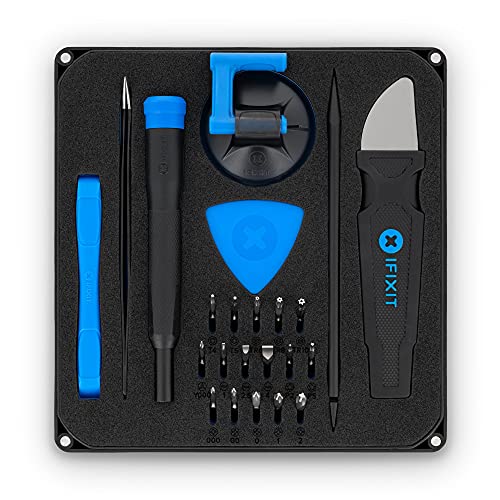
A stripped-down sibling of the Pro Tech set, this toolkit ships with 16 4mm bits and a single knurled (textured for grip) driver with a magnetic socket and swivel top. That sounds minimal, but it covers roughly 90 percent of smartphone and laptop screen swaps.
Where the Pro Tech toolkit feels like a shop in a box, this one feels like a phone-repair friend. The compact size makes it easy to toss in a drawer or backpack, and the included opening picks and suction handle cover most battery-replacement jobs.
Real-World Strengths
- Knurled grip and swivel top reduce wrist fatigue during long screen-removal sessions.
- Magnetic bit socket holds bits firmly and prevents dropped fasteners inside the case.
- Backed by the same free repair guides as the Pro Tech toolkit.
Minor Gripes
- Only 16 bits means niche console repairs will require buying extras.
- Lacks a flex extension for deeply recessed screws.
Made For
First-time fixers swapping a phone battery or laptop SSD who want a friendly, well-documented starting point.
Skip It When
Anyone routinely repairing game consoles or vintage electronics should step up to the iFixit Pro Tech Toolkit.
With 101 precision bits crammed into a single kit, this set reads like a Swiss Army knife for anyone who repairs across brands. The magnetic driver and ESD-safe (electrostatic-discharge-safe, designed to prevent static damage to electronics) tweezers cover phones, laptops, drones, and cameras without swapping cases.
Compared with the slimmer XOOL 140-in-1 covered later, STREBITO leans harder on bit variety than ergonomic extras. That makes it a natural fit for repairers who chase obscure screws but rarely work for hours straight.
Positive Takeaways
- Wide bit library reaches niche fasteners in PS5, Xbox, and MacBook internals.
- Magnetic driver tip speeds up screw placement and prevents drops.
- Compact storage case keeps the 124 pieces organized and portable.
Points To Note
- Bit density can make locating the right size slower without a printed inventory sheet.
- Some users report softer steel on specialty bits used heavily on console repairs.
Best Suited To
Multi-device households and repair-curious hobbyists juggling phones, tablets, and game controllers.
Another Choice May Suit
Workshop technicians needing tougher CR-V (chromium-vanadium, a hard and wear-resistant steel alloy) bits should consider the XOOL 200 in 1 Precision Screwdriver Kit.
This is the kit for someone who treats repair work like a part-time job. The 164 CR-V steel bits are rated above HRC62 (Rockwell C hardness scale, where higher numbers mean harder steel that resists wear), which means they hold up against the torquing pressure of tight PC case screws without stripping the tip.
Where STREBITO’s 124-piece kit favors breadth, XOOL leans into build quality and accessories. A flexible shaft extension, suction cup, magnetizer, and magnetic pad turn a phone swap into a workstation-grade session.
What Stands Out
- Vulcanized CR-V bits (treated through a heat-and-pressure process for added toughness) resist tip wear better than standard steel.
- Flexible shaft reaches recessed motherboard screws in tight laptop chassis.
- Magnetic work pad catches tiny screws during disassembly.
Trade Offs
- Bulkier case takes up more drawer space than minimal kits.
- Two driver handles may be overkill for users who only do one repair style.
Technical Sheet
Right Fit For
Repair hobbyists, refurbishers, and IT pros running weekly teardowns on laptops and consoles.
Look Elsewhere When
Casual users who just need a screwdriver for one battery swap may prefer the slimmer STREBITO 124-Piece Magnetic Screwdriver Set.
Shifting from tools to the actual computer: the Raspberry Pi 4 is the small single-board computer (SBC, a complete computer built on one circuit board) that powers more home projects than almost any other. A quad-core 64-bit ARM processor (a compact, energy-efficient processor architecture commonly used in phones and SBCs) and 4GB of RAM make it usable as a desktop replacement for light tasks.
Unlike the Element14 Pi 3 B+ that follows, this board adds dual-display support, faster USB 3.0 ports, and gigabit Ethernet. That makes it a credible platform for home servers, retro gaming rigs, or learning Linux hands-on.
Real Benefits
- 4GB of RAM handles web browsing, coding, and media playback without choking.
- Built-in Wi-Fi and Bluetooth simplify headless setups (running the Pi without a monitor or keyboard).
- Large project ecosystem means thousands of tutorials and ready-to-flash operating systems.
Softer Spots
- Boards ship without a case, power supply, or microSD card, so add-ons add up.
- Can run warm under sustained load, so a basic heatsink helps in enclosed cases.
Quick Facts
Who It Suits Best
Project builders, students, and aspiring developers who want a real computer they can take apart and reprogram.
Reach For A Different Pick When
Budget-focused hobbyists only running simple scripts should consider the more affordable Element14 Raspberry Pi 3 B+ Motherboard.
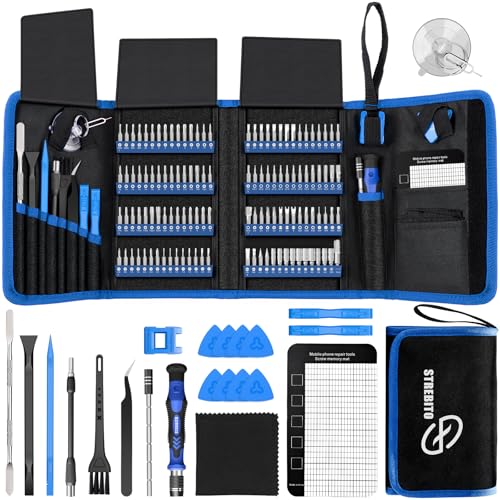
This STREBITO set adds practical extras to a familiar 120-bit core: a magnetic mat, ESD tweezers, suction cup, and spudger (a pointed plastic pry tool for separating clips and adhesive without scratching surfaces). It reads as a balanced kit rather than a one-trick screwdriver.
Compared with the company’s own 124-piece version, this one trades a few specialty bits for those repair accessories. That makes it a friendlier daily carry for users who already know which bits they reach for.
Useful Strengths
- Magnetic mat keeps tiny screws visible during full disassemblies.
- ESD tweezers protect sensitive SMD (surface-mount device, tiny components soldered directly onto circuit boards) components.
- Suction cup handles glass screen lifts on phones and tablets.
Worth Noting
- Some bits may sit loose in the case and require rearranging after travel.
- Bit density remains high, so new users should expect a learning curve.
Feature Snapshot
Whose Shelf It Belongs On
Everyday tinkerers and IT support staff who need a ready-for-anything toolkit in one case.
Swap It Out When
Anyone wanting the toughest available bits for high-torque PC builds should step up to the XOOL 200 in 1 Precision Screwdriver Kit.
The Raspberry Pi 3 B+ remains a favorite for first-time builders and classroom projects. A 1.4GHz 64-bit quad-core ARMv8 processor (a 64-bit instruction set for ARM processors) and 1GB of RAM are enough for programming lessons, retro emulation, and simple automation tasks.
Stack it next to the Pi 4 and the trade-offs are obvious: less RAM, no USB 3.0, and no dual-monitor output. But for learning the basics, that’s usually plenty.
Notable Upsides
- Built-in wireless and Bluetooth remove the need for USB adapters.
- Improved power management over earlier Pi 3 models for stable USB peripherals.
- Backed by decades of community tutorials and project guides.
Honest Caveats
- 1GB of RAM struggles with modern desktop web browsers.
Perfect Match For
Students, parents, and budget-focused hobbyists introducing themselves to coding and electronics.
A Better Fit Elsewhere
Anyone wanting desktop-class multitasking should jump to the Raspberry Pi 4 Model B 4GB.
Where the bigger XOOL 200-in-1 kit leans into bit count, this 140-piece set prioritizes comfort. The ergonomic handle with a rubberized grip reduces fatigue during long repair sessions, and the 120 CR-V magnetic bits cover most everyday devices.
It’s a noticeable step up in feel compared to entry-level kits that ship with hard plastic handles. For someone restoring a stack of vintage game consoles, that comfort difference adds up.
Features That Help
- Rubberized grip minimizes slippage during high-torque loosening.
- Magnetic bit holder simplifies swaps mid-repair.
- Includes magnetizer, demagnetizer, tweezers, and suction cup.
Some Limits To Know
- Slightly fewer bits than the 200-in-1 XOOL kit for niche fasteners.
- Case design prioritizes compactness over quick visual bit identification.
Core Details
Who Should Grab It
Long-session repairers and refurbishers who care about hand comfort as much as bit variety.
Not Your Match When
Anyone needing maximum bit variety for exotic hardware may prefer the XOOL 200 in 1 Precision Screwdriver Kit.
HengTianMei rounds out the list with a kit aimed at console and laptop owners. The 142-piece count includes a ruler, ESD wrist strap, screen-removal cards, opening tools, and fiber spudgers that handle adhesive screen lifts on phones and tablets.
Versus the STREBITO 142-piece kit above, HengTianMei leans into screen-repair accessories rather than magnetic mats. For someone fixing cracked phone displays, those extras pull their weight fast.
Practical Pluses
- ESD wrist strap adds static protection for novice repairers.
- Screen-removal cards and fiber spudgers simplify adhesive separation.
- Compact case keeps tools organized for travel between jobs.
A Few Limitations
- Bit steel may not match CR-V-rated kits for repeated high-torque use.
The Right Fit
Console enthusiasts and screen-repair hobbyists who need a well-rounded kit for adhesive-heavy devices.
Where A Sibling Pick Shines
Workshop-level rebuilders needing maximum bit durability should consider the XOOL 200 in 1 Precision Screwdriver Kit.
What Matters Most When Choosing Diy Computer Kits
A good kit starts with the right screwdriver. Bit compatibility matters most: look for standard 4mm shanks so you can swap in replacements later, and check that the kit covers Torx, pentalobe, and Phillips patterns common to modern laptops and consoles. Magnetic tips and a knurled grip turn frustrating jobs into smooth ones, especially during long sessions.
Storage and portability often get overlooked. A molded foam insert or magnetic case stops tiny bits from disappearing into couch cushions, and a compact footprint encourages you to actually carry the kit to the repair. For beginners, lighter cases feel less intimidating than workshop-grade chests.
For single-board computer projects, prioritize RAM and connectivity. A Raspberry Pi with 4GB handles desktop-style tasks, while built-in Wi-Fi and Bluetooth eliminate dongle clutter. Match the board to the project: simple scripting and classroom use rarely need more than a Pi 3 B+, while media centers and home servers benefit from the Pi 4’s extra horsepower and dual-display support.
Accessories can tip the scales. Suction cups, spudgers, and magnetic mats turn a basic screwdriver set into a proper workstation, and they tend to matter more for phone and tablet repairs than for full-size PC builds. Plan to spend a few extra minutes comparing accessory bundles before committing.
Practical Realities Before You Click
Wrong Turns To Avoid
The biggest mistake is buying a giant bit count without checking quality. Cheap steel snaps under torque and strips screw heads, turning a five-minute job into an hour of extraction. Look for CR-V steel ratings and read the included bit inventory carefully before assuming every advertised bit is useful.
Another common slip is forgetting the ecosystem. A repair kit without a good guide library leaves beginners guessing, and a Raspberry Pi without a case, power supply, or microSD card adds hidden costs that quickly eclipse the board itself. Match the kit to your skill level and budget for the supporting accessories up front.
Where The Extra Money Goes
Premium kits earn their price through hardened bits, anti-static tools, and well-designed storage. The iFixit Pro Tech Toolkit and XOOL 200 in 1 set justify their cost for frequent repairers because the bits last longer and the cases survive years of travel. For occasional users, the upgrade isn’t always worth it: a mid-range STREBITO or HengTianMei kit covers most household repairs without the premium tax.
Higher-tier Raspberry Pi models cost more because of the extra RAM, faster USB, and dual-display support. Power users running home servers or compiling code notice the difference, but casual learners can save by starting with the Pi 3 B+.
Frequently Asked Questions
What is included in a typical Diy Computer Kit?
Most kits include a precision screwdriver handle, interchangeable bits, and basic tools like tweezers, suction cups, and spudgers. Higher-end kits add anti-static wrist straps, magnetic mats, and flexible extension shafts.
Can I build a working computer with a Raspberry Pi alone?
A Raspberry Pi board needs a case, power supply, and microSD card to function, plus peripherals like a monitor and keyboard. Once those are added, it works as a fully functional compact computer.
Are magnetic screwdriver bits safe for electronics?
Yes, when used properly. Magnetic tips help hold tiny screws during placement and retrieval, but the magnetism is generally too weak to affect modern components. Avoid using stronger neodymium magnets near exposed hard drives.
How many screwdriver bits do I really need?
Sixteen well-chosen bits cover most smartphone and laptop repairs, while 100+ bits become useful when working across consoles, cameras, and vintage electronics. Buy for the devices you actually repair.
What’s the difference between CR-V and regular steel bits?
CR-V (chromium-vanadium) steel is hardened through a specific alloy and heat-treating process, making it more resistant to wear and tip deformation. Regular steel bits are softer and strip more easily under repeated use.
Closing Remarks
The right kit turns repair from a chore into a satisfying project, and the right single-board computer opens doors to coding, automation, and home-server tinkering. Start with a clear sense of what you’ll actually fix or build, then pick a kit whose bit quality, accessories, and documentation match that scope. From there, the learning curve stays friendly and the projects keep getting more interesting.