Working at a desk for hours on end takes a quiet toll. I started noticing it in my own neck and shoulders years ago, and the fix that made the biggest difference was getting both of my monitors up at proper eye level on a real articulating arm. Two screens floating above the desk instead of sitting on it opens up workspace, fixes posture, and turns a cluttered surface into something that actually feels calm.
The mounts below cover the range I get asked about most: budget-friendly gas spring arms, heavy-duty options for ultrawide panels, freestanding poles for desks that can’t be drilled, and a couple of wall-mounted options for people who want their desk completely clear. VESA compatibility (the four-hole pattern on the back of your monitor) is the universal thread running through all of them, so double-check your monitor’s pattern before settling on any one mount.
A Quick View Of The Lineup

HUANUO Dual Monitor Stand 13″–40″
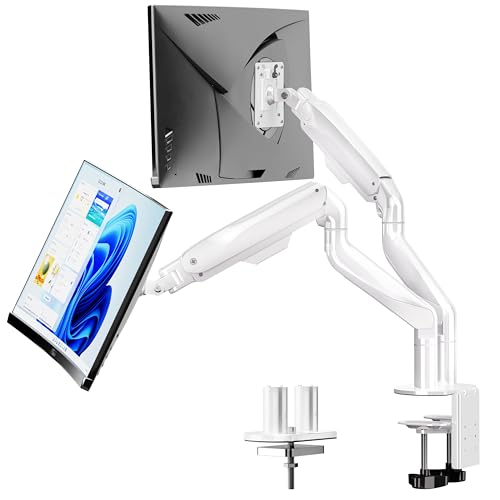
BIZUM Dual Monitor Stand 17″–42″

Suptek Dual Monitor Stand Free-Standing ML6802

VIVO Single Monitor Arm PT-SD-AM01AW

VIVO Dual Monitor and Laptop Mount Kit

ARES WING Dual Monitor Wall Mount 24-57″

VIVO Pneumatic Dual Ultrawide Wall Mount MOUNT-V120K

HUANUO FlowLift Dual Monitor Stand 13-32″

HUANUO FlowLift Single Monitor Mount 13-32″

VIVO Dual Pneumatic Ultra-Wide Mount STAND-V200O
A Deeper Look At The Lineup
The HUANUO HNDS7 is the kind of mount I tend to recommend when someone asks me where to start without overthinking it. Solid aluminum arms hold up to 26.4 lbs per side, the screen range covers everything from a 13-inch portable panel to a chunky 40-inch display, and the VESA 75×75 or 100×100 pattern matches the back of essentially any monitor made in the last decade. For a typical pair of 27-inch office screens, it just works.
Compared to the budget single arms on this list, the HNDS7 brings both height and reach adjustments that feel noticeably smoother, which matters once you’ve spent eight hours nudging a screen to avoid glare. The clamp or grommet base fits standard desks, and a built-in USB port on the pole is a small touch that turns out to be more useful than it sounds for plugging in a webcam or charging cable.
Real-World Strengths
- Wide 26.4 lb per-arm capacity handles heavier productivity panels without sagging.
- Full-motion articulation lets you tilt, swivel, and rotate into portrait orientation.
- Integrated USB passthrough on the pole cuts down on reaching behind the desk.
- Gas spring tension is adjustable, so the arm stays where you put it.
- Compatible with both clamp and grommet mounting for different desk styles.
Trade Offs
- Installation takes patience; routing cables through the arm cleanly is the fiddly bit.
- Owners commonly report the included hardware works for most desks but not for unusually thick surfaces.
Key Specs
Who It Suits Best
Home and office workers running two standard 24–32 inch monitors who want a reliable, no-fuss mount that adjusts easily throughout the day.
Where Another Pick Suits Better
For two 38-inch-plus curved ultrawides, the BIZUM dual monitor stand offers higher per-arm weight capacity built specifically for that load class.
The BIZUM dual monitor stand leans into the heavier end of the spectrum, and you feel that the moment you unbox it. The aviation aluminum arms and dual C-clamp base make it noticeably sturdier than lighter mounts, which is exactly what you want when you’re dangling a curved 34-inch or a 38-inch ultrawide panel above your desk. At 33.1 lbs per arm, it can hold screens that would overpower the HNDS7.
The white finish sets it apart visually, blending into bright Scandinavian-style workspaces where black arms would feel heavy. For most office setups with one or two ultrawide panels, this is a more confident match than the HUANUO HNDS7 if you’re flirting with the upper edge of its weight range.
The Upside
- 33.1 lb per-arm capacity handles large curved ultrawides confidently.
- Aviation-grade aluminum arms resist flex even at full reach.
- Dual C-clamp design spreads clamping force across the desk edge.
- White finish blends into lighter office aesthetics.
- Full articulation supports tilt, swivel, and rotation for shared-screen scenarios.
Points To Note
- Larger base footprint takes up more desk edge than smaller mounts.
- At this weight class, proper torque on the clamp matters; loose installation shows up fast.
- Cable management is more demanding with heavier arms; bundled clips help but aren’t generous.
Feature Snapshot
Made For
Power users and creatives running one or two large curved ultrawide monitors who need the extra weight headroom and arm rigidity that lighter mounts can’t deliver.
Look Elsewhere When
Anyone running standard 24-inch office displays is paying for capacity they won’t use, and the HUANUO HNDS7 is a more proportionate choice for that setup.
The Suptek ML6802 takes a different route from the clamp-based mounts above. A weighted freestanding base sits on your desk and a tall 31.5-inch pole rises from it, supporting two screens without any drilling. For renters, shared desks, or anyone who simply doesn’t want to put a hole in their tabletop, that detail alone makes this a serious option.
The pole design also pushes monitors up higher than most articulating arms can reach, which is great for taller users. Each arm supports up to 22 lbs and tilts, swivels, and rotates a full 360 degrees. The integrated cable channel keeps the back of your desk looking clean, which matters more than people expect when both monitors are floating up high.
Practical Pluses
- No clamp or grommet required, so it works on any flat surface.
- Tall 31.5-inch center pole gives extra lift over standard arms.
- Full 360-degree rotation supports portrait orientation for coding or reading.
- Cable management channel keeps wiring tidy up the pole.
Things To Consider
- Freestanding base takes up desk real estate that clamp mounts leave free.
- At 22 lbs per arm, it won’t handle the heaviest ultrawides.
- Moving the whole unit is heavy; not something you reposition often.
Best Suited To
Renters, hot-deskers, and anyone with a non-clampable desk surface who still wants the ergonomic benefits of elevated dual screens.
A Better Fit Elsewhere
For users with heavier 32-inch-plus ultrawides, the BIZUM dual monitor stand offers a far higher per-arm weight rating and sturdier arm geometry.
The VIVO PT-SD-AM01AW is a single-arm mount that does one thing really well: holds a 27-inch screen exactly where you want it. Solid steel construction in a clean white finish gives it a low visual footprint, which is the whole point for someone who only needs one monitor and wants the desk back. The arm folds flat against the wall when not in use, which I appreciate more than I expected once the desk is actually clear.
It isn’t a dual mount, and that’s deliberate. For minimal home offices, single-screen workstations, or anyone thinking about adding a second arm later, this is a tidy way to dip a toe into the category before committing to a full dual setup.
What Makes Sense
- Solid steel build feels substantial without being bulky.
- Scratch-resistant white finish blends into bright, modern setups.
- Folds close to the wall to free up desk space when monitor isn’t in use.
- Compatible with both clamp and grommet mounting styles.
Honest Caveats
- Single-arm only; you’ll need a second mount for a dual-screen setup.
- 27-inch ceiling is modest compared to the other picks on this list.
Whose Shelf It Belongs On
Minimal home offices and single-screen workstations where clean visual lines matter more than multi-monitor scale.
Skip It When
Two-screen productivity is the goal, in which case the VIVO Dual Monitor and Laptop Mount Kit covers both monitors plus a laptop tray in one integrated setup.
The VIVO dual monitor and laptop kit expands on the standard two-screen formula by adding a ventilated 14-by-12-inch laptop tray to the side. That’s the configuration I see most often in finance, trading, dev, and editing workflows where a third device stays open as a reference or comms panel. The whole bundle clamps onto the desk edge as one unit.
Two 13–27 inch monitors at 22 lbs each share the load with the laptop tray, which holds up to 22 lbs as well. Full articulation on every joint means you can angle the laptop screen however you want, even tuck it under the monitors if you only need it occasionally. Compared to the HUANUO HNDS7, you’re trading away some per-arm weight headroom for the third-device integration.
Everyday Advantages
- Integrated laptop tray turns a dual setup into a true three-screen workstation.
- Ventilated tray design helps with airflow under the laptop.
- Independent adjustment on the tray keeps typing angles ergonomic.
- One-clamp installation for the entire bundle simplifies setup.
A Few Limitations
- Laptop tray width assumes a 14-inch footprint; larger 16-inch laptops overhang.
- 22 lb per-arm limit rules out heavier ultrawide productivity panels.
- Bundle is heavier and bulkier than a dual-arm-only mount.
Feature Snapshot
The Right Fit
Knowledge workers and creators running two monitors plus a permanently open laptop who want all three elevated and adjustable from one mount.
Swap It Out When
You only need two screens with no laptop integration, in which case the HUANUO HNDS7 gives you more screen-size range for the same money.
The ARES WING dual monitor wall mount is the heaviest hitter in this lineup, and it’s the only one that handles true 57-inch ultrawides without flinching. A bearing-style head design supports up to 60 lbs per arm, with a 22 kg curved-screen rating that gives serious gaming and content-creation setups some breathing room. Mounting to the wall instead of the desk also means zero footprint competition for your tabletop.
For sim racers, flight sim enthusiasts, and anyone whose monitors are basically the centerpiece of the room, this category of mount is the move. The trade-off is real installation: this needs wood studs or masonry, not drywall alone, so you do need the right wall behind it.
Everyday Perks
- 60 lb per-arm capacity supports the largest consumer ultrawides.
- Bearing head structure delivers smooth angle adjustments even under heavy loads.
- Wall mounting frees up desk space entirely.
- Curved-screen rating up to 22 kg covers most curved gaming displays.
Practical Considerations
- Requires wood studs or masonry, not drywall alone, which rules out some rooms.
- Wall-mounted installation is harder to undo than a desk clamp if you rearrange often.
- Cable runs through the wall need planning during installation.
Perfect Match For
Hardcore gamers, sim racers, and creators running one or two 49–57 inch ultrawides who want their desk completely clear of mount hardware.
Reach For A Different Pick When
Your screens are standard 27–32 inch office monitors, since the VIVO Pneumatic Dual Ultrawide Wall Mount offers similar wall benefits with less overkill capacity.
The VIVO MOUNT-V120K swaps gas springs for cast aluminum construction, which gives the arms a noticeably more rigid feel than spring-assisted competitors. Designed for two stacked ultrawides up to 49 inches each (or 38 inches side-by-side), it’s a serious choice for trading desks and creative studios where vertical screen stacking is part of the workflow.
Each arm holds up to 33.5 lbs, and the joints are built around high-capacity tilt hardware. The cast aluminum body is the headline feature: it doesn’t twist under load the way lighter steel arms can. For a permanent install on a proper wall, this is one of the more confidence-inspiring mounts I’ve seen in this price tier.
Benefits That Matter
- Cast aluminum arms resist flex and twist under heavy monitors.
- Handles stacked 49-inch ultrawides up to 33.5 lbs per arm.
- High-capacity tilt joints stay put once adjusted.
- Wall-mounting approach frees the desk entirely for peripherals.
Worth Bearing In Mind
- Requires wood studs, concrete, or brick, never drywall alone.
- Stacked configuration demands more ceiling clearance than side-by-side.
- Cast aluminum adds noticeable weight to the install.
Built With In Mind
Multi-monitor trading, surveillance, and creative workflows that stack or pair large ultrawides against a properly reinforced wall.
Where A Sibling Pick Shines
For pure gaming setups that don’t need the stacking option, the ARES WING dual monitor wall mount offers higher per-arm capacity in a more gaming-focused design.
The HUANUO FlowLift dual monitor stand is the budget-friendlier cousin of the HNDS7, with a tighter 4.4 to 19.8 lb per-arm range and a 13–32 inch screen fit. For two 24 or 27-inch gaming monitors at typical weights, this lands in the sweet spot. The full-motion articulation matches what’s on the more expensive HUANUO mount, including the same tilt, swivel, and 360-degree rotation for portrait orientation.
For streamers and content creators, the FlowLift’s strength is moving both screens around without the gas-spring fights you sometimes get with cheaper arms. The C-clamp or grommet base adapts to most desks, and the arms hold position through hours of gaming without drifting.
Features That Help
- Full-motion articulation across tilt, swivel, and rotation.
- Stable positioning through long gaming or work sessions.
- Standard VESA 75×75 and 100×100 compatibility.
- Both C-clamp and grommet mounting included.
Trade-Offs To Consider
- 4.4 lb minimum per arm rules out very light portable monitors.
- 19.8 lb per-arm ceiling is lower than heavier HUANUO mounts.
- Owners commonly report the included manual is light on detail for first-timers.
At A Glance
Who Should Grab It
Gamers and streamers running two standard 24–27 inch monitors who want full articulation without stepping up to heavier-duty pricing.
Consider Something Else When
You’re carrying 32-inch-plus curved screens, in which case the HUANUO HNDS7 or BIZUM stand gives you the headroom and rigidity you actually need.
The HUANUO FlowLift single monitor mount is the gentlest entry point on this list. It supports the same 13–32 inch and 4.4–19.8 lb range as its dual-arm sibling, but in a single-arm configuration that’s easier to wrap your head around if you’ve never installed a monitor arm before. The whole setup is one clamp, one arm, one monitor, no balancing act.
For anyone upgrading from the stock stand that came with their monitor, this is the move. The clamp and grommet options cover most desks, the VESA pattern covers most monitors, and the full articulation delivers the ergonomic improvement that justifies the swap in the first place.
What Stands Out
- Single-arm setup is the easiest install path on this list.
- Same articulation range as the dual FlowLift for ergonomic positioning.
- VESA 75×75 and 100×100 covers standard monitors.
- Compatible with both clamp and grommet mounting.
Small Caveats
- Single-arm only; a dual setup requires a second mount.
- 19.8 lb ceiling rules out heavier ultrawide panels.
Right Fit For
First-time monitor mount shoppers looking to upgrade a single-screen setup before considering a multi-monitor configuration.
Not Your Match When
Two screens are already on the desk, since the HUANUO FlowLift dual monitor stand covers the same weight and size range for both monitors at once.
The VIVO STAND-V200O rounds out the list as a spring-assisted dual mount built specifically for two ultrawides up to 35 inches and 26.4 lbs each. The pneumatic (gas spring) counterbalance makes height adjustments feel almost effortless, which is what you want when you’re raising and lowering screens multiple times a day.
The C-clamp secures to desks up to 3.15 inches thick, with an optional grommet mount for thinner surfaces. For daily ultrawide users who adjust their setup often, the gas-spring design takes a lot of the friction out of the routine compared to fixed-tension arms.
What Pays Off
- Pneumatic arms make height adjustments feel smooth and effort-light.
- 26.4 lb per-arm capacity covers most ultrawide productivity panels.
- C-clamp fits thicker desks up to 3.15 inches.
- Optional grommet mount supports thinner surfaces.
Worth Noting
- 35-inch screen ceiling is lower than wall-mount alternatives for true 49-inch panels.
- Gas springs may need occasional tension adjustment after long-term use.
- Grommet option requires a pre-drilled hole in the desk.
Spec Overview
Who Will Love This
Daily ultrawide users who adjust screen height often and want gas-spring convenience over fixed-tension arms.
Another Choice May Suit
Anyone running 49-inch-plus stacked panels should look at the VIVO MOUNT-V120K wall mount instead, since it covers that size class with stronger cast aluminum arms.
## Choosing The Right Dual Arm Monitor Mounts For Your Setup### Match The Mount To Your Monitor WeightThe single biggest mistake I see is buying a mount rated just barely above the actual monitor weight, then wondering why the arm sags over time. Always leave headroom: a 15 lb monitor on a 19.8 lb arm will hold position better than the same monitor on a 16 lb arm. For ultrawides and curved screens, the rule gets stricter because leverage at full arm extension multiplies the load on the joints.### Check VESA Before You Check Anything ElseVESA is the four-hole pattern on the back of your monitor, measured in millimeters. The two patterns almost every mount supports are 75×75 and 100×100. Some ultra-budget or specialty displays use different patterns and need an adapter plate. Two minutes with a tape measure on the back of your monitor saves a return shipment later.### Decide Between Desk Clamp, Grommet, Wall, Or FreestandingDesk clamps are the most common and easiest to install, but they need a proper edge to grip. Grommet mounts need a pre-drilled hole but look cleaner. Wall mounts clear the desk entirely but require studs or masonry behind the drywall. Freestanding poles like the Suptek ML6802 work on any surface but consume desk space. Each fits a different room and a different renter-versus-owner situation.### Consider Articulation You Will Actually UseFull-motion arms with tilt, swivel, and rotation cost more but pay off when you share your screen, switch between landscape and portrait for coding or reading, or just want to angle away from window glare. If your screens stay put once positioned, a simpler tilt-only arm saves money. Most people underestimate how often they nudge a screen during the day.## Where Shoppers Slip Up On Dual Arm Monitor Mounts### Pitfalls Shoppers HitTwo screens above a desk is a real load on whatever surface they’re attached to. Common slip-ups include ignoring desk thickness limits for clamps, forgetting to verify that the back of the monitor has flat VESA mounting holes (some curved-back panels need extra clearance), and underestimating cable routing. Cables for two monitors, power, USB, and audio add up fast, and a mount without built-in cable management turns into a visible mess within a week.### What Separates Premium From BasicThe jump from budget to premium in this category usually shows up in three places: gas-spring versus mechanical tension (smoother daily adjustments), material choice (cast aluminum or thicker steel arms resist flex), and joint engineering (higher-capacity tilt hardware holds position under load). For someone adjusting screens multiple times a day, that upgrade is worth it. For a single-position setup, the budget tier delivers the ergonomic benefits without the premium.## Frequently Asked Questions### What Does VESA Mean For Monitor Mounts?VESA is the standard four-hole mounting pattern on the back of most monitors, measured in millimeters. The two patterns almost every mount supports are 75×75mm and 100×100mm, and you can confirm yours by measuring the distance between the screw holes on the back of your display.### How Much Weight Can A Dual Monitor Arm Hold?Weight capacity varies widely across the picks here, ranging from about 19.8 lbs per arm on lighter models up to 60 lbs per arm on heavy-duty wall mounts. Always pick a mount rated above your actual monitor weight to avoid sagging and joint wear.### Can I Install A Dual Monitor Mount On Any Desk?Clamp mounts need a flat edge typically 0.5 to 3 inches thick. Grommet mounts require a pre-drilled hole. Wall mounts need wood studs or masonry behind the wall surface. Freestanding poles work on any flat surface but take up desk space.### Do Dual Monitor Arms Support Curved Screens?Yes, most modern dual arms support curved displays as long as the screen size and weight fall within the mount’s specifications. Curved ultrawides tend to be heavier, so verify the per-arm weight rating carefully before choosing a mount.### Is A Gas Spring Monitor Arm Worth The Upgrade?For users who adjust screen height or angle frequently, gas spring arms feel noticeably smoother and require less effort than mechanical-tension arms. If your screens stay in one position all day, the upgrade is harder to justify on cost alone.## Wrap UpThe right dual arm monitor mount comes down to three honest numbers: your monitor size, your monitor weight, and the type of desk or wall you have to work with. Get those right and the rest is preference. Whether you land on a budget-friendly FlowLift, an ultrawide-ready BIZUM, or a wall-mounted ARES WING for serious screen real estate, getting both monitors up off the desk is the kind of small change that quietly improves every workday after.