Working from a cramped desk kills productivity. Two screens stacked side-by-side on their factory bases swallow prime real estate, and that floating paperwork never seems to find a home. The right dual display arms clear that mess in minutes, lift monitors to eye level, and free up space for a keyboard, notebook, or a second coffee.
I’ve spent time digging through the spec sheets of ten popular dual monitor mounts, comparing VESA patterns (the four-hole mounting standard on the back of most flat-panel displays), weight limits, articulation range, and clamp versus grommet mounting. The picks below cover different desk thicknesses, monitor sizes, and workflows, so a programmer, a trader, and a casual remote worker can each land on something that actually fits.
How The Shortlist Stacks Up

HUANUO 17-32 Inch Dual Monitor Stand, Stacked Monitor Mount

HUANUO Dual Monitor Stand for 13″–40″, Premium Dual Monitor Mount with USB (HNDS7)

Suptek Dual LED LCD Monitor Stand Free-Standing Desk Mount, 31.5 Inch Pole (ML6802)
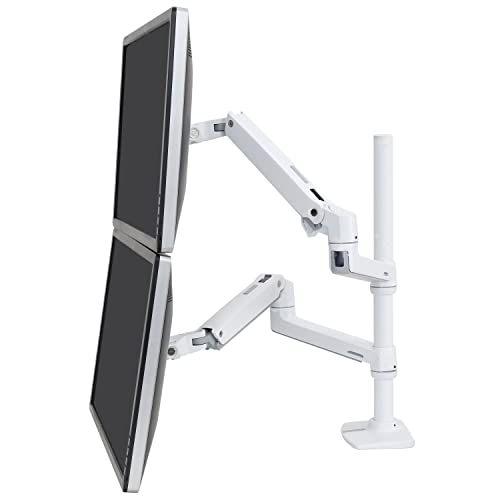
Ergotron LX Vertical Stacking Dual Monitor Arm, VESA Desk Mount

HUANUO FlowLift Pro Dual Monitor Mount for 13–27″ Screens, MechaSpring

HUANUO Dual Monitor Mount for 2 Monitors up to 32 inches, 22 lbs per Arm

VIVO Premium Dual 21–32 inch LCD LED Monitor Wall Mount (MOUNT-TS32B)

MOUNT PRO Dual Monitor Arm Desk Mount, Fits Max 32 inch Screens

HUANUO FlowLift Dual Monitor Stand, Full Motion Gaming Monitor Desk Mount

VIVO Laptop and Dual 13–27 inch LCD Monitor Stand up Desk Mount (STAND-V012J)
Small desks reward setups that use vertical space, and that’s exactly where this HUANUO stacked mount earns its keep. Instead of stretching two screens wide across the surface, it stacks one above the other on a single pole, recovering a strip of desk that’s normally lost between monitor bases.
Each arm carries a monitor up to 32 inches and 19.8 lbs, so a pair of 27-inch productivity panels sits comfortably. The mount uses standard VESA 75 or 100 mm hole patterns, which covers most office displays sold in the last several years. Programmers running docs above and code below, or traders stacking charts over order flow, tend to appreciate the upright footprint most.
Reasons It Performs
- Vertical stacking frees desk depth for keyboards, notebooks, and that second coffee.
- Standard VESA 75/100 mm compatibility keeps it broadly usable across modern LCD panels.
- Tilt, swivel, and rotation on each arm lets the lower screen angle up and the upper one angle down.
- 19.8 lbs per arm covers most 27-inch and lighter 32-inch office monitors without sag.
Things To Consider
- Stacking puts the top monitor at head height, so shorter users may need to sit a touch further back.
- Desk thickness and material limits from the clamp should be checked before mounting on a glass surface.
Right Fit For
Programmers, analysts, and anyone working with reference material above an active window on a tight desk.
Look Elsewhere When
Anyone running ultrawide 34-inch panels should pivot to the HUANUO HNDS7, which is built for heavier, longer screens.
Ultrawide panels and large curved displays put real stress on a monitor arm, and that’s where this HNDS7 model steps in. Its aluminum arms, dual C-clamp base, and 26.4 lb per-arm rating make it the sturdiest HUANUO in this list, comfortably holding two 32-inch screens or a pair of 34-inch ultrawides.
Unlike the stacked design of the first pick, this one spreads the monitors side by side at adjustable height. The integrated USB pass-through is a small but useful touch for laptops and webcams. VESA 75 or 100 mm compatibility keeps the fit broad across modern panels.
Where It Delivers
- 26.4 lb per arm handles heavier ultrawides and curved 34-inch panels without drift.
- Aluminum arm construction feels notably more rigid than entry-level steel mounts.
- Dual C-clamp base spreads load across the desk edge for steadier motion.
- Built-in USB ports cut down on a separate hub for webcam or keyboard receivers.
Worth Noting
- Side-by-side layout needs more horizontal desk space than the stacked option above.
- Clamp design may not suit very thick standing-desk frames without extra clearance.
Made For
Power users with 32-inch or 34-inch ultrawide panels who want side-by-side motion without wobble.
Consider Something Else When
Anyone on a narrow desk will get more vertical mileage from the HUANUO stacked stand earlier in this list.
Not every desk wants a clamp biting into its edge. Suptek’s ML6802 uses a weighted free-standing base, which sits on top of the desk rather than gripping it, making it friendly to glass tops, rented furniture, and anyone nervous about drilling.
The 31.5-inch center pole is unusually tall, raising two 32-inch monitors well above the desk surface for a more ergonomic eye line. Each arm tilts, swivels, and rotates for fine-tuning, while VESA 75 or 100 mm compatibility covers most standard office displays up to 22 lbs.
What Pays Off
- Free-standing base means no clamp marks and no hole through the desk.
- 31.5-inch pole is taller than most competitors, lifting screens to a healthier eye line.
- Full ±45° tilt and swivel range on each arm for sharing screens with a colleague.
- Cable management along the pole keeps wiring tucked out of sight.
Trade Offs
- Free-standing design needs a deep desk to keep the base out of the way.
- Moving the whole rig means lifting the base, which gets awkward with two 32-inch monitors attached.
Whose Shelf It Belongs On
Renters, glass-desk owners, and anyone who values a no-drill, no-clamp footprint.
Skip It When
Anyone planning a sit-stand workflow should reach for a clamp-mounted arm like the Ergotron LX instead.
Ergotron has been building monitor arms since long before most of today’s brands existed, and the LX series reflects a level of refinement that shows up in small ways. The 23-inch extension column, two-piece heavy-duty clamp, and gas-spring arms hold two 40-inch monitors between 7 and 22 lbs with smooth, controlled motion.
The vertical-stacking format reclaims desk depth the same way the first HUANUO does, but with a noticeably tighter build tolerance. Each arm adjusts independently for height, tilt, and rotation, and the included grommet plate accommodates through-hole mounting on thicker surfaces.
Real Benefits
- Gas-spring arms hold position firmly, no drift mid-typing.
- Supports two 40-inch displays up to 22 lbs each, among the widest ranges here.
- Two-piece clamp and grommet plate fit surface edges 0.63 to 2.6 inches thick.
- Proven office-grade construction that holds up across years of daily adjustment.
Soft Spots
- Premium positioning typically lands above entry-level HUANUO alternatives in cost.
- Vertical stack requires sufficient ceiling clearance above the desk for the upper monitor.
Perfect Match For
Long-haul office workers who adjust their screens dozens of times a day and want a mount that won’t quit.
Reach For A Different Pick When
Anyone on a tighter budget should look at the standard HUANUO 32-inch dual mount, which covers similar sizes for less.
The FlowLift Pro targets the common home-office setup: two 24-inch monitors on a modest desk, with the user wanting a cleaner look without overbuilding the mount. A MechaSpring counterbalance mechanism keeps each screen floating in place once positioned.
The mount’s 15.4 lb per-arm rating caps it well below the heavy-duty picks above, so this isn’t the right call for a 32-inch panel. For most 22 to 27 inch displays though, the range covers what people actually own. The tool-free VESA plate speeds up the install on a Saturday afternoon.
Bright Spots
- MechaSpring counterbalance holds lighter monitors exactly where you set them.
- Tool-free VESA plate skips the screwdriver dance at install time.
- Compact arm footprint leaves more usable desk area than taller pole mounts.
- Quick tilt, swivel, and rotation for sharing a screen across the table.
Points To Keep In Mind
- 15.4 lb per-arm ceiling rules out 32-inch and most heavier ultrawide panels.
- Manufacturer recommends wood desks 0.59 to 3.54 inches thick, so glass tops need a different solution.
Right Fit For
Remote workers and students running dual 24-inch panels who want a tidy install without the heavy-duty cost.
Swap It Out When
Anyone planning to upgrade to 32-inch monitors should pick the HUANUO 22 lbs per arm mount instead.
When two 32-inch panels sit on the desk, ordinary mounts start to wobble at full extension. This HUANUO model uses aerospace-grade aluminum alloy to push the per-arm rating to 22 lbs, sitting right between the entry-level stacked stand and the premium Ergotron LX.
Compared to the FlowLift Pro earlier in this list, the difference shows up in steady, controlled motion under heavier loads. The advanced tilt-swivel-rotate joints let each screen face slightly different angles, useful when one screen is shared during a video call.
Everyday Wins
- 22 lb per arm handles most 32-inch productivity monitors without sag.
- Aerospace-grade aluminum construction adds rigidity over standard steel arms.
- Full articulation on each arm supports natural screen sharing during meetings.
- VESA 75 and 100 mm patterns cover the majority of modern office displays.
Less-Strong Areas
- Side-by-side layout needs more horizontal clearance than the stacked option above.
- Heavier aluminum build adds a bit of weight at the clamp, worth noting on thinner desks.
Made For
Office workers running two 27 to 32 inch panels who want a sturdy side-by-side setup without premium pricing.
A Better Fit Elsewhere
Anyone who wants the vertical-stack layout instead should look at the HUANUO stacked monitor stand earlier in this list.
Sometimes the desk itself is the problem. VIVO’s MOUNT-TS32B shifts the entire dual-screen rig off the work surface and onto the wall, with telescoping arms that extend straight out for a flush setup that still allows for angle adjustment.
It’s the only wall-mounted option in this list, and that changes the ownership equation. Where the others reclaim desk space, this one returns the whole desk. Detachable VESA brackets simplify screen install, and included hardware covers standard wood-stud construction.
Advantages To Know
- Frees the entire desk surface for keyboards, papers, or a clean minimalist look.
- Telescoping arms extend outward and retract for a flush-to-wall resting position.
- 22 lb per arm rating handles most 27 and 32 inch productivity panels.
- Detachable VESA plates make hanging the screens much easier than one-piece brackets.
Honest Caveats
- Wood-stud installation is required, so concrete or metal-stud walls need different hardware.
- Wall relocation becomes a project, so the setup suits long-term arrangements more than renters.
Who It Suits Best
Studio creators, traders, and home-office owners who want a permanently wall-mounted command center.
Another Choice May Suit
Anyone renting or unable to drill the wall should pick the Suptek free-standing mount from earlier in this list.
MOUNT PRO keeps things straightforward with a 4.4 to 19.8 lb per-arm weight range that covers a wide spread of mid-sized office displays, including most 27-inch and lighter 32-inch monitors. It’s the kind of uncomplicated mount that fits the average home office without fuss.
The product description explicitly notes it isn’t compatible with 1000R, 1500R, or 1800R curved screens, which is worth checking before ordering if you’re running an aggressive Samsung or LG gaming curve. For flat panels, it offers standard VESA 75 and 100 mm mounting.
Key Advantages
- Broad 4.4 to 19.8 lb range covers most common productivity monitors.
- Standard VESA 75/100 mm plates fit the majority of office displays.
- Full-motion articulation supports natural screen positioning throughout the day.
Trade-Offs To Consider
- Not compatible with 1000R, 1500R, or 1800R curved screens, a notable gap for curved-monitor owners.
- 19.8 lb ceiling means heavier 32-inch panels need a step up to the HUANUO 22 lb mount.
Best Suited To
Home-office users with a mixed pair of flat panels up to 32 inches who want flexible full motion at a moderate spend.
Look Elsewhere When
Anyone with aggressive-curve monitors should pivot to the HUANUO FlowLift Pro or the Suptek free-standing mount.
Casual gamers who want a clean dual-screen setup for chat on one side and game on the other will find this HUANUO FlowLift tuned for that workflow. Each arm carries 4.4 to 19.8 lbs, and full articulation lets screens pivot between landscape and portrait orientations.
It uses C-clamp and grommet mounting, which adds setup flexibility on different desk types. VESA 75 and 100 mm compatibility keeps it broadly useful across both office and gaming panels. Compared with the MOUNT PRO option above, the FlowLift offers a similar weight range with more pronounced gaming-friendly marketing.
Where It Excels
- Full motion joints let each monitor pivot between landscape and portrait quickly.
- C-clamp and grommet base adapts to clamped or through-hole mounting.
- 13 to 32 inch range covers both compact side screens and primary 27 to 32 inch panels.
Soft Spots
- Gaming-grade color and high-refresh panels add weight, so heavier 32-inch screens need a sturdier mount.
- Tooling and clamp tightening require a flat, sturdy desk edge.
Right Fit For
Casual gamers and streamers running a chat screen beside a primary gaming display.
Consider Something Else When
Anyone with heavier curved gaming monitors should pick the HUANUO HNDS7 heavy-duty model from earlier in this list.
Most dual monitor mounts assume a tower or a closed laptop sits under the desk, but this VIVO STAND-V012J adds a third tier: a ventilated laptop tray that holds notebooks up to 17 inches. It turns the rig into a triple-screen workstation in one install.
The two monitor arms take 13 to 27 inch screens up to 22 lbs each, plus full articulation including +90° to -90° tilt, 180° swivel, and 360° rotation. For someone running an open MacBook or coding laptop alongside external monitors, this single purchase replaces a separate laptop stand entirely.
The Practical Payoff
- Built-in ventilated laptop tray removes the need for a separate laptop riser.
- Two monitor arms accept 13 to 27 inch screens up to 22 lbs each.
- Full tilt, swivel, and rotation on each arm for shared-viewing setups.
- VESA 75 and 100 mm patterns cover standard modern displays.
Possible Compromises
- Tray design suits open laptops, so closed-lid dock users won’t benefit from the third tier.
- Tall center pole demands enough vertical clearance above the desk for a 17-inch laptop.
Made For
Laptop-first workers who want a single mount to handle notebook plus two external monitors.
Another Choice May Suit
Anyone running a desktop tower with no laptop should pick the simpler HUANUO 32-inch dual mount for the cleaner footprint.
Picking The Right Mount For Your Monitors
The first decision is layout. Side-by-side arms spread screens across the desk and suit wide tables and panoramic workflows. Vertical stacking compresses that footprint upward, which helps narrow desks but raises the top screen near eye level. The first two HUANUO picks in this list show that contrast clearly.
Weight and screen size matter next. A 24-inch panel at 8 lbs barely stresses most mounts, while a 32-inch curved display at 18 lbs rules out lightweight options like the FlowLift Pro. Check your monitor’s listed weight against the per-arm rating, not the maximum screen size, because the two numbers tell different stories.
Mounting type changes the install story. C-clamps grip the desk edge and suit most wood desks, while grommet mounts need a drilled hole through the surface for a cleaner look. Free-standing bases like the Suptek ML6802 avoid both, at the cost of desk depth. Wall mounts skip the desk entirely but commit the user to a long-term arrangement.
Desk thickness and material deserve attention too. Many mounts specify a range, such as 0.59 to 3.54 inches for the FlowLift Pro, and glass desks often need a free-standing alternative. VESA pattern is the last gate: 75×75 mm and 100×100 mm cover almost every modern office monitor, but anything outside those sizes needs an adapter plate or a different mount entirely.
Common Slip Ups Worth Dodging
The most common mistake is matching by screen size alone. A 32-inch monitor can weigh anywhere from 10 to 25 lbs depending on the panel, so the weight rating matters more than the diagonal measurement. Skipping that check leads to slow arm drift over months.
Another trap is buying a clamp-only mount for a thick standing-desk frame. Some clamp designs max out around 2.5 inches of desk thickness, which falls short of many sit-stand tops. Verifying the desk-thickness range before ordering saves a return trip later.
Finally, owners of aggressive curved monitors sometimes forget to confirm VESA compatibility and curve rating. The MOUNT PRO mount notes it isn’t compatible with 1000R, 1500R, or 1800R curved screens, so a quick check against the monitor spec sheet avoids a frustrating mismatch at install time.
Where The Higher Tier Buys
Premium mounts like the Ergotron LX earn their position through smoother gas-spring action and longer service life. The motion stays consistent across years of adjustment, where entry-level arms often develop a slow sag as the internal spring weakens.
Sturdier materials also help. Aerospace-grade aluminum and thicker steel arms hold heavier monitors without flex, which matters for ultrawide panels where even a small lean is noticeable. The extra weight capacity shows up most when both arms are extended to full reach.
For most home offices the entry tier handles daily use just fine. The upgrade becomes meaningful for users who adjust screens dozens of times a day, run heavy 32-inch or ultrawide panels, or simply want a mount that still feels tight five years from now.
Frequently Asked Questions
What VESA pattern do most dual monitor arms support? The vast majority of mounts in this category support VESA 75×75 mm and 100×100 mm, which covers most office and home monitors sold in the last several years.
Do dual monitor arms work with curved screens? Most do, but aggressive curves like 1000R, 1500R, or 1800R sometimes fall outside the listed compatibility, so check the mount’s spec sheet against your specific monitor model before buying.
How much weight can a dual monitor arm hold per arm? Per-arm capacity in this list ranges from about 15 lbs on lighter models to 26 lbs on heavy-duty options, with 19 to 22 lbs covering most mainstream 27 and 32 inch office displays.
Can I mount two different-sized monitors on the same arm? Yes, as long as each screen falls within the per-arm weight limit and supports the VESA pattern, the two arms usually adjust independently for height and tilt.
Are wall-mounted dual arms better than desk clamps? Wall mounts free the entire desk surface and suit long-term studios, while desk clamps are easier to install and let users reposition without committing to a fixed wall location.
Bottom Line
The right dual display arms depend on the monitors, the desk, and the workflow behind them. Heavy 32-inch panels call for the HUANUO HNDS7 or the Ergotron LX, while compact 24-inch setups do fine with the FlowLift Pro. Narrow desks benefit from the stacked format, and renters or glass-top owners get the most from the Suptek free-standing base. Match the weight rating and mounting style to your actual setup, and the rest tends to fall into place.