A second screen quietly transforms a home office, but only when it’s mounted properly. After sorting through dozens of dual monitor arms, I focused on real-world needs: desk clamp versus grommet, gas spring versus mechanical, single arm versus stacked, and the awkward reality of ultrawide screens that overwhelm cheaper mounts.
I’ve broken this list down by use case. Some shoppers want a clean minimalist setup with mid-size screens. Others run 49-inch curved ultrawides or gaming monitors that weigh close to 30 pounds each. A few readers just need one sturdy arm and plan to add the second later. Pick the column that matches your situation, then jump to the matching review.
How The Shortlist Stacks Up

HUANUO Dual Monitor Stand for 13″–40″ with USB
BIZUM Dual Monitor Stand for 17″–42″ Heavy Duty

Suptek Dual Monitor Stand Free-Standing ML6802

VIVO Dual 13 to 27 inch Monitor and Laptop Mount Kit

ARES WING Dual Monitor Wall Mount 24–57 Inch

VIVO Pneumatic Arm Dual Ultrawide Wall Mount V120K
VIVO Dual Monitor Desk Mount STAND-V002W White

HUANUO FlowLift Dual Monitor Stand for 13–32″ Screens

HUANUO FlowLift Single Monitor Arm 13–32 Inch

VIVO Dual Pneumatic Arm Ultra-Wide Mount STAND-V200O
A Closer Look At Each Pick
The HUANUO HNDS7 is the kind of arm that disappears into a setup after a few days of use, which is exactly what most home offices need. Its aluminum construction, dual C-clamp base, and 26.4 lb per-arm rating give it enough backbone for a pair of 27-inch work monitors without any noticeable sag. The integrated USB hub along the base is a small touch that pays off daily, since most workstations lose ports to the monitor arm itself.
For anyone running mixed-size displays, the 13″–40″ range covers everything from compact secondary screens to 32-inch productivity panels. The gas-spring arms move smoothly and stay put once you lock them in. In our view, this is the strongest all-rounder in the lineup for shoppers who want a no-fuss upgrade over the stock monitor stands.
Strengths Worth Knowing
- Two USB ports on the base keep peripherals and webcams within reach without crawling under the desk.
- The 26.4 lb per-arm capacity handles most 27-inch and many 32-inch monitors without drift.
- Clamp or grommet mounting makes it adaptable to most standard desks up to about 3 inches thick.
- Cable routing along the arms keeps the back of the desk tidy.
Trade-Offs To Consider
- The 40-inch upper limit means ultrawide 34-inch curved monitors are fine, but stacked 49-inch screens are not.
- Tension adjustments require a hex key rather than a tool-free knob.
At A Glance
Who It Suits Best
This arm fits professionals running dual 24-to-27-inch monitors who want a USB hub and clean cable management in one mount.
Consider Something Else When
Shoppers stacking heavy 49-inch ultrawides should look at the ARES WING Dual Monitor Wall Mount for the weight headroom.
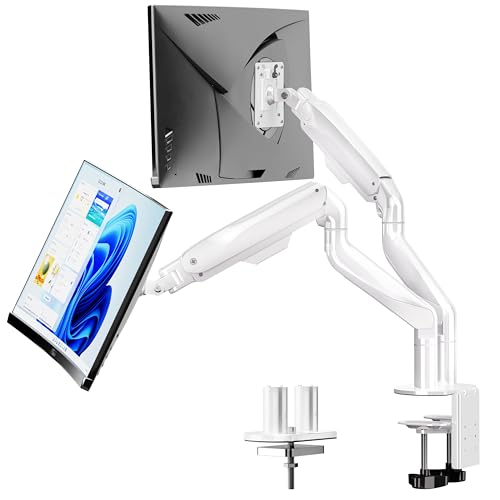
BIZUM’s heavy-duty arm is built around one core promise: hold heavier monitors without sagging. The 33.1 lb per-arm rating, aviation aluminum arms, and wider base let it support a pair of curved 34-inch ultrawides that would push a lighter arm past its comfort zone. For shoppers with deep desks and chunky displays, this is one of the few budget-friendly mounts that actually feels planted.
The arm range of 17″–42″ is generous, covering everything from a 24-inch secondary screen to a stacked 38-inch ultrawide. The white finish is a nice change of pace from the usual black-and-gray palette, which matters for bright studios. Depending on your screen weight, you may need to dial in the spring tension a few times during the first week.
Practical Advantages
- 33.1 lb per arm gives real headroom for curved ultrawides and gaming panels.
- Aviation aluminum construction keeps the arm rigid under load.
- White finish blends into light-colored or Scandinavian-style setups.
- C-clamp and grommet options suit both solid tops and pre-drilled desks.
Points To Keep In Mind
- The 42-inch upper limit excludes 49-inch stacked configurations.
- Lighter 24-inch monitors may need extra spring tension to stay at full height.
Made For
Anyone running two curved 32–34 inch screens and needing an arm that won’t drift after a month of use.
A Better Fit Elsewhere
Those mounting 49-inch ultrawides should choose the VIVO Pneumatic Arm Dual Ultrawide Wall Mount V120K for gas-spring assist.
The Suptek ML6802 takes a different approach from most arms here. Instead of clamping to a desk, it sits on a free-standing base with a 31.5-inch center pole, which is a real advantage for glass tops, rental units, or desks without a grommet hole. The pole height gives it serious vertical range, useful for tall users who need their top screen closer to eye level.
For shoppers who move furniture often, the free-standing base lifts off and relocates cleanly. Owners commonly report that the wide base keeps the whole rig stable even with two 27-inch panels. The 22 lb per-screen limit keeps it in the mid-size category, so this isn’t the place for a heavy ultrawide.
Where It Delivers
- Free-standing base means no drilling or clamping, ideal for renters.
- 31.5-inch pole offers more vertical lift than most compact arms.
- Tilt, swivel, and rotation adjustments cover typical ergonomic tweaks.
Honest Caveats
- 22 lb per-screen limit rules out heavier ultrawide panels.
- The base footprint consumes more desk depth than a clamp-mounted arm.
Right Fit For
Renters and home offices with glass desks or no grommet hole who want a no-modification dual-screen setup.
Skip It When
Anyone mounting 32-inch-plus curved screens should consider the BIZUM Dual Monitor Stand for its higher weight capacity.
VIVO’s bundle mounts two monitors and a laptop from a single pole, turning a desk into a three-screen workstation. The ventilated 14-by-12 inch tray supports most laptops up to 27 inches, and the dual monitor arms share that central spine. For developers, analysts, and traders, the third screen is the selling point.
The 22 lb per-monitor and 22 lb laptop rating lines up with a typical 13–27 inch work monitor plus a standard 15-inch laptop. Ergonomic tweaks come through full articulation on each arm. You may find the central pole a bit busy when cables route through three arms, so plan your cable management upfront.
Good Reasons To Consider
- One pole supports two monitors and a laptop, freeing up significant desk real estate.
- Ventilated laptop tray helps keep thin laptops from thermal throttling during long sessions.
- 22 lb per-screen capacity covers standard productivity displays.
- Full articulation on each arm supports ergonomic viewing angles.
Possible Compromises
- Three arms on one pole can collect cables at the junction, so plan routing carefully.
- The 27-inch monitor ceiling excludes larger productivity or gaming panels.
Best Suited To
Knowledge workers who want a triple-screen setup using a laptop as one of the displays.
Reach For A Different Pick When
Shoppers needing a clean dual-only setup without the laptop tray should look at the VIVO STAND-V002W.
The ARES WING is one of the most ambitious mounts in this roundup, handling 24–57 inch screens at 60 lbs per arm. It mounts to the wall rather than the desk, which opens up a lot of usable desk space for sim rigs, racing wheels, and full-size keyboards. For gamers running two 32-inch curved panels, this mount is in its element.
The bearing-head structure helps with fine angle tweaks on heavy screens, and the wide VESA support keeps it compatible with most modern displays. Wall installation does require stud or concrete mounting, which not every rental situation allows. Assuming a standard wood-stud wall, the installation is straightforward.
A Few Strong Suits
- 60 lb per arm handles 49-inch ultrawides and stacked gaming setups with margin.
- Wall mounting clears the desk entirely for sim wheels and stream gear.
- Bearing-head design lets heavier monitors pivot smoothly.
Practical Considerations
- Requires wall studs or masonry, which renters may not be able to modify.
- Overkill for anyone running 24-inch work monitors.
Who Will Love This
Sim racers and competitive gamers running dual 32-inch-plus curved displays who want a wall-mounted, weight-tolerant rig.
Look Elsewhere When
Those with smaller 27-inch monitors should pick the HUANUO FlowLift Dual Monitor Stand for a better price-to-size match.
VIVO’s MOUNT-V120K is built around one thing: making stacked 49-inch ultrawides feel weightless. The cast aluminum arms, gas-spring assist, and 33.5 lb per-arm rating give it the backbone for screens most mounts can’t handle. Where mechanical arms start to fight you at full extension, pneumatic springs counterbalance the load so a light push moves the screen exactly where you want it.
Wall installation opens up the entire desk surface, which matters when both arms hold 38-inch side-by-side screens. High-capacity tilt joints accommodate heavier displays without binding. In our view, this is the right pick for shoppers who have already invested in flagship ultrawides and need a mount that respects that investment.
Notable Upsides
- 33.5 lb per arm and 49-inch support handle stacked flagship ultrawides.
- Pneumatic spring assist makes daily repositioning effortless.
- Cast aluminum body resists scratches and holds alignment over time.
- Wall-mount format frees up the entire desk surface for peripherals.
Where It Is Less Suited
- Requires wood-stud or concrete/brick walls; drywall alone is not rated for the load.
Feature Snapshot
Perfect Match For
Flagship ultrawide owners running two 38-inch or stacked 49-inch screens in a dedicated workspace.
Swap It Out When
Anyone using 27-inch productivity monitors will overpay for capacity they don’t need; the HUANUO HNDS7 is the better match.
The STAND-V002W is VIVO’s classic dual-arm mount in a white finish, and the color choice matters more than it sounds. In a bright Scandinavian-style office or a streaming setup with white furniture, the matte white blends into the background rather than announcing itself as black hardware. Underneath, the spec sheet is workmanlike: 22 lb per arm, 13–30 inch screen support, full articulation.
Cable management clips run along the arms and pole, which keeps the back of the desk clean during daily use. The C-clamp and grommet options handle the usual desk thicknesses. For shoppers prioritizing visual integration over raw weight capacity, this is a thoughtful fit.
Where It Helps
- White finish integrates with bright office furniture and minimalist setups.
- Full tilt, swivel, and rotation on each arm covers ergonomic adjustments.
- Cable clips along the pole and arms keep wires organized.
- 30-inch screen ceiling covers most productivity displays.
Where It May Fall Short
- 22 lb per arm excludes heavier 32-inch-plus panels.
- White finish shows dust and scuffs more than black.
Built With In Mind
Home office shoppers with white desks, light wood, or Scandinavian-style furniture who want hardware that disappears into the room.
Not Your Match When
Those running heavier 27-inch-plus gaming monitors should look at the BIZUM Dual Monitor Stand for more arm strength.
The HUANUO FlowLift is the everyday workhorse of the lineup, sized for the 24–27 inch monitors that fill most home offices. Its 4.4–19.8 lb per-arm window covers standard productivity and gaming displays without overbuilding. The “FlowLift” name hints at the smooth gas-spring movement, which makes daily height adjustments feel natural rather than mechanical.
Full-motion VESA support (75×75 and 100×100) means most modern screens attach without adapters. The C-clamp and grommet base adapts to different desk thicknesses. For shoppers who don’t need ultrawide capacity, this is the no-drama choice that handles common setups cleanly.
What Helps Most
- Gas-spring movement keeps repositioning smooth during long workdays.
- Standard VESA compatibility skips the adapter hunt for most monitors.
- Compact footprint suits smaller desks better than bulkier heavy-duty arms.
Small Caveats
- 19.8 lb per-arm ceiling excludes heavier 32-inch ultrawides.
- May feel underbuilt compared to the BIZUM for screens close to the weight limit.
Whose Shelf It Belongs On
Home and remote workers running dual 24–27 inch monitors who want smooth daily adjustments at a sensible size.
Consider Something Else When
Anyone running heavier 32-inch-plus screens should look at the HUANUO HNDS7 for more capacity per arm.
The single-arm FlowLift earns its place because dual monitor arms aren’t always the right starting point. Many shoppers run one monitor today and plan to add a second later, and a single-arm mount is the most flexible way to start. The 4.4–19.8 lb range covers any single 24–27 inch work monitor or gaming display, with full articulation on the arm.
Owners commonly report that the gas-spring mechanism holds position well across the height range. For future expansion, mounting a second FlowLift arm later means two single-arm mounts rather than committing to a single dual-arm product. In our view, this is the right pick for the gradual upgrader.
Positive Takeaways
- Single-arm starting point fits a one-screen setup without committing to dual hardware.
- Gas-spring hold keeps position stable during daily use.
- C-clamp and grommet base options suit most desks.
A Few Limitations
- Only one arm included, so a second mount must be purchased for dual setups.
- 19.8 lb ceiling excludes heavier 32-inch gaming panels.
Who Should Grab It
Shoppers starting with one monitor and planning a gradual upgrade to a dual-screen workstation.
Where Another Pick Suits Better
Anyone committed to a dual-monitor setup from day one should choose the HUANUO FlowLift Dual Monitor Stand instead.
The STAND-V200O brings pneumatic-spring assist to a desk-mounted dual arm, which is a meaningful upgrade over mechanical arms for ultrawide owners. With 26.4 lb per arm and 35-inch screen support, it handles a pair of 32-inch curved displays that would leave most arms sagging within months. The spring counterbalance means a light push floats the screen into position.
The C-clamp secures to desks up to 3.15 inches thick, with an optional grommet path for thinner tops. Owners commonly report that the gas springs need a tension adjustment for each monitor’s weight, which is normal for pneumatic arms. For shoppers who want wall-mount performance in a desk-mount form factor, this is the closest option here.
Real Benefits
- Pneumatic assist makes repositioning 32-inch curved screens effortless.
- 26.4 lb per arm covers most 32-inch ultrawides on the market.
- C-clamp and grommet paths suit different desk configurations.
Points To Note
- 35-inch screen ceiling rules out 38-inch-plus ultrawides.
- Gas-spring tension requires a manual adjustment step during setup.
The Right Fit
Shoppers with two 32-inch curved ultrawides who want pneumatic assist without going to a wall-mounted mount.
Another Choice May Suit
Those with 38-inch or 49-inch screens should pick the VIVO MOUNT-V120K for its higher size ceiling.
Factors To Consider When Choosing Dual Monitor Arms
Screen Size and Weight Capacity
The first filter is always whether the arm physically supports the monitors you own. Check the VESA pattern (the bolt-hole grid on the back of the monitor, typically 75×75 or 100×100) and the actual weight per screen. A 27-inch work monitor weighs around 10–14 lbs, while a 34-inch curved ultrawide can hit 20 lbs. Buying an arm rated to the exact upper limit leaves no margin for error, so I aim for at least 20% headroom.
Mounting Style: Clamp, Grommet, or Wall
Clamp mounts are the most common and work on most solid desks 0.5 to 3 inches thick. Grommet mounts require a pre-drilled hole and look cleaner, but they don’t suit glass tops or renters. Wall mounts free up the entire desk surface but require wood studs or masonry, which rentals often forbid. The Suptek free-standing option is the answer for glass desks and surfaces that can’t be drilled.
Articulation and Adjustability
Look for tilt, swivel, rotation, and height range, not just the headline movement numbers. Tilt of ±90° lets you flip a screen vertically for code or long documents. Swivel of 180° or more makes it easy to share your screen with someone sitting beside you. Height range matters for ergonomics; the top of your monitor should sit roughly at eye level when seated.
Cable Management and Extras
Built-in cable clips along the arms and pole keep the back of the desk tidy. A few arms in this list add USB ports at the base, which is a small but daily-useful perk. For wall-mounted setups, plan cable routing through the wall or use surface raceways; cables hanging from a wall-mounted arm look unfinished.
Key Considerations Across These Picks
Pitfalls Shoppers Hit
The most common mistake is buying an arm rated for the exact weight of a monitor without accounting for leverage. A 27-inch monitor at full extension puts more stress on the arm than the static weight suggests, and arms at the limit tend to drift downward over time. Another trap is choosing a wall mount for a rental without confirming stud placement first. Drywall alone won’t hold a 30 lb screen.
When Paying More Pays Off
Higher-tier arms in this category buy two things that matter long-term: stronger materials and gas-spring assist. A cast aluminum arm resists the gradual sagging that stamped steel arms develop after a year of holding heavy monitors. Pneumatic springs cost more upfront, but moving a 30 lb ultrawide with one finger instead of fighting a mechanical joint is a daily quality-of-life difference that’s easy to underestimate before you live with it.
Frequently Asked Questions
What VESA pattern do most monitors use?
Most monitors sold today use either 75×75 mm or 100×100 mm VESA mounting holes. Every arm in this list supports both patterns, so adapters are rarely needed.
Can I mount a curved ultrawide on a standard dual monitor arm?
Curved ultrawides work on standard arms as long as the arm’s weight and size ratings cover them. For 34-inch curved displays, look for arms rated above 20 lbs per arm; for 38-inch-plus, choose a heavy-duty or wall-mounted option.
Do I need a stud finder for wall-mounted arms?
Yes. Wall-mounted arms in this roundup require wood studs or masonry, not drywall alone. A basic stud finder confirms placement before drilling.
Will a dual monitor arm work with a glass desk?
Standard clamp arms don’t grip glass securely, so a free-standing option like the Suptek ML6802 is the safer choice for glass tops.
How much weight can a dual monitor arm realistically hold?
Most quality arms in this category handle 22–33 lbs per arm. Heavier ratings exist for specialty wall mounts but aren’t necessary for standard productivity or gaming setups.
Wrap Up
The right dual monitor arm depends almost entirely on the screens you own and the desk you sit at. Mid-size work monitors call for the HUANUO HNDS7 or the FlowLift Dual, ultrawides need the BIZUM or VIVO STAND-V200O, and stacked 49-inch flagships belong on the ARES WING or VIVO V120K. Match the mount to your monitors first, then to your desk, and the cable management and ergonomics fall into place after that.