I spent weeks sorting through dual monitor desk mounts because the gap between a budget clamp and a proper ultrawide-ready arm is enormous. The wrong pick sags, drifts, or fights you every time you adjust the height. The right one disappears into your workflow and just feels like part of the desk. I focused on real specs: arm reach, weight capacity per side, tilt and swivel range, and whether the base clamps or stands free. The list below covers everything from compact home offices to wide ultrawide gaming rigs.
The Lineup, Simplified

HUANUO Dual Monitor Stand for 13″–40″ with USB (HNDS7)
BIZUM Dual Monitor Stand for 17″–42″ Ultrawide (White)

Suptek Free-Standing Dual Monitor Mount ML6802

VIVO Dual Monitor + Laptop Tray Bundle
monTEK Mechanical Spring Dual Monitor Arm with USB

HUANUO FlowLift Dual Monitor Stand (13–32″)

HUANUO FlowLift Single Monitor Mount

monTEK Heavy-Duty Dual Monitor Stand 17–32″

monTEK Freestanding Dual Monitor Stand 17–32″
monTEK Dual Monitor Arm Stand 17–32″ Full Motion
A Closer Look At Each Pick
This HUANUO arm opens with a generous 40-inch upper screen limit, which puts it ahead of most standard dual mounts in this price tier. The included USB ports are a small but meaningful touch, especially in home setups where the monitor is the closest USB hub to your hands. For most office desks with two mid-size displays, this is the safe, well-rounded choice.
Compared to the BIZUM below, it trades a slightly lower per-arm weight rating for a friendlier clamp and a more compact desk footprint. You probably won’t need the extra pound capacity unless you run true ultrawides.
Practical Pluses
- Holds two screens from 13″ up to 40″, covering everything from compact office displays to large creative panels
- Per-arm capacity of 26.4 lbs handles heavier 32″–34″ productivity monitors without sag
- Built-in USB ports cut down on reaching under the desk for a hub
- Dual C-clamp base spreads clamping pressure, useful on thinner desk tops
- VESA 75×75mm and 100×100mm fit the vast majority of modern monitors
Trade Offs To Consider
- At the upper 40″ limit, you may notice slight drift over months of heavy adjustments
- Taller screens push the arm reach to its outer edge, so deeper desks benefit most
Key Attributes
Right Fit For
Home office workers running two 27″–32″ productivity monitors who want a single mount that can grow with a future display upgrade.
Look Elsewhere When
You carry a heavy 42″ curved ultrawide, because the BIZUM below supports noticeably more weight per arm for those flagship screens.
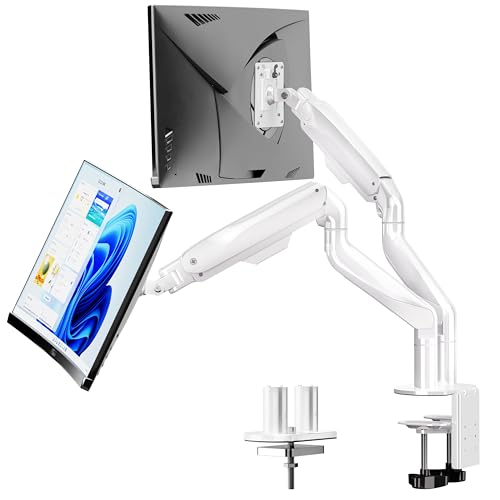
The BIZUM earns its place with the highest per-arm weight rating on this list at 33.1 lbs, paired with an aviation-grade aluminum build. For anyone running heavy 34″–42″ curved ultrawides, that extra headroom is the difference between a mount that holds position and one that slowly sinks through the day.
Where the HUANUO HNDS7 focuses on general office use, this one leans toward creators and serious multitaskers who measure desk space in ultrawide inches. The white finish is a nice touch if your setup leans minimalist.
Notable Gains
- 33.1 lbs per arm is the strongest rating in this roundup, ideal for 42″ flagships
- Aviation aluminum arms resist flex better than standard steel at this length
- 17″–42″ range covers gaming ultrawides and standard office displays alike
- Dual C-clamp plus grommet base fits both thick desks and predrilled tops
A Few Limitations
- Larger base footprint than smaller dual mounts, so shallow desks lose working space
- Heavier monitors at full reach can stress the spring tension over long sessions
Best Suited To
Content creators and sim-racing or flight-sim enthusiasts with heavy curved ultrawides who need a mount rated for flagship weight.
Reach For A Different Pick When
Your screens are 27″ office panels, since the HUANUO HNDS7 above handles that range with a lighter, less desk-hungry base.
The Suptek ML6802 is the friendliest choice for anyone who can’t or won’t clamp a mount to their desk. The freestanding base sits on the surface and holds two screens up to 32″ without drilling or grommets. For glass desks, rental workspaces, or sit-stand tops with awkward edges, that alone solves the installation problem.
The 31.5-inch center pole is taller than most, which makes it useful when you need the screens well above desk level. Against the HUANUO HNDS7, you trade clamp stability for installation freedom.
A Favorable Mix
- Freestanding base means zero risk to glass tops or rented desks
- Extra-tall 31.5-inch pole raises monitors comfortably above standing-desk height
- VESA 75×75mm and 100×100mm cover standard office displays up to 32″
Honest Caveats
- Base takes up desk real estate that a clamp-mounted arm would leave free
- Freestanding designs can shift slightly when both screens are pushed to one side
- Lower weight rating than the BIZUM, so it isn’t built for heavy ultrawides
Core Details
Made For
Renters and glass-desk owners who want a clean dual-monitor setup without modifying their workspace.
Skip It When
You need maximum desk space back, because the monTEK Freestanding Dual Monitor Stand further down is a tighter stand-up base for the same screen class.
This VIVO bundle is the only entry on the list that treats your laptop as a first-class citizen alongside two monitors. The ventilated 14″ × 12″ tray mounts below the dual arms, turning a desk into a three-screen workstation without a separate riser. For developers and remote workers who dock a laptop daily, that integrated tray is the selling point.
It’s narrower in screen range than the HUANUO HNDS7, topping out at 27″. If you plan to grow into bigger panels, this isn’t the one. But for a focused 24″–27″ triple setup, it removes a lot of clutter.
Notable Upsides
- Laptop tray turns a dual mount into a full triple-screen docking station
- Ventilated tray surface helps cooling for sustained laptop workloads
- Independent articulation on each arm keeps screens at custom angles
- 22 lbs per monitor is enough for most 27″ office and creator displays
Worth Bearing In Mind
- 27″ maximum screen size rules out large ultrawides
- Tray supports up to 22 lbs, so heavier workstations laptops sit at the limit
- Tray and arms share the central pole, so layout adjustments are coupled
Who It Suits Best
Remote engineers and writers who want laptop plus dual external monitors in one tidy mount instead of stacking a separate laptop stand.
Not Your Match When
You plan to upgrade to 32″ or larger panels, because the monTEK Heavy-Duty Dual Monitor Stand further down handles that class with more capacity per arm.
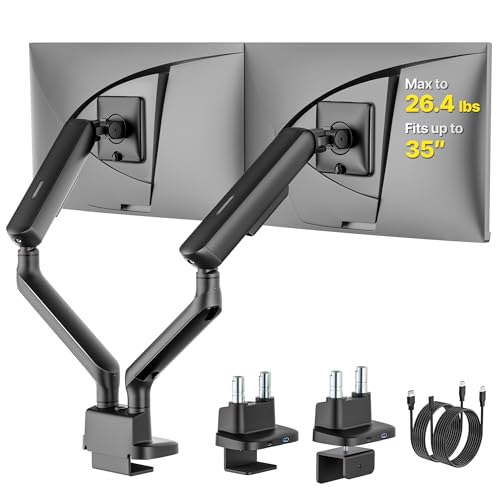
Where gas-spring arms can feel mushy after months of use, mechanical spring arms hold their position with a firmer, more predictable feel. This monTEK arm leans into that with reinforced springs and a per-arm capacity tuned for 27″–34″ screens. Gaming and creator setups that get adjusted constantly benefit from the firmer return.
The USB passthrough echoes the HUANUO HNDS7’s convenience, and the VESA compatibility stays within the standard 75×75mm and 100×100mm pattern.
Standout Benefits
- Mechanical spring action gives a more controlled hold than gas-strut alternatives
- 26.4 lbs per arm handles heavier 32″–34″ curved gaming displays
- USB ports reduce cable clutter on the desk surface
- Full VESA compatibility covers virtually every modern monitor brand
Points To Keep In Mind
- Mechanical springs require an initial tension adjustment per monitor weight
- Spring tuning takes longer on first setup than gas arms
Whose Shelf It Belongs On
Gamers and creative pros with curved 27″–34″ panels who tweak their monitor position often and want a firm, predictable hold.
Swap It Out When
Your monitors are lighter 24″ office panels, because the HUANUO FlowLift Dual Monitor Stand further down is built precisely for that everyday weight class.
This HUANUO FlowLift lands in the sweet spot for most home offices: 13″–32″ screens at 4.4–19.8 lbs per arm. That covers the entire mainstream office monitor range, including the popular 27″ IPS productivity panels and 32″ 4K displays under the weight ceiling. It’s the kind of mount that disappears into the setup.
Against the bigger HUANUO HNDS7 above, the FlowLift trades the 40″ upper limit and USB ports for a lighter, easier-on-the-desk frame.
Practical Advantages
- Wide compatibility across nearly every office monitor sold today
- Lightweight per-monitor range keeps the gas spring action smooth
- C-clamp and grommet base options fit common desk thicknesses
- Full motion articulation supports standing-desk transitions
Trade-Offs To Consider
- 19.8 lbs per arm rules out heavy 32″+ curved gaming displays
- No integrated USB hub like the HNDS7 sibling
Feature Snapshot
Built With In Mind
Standard office and home users with two 24″–27″ monitors who want a smooth, no-fuss mount that just works day after day.
Consider Something Else When
You run heavier curved gaming panels above 20 lbs, where the monTEK Mechanical Spring Dual Monitor Arm above offers more headroom.
This single-arm entry earns a spot because not every desk needs two monitors, and a quality single arm beats a cheap dual one when you only run one screen. It shares the FlowLift platform with the dual version above, so you get the same 13″–32″ range and 4.4–19.8 lbs capacity in a smaller footprint.
It’s the right pick for compact desks, narrow kitchen-counter workstations, or anyone building toward a second screen later without committing to a dual mount now.
Well-Handled Touches
- Smaller footprint leaves room on narrow desks and writing tables
- Same VESA and weight range as the dual FlowLift sibling for consistent ergonomics
- C-clamp and grommet options suit varied desk constructions
Some Limits To Know
- Single arm only, so a future second monitor means buying again
- 19.8 lbs ceiling excludes heavier 32″+ curved screens
Perfect Match For
Minimalist single-screen users in small home offices or shared spaces where a dual mount would be wasted real estate.
Another Choice May Suit
You’re confident you’ll add a second monitor within a year, because the HUANUO FlowLift Dual Monitor Stand above delivers the same range on a unified frame.
This monTEK mount is the conservative office choice: reinforced steel joints, thickened VESA plates, and an anti-slip base that resists wobble through years of daily adjustments. The 22 lbs-per-arm rating is comfortable for mainstream 27″–32″ displays without entering ultrawide territory.
Against the more aggressive BIZUM ultrawide mount above, this one trades peak weight capacity for a sturdier, more office-tuned feel. For desks where the monitor gets bumped occasionally, that structural emphasis pays off.
A Few Strong Suits
- Reinforced steel joints resist long-term sag better than lighter aluminum arms
- Anti-slip base pads keep the mount planted on smooth desk surfaces
- 22 lbs per arm comfortably handles most 27″–32″ office displays
- Standard VESA compatibility for fast monitor swaps
Where It Is Less Suited
- Heavier base footprint means more desk space consumed at the clamp point
- Less reach than the BIZUM, so deep corner desks may feel under-served
Key Product Details
Who Will Love This
Long-term office workers who adjust their monitors daily and want a mount that stays tight for years without re-tensioning.
Where A Sibling Pick Shines
You’re chasing a true ultrawide setup, where the BIZUM dual mount offers more reach and a higher per-arm rating.
If the Suptek above was appealing but you want a tighter, more compact freestanding base, this monTEK answers that. It supports the same 17″–32″ range at 22 lbs per arm, with reinforced steel construction and anti-slip base pads that keep the stand planted even when both monitors are pushed to one side.
It’s a smart alternative for anyone with a glass desk, a thick butcher-block top, or a workspace where clamping just isn’t possible.
Key Advantages
- Freestanding base removes the need to drill or clamp the desk
- Steel construction and anti-slip pads reduce wobble during typing
- 22 lbs per arm fits mainstream 27″–32″ office displays
- Standard VESA patterns for fast monitor swaps
Factors To Consider
- Stand still consumes a footprint of desk space under the monitors
- Moving the stand means lifting both monitors together
Who Should Grab It
Glass-top desk owners and remote workers in non-permanent setups who want the no-clamp benefit without giving up steel-reinforced stability.
A Better Fit Elsewhere
Your desk allows clamping and you want the desk space back, because the monTEK Heavy-Duty Dual Monitor Stand above clamps directly and frees the surface underneath.
The closing entry rounds out the list as a no-nonsense full-motion arm for everyday dual setups. The 20 lbs per arm rating covers most 27″ office monitors and lighter 32″ panels, while the full motion design lets you tilt, swivel, and rotate as needed. Each arm lifts monitors up to 15.9 inches high and extends nearly 20 inches out.
Compared to the more specialized HUANUO FlowLift above, this one trades a slightly tighter weight range for added extension reach. Forgiving specs in a flexible package.
Good Reasons To Consider
- 20 lbs per arm comfortably fits most 27″ and lighter 32″ productivity displays
- Up to 15.9″ of vertical lift supports ergonomic sit-stand transitions
- Up to 19.9″ extension reaches over deeper desks and around corner setups
- Full motion articulation covers tilt, swivel, and rotation adjustments
Where It May Fall Short
- 20 lbs ceiling excludes heavier curved gaming ultrawides
- Lacks integrated USB ports that the HUANUO HNDS7 offers
The Right Fit
Mixed-use home and office workers who want flexible adjustment without paying for ultrawide-grade weight capacity they won’t use.
Wrong Turns To Avoid
You already know you’ll be running heavy 34″+ panels within a year, because the BIZUM mount earlier in the list is built specifically for that workload.
What To Weigh Before Choosing a Dual Monitor Desk Mount
VESA Compatibility and Weight Capacity
VESA (Video Electronics Standards Association) is the standardized mounting hole pattern on the back of monitors, and the two common sizes are 75×75mm and 100×100mm. Every mount on this list supports both, which covers the vast majority of consumer and prosumer displays. The number that matters more for stability is weight capacity per arm: cheap mounts sag visibly above 15 lbs, and heavier curved ultrawides need 26+ lbs per arm to hold position through the day. Always leave a margin of at least 10–15% under the stated limit for long-term reliability.
Desk Type, Clamp Depth, and Base Style
A clamp-mounted arm saves desk space but needs a flat edge and a thickness the clamp can grip. Grommet mounts require a drilled hole, typically 0.5–2 inches. Freestanding bases trade desk space for installation freedom, which matters on glass tops or rental desks. Measure your desk thickness and check edge clearance before committing to a clamp design, because returning a mount that won’t grip is a hassle nobody enjoys.
Articulation and Daily Adjustment
Full motion arms let you tilt, swivel, rotate, and lift through a wide range. The trade-off is more joints, which can loosen over years of heavy adjustment. Mechanical spring arms hold firmer than gas struts for users who constantly reposition, while gas arms feel lighter for occasional moves. For sit-stand desks, prioritize vertical lift range so screens clear the surface at standing height.
Key Considerations Across These Picks
Where Shoppers Go Wrong
The most common mistake is buying a mount rated only for the monitor’s listed weight without considering real-world forces. Pushing a screen to full extension multiplies the effective load on the arm, and a mount rated exactly at your monitor’s weight will sag over months. Aim for at least 10–15% headroom above your heaviest panel’s spec. Another trap is ignoring desk thickness: a clamp designed for 0.5″–2″ edges won’t bite on a 3″ butcher block, and a grommet mount needs a hole that actually exists in your desk. Measure twice, order once.
When Paying More Pays Off
Higher-tier mounts earn their price through three upgrades you can feel. First, mechanical spring arms replace gas struts for firmer hold. Second, reinforced steel joints at the pivot points resist the slow loosening that plagues budget arms after a year. Third, higher per-arm weight capacity means a wider safety margin, which translates to longer service life. If your monitors cost more than a mid-range laptop, the upgrade from a budget arm to a premium mount usually pays for itself in fewer re-tightening sessions and a steadier display through years of daily use.
Frequently Asked Questions
How do I know if my monitor will fit a dual mount?
Check the back of your monitor for four screw holes in a square pattern, and measure the spacing center-to-center. If it reads 75×75mm or 100×100mm, every mount on this list will fit. Then weigh your monitor, including the stand if it’s heavy, and confirm it’s under the per-arm limit.
Are gas spring or mechanical spring arms better?
Gas spring arms feel lighter and adjust smoothly, which suits occasional repositioning. Mechanical spring arms feel firmer and hold position more reliably through heavy daily use, which suits gamers and creators who tweak their setup constantly. Both work well when matched to your adjustment style.
Can I mount a curved ultrawide on any dual stand?
Curved ultrawides work on most mounts as long as the VESA pattern and weight fit. The extra depth of a curved panel adds leverage at the arm joint, so heavier 34″–42″ models benefit from mounts rated 26+ lbs per arm like the BIZUM entry above. Standard office mounts under 22 lbs per arm will sag noticeably.
Do I need a clamp or grommet mount?
A clamp-mount arm attaches to the edge of your desk, while a grommet mount passes through a pre-drilled hole. Clamps are friendlier for renters and easy to move between setups. Grommet mounts are sturdier on permanent desks and look cleaner because the base sits flush. Choose based on whether your desk has a compatible hole or edge.
Will a dual mount damage my desk?
A properly installed clamp-mount arm distributes pressure across a wide contact area and won’t damage solid wood, metal, or laminate desks. Glass desks need a freestanding base or a protective pad under the clamp to avoid stress cracks. Cheap particleboard edges can crush under heavy clamp pressure, so reinforce the edge or choose a lighter mount if your desk is in that category.
Closing Remarks
The right dual monitor desk mount comes down to your screens, your desk, and how often you adjust. Clamp a heavy ultrawide pair to a sturdy desk with the BIZUM, free up a glass top with the Suptek or monTEK freestanding base, and pick the HUANUO FlowLift for the everyday 27″–32″ office sweet spot. Match the mount to your real workload, and the upgrade pays back every workday.