I spend my days in front of two screens, and the right mount turned my cramped desk into a calmer, more focused workspace. Lifting monitors to eye level fixed my neck tension, freed up usable surface area, and made cable clutter disappear behind a single pole. The trick is matching the stand to your monitors, desk, and how you actually work, not just grabbing whatever looks sturdy in a thumbnail.
A Closer Look At The Lineup

HUANUO 17-32 Inch Dual Monitor Stand Stacked Mount

HUANUO Premium Dual Monitor Mount with USB (HNDS7)
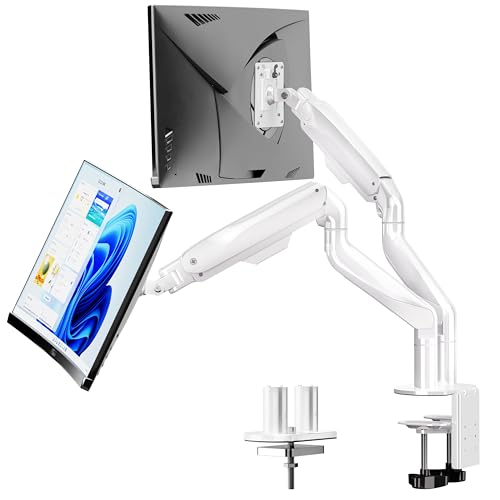
BIZUM Heavy Duty Ultrawide Dual Monitor Mount (White)

Suptek Dual LED LCD Monitor Stand Free-Standing 31.5 inch Pole (ML6802)

VIVO Dual Monitor Mount and Laptop Tray Kit (Bundle)
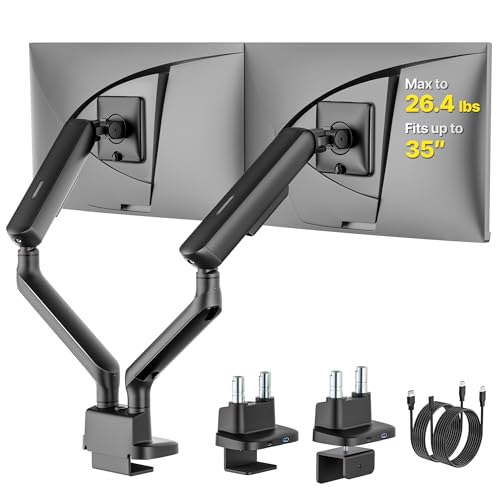
monTEK Mechanical Spring Dual Monitor Arm with USB

HUANUO FlowLift Dual Monitor Stand for 13–32 inch Screens

monTEK Heavy-Duty Dual Monitor Stand for 17-32 inch, 22 lbs Each

monTEK Freestanding Dual Monitor Stand for 17-32 inch Screens
monTEK Dual Monitor Arm Stand 17-32 inch, 20 lbs Each
The Details Behind The Selections
Where most dual monitor stands spread screens side by side, this HUANUO model stacks one display directly above the other on a vertical column. That layout works beautifully in narrow desks or in shared spaces where a wide footprint simply isn’t available. I find it especially practical for writers, coders, or anyone who treats the top monitor as a reference screen and the bottom one as the active workspace.
The arms support up to 19.8 lbs per monitor, fit standard VESA 75x75mm or 100x100mm (VESA is the four-hole mounting pattern on the back of most monitors), and move through tilt, swivel, and full rotation. You can pivot a stacked screen into portrait mode, which is a quiet win for reading long documents.
Useful Strengths
- Stacking design frees horizontal desk space, a real benefit in home offices under 48 inches wide.
- Each arm carries up to 19.8 lbs, comfortably handling most 27-inch and many 32-inch office monitors.
- Full tilt, swivel, and 360° rotation let you swing a screen into portrait for coding or long-form reading.
- C-clamp and grommet mounting options suit most standard desk thicknesses.
Worth Noting
- Stacked screens sit closer together, so reading both at once means more eye travel than a side-by-side setup.
- The bottom monitor can drop quite low, which may force taller users to mount the clamp higher on the desk.
Built With In Mind
Anyone working in a tight home office who reads reference material on the top screen while typing on the bottom one.
Reach For A Different Pick When
The Suptek Dual LED LCD Monitor Stand (ML6802) suits shoppers who want a tall freestanding pole instead of a clamp-mounted stack.
The HNDS7 is HUANUO’s step-up model, and the upgrade shows in the materials and the size range. Solid aluminum arms, a wider base, and dual C-clamps give this stand a planted feel that cheaper gas-spring mounts tend to lack. Compared to the HUANUO stacked version above, this one runs side by side and pushes the size ceiling to 40 inches per arm, which opens it up to larger ultrawide-curved displays.
The integrated USB passthrough is a small but appreciated touch for desk builds where the ports on the monitors are hard to reach. I find the grommet-plus-clamp combo especially helpful on thicker standing-desk surfaces.
Benefits That Matter
- Supports up to 26.4 lbs per arm, covering most 32-inch and many 38-inch ultrawide monitors.
- Solid aluminum construction feels noticeably sturdier than the basic steel arms in this category.
- Built-in USB ports reduce cable sprawl and give you a reachable hub right on the base.
- Tall, long arms create generous height adjustment for tall users and standing-desk routines.
Trade Offs
- The wider footprint and dual clamps demand a sturdy desk, so lightweight particleboard tops may flex.
- USB ports draw power from the source, so you’ll still need a free USB-A slot on the PC for passthrough.
Feature Snapshot
Whose Shelf It Belongs On
Hybrid and creative professionals running two larger monitors who want aluminum-grade stability and a reachable USB hub.
Look Elsewhere When
The BIZUM Heavy Duty Ultrawide Dual Monitor Mount fits shoppers with 42-inch displays who need 33 lbs of headroom per arm.
BIZUM built this model for people who have crossed into ultrawide territory, where 34-inch curved screens and 42-inch panels are common. The aviation-grade aluminum arms and dual C-clamp base deliver the kind of planted stability that prevents the gentle wobble you sometimes see on lighter arms holding a curved display. At 33.1 lbs per arm, the weight rating is among the highest in this category.
The white finish is also a quiet differentiator in a market dominated by matte black, useful for bright Scandinavian-style or photography studios where black hardware stands out.
Useful Touches
- 33.1 lb per arm capacity handles heavy curved gaming and editing monitors with room to spare.
- Aviation aluminum arms resist flex during long adjustment sessions.
- White finish blends into lighter decor instead of looking like industrial black hardware.
- VESA 75 and 100 compatibility covers most modern displays without adapters.
Points To Note
- Dual C-clamps and a larger base need a thick, solid desk edge for a secure fit.
- The white finish shows scuffs and dust more readily than the standard black powder coat on competing models.
Best Suited To
Owners of 34-inch and larger curved or ultrawide monitors who want the highest weight rating in this lineup.
Swap It Out When
The HUANUO Premium Dual Monitor Mount with USB (HNDS7) makes more sense for those who prioritize aluminum stability plus USB ports at a friendlier weight range.
The Suptek ML6802 stands apart because it doesn’t clamp to your desk at all. A weighted freestanding base lets the whole unit sit on top of the surface, which is a relief for renters, glass-desk owners, and anyone who has been burned by clamp marks. The 31.5-inch center pole is unusually tall, so even long-torso users can lift their monitors to a comfortable eye line.
Each arm moves through a wide tilt, swivel, and rotation range, and integrated cable management runs down the pole to keep things tidy.
Advantages To Know
- Freestanding base means no clamp pressure, ideal for glass desks or rented workspaces.
- Extra-tall 31.5-inch pole gives generous height range for taller users.
- Full 360° rotation supports portrait orientation for coding or document work.
- Built-in cable channel keeps wiring hidden along the pole.
Potential Drawbacks
- The base footprint takes up real desk surface, which is a real trade-off for compact workstations.
- 22 lbs per arm is lower than BIZUM and HUANUO’s premium options.
Who It Suits Best
Renters and glass-desk shoppers who want a no-drill, no-clamp solution that still lifts monitors to a healthy height.
Consider Something Else When
The monTEK Freestanding Dual Monitor Stand suits shoppers who want a similar no-drill approach with a slightly different arm geometry.
VIVO’s bundle turns a dual monitor stand into a triple-screen workstation by including a ventilated laptop tray. Two external monitors sit on arms while a laptop hovers below, which is the layout I see in developer setups, podcast recording rooms, and trading-style desks. The ventilated tray also keeps thermals healthier during long render sessions.
The arms handle 13 to 27-inch displays at 22 lbs each, while the tray supports laptops up to around 27 inches at the same weight rating. That covers most everyday productivity and creator laptops without flex.
Practical Pluses
- Includes a laptop tray, effectively creating a third screen without buying a third arm.
- Ventilated tray design helps keep laptop thermals in check during heavy workloads.
- Full articulation on each arm gives a comfortable typing and viewing geometry.
- VESA 75 and 100 mounting fits the majority of office monitors.
Things To Consider
- 27-inch monitor limit rules out larger ultrawide displays.
- Adding a laptop to the load means the clamp must bite into a very sturdy desk.
Feature Rundown
Right Fit For
Multitaskers who run a laptop plus two monitors and want everything on one shared mount.
A Better Fit Elsewhere
The HUANUO FlowLift Dual Monitor Stand is a cleaner match for shoppers who don’t need the laptop tray and want a lighter arm system for gaming.
monTEK leans into mechanical spring arms here, which use a counterbalanced spring inside the arm rather than a gas cylinder. The feel is crisper and more precise, with less drift over time as temperatures shift. For curved and ultrawide displays that hold their position better under heavier loads, that spring precision is genuinely useful.
The integrated USB ports sit conveniently on the base, and the 26.4 lb per arm rating covers most 27 to 34-inch screens including heavier curved gaming monitors.
Notable Upsides
- Mechanical spring arms hold position more reliably than gas springs under heavier curved screens.
- Supports 17 to 35-inch displays, covering most curved gaming and ultrawide configurations.
- Built-in USB ports simplify connecting peripherals without reaching behind the monitors.
- Full motion range for tilt, swivel, and rotation supports portrait workflows.
Honest Caveats
- Mechanical spring arms are sometimes stiffer to adjust than gas-spring equivalents until you dial in the tension.
- The base and clamp geometry require a flat desk edge for a flush fit.
Who Should Grab It
Owners of curved or ultrawide screens who want spring-crisp positioning rather than gas-spring drift.
Skip It When
The HUANUO Premium Dual Monitor Mount with USB (HNDS7) is a smoother experience for users who prefer aluminum gas-spring arms with USB passthrough.
The FlowLift is HUANUO’s mid-weight answer for gamers and streamers running two lighter screens side by side. The arm rating starts at 4.4 lbs and tops out at 19.8 lbs per arm, which lines up neatly with most 24 to 27-inch gaming panels and the lightweight 32-inch office monitors that streamers often pair with a chat or dashboard display.
Full motion articulation and the C-clamp plus grommet mounting make it flexible for both standing desks and traditional workstations. It doesn’t try to be the heaviest-duty option, and that restraint is part of the appeal.
Where It Helps
- Lower weight range matches typical gaming and streaming monitors without overpaying for unused capacity.
- Full motion tilt, swivel, and rotation supports portrait streaming chat layouts.
- C-clamp plus grommet base fits most modern standing desks.
- VESA 75 and 100 compatibility covers the vast majority of monitors on the market.
Things To Weigh
- 19.8 lb per arm ceiling rules out heavy ultrawides and large studio displays.
- Initial arm tension adjustment takes some patience before the screens hold position cleanly.
Who Will Love This
Streamers and gamers running dual 24 to 27-inch panels who want clean articulation at a sensible capacity.
Not Your Match When
The BIZUM Heavy Duty Ultrawide Dual Monitor Mount is a stronger fit for users with curved 34-inch panels that exceed 19.8 lbs per screen.
Where the monTEK mechanical spring arm targets precision, this heavy-duty sibling targets raw sturdiness. Reinforced steel joints, thickened VESA plates, and anti-slip base pads create the kind of clamp-mounted bracket I picture on a desk where someone is going to lean on the monitors without flinching. The 22 lbs per arm rating lines up with most 32-inch productivity displays.
VESA 75 and 100 compatibility keeps it broadly usable, and the full motion range supports portrait orientation for document-heavy work.
Practical Advantages
- Reinforced steel joints resist wobble during typing-heavy sessions.
- 22 lb per arm capacity covers most 32-inch productivity monitors.
- Thickened VESA plates spread load over a larger contact area for heavier displays.
- Anti-slip base pads add a layer of grip on smooth desk surfaces.
Softer Spots
- Steel construction adds weight, so the clamp must bite into a solid desk to feel truly planted.
- Anti-slip pads can leave faint impressions on softer wood finishes if left in one place too long.
Core Features
Made For
Anyone with a sturdier solid-wood or steel-frame desk who wants a planted, no-drift dual clamp mount.
Where Another Pick Suits Better
The Suptek Dual LED LCD Monitor Stand (ML6802) is a friendlier match for renters who want to avoid clamps entirely.
Glass desks, hollow-core tables, and rental situations all push people away from clamps. monTEK’s freestanding dual monitor stand steps in with a heavy weighted base and the same 22 lb per arm rating as the clamp-mounted sibling above. The reinforced joints and anti-slip base pads keep things stable without drilling a grommet hole.
The footprint is real, so plan for it. I find this style works best when the user is willing to give up a slice of desk space to gain the freedom of a clamp-free setup.
Everyday Perks
- No clamp or grommet needed, ideal for glass desks, rentals, and shared workspaces.
- 22 lbs per arm capacity matches the clamp-mounted version for consistency.
- Anti-slip base pads keep the unit from drifting across smooth surfaces.
- Full motion range supports tilt, swivel, and portrait rotation.
Trade-Offs To Consider
- Weighted base eats desk surface area, which is a real cost in compact setups.
- Freestanding stands can still shift slightly if bumped from the side, so corner placement helps.
Perfect Match For
Glass-desk and rental-desk shoppers who refuse to drill or clamp and want 22 lb per arm support.
Another Choice May Suit
The Suptek Dual LED LCD Monitor Stand (ML6802) offers a similar no-clamp approach with a taller pole for users who need extra height.
monTEK rounds out the lineup with a daily-driver dual arm that focuses on smooth motion rather than maximum capacity. Mechanical spring arms lift each monitor up to 15.9 inches high and extend nearly 20 inches forward, which makes sharing a screen with a colleague or pulling one closer for detail work much easier.
The 20 lb per arm rating suits most 24 to 27-inch office panels and lighter 32-inch displays, and the steel frame keeps the assembly rigid during adjustment.
Where It Delivers
- Mechanical spring arms lift each monitor up to 15.9 inches and extend to about 19.9 inches forward.
- 20 lbs per arm suits most standard office monitors.
- Steel frame with reinforced springs holds position without drift.
- Full motion articulation supports landscape, portrait, and angled viewing.
Less Ideal Details
- 20 lb ceiling rules out the heaviest curved ultrawides, where the monTEK mechanical spring arm with USB is a better fit.
- Spring tension adjustment may need a redo after swapping monitors of different weights.
Feature Card
Perfect Match For
Office multitaskers with mid-weight monitors who want smooth spring-assisted motion for frequent repositioning.
Skip It When
The HUANUO Premium Dual Monitor Mount with USB (HNDS7) is a better match for those who want aluminum construction plus integrated USB ports.
What To Weigh Before Choosing A Dual Monitor Stand
The first decision is mounting style. Clamp and grommet bases give you more clearance under the monitors and a cleaner look, but they need a sturdy desk edge. Freestanding bases cost you some desk surface but save you from drilling and work on glass or hollow-core tables. If your desk shifts between sitting and standing, prioritize gas or mechanical spring arms with a tall vertical lift range.
Weight capacity and screen size range matter more than people expect. Check the actual weight of each monitor, not just the diagonal size, and pick a stand rated comfortably above that number. VESA compatibility (the four-hole pattern on the back of the monitor) is usually 75x75mm or 100x100mm on modern displays, but it’s worth confirming before anything else. For curved or ultrawide screens, look at heavier-duty aluminum or steel arms and at least 26 lbs of headroom per arm.
Adjustment range is the third pillar. A full motion stand that tilts, swivels, and rotates gives you portrait mode for reading, easier screen sharing across a desk, and better posture throughout the day. Extra reach and height are especially valuable for tall users and anyone who alternates between sitting and standing.
Key Things To Think About Across These Picks
Where Shoppers Go Wrong
The most common slip is buying a stand rated just barely above the monitor’s weight. That leaves no margin for the gentle sag and drift that show up over months of use. Picking a stand with at least 20 to 30 percent headroom over your heaviest monitor keeps positioning crisp longer.
Another trap is ignoring desk thickness. Many clamps need at least a half-inch to two inches of edge to seat correctly. Glass tops, beveled edges, and very thin tabletops often rule out clamps entirely, which is where freestanding picks earn their keep.
The Case For Spending Up
Higher-tier stands earn their cost through materials and motion quality. Aviation-grade aluminum arms resist flex better than basic steel, and mechanical spring arms hold position more reliably than entry-level gas springs as temperatures shift. Integrated USB passthrough, taller poles, and wider bases all add real everyday comfort that budget picks usually skip.