A laptop screen feels cramped the moment I open a spreadsheet alongside a video call, a chat thread, and a code window. Dual monitor attachments solve that by clipping an extra panel (or two) directly to your lid, turning a single-screen laptop into a triple-screen workstation wherever you happen to sit. The trick is matching the attachment to your machine’s size, ports, and how often you actually travel with it.
I pulled together ten current options spanning ultra-light single-extenders, foldable triple-screen arrays, and full docking stations for a more permanent desk setup. The picks below lean on published specs and the kinds of details that matter in daily use: panel size, weight, supported laptop range, and the ports you need to actually plug in.
A Side-By-Side Look

Helpnight 14″ Laptop Screen Extender 1.31lbs FHD IPS

AOKER Laptop Screen Extender 14″ FHD IPS Dual
DZVW 14″ FHD 1080P IPS Dual Laptop Monitor Extender
DZVW Laptop Screen Extender 15.6″ FHD Triple Monitor
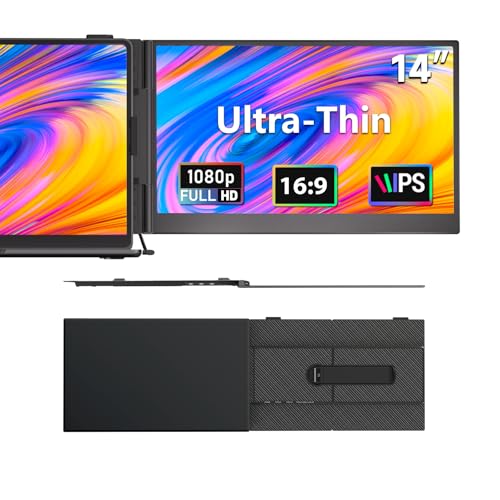
DZVW 14″ 1080P FHD Portable Monitor 1.3lb
Selore USB C Docking Station Dual Monitor 3 Monitors

Selore USB C Docking Station 3 Monitors 13-in-1 Hub
Selore Laptop Docking Station 3 Monitors Triple 4K

Vixtan 14″ Triple Laptop Screen Extender FHD IPS

sharanix 14″ FHD 1080P IPS Dual Laptop Screen Extender
The Picks, Examined More Closely
The Helpnight extender leans hard into portability, weighing roughly 1.31 pounds and measuring around 0.17 inches thick, which lands it in the same conversation as a slim tablet rather than a chunky external display. In a real-world carry case, that profile barely registers next to a 13-inch laptop, and the clip-on design means no separate stand to lose in transit.
It mounts to laptop lids between 13 and 17 inches and ships with both USB-C and legacy video inputs, so it adapts cleanly to most modern ultrabooks and older machines. For someone commuting by train or flying short-haul weekly, the trade-off of a smaller 14-inch panel versus a heavier 15.6-inch option usually pays off in shoulder comfort.
Notable Gains
- Under 1.5 pounds means it slips into a laptop sleeve without a second bag.
- 0.17-inch profile keeps bulk minimal for backpack users.
- Plug-and-play setup removes driver headaches during quick office swaps.
- 1080P IPS panel (IPS means the screen stays color-accurate at wide angles) handles document work and video calls cleanly.
Worth Noting
- A single extra screen limits serious multitaskers compared to the triple-screen options further down this list.
- Owners commonly report that the clip mechanism needs a careful hand on thinner laptop lids to avoid scuffing.
Feature Snapshot
Made For
Road-warrior professionals who want a second screen without checking a bag at the airport.
Skip It When
The Vixtan triple extender suits you better when three full screens beat two for your workflow.
Where the Helpnight model is slim plastic, the AOKER extender leans on an aerospace-grade aluminum back panel to stiffen the chassis against twisting and flex. That extra rigidity tends to matter when an extender spends months bouncing around in a padded backpack rather than living on a single desk.
At about 1.3 pounds and 0.25 inches thick, it adds a similar carry burden to the Helpnight while promising better long-term durability. A protective sleeve ships in the box, which is one of those small touches that saves a cracked corner after the inevitable drop onto a hotel-room floor.
Where It Helps
- Aluminum back plate resists flex during travel and over extended desktop use.
- Included sleeve adds an extra layer of drop protection on commutes.
- Multi-OS support covers Windows, macOS, and Android without driver hunting.
- 14-inch FHD IPS panel matches the readability of the Helpnight for office tasks.
Things To Consider
- Single-side extender setup still leaves heavy multitaskers wanting a second auxiliary screen.
- Slightly thicker than the thinnest rivals, which may bother sleeve-fit perfectionists.
Who It Suits Best
Travelers who treat their gear roughly and want a sturdier shell without doubling carry weight.
Consider Something Else When
The DZVW 1.3lb Ultra Lightweight extender is the smarter grab for shoppers prioritizing the thinnest possible profile over aluminum rigidity.
The DZVW dual extender stands out for the sheer range of inputs it accepts, covering HDMI, USB-A, and USB-C from a single panel. That flexibility pays off in households or offices where one extender has to dock with a Windows workstation in the morning and a MacBook by afternoon without swapping cables.
Beyond port variety, the unit mirrors and extends across most current operating systems, including Chrome OS. Compared to the AOKER unit’s aluminum shell, this one reads as a slightly more connectivity-focused option aimed at people who hot-swap between machines.
What Works In Its Favor
- HDMI, USB-A, and USB-C inputs cover older docks and modern laptops alike.
- Chrome OS support opens the door to Chromebook-based workflows.
- Plug-and-play design removes adapter shopping for most users.
- 1080P IPS panel keeps text legible during long reading sessions.
Honest Caveats
- Some users report needing a powered USB-C cable for stable output on lower-wattage laptop ports.
- Single-screen extension only, so heavy spreadsheet traders may still want a third panel.
Feature Snapshot
Best Suited To
IT consultants, teachers, and anyone plugging into multiple operating systems in a single week.
Look Elsewhere When
The Selore 13-in-1 hub serves you better if you want a permanent desk-based triple-monitor setup rather than a portable panel.
This is the first triple-screen extender on the list, and the jump from one auxiliary display to two flanking panels transforms laptop work into something resembling a fixed workstation. The 15.6-inch FHD IPS panels unfold from a single bracket and rotate into portrait or landscape orientation depending on the task.
The catch is weight: carrying two extra 15.6-inch panels naturally adds heft compared to the 14-inch single-screen options earlier in the lineup. For analysts, coders, or content creators who genuinely need three visible windows, that bulk is usually an acceptable trade for the productivity bump.
Good Reasons To Consider
- True triple-screen layout lets you park chat, research, and main work side by side.
- Portrait mode support is handy for long documents and code review.
- Plug-and-play design avoids hunting for proprietary drivers.
- 15.6-inch panels give more vertical breathing room than 14-inch alternatives.
Some Limits To Know
- Bulk and weight are noticeably higher than single-screen extenders, so daily backpack use gets tiring.
- Triple-screen power draw may require both USB-C ports on the host laptop.
Right Fit For
Financial traders, developers, and editors who run multiple persistent windows rather than alt-tabbing.
Reach For A Different Pick When
The Vixtan 14″ Triple Extender fits better for users who want three screens at a lighter carry weight.
The DZVW 1.3lb Ultra Lightweight option lands at roughly the same carry weight as a water bottle and a slimmer profile than most phones. For someone already carrying a laptop, charger, and notebook, that translates to genuinely portable rather than “technically portable.”
Like the Helpnight unit, this one ships with a 14-inch 1080P IPS panel rated at 300 nits of brightness. The catch with extra-bright panels is that they tend to chew through laptop battery faster than dimmer ones, especially during long sessions away from an outlet.
A Favorable Mix
- 1.3-pound carry weight barely registers against the laptop itself.
- 72% sRGB coverage (a color gamut measurement: 72% sRGB means reasonably accurate colors for general office and web work) supports accurate document and web visuals.
- Plug-and-play design works across Windows, macOS, Android, and Chrome OS.
- 14-inch IPS panel keeps viewing angles consistent during shared presentations.
Points To Keep In Mind
- Higher brightness drains laptop battery faster during unplugged sessions.
- Single auxiliary screen limits parallel-app workflows compared to triple-screen units.
Feature Snapshot
Whose Shelf It Belongs On
Coffee-shop regulars and digital nomads who carry their setup every day and value lightness above all.
A Better Fit Elsewhere
The sharanix extender is worth a look for users who want built-in blue-light filtering for long reading sessions.
Switching from clip-on extenders to a true docking station, the Selore 10-in-1 hub turns a single USB-C port on your laptop into HDMI, DisplayPort, VGA, Ethernet, multiple USB-A ports, and PD (Power Delivery, a USB-C standard that charges the laptop while data flows) passthrough. That makes it the right tool for a hybrid worker who wants one cable to rule them all at a fixed desk.
The catch, and it matters, is that macOS only supports mirror mode through this dock rather than extended desktops. Windows users get the full benefit; Mac users get a duplicated display. The dual HDMI ports push 4K at 60Hz, which is plenty for most modern monitors.
Where It Delivers
- One USB-C connection replaces a rat’s nest of dongles at the desk.
- Dual 4K HDMI outputs support high-resolution external monitors.
- 100W Power Delivery keeps a laptop charged during heavy workloads.
- Gigabit Ethernet adds the wired reliability Wi-Fi sometimes lacks.
Trade-Offs To Consider
- MacOS users only get mirror mode, which limits creative workflows on Apple silicon.
- Requires compatible USB-C or Thunderbolt 3/4/5 ports to hit full bandwidth.
Who Should Grab It
Hybrid Windows professionals who dock and undock daily and want their desk cabling simplified to a single cable.
Swap It Out When
The Selore 13-in-1 hub makes more sense for users who want three HDMI outputs instead of a mix of HDMI, DisplayPort, and VGA.
The 13-in-1 Selore hub leans into triple HDMI outputs plus SD and microSD card readers, which makes it a natural fit for photographers, video editors, and content creators juggling memory cards alongside external displays. A dedicated one-touch screen-switch button saves time when toggling between mirrored and extended layouts.
It pushes 4K at 60Hz across all three HDMI ports when the host laptop can spare the bandwidth. For anyone whose workflow depends on fast file transfers, the 10Gbps USB-C and USB-A 3.1 ports move data noticeably faster than older USB 3.0 docks.
Strong Points
- Three HDMI outputs turn a laptop into a proper triple-monitor workstation.
- Built-in SD and microSD slots simplify camera and drone workflows.
- 10Gbps USB-C and USB-A 3.1 ports handle fast external SSD transfers.
- 100W PD charging supports most flagship laptops without a separate brick.
Points To Note
- Triple-display extended mode is generally a Windows-only feature.
- Higher port density means a slightly larger desk footprint than slimmer hubs.
Feature Snapshot
Perfect Match For
Creators and editors who need multiple high-resolution monitors plus fast card access from a single connection.
Where Another Pick Suits Better
The Selore 17-in-1 dock makes sense for users who also want DisplayPort outputs alongside HDMI.
The flagship Selore 17-in-1 dock expands on the 13-in-1 hub with two DisplayPort outputs in addition to three HDMI ports, making it the only unit on this list capable of pushing 8K through a single DisplayPort at 30Hz. For anyone running higher-end creative monitors, that flexibility tends to matter more than raw port count.
It also widens the data pipe with both 10Gbps and 5Gbps USB-A ports, plus SD and microSD 3.0 card readers that hit transfer speeds up to 104MB/s. The 100W PD input (with 85W output to the laptop) means even power-hungry 16-inch workstations stay charged during the day.
What It Does Well
- 3 HDMI plus 2 DisplayPort outputs cover nearly any monitor mix at a fixed desk.
- 8K-capable single DisplayPort supports next-generation high-res panels.
- 17 ports consolidate power, data, displays, and networking through one USB-C cable.
- SD/microSD 3.0 slots speed up large card-to-drive transfers.
Worth Bearing In Mind
- Higher cost than the 10-in-1 and 13-in-1 Selore docks, which may not pencil out for casual setups.
- Full functionality generally requires a Windows host laptop.
Built With In Mind
Power users with multi-monitor workstations who want one cable to handle power delivery, displays, and fast storage.
Another Choice May Suit
The Selore 13-in-1 hub is a more affordable fit for shoppers who do not need DisplayPort or 8K output.
The Vixtan triple extender is the lightest triple-screen option in this roundup, weighing roughly 3 pounds and folding down to about 0.3 inches thick. Compared to the DZVW 15.6-inch triple extender, the smaller 14-inch panels trim weight and bulk in exchange for slightly less screen real estate per panel.
USB-C plug-and-play connectivity means fewer cables to wrangle during setup. For remote workers and digital nomads who set up shop in hotel rooms and Airbnbs, the portability is genuinely useful. Owners commonly note that the clip system works best on mid-thickness laptop lids rather than ultralight magnesium chassis.
What Earns Its Place
- Triple-screen layout folds into a 0.3-inch profile for travel.
- 3-pound carry weight is manageable for most backpacks.
- USB-C plug-and-play reduces cable clutter during setup.
- 14-inch IPS panels keep viewing angles clean during shared work.
Small Limitations
- 3 pounds is meaningfully heavier than single-screen extenders for daily commuters.
- Clip mounting may scuff thinner laptop lids if not handled carefully.
Feature Snapshot
Who Will Love This
Remote workers and digital nomads who set up full workstations in temporary spaces and value a triple-screen boost.
Not Your Match When
The Helpnight 14″ extender fits better for commuters who only need a single extra screen and want the lightest possible carry.
The sharanix extender rounds out the list with one of the more eye-friendly panel specs on the market, layering blue-light filtering and anti-glare coating on top of a 300-nit, 1000:1 contrast, 72% sRGB IPS display. For anyone logging eight or more hours in front of documents, those small comfort touches add up across a workday.
Connectivity covers USB-C and HDMI, plus compatibility with Windows, macOS, Android, and surprisingly the Nintendo Switch and PS5. The latter makes it a fun option for gamers who want a second screen for chat or guides next to their console.
Key Advantages
- Blue-light filtering reduces eye strain during long reading sessions.
- Anti-glare coating improves visibility under bright office lights.
- 1000:1 contrast ratio delivers deeper blacks than budget panels.
- Game console support opens non-office use cases.
Where It Is Less Suited
- Single extra screen only, so users running multiple persistent windows may want a triple-screen option instead.
- Console compatibility requires verified USB-C alt-mode support on the host device.
The Right Fit
Long-hours professionals, writers, and analysts who prioritize eye comfort over maximum screen count.
Where A Sibling Pick Shines
The Vixtan 14″ Triple Extender serves gamers and traders better when three screens outweigh eye-comfort refinements.
Matching Your Setup to the Right Attachment
Laptop Size and Mounting Fit
The first filter is physical. Most clip-on extenders on this list support laptops between 13 and 17 inches, but the clamping range varies slightly between models. Measure your laptop’s lid thickness before buying; very thin ultrabooks sometimes need a shim or extra care to avoid scuff marks from the clip. Heavy users running 16-inch workstations may prefer a 15.6-inch extender panel for better visual balance, while 13-inch road warriors should prioritize a thin, sub-1.5-pound unit like the Helpnight or DZVW 1.3lb.
Single vs Triple Screen Layout
Decide honestly how many persistent windows you actually need. A single auxiliary panel handles chat plus main work for most writers, students, and general office tasks. Triple-screen extenders, like the DZVW 15.6″ or Vixtan units, shine for traders, coders, and editors juggling reference material on both sides. The trade-off is weight and bulk; triple setups add several pounds and require more desk depth when unfolded.
Port Requirements and Host Compatibility
USB-C handles video, data, and power through a single cable, but not every laptop supports USB-C alt-mode (the laptop’s USB-C port must support sending a video signal) for video output. Older machines may need HDMI input instead, which the DZVW and sharanix extenders cover. macOS users should know that some docks only mirror rather than extend, so verify your operating system supports extended desktop mode before committing. Gaming laptops with discrete GPUs generally handle dual or triple external screens without breaking a sweat.
Travel Frequency and Build Materials
Daily commuters should weight the carry burden above all else. Aluminum-backed models like the AOKER extender offer better long-term durability at the cost of a slightly thicker profile. Sleeve-equipped options are worth a small premium for anyone whose bag gets tossed into overhead bins or rides in car trunks.
Key Considerations Across These Picks
Common Shopping Slip Ups
The most common mistake is buying an extender without checking whether the host laptop’s USB-C port supports video output. Many budget laptops include USB-C ports limited to data and charging only, forcing users to fall back on HDMI adapters or replace the extender entirely. Another pitfall is assuming triple-screen extenders work the same across operating systems; macOS often limits external displays to one in mirror mode, so triple-screen claims usually mean Windows-only. Buyers also tend to overlook the clip mechanism’s grip range, which can leave a unit wiggling on thicker gaming laptops.
When Paying More Pays Off
Higher-tier docks like the Selore 17-in-1 earn their cost through port density rather than display count alone. The added DisplayPort outputs, faster 10Gbps USB ports, and 8K-capable single-display support matter for creative professionals using color-graded monitors. Tripod-style triple-screen extenders cost more than single-screen models but replace a fixed multi-monitor desk setup, which can save money on traditional displays for hybrid workers who split time between home and office.
Frequently Asked Questions
Do laptop screen extenders drain laptop battery quickly?
Yes, extenders pull power through the laptop’s USB-C port, and brighter panels drain batteries faster. For long unplugged sessions, dimming the extender or using a powered USB-C hub helps extend runtime.
Will a laptop screen extender work with any laptop?
Most extenders support laptops between 13 and 17 inches across Windows, macOS, Chrome OS, and Android. The catch is the laptop’s USB-C port must support video output, often labeled as DisplayPort alt-mode.
Can I use a triple-screen extender on macOS?
Extended desktop across three screens generally requires Windows. macOS often limits external displays to mirror mode or supports only one extended screen depending on the dock. Verify extended-mode support before purchase.
Are clip-on extenders safe for thin laptop lids?
Owners commonly report that mid-thickness lids grip well, while very thin magnesium or carbon-fiber chassis need a shim or gentler handling. A microfiber pad between the clip and lid reduces scuff risk.
How do these differ from a USB-C docking station?
Clip-on extenders travel with the laptop and add screen real estate anywhere. Docking stations stay at a fixed desk and turn one USB-C cable into a full multi-monitor setup with Ethernet, USB ports, and power delivery.
Closing Remarks
The right dual monitor attachment comes down to how many screens you actually keep open and how often the setup leaves your desk. Travelers and commuters get the most from a lightweight 14-inch single extender, while heavy multitaskers benefit from a triple-screen foldable or a full docking station. Match the unit to your laptop’s ports first, then decide whether the bulk of triple-screen setups is worth the productivity trade. The picks above cover the realistic range of those trade-offs in 2026.