Buying a first desktop shouldn’t feel like decoding a spec sheet in a foreign language. I’ve rounded up ten approachable machines that balance price, performance, and day-to-day usability, so students, home offices, and casual creators can pick something honest without overpaying for jargon they don’t need. Below, each pick gets a clear look at who it fits, where it stumbles, and when a sibling model suits better.
The Shortlist At A Glance

Dell 23.8″ All-in-One Desktop, FHD Touchscreen, Core Ultra 7, 16GB DDR5, 1TB SSD

CyberpowerPC Gamer Xtreme VR Gaming PC, i5-10400F, GTX 1660 Super, 8GB DDR4, 500GB SSD
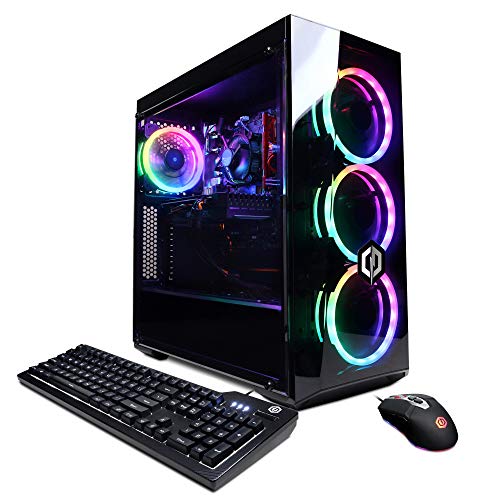
CyberpowerPC Gamer Xtreme VR Gaming PC, i5-10400F, GTX 1660 Super, 8GB DDR4, 500GB SSD
Dell 23.8″ All-in-One Desktop, FHD Touchscreen, Core Ultra 7, 64GB DDR5, 2TB SSD
Dell 23.8″ All-in-One Desktop, FHD Touchscreen, Core Ultra 7, 32GB DDR5, 1TB SSD
Dell 23.8″ All-in-One Desktop, FHD Touchscreen, Core Ultra 7, 32GB DDR5, 2TB SSD
Dell 23.8″ All-in-One Desktop, FHD Touchscreen, Core Ultra 7, 64GB DDR5, 1TB SSD
Dell 23.8″ All-in-One Desktop, FHD Touchscreen, Core Ultra 7, 64GB DDR5, 4TB SSD
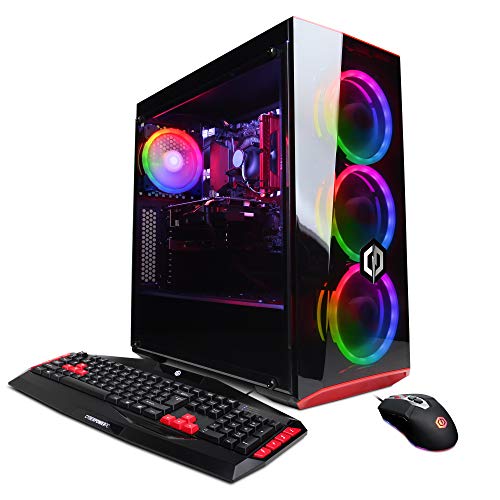
CyberpowerPC Gamer Xtreme VR Gaming PC, i5-9400F, GTX 1660, 8GB DDR4, 120GB SSD, 1TB HDD

GEEKOM IT13 MAX AI Mini PC 2026, Ultra 9 185H, 24GB LPDDR5, 500GB SSD
More On The Choices That Made The List
This Dell keeps the desktop tidy by folding the tower into the display, so a kitchen counter or shared desk stays uncluttered. The 23.8-inch FHD (Full High Definition, 1920×1080) touchscreen pairs with a wireless keyboard and mouse right in the box, which trims setup time for first-time owners.
Intel’s Core Ultra 7 Series 3 is paired with 16GB of DDR5 RAM, the current fastest mainstream memory type for desktop workloads, and a 1TB PCIe SSD for fast boot times and app launches. A Copilot+ PC badge means the processor includes a neural processing unit (NPU), a dedicated chip that accelerates on-device AI tasks like background blur and transcription without leaning on the cloud. For most households, the trade-off is real but fair.
Where It Helps
- The all-in-one form factor saves roughly a square foot of desk space compared to a separate tower and monitor setup.
- 16GB DDR5 handles around a dozen browser tabs plus Office apps without sluggishness in everyday use.
- 1TB PCIe SSD stores a sizeable photo library, with faster read and write speeds than older SATA drives.
- Wireless peripherals mean no cable clutter behind the screen.
- Windows 11 Pro adds BitLocker encryption and Remote Desktop for working from another machine.
Some Limits To Know
- The 23.8-inch panel is not the brightest choice for sunlit rooms; glare may show up near a window.
- All-in-one designs tend to limit future upgrades, so swapping RAM later may not be straightforward.
Key Attributes
Built With In Mind
First-time desktop shoppers, remote workers, and families wanting one clean machine for homework, email, and streaming.
Reach For A Different Pick When
Photographers and video editors juggling huge files will find the Dell 23.8″ All-in-One Desktop (64GB DDR5, 2TB SSD) a more comfortable match.
For someone stepping into PC gaming without a tower full of mysterious lights, this CyberpowerPC keeps things traditional and approachable. The mid-tower chassis leaves room to grow, a quiet plus if the machine ends up in a bedroom or shared study nook.
The Intel i5-10400F at 2.9GHz is a six-core chip that runs cooler than newer flagships, while the GeForce GTX 1660 Super with 6GB of VRAM (video memory, dedicated to graphics work) handles esports titles and many AAA games at 1080p. WiFi readiness means a wireless adapter is preinstalled, a small detail that simplifies the first evening of setup.
Real-World Strengths
- The GTX 1660 Super still handles popular esports titles at smooth frame rates in 1080p.
- 500GB NVMe SSD loads Windows and games noticeably faster than older spinning drives.
- Mid-tower chassis gives room for a future graphics card or extra storage drive.
- Six-core CPU handles livestreams and game recording without choking.
Honest Caveats
- 8GB DDR4 is the minimum comfortable for modern gaming; owners commonly add another stick later.
- WiFi is ready but the model ships with Windows 10 Home, which is approaching end-of-support territory for mainstream updates.
- The i5-10400F lacks integrated graphics, so a GPU failure means no display until repaired.
Perfect Match For
Teens, college students, and casual gamers who want a tower that plays today’s games without overcomplicating things.
Look Elsewhere When
Buyers who prefer a single-cable, monitor-and-CPU-in-one setup should consider the Dell 23.8″ All-in-One Desktop (Core Ultra 7, 32GB DDR5, 1TB SSD) instead.
This sibling to the previous CyberpowerPC carries identical core hardware, which is a useful signal that gamers have two listings to compare rather than one take-it-or-leave-it option. Stock tends to differ between the two SKUs, so availability may push a shopper toward whichever ships faster.
The internal recipe stays the same: i5-10400F, GTX 1660 Super 6GB, 8GB DDR4, and a 500GB NVMe SSD. The trade-off for shoppers is essentially zero performance difference, with the choice coming down to bundle contents and timing.
Features That Help
- Same GTX 1660 Super graphics card delivers consistent 1080p performance as its near-twin.
- NVMe SSD cuts game load screens noticeably compared to older SATA SSDs.
- Mid-tower case offers straightforward access for adding RAM or storage later.
Points To Note
- 8GB DDR4 is light for modern multitasking; owners commonly upgrade to 16GB.
- Windows 10 Home ships installed, so a Windows 11 upgrade is something to plan for.
Technical Sheet
Best Suited To
Entry gamers who want a familiar tower and don’t mind picking between two near-identical listings.
Consider Something Else When
Shoppers seeking an all-in-one for a small apartment should look at the Dell 23.8″ All-in-One Desktop (Core Ultra 7, 16GB DDR5, 1TB SSD) instead.
Where the entry-level Dell stretches thin under heavy multitasking, this configuration answers with quadruple the memory and double the storage. The all-in-one shell stays identical, so the desk footprint doesn’t grow, but the headroom for browser tabs and creative apps does.
64GB of DDR5 RAM is honestly more than most first-time owners need, but it’s a comfortable buffer for anyone running virtual machines, large spreadsheets, or layered Photoshop projects. The 2TB SSD matches what many separate towers ship with, which makes this a fair step up for households that don’t want a tower at all.
The Value In It
- 64GB DDR5 keeps dozens of browser tabs and apps open without slowdowns.
- 2TB SSD holds a sizeable RAW photo library and 4K video projects locally.
- The Core Ultra 7 NPU accelerates on-device AI features like background blur and noise removal.
- Touchscreen and included wireless keyboard reduce accessory shopping.
Where It May Fall Short
- All-in-one designs tend to be harder to open, so adding components later requires patience.
- The 23.8-inch screen sits at the smaller end for photo and video editing work.
Whose Shelf It Belongs On
Power users, content creators, and households running complex workflows who still want a tidy all-in-one footprint.
Swap It Out When
Gamers prioritising a dedicated graphics card will get more value from the CyberpowerPC Gamer Xtreme VR Gaming PC (i5-10400F, GTX 1660 Super).
Somewhere between the modest 16GB model and the lavish 64GB variant lives this 32GB configuration, which often hits the comfortable middle for most households. The all-in-one chassis stays the same, so anyone who has seen one Dell AIO has essentially seen them all.
32GB of DDR5 RAM and a 1TB SSD match what mid-range separate desktops ship with, which makes this configuration feel like a sweet spot rather than a compromise. Wi-Fi 6E support (a wireless standard faster than Wi-Fi 5, with improved performance on crowded networks) and Bluetooth 5.3 keep peripherals and home networks current.
Everyday Perks
- 32GB DDR5 comfortably handles heavy browser sessions, Office work, and light photo editing.
- 1TB SSD gives room for a family photo library plus a healthy app installation.
- Wireless keyboard and mouse ship in the box, cutting the accessory list.
- Bluetooth 5.3 supports modern low-energy peripherals like wireless earbuds.
Practical Considerations
- The integrated display caps screen real estate; multi-monitor users may need adapters.
- Like other AIOs, repair access can be tighter than a traditional tower.
Right Fit For
Families and home offices wanting strong all-round performance without stepping into the upper price tier.
Another Choice May Suit
Anyone leaning toward serious gaming should pick the CyberpowerPC Gamer Xtreme VR Gaming PC (i5-10400F, GTX 1660 Super, 500GB SSD) for a dedicated GPU.
If the previous 32GB Dell fits the family but storage is the worry, this twin doubles the SSD capacity. The 23.8-inch chassis and Core Ultra 7 platform stay consistent, so the upgrade story is intentionally narrow and easy to grasp.
2TB of PCIe SSD space swallows large game libraries, RAW photo backups, and several seasons of downloaded video before anyone needs to think about external drives. The trade-off versus the smaller AIOs is real money, but for families keeping a desktop for five-plus years, the breathing room tends to pay off.
The Practical Payoff
- 2TB PCIe SSD holds large photo and video collections without external drives.
- 32GB DDR5 keeps multitasking smooth even with security software and browser sessions layered.
- Touchscreen input suits quick note-taking and casual content browsing.
- Wi-Fi 6E helps on busy networks with many connected devices.
Where It Is Less Suited
- The FHD resolution on a 23.8-inch panel can feel tight for professional photo editing.
- All-in-one internals are less accessible than a tower for the curious hobbyist.
Feature Card
Who Will Love This
Home media collectors, hobbyist photographers, and families who hate juggling external drives.
A Better Fit Elsewhere
Buyers wanting a tiny desktop for cramped desks will get more from the GEEKOM IT13 MAX AI Mini PC.
Same chassis, same display, but the memory ceiling climbs to 64GB while storage holds at 1TB. This configuration is the right pick when memory-heavy work matters more than raw file storage.
Virtual machines, large databases, and modern Electron apps (desktop programs built with web technologies, which tend to use more RAM than older native apps) all reward generous RAM. The 1TB SSD still covers typical household storage needs, so the trade-off is mostly one-sided in favor of the multitasker.
Useful Highlights
- 64GB DDR5 keeps many virtual machines or large datasets resident without paging to disk.
- Core Ultra 7 NPU accelerates on-device AI workflows like transcription and image generation.
- Wi-Fi 6E handles crowded apartment networks more gracefully than older radios.
- All-in-one design keeps cables to a single power lead.
Things To Consider
- 1TB storage fills up faster than expected for households keeping years of photos locally.
- For most home users, 64GB RAM is overkill and may sit underused.
Made For
Software developers, data analysts, and serious multitaskers who run several heavy apps at once.
Not Your Match When
Casual users will be better served by the lighter Dell 23.8″ All-in-One Desktop with 16GB DDR5 and 1TB SSD.
This is the ceiling configuration in the Dell AIO lineup, pairing top-tier memory with the largest storage offering in the family. It is genuinely more machine than most entry-level shoppers need, but for households that want to set and forget for years, the headroom feels reassuring.
4TB of PCIe SSD storage dwarfs what most separate desktops ship with, and 64GB of DDR5 RAM is the kind of spec that keeps the machine feeling quick even as Windows and apps grow heavier in the coming years. The same all-in-one chassis and 23.8-inch FHD touchscreen carry over from lower configurations.
Real Benefits
- 4TB SSD swallows a long-term photo and video archive without leaning on external drives.
- 64GB DDR5 future-proofs against heavier apps over the machine’s lifespan.
- Core Ultra 7 NPU enables on-device AI features without cloud round-trips.
- Bluetooth 5.3 and Wi-Fi 6E keep wireless peripherals and networks current.
Some Limits To Know
- Premium tier price tag makes this overkill for basic email and browsing households.
- 23.8-inch FHD panel is the smallest in the lineup; serious creators often want larger displays.
Quick Facts
Right Fit For
Long-term owners, professional home users, and small creative studios wanting a clean, future-resistant setup.
Skip It When
Budget-first shoppers will find more sensible value in the CyberpowerPC Gamer Xtreme VR Gaming PC with GTX 1660 Super.
This older CyberpowerPC Gamer Xtreme keeps the entry-level gaming torch lit for shoppers watching the budget. The dual-drive setup splits operating system and bulk storage in a way that’s less common in newer towers, which can actually be useful for large game libraries.
The Intel i5-9400F runs at 2.9GHz across six cores, and the GTX 1660 6GB handles esports and many AAA games at 1080p. The catch is that 8GB DDR4 and a 120GB SSD for the OS mean a fairly quick storage upgrade is probably on the horizon for most owners.
A Strong Showing
- Dual-drive design pairs a fast 120GB SSD for Windows with a 1TB HDD for game and media storage.
- GTX 1660 6GB still runs popular esports titles smoothly at 1080p.
- Mid-tower chassis leaves physical room for a future SSD or RAM upgrade.
- WiFi ready with adapter preinstalled.
Trade-Offs To Consider
- 120GB SSD fills up fast once Windows updates and a couple of games are installed.
- Windows 10 Home is approaching mainstream end-of-support, so an OS upgrade is worth planning.
- i5-9400F lacks integrated graphics, so GPU troubleshooting requires a spare card or display swap.
Perfect Match For
First-time gaming shoppers on a tight budget who don’t mind adding an SSD down the road.
Reach For A Different Pick When
Anyone wanting a modern CPU with AI acceleration should look at the Dell 23.8″ All-in-One Desktop (Core Ultra 7, 32GB DDR5, 2TB SSD).
The GEEKOM IT13 MAX trades the traditional tower for a mini PC form factor that hides behind a monitor or tucks into a media shelf. For tiny apartments and dorm desks, that small footprint is the headline feature.
Intel’s Ultra 9 185H brings sixteen cores and AI acceleration into that small chassis, paired with 24GB of LPDDR5 (low-power DDR5, common in laptops and mini PCs) and a 500GB SSD. Owners will need to supply their own monitor, keyboard, and mouse, but the trade-off is a desktop that genuinely fits in a palm-sized space.
Practical Pluses
- Mini PC chassis takes up roughly the space of a paperback book stack.
- Ultra 9 185H with sixteen cores handles AI and creative workloads far above typical mini PCs.
- LPDDR5 keeps memory fast while drawing less power than standard DDR5.
- 500GB SSD offers a respectable starting capacity for apps and active projects.
Things To Weigh
- Mini PCs run warmer under sustained load, so placement matters more than with a tower.
- No display or peripherals in the box, so total cost climbs once a monitor is added.
Feature Rundown
Who Should Grab It
Apartment dwellers, dorm students, and minimalist desk owners who value a tiny footprint over internal expansion.
Consider Something Else When
Shoppers wanting a turnkey setup with display included will be happier with the Dell 23.8″ All-in-One Desktop (Core Ultra 7, 32GB DDR5, 1TB SSD).
What To Weigh Before Picking Your First Desktop
Most first-time buyers overthink specs and underthink daily use. A machine that breezes through forty browser tabs, a Zoom call, and a Word doc still feels fast, while a machine that wins benchmark charts but whines under fans during homework loses charm fast. Look for RAM that won’t choke under your real workload: 16GB is fine for light office and school use, 32GB buys headroom for photo editing and heavier multitasking, and 64GB only pays off in software development or media production. Storage is similar; a 1TB SSD covers most households, but heavy photo and video collectors will appreciate 2TB or more to avoid juggling external drives.
Form factor matters more than people expect. All-in-one desktops save space and cut cable clutter but tend to limit future upgrades. Traditional towers are bulkier yet offer easy access for adding RAM, storage, or a graphics card later. Mini PCs vanish behind a monitor but run warmer and ship without a display, which adds to the total spend. The right shape depends on where the desktop will live and how long someone plans to keep it.
Connectivity and operating system deserve a quick reality check. Wi-Fi 6E and Bluetooth 5.3 keep a machine current with modern routers and wireless accessories. Windows 11 Pro adds BitLocker encryption and Remote Desktop, useful for anyone working from a laptop into the home PC. Entry-level shoppers can usually skip Pro unless those features ring a bell.
Common Sense Checks Before You Click Buy
Pitfalls Shoppers Hit
The most common trap is paying for RAM or storage the household will never use. A 64GB machine sounds impressive, but a family that only browses and streams won’t notice the difference versus 16GB. The opposite mistake shows up too: buying 8GB to save money, then watching the system stall when too many tabs and apps stack up. A balanced middle usually wins.
Another hidden cost is forgetting peripherals. Mini PCs and many towers ship without a monitor, keyboard, or mouse, which can add up fast. All-in-one machines like the Dell AIOs include wireless accessories in the box, which simplifies budgeting. Buyers should also check that the operating system ships with the machine, since some refurbished listings skip this detail.
Where The Extra Money Goes
Higher-tier configurations charge more for two things: faster storage and more memory. A 4TB SSD costs more because high-capacity PCIe drives are still pricey to manufacture, and 64GB of DDR5 RAM uses more chips than a 16GB stick. The honest question is whether those gains show up in daily life.
For most entry-level households, jumping from 16GB to 32GB RAM is a meaningful upgrade, while jumping to 64GB is only worth it for power users. Doubling SSD capacity from 1TB to 2TB makes sense for media collectors but is wasted on households that stream everything. The Dell AIO lineup makes this trade-off visible at every step, which helps buyers match spend to actual need rather than spec-sheet thrill.
Frequently Asked Questions
How much RAM do I really need in an entry-level desktop? For email, browsing, and Office work, 16GB is comfortable, while 32GB covers heavier multitasking and light creative apps. Anything above 32GB mainly helps developers and content creators running large projects.
Is an all-in-one desktop easier to set up than a tower? Yes, all-in-ones ship with the display and internal components integrated, so setup is essentially plug in power and connect peripherals. Towers need a separate monitor, more cables, and often extra desk space.
Do mini PCs run as fast as full-size desktops? Modern mini PCs with high-end mobile processors handle productivity and even light creative work well, but sustained heavy loads can run warmer than a tower with more airflow. For typical home use, the speed difference is minor.
What is an NPU and does it matter? An NPU, or neural processing unit, is a chip that handles AI tasks like background blur and image generation directly on the device. It matters for shoppers who want on-device AI features without sending data to the cloud, and it’s increasingly common in newer Copilot+ PCs.
Should first-time buyers skip Windows 10 machines? Windows 10 is approaching end of mainstream support, so machines shipping with it may need a free upgrade to Windows 11 soon. Buyers who prefer a longer support runway should focus on Windows 11 configurations.
The Takeaway
Any of these ten machines can serve as a solid first desktop, and the right one depends less on spec charts and more on the room it lives in. All-in-one Dell models suit tidy home offices, the CyberpowerPC towers welcome first-time gamers, and the GEEKOM mini PC disappears into a small apartment. Match the configuration to the workload, and the entry-level leap feels easy rather than risky.