A good monitor arm pays for itself the first week you stop craning your neck. Hours at a desk add up, and a proper mount puts the top of your screen at eye level, frees up a surprisingly large patch of desk, and makes the whole setup feel calmer. I pulled together ten ergonomic monitor arms that cover the most common desk setups: single ultrawide rigs, dual-screen home offices, stacked configurations for coding or trading, and triple-monitor battlestations.
You’ll find a mix of gas-spring arms, mechanical spring mounts, and a freestanding pole option for renters who can’t clamp to a desk. I’ll call out the real differences between them, the trade-offs I’d actually worry about, and which one makes sense for which kind of work.
A Fast Comparison Of The Options

HUANUO 17-32 Inch Dual Monitor Stand, Stacked Mount

HUANUO Premium Dual Monitor Mount with USB (HNDS7)
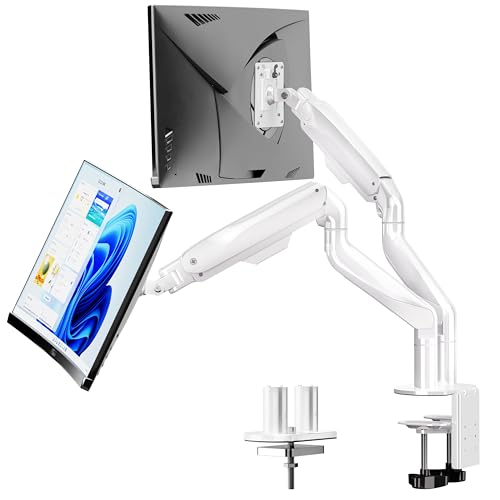
BIZUM Dual Monitor Stand for 17″-42″, White

HUANUO FlowLift Pro Monitor Arm (MechaSpring)

Suptek Free-Standing Dual Monitor Stand (ML6802)
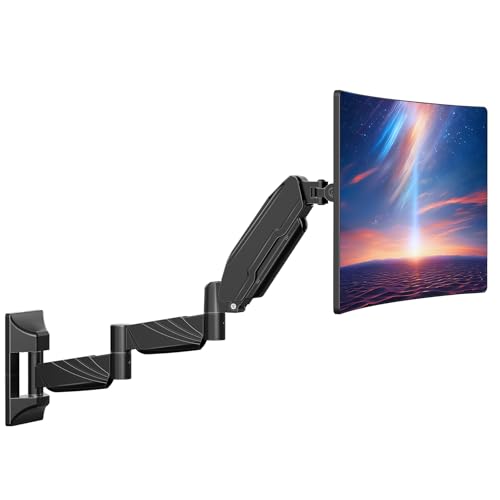
ErgoFocus Long Arm Monitor Wall Mount

PUTORSEN Laptop Desk Mount for 18″ Laptop & 17-32″ Monitor

HUANUO FlowLift Dual Monitor Stand

ARES WING Single Gaming Monitor Arm (60 lb)

HUANUO Triple Monitor Mount for 17-32″ Screens
Why These Options Stand Out
Most dual-arm mounts spread two monitors side by side. The HUANUO stacked configuration instead floats one panel above the other on a single vertical pole, which is the layout traders, programmers, and spreadsheet-heavy analysts tend to prefer. The mount accepts two screens up to 32 inches each and up to 19.8 lb per display, and it clamps onto a standard wood desk edge.
Because the screens share one pole instead of two independent arms, the whole footprint narrows dramatically. You gain back the side-to-side depth that a side-by-side setup normally steals, which is a quiet benefit on 48-inch or shallower desktops.
Reasons It Performs
- Vertical stacking frees horizontal desk depth for keyboards, notebooks, and reference binders
- Full tilt, swivel, and rotation on each panel lets you angle the top screen toward seated eye level
- VESA 75x75mm and 100x100mm mounting covers the vast majority of consumer and office panels
- Cable management channel along the pole keeps wiring from tangling across the two screens
Things To Consider
- Two screens stacked puts the top panel well above natural sightline, so callibrating seated height matters
- Single-clamp pole concentrates all the load on one desk point, so very heavy panels can stress thinner tabletops
Right Fit For
Programmers, traders, and analysts who prefer a tall two-screen layout and want their desk depth back.
Consider Something Else When
Anyone wanting true ultrawide support should look at the HUANUO HNDS7 instead, since its 26.4 lb per arm rating handles heavier displays more comfortably.
The HNDS7 is HUANUO’s answer for people running two large, heavy panels and not willing to baby the mount. Each arm carries up to 26.4 lb, and the clamp system uses a dual C-clamp design on a wider base to spread the load across the back of the desk. It also covers an unusually wide size range, from 13-inch portable screens all the way up to 40-inch ultrawides.
A built-in USB port on the base is a small but genuinely useful touch. You can park a webcam, a phone charging cable, or a desk lamp right at the clamp without reaching for the computer tower.
A Few Strong Suits
- 26.4 lb per arm easily handles 32-inch and most 34-inch ultrawide monitors
- Aluminum arm construction resists flex when the arms are fully extended outward
- Clamp and grommet base options accommodate both thick and through-hole desk installations
- Integrated USB port simplifies cable routing for charging or peripherals
Trade Offs
- Premium build carries a higher price than HUANUO’s basic FlowLift models
- Two 40-inch screens at full extension create a wide reach that needs a deeper desk to feel stable
Key Specs
Made For
Power users running two large or ultrawide monitors who want extra reach, stability, and a clean cable profile.
A Better Fit Elsewhere
Anyone on a tighter budget with smaller monitors should pick the HUANUO FlowLift Dual Monitor Stand, which handles everyday dual-screen work at a lower tier.
If your screens are genuinely heavy, the BIZUM dual mount is purpose-built for that case. It uses aviation-grade aluminum arms rated for 33.1 lb per arm, which is heavier than most dual-arm mounts in this category even attempt. The 17-to-42-inch size window also covers the largest ultrawide and curved panels on the market.
Where it stands out from the HNDS7 above is the higher per-arm weight ceiling and the slightly cleaner white finish, which matters in bright rooms and minimalist setups. The dual C-clamp base is the same general approach but tuned for higher loads.
What Earns Its Place
- 33.1 lb per arm is the heaviest rating in this roundup, ideal for 38-inch ultrawides and large curved displays
- Aviation aluminum construction keeps arm deflection low even at full extension
- White finish integrates well with bright office interiors and standing-desk setups
- Full motion articulation covers the ergonomic positions most people actually use
Points To Note
- The base footprint is wider than lighter mounts, so narrower desks lose some usable space
- Two very heavy screens at full extension may still drift slowly over time and benefit from occasional retensioning
Best Suited To
Creators and engineers running two large ultrawide or curved panels who need genuine heavy-duty support.
Look Elsewhere When
Someone running standard 27-inch office monitors doesn’t need this rating, and the HUANUO FlowLift Dual is a friendlier match.
Most gas-spring arms rely on a pressurized cylinder that can lose tension over years. The HUANUO FlowLift Pro uses a MechaSpring mechanical spring instead, which keeps its adjustment feel consistent over a much longer lifespan. For a single-monitor home office, this is one of the more refined mounts I’ve come across in this price band.
It supports 13-to-32-inch screens and up to 19.8 lb, with tool-free VESA mounting that genuinely speeds setup. The clamp and grommet base means it fits most desks between roughly 0.6 and 3.5 inches thick.
A Strong Showing
- MechaSpring mechanism avoids the slow tension loss common with gas cylinders
- Tool-free VESA plate speeds up installation for anyone who dislikes fiddly thumbscrews
- Smooth tilt, swivel, and rotation across the full ergonomic range
- Wide clamp range fits most standard desks without modification
Honest Caveats
- Mechanical springs tend to feel slightly stiffer at the bottom of the travel, so the initial height tuning may take a few attempts
- Single-arm design means no second screen without buying a separate mount
Who It Suits Best
Single-monitor home office workers who want a clean, long-lasting mount and a quick setup.
Swap It Out When
Anyone running two screens should step up to the HUANUO FlowLift Dual Monitor Stand for a matched pair.
The Suptek ML6802 takes a different approach from every other entry here: it sits on the desk as a freestanding base instead of clamping to it. The 31.5-inch center pole gives it a noticeably tall lift range, which is useful for anyone above average height or for sit-stand desks that need extra vertical travel.
It fits two screens up to 32 inches each at up to 22 lb per monitor, with a 360-degree rotation on each panel. For renters, glass desks, or anyone whose landlord frowns on clamp holes, this is one of the more practical shapes on the market.
Standout Benefits
- Freestanding base requires zero desk modification, ideal for renters and glass-top desks
- Extra-tall pole offers more headroom than most clamp-based mounts for tall users
- Full 360-degree rotation per panel supports portrait orientation layouts
- Moveable design lets you reposition the whole rig without unmounting
Less Ideal Details
- Freestanding base occupies desk surface area that a clamp mount would leave clear
- Lower per-monitor weight ceiling than the BIZUM and HNDS7, so it’s less suited to ultrawides
Perfect Match For
Renters, glass-desk owners, and tall users who can’t or won’t drill into their furniture.
Reach For A Different Pick When
Anyone with a sturdy wood desk and heavier screens should consider the BIZUM dual mount for its 33.1 lb per arm capacity.
The ErgoFocus breaks the desk-mount pattern entirely. Instead of a clamp, it bolts to the wall and offers a 27.97-inch arm reach, which is meaningfully longer than the typical 21.6-inch desk-mount arm. For tight spaces, clinical workstations, or anyone running a keyboard tray pulled close to the body, that extra reach makes the screen feel properly floating rather than crammed over the keyboard.
It’s a single-arm mount rated for screens up to 32 inches and 17.6 lb. The catch is the obvious one: this needs wall studs or solid masonry to anchor into, so it’s not a quick install.
Everyday Wins
- Extended reach floats the screen away from the desk, ideal for compact workstations
- Wall mounting clears the desk surface completely, no clamp or base footprint
- Full motion articulation covers tilt, swivel, and rotation for ergonomic adjustments
- Clean install for clinics, reception desks, and standing-desk conversions
Potential Drawbacks
- Requires wall studs or masonry, not a good match for hollow drywall without reinforcement
- 17.6 lb weight limit rules out larger ultrawide panels
Who Should Grab It
Anyone working in a compact space, a clinical or reception setting, or anyone wanting a truly floating screen position.
Not Your Match When
Standard home office users on a regular wood desk will find the HUANUO FlowLift Pro easier to install for similar daily ergonomics.
Most monitor arms assume you’ll always have a monitor. The PUTORSEN mounts either a laptop up to 18 inches or a 17-to-32-inch monitor, with a removable laptop tray that swaps in or out depending on the day’s workflow. That flexibility is the whole point.
It supports up to 19.84 lb monitors and 11 lb laptops on its three-section spring arm, with up to 831mm of reach. The trade-off is that the laptop tray adds bulk when attached, so the rig looks more substantial than a pure monitor mount.
Strengths Worth Knowing
- Two-in-one design swaps between VESA-mounted monitor and laptop tray without changing the base
- Three-section arm extends to 831mm, useful for deeper sit-stand desks
- Removable tray means you only carry the bulk when you need the laptop mode
- Compatible with VESA 75x75mm and 100x100mm patterns
Points To Keep In Mind
- Laptop tray mode takes up noticeable vertical space, so seated ergonomics need careful adjustment
- 11 lb laptop ceiling excludes heavier mobile workstations like gaming or render laptops
Key Specs
Whose Shelf It Belongs On
Hybrid workers who regularly switch between docked laptops and external monitors at the same desk.
Skip It When
Dedicated desktop users without a regular laptop workflow should pick a pure monitor mount like the HUANUO FlowLift Pro instead.
The original HUANUO FlowLift dual is the model that built the brand’s reputation in this category, and it’s still a sensible default for the everyday dual-screen setup. It fits two screens between 13 and 32 inches, with each arm holding 4.4 to 19.8 lb. For a pair of 24-inch or 27-inch office monitors, that’s the sweet spot.
Unlike the Pro single-arm version earlier in this list, this one uses a more conventional gas-spring system. That means smoother initial travel, but a slight chance of tension drift after years of heavy adjustment cycles.
Everyday Advantages
- Each arm handles the standard 24-inch to 27-inch office monitor range comfortably
- Gas-spring action feels light and smooth out of the box
- C-clamp and grommet base covers most desk installation scenarios
- Full motion range supports tilt, swivel, and rotation on each panel
Where It May Fall Short
- 19.8 lb per arm ceiling is below the BIZUM and HNDS7 for heavier ultrawide panels
- Gas-spring tension may drift after years of frequent height changes, depending on use
At A Glance
The Right Fit
Home and small-office workers running two standard-size monitors who want a balanced, mid-priced dual mount.
Where Another Pick Suits Better
Anyone with two large ultrawides should choose the HUANUO HNDS7 for the higher 26.4 lb per arm rating.
The ARES WING is built for the upper end of the screen-size market: 24-inch panels all the way up to 57-inch monsters, including the 49-inch and 55-inch ultrawides popular with sim racers and console-curved PC gamers. The 60 lb weight capacity is the headline number here, well above what most home mounts attempt.
The white finish and angular e-sports styling make it visually obvious in a gaming setup, which is either a feature or a drawback depending on your taste. In a creator’s studio, it disappears more cleanly in black or gray.
What It Does Well
- 60 lb capacity handles the largest ultrawides and most 55-inch screens on the market
- 24-to-57-inch range covers gaming, sim racing, and creator workflows
- Strong e-sports aesthetic that complements modern gaming battlestations
- Full motion articulation for tilt, swivel, and rotation
Factors To Consider
- Single-arm design limits you to one screen without an additional mount
- The bright white finish stands out in non-gaming environments
Who Will Love This
Gamers and creators running a single massive ultrawide or super-ultrawide who need a mount that won’t buckle under the load.
Another Choice May Suit
Anyone setting up two monitors should pick the BIZUM dual mount, which provides similar heavy-duty support across a wider rig.
The HUANUO triple monitor mount closes the list because it solves a problem the dual-arm mounts can’t: three side-by-side screens from a single clamp. It accepts three 17-to-32-inch panels between 4.4 and 17.6 lb each, with full tilt, swivel, and rotation across the set.
This is the configuration traders, dispatch operators, and serious multitaskers run, and it needs more desk depth than a dual setup. The honest read is that triple mounts always feel more imposing on a desk than dual ones, even when the engineering is solid.
A Favorable Mix
- Three independent arms keep the center screen fully adjustable rather than fixed
- One clamp installation covers the entire triple-screen setup
- Compatible with VESA 75x75mm and 100x100mm on every panel
- Cable management path along the pole keeps wiring clean across all three screens
Possible Compromises
- 17.6 lb per screen ceiling excludes heavier 32-inch curved panels
- Triple-monitor rigs need 48-inch or wider desks to feel balanced
- One clamp supporting three loads concentrates stress on a single desk point
Feature Snapshot
Built With In Mind
Traders, dispatchers, and power multitaskers who want three independent screens on one clamp.
Swap It Out When
Anyone running only two screens should pick the HUANUO HNDS7 for a steadier per-arm rating and cleaner fit.
Choosing A Mount That Actually Fits Your Desk
Start with the screen you have, not the mount you want. The two numbers that decide compatibility before anything else are the VESA mounting pattern (VESA is the standardized bolt-hole spacing on the back of your monitor, either 75x75mm or 100x100mm for most consumer panels) and the screen’s weight. Every mount in this roundup lists both, and exceeding either will cause sagging or outright failure.
Next, think about desk thickness and edge style. Clamp mounts work best on solid wood edges between roughly 0.6 and 3.5 inches thick. Glass desks, hollow-core furniture, and standing desks with thick tops may need a grommet hole or the freestanding Suptek option. Wall mounting sidesteps all of this but introduces a stud requirement that not every wall can satisfy.
Finally, decide on dual versus single. Most home offices benefit more from a single well-positioned screen than from a wobbly dual setup, but if your work genuinely spans two applications, the dual arms here run from the budget FlowLift dual all the way up to the heavy-duty BIZUM rig.
Key Considerations Across These Picks
Where Shoppers Go Wrong
The most common slip-up I see is buying on screen size alone. A 32-inch monitor that weighs 25 lb is fine for the BIZUM and HNDS7 but over the ceiling for the FlowLift models. Always cross-check the weight spec against the arm’s rated capacity before committing, and remember that ultrawide panels tend to weigh more than their flat counterparts at the same screen size. The other frequent mistake is overlooking desk thickness: a clamp that opens to 3.5 inches still needs the desk edge to be solid wood or a similar rigid material.
Where The Extra Money Goes
Spending more on a mount usually buys three things: higher per-arm weight capacity, longer-term consistency in the spring mechanism, and stronger base hardware. The HUANUO HNDS7 and BIZUM models charge more because their aluminum arms and dual C-clamps handle heavier panels without flex. The MechaSpring single-arm model costs a bit more than a basic gas-spring arm because that mechanical spring resists the slow tension drift that cylinders develop over years. For most people running standard 24-to-27-inch monitors, a mid-tier mount is enough. For ultrawide or triple-screen setups, the upgrade tends to pay off in stability and lifespan.
Frequently Asked Questions
What Does VESA Mounting Mean For My Monitor?
VESA refers to the four-hole pattern on the back of your monitor used to attach a mount. Most consumer monitors use either 75x75mm or 100x100mm spacing. Every mount in this roundup supports both, but you should still verify your monitor’s exact pattern in its spec sheet before ordering.
How Do I Know If My Desk Can Handle A Clamp Mount?
Check the edge thickness first. Most clamp mounts work on desks between roughly 0.6 and 3.5 inches thick. Solid wood and thick MDF edges clamp securely, while glass, hollow-core, or particleboard edges may need a grommet-base mount or a freestanding pole design instead.
Are Gas Spring Arms Reliable Over Time?
Gas spring arms work well out of the box but can lose tension slowly after years of frequent height changes. Mechanical spring arms like the HUANUO FlowLift Pro avoid this drift entirely, which is the main reason they tend to last longer in heavy-use setups.
Can One Mount Hold A Curved Ultrawide Panel?
Yes, provided the weight falls within the mount’s capacity. Curved ultrawides typically need a higher per-arm weight rating, which is why the BIZUM dual and HNDS7 are the better fits for that category than lighter gas-spring models.
Is A Wall Mount Worth It Over A Desk Clamp?
For compact desks and clinical setups, yes. Wall mounting clears the desk surface completely and offers longer arm reach than most clamps. The trade-off is the install requirement, since the wall needs studs or solid masonry to anchor into safely.
Closing Remarks
Any of these mounts will improve your setup, but the right one depends on the screen you have, the desk you sit at, and the kind of work you do across the day. Match the weight and VESA pattern first, then choose the shape that suits your layout. A mount that matches your actual workflow beats a fancier one that fights it every morning.