Stepping into PC gaming can feel overwhelming, and choosing the right first machine often determines whether the hobby sticks. Entry level gaming laptops exist for that exact moment, balancing price, frame rates, and build quality without demanding a full setup. I’ve spent time comparing specs, reading feedback patterns, and thinking through the daily realities of a first gaming rig, and these five represent the most sensible starting points for 2026.
The Leading Options At A Glance
HP OmniBook 5 16 inch Next Gen AI PC, 2K Display, Snapdragon X1-26-100, 16GB RAM, 512GB SSD, Glacier Silver

Acer Nitro 5 Gaming Laptop, 9th Gen i5-9300H, GTX 1650, 15.6″ Full HD IPS, 8GB DDR4, 256GB NVMe SSD
HP OmniBook 3 14 inch Next Gen AI PC, 2K Display, Snapdragon X1-26-100, 16GB RAM, 512GB SSD, Glacier Silver
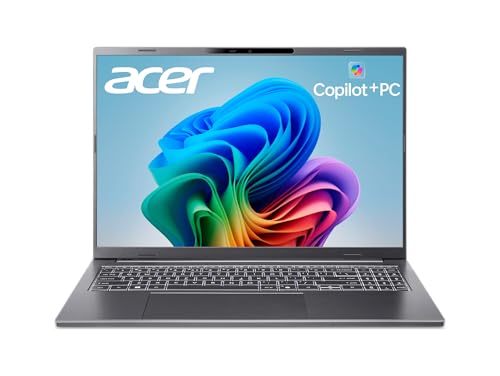
acer Aspire 16 AI Copilot+ PC, 16″ WUXGA 120Hz Multi-Touch, Snapdragon X1-26-100, 16GB LPDDR5X, 512GB SSD, Wi-Fi 7

acer Nitro 5 Gaming Laptop, 10th Gen i5-10300H, GTX 1650 Ti, 15.6″ Full HD IPS 144Hz, 8GB DDR4, 256GB NVMe SSD
Why These Options Stand Out
The HP OmniBook 5 16 inch leans heavily into the everyday laptop side of things, with a Snapdragon X chip (a type of ARM-based mobile processor designed for efficiency) paired with 16 GB of RAM and a roomy 16-inch 2K panel. For a newcomer who wants one machine for class, streaming, and lighter gaming on the side, that combination feels measured rather than extreme. I think of it as a productivity laptop with gaming curiosity baked in, not the other way around.
The big 2K display gives text, video, and casual titles more breathing room than a 1080p screen at this size. Battery life is the headline feature, since Qualcomm’s ARM architecture is designed for endurance rather than peak throughput. For someone who values unplugged sessions more than frame rates, this is the friendlier starting point of the list.
A Favorable Mix
- 16-inch 2K panel gives sharper image clarity than typical 1080p laptops at this class.
- Snapdragon X chip with 16 GB RAM handles multitasking and modern productivity apps efficiently.
- 512 GB SSD leaves room for a starter game library and software without immediate upgrades.
- Glacier Silver chassis feels closer to a clean office aesthetic than a chunky gaming look.
Things To Consider
- Qualcomm Adreno integrated graphics won’t run heavy AAA titles smoothly; this is for lighter or cloud-based play.
- Windows on ARM (a processor architecture that handles instructions differently from traditional Intel/AMD chips) can occasionally need app compatibility workarounds.
Quick Facts
Who It Suits Best
First-time shoppers who want a polished everyday laptop with light gaming on the side, especially students or remote workers who value battery life.
Where Another Pick Suits Better
The Acer Nitro 5 AN515-54-5812 is a better match for someone whose priority is running real PC games locally at decent frame rates.
This Acer Nitro 5 AN515-54-5812 is the most traditional entry-gaming laptop in the lineup, and that is part of its appeal. The combination of an Intel Core i5-9300H (a quad-core mobile CPU from the 9th generation, capable of boosting up to 4.1 GHz under load) and a GTX 1650 (a dedicated graphics card designed for 1080p gaming) gives it a clear leg up over integrated graphics options like the HP OmniBook 5. For a newcomer who wants to actually play games rather than stream them, that dedicated GPU matters.
The 15.6-inch Full HD IPS display (a screen technology that delivers wide viewing angles and consistent color) keeps visuals honest at 1080p, and Wi-Fi 6 support means a stable wireless connection for online play. The chassis leans into the gaming aesthetic with a backlit keyboard, which doubles nicely for late-night typing sessions. It feels like a true starter gaming machine, not a productivity laptop pretending.
Practical Pluses
- Dedicated GTX 1650 GPU handles real PC games at 1080p, unlike integrated graphics.
- 9th-gen Intel Core i5 with boost speeds up to 4.1 GHz keeps gameplay responsive.
- NVMe SSD (a fast solid-state drive that connects directly to the PCIe bus for quick data transfer) shortens load times significantly.
- Backlit keyboard aids both late gaming sessions and dim typing environments.
Worth Noting
- 8 GB of RAM is the minimum for modern gaming; expect to upgrade for heavier titles.
- 256 GB SSD fills up fast with modern installs; most owners add storage or use the available M.2 slot.
- 9th-gen Intel chip is older, so long-term software support will be shorter than newer picks.
Best Suited To
First-time gaming laptop shoppers who want a real dedicated GPU and are comfortable with a slightly older platform that still handles current 1080p titles well.
Look Elsewhere When
The acer Nitro 5 AN515-55-59KS fits better when esports players want a 144Hz display for smoother motion in competitive titles.
The HP OmniBook 3 14 inch takes everything appealing about its bigger sibling and shrinks it into a smaller, easier-to-carry package. A 14-inch 2K display is a sweet spot for portability without sacrificing sharpness, and the same Snapdragon X platform handles daily workloads with the same efficiency. Compared to the OmniBook 5’s 16-inch chassis, this one slips into a backpack without the bulk.
For commuters, students, and remote workers who travel often, the smaller footprint changes daily life. You give up some screen real estate, but for casual gaming and cloud streaming, the trade makes sense. I would suggest it as the practical second choice over the larger OmniBook for anyone whose gaming happens between classes or meetings.
Everyday Wins
- 14-inch form factor slips into backpacks and tight desks easily.
- 2K resolution at this size gives crisp text and detailed visuals.
- Snapdragon X chip plus 16 GB RAM keeps multitasking fluid on the road.
- 512 GB SSD offers the same generous starting storage as larger siblings.
Honest Caveats
- Smaller screen means less immersion for story-driven games compared to the 16-inch OmniBook 5.
- Adreno integrated graphics still limit play to lighter or cloud-streamed titles.
Feature Snapshot
Made For
Commuters and students who want a compact, efficient laptop with light gaming capability and long battery life in a travel-ready shell.
Consider Something Else When
The HP OmniBook 5 16 inch suits better when screen size matters more than portability for gaming sessions at home.
The acer Aspire 16 AI Copilot+ PC is the most forward-looking machine in the list, with Wi-Fi 7 (the newest wireless standard offering faster speeds and lower latency than Wi-Fi 6), a 120Hz multi-touch display, and a 45 TOPS NPU (a neural processing unit dedicated to handling AI tasks like background noise removal and on-device assistants) for on-device AI work. For someone split between productivity, creative tinkering, and casual play, this one quietly covers more bases than its specs suggest at first glance.
The 16-inch WUXGA panel at 120Hz gives smoother scrolling and visual feedback than standard 60Hz screens, which matters more than people expect for everyday comfort. Multi-touch adds a tablet-like option for scrolling through documents or sketching in supported apps. Realistically, this is a hybrid work laptop first and a gaming machine second, much like the OmniBook 5, but with newer connectivity and display tech.
Useful Touches
- 120Hz refresh rate makes scrolling, menus, and lighter games feel noticeably smoother.
- Wi-Fi 7 future-proofs wireless speed for years of router upgrades ahead.
- Multi-touch display adds flexibility for creative and document workflows.
- 16 GB LPDDR5X memory (a faster, more power-efficient RAM standard) keeps multitasking responsive.
- 45 TOPS NPU handles AI tasks locally rather than relying on cloud servers.
Trade Offs
- Integrated graphics still restrict heavy AAA gaming.
- 16-inch touchscreen form factor weighs more than the 14-inch OmniBook 3.
Perfect Match For
Hybrid workers and creative hobbyists who want modern connectivity, a smooth touchscreen, and light gaming in one dependable daily driver.
A Better Fit Elsewhere
The acer Nitro 5 AN515-55-59KS makes more sense when dedicated gaming performance matters more than display and connectivity extras.
The second Nitro 5 on the list upgrades the recipe with a 144Hz display and a GTX 1650 Ti (a slightly faster version of the GTX 1650, with GDDR6 memory for better bandwidth), making it the most performance-oriented entry option here. The 10th-gen Intel Core i5-10300H pushes turbo speeds up to 4.5 GHz, which gives competitive games a little more headroom than the older AN515-54-5812. For esports fans playing Valorant, CS2, or Fortnite at high refresh, this is the clear pick of the five.
Higher refresh screens only shine when the GPU can push frame rates to match, and the GTX 1650 Ti handles that at 1080p in lighter competitive titles. The trade is the same 8 GB RAM and 256 GB storage ceiling as its sibling, so storage upgrades are almost inevitable for anyone with a moderate game library. Still, for the target audience, none of the other picks here deliver that smoother motion.
A Few Strong Suits
- 144Hz IPS display delivers visibly smoother motion for competitive gameplay.
- GTX 1650 Ti with GDDR6 memory pushes higher frame rates than the standard GTX 1650.
- 10th-gen Intel chip with up to 4.5 GHz turbo handles modern game logic without stalling.
- DTS X Ultra audio adds depth to headphone sessions out of the box.
Points To Note
- 8 GB RAM is the same baseline as the older Nitro 5, so multitasking limits remain.
- 256 GB SSD fills quickly with larger modern titles.
- 10th-gen Intel platform is now a few generations behind current options.
- Gaming chassis is bulkier than the slim OmniBook options for daily commuting.
Key Product Details
Who Should Grab It
Esports players and fast-paced competitive gamers who care most about high refresh and smooth motion in entry-level titles.
Swap It Out When
The Acer Nitro 5 AN515-54-5812 fits better when budget is the priority and 144Hz is less important than overall value.
What To Weigh Before Choosing Your First Gaming Laptop
Picking a first gaming laptop comes down to matching hardware to how you actually play, not chasing the highest numbers on a spec sheet. Dedicated graphics matter more than raw CPU speed for most modern titles, and RAM at 8 GB is the realistic floor for entry gaming today. Refresh rate is easy to overlook, but a 144Hz panel feels meaningfully smoother in competitive play than a 60Hz one, even at the same resolution.
Storage deserves real attention because modern game installs balloon quickly. A 256 GB SSD fills up within a handful of larger titles, so consider whether the laptop has an open M.2 slot (a small internal connector that lets you add another SSD) for later expansion. Display size is another quiet decision: 14-inch machines travel better, while 15.6-inch and 16-inch panels give more room to enjoy story-driven games.
Battery life and weight shape daily usability just as much as game performance. Snapdragon-based picks like the OmniBook 5 and OmniBook 3 trade raw GPU power for longer unplugged sessions, which matters for students and commuters more than plugged-in desk players. Whichever path you lean toward, plan for at least one storage upgrade within the first year of ownership.
Key Considerations Across These Picks
Where Shoppers Go Wrong
A common trap is choosing the cheapest option with the biggest screen and overlooking whether it has a dedicated GPU at all. Integrated graphics handle productivity fine, but they struggle with most modern games, leaving newcomers disappointed after a week of use. Another mistake is ignoring thermals and build, since entry gaming laptops can run hot and loud under sustained load.
Where The Extra Money Goes
Stepping up from a 60Hz to 144Hz panel, or from integrated graphics to a dedicated GTX card, changes the gaming experience more than doubling RAM or storage does. Higher tiers usually add better cooling systems, faster memory, and longer platform support. If the budget allows, investing in a dedicated GPU and a smoother screen pays off across every game you will play, not just one or two titles.
Frequently Asked Questions
What specs matter most in an entry level gaming laptop?
A dedicated graphics card and at least 8 GB of RAM matter most, since the GPU drives frame rates in modern games.
Can entry level gaming laptops handle modern AAA titles?
They handle lighter AAA and esports titles at 1080p, though heavier recent releases often need reduced settings or lower resolutions.
Is a 144Hz display worth it for beginners?
It is worth it for competitive players who play fast-paced esports, while casual gamers often do not notice the difference from 60Hz screens.
How much storage do I really need?
Plan for at least 512 GB to hold a starter library comfortably, since modern games often exceed 50 GB each.
Should beginners prioritize battery life or performance?
Battery life suits commuters and students best, while plugged-in desk players should prioritize dedicated graphics for smoother gameplay.
Bottom Line
Your first gaming laptop should match how you actually play, whether that means long battery days on campus or plugged-in competitive evenings at home. The five options here each lean into a different priority, so the honest choice depends on which trade-off feels right for your situation. Take your time, read the specs that matter to your favorite games, and pick the one that fits your routine rather than someone else’s.