A desktop PC pulls in dust like a quiet magnet, and keyboards trap crumbs, hair, and lint between keys faster than any other spot in the house. Canned air works for a while, but the cost stacks up and the propellant leaves a faint residue on sensitive electronics. I’ve spent enough time watching friends fight grimy fans with a straw and a prayer to know that a rechargeable electric duster pays for itself in a few months of regular use.
The picks below lean on three things I trust: brushless motors with real RPM figures, swappable nozzles for tight crevices, and batteries that hold enough charge to finish a full tower clean. Each one handles a slightly different use case, from quick keyboard touch-ups to weekly gaming-rig maintenance.
The Picks In Brief

AOTONOK Compressed Air Duster, 4-Speed Adjustable

KAJICOO 130000RPM Electric Air Duster 4-Gear Adjustable

HolyPoint 110000RPM Electric Air Duster 3-Speed Cordless
WOLFBOX MF60 Compressed Air Duster 3-Speed

WOLFBOX MF70 Compressed Air Duster 3-Speed Adjustable

WOLFBOX MF100 Compressed Air Duster 150000RPM Turbo Fan

WOLFBOX MF200-2PK Compressed Air Duster 2 Batteries & Case

WOLFBOX MegaFlow 50 Compressed Air Duster 3-Gear Adjustable

WOLFBOX MF200 Compressed Air Duster Removable Battery

Glowsky 2-in-1 130000RPM Cordless Air Blower
What Each Pick Brings To The Table
The AOTONOK feels like the gentle entry point into electric dusters, which is exactly why I keep recommending it to friends who have never owned one. Four speed steps mean a beginner can start low on a delicate mechanical keyboard and work up to stubborn vents without guessing whether the airflow is too aggressive.
For a small home office or a single gaming setup, the power range covers the everyday messes most people deal with. It also makes a sensible gift for someone who keeps asking to borrow your canned air.
Where It Helps
- Four speed steps let you match airflow to the surface, from delicate keycaps to chunky vent grilles.
- Adjustable settings reduce the chance of blowing dust deeper into a case instead of out.
- A solid starter option that costs less than a yearly habit of disposable cans.
- Cordless design clears cable clutter from your desk during cleanup.
Things To Consider
- Runtime on higher gears tends to be shorter, so plan big jobs in short bursts.
- Owners commonly report that the included nozzle set is basic, and third-party tips improve reach.
Who It Suits Best
First-time electric duster owners cleaning a single PC and a keyboard on a weekly schedule.
Where Another Pick Suits Better
The WOLFBOX MF200 is a better match for tech pros who run multi-hour cleaning sessions and need a swappable battery.
The KAJICOO pulls double duty, and that matters more than the headline RPM figure once you actually start using it. A 150-watt motor spinning at 130000 RPM handles deep dust, while the vacuum side picks up crumbs that would otherwise scatter across the desk.
Type-C fast charging is a small touch that adds up over time, and the four-gear range gives finer control than the AOTONOK I started with. For someone who cleans a PC and a car seat in the same afternoon, the combo design replaces two separate tools.
Notable Gains
- Blower and vacuum modes share one motor, saving drawer space.
- Type-C charging works with the same cable as most modern laptops and phones.
- Four speed settings cover light dusting and stubborn debris in one session.
- Built-in LED light helps spot dust inside dark PC cases.
Worth Noting
- The vacuum mode collects fine debris in a small chamber that needs emptying mid-job on bigger cleans.
- Switching between modes takes a moment, so it is less convenient for back-to-back spot jobs.
Made For
Households that want one tool for keyboards, car interiors, and the occasional pool float inflation.
Consider Something Else When
The WOLFBOX MF100 makes more sense if pure blower force on heavy dust is your top priority.
HolyPoint leans into raw airflow, and the spec sheet reads like it belongs in a workshop rather than a desk drawer. A 120W brushless motor drives the fan hard enough to push dust out of radiator fins and PC cases without multiple passes.
I would reach for this one when a gaming tower has gone six months without attention, or when pet hair has worked its way into every crevice. It is overkill for a clean build, but it pays off when the job is genuinely grimy.
What Works In Its Favor
- 110000RPM brushless motor pushes stubborn dust out in fewer passes.
- Three-speed range keeps the lowest setting gentle enough for fan blades.
- Rechargeable design removes the cost and waste of disposable cans.
Trade Offs
- At top speed, runtime drops fast, so a full tower clean may need a recharge break.
- The higher airflow can scatter lightweight debris if you hold the nozzle too close.
Best Suited To
Gaming PC owners and hobbyists who deep-clean their towers every few weeks.
Not Your Match When
The WOLFBOX MegaFlow 50 is a friendlier option for someone who only needs a light weekly dusting.
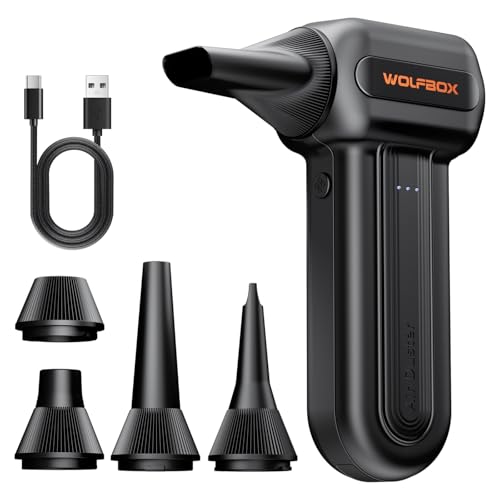
Half a pound changes how often I actually pick a tool up, and the MF60 lands at a weight I forget I am holding. The three speeds cover the standard low-medium-high pattern, which is enough for most keyboards and case interiors.
The MF60 also travels well, slipping into a laptop bag without weighing down the strap. For someone whose cleaning happens at home and on the road, the lighter frame is the real selling point.
Reasons It Performs
- 0.5 lb weight reduces wrist fatigue during longer sessions.
- Three-speed control adapts to keyboards, vents, and car crevices.
- Fast charging minimizes downtime between cleans.
- Cordless body reaches awkward spots without dragging a cable.
Points To Keep In Mind
- Compact size means a smaller battery, so top-speed sessions run short.
- Air output is gentler than the heavier MF100, which shows up on thick dust layers.
Who Should Grab It
Travelers and remote workers who want a featherweight duster that fits in a laptop bag.
Look Elsewhere When
The WOLFBOX MF200-2PK is worth the upgrade for shop owners who clean multiple setups a day.
Quick Facts
The MF70 sits in a comfortable middle spot, with the same 110000RPM ceiling as the lighter MF60 but a slightly larger body that holds more charge. It is the model I would hand to a family member without hesitation because the controls stay simple.
Three speeds is enough for a typical home setup, and the build feels solid without tipping into heavy. For predictable weekly cleanups, the MF70 rarely disappoints.
Useful Highlights
- Three-step airflow suits keyboards, desktops, and vents alike.
- Larger battery than the MF60, so longer sessions finish on one charge.
- Cordless design is forgiving in tight desk layouts.
Honest Caveats
- No swappable battery, so downtime requires a charge cycle.
- The included nozzle kit leans basic, and aftermarket tips help with tight spots.
The Right Fit
Home users who want a dependable mid-range duster for a weekly cleanup routine.
A Better Fit Elsewhere
The HolyPoint 110000RPM duster suits someone who needs stronger airflow for gaming builds.
The MF100 is the most powerful blower in the WOLFBOX line, and the 45 m/s airflow figure is the kind of number I notice when dust really does lift off on the first pass. The included five nozzles and two brushes let me cover everything from GPU fins to camera sensors without swapping tools.
For a workshop bench or a multi-PC setup, the extra force matters more than the added weight. I would not recommend it as a first duster, but for someone who already knows what they need, the MF100 is hard to argue with.
A Few Strong Suits
- 150000RPM motor delivers serious airflow for thick dust and pet hair.
- Five nozzles and two brushes handle everything from keyboards to camera sensors.
- Three-speed range keeps the lowest setting gentle enough for delicate work.
- Reusable design pays back the cost over a year of canned air.
Room For Improvement
- Heavier than the MF60 and MF70, so longer sessions tire the wrist.
- Top-speed runtime is shorter, which limits marathon cleaning days.
Whose Shelf It Belongs On
PC enthusiasts, content creators, and detailers who clean equipment regularly and need real force.
Swap It Out When
The WOLFBOX MF200-2PK is the better choice for someone who needs uninterrupted run time.
Feature Snapshot
Two batteries and a hardshell case change the rhythm of cleaning, especially when the job spans more than one rig. The MF200-2PK is built for the kind of detail work where stopping to charge mid-task is not an option.
This is the kit I would keep in a workshop drawer or take along to client sites. The extra battery is the kind of feature you do not appreciate until you have run out of charge halfway through a build.
The Upside
- Swappable battery design eliminates mid-job downtime.
- Hardshell case keeps nozzles and batteries organized in transit.
- Hurricane-force airflow handles heavy dust and debris efficiently.
- Suitable for shop use, mobile detailing, and tech professionals.
Possible Compromises
- The kit costs more than single-battery alternatives, so it is overkill for casual use.
- Larger footprint than the compact MF50 and MF60 picks.
Built With In Mind
IT technicians, PC builders, and mobile detailers who clean equipment across multiple sites.
Reach For A Different Pick When
The WOLFBOX MF100 makes more sense for a single-workstation setup that does not need the second battery.
Key Product Details
The MegaFlow 50 is the lightest duster in the lineup at 0.45 lb, and the four included nozzles handle a wider variety of tasks than the price suggests. For someone who only needs a quick pass over a keyboard and a console once a week, it does the job without overcomplicating things.
I think of it as the friendly starter WOLFBOX, built for casual owners rather than heavy users. The 110000RPM ceiling is plenty for everyday dust, and the lower price keeps the commitment small.
What Stands Out
- 0.45 lb weight is the lightest in this lineup.
- Four included nozzles cover keyboards, vents, and small electronics.
- Fast charging keeps the duster ready between sessions.
- Reusable design replaces disposable cans over time.
Small Caveats
- Runtime at top speed is short, so heavy jobs need a recharge break.
- Airforce falls short of the MF100 and MF200 on stubborn debris.
Perfect Match For
Casual home users who want a simple, lightweight duster for occasional cleanups.
Another Choice May Suit
The WOLFBOX MF70 is a better fit for someone who wants longer runtime on the same speed range.
The MF200 introduces a removable battery system, which means the tool can keep working long after the first cell wears out. The 22.2Wh pack charges through Type-C in around two and a half hours, and the lowest setting stretches run time up to roughly 100 minutes.
For long cleaning sessions across a home or shop, the swappable design keeps things moving. Compared to the fixed-battery MF70, the MF200 trades a slight weight increase for noticeably longer continuous use.
Advantages To Know
- Removable 22.2Wh battery extends the tool’s useful lifespan.
- Up to 100 minutes of runtime on the lowest speed for big jobs.
- Type-C charging fits existing cables and power banks.
- Four charging methods add flexibility for travel and mobile work.
Factors To Consider
- Battery replacement adds cost over the life of the tool.
- Heavier than the MF50 and MF60 due to the larger battery.
Who Will Love This
Power users who run long cleaning sessions and value a replaceable battery over a featherweight body.
Where A Sibling Pick Shines
The WOLFBOX MF200-2PK is the better call for someone who wants a second battery in the box from day one.
Spec Overview
The Glowsky is another 2-in-1 blower and vacuum, with a 130000RPM brushless motor that handles daily dust on laptops, keyboards, and 3D printer beds. The compact frame makes it easy to carry from a desk to a car without much fuss.
For mixed surfaces where a vacuum side matters more than peak airflow, this is the kind of tool that earns its drawer space. The cordless design also removes one more cable from the cleaning routine.
Strong Points
- Blower and vacuum modes cover both dust and debris in one tool.
- 130000RPM brushless motor balances force with everyday usability.
- Reusable design cuts down on disposable can waste.
- Works across laptops, gaming gear, camera lenses, and car interiors.
Details To Watch
- Vacuum chamber is small, so larger cleanups need frequent emptying.
- Vacuum airflow is modest compared to dedicated shop vacs.
Right Fit For
Desk-based creators and casual users who want one tool for dusting and crumb pickup.
Skip It When
The KAJICOO 2-in-1 is a stronger alternative if you need a higher-wattage motor and an LED light.
Feature Card
What To Weigh Before Choosing A Pc Duster
A brushless motor matters more than the raw RPM number on the box. Brushless designs run cooler, last longer, and hold their speed under load, which is what separates a duster that feels powerful on day one from one that still feels powerful a year later. Cheaper brushed motors tend to lose torque as the battery drains, leaving you with weak puffs right when the job needs force.
Runtime on the lowest setting is the more honest number to compare. Top-speed runtimes look short because higher gears pull more current, so the realistic runtime is whatever the manufacturer lists for the mode you will use most. For most PC owners, that is the medium gear.
Nozzle variety changes how useful the tool actually feels. A long, thin nozzle reaches between GPU fins and case fans, while a wider nozzle moves dust off keyboards quickly. Brush attachments help with stubborn lint and pet hair on speaker grilles.
Weight and grip matter more than people expect during a full tower clean. Anything over a pound starts to tire the wrist by the third rig, and the lighter picks like the WOLFBOX MegaFlow 50 and MF60 tend to get used more often because they stay out of the way when not in use.
Key Considerations Across These Picks
Common Shopping Slip Ups
Shoppers often buy the highest RPM model on the list and forget about runtime. A 150000RPM blower that dies in eight minutes frustrates more than it helps, so matching motor speed to actual session length is the smarter move. Another mistake is ignoring the included nozzles. A duster with one generic tip is harder to use on a crowded motherboard, while a kit with five or six tips makes every job feel designed for.
What The Higher Tier Buys
Premium models like the WOLFBOX MF200-2PK and MF100 earn their price through swappable batteries, larger nozzle kits, and stronger housings. For someone cleaning one PC a month, the jump from a budget duster to a pro kit rarely pays off. For shops, detailers, and tech pros who run multiple cleans a week, the upgrade pays back in saved time and longer product life.
Frequently Asked Questions
How often should I dust my PC with an electric duster? A light pass every two to four weeks keeps fan blades and filters clear, and most owners find that monthly is enough unless pets or carpet add to the dust load.
Can an electric duster replace canned air completely? For most PC and keyboard jobs, yes. Canned air still has a niche in places where even the strongest cordless blower feels too bulky, but the gap closes every year.
Are brushless motors really worth the extra cost? In this category, brushless motors tend to last longer and hold their speed under load, which matters more than the small price difference for anyone using the tool weekly.
Is a 2-in-1 blower and vacuum better than a dedicated duster? A 2-in-1 helps when crumb pickup matters as much as dust removal, but a dedicated blower delivers stronger airflow for stubborn dust on electronics.
How do I clean the duster itself? Most models wipe down with a dry microfiber cloth, and the nozzle tips detach for occasional clearing. Owners commonly report that keeping the intake vent clear of dust extends battery life noticeably.
Bottom Line
Any of these picks will outperform a half-used can of compressed air, and the right choice comes down to how often the duster will leave the drawer. Casual owners should start with the AOTONOK or WOLFBOX MegaFlow 50, while weekly builders will appreciate the MF100’s force or the MF200-2PK’s swappable batteries. Pick the one that fits the cleaning habit, not the one with the biggest number on the box.