Most laptops ship without an optical drive now, but plenty of discs haven’t gone anywhere. Old software installers, ripped CD collections, archival photos on DVD-R, and school or office discs all still need a reader. I pulled together seven external DVD CD RW drives that handle everyday disc work across macOS, Windows, and modern USB-C laptops, paying close attention to write speed, cable design, and how each one behaves when space is tight.
A Quick View Of The Lineup

Dell External USB Slim DVD RW Drive DW316

ASUS SDRW-08D2S-U External Slim DVDRW 8X

ROOFULL External CD DVD Drive USB 3.0 Type-C

BENEWY External CD/DVD Drive USB 3.0

ROOFULL External CD DVD Drive with Hub and SD Reader

ROOFULL External CD DVD Drive with USB Hub and SD Reader
More Details On Our Top Picks
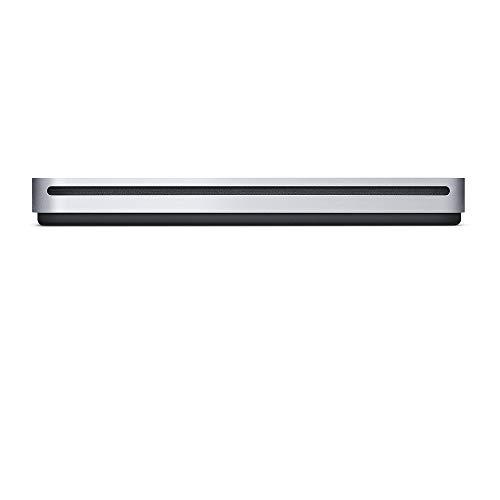
The Apple USB SuperDrive sits in a category of its own because it’s tuned specifically for macOS and built to disappear on a clean desk. Only slightly larger than a standard CD case, it slips next to a closed MacBook in a commuter sleeve without adding noticeable weight. The integrated USB Type-A cable tucks into the body when not in use, which solves the usual tangle of accessories that come with a portable writer.
Setup is genuinely minimal, and the drive draws all of its power through that single USB connection. Apple owners who want one less wall adapter in the bag will appreciate that. Disc reading and burning for both CDs and DVDs work through Finder or compatible macOS apps, so there’s no extra software to chase down. Where it differs from the Dell DW316 is polish and platform fit; where it differs from the ASUS below is form factor discipline.
Useful Highlights
- Slim, Apple-matched aluminum body looks at home next to any MacBook or iMac on a minimalist desk.
- Integrated USB Type-A cable means no separate power brick and nothing to forget when traveling.
- Plug-and-disc experience under macOS removes the usual driver hunt for routine CD and DVD work.
- Compact enough for daily commuters and frequent flyers who want one less thing in the bag.
Things To Consider
- USB Type-A only, so newer MacBook models with only USB-C ports will need a separate adapter or dock.
- Less versatile on Windows or Linux machines, where functionality may be inconsistent depending on the OS build.
- The slot-load tray demands clean, undamaged discs; warped or heavily scratched media can stall the mechanism.
Feature Snapshot
Made For
MacBook and iMac owners who want a sleek, Mac-native writer that lives quietly in a bag or on a clean workspace.
Consider Something Else When
The ROOFULL External CD DVD Drive with Hub and SD Reader is a smarter match for hybrid Windows and Mac users who need extra USB ports and a card reader in the same device.
The Dell DW316 was built with the Ultrabook crowd in mind, and that focus shows. The chassis measures about 14mm thick and weighs roughly 200g, so it disappears into the same sleeve as most 13-inch notebooks. Compared with the Apple SuperDrive’s fixed USB Type-A cable, this one uses a separate USB cord that gives you more reach on a cluttered desk.
Plug-and-play means most users drop it in and start burning within minutes, no driver scavenger hunt required. Dell ships the drive with CyberLink Media Suite pre-installed, which handles disc burning and basic playback without extra purchases. For someone with a small workspace or a thin laptop, the footprint is the real story; this is the most tossable unit in the roundup after the Apple.
Useful Strengths
- 14mm thin body and 200g weight make it one of the easiest external writers to carry daily.
- Plug-and-play setup works smoothly across Windows notebooks without extra drivers.
- Pre-loaded CyberLink Media Suite handles playback and disc burning right out of the box.
- Standard USB connection means compatibility with older ports that aren’t USB-C.
Worth Noting
- No USB-C cable included, so newer thin laptops without Type-A ports will need a separate adapter.
- Mac users may find the bundled CyberLink software redundant or incompatible depending on the macOS version.
- The matte plastic shell tends to show scuffs in a backpack over months of daily travel.
Quick Facts
Right Fit For
Ultrabook owners who carry their laptop between locations and want a thin, plug-and-play writer for routine disc tasks.
Look Elsewhere When
Modern USB-C-only laptop owners should consider the ROOFULL External CD DVD Drive USB 3.0 Type-C for a native Type-C plug.
The ASUS SDRW-08D2S-U leans hard into aesthetics, and the diamond-cut pattern on the lid gives it the look of a small jewelry box rather than a typical optical drive. It’s a 8x read and write unit, which lines up with the write speed of every other external DVD writer on the market today. Where the Dell DW316 plays it plain, this one wants a visible spot on the desk.
Functionally, the disc tray opens smoothly and supports standard 12cm CD and DVD media. Burning software varies by region, so users may need to pair it with their preferred burning app for full Blu-ray-free DVD functionality. I think of this as the writer for someone who keeps their workspace visually intentional and wants the drive to feel like part of the setup, not an afterthought.
What Helps Most
- Diamond-cut lid pattern adds a distinct visual accent that most plastic external drives lack.
- 8x read and write speed keeps full-disc DVD burns under ten minutes on compatible media.
- Slim chassis fits easily next to a laptop on a standing-desk converter without crowding the surface.
- Drag-and-burn software simplifies one-off disc tasks for less technical users.
Trade Offs
- The glossy lid shows fingerprints and dust within minutes of handling, so regular wiping is part of ownership.
- Bundled burning software can be limited, often pushing users toward third-party apps for full feature access.
- No native USB-C support means USB-C-only laptops require an adapter or hub.
Built With In Mind
Style-conscious users who keep an attractive workspace and want a slim writer that visually complements a curated desk.
A Better Fit Elsewhere
Photographers and creators who need an SD card reader should look at the ROOFULL External CD DVD Drive with Hub and SD Reader instead.
ROOFULL keeps this model focused on the disc job itself, leaving hub ports and card readers to siblings in its lineup. The integrated cable splits into USB Type-A and Type-C plugs at the laptop end, so it works with both a 2024 MacBook Air and an older Dell workstation without a dongle. That alone solves the most common complaint with picks like the Dell DW316, which assumes a USB-A port.
An extra power cord is included in the box for low-power USB-C ports that struggle to feed the drive on their own, which is the right call for thin-and-light machines. Performance lands in line with other 8x external writers, and the unit skips the bundled bloatware that often accompanies consumer optical drives. For most people who just need discs to work on a modern laptop, this is the cleanest path.
Practical Pluses
- Dual USB-A and USB-C plug head means no adapter is needed for current-generation laptops.
- Included auxiliary power cable handles low-output USB-C ports on the thinnest machines.
- Stripped-down feature set keeps the focus on reliable disc reading and burning.
- Ultra-slim profile stays out of the way in backpacks and laptop sleeves.
Room For Improvement
- No SD card reader or extra USB hub, so users with port-limited laptops still need a separate dock.
- The dual-plug cable is slightly stiffer than a single-plug design, which can be awkward on a small desk.
Feature Card
Best Suited To
Owners of modern USB-C laptops who want a fuss-free writer without extra hub features or bundled software.
Skip It When
The ROOFULL External CD DVD Drive with Hub and SD Reader makes more sense for port-limited laptops that also need extra USB ports and card slots.
The BENEWY external drive is the budget-conscious end of this list, and it doesn’t pretend to be anything else. A USB 3.0 connection handles data transfer and disc writing, with backward compatibility for USB 2.0 ports on older hardware. The cable ends in both USB-A and USB-C connectors, which is unusual at the lower end of the category.
Disc burning relies on whatever software the user installs, since nothing meaningful ships in the box. That keeps the cost down and puts the choice of burning app in your hands. For occasional use, such as installing legacy software, burning the occasional music CD, or watching a DVD on a hotel-room laptop, this is the kind of writer that earns its place without taking up shelf space.
Features That Help
- USB 3.0 transfer speeds shorten burn times for full DVD media compared to USB 2.0 drives.
- USB-A and USB-C combo cable covers both modern and legacy ports in one accessory.
- Plug-and-play recognition across Windows and macOS simplifies first-time setup.
- Lower cost makes it a reasonable secondary writer for travel or a guest room.
Honest Caveats
- No bundled burning software, so first-time users need to source a compatible app separately.
- Plastic shell construction tends to feel lighter and less durable than metal-cased options during daily transport.
- No SD card slot or extra USB ports, unlike the ROOFULL hub-equipped models further down.
Who Should Grab It
Casual home users who need an occasional-use disc reader and writer without paying for extras they won’t use.
Reach For A Different Pick When
Apple-centric households will get smoother integration and a more polished chassis from the Apple USB SuperDrive.
ROOFULL goes the opposite direction from its minimalist sibling by stuffing a USB hub, an SD card reader, and a carrying case into one enclosure. For anyone running a slim laptop with two USB-C ports and zero legacy I/O, this kind of all-in-one writer fills several roles in one accessory. The integrated cable still splits between USB-A and USB-C, so the same drive works on a home desktop and a travel machine.
Where the standard ROOFULL writer focuses on disc performance alone, this one trades that single-mindedness for genuine desk flexibility. Photographers can pull files off an SD card while burning an archival DVD at the same time. The included case helps protect the matte plastic shell during daily backpack trips. For creators who would otherwise buy a writer and a hub separately, this consolidates the bag.
The Good Stuff
- Seven functions in one unit cover discs, USB expansion, and SD card reading for laptops short on ports.
- Integrated USB-A and USB-C combo cable removes the need for a separate adapter in most setups.
- Included carrying case helps protect the drive during daily backpack or briefcase transport.
- No-driver setup on modern Windows and macOS versions keeps installation to a single step.
Points To Note
- More functions mean a slightly larger and heavier chassis than the bare-bones ROOFULL sibling.
- The SD card reader tops out at standard UHS-I speeds, which may frustrate users moving large RAW photo files.
- Powering the hub and drive simultaneously can tax low-output USB-C ports without the auxiliary cable.
Feature Rundown
Whose Shelf It Belongs On
Photographers, videographers, and creators running port-limited laptops who need disc writing plus USB and SD expansion in one device.
Where A Sibling Pick Shines
The Apple USB SuperDrive is a calmer, more minimal choice for Mac users who don’t need extra ports or card reading.
This sibling to the previous ROOFULL shares the 7-in-1 approach but trims the bundle by skipping the included carrying case. The disc drive, USB hub, and SD reader all live in the same slim chassis, and the integrated cable still splits between Type-A and Type-C. For users who already own a padded laptop sleeve or don’t travel with the drive daily, dropping the case is a sensible trade.
Behavior at the desk is essentially identical to its case-equipped sibling, which makes sense given the shared internals. Burning a DVD while reading from an SD card works without the laptop slowing down, provided the USB-C port delivers enough current. For home offices where the drive stays put, this version covers the same surface area of work without adding anything to the storage shelf.
Practical Advantages
- Three-way functionality (disc drive, USB hub, SD reader) consolidates desk accessories into one unit.
- USB-A and USB-C combo plug supports a wide range of laptops without additional adapters.
- Plug-and-play recognition on Windows and macOS removes the driver hunt for new owners.
- Lower cost than the case-equipped sibling for users who don’t need travel protection.
Potential Drawbacks
- No carrying case included, which means users who do travel will need to find separate protection.
- Matte plastic shell can scratch against laptop corners when packed loosely in a backpack.
- Same UHS-I SD card limit as the sibling model may slow high-resolution photo transfers.
Who Will Love This
Home and small-office users who keep their drive at one desk and want hub and card-reader functions alongside disc writing.
Swap It Out When
Frequent travelers should choose the ROOFULL External CD DVD Drive with Hub and SD Reader that includes a carrying case for better protection.
What Matters Before Buying an External DVD Drive
Connection Type and Cable Design
USB Type-C (the small, reversible connector found on most modern laptops) has quietly become the default port on new machines, and a drive that ships with only USB Type-A (the older, rectangular connector) is going to feel dated fast. Pick a writer that includes both USB-A and USB-C plug options, or at least ships with a reliable adapter. The Apple SuperDrive sidesteps this by sticking to Type-A for macOS users, while ROOFULL’s options cover both camps in a single cable.
Power Delivery and Port Limitations
Thin laptops often output less current than a disc drive wants, especially when the same port also feeds a phone or external display. Drives that include an auxiliary power cable solve this without asking you to find a spare USB port. The Dell DW316 and the Apple SuperDrive both rely on a single USB connection, which is fine for most desktops but can be flaky on underpowered ultrabooks.
Hub Features and Extras
For users whose laptops dropped legacy ports, a built-in USB hub and SD card reader turn an optical drive into something more useful. ROOFULL’s 7-in-1 picks add real day-to-day value beyond the disc tray itself. Anyone whose laptop still has full-size ports can safely skip these extras and save weight in the bag.
Write Speed and Media Compatibility
Every writer in this roundup burns at 8x DVD speed, which is the practical ceiling for external USB drives. CDs burn faster by default, and most software titles ship on DVDs that finish well under ten minutes. Blu-ray (a higher-capacity disc format that standard DVD drives cannot read or write) is the gap to watch: none of these units support it, so a Blu-ray collection still needs a different drive entirely.
Key Considerations Across These Picks
Common Buying Slip Ups
The most common slip-up is assuming any USB port can power an external optical drive without checking the laptop’s output rating. Older ultrabooks in particular can drop a disc mid-burn if the port goes into power-saving mode, so the auxiliary power cable included with the ROOFULL models is more useful than it looks.
Another trap is buying an Apple SuperDrive expecting it to behave like a generic writer on a Windows PC. macOS support is excellent, but cross-platform functionality is limited by design. Picking a drive that matches your primary computer saves real frustration later.
Why Top Tier Costs More
Apple’s pricing reflects the matched aluminum chassis, the integrated cable management, and the platform-tuned firmware that just works on macOS. The premium is partly aesthetic and partly engineering, which is why the SuperDrive still earns its place despite the older USB-A connection.
ROOFULL’s hub-equipped models cost more because they replace a separate dock and card reader in addition to the optical drive. For anyone already eyeing a USB hub, the bundled approach often costs less than buying both pieces separately.
Frequently Asked Questions
Do external DVD drives work with macOS Sonoma and newer?
Yes, every drive on this list works with current macOS versions, though Apple’s SuperDrive offers the smoothest native integration while Windows-focused drives may need a third-party burning app for full functionality.
Can these drives read Blu-ray discs?
None of the writers in this roundup support Blu-ray, since Blu-ray requires a different laser assembly that adds significant cost and is outside the scope of standard external DVD writers.
Will an external DVD drive slow down my laptop?
For normal browsing and document work, no, but a disc burn does tax the CPU and USB bus, so very light laptops may feel slower during a full-DVD burn session.
Are the USB hub ports on the ROOFULL 7-in-1 drives fast enough for external SSDs?
The hub ports handle everyday peripherals like mice and keyboards comfortably, though users transferring multi-gigabyte files to an external SSD may want a dedicated USB-C port for full speed.
How long do external DVD drives typically last?
With reasonable care and clean media, most external DVD writers last several years of regular use, with the laser assembly being the most likely wear point over time.
Closing Remarks
The right external DVD CD RW drive depends on whether you value platform integration, port expansion, or simple portability most. For Mac users, the Apple USB SuperDrive remains a polished match; for everyone else, ROOFULL’s USB-C-friendly writers cover modern laptops with sensible extras. Match the drive to the laptop you actually use, and disc work will fade back into the background where it belongs.