Modern laptops rarely ship with built-in disc drives anymore, and that creates a real gap for anyone with a stack of family DVDs, legacy software, or backup discs they still need to read. I’ve spent time digging through the current lineup of external DVD drives to figure out which ones genuinely hold up for everyday use, and which trade-offs are worth accepting. The picks below cover everything from ultra-slim archival drives to multi-function hubs built for ultrabooks that barely have any ports left.
The Leading Options At A Glance
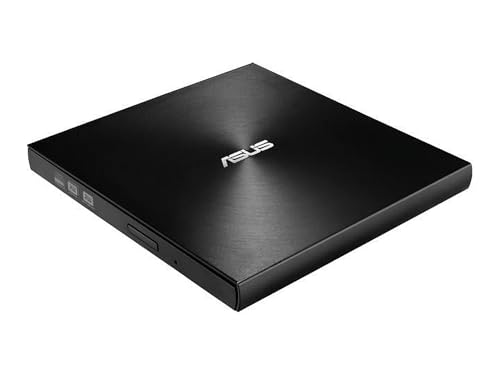
ASUS ZenDrive Ultra Slim USB 2.0 External 8X DVD Drive

ASUS SDRW-08D2S-U Lite External Slim DVD-RW 8X
ASUS SDRW-08D2S-U Lite 8X DVD Burner

8-in-1 External CD/DVD Drive USB-C with SD/TF Reader

5-in-1 External CD/DVD Drive USB-C/USB 3.0

External CD/DVD Drive USB 3.0 CD Burner

5-in-1 External CD Drive DVD Player Burner

External DVD Drive USB with 8-in-1 Hub

5-in-1 External CD/DVD Drive USB 3.0 Type-C

8-in-1 External CD/DVD Drive USB 3.0 Reader
Taking A Closer Look At The Options
The ASUS ZenDrive opens my list because it tackles the one job most buyers actually care about: keeping important files readable for decades. Where the SDRW-08D2S-U models that follow are mostly read-and-write workhorses, this ZenDrive leans hard into archival-grade M-Disc support, a write format engineered to resist heat, humidity, and light far longer than standard DVD-R media.
That focus shows up in the real-world scenarios I think about: wedding videos, scanned family photos, old tax records, or a small business archive that needs to survive a basement flood. At 13mm thick, it slips into a laptop sleeve almost as easily as a smartphone, which makes it a sensible grab for anyone working between a home office and a coworking space.
Advantages To Know
- M-Disc compatibility gives recorded discs a much longer rated lifespan than standard DVD media, useful for permanent archives.
- The 13mm ultra-slim shell travels well in a laptop bag without adding meaningful weight.
- 8X DVD write speed keeps full-disc burns moving along at a sensible pace for most backup jobs.
- Cross-platform support covers both Windows and Mac without extra driver hunting.
- Bundled backup software adds a usable entry point for users who have never burned an archive disc before.
Small Caveats
- USB 2.0 only, so large disc image transfers are noticeably slower than the USB 3.0 picks later in the list.
- M-Disc media costs more per disc than standard DVD-R blanks, which raises the total cost of an archival project.
Key Specs
Made For
People building long-term family or small-business archives on physical media who want a slim drive that travels between desks.
Consider Something Else When
The ASUS SDRW-08D2S-U Lite is a better match for shoppers who mainly read and burn everyday discs and do not need M-Disc archival depth.
This SDRW-08D2S-U model is the option I’d point a style-conscious shopper toward. The diamond-cut pattern on the top plate looks more like a piece of consumer electronics than a generic slab, and that aesthetic carries over to how it feels on a tidy desk next to a thin ultrabook.
Performance lands right where you’d expect from a slim 8X drive, with disc encryption and hidden-folder functionality that the ZenDrive doesn’t lean on as heavily. Drag-and-burn software rounds out a package that fits users who want something simple to install on a Windows machine and just have working.
A Favorable Mix
- The diamond-cut finish gives the drive a more distinctive look than typical matte-black optical drives.
- Password-controlled disc encryption protects sensitive backups from casual snooping.
- Drag-and-burn software keeps the learning curve low for less technical users.
Trade Offs
- USB 2.0 limits throughput for users who regularly burn or rip full DVD video collections.
- The textured finish tends to show fingerprints and dust more than a smooth matte shell.
Quick Facts
Best Suited To
Windows users who want a slim drive with a touch of style and built-in encryption for sensitive disc backups.
Look Elsewhere When
The ASUS ZenDrive makes more sense if archival M-Disc support matters more to you than the encrypted drag-and-burn workflow here.
This SDRW-08D2S-U Lite variant sits in the middle of the ASUS trio, and it’s the one I’d grab for daily commutes. At roughly 280g, it disappears into a backpack, and the 140ms/160ms access times keep software installs and disc-to-PC backups snappy enough that you won’t be tapping your fingers.
Compared with the ZenDrive’s archival focus, this one is more of a generalist: solid for occasional DVD movie playback, old game installs, and burning the occasional music CD. The same slim silhouette means it pairs well with the second pick on this list if you’re looking for a primary-and-backup setup.
The Practical Payoff
- Around 280g keeps it light enough for daily bag-carry without strain.
- Access times in the 140 to 160ms range make disc-to-drive transfers feel responsive.
- Works across Windows and Mac, which suits mixed-device households.
Points To Note
- USB 2.0 only, so it lags behind the USB 3.0 options covered later when ripping large DVD video files.
- No bundled software beyond basic burning, so users may need to source their own media player.
Technical Highlights
Right Fit For
Commuters and casual users who need a no-fuss slim burner for occasional DVD and CD jobs on both Windows and Mac laptops.
Skip It When
The GODBPNYMU 5-in-1 External CD/DVD Drive is a smarter pick for users who also need SD and TF card slots built into the same device.
This is where the list shifts from ASUS classics to the GODBPNYMU lineup, and this 8-in-1 model is the one I’d recommend to ultrabook owners who feel like they’re always one dongle short. Beyond reading and burning CDs and DVDs, it folds SD and TF card slots into the same chassis, which matters the moment you try to pull photos off a camera without a separate adapter.
USB-C connectivity lines it up with current MacBook, Dell XPS, and modern ThinkPad ports, which sidesteps the USB 2.0 limitation that hangs over the earlier ASUS picks. Blu-ray discs are off the table, but for mixed digital-and-physical workflows, this hub-and-drive combo pulls its weight.
What Works In Its Favor
- SD and TF card slots in the same enclosure save desk space for photo and video editors.
- USB-C input fits modern laptops without needing an extra adapter.
- Multi-function design turns one USB-C port into a small media hub.
Room For Improvement
- No Blu-ray support limits it for anyone with a library of Blu-ray discs to play.
- Combining a drive and hub in one unit means a single point of failure for both jobs.
Who Should Grab It
Ultrabook and MacBook owners who want disc reading, burning, and memory card access from a single USB-C connection.
Reach For A Different Pick When
The GODBPNYMU 8-in-1 Hub DVD Drive is a better fit for users who specifically need extra USB-A and Type-C ports in addition to card slots.
This 5-in-1 GODBPNYMU drive earns its travel-ready badge because it covers both modern and legacy ports. USB-C works with current laptops, while USB 3.0 keeps throughput reasonable for bigger DVD backups when paired with a traditional Type-A port.
OS coverage is the quiet strength here. The drive handles Windows from XP through 11, every modern macOS release, and Linux, which makes it a strong match for households where one person runs a MacBook and another works on a Linux mini PC. Compare that to the ASUS picks earlier, which lean Windows-first, and you see why this slot earns its place.
Notable Upsides
- Dual USB-C and USB 3.0 input covers newer ultrabooks and older laptops alike.
- Broad OS support including Windows, macOS, and Linux fits mixed-device homes.
- 5-in-1 multi-function design consolidates disc reading and burning into one travel piece.
Honest Caveats
- Cable layout can be finicky in tight laptop sleeves, depending on the orientation of the ports on your specific machine.
Perfect Match For
Cross-platform households that need one external drive to cover a Mac, a Windows laptop, and the occasional Linux box.
Swap It Out When
The ASUS ZenDrive Ultra Slim is a smarter pick for shoppers who prioritize M-Disc archival longevity over cross-platform versatility.
For shoppers who simply want a USB 3.0 drive that handles everyday disc tasks without bells and whistles, this GODBPNYMU model fits the bill. Plug-and-play operation is the headline feature, which translates to fewer driver headaches for users who don’t want to dig through Device Manager.
The USB 3.0 interface gives it a real edge over the ASUS trio when you’re transferring multi-gigabyte DVD video images. That speed boost matters in offices where backups run in batches, but it won’t change the experience much for someone just installing the occasional piece of legacy software.
Positive Points
- USB 3.0 speeds make large disc image transfers noticeably faster than USB 2.0 drives.
- Plug-and-play behavior keeps setup time short for non-technical users.
- Sturdy build quality helps the drive hold up to repeated plugging and unplugging.
Less Ideal Details
- No additional ports or card slots, so users still need separate accessories for SD cards or extra USB.
- The thicker shell feels bulkier than the ultra-slim ASUS options in a slim laptop sleeve.
Whose Shelf It Belongs On
Users who mostly burn or read CDs and DVDs and prefer a single-purpose USB 3.0 drive over a multi-function hub.
A Better Fit Elsewhere
The GODBPNYMU 8-in-1 Hub DVD Drive is the smarter choice for anyone who needs extra USB ports and card slots on the same connection.
First-time external drive owners tend to want something that just works the moment they plug it in, and this 5-in-1 model targets that exact audience. It supports the same wide OS range as the travel-ready pick earlier, but pairs that compatibility with a simpler setup story that doesn’t assume any prior experience.
Functionally, it reads and burns CDs and DVDs and doubles as a DVD player for laptop viewing, which suits a college student moving into a dorm without a streaming-first setup. The trade-off versus the 8-in-1 hub models is fewer extra ports, but for someone just trying to play one movie or burn one backup, that’s often a non-issue.
A Few Strong Suits
- Broad OS support makes it forgiving for households that mix Windows, macOS, and Linux devices.
- Multi-function design reads, burns, and plays without needing extra apps beyond a basic media player.
- Compact shell makes it easy to stow in a drawer or backpack when not in use.
Things To Weigh
- Fewer extra ports than the 8-in-1 hub models, so users with port-hungry setups will still need a separate hub.
- Lacks the speed advantage of USB 3.0 in some configurations, depending on which cable version ships.
Built With In Mind
First-time external drive users who want a forgiving, plug-and-play experience across multiple operating systems.
Where A Sibling Pick Shines
The GODBPNYMU 5-in-1 USB 3.0 Type-C Drive is a better match for users who want USB 3.0 throughput plus SD and TF card slots in the same enclosure.
This is the model I’d hand to someone with a modern ultrabook that’s down to two USB-C ports and a headphone jack. Beyond reading and burning DVDs, it adds two USB-A ports, two USB-C ports, and a TF/SD card slot to the same connection, which is a real lifesaver when a wireless mouse dongle, an external SSD, and a phone-charging cable all want a port at once.
The design choice to bundle so many functions does mean the enclosure runs larger than the bare-bones DVD pick earlier. For desktop use, that extra footprint is easy to absorb. For travel, it’s a trade-off worth thinking about if your laptop bag is already crowded.
The Upside
- Eight extra connections turn one laptop port into a small docking station.
- TF and SD slots support camera and drone card workflows alongside DVD playback.
- Stable power draw through the hub prevents the disc recognition issues that plague some bus-powered drives.
A Few Limitations
- Larger footprint than slim single-function drives, which matters in tight travel bags.
- Combining a drive and hub means a single point of failure for both tasks.
- No Blu-ray support, so users with Blu-ray libraries still need a separate player.
The Right Fit
Port-hungry ultrabook and MacBook owners who want disc reading, burning, and extra connectivity from a single USB connection.
Not Your Match When
The ASUS SDRW-08D2S-U Lite is a smarter choice for shoppers who prioritize a slim single-purpose drive over a multi-port hub.
This 5-in-1 model sits in the comfortable middle of the GODBPNYMU lineup, and it’s the one I’d recommend for a home office that occasionally needs both discs and memory cards. USB 3.0 and Type-C inputs together cover older desktops and newer laptops, and the SD/TF card slots save reaching for a separate reader when downloading camera footage.
Compared with the simpler USB 3.0 pick earlier, this one trades a slimmer shell for extra card functionality. For mixed-use households that alternate between DVD backups and photo imports, the broader feature set tends to pay for itself in saved desk space.
Reasons It Performs
- USB 3.0 and Type-C dual input covers both legacy desktops and current laptops.
- SD and TF card slots support photographers and videographers without a separate reader.
- 5-in-1 design consolidates disc and card tasks into one enclosure.
Points To Keep In Mind
- Heavier than single-purpose drives, which may bother users with strict travel weight budgets.
- Lacks the extra USB ports of the 8-in-1 hub model, so port expansion still requires another accessory.
Who It Suits Best
Mixed-use home offices that alternate between DVD backups, legacy software installs, and memory card imports.
Another Choice May Suit
The GODBPNYMU 8-in-1 Hub DVD Drive is a better match for users who also need extra USB-A and Type-C ports for peripherals.
Closing out the list is the most straightforward GODBPNYMU reader, and the simplest way to describe it is “no-fuss.” USB bus power means there’s no wall adapter to forget on a trip, which is the kind of detail that matters when you’re pulling a drive out of a drawer for a one-off job.
It leans on USB 3.0 for transfer speed without piling on extra hubs or card readers, which makes it a sensible secondary drive for a household that already owns a multi-function hub. For laptop-to-laptop transfers or quick software disc installs, that simplicity is the whole point.
Notable Gains
- USB bus power removes the need to carry a separate power adapter.
- USB 3.0 transfer speeds handle disc-to-drive backups faster than USB 2.0 alternatives.
- Plug-and-play functionality shortens setup time for users who need a quick read or burn.
Things To Consider
- Bus power can occasionally be marginal on older laptops with weak USB ports, depending on the disc type.
- No extra ports or card slots, so this works best alongside an existing hub setup.
Who Will Love This
Users who want a simple USB 3.0 reader for occasional disc tasks without extra hubs or card slots.
Where Another Pick Suits Better
The ASUS ZenDrive Ultra Slim is a smarter pick for shoppers who want archival-grade M-Disc support in addition to everyday reading.
What Matters Most Before Choosing External Dvd Drives
Connection type sets the ceiling for how useful any drive will feel day to day. USB 2.0 drives like the early ASUS picks work fine for music CDs and software installs, but full DVD video backups crawl when ripping. USB 3.0 and Type-C options pull that ceiling up significantly.
Write speed and supported formats decide whether a drive is a daily tool or a backup-of-last-resort. 8X is the standard for slim external drives and covers most DVD±R jobs. Anyone burning M-Disc archives should confirm the specific drive supports that format, since not every model does.
OS compatibility is easy to overlook until a drive arrives and refuses to mount. Windows coverage is universal across these picks, but Mac and Linux support varies. Mixed-device households should look for explicit mentions of both ecosystems, as the GODBPNYMU models tend to spell out.
Form factor and bundled ports matter more than raw specs once you start traveling with the drive. Slim shells travel better, while hub-style drives trade portability for extra connectivity on cramped ultrabooks.
Key Considerations Across These Picks
Wrong Turns To Avoid
A common slip is picking a USB 2.0 drive for ripping large DVD video collections. The transfer bottleneck adds up fast over dozens of discs, and the time cost is rarely worth the savings. Another trap is assuming every “external DVD drive” reads Blu-ray; none of the picks here do, so users with Blu-ray libraries still need a dedicated player.
Where The Extra Money Goes
Higher-tier models in this category usually charge a premium for archival formats like M-Disc, USB 3.0 throughput, or bundled hub functionality. The upgrade is worth it for users with real archival needs, large backup batches, or port-hungry ultrabooks. For occasional CD or DVD playback, a basic USB 3.0 reader covers the job without the extra spend.
Frequently Asked Questions
Do any of these drives support Blu-ray discs?
No, none of the picks in this roundup support Blu-ray. They handle CDs and DVDs, which covers most legacy software and standard-definition video libraries, but Blu-ray playback or burning requires a dedicated Blu-ray drive.
Can I use these external DVD drives with a Mac?
Several picks, including the GODBPNYMU models and the ASUS SDRW-08D2S-U Lite, support macOS. Buyers should confirm the specific drive’s compatibility list, since some entry-level drives list Windows only.
Do I need a separate power adapter?
Most slim external DVD drives draw power directly from the USB port and do not need a wall adapter. Hub-style drives with extra ports sometimes require more power, so buyers should check the cable setup before plugging in.
Will these work with modern laptops that only have USB-C?
Several picks, including the GODBPNYMU 5-in-1 and 8-in-1 models, include USB-C input. Users with only USB-C ports should avoid the older USB 2.0-only ASUS drives unless they already have a compatible adapter.
Are these drives good for burning movies or just reading discs?
Most picks handle both reading and burning CDs and DVDs. Users planning to author commercial movie discs should verify regional coding compatibility, since drives are typically locked to a specific region on first use.
Bottom Line
External DVD drives still earn their place in 2026, whether the goal is preserving old family videos, installing legacy software, or playing a favorite DVD on a modern laptop. The ASUS picks suit users who care about archival depth or a slim travel build, while the GODBPNYMU lineup covers anyone who needs broader OS support or built-in hub functionality. Match the drive to the workflow you actually have, and the rest tends to fall into place.