Modern laptops ship without optical drives, yet plenty of us still need one for legacy software, archival discs, or ripping that old DVD collection. I picked nine external DVD drives that connect cleanly to current hardware, handle everyday read-and-burn tasks without fuss, and come from brands with a track record. Whether you archive family videos or just need to install an older program, there’s something here that fits.
The Choices Worth Comparing
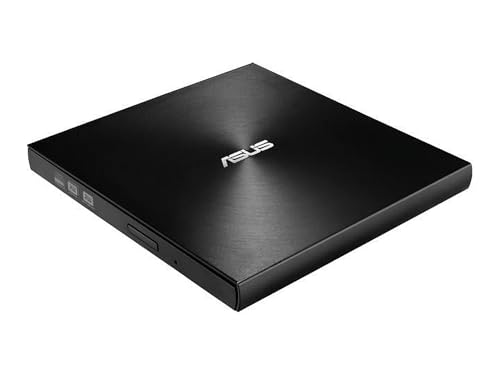
ASUS ZenDrive Ultra Slim USB 2.0 External 8X DVD Optical Drive

ASUS SDRW-08D2S-U LITE External Slim DVDRW 8X
SDRW-08D2S-U LITE 8X External DVD Burner

8-in-1 External CD/DVD Drive with USB-C SD/TF Reader

5-in-1 External CD/DVD Drive USB-C/USB 3.0

External CD/DVD Drive USB 3.0 Burner

BENEWY External CD/DVD Drive for Laptop PC Mac

5-in-1 External CD/DVD Drive USB 3.0 & Type-C

8-in-1 External CD/DVD Drive USB 3.0 Reader
More On The Choices That Made The List
The ASUS ZenDrive Ultra Slim earns its place at the top for anyone who wants a premium-feeling drive that doubles as an archival tool. Its 13mm-thin chassis slips into a laptop sleeve without bulging, and the concentric-circle hairline finish gives it a grown-up look on a desk. M-Disc support means data gets etched into a rock-like layer, which is meant to outlast standard DVD media by decades.
It connects over USB 2.0, which is plenty for 8X DVD write speeds, and works with both Windows and Mac. Compared with the SDRW-08D2S-U picks below, this ZenDrive leans harder into longevity than aesthetics.
Noteworthy Benefits
- M-Disc burning support for archival-grade discs that resist heat, light, and humidity
- 13mm ultra-slim profile slips into a laptop sleeve or small drawer
- Includes Nero BackItUp for Android, useful for backing up phone media
- Cross-platform with both Windows and macOS out of the box
- 8X DVD write speed keeps full-disc burns in a reasonable window
Points To Keep In Mind
- USB 2.0 only, so no speed bump on systems with USB 3.0 ports
- M-Disc media costs more than standard DVD-R blanks, which adds up over time
Quick Facts
Right Fit For
People archiving family photos, legal documents, or any media they want readable in 2050 rather than next Tuesday.
Look Elsewhere When
You’re a creative who also needs SD card slots and the 8-in-1 GODBPNYMU External CD/DVD Drive with USB-C SD/TF Reader will serve that workflow better.
The ASUS SDRW-08D2S-U LITE is the drive I’d recommend to anyone who keeps a tidy desk. Its diamond-cut detailing catches light differently than the ZenDrive’s matte finish, and disc encryption plus hidden-file folders give it a privacy edge. Drag-and-burn software makes it approachable even for someone who hasn’t burned a disc in a decade.
It runs over USB 2.0 and reads/writes DVDs at 8X, putting it in the same performance tier as the ZenDrive above. The real difference is styling and built-in security tools rather than raw speed.
Advantages To Know
- Password-controlled disc encryption keeps sensitive archives private
- Diamond-cut finish gives it a polished look next to other desk accessories
- Drag-and-burn interface lowers the barrier for first-time users
Trade-Offs
- USB 2.0 caps throughput at the standard DVD ceiling
- Encryption software requires setup time before the first burn
- Heavier than the ZenDrive at a glance, with a glossier surface that shows fingerprints
Made For
Style-conscious users and anyone who needs password-protected discs for client files or personal records.
A Better Fit Elsewhere
If you burn M-Disc archival media specifically, the ASUS ZenDrive Ultra Slim has the right hardware support for that workflow.
The SDRW-08D2S-U LITE 8X is the cousin of the previous pick, trimmed down for shoppers who don’t need encryption extras. At roughly 280 grams with 140ms CD and 160ms DVD access times, it handles day-to-day reading and writing without overpromising. The black shell looks neutral next to either an ultrabook or a desktop tower.
Compared with the design-focused SDRW above, this one drops the diamond-cut styling in favor of a more utilitarian build. Both connect over USB 2.0, so picking between them mostly comes down to whether you want the bundled security software.
A Few Highlights
- Lightweight 280g chassis is easy to slip into a commuter bag
- 8X DVD read/write at industry-standard speeds
- Compatible with both Windows and macOS systems
- Straightforward plug-and-play setup
Honest Caveats
- USB 2.0 only, no throughput advantage over faster ports
- No bundled encryption suite like the SDRW-08D2S-U LITE model above
Who It Suits Best
Shoppers who want a no-frills burner that handles basic reading and writing without bundled extras they may never open.
Consider Something Else When
You regularly transfer photos from SD cards alongside disc work, in which case the 8-in-1 GODBPNYMU drive with USB-C and card readers is a stronger fit.
The 8-in-1 External CD/DVD Drive from GODBPNYMU leans into versatility, bundling disc reading, writing, and SD/TF card slots into one chassis. USB-C connectivity lines it up with modern MacBooks, Chromebooks, and ultrabooks that have abandoned USB-A. Creators juggling camera cards and DVD archives will appreciate the all-in-one footprint.
It supports CD and DVD read/write but not Blu-ray, which matters if you have Blu-ray media lying around. Versus the slim ASUS picks above, this one trades a bit of portability for hub functionality.
Useful Touches
- SD and TF card slots built in for photographers and drone operators
- USB-C cable matches the ports on most current laptops
- Reads CDs and DVDs plus writes both formats for full versatility
- Replaces a separate card reader on cramped desks
A Few Limitations
- Does not read or write Blu-ray discs, which limits media options
- Slightly thicker than pure optical drives because of the card reader housing
Quick Facts
Best Suited To
Creators and media archivists who copy from camera cards and discs in the same workflow.
Skip It When
You only need disc burning and value slim portability, in which case the ASUS ZenDrive Ultra Slim is a tighter fit.
The 5-in-1 External CD/DVD Drive from GODBPNYMU ships with dual USB-C and USB 3.0 cables, which sidesteps the dongle question before it starts. Travelers bouncing between a MacBook at home and a Windows laptop at work won’t need to pack adapters. It covers CD and DVD read/write without Blu-ray support.
Compared with the 8-in-1 model above, this one drops the card reader slots and trims down to core optical tasks. That makes it lighter in a backpack for short trips.
The Case For It
- Dual USB-C and USB 3.0 cables cover both modern and legacy ports
- Broad operating system support across Windows, macOS, and Linux
- Lighter than the hub-style 8-in-1 model
- Plug-and-play without driver installs on most systems
Soft Spots
- No SD or TF card slots means photographers still need a separate reader
- Blu-ray discs are off the table
Whose Shelf It Belongs On
Commuters and remote workers who plug into both Mac and PC machines during a typical week.
Reach For A Different Pick When
Card reading matters as much as disc reading, in which case the 8-in-1 GODBPNYMU with SD/TF slots covers both jobs.
The GODBPNYMU External CD/DVD Drive with USB 3.0 is a workhorse option for daily burning and ripping. USB 3.0 gives it headroom beyond the older ASUS drives at the top of the list, even though DVD write speeds top out at the same 8X ceiling. For most folks, the practical difference shows up in faster CD ripping and smoother video playback.
It sticks to a focused feature set without card slots or bundled archive software. That’s exactly the right shape for someone who values a single job done well over a multi-function tool.
The Helpful Details
- USB 3.0 interface gives faster CD read performance than USB 2.0 models
- Simple plug-and-play operation requires no driver install
- Backwards compatible with USB 2.0 ports for older machines
Things To Consider
- No bundled burning or backup software to learn
- USB-A connector, so USB-C-only laptops need an adapter
- Doesn’t read Blu-ray media
Feature Snapshot
Perfect Match For
Frequent users who rip CDs for a music library or burn weekly backups on a single computer.
Not Your Match When
You split time between USB-C and USB-A machines and would rather skip the adapter, in which case the 5-in-1 External CD/DVD Drive USB-C/USB 3.0 model handles both natively.
The BENEWY External CD/DVD Drive leans into simplicity with a USB-A and USB-C cable combo that works straight out of the box. It draws power over USB, so no wall adapter enters the equation. For a household with both an older Windows tower and a newer MacBook, that cross-platform reach saves the headache of juggling accessories.
Compared with the BUS-powered USB 3.0 model above, this BENEWY keeps things accessible rather than chasing speed. It handles everyday disc tasks without fuss.
The Value In It
- Combined USB-A and USB-C cable setup works across most laptops
- USB 3.0 throughput with backwards support for USB 2.0 ports
- Plug-and-play without hunting for drivers online
- Cross-platform compatibility with Windows and macOS
Possible Compromises
- Brand recognition is lower than ASUS, which may matter for long-term support expectations
- No Blu-ray playback or burning
Who Will Love This
Cross-platform households with mixed Windows and Mac machines that share one external drive.
Swap It Out When
You specifically want M-Disc archival support and a slimmer body, in which case the ASUS ZenDrive Ultra Slim covers that niche.
The 5-in-1 GODBPNYMU External CD/DVD Drive adds SD and TF card slots to the dual-cable convenience of the earlier 5-in-1 model. Photographers can pull images off a camera card and burn them to disc in one session, without swapping accessories. The Type-C and USB 3.0 dual cable setup matches the rest of GODBPNYMU’s lineup.
Versus the 8-in-1 model up the list, this one trims the function count slightly but keeps the SD/TF slots. Owners commonly report that the card reader slots feel solid for daily transfers.
Real Benefits
- SD and TF card readers built in for hybrid disc-and-card workflows
- Dual USB 3.0 and Type-C cables cover modern and legacy ports
- Compatible with Windows 11 down through legacy releases, plus macOS and Linux
- Plug-and-play without driver installs
Things To Weigh
- Blu-ray support is absent, so plan for a dedicated player if needed
- Card reader slots add a small amount of bulk compared to single-purpose drives
Feature Card
Built With In Mind
Hybrid workflows that move between camera cards and DVD media in the same session.
Where A Sibling Pick Shines
For pure disc-archiving with M-Disc support, the ASUS ZenDrive Ultra Slim delivers hardware designed for that specific task.
The 8-in-1 External CD/DVD Drive from GODBPNYMU rounds out the list as a streamlined multi-function option. It draws power over USB, so the only thing on your desk is the cable. Students and casual users who need occasional disc access without premium extras will find it sensible.
Versus the pricier 8-in-1 model with USB-C, this one sticks to USB 3.0. It’s the practical pick for anyone who doesn’t need to push past standard DVD speeds.
Positive Points
- Plug-and-play USB 3.0 with no external power brick
- Reads and writes CDs and DVDs for everyday tasks
- Compact enough to slip behind a monitor stand when not in use
- Backwards compatible with USB 2.0 ports for older machines
Less-Strong Areas
- USB-A only, no native USB-C cable in the box
- No M-Disc support for century-rated archival media
- Blu-ray playback and burning are not included
Who Should Grab It
Casual readers and students who want an affordable disc drive for occasional software installs or movie playback.
A Better Fit Elsewhere
If USB-C connectivity matters as much as the multi-function design, the 5-in-1 External CD/DVD Drive USB-C/USB 3.0 model has the cable you need.
What To Weigh Before Picking An Optical Drive
Connection Type And Cable Setup
USB-C has become the default port on most laptops released in the last few years, while older desktops still rely on USB-A. Drives with dual cables remove the adapter question entirely. Models that ship with only one cable type force you to buy a hub or dongle for the other port family.
Speed And Throughput
DVD write speeds cap at 8X across this category because that is the optical media ceiling, not a limitation of these specific drives. Where USB 3.0 helps is with CD ripping and reading scratched discs, where higher bandwidth shortens the time you wait. For purely writing DVDs, USB 2.0 is sufficient.
Special Media And Archival Support
M-Disc compatibility sets the ASUS ZenDrive Ultra Slim apart from the rest of this list. M-Disc blanks cost more, but they engrave data into a stone-like layer rated for centuries of storage. Anyone archiving family videos or legal paperwork benefits from that longevity.
Extra Functions And Form Factor
Multi-function drives add SD/TF card readers for hybrid workflows, but those slots add a small amount of bulk. If your desk space is tight or your bag is already heavy, a slim single-purpose drive might serve better. Conversely, photographers and videographers save real time when the card reader lives in the same chassis as the disc drive.
Key Considerations Across These Picks
Common Shopping Slip Ups
Most folks forget to check whether their laptop even has the right port before the drive arrives, then scramble for an adapter. Double-check your machine’s ports first, and decide if you’d rather buy a drive with the correct cable baked in. Another slip is assuming all external drives handle Blu-ray. None on this roundup support Blu-ray, so plan accordingly if you have that media.
Where The Extra Money Goes
Premium drives like the ASUS ZenDrive Ultra Slim add M-Disc archival support, bundled backup software, and tighter build tolerances. The benefit shows up in long-term disc readability and security features, not in raw burn speed. Spend up only if those features match your actual workflow; otherwise a USB 3.0 workhorse is plenty.
Frequently Asked Questions
Do external DVD drives work on Macs?
Yes, every drive on this list supports macOS alongside Windows, and several add Linux for good measure. Plug-and-play means no extra drivers on most modern systems.
Can I burn Blu-ray discs with these drives?
No, Blu-ray support is absent across this roundup. All nine handle CD and DVD media but stop short of Blu-ray read or write capability.
What is M-Disc and why does it matter?
M-Disc is a special DVD format that engraves data into a rock-like layer rather than organic dye. The discs are rated for centuries of storage, which makes them ideal for archives you want readable decades from now.
Do I need a separate power adapter?
No, every drive here draws power through the USB cable itself. That keeps the cable count down and makes the drives easier to pack for travel or quick desk moves.
Is USB 3.0 faster than USB 2.0 for DVD burning?
Not meaningfully for DVD write speeds, since both top out at the 8X optical ceiling. USB 3.0 helps more with CD ripping and smoother playback of scratched discs.
The Takeaway
Picking an external DVD drive in 2026 mostly comes down to matching your ports and your workflow. M-Disc archivists will lean toward the ASUS ZenDrive Ultra Slim. Travelers and cross-platform households get the most mileage from the dual-cable GODBPNYMU 5-in-1. Whatever you choose, a slim external drive is a small accessory that solves a real, persistent problem.