External DVD drives still earn their spot on a desk in 2026. Plenty of recent laptops dropped their built-in optical bays, yet families still archive wedding discs, students burn lecture recordings, and small studios rip legacy software. I went through ten current options, weighing connection type, write speed, bundled extras like card readers and USB hubs, and the kind of real-world flexibility that matters once a drive leaves the box.
How The Shortlist Stacks Up
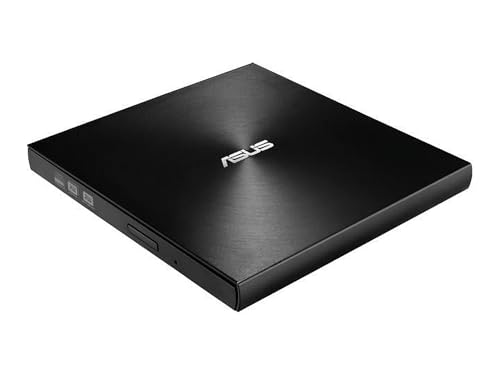
ASUS ZenDrive Ultra Slim USB 2.0 External 8X DVD Drive

ASUS SDRW-08D2S-U External Slim DVDRW 8X
ASUS SDRW-08D2S-U LITE 8X USB 2.0 DVD Burner

8-in-1 External CD/DVD Drive with USB-C Card Reader

5-in-1 External CD/DVD Drive USB-C and USB 3.0

External CD/DVD Drive USB 3.0 Burner and Player

ROOFULL External CD/DVD Drive with USB Hub and SD Reader

ROOFULL External CD/DVD Drive with Type-C Hub and Card Reader

5-in-1 External CD/DVD Drive with SD/TF Reader

8-in-1 External CD/DVD Drive USB 3.0
Why These Options Stand Out
The ZenDrive earns its spot at the top because M-Disc support sets it apart from every other entry here. M-Disc is a writeable DVD format that etches data into a rock-like layer rather than organic dye, so a properly burned disc is engineered to outlast standard DVDs in a closet or attic. For someone archiving tax records, baby photos, or a vinyl-ripping project, that longevity claim is the whole pitch.
The chassis is the slimmest in this roundup, slipping into a sleeve pocket next to a laptop without complaint. Setup is straightforward on both Windows and macOS, and Nero BackItUp gives Android owners a way to push mobile files onto a disc without juggling cables. Where the earlier SDRW-08D2S-U leans on USB 2.0 only, this one keeps that same ceiling but adds the M-Disc angle, which is the reason I’d choose it over the Lite models below for permanent storage.
Useful Strengths
- M-Disc compatibility for genuinely long-term archives
- 8X DVD write speed, fast enough to finish a 4.7 GB disc in roughly eight minutes
- Ultra-slim 13mm body that disappears into a laptop bag
- Cross-platform support for Windows and macOS
- Includes Nero BackItUp for Android-based disc burning
Honest Caveats
- USB 2.0 only, so a full DVD transfer tops out around theoretical USB 2.0 speeds
- M-Disc media costs more than standard DVD-R blanks and is harder to find in local stores
Made For
Archivists and family historians who want discs to outlive a hard drive.
Consider Something Else When
Anyone who values card-reading and extra ports over M-Disc longevity should look at the ROOFULL External CD/DVD Drive with USB 3.0/Type-C Hub instead.
The SDRW-08D2S-U LITE keeps the same 8X DVD read and write speed as the ZenDrive but trims extras in favor of a more straightforward package. The diamond-cut concentric pattern on the lid gives it a cleaner look on a desk than the matte plastic most budget drives ship with. For a small office or a college dorm where the drive stays in one place, that styling detail quietly earns its keep.
Compared to the ZenDrive above, this one skips M-Disc and ships without the Nero backup software, so it’s really a drive for everyday read, write, and burning tasks. Disc encryption with password-controlled hidden-file functionality is bundled for anyone who wants a basic lock on sensitive backups. I’d reach for it over the ZenDrive when M-Disc is unnecessary and a clean, slim chassis is the priority.
Strong Points
- 8X DVD write speed, the standard for a mainstream external burner
- Disc encryption with password-protected hidden folders for sensitive files
- Drag-and-burn interface that simplifies ad-hoc disc jobs
- Slim chassis that takes up little desk space
Points To Keep In Mind
- USB 2.0 only, so transferring a full DVD takes longer than USB 3.0 alternatives
- No card reader or extra USB ports, unlike the multi-function picks later in this list
Right Fit For
Windows users with steady backup routines who want a polished-looking, no-fuss burner.
Skip It When
Folks running newer ultrabooks with only USB-C ports will get more from the ROOFULL External CD/DVD Drive with USB 3.0 Type-C Hub.
The LITE variant is a streamlined sibling to the SDRW above, weighing just 280 grams with access times around 140ms for CD and 160ms for DVD. That lighter profile makes it a sensible companion in a messenger bag, especially for students bouncing between a dorm room and a shared study space. The 8X ceiling matches what most external burners deliver, and it works with both Windows and Mac.
What sets it apart from the previous pick is the price floor, generally the lowest in this roundup. The trade-off is that the design is plainer, and there’s no encryption or backup software in the box. For someone who just wants a disc to spin in and a file to land on it, that minimalism is actually a plus.
What Helps Most
- Lightweight 280g body for frequent travel
- Reasonable 140ms CD and 160ms DVD access times for quick file retrieval
- Cross-platform compatibility with Windows and macOS
- USB 2.0 bus power, so no extra brick to pack
Honest Caveats
- Plain black finish with no extra software bundle
- USB 2.0 throughput, which can stretch a full-disc rip
Best Suited To
Students and home-office users who need a basic, no-frills burner that pulls power from a single cable.
Where Another Pick Suits Better
Anyone juggling SD cards and USB sticks should step up to the GODBPNYMU 8-in-1 External CD/DVD Drive with USB-C SD/TF Card Reader for built-in card slots.
This 8-in-1 from GODBPNYMU folds a disc reader, a disc writer, an SD slot, and a TF (microSD) slot into a single slab. For someone carrying a mirrorless camera and a laptop through an airport, that consolidation replaces a stack of dongles. It handles legacy software installs, music CD rips, and full DVD playback, with five core functions covering read, write, backup, media, and software installation.
The catch worth flagging is that the listing is explicit about Blu-ray limitations, so this won’t help anyone sitting on a stack of Blu-ray archives. USB-C connectivity keeps it compatible with modern laptops, and the lightweight housing makes it easier to justify in a backpack than a full docking station. Compared to the workhorse pick above, this is the choice when card reading is part of the daily workflow.
Well-Handled Touches
- Integrated SD and TF card slots eliminate extra dongles
- USB-C native connection, fitting modern laptop ports
- Reads, writes, and burns CDs and DVDs in one unit
- Useful for ripping old family video or installing legacy software
Softer Spots
- Blu-ray discs are not supported
- Performance on the optical side is standard DVD rather than higher-tier formats
Who It Suits Best
Photographers and content creators who want disc access plus card reading in a single travel-friendly unit.
Look Elsewhere When
Anyone planning to back up decades of optical media on a budget should pair the ASUS ZenDrive Ultra Slim USB 2.0 with this drive for M-Disc support.
The 5-in-1 earns its compatibility badge by working across Windows (XP through 11), macOS, and Linux, plus mainstream laptop brands from Apple to Dell, Lenovo, HP, and ASUS. For a household where one person runs a ThinkPad, another runs a MacBook, and a third runs a Linux mini-PC, that universal support removes a layer of fiddling. USB-C and USB 3.0 dual connection lets the same drive hop between machines without a separate adapter.
It doesn’t carry card slots like the 8-in-1 above, but the dual-connection approach is what sets it apart in a mixed-OS setting. For someone whose laptop only has USB-C, this one pulls double duty without needing an extra hub. The tradeoff is that the feature count is more modest, so anyone who wants a fuller port array should move up the list.
Advantages To Know
- Supports Windows, macOS, and Linux for shared-household use
- Dual USB-C and USB 3.0 interface covers modern and legacy ports
- Reads and writes both CDs and DVDs
- Plug-and-play without driver installs in most setups
Practical Considerations
- No built-in card reader, unlike several picks higher up
- No bundled backup or encryption software
Key Specs
Who Will Love This
Mixed-OS households and IT tinkerers who want one drive that just works across every machine in the house.
Swap It Out When
Anyone who needs card slots and additional USB ports should swap to the ROOFULL External CD/DVD Drive with USB 3.0 Type-C Hub instead.
This GODBPNYMU burner is built around the USB 3.0 standard, so it transfers data well above what older USB 2.0 drives push in real-world conditions. That’s a meaningful difference when ripping a full DVD to a desktop library, since the bandwidth ceiling affects how long the job takes. For high-speed read and write, USB 3.0 is where the meaningful speed bump lives.
It leans on plug-and-play operation, so there’s no driver hunting when switching between machines. The construction is described as durable, which matters over years of disc trays opening and closing. Where it differs from the ROOFULL options below is that it stays focused on optical duties rather than acting as a hub. That’s the honest trade: speed over versatility.
The Good Stuff
- USB 3.0 transfer speeds for faster rip and burn times
- Plug-and-play operation with no driver setup
- Functions as a DVD-ROM player and a rewritable burner
- Bus-powered from a single USB connection
Worth Noting
- No built-in card reader or extra USB ports
- USB-A orientation may require an adapter for USB-C-only laptops
Perfect Match For
Users who frequently rip large disc libraries and value raw transfer speed over hub features.
Consider Something Else When
Anyone whose laptop has limited ports should consider the ROOFULL External CD/DVD Drive with USB 3.0 Type-C Hub for the added connectivity.
The ROOFULL 7-in-1 pulls a clever trick by being both a disc drive and a small docking station. The integrated USB 3.0 and Type-C cable connects to a laptop, and the body of the drive itself exposes extra USB ports plus an SD card reader. For an ultrabook owner who has already given up most of the port array, that combination replaces three or four separate accessories.
The integrated cable means no separate USB cable to lose in a drawer, which is a small daily-life win. A protective carrying case is included, which matters for a drive that’s likely to ride in a bag. Compared to the 5-in-1 above, this trades card-slot count for a wider port selection, and the difference shows up when a user wants to plug in a mouse, a flash drive, and a card at the same time.
The Practical Payoff
- Combines an optical drive, USB hub, and SD reader in one unit
- Integrated cable design reduces setup clutter
- Protective case included for travel
- Plug-and-play detection with no driver installation
Small Caveats
- Slightly larger footprint than dedicated optical drives due to the hub body
- SD reader is single slot, not dual SD and TF like some peers
Feature Snapshot
Built With In Mind
Ultrabook and MacBook owners who need disc access and expanded ports from a single connection.
Another Choice May Suit
Folks who don’t need hub functions and prioritize pure optical durability should consider the ASUS SDRW-08D2S-U LITE 8X USB 2.0 DVD Burner.
The sibling to the previous ROOFULL keeps the same all-in-one concept but routes the primary connection through a Type-C cable for newer laptops. With USB 3.0 hub functionality and a card reader built in, it’s a desktop-class accessory compressed into a small enclosure. For someone whose laptop already lives on a desk, this replaces the kind of clunky docking station that used to be standard.
The honest read is that this drive is the practical choice for users who value port flexibility over a smaller chassis. Its body is slightly chunkier than a dedicated optical drive, but the trade is that one cable to the laptop covers optical, USB, and SD duties. Compared to the 8-in-1 GODBPNYMU above, this ROOFULL tends to feel more like a docking station than a pure drive.
Practical Pluses
- Built-in USB hub expands port-starved laptops
- SD card reader for direct photo and video transfers
- Type-C cable fits modern ultrabook connections
- Functions as a CD and DVD reader and writer
A Few Limitations
- Larger than dedicated optical drives because of the hub body
- Bus-powered, so high-demand USB peripherals may need their own power
Whose Shelf It Belongs On
Home offices with USB-C laptops where one connection should cover optical media plus connectivity.
Not Your Match When
Travelers who prioritize a slim form factor should pick the ASUS ZenDrive Ultra Slim USB 2.0 External 8X DVD Drive instead.
The second 5-in-1 from GODBPNYMU covers Windows 11 down through Windows 7, plus Linux and macOS, with both USB 3.0 and Type-C connectors. The dual SD and TF (microSD) card slots distinguish it from the earlier 5-in-1 pick, which lacked those slots entirely. So for hybrid workflows where someone burns a disc and pulls footage off a GoPro card in the same session, this is a more flexible choice.
Construction is described as durable for long-term use, and the drive draws power through USB, so a single cable to a laptop is enough. Where it differs from the 8-in-1 GODBPNYMU is that this one is more focused on a tighter feature set rather than maxing out the port count. For someone who wants SD and TF without paying for additional hub ports, this lands in the middle.
Useful Highlights
- Dual SD and TF card slots for both full-size and microSD media
- USB 3.0 and Type-C dual interface for newer and older ports
- Reads and rewrites DVDs and CDs as a DVD-ROM rewritable drive
- Plug-and-play with broad OS coverage
Trade Offs
- No Blu-ray support
- Five functions instead of the eight-function peers above
Right Fit For
Field workers and creators who handle SD, microSD, and disc media on the same trip.
A Better Fit Elsewhere
Anyone who values maximum port count should reach for the 8-in-1 GODBPNYMU External CD/DVD Drive further up this list.
The final 8-in-1 from GODBPNYMU pushes the function count to eight, sitting somewhere between a basic burner and a small docking station. USB 3.0 throughput gives it the same speed ceiling as the dedicated USB 3.0 pick above, while the broader port array adds genuine flexibility. It draws power directly through the USB cable, so no bulky adapter is required.
The trade-off is the size and weight that come with cramming more into the chassis. It’s not as pocketable as the ZenDrive at the top of this list, but it covers more bases in a single connection. For someone whose laptop is already stretched on ports and who wants one device for optical media plus accessories, this rounds out the shortlist nicely.
Notable Upsides
- Eight functions packed into a single external unit
- USB 3.0 data throughput for fast disc reads and writes
- Bus-powered with no external adapter
- Plug-and-play functionality with broad system coverage
Possible Compromises
- Heavier than dedicated optical drives due to extra components
- Full feature list means a slightly larger desk footprint
Who Should Grab It
Owners of port-limited laptops who want a single accessory to cover discs, cards, and extra USB connections.
Reach For A Different Pick When
Pure archival work with M-Disc media calls for the ASUS ZenDrive Ultra Slim USB 2.0 External 8X DVD Drive up at the top.
What To Weigh Before Choosing An External DVD Drive
Connection type sets the tone. USB-C is the right pick for newer laptops with limited ports, while USB 3.0 still covers most machines and gives a real speed bump over USB 2.0. For an ultrabook that has dropped every other port, a drive with built-in USB hub functionality essentially replaces a docking station, which is worth paying for if you regularly plug in a mouse, a flash drive, and an SD card.
Write speed tells you how long a burn takes. An 8X DVD write speed finishes a 4.7 GB disc in roughly eight minutes, which is the practical ceiling across this roundup. For read-only use, speed matters less than reliable pickup, and slower drives often feel similar once the disc spins up.
Bundled features earn their place only when they match a real workflow. M-Disc support is a genuine differentiator for archival projects, since the etched rock-like layer is engineered for decades of storage rather than years. Card readers matter most for photographers and drone operators, and dual SD plus TF slots are useful for anyone juggling both full-size and microSD media. Blu-ray support is rare in this category, so anyone sitting on Blu-ray libraries should look elsewhere. Finally, check OS compatibility: most modern drives support Windows and macOS, but Linux support is less universal and worth confirming on the product page.
Key Considerations Across These Picks
Where Shoppers Go Wrong
The most common slip is choosing a drive based on form factor alone and then discovering the cable doesn’t fit the laptop. USB-C-only laptops paired with a USB-A drive mean a daily adapter routine, and an adapter that works for power often won’t pass data cleanly. Matching the connector to the laptop’s ports before anything else saves a return trip.
Another trap is assuming every external DVD drive reads Blu-ray. None of the ten options here supports Blu-ray, so anyone trying to back up a Blu-ray library will hit a wall. Confirming disc format support against actual media on the shelf is a better pre-purchase step than comparing feature counts in isolation.
Where The Extra Money Goes
Premium picks in this category spend their budget on M-Disc engraving support, durable chassis construction, and hub integration that replaces separate accessories. The ZenDrive at the top of this list is the clearest example: M-Disc technology, a slim 13mm body, and bundled backup software represent real engineering, not just branding. The ROOFULL drives command a similar premium by folding in USB hub and card reader functionality.
Spending up makes sense when the upgrade maps to a recurring task. Burning family archives once a decade justifies M-Disc; replacing a docking station justifies a hub-equipped drive; weekly disc rips justify USB 3.0 throughput. When none of those apply, the workhorse picks lower in the list do the same job for less.
Frequently Asked Questions
Do external DVD drives need their own power supply?
Most modern external DVD drives draw enough power from a single USB cable to run without a separate adapter. The picks in this roundup are all bus-powered, so one cable to the laptop is enough for normal read and write duties.
Can an external DVD drive play Blu-ray discs?
None of the ten drives in this list support Blu-ray playback. They all handle CDs and DVDs, including rewritable formats, but Blu-ray requires dedicated hardware that isn’t part of these picks.
Will an external DVD drive work with macOS?
Most of the drives here work with both Windows and macOS without extra drivers. The GODBPNYMU 5-in-1 explicitly lists macOS alongside Windows and Linux, and the ROOFULL picks carry similar coverage.
How fast is an 8X DVD write speed?
An 8X DVD write speed burns a standard 4.7 GB single-layer DVD in roughly eight minutes under ideal circumstances. Actual times vary based on the disc brand and the file types being written.
Is an external DVD drive worth buying in 2026?
For tasks like installing legacy software, ripping personal CD collections, or archiving tax records, an external DVD drive still earns its place. Anyone whose laptop has dropped the built-in optical bay will find one of these picks covers the gap affordably.
Closing Remarks
The right pick really depends on the laptop in front of you and the discs sitting on the shelf. For pure archival intent, the ZenDrive with M-Disc support stands apart. For a port-limited ultrabook, the ROOFULL hub drives consolidate accessories in one cable. For everyday rip and burn on a budget, the workhorse SDRW models keep things simple. Match the connection to the laptop first, then weigh the extras, and the choice usually makes itself.