Most laptops have ditched built-in optical drives, but plenty of people still need one for old software installs, CD music collections, archived photos on discs, or legacy backups. I put together this list for anyone who keeps running into that gap, whether you’re reviving a vintage game, burning a mix for the car, or just want a reliable way to read a disc that matters. These nine external DVD drives cover the realistic range, from sleek ASUS ultrabooks to USB-C combo drives that double as card readers, so there’s something here for almost any modern PC.
A Fast Comparison Of The Options
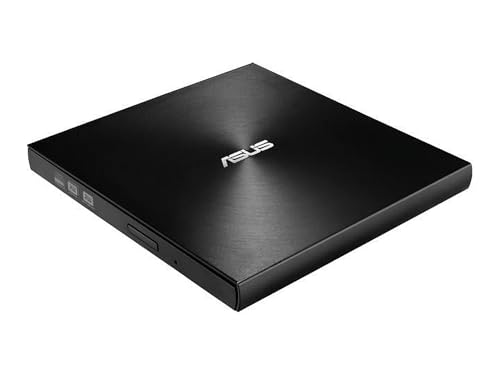
ASUS ZenDrive Ultra Slim External DVD Drive

ASUS SDRW-08D2S-U External Slim DVDRW 8X
ROOFULL External CD DVD Drive USB 3.0 Type-C

ROOFULL External CD DVD Drive USB 3.0 Type-C

8-in-1 External CD/DVD Drive USB-C SD/TF Reader

5-in-1 External CD/DVD Drive USB-C USB 3.0

External CD/DVD Drive USB 3.0 Burner Player

5-in-1 External CD/DVD Drive USB 3.0 Type-C

8-in-1 External CD/DVD Drive USB 3.0 Reader
Inside Each Recommended Option
The ZenDrive opens this list because it addresses the one thing most external drives skip: serious archival. M-Disc media uses a rock-like recording layer that is widely reported to outlast standard DVD or Blu-ray by a wide margin, which makes this drive the kind of pick someone burning family archives or business records actually cares about.
The body stays slim at roughly 13 mm, so it slips into a laptop sleeve without bulk. It writes DVDs at 8X and works with both Windows and Mac out of the box, and a Type-C adapter variant is available for newer laptops. If your priority is long-term peace of mind rather than raw speed, this is the obvious starting point.
Real Benefits
- M-Disc compatibility gives recorded discs a much longer rated lifespan than standard DVD media.
- Slim 13 mm shell travels easily in a laptop bag without adding noticeable weight.
- 8X DVD write speed handles full disc burns in roughly eight minutes for standard media.
- Cross-platform support means one drive covers a mixed Windows and Mac household.
Things To Consider
- M-Disc media costs more per disc, so the long-term benefit only shows up if you actually archive regularly.
- USB 2.0 is the headline connection, which is fine for discs but slower than USB 3.0 rivals when transferring large files.
Key Specs
Who Will Love This
Anyone whose main job for this drive is preserving important files for years rather than just occasionally reading one.
Reach For A Different Pick When
The ROOFULL External CD DVD Drive USB 3.0 Type-C is a smarter grab for someone who values USB 3.0 throughput and bundled travel storage over M-Disc archival.
This is the no-frills option from ASUS, and that is its appeal. Compared to the ZenDrive above, it drops M-Disc support in favor of a lower price and a clean diamond-cut finish that still looks at home next to a modern ultrabook.
It reads and writes DVDs at 8X, supports drag-and-burn software workflows, and includes password-controlled disc encryption for sensitive files. For someone who just needs an optical drive a few times a month, this hits the sweet spot.
Good Reasons To Consider
- Lower entry cost covers basic reading and burning without premium features.
- Disc encryption with password protection adds a layer of security for personal data.
- Drag-and-burn support keeps everyday disc creation simple.
Worth Noting
- No M-Disc support means it is not the right tool for serious long-term archival.
- The finish shows fingerprints easily, so a quick wipe-down is part of the routine.
- USB 2.0 only, which is fine for discs but feels dated next to USB 3.0 models.
Best Suited To
Anyone who occasionally needs to read or burn a disc and would rather not pay for features they will rarely use.
Look Elsewhere When
The ASUS ZenDrive Ultra Slim External DVD Drive is a stronger fit if archival-grade media support matters more than the price difference.
ROOFULL leans into the mobile-first use case here. Where the two ASUS picks above stick with USB 2.0, this drive ships with USB 3.0 and a Type-C cable in the box, so it talks to newer laptops without an adapter sitting between them.
A travel case comes included, which sounds small but matters: optical drives scratch easily when tossed into a backpack next to a charger and notebook. For someone commuting or working between locations, that case alone saves a lot of grief.
Strengths Worth Knowing
- USB 3.0 with Type-C cable covers modern laptops without extra adapters.
- Included travel case protects the disc tray from scratches in transit.
- Plug-and-play operation removes the usual driver headaches on most systems.
- Plays, burns, and rips both CDs and DVDs for full disc versatility.
Trade Offs
- USB 3.0 speed advantage is meaningful for hard drives but largely invisible for spinning discs, so the upgrade is more about convenience than throughput.
- No Blu-ray support, which matters only if you specifically need Blu-ray playback.
Made For
Students and professionals who shuttle between home, the office, and a coffee shop with their laptop in tow.
Swap It Out When
The 8-in-1 External CD/DVD Drive USB-C SD/TF Reader is a smarter choice if you also need built-in card slots for photography or video work.
Think of this as the older sibling of the previous ROOFULL pick. It shares the USB 3.0 and Type-C approach, but it has been on the market long enough to feel like a known quantity rather than a fresh experiment.
For someone setting up a permanent desk spot with a slim laptop dock, this drive covers everything from software installs and disc backups to playing older movies on a big screen. The honest read is that it does nothing flashy, which is exactly what a daily-use optical drive should do.
A Strong Showing
- Mature, widely deployed design that has been refined over multiple product cycles.
- USB 3.0 and Type-C support modern laptops at full speed without dongles.
- Handles full CD and DVD tasks including burning, ripping, and software installation.
Room For Improvement
- Lacks a bundled travel case, so one needs to be sourced separately for mobile use.
- Plain exterior design does not stand out next to fancier ASUS models.
Right Fit For
Anyone who wants a set-and-forget external DVD drive for everyday home or office tasks.
A Better Fit Elsewhere
The ROOFULL External CD DVD Drive USB 3.0 Type-C with case is the better match if you commute and want built-in protection.
This is where the list starts getting interesting. The 8-in-1 merges an optical drive with SD and TF card readers, which addresses a real gap on modern ultrabooks that dropped both ports. Compared to the simpler ROOFULL models above, this one covers more workflow in a single accessory.
It plays and burns CDs and DVDs, handles legacy software installs, and pulls photos straight off camera cards. For someone shooting on a mirrorless camera and editing on a slim laptop, cutting two accessories down to one is a real space and weight win.
Advantages To Know
- Combines optical drive and card readers in one chassis to reduce accessory clutter.
- USB-C connection fits modern laptops without adapters or hubs.
- Reads and writes CDs and DVDs for full disc versatility.
- Useful for transferring camera files without buying a separate card reader.
Honest Caveats
- No Blu-ray support limits it to CD and DVD media only.
- Combined card readers may not match the transfer speed of dedicated USB-C card readers for high-bitrate video files.
- Multi-function design adds a bit more bulk than a pure optical drive.
Perfect Match For
Photographers, videographers, and hobbyists who already pull memory cards regularly and want one less dongle in the bag.
Skip It When
The 5-in-1 External CD/DVD Drive USB-C USB 3.0 is the cleaner call for someone who only needs the optical drive and broad OS coverage.
Where the 8-in-1 above adds card readers, this 5-in-1 leans into broad system compatibility. It plays nicely with Windows from XP through 11, every modern macOS release, and Linux, which is a wider compatibility claim than most optical drives bother to make.
For a household or classroom with a mix of old and new machines, that coverage removes the usual guesswork. Plug it in, and the system tends to recognize it.
Useful Touches
- Cross-OS support covers Windows, macOS, and Linux without hunting for drivers.
- USB-C and USB 3.0 cables included for immediate use with new and legacy laptops.
- Burns DVDs at standard speeds for backup and software install workflows.
Points To Note
- Less specialized than dedicated M-Disc or Blu-ray drives.
- Plastic chassis can flex slightly under pressure in transit.
Whose Shelf It Belongs On
Mixed-OS households, classrooms, and small offices where one accessory needs to serve many machines.
Consider Something Else When
The ASUS ZenDrive Ultra Slim External DVD Drive is the better long-term storage play if you need M-Disc archival.
This is the “I just need it to work” option. Compared to the multi-function drives elsewhere on this list, this one focuses on the basics: read CDs, read DVDs, burn discs, install software, and stay out of the way.
USB 3.0 keeps the connection current, and the unit draws power straight from the laptop, so there is no power brick to misplace. For a parent installing old educational software or someone revisiting boxed games, this is the kind of low-fuss pick that earns its keep.
Key Advantages
- USB-powered operation removes the need for a separate power adapter.
- USB 3.0 connection handles disc tasks without bottlenecking.
- Plug-and-play behavior keeps the setup steps short for non-technical users.
- Compatible with most modern Windows and Mac systems.
Small Caveats
- Basic feature set means no card readers or extra ports beyond the disc drive itself.
- Plastic shell is fine for desk use but not as rugged as aluminum-clad rivals.
Built With In Mind
First-time buyers and anyone who needs a drive for occasional software installs without learning new software.
Not Your Match When
The ROOFULL External CD DVD Drive USB 3.0 Type-C is worth the upgrade for daily commuters who want a travel case included.
Functionally, this sits between the simpler USB 3.0 burner above and the more ambitious 8-in-1. It pairs the optical drive with both SD and TF card slots, plus USB 3.0 and Type-C cables for current laptops. For hybrid workflows that mix disc-based media with camera cards, that combination lands in a useful sweet spot.
Compatibility covers Windows 11 down through Windows 7, plus macOS and Linux, which makes it a safe pick for a multi-machine household. It is one of those quietly versatile options that handles more than its size suggests.
Noteworthy Benefits
- Built-in SD and TF slots add card reading without buying a separate accessory.
- USB 3.0 with Type-C cable covers new laptops and desktops alike.
- Wide OS coverage reduces compatibility headaches in mixed setups.
- Rewritable DVD support handles backup and burning workflows.
Possible Compromises
- Compact build tends to run a bit warm during long burn sessions.
- Card reader speeds may lag behind dedicated USB 3.2 readers for very large transfers.
Who Should Grab It
Hybrid creators who edit photos off SD cards one day and burn DVDs the next, all from the same laptop.
Where Another Pick Suits Better
The 8-in-1 External CD/DVD Drive USB-C SD/TF Reader is the stronger pick if you want even more ports bundled into the same chassis.
Closing out the list is another 8-in-1 entry that focuses on grab-and-go simplicity. Like the previous GODBPNYMU options, it pulls power straight from the USB port and skips the wall adapter entirely, which is one less thing to pack on a trip.
Compared to the heavier multi-port models above, this one reads as the lightweight option. It is a solid match for a backpack or shared desk where someone just needs to pop in a disc and read it without a chain of accessories.
A Favorable Mix
- USB-powered design means no adapter to forget at home.
- Plug-and-play operation removes the usual driver dance.
- USB 3.0 handles read and write tasks without slowdown.
- Compact build slips into a laptop sleeve alongside a charger.
Factors To Consider
- Lighter build trades some rigidity for portability.
- Like other drives here, it does not handle Blu-ray media.
Made For
Anyone who wants the smallest possible gap between bag and disc, without juggling cables or power bricks.
Where A Sibling Pick Shines
The 5-in-1 External CD/DVD Drive USB 3.0 Type-C is the better fit if you also want SD and TF card slots in the same package.
Choosing External Dvd Drives For Pc That Actually Fit Your Setup
Connection Type And Cable Situation
USB-C is becoming the default on slim laptops, so drives that ship with both USB-A and USB-C cables save the hassle of buying an adapter separately. USB 3.0 is faster on paper than USB 2.0, though for disc-based tasks the difference is small because discs themselves are the bottleneck. For most setups, matching the cable to your laptop’s port matters more than chasing a faster spec.
Media Support And Burn Capability
Most drives handle CDs and DVDs, which covers software installs, music, and standard movie discs. Blu-ray requires a specific drive and is not on this list. If you plan to burn discs for archival, look at M-Disc support, since that media is rated to last much longer than standard DVD-R in widely reported conditions.
Portability Versus Home Use
A travel case, slim profile, and bus-powered design matter for commuters and students. A more stationary setup benefits from a stable chassis and longer cable reach. Consider where the drive will live most of the time, and pick a build that suits that environment.
Extra Ports And Multi-Function Value
Some drives bundle SD and TF card readers, which is handy for photographers and videographers working from slim laptops. That extra value is worth something, but a multi-function drive is usually larger than a pure optical drive. Decide whether consolidating accessories or staying minimal matters more to you.
Things Worth Weighing Before You Decide
Pitfalls Shoppers Hit
Assuming every drive plays Blu-ray is the most common slip. Standard DVD drives do not, and forcing the issue usually means buying twice. Another trap is grabbing a USB 2.0 drive for a USB-C-only laptop and forgetting to budget for an adapter. Check the port situation before the cable situation.
Where The Extra Money Goes
A higher-tier drive typically adds M-Disc archival support, a sturdier chassis, or bundled card readers. The premium is small compared to the cost of lost data on cheap media. For someone burning anything they want to keep for years, the upgrade tends to pay for itself in peace of mind.