External optical drives have quietly become essential for anyone preserving old CD and DVD collections, installing legacy software, or backing up family video. Modern laptops ship without built-in disc trays, so the right plug-and-play drive turns a pile of coasters into a tidy digital archive. I pulled together nine external DVD drives that handle ripping, burning, and playback across Windows, macOS, and Linux, with attention to read speed, M-DISC archival support, cable flexibility, and form factor. Some double as USB hubs or card readers, which helps on thinner laptops that already gave up every port.
A Quick View Of The Lineup
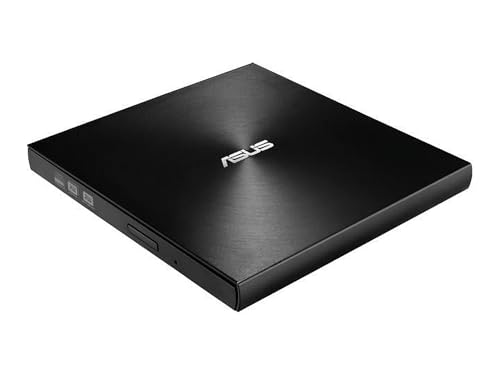
ASUS ZenDrive Ultra Slim External 8X DVD Drive with M-Disc Support

ROOFULL External CD DVD Drive USB 3.0 Type-C Ultra Slim

Dell DW316 USB Low Profile DVD Super Multi Drive
ROOFULL External CD DVD Drive for Laptop & Mac with Case

ROOFULL External CD DVD Drive for Laptop PC USB 3.0 Type-C

Unitek External CD DVD Drive USB 3.0 Type-C with Built-in Hub

ROOFULL External CD DVD Drive with Hub, SD Reader & Case

ROOFULL External CD DVD Drive with USB 3.0 Type-C Hub & SD Reader

LG GP60NB50 Ultra Slim Portable DVD+/-RW External Drive with M-DISC
The Details Behind The Selections
The ZenDrive is built around M-DISC, a write-once archival media that engraves data into a rock-like inorganic layer rather than organic dye. For anyone planning to rip wedding DVDs and then preserve the originals for decades, that matters: M-DISC-rated discs are rated to survive light, heat, and humidity far better than standard DVD-R. It runs over USB 2.0, writes at 8X for DVD, and pairs with Nero BackItUp for Android, which is a quiet bonus for offloading phone photos to a physical disc.
At roughly 13mm thin and finished with a Zen-inspired concentric hairline pattern, the drive slides into a laptop sleeve without bulking up the kit. For commuters and home archivists alike, this is the kind of drive you forget is in the bag until you need it.
Practical Pluses
- M-DISC support turns the drive into a true archival tool, not just a one-time ripper.
- Ultra-slim 13mm chassis is genuinely portable in a laptop sleeve or small shoulder bag.
- 8X DVD write speed finishes a full disc in roughly the time of a coffee break.
- Cross-platform support spans Windows and Mac out of the box.
- Nero BackItUp for Android extends the workflow to phone archives.
Points To Note
- USB 2.0 only, so very large disc-to-drive transfers feel slower than USB 3.0 rivals.
- The textured finish picks up fingerprint smudges during handling.
- M-DISC media costs more per disc than standard DVD-R, which raises total project cost.
Best Suited To
Family archivists and hobbyists preserving wedding videos, home movies, and scanned photo discs for decades on M-DISC media.
Reach For A Different Pick When
Strict USB 3.0 throughput matters more than archival depth, in which case the ROOFULL External CD DVD Drive for Laptop & Mac with Case is a faster everyday fit.
The newer ROOFULL ultrabook-focused drive ships with both a USB-A pigtail and a USB-C pigtail, which solves the most common pain point of thin 2026-era laptops: no full-size USB port at all. It draws power from the laptop through the data cable and ships with an auxiliary USB power cord for older MacBooks that under-deliver current over a single port.
Setup is genuinely plug-and-play on modern macOS and Windows 11, with no driver hunt required. For ripping a stack of CDs into iTunes or pulling an old software installer off DVD, the process takes about as long as the disc itself.
Why It Works Well
- Integrated dual USB-A and USB-C cabling eliminates adapter anxiety.
- USB 3.0 throughput shortens large-batch rip sessions noticeably over USB 2.0.
- Extra power cable included for finicky MacBook ports.
- Pure optical-drive focus, no extra hub ports crowding the chassis.
Soft Spots
- No bundled carrying case, so cable management is on you.
- Plastic shell feels lighter in the hand than the ASUS ZenDrive.
Quick Facts
Whose Shelf It Belongs On
MacBook, Surface, and other USB-C-only ultrabook owners who want a cable-ready drive that simply shows up and works.
Consider Something Else When
You also need extra USB ports or SD card slots, in which case the Unitek External CD DVD Drive covers both jobs in one chassis.
The Dell DW316 is the lightest external drive in this lineup at roughly 200g and roughly 14mm thin. The chassis uses a low-profile tray loader that disappears into the body when closed, so the drive rides flat in a laptop bag without snagging on zippers.
Dell designed this unit as a plug-and-play solution for Ultrabook owners who lost their built-in optical drive. It comes preloaded with CyberLink Media Suite for playback and basic authoring, which saves a step for anyone who doesn’t already have ripping software on hand.
Positive Points
- 14mm chassis and 200g weight make it the easiest carry in this roundup.
- Preloaded CyberLink Media Suite handles basic ripping and playback out of the box.
- Tray loader feels familiar and keeps discs aligned during long reads.
- Plug-and-play recognition on Windows without a separate driver install.
Honest Caveats
- USB 2.0 interface limits throughput for big ISO rips compared to USB 3.0 peers.
- Glossy plastic finish scratches visibly with daily commute abuse.
Perfect Match For
Frequent travelers and remote workers who want the smallest possible drive for occasional disc access on the road.
Swap It Out When
Ripping speed is the priority, in which case the ROOFULL External CD DVD Drive for Laptop PC moves much faster over USB 3.0.
ROOFULL’s ECD829-Y model has the longest track record of any drive in this roundup. It’s a plain-and-simple external DVD writer that focuses on the actual job: reading, writing, and ripping CDs and DVDs without extra ports cluttering the chassis. The included carrying case is a quiet win, since it prevents the tray from opening inside a packed bag.
For someone who rips a stack of CDs every weekend or burns a DVD-R for a friend’s birthday, this is the dependable workhorse. It works with both USB-A laptops and modern Type-C machines through the integrated cable arrangement.
The Upside
- Refined through years of revisions, so the quirks are mostly ironed out.
- Carrying case included, which protects the tray in transit.
- USB 3.0 keeps CD batch rips noticeably faster than USB 2.0 drives.
- Reads and writes both CD and DVD media without complaint.
Some Limits To Know
- No card reader or extra hub ports for accessory hookups.
- The bundled case adds a little bulk to a slim laptop kit.
Feature Snapshot
Right Fit For
Music archivists and home media organizers who rip CDs to digital libraries every week and want a steady, no-fuss tool.
Look Elsewhere When
You also want SD card access or USB hub ports, in which case the ROOFULL External CD DVD Drive with Hub, SD Reader & Case pulls double duty.
The ECD819-SU3 is the veteran of the ROOFULL lineup, refined continuously since its release. For someone with a desktop PC that lacks an optical drive or an older tower with a dead tray, this unit plugs in and behaves like the internal drive it replaced. The combination of USB 3.0 throughput and Type-C compatibility lets it work with most systems built in the past decade.
It handles all the common CD and DVD tasks, from ripping audio CDs to MP3, to burning home videos onto DVD-R for grandparents who still prefer discs. For an inexpensive second drive that lives in a drawer until needed, it’s a sensible pick.
Everyday Advantages
- Years of firmware refinement mean fewer compatibility surprises.
- USB 3.0 and Type-C support cover both modern and older machines.
- Reads music CDs, movie DVDs, and software installers without fuss.
- Lightweight shell stores easily in a desk drawer when not in use.
Trade Offs
- Plastic enclosure can show wear after years of cable wrapping.
- No protective case ships in the box.
Who Should Grab It
Shoppers who want a no-frills optical drive that has earned its keep over many years and just keeps working.
Skip It When
You want archival-grade M-DISC burning, in which case the ASUS ZenDrive is purpose-built for long-term disc writing.
The Unitek drive reads and writes CDs and DVDs while doubling as a 5-in-1 hub. It adds a USB 3.0 port, a USB 2.0 port, a USB-C 2.0 port, and an SD card slot to a laptop that gave them all up for thinness. The hub ports can run a wireless mouse dongle, an external hard drive, or pull files off a camera card while the optical drive is spinning.
For a remote worker with one USB-C jack on a 13-inch laptop, this combo is genuinely useful. It pulls a second job without asking for a second device on the desk.
Points In Its Favor
- Hub ports solve the chronic accessory shortage on modern ultrabooks.
- SD card slot pulls double duty for photographers and videographers.
- Plug-and-play setup means no driver hunt on Windows or macOS.
- USB 3.0 optical read speed keeps CD rips moving briskly.
Practical Considerations
- Hub ports share bandwidth with the optical drive during simultaneous use.
- Slightly heavier than a pure optical drive because of the extra circuitry.
Made For
Thin-and-light laptop owners who need an optical drive plus a few extra USB ports and don’t want to carry two separate gadgets.
A Better Fit Elsewhere
If card reader performance is the priority over hub ports, the ROOFULL External CD DVD Drive with Hub, SD Reader & Case pairs the drive with a faster SD slot.
This 7-in-1 ROOFULL drive packages an optical drive, multiple USB ports, and an SD/TF card reader into one chassis. For a content creator who needs to pull footage from a camera card, archive a finished project to DVD, and charge a phone over USB, the all-in-one layout eliminates the cable salad that usually sits next to a laptop during a shoot.
The integrated cable carries both USB-A and USB-C connectors, so the unit travels between a desktop tower, a Windows laptop, and a MacBook without a separate adapter. ROOFULL includes a protective case, which keeps the disc tray and SD slots clean in a camera bag.
What Makes Sense
- Seven functions in one chassis reduce desk clutter during a busy work session.
- Integrated USB 3.0 and Type-C cable suits multiple machines without adapters.
- SD and TF card slots handle camera media without a separate reader.
- Carrying case bundled for travel between home and a shoot location.
Where It May Fall Short
- All-in-one design weighs more than a pure optical drive.
- Hub ports share a single USB bus with the optical drive.
Feature Rundown
Who It Suits Best
Photographers, videographers, and small studio operators who need optical disc access, card reading, and USB ports in one travel-ready unit.
Where Another Pick Suits Better
When only a basic hub is needed and weight matters more than ports, the slimmer ROOFULL External CD DVD Drive for Laptop & Mac is a lighter carry.
This ROOFULL unit is a near-twin of the 7-in-1 model above, tuned for creators who need reliable SD card throughput alongside disc burning. Plug it into a laptop, drop a memory card into the reader, drag the files onto a DVD-R, and the workflow becomes a single cable on the desk.
The integrated dual USB cable arrangement works across macOS, Windows, and Linux without a separate driver. For a YouTuber archiving finished videos to disc as a redundancy layer alongside cloud storage, the combo is genuinely useful.
Everyday Wins
- Combined SD reader and optical drive cuts down on desk accessories.
- USB 3.0 throughput speeds up both card transfers and disc writes.
- Plug-and-play behavior across macOS, Windows, and Linux without driver fuss.
- Compact footprint fits next to a laptop on a small editing desk.
Things To Weigh Up
- Card reader shares bandwidth with the optical drive during simultaneous use.
- No carrying case included in the box.
Built With In Mind
Content creators and small studio editors who need quick SD card access and disc archiving in a single device.
Not Your Match When
A pure optical drive is the goal, in which case the slimmer Dell DW316 trades the hub functions for a lighter carry.
The LG GP60NB50 is the broadest cross-platform option here, working across Windows, Linux, macOS, and Surface Pro tablets out of the box. It supports M-DISC archival media, runs over USB 2.0 (a USB 3.0 host port also works), and ships in a slim black enclosure that matches most laptop colorways.
The 0.75MB buffer memory keeps data flowing during long rips without underrun errors that can ruin a disc. For tinkerers who run multiple operating systems on the same desk, the LG is the kind of drive that doesn’t pick favorites.
What Stands Out
- M-DISC support matches the ASUS ZenDrive for archival-grade disc writing.
- Broad OS compatibility covers Windows, Linux, and macOS in one unit.
- 0.75MB buffer memory prevents burn failures during long writes.
- Ultra-slim chassis travels easily between machines.
Practical Considerations
- USB 2.0 interface tops out below USB 3.0 peers for big rips.
- No carrying case bundled in the box.
At A Glance
Right Fit For
Mixed-OS households and Linux tinkerers who want a single drive that works on every machine without configuration.
A Better Fit Elsewhere
Speed-focused Windows users may prefer the ROOFULL External CD DVD Drive for Laptop PC for its USB 3.0 throughput.
How To Pick An External DVD Drive That Actually Rips Well
Read And Write Speed That Matches Your Disc Pile
DVD write speed is the most quoted spec on the box, but the number only matters if you also burn discs regularly. For a ripper whose main job is one-way conversion from disc to digital file, even 8X DVD read speed finishes a full movie in roughly eight minutes, and slower drives rarely become the bottleneck for a typical stack of 25 discs.
A bus-powered USB 3.0 drive handles batch CD ripping noticeably faster than a USB 2.0 unit. For someone digitizing a music collection on weekends, that throughput gap adds up over a year.
Cable Layout And Power Delivery
Modern ultrabooks ship with one or two USB-C ports and nothing else. A drive with an integrated USB-C pigtail, or a dual USB-A/USB-C cable arrangement, removes the need for a separate adapter that can walk away during travel.
Some MacBook ports under-deliver current over a single cable, which can make a drive stutter mid-rip. Drives that include an auxiliary power cable solve that without forcing the laptop to share battery current.
Archival Media Support When You Need It
M-DISC is a write-once archival media rated to outlast standard DVD-R by decades. If the goal is preserving family videos, scanned photo discs, or business records that need to survive a closet for twenty years, an M-DISC-capable drive pays for itself in reduced replacement disc cost.
For someone who only rips for one-time viewing, regular DVD-R writes are perfectly fine, and the M-DISC premium on the drive can be skipped.
Extras That Earn Their Space
Built-in USB hubs and SD card readers make sense for thin laptops that already gave up all their ports. They make less sense for a desktop tower with twelve USB ports and a dedicated card reader.
The honest read is that combo drives add a little bulk and a little weight, so pick the combo only when the accessory ports solve a real problem on your specific machine.
Smart Buying Advice For External DVD Drives
Pitfalls Shoppers Hit
The most common mistake is assuming any external DVD drive handles M-DISC. Most do not, and writing to M-DISC without an M-DISC-capable drive quietly produces standard DVD-R media that won’t last the decades the buyer expected.
Another trap is picking a USB 2.0 drive for a MacBook that under-supplies power. The drive connects, spins up briefly, then drops out mid-rip with an undervoltage error. A drive with an auxiliary power cable or dual-cable arrangement sidesteps that scenario.
Where The Extra Money Goes
Higher-tier drives earn their premium through M-DISC support, integrated USB-C cabling, and bundled protective cases. The case alone protects the tray mechanism from the most common failure mode: opening accidentally inside a packed bag.
The extra cost also covers firmware refinement. A drive that has shipped for several years with continuous firmware updates tends to read scratched or low-quality discs more gracefully than a fresh, untested model.
Frequently Asked Questions
Do External DVD Drives Work With Macbooks?
Yes, most modern external DVD drives work with current macOS through plug-and-play USB or USB-C connections. For older MacBooks that under-deliver power, a drive with an auxiliary power cable is the safer pick.
Can I Rip Copyrighted Movies And Music With These Drives?
The drives themselves support CD and DVD ripping through third-party software, but copyright laws vary by region and material. Always confirm the legal status of the discs in your collection before archiving.
How Long Do External DVD Drives Typically Last?
A well-cared-for external DVD drive commonly lasts five years or longer of regular use. The tray mechanism and laser assembly are the usual wear points, so storing the drive in a protective case and keeping discs clean both extend service life.
What Software Do I Need For Ripping DVDs?
Common free options include HandBrake for DVD-to-video conversion and Exact Audio Copy for CD audio. macOS users can use the built-in Music app for CD ripping with a few clicks.
Is USB 3.0 Necessary For Ripping CDs And DVDs?
USB 2.0 handles CD and DVD ripping fine for most users, but USB 3.0 shortens long batch sessions noticeably. For one-off rips, the speed difference is rarely worth chasing.
The Takeaway
External DVD drives remain the cleanest way to move CDs and DVDs into a digital library on a laptop that no longer ships with one. For pure archival depth, the ASUS ZenDrive and LG GP60NB50 are the standout M-DISC options. For USB-C ultrabook owners, the ROOFULL ultra-slim drive and Dell DW316 keep the kit compact. For thin laptops that need more ports, the Unitek and ROOFULL combo units pull double duty. Pick based on your operating system, your cable situation, and whether M-DISC matters to your archive.