Laptop thermals have gotten aggressive in recent years, and a thin chassis can only do so much when a GPU pulls hard for hours. External fans for laptop rigs are the simplest way to claw back lost frame rates, tame thermal throttling, and keep your keyboard deck from feeling like a griddle. After poring over specs, fan sizes, and ergonomic stands across a crowded category, I narrowed the field to ten picks that genuinely earn their place on your desk. Whether you’re editing 4K footage, pushing frame rates in demanding titles, or just want a quieter workstation setup, there’s something here for you.
A Fast Comparison Of The Options

llano V12 Gaming Laptop Cooling Pad (RGB)

llano V12 Laptop Cooling Pad (No RGB)

llano V12 Ultra Laptop Cooling Pad with Software Control

llano V11 Pro Laptop Cooling Pad RGB

llano V10 Gaming Laptop Cooling Pad RGB

llano Gaming Laptop Cooling Pad 3500RPM
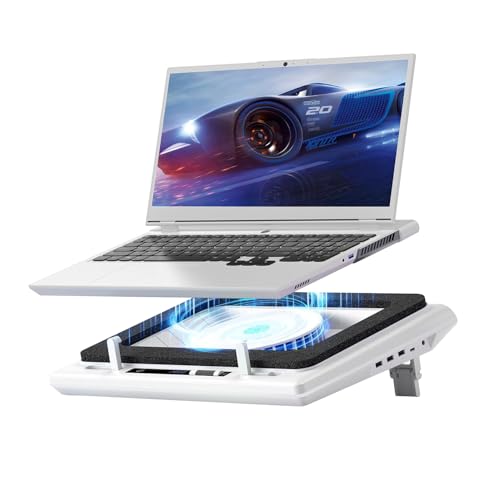
llano V12 Gaming Laptop Cooling Pad

llano V10 Gaming Laptop Cooler RGB (White)

llano V12 Gaming Laptop Cooling Pad Stand
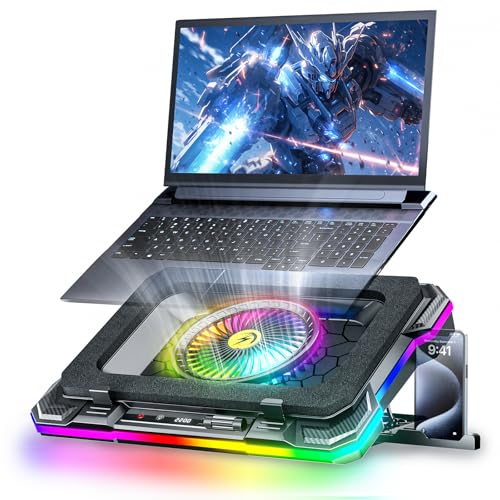
KeiBn Gaming Laptop Cooling Pad with RGB Fan
Why These Options Stand Out
The llano V12 RGB sits at the top because it pairs a sizeable 5.5-inch turbofan with a sealed foam pressure chamber, which forces air directly up through the laptop’s intake rather than letting it spill sideways. For anyone running a 15.6 to 19-inch machine, that geometry matters more than raw RPM. Compared to the smaller 4.7-inch units later in this list, the larger blade pushes a thicker column of air with less strain on the motor.
In real use, that means shorter sprints to thermal recovery when you’re bouncing between heavy renders and lighter web work. The pad handles laptops most other stands would buckle under, and the RGB strip adds personality without screaming for attention in a home office.
Standout Benefits
- 5.5-inch turbofan delivers aggressive cooling without forcing the motor to redline.
- Sealed foam chamber channels airflow straight into the laptop’s intake, which reduces wasted side spillage.
- Fits laptops from 15.6 inches up to 19 inches, covering most desktop-replacement rigs.
- Three-port USB hub keeps your mouse, headset, and dongle plugged in without eating laptop ports.
- Adjustable speed control lets you tune airflow to match the workload.
Points To Keep In Mind
- Larger footprint may crowd compact desks; you may find it overruns shallow keyboard trays.
- RGB lighting means a small parasitic draw on the USB connection even when the fan is off.
- Owners commonly report that foam sealing needs occasional cleaning to keep airflow consistent.
Feature Snapshot
Who Should Grab It
Gamers and creators running a large 17 or 18-inch laptop who want maximum airflow with minimal setup fuss.
Look Elsewhere When
The KeiBn Gaming Laptop Cooling Pad with RGB Fan is a smarter pick if you want eight distinct height stops for ergonomic tweaks across long sessions.
This is the same 5.5-inch turbofan platform as the RGB version above, but stripped of the lighting and given a touch-mute button on the bottom edge for silent fan cycling. For shared spaces or late-night sessions, that one-touch mute is the real selling point. It uses the same airtight pressure chamber, so the cooling geometry remains a strong point.
Stripping RGB out also drops a bit of parasitic USB draw, which matters if you’re running on battery or a small docking station. The trade-off is a less flashy desk accessory, though the all-black chassis still looks clean.
Practical Pluses
- Touch-mute button lets you silence the fan without unplugging during meetings.
- Same 5.5-inch turbofan as the RGB sibling, so cooling performance holds steady.
- Lower USB draw compared to RGB-equipped pads, depending on your setup.
- Airtight pressure chamber keeps airflow focused on the laptop intake.
Things To Consider
- No lighting means no visual cue that the fan is running, which can confuse first-time users.
- Touch controls can be sensitive to placement; some owners report accidental activations.
Made For
Anyone working in a shared apartment, dorm, or open office where noise discipline matters more than RGB flair.
Skip It When
The llano V10 Gaming Laptop Cooling Pad RGB is a smarter pick if you want a four-port hub and don’t mind a little extra lighting in exchange.
The V12 Ultra adds a layer most competitors skip: a companion software suite that watches your system thermals and shifts the fan between three cooling modes automatically. That kind of automation matters when your workload jumps from a Zoom call to a GPU-heavy compile without warning. It also brings USB 3.0 speeds to the hub, which is a real upgrade over the 2.0 ports on most pads.
For people who hate babysitting fan curves, the smart software is the headline feature. Three height stands also make it a usable ergonomic riser, not just a cooler.
What Pays Off
- AI temperature control adjusts fan speed in real time, removing manual tweaking.
- USB 3.0 hub transfers files much faster than the 2.0 hubs on cheaper pads.
- Three height stands turn the pad into a proper ergonomic riser.
- Same proven 5.5-inch turbofan platform as the rest of the V12 line.
Worth Noting
- Software control adds setup overhead; users uncomfortable with companion apps may not use it.
- Higher cost reflects the smart features, which may be wasted on lighter workloads.
Quick Facts
Best Suited To
Power users juggling mixed workloads who want a cooler that adapts without constant attention.
Consider Something Else When
The llano V11 Pro Laptop Cooling Pad RGB is a better fit for anyone with a 14-inch laptop who wants a smaller footprint.
The V11 Pro trims down to a 4.7-inch turbofan, which is enough for most 14 to 17.3-inch laptops without the bulk of the V12 line. Think of it as the agile middle child of the family. It still uses the airtight pressure chamber concept, just at a smaller scale that fits crowded backpacks and tighter desks.
For students and hybrid workers, the smaller footprint is the real perk. It slips into a messenger bag alongside a charger without dominating the space.
The Value In It
- Compact 4.7-inch turbofan fits laptops down to 14 inches without wasted overhang.
- Lighter overall weight makes it travel-friendly compared to 5.5-inch pads.
- Three-port USB hub covers basic mouse, keyboard, and dongle needs.
- Dustproof seal reduces how often you need to clean the intake path.
Trade Offs
- Smaller fan moves less air than 5.5-inch pads under maximum thermal load.
- RGB lighting adds a small parasitic draw on the host USB port.
Right Fit For
Students, commuters, and anyone with a 14 to 15-inch laptop who needs a portable cooling pad that doesn’t weigh much.
A Better Fit Elsewhere
The llano V12 Gaming Laptop Cooling Pad (RGB) is a smarter pick for owners of large 17 or 18-inch rigs who need the bigger fan.
The V10 RGB is the swiss army knife of this list: a 4.72-inch turbofan, four USB ports (mix of USB-C and USB-A), and three adjustable stand positions. That port count is the standout detail, because most competitors ship with three at best. For anyone running a modern laptop that gave up half its ports to thinness, the extra Type-A and Type-C slot matters.
The 3500 RPM motor with a pure copper build delivers solid thermal drops for everyday gaming and editing sessions. It’s not the flashiest pad, but it covers the most bases.
Good Reasons To Consider
- Four-port hub with both USB-C and USB-A covers modern and legacy accessories.
- Pure copper motor supports 3500 RPM for sustained thermal reduction.
- Three adjustable stand positions help with neck and wrist posture.
- Broad compatibility from 13-inch ultrabooks up to 17.3-inch gaming rigs.
Room For Improvement
- Button-only controls can feel clunky compared to the touch-mute pads higher in this list.
- Four-port hub means more cables to manage on a clean desk, depending on your tolerance.
Whose Shelf It Belongs On
Owners of port-light ultrabooks or modern gaming laptops who need the extra connectivity as much as the cooling itself.
Reach For A Different Pick When
The llano V12 Ultra Laptop Cooling Pad with Software Control is worth the upgrade for users who want automatic thermal response without manual button presses.
This stripped-down variant skips the RGB lighting and the extra ports, focusing entirely on the 3500 RPM turbofan. Think of it as the working-man’s version of the V10 above. It’s the kind of pad that does one job and does it without ceremony.
For minimalists, the lack of lighting and ports is actually a feature. Fewer distractions, fewer cables, and a quieter visual footprint on the desk.
Everyday Perks
- Same proven 4.72-inch turbofan with 3500 RPM as the full V10.
- No RGB means no parasitic USB draw from lighting circuits.
- Cleaner visual footprint for minimalist desks.
Soft Spots
- No extended ports means you’ll lean on the laptop’s own USB slots for accessories.
- Less height adjustment compared to feature-loaded siblings.
Built With In Mind
Minimalists and anyone who treats their cooler as a pure thermal tool rather than a desk centerpiece.
Swap It Out When
The llano V10 Gaming Laptop Cooling Pad RGB is the better fit if you need that four-port hub and don’t mind the extra lighting.
The original V12 platform pairs a 14cm (5.5-inch) turbofan with sealed foam and claims rapid thermal drops even during high-intensity sessions. It’s the foundation that all the V12 variants in this list build on. The touch-mute button on the bottom keeps things silent on demand, which is a thoughtful touch for streamers and voice chat users.
For owners who want proven core cooling without paying extra for software or extra ports, this is the straightforward choice.
The Case For It
- 14cm turbofan delivers aggressive airflow for sustained workloads.
- Sealed foam setup focuses cooling where it matters most.
- Touch-mute button on the bottom is easy to find without looking.
Honest Caveats
- Generic feature set means less differentiation from the V12 siblings higher in this list.
- No smart software, so adjustments remain manual.
Feature Rundown
Perfect Match For
Gamers and editors who want the V12 cooling platform without paying for software or extra RGB features.
Where A Sibling Pick Shines
The llano V12 Ultra Laptop Cooling Pad with Software Control is the smarter upgrade if you want auto-adjusting fan curves.
This is the same V10 RGB cooling platform, but finished in white rather than black. For bright desks, Scandinavian setups, or minimalist gaming rooms, that color choice shifts the entire feel of the workstation. Performance is identical to the black V10 above: 4.72-inch turbofan, four-port hub, three height adjustments.
For shoppers who care about how their gear looks as much as how it performs, the white finish is the headline reason to choose this variant.
Reasons It Performs
- White finish brightens minimalist and Scandinavian-style desks.
- Same 4.72-inch turbofan and 3500 RPM motor as the black V10.
- Four-port USB-C and USB-A hub matches the connectivity of the standard V10.
Small Caveats
- White surfaces tend to show dust and scuffs more readily than black.
- Color preference is subjective, so this only fits shoppers who want white specifically.
Who Will Love This
Aesthetic-driven shoppers building a clean, bright workstation who also want the V10’s proven cooling.
Not Your Match When
The llano V10 Gaming Laptop Cooling Pad RGB (black) is the smarter buy if you prefer darker finishes or want the same cooling at potentially lower cost.
The V12 stand variant leans into its role as a heavy-duty riser for 17-inch and larger laptops. The 5.5-inch turbofan handles thick desktop replacements that smaller pads would struggle to support, and the chassis is built to take the weight without flexing. Think of it as the structural backbone of the V12 family.
For anyone whose daily driver is a thick 17 or 18-inch gaming laptop, the reinforced frame is the feature that matters most. A flimsy pad under a 3kg machine is asking for trouble.
A Strong Showing
- Reinforced chassis supports heavy 17 to 19-inch desktop replacements.
- 5.5-inch turbofan handles the high thermal output of large gaming rigs.
- Sealed foam setup keeps airflow focused on the intake.
Points To Note
- Larger and heavier than the smaller pads on this list, so portability suffers.
- Fewer ergonomic stops than the KeiBn pad, which offers eight positions.
Who It Suits Best
Owners of big, heavy gaming laptops who need a structurally sound pad rather than a portable one.
Where Another Pick Suits Better
The KeiBn Gaming Laptop Cooling Pad with RGB Fan is worth a look if eight height adjustments matter more than heavy-duty frame strength.
KeiBn rounds out this list with a 5.5-inch turbofan, eight height adjustments, and a built-in phone holder. That level of ergonomic flexibility is rare in this category, where most pads stop at three or four positions. The 0 to 2200 RPM range covers everything from whisper-quiet office work to full-throttle gaming, and the sealed foam channels airflow efficiently.
For people who sit at their desk for hours and care about neck and wrist posture, the eight-stop riser is the headline feature. The phone dock is a nice touch for keeping notifications in view without lifting the main laptop lid.
What Works In Its Favor
- Eight height adjustments enable fine ergonomic tuning for long workdays.
- 0 to 2200 RPM range adapts to office, creative, and gaming workloads.
- Sealed foam design channels airflow straight into the laptop.
- Phone holder adds a secondary dock for notifications or video calls.
- 5.5-inch turbofan handles 15.6 to 19.3-inch laptops with room to spare.
Factors To Consider
- Two USB ports are fewer than the four-port V10 pads higher in this list.
- Phone holder takes up desk depth you may not want to spare on a small surface.
Spec Overview
Right Fit For
Hot-desk professionals, students, and creators who sit for hours and want granular ergonomic control over their laptop angle.
Another Choice May Suit
The llano V12 Gaming Laptop Cooling Pad Stand is the better fit for anyone running a heavy 17-inch desktop replacement who values frame strength over height stops.
What Matters When Buying A Laptop Cooler
The right external fan for laptop setups comes down to three things: how much air your machine actually needs, how loud you can tolerate the fan being, and whether you want extras like USB ports or RGB. A thin ultrabook doing word processing barely breaks a sweat, so a small 4.7-inch pad is plenty. A 17-inch gaming rig running AAA titles for hours needs a 5.5-inch turbofan with a sealed chamber to push air where it counts.
Fan size is the headline spec, but RPM range matters just as much. Variable speed control lets you dial the noise down for office work and ramp it up for gaming, which is much friendlier than a fixed-speed fan that roars during spreadsheets. A sealed foam pressure chamber, the airtight ring that surrounds the fan and channels airflow upward, also helps concentrate cooling on the laptop’s intake rather than wasting it sideways.
Ergonomics shouldn’t be an afterthought. Look for adjustable height stops that match your chair and desk height, since a cooler that tilts your keyboard at a bad angle will wreck your wrists over time. USB hubs are a useful bonus if your laptop is port-light, and dustproof sealing keeps maintenance intervals longer.
Finally, think about your desk space. A 19-inch pad with a four-port hub is great for a deep workstation, but it’ll dominate a small dorm desk. Match the pad’s footprint to the space you actually have, not the spec sheet.
Key Considerations Across These Picks
Where Shoppers Go Wrong
The most common slip-up is buying the biggest fan you can find without checking laptop compatibility. A 5.5-inch pad is wasted on a 13-inch ultrabook, and oversized cooling surfaces can even block smaller intake vents. Another trap is ignoring noise levels at full speed, since some pads run much louder than their quiet idle suggests. Always check whether the pad has variable speed control before committing.
Where The Extra Money Goes
Premium pads in this category earn their higher cost through smarter features rather than just bigger fans. Smart software that adjusts fan curves automatically, USB 3.0 hubs for faster file transfers, and reinforced chassis that hold up under heavy laptops all justify the upgrade for the right shopper. For casual users doing light office work, a budget-friendly pad delivers most of the cooling benefit at a lower cost.
Frequently Asked Questions
Do external laptop fans actually make a difference?
Yes, particularly for laptops that thermal throttle under sustained load. A 5.5-inch turbofan with a sealed chamber can shave meaningful degrees off CPU and GPU temperatures during long gaming or rendering sessions, which translates to steadier frame rates and quieter internal fans.
Will a cooling pad fit any laptop size?
Most pads list a compatible size range, and staying within that range matters. A pad designed for 15.6 to 19-inch laptops may not seat a 14-inch machine properly, while a compact 4.7-inch pad won’t support a 17-inch desktop replacement’s weight comfortably.
Are USB hubs on cooling pads reliable?
For basic accessories like mice, keyboards, and flash drives, yes. The pads with USB 3.0 hubs transfer files noticeably faster than USB 2.0, though neither is a substitute for a dedicated dock if you need display output or ethernet.
How loud are these cooling pads at full speed?
A 5.5-inch turbofan running at full speed is audible but rarely unpleasant, similar to a desktop case fan. Variable speed control lets you drop the RPM during quiet tasks like writing or video calls, which is why adjustable models tend to be more practical for shared spaces.
Do I need RGB lighting on a cooling pad?
No, RGB is purely cosmetic. The only practical reason to consider it is if you want a visual cue that the fan is running, which can be useful when troubleshooting. Otherwise, skip the lighting and save the cost.
Wrap Up
A good external fan for laptop use turns a throttling, fan-screaming machine into a steady, quieter workstation. For most shoppers, the llano V12 Gaming Laptop Cooling Pad (RGB) hits the sweet spot of fan size, sealed chamber design, and ergonomic flexibility. Smaller laptops do well with the V11 Pro, while heavy 17-inch rigs need the V12 stand’s reinforced frame. Match the pad to your machine’s size and your tolerance for noise, and you’ll feel the difference within the first hour.