Anyone who spends hours in spreadsheets, books, or financial reports knows the frustration of hunting for the equals sign on the top row. A dedicated numpad turns those long data-entry sessions into something smoother, and the right wireless or wired option can quietly transform a laptop setup. I’ve rounded up nine external numeric keypads that cover the real-world situations where speed, comfort, and portability all matter.
The Leading Options At A Glance
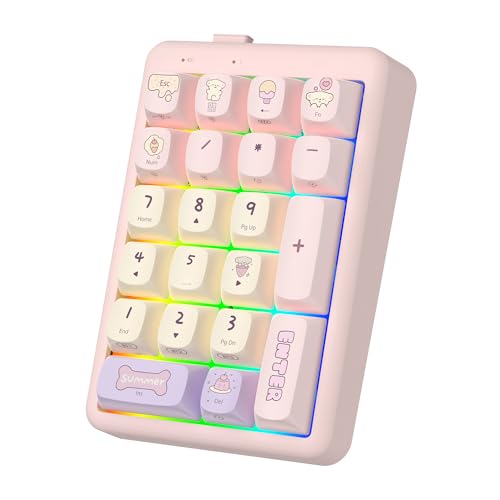
FOPATO Wireless Mechanical Numpad Numeric Keypad for Laptop

Lomiluskr Wireless Number Keypad with Cute Silicone Bear (MilkTea)
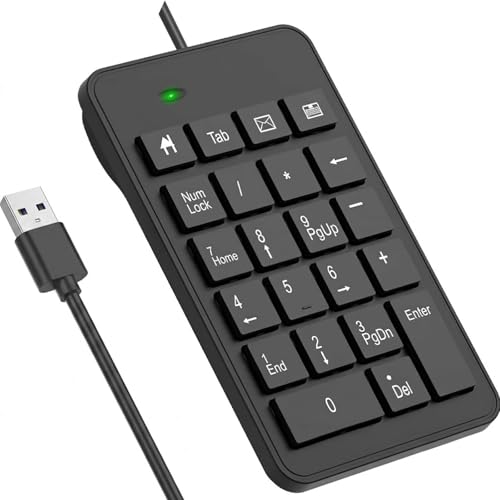
LOONASA Wired Number Pad 23 Key USB Numpad

LOONASA Wired USB-C Number Pad 23 Keys

Macally Bluetooth Number Pad 18 Key Rechargeable

Macally Slim Aluminum Bluetooth Number Pad 35 Key

Macally Slim Bluetooth Number Pad 35 Key

Macally Bluetooth Number Pad 22 Key Wireless

LOONASA Wireless Number Pad 23 Key with Battery
Meet The Standout Selections
The FOPATO mechanical numpad is built for the kind of person who treats their keyboard like a tool, not an accessory. It pairs over Bluetooth 5.2, a 2.4GHz wireless dongle, or a wired USB connection, which means swapping between a desktop workstation and a laptop is a matter of flipping a switch rather than juggling cables.
Because the switches are hot-swappable, a curious owner can swap in different mechanical key feel without soldering. Compared to the cheaper Lomiluskr silicone pad that follows, this one trades playful looks for a real typing feel.
Strong Points
- Triple-mode connectivity covers Bluetooth, 2.4GHz, and wired use without buying extra adapters.
- Hot-swappable mechanical switches let owners customize the typing feel later on.
- Mechanical keys give clear tactile feedback for long data-entry blocks.
- Switching between devices is fast, which suits people bouncing between laptop and desktop.
Things To Consider
- The mechanical key feel is louder than the membrane and scissor-switch options on this list, so it may not suit shared quiet spaces.
- Hot-swappable parts add maintenance complexity if a switch ever fails.
Key Specs
Best Suited To
Power users and hobbyists who enjoy tinkering with their gear and want tactile feedback for marathon data-entry sessions.
Consider Something Else When
The Lomiluskr Wireless Number Keypad with Cute Silicone Bear is a friendlier pick for a casual home office where quiet, soft keys matter more than switch feel.
The Lomiluskr numpad does not pretend to be a serious accounting tool, and that is exactly the point. Eighteen colorful round keys sit inside a silicone shell topped with a removable bear figure, giving it a charm that brightens up a home-office desk.
Connection is handled by a single 2.4GHz USB receiver with a stated range up to 10 meters, so a quick plug-and-play setup means no driver juggling. The silicone overlay also adds a layer of spill resistance that the metal Macally pads cannot match.
Notable Gains
- Soft silicone shell cushions accidental bumps and resists minor spills.
- 2.4GHz plug-and-play pairing keeps setup to a single USB port.
- Removable bear accent adds personality that bland black pads cannot match.
- Color-coded round keys help with quick scanning in dim lighting.
Worth Noting
- The 18-key layout omits some dedicated function shortcuts that accountants expect from a 23-key pad like the LOONASA Wired Number Pad.
- Silicone surfaces can attract dust over time and may need occasional wiping.
- 2.4GHz only means no native Bluetooth pairing for tablets without a USB host.
Made For
Casual home offices and students who want a friendly, spill-resistant numpad for light bookkeeping and study sessions.
Skip It When
Daily heavy financial work suits the LOONASA Wired Number Pad 23 Key USB Numpad better, since it offers the extra shortcut keys that long sessions need.
Accountants and analysts who punch numbers all day tend to ask the same question: where are the shortcut keys? The LOONASA wired numpad answers with a 23-key layout that adds dedicated function keys on top of the standard 10-key grid, giving quick access to common Excel and spreadsheet shortcuts.
The USB-A wired connection means no batteries, no pairing, and no dropouts during long ledger sessions. Large printed letters reduce the eye strain that comes from squinting at tiny keycaps, and the shorter key travel helps keep wrist fatigue down on marathon workdays.
Positive Points
- 23 keys include dedicated shortcuts that speed up spreadsheet navigation.
- Wired USB connection never needs charging or pairing steps.
- Big print key labels reduce strain during long entry sessions.
- Shorter key travel helps reduce finger fatigue over hours of work.
Trade Offs
- The USB-A cable is not ideal for modern laptops that only ship USB-C ports.
- Plug-and-play wired design means no wireless freedom for hybrid desk setups.
- The basic black plastic shell lacks the premium aluminum feel of the Macally Slim Aluminum pad.
Feature Snapshot
Right Fit For
Finance and accounting professionals working long hours in spreadsheets who want reliable wired input and extra shortcut keys.
Where Another Pick Suits Better
MacBook owners without USB-A ports should reach for the LOONASA Wired USB-C Number Pad 23 Keys instead, since it shares the layout but matches modern laptops.
The LOONASA USB-C numpad carries over the same 23-key layout as its USB-A sibling, but swaps the cable for a USB-C connector that plugs straight into MacBooks, modern Windows notebooks, and Surface Pros without a dongle.
That single change matters more than it sounds. Anyone who has fumbled with a loose adapter in the middle of a tax return will appreciate one less piece of hardware between the pad and the laptop.
Everyday Perks
- Native USB-C connection removes the need for adapters on modern laptops.
- 23-key layout includes the same productivity shortcuts as the USB-A version.
- Wired power means zero downtime from charging or pairing.
- Compatible with MacBook, Surface Pro, and standard PC laptops out of the box.
Points To Keep In Mind
- Older desktops without USB-C ports will need an adapter to use this pad.
- The fixed cable limits desk placement flexibility compared to wireless picks like the Macally Bluetooth Number Pad 18 Key.
Whose Shelf It Belongs On
MacBook and Surface owners who want a no-fuss wired numpad that matches their laptop’s port layout without extra adapters.
Look Elsewhere When
Wireless freedom and silent typing suit the Macally Slim Bluetooth Number Pad 35 Key more, especially for shared or flexible workspaces.
The Macally 18-key Bluetooth numpad is a sensible middle-of-the-road pick for someone moving between a home iMac, an office PC, and a personal iPad. The internal rechargeable battery removes the cost and waste of disposable cells, and pairing is handled by the host’s native Bluetooth settings rather than a dongle.
The tilted slope helps reduce wrist strain during long entry sessions, and the quiet scissor-switch keys keep shared offices friendly. Compared to the wired LOONASA pads, this one trades shortcut keys for clean wireless portability.
Useful Touches
- Rechargeable battery avoids the constant cost of replacements.
- Bluetooth pairing works across macOS, Windows, and iPad without dongles.
- Tilted slope eases wrist angle during extended use.
- Quiet scissor switches keep shared workspaces peaceful.
Honest Caveats
- 18 keys provide fewer dedicated shortcuts than the 23-key LOONASA pads.
- Bluetooth pairing adds a setup step compared to plug-and-play USB options.
Quick Facts
Who Should Grab It
Cross-platform home and small-office users who want quiet wireless entry without juggling dongles or batteries.
Reach For A Different Pick When
Accountants needing extra shortcut keys should look at the LOONASA Wired Number Pad 23 Key USB Numpad, which prioritizes function over portability.
Anyone whose desk already hosts a MacBook Pro and a matching aluminum monitor stand knows how a plastic numpad can break the visual flow. The Macally slim aluminum pad addresses that with a brushed metal shell and a generous 35-key layout that includes a row of shortcut buttons.
Scissor-switch keys keep the action low-profile and quiet, and the rechargeable battery tucks inside the aluminum body. Compared to the more affordable Lomiluskr silicone pad, this one is built for appearance-conscious offices.
Real-World Strengths
- Slim aluminum body matches the look of modern Apple hardware.
- 35 keys add six dedicated shortcuts for spreadsheet navigation.
- Rechargeable battery keeps the design sealed and clean.
- Bluetooth pairing covers Mac, iPad, iPhone, PC, and Android devices.
Small Caveats
- Aluminum finish shows fingerprints more easily than plastic shells.
- The slim body offers less wrist cushioning than the silicone Lomiluskr pad.
- Premium materials typically cost more than the basic LOONASA wired options.
Perfect Match For
Design-focused Mac and iPad users who want their accessories to match the rest of their aluminum workspace.
Not Your Match When
Shoppers wanting a budget daily driver should consider the LOONASA Wireless Number Pad 23 Key with Battery, which trades style for simpler value.
The Macally slim 35-key Bluetooth pad keeps the same expanded layout as its aluminum sibling but drops the metal shell for a lighter plastic body that slips easily into a laptop sleeve. It is the kind of accessory that disappears into a bag and reappears at a coffee-shop table.
Setup relies on standard Bluetooth pairing across Mac, iPad, Windows, and Android devices, with no driver software required. Compared to the heavier FOPATO mechanical numpad, this one favors portability over typing feel.
Practical Pluses
- Slim plastic shell keeps the weight low for daily commuting.
- 35-key layout includes extra shortcuts beyond a basic 10-key pad.
- Rechargeable battery avoids disposable cells on the road.
- Bluetooth pairing works across most laptops and tablets.
Less Ideal Details
- Plastic body lacks the desk presence of the aluminum Macally slim pad.
- Bluetooth pairing may add a step when switching between a work laptop and a personal phone.
Feature Card
Built With In Mind
Commuters and remote workers who want a slim wireless numpad that travels in a laptop bag without bulk.
A Better Fit Elsewhere
Home accountants wanting dedicated shortcuts at a fixed desk may prefer the LOONASA Wired USB-C Number Pad 23 Keys for its no-charge reliability.
Some offices run on quiet. The Macally 22-key wireless numpad leans into that reality with scissor-switch keys that stay soft even during a long ledger run, paired with a compact layout that adds dedicated arrow keys for spreadsheet navigation.
Bluetooth pairing works across macOS, iOS, Windows, and Android, which means the same pad can travel from a MacBook to an iPad without juggling drivers. Compared to the FOPATO mechanical pad, this one is much easier on the ears of nearby coworkers.
The Good Stuff
- 22 full-size keys add arrow keys for easier spreadsheet navigation.
- Quiet scissor switches keep shared workspaces free of click noise.
- Bluetooth pairing covers Mac, iPad, PC, and Android out of the box.
- Compact layout fits neatly beside a tenkeyless laptop keyboard.
Practical Considerations
- Wireless pairing can occasionally need re-syncing after extended sleep, depending on the host device.
- Plastic shell is lighter but feels less substantial than the aluminum Macally slim pad.
The Right Fit
Quiet shared offices and classrooms where click noise matters and a slim footprint saves desk space.
Another Choice May Suit
Tactile-typing fans may want the FOPATO Wireless Mechanical Numpad, which trades quiet keys for a heavier mechanical feel.
The LOONASA wireless 23-key numpad bundles the same productivity layout as the wired USB and USB-C siblings, but cuts the cord entirely. Batteries ship in the box, so it is ready to use the moment the wireless receiver finds an open USB port.
Plug-and-play pairing means no driver juggling, and the wider compatibility list covers laptops, desktops, notebooks, and Surface Pro devices. For shoppers who want the LOONASA shortcut layout without the cable, this is the simplest path.
A Strong Showing
- 23 keys include the same dedicated shortcuts as the wired LOONASA pads.
- Batteries ship in the box for immediate setup.
- Wireless receiver frees up desk space for flexible placement.
- Wide compatibility across Windows laptops and Surface devices.
Details To Watch
- Disposable batteries require occasional replacement, unlike the rechargeable Macally pads.
- Wireless receivers can be misplaced more easily than integrated Bluetooth pairing.
- Wireless-only design may introduce rare input lag compared to the wired LOONASA USB-C Number Pad 23 Keys.
Who Will Love This
Daily spreadsheet workers who want the LOONASA shortcut layout but need the freedom to reposition the pad without cable clutter.
Swap It Out When
Rechargeable convenience and cross-platform Bluetooth pairing suit the Macally Bluetooth Number Pad 18 Key Rechargeable better for mixed-device households.
What Matters Most Before Choosing External Numeric Keypads
Wired Versus Wireless Freedom
Wired numpads like the LOONASA USB-C Number Pad 23 Keys never need charging and avoid pairing hiccups, which matters for fixed desks. Wireless picks such as the Macally Bluetooth Number Pad 22 Key Wireless free the desk from cable clutter but introduce a battery or charging step and an occasional re-pair after long sleep cycles. Most office users lean wired for reliability; hybrid and mobile users tend to favor wireless.
Key Count And Layout
A basic 10-key grid handles simple entry, but anyone working in spreadsheets benefits from extra function and arrow keys. The 23-key LOONASA pads and the 35-key Macally slim models add shortcuts that speed up navigation. Compact 18-key pads like the Macally Bluetooth 18 Key Rechargeable keep the footprint small but skip those productivity extras.
Switch Feel And Noise
Mechanical switches (FOPATO) give clear tactile feedback and last longer but click loudly in shared rooms. Scissor switches (most Macally pads) feel softer and quieter, which suits open offices. Membrane pads sit in between, balancing price and noise.
Port Match And Compatibility
Modern laptops often ship only USB-C, so an older USB-A pad needs an adapter. USB-C models like the LOONASA USB-C Number Pad 23 Keys plug straight in. Bluetooth pads pair natively with macOS, iPadOS, and Windows but may not work with older desktops that lack Bluetooth radios.
Where Shoppers Slip Up And When Paying More Helps
Wrong Turns To Avoid
A common slip is buying a wireless pad without checking the host device’s Bluetooth support, only to find a dongle is still required. Another is choosing a tiny 10-key layout and later realizing dedicated arrow keys would have saved time during data entry. Confirming port type, key count, and intended host saves returns.
When Paying More Pays Off
Premium pads earn their keep through better materials, rechargeable power, and shortcut-rich layouts. The Macally Slim Aluminum Bluetooth Number Pad 35 Key is a good example: the aluminum shell matches Apple hardware, and the extra shortcut row speeds up real spreadsheet work. For light home use, the cheaper wired options deliver similar core function without the extras.
Frequently Asked Questions
Are wireless external numeric keypads as reliable as wired ones?
For most office work, yes. Modern Bluetooth pairs quickly and stays stable, but wired pads like the LOONASA USB-C Number Pad 23 Keys still edge out wireless in heavy data-entry environments with no pairing hiccups.
Do external numeric keypads work with both Mac and Windows?
Most do, especially Bluetooth models from Macally and the wireless LOONASA pad in this list. Wired pads using standard USB or USB-C HID drivers also work across both, though some Mac users may need to remap a few shortcut keys.
How many keys should a good external numeric keypad have?
A basic 10-key grid handles light work, but 18 to 35 keys add helpful shortcuts and arrow keys for spreadsheet navigation. Heavy spreadsheet users tend to prefer 22 or 23 keys at minimum.
Can an external numeric keypad reduce wrist strain?
Yes, especially models with a tilted slope like the Macally Bluetooth Number Pad 18 Key Rechargeable. Pairing the pad with a wrist rest and an ergonomic keyboard further reduces fatigue during long sessions.
Are rechargeable numpads better than battery-powered ones?
Rechargeable pads like the Macally slim 35-key models avoid battery waste, while battery-powered pads like the LOONASA Wireless 23 Key keep working when no USB charging cable is available. The better choice depends on whether easy recharging or guaranteed runtime matters more.
Closing Remarks
A good external numeric keypad quietly removes one of the most annoying friction points in daily computer work, whether the desk is a fixed office setup or a couch with a laptop. Match the connection type to the host device, choose a key count that matches the workload, and pick a switch feel that suits the room. With those three decisions settled, the right pad from this list will fade into the background and just let the numbers flow.