Whether you prefer the precision of a mouse-and-keyboard veteran or you’re easing into shooters with a gamepad, the right gear makes the difference between frustration and fluid play. I put together this lineup to cover the full spectrum of FPS setups on PC: from high-density mousepads built for twitchy aim to wireless controllers with hall-effect sticks, plus one quirky aim-assist mod for couch setups. Let’s get into it.
A Closer Look At The Lineup

SteelSeries QcK XL Performance Control Gaming Mousepad

ASUS Strix Glide Control Gaming Mouse Pad

GameSir G7 Pro 8K PC Wireless Gaming Controller
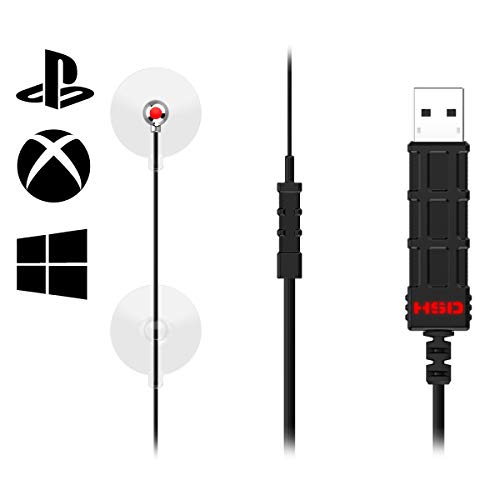
Hipshotdot PRO LED Aim Assist Mod for Gaming TV

PDP Wired Xbox Controller Red Camo

PDP Wired Xbox Controller Blue Camo
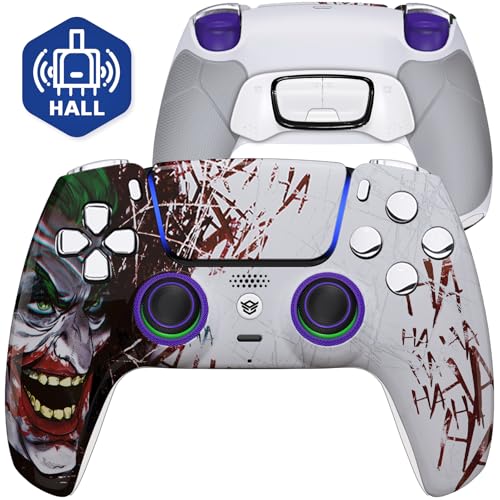
HEXGAMING ULTIMATE Wireless Controller
A Closer Look At Each Pick
The SteelSeries QcK XL Performance Control sits in that rare sweet spot where surface density, thickness, and stitched edges all line up for serious mouse aim. At 3.5 mm thick with a high-grade neoprene foam core, the pad gives a planted feel under the wrist, so micro-adjustments during a tense firefight don’t drift into noise. Its 15.75 x 34.43 inch footprint swallows a full keyboard plus generous mouse travel, which is exactly what low-sensitivity FPS players need for wide swipes.
Compared to lighter, flimsier pads, this one stays put on the desk thanks to its non-slip rubber base. Low-profile stitched edges reduce fraying over time, an honest durability win for anyone grinding ranked matches nightly.
Well-Handled Touches
- The 3.5 mm dense foam resists compression, so the glide stays consistent over years of use.
- The extra-wide XL footprint supports low-DPI players who swing through long flicks without lifting.
- Reinforced stitched edges hold up against the kind of repeated wrist contact that eats cheap pads.
- The Control surface texture is tuned for slower, deliberate tracking rather than pure speed, which helps with micro-corrections.
- The non-slip base keeps the pad anchored even when gameplay gets heated and the desk rattles.
Worth Noting
- The Control surface skews toward slower glide; players who want glassy-fast swipes may prefer a different finish.
- Cleaning requires mild soap and air drying, so it isn’t a wipe-and-go surface for messy desks.
Key Product Details
Made For
Low-sensitivity mouse players who want a dense, stable surface for tracking and micro-adjustments in competitive shooters.
Skip It When
You favor a faster glide; the ASUS Strix Glide Control pad delivers a different texture profile that may suit quicker-twitch aim styles.
The ASUS Strix Glide Control mouse pad leans into a different philosophy than the SteelSeries above: a premium heavy-weave fabric surface that gives more bite and slightly more friction for deliberate flicks. Players who run optical sensors at moderate DPI appreciate that it plays nicely across sensor types and sensitivity levels, so a quick swap from a laser to an optical mouse won’t suddenly feel wrong.
Where it stands out is the fray-resistant stitching along the perimeter. Most fabric pads start peeling within months, and ASUS clearly aimed at that weak point. For a budget-friendly entry into serious aim gear, it punches above what most casual pads deliver.
Strong Points
- The heavy-weave fabric gives a controlled, slightly resistive glide for precise shots.
- Universal sensor compatibility means no recalibration when switching mice.
- Fray-resistant edges aim at the most common failure point on cheaper pads.
Trade Offs
- The fabric texture slows fast flicks compared to smoother hard pads.
- Sticker residue from the underside tends to require careful peeling if you ever reposition it.
Right Fit For
Budget-conscious players who want a textured cloth pad with universal sensor support and don’t mind a touch more friction.
Look Elsewhere When
Speed is everything to your aim style; the SteelSeries QcK XL Performance Control offers a denser, thicker base for players who want more cushion.
GameSir’s G7 Pro 8K is built for PC players who have moved to controllers but refuse to give up on twitch response. The standout spec is the 8000Hz polling rate (the rate at which the controller reports its position to the PC, measured in hertz), supported over both wired and 2.4GHz wireless. That means input updates arrive roughly eight times faster than a standard 1000Hz pad, and on a fast-paced FPS that gap becomes noticeable during snap aim.
The Gen 2 TMR sticks (tunneling magnetoresistance, a stick sensor tech that uses magnetic fields rather than physical contact) blend the analog feel of traditional sticks with the anti-drift durability of Hall Effect sensors, which read stick position via magnets. For controller FPS players burned by stick drift on older pads, that alone makes the G7 Pro worth a serious look.
Why It Works Well
- 8000Hz polling over wireless gives near-zero input lag for competitive play.
- TMR sticks aim to eliminate the stick-drift problem that plagues older analog controllers.
- Wireless and wired dual modes let players pick between freedom and absolute lowest latency.
- Native PC focus means no awkward console-style remapping required for shooters.
Possible Compromises
- Wireless requires keeping the 2.4GHz dongle safe; lose it and the wireless mode is gone.
- Battery life depends on polling mode, and owners commonly report charging more often when running at the full 8K rate.
Built With In Mind
Competitive PC shooter players who want a controller that approaches mouse-level responsiveness without giving up the gamepad form factor.
Swap It Out When
You prefer an Xbox-shaped layout with deep customization; the PDP Wired Xbox Controller Red Camo keeps things simpler and lighter on the wallet.
The Hipshotdot PRO is one of the more unusual items I’ve included, and it earns its place for a specific scenario: shooting from the couch on a TV. It mounts a USB-powered red dot to your display, sitting in your line of sight so you can aim without zooming in-game or breaking focus from the screen. For run-and-gun play in shooters where hip-fire accuracy matters more than scope work, that physical reference point changes the feel entirely.
Compatibility spans Xbox, PlayStation, Nintendo, and PC, which broadens its reach beyond any single console. The PRO version adds color and brightness control, so you can tune the dot intensity to match ambient lighting without washing out the picture.
Useful Highlights
- The physical red dot reduces the need to scope in, keeping peripheral vision on the action.
- Color and brightness controls let the dot adapt to bright rooms or dim setups.
- Cross-platform support makes it flexible across console and PC gaming sessions.
A Few Limitations
- It’s designed primarily for TV-distance play, so monitor users at desk distance may find the dot distracting.
- USB power means another cable to manage near the display.
Who Should Grab It
Couch gamers who lean into hip-fire shooters on a big screen and want a physical reference point for run-and-gun aim.
Consider Something Else When
You game at a desk on a monitor; the GameSir G7 Pro 8K Controller fits traditional PC setups far better.
The PDP Wired Xbox Controller in red camo is the kind of no-nonsense pad that fits naturally into a PC FPS rotation. Officially licensed by Microsoft for Xbox Series X|S, Xbox One, and Windows 10 PCs (including Steam over USB), it sidesteps the usual headache of third-party pad compatibility. Plug it in and it just works.
Beyond the standard layout, the PDP Control Hub app opens up button remapping, trigger tuning, and rumble motor adjustments, which is more flexibility than most budget pads offer. The 3.5mm audio jack on the bottom keeps wired headsets in play, and the dedicated share button is a small but welcome touch for clipping standout moments.
Everyday Perks
- Plug-and-play compatibility across Xbox consoles and Windows PCs removes setup friction.
- Remappable buttons and trigger sensitivity through the companion app add real customization.
- The wired connection sidesteps battery anxiety for long sessions.
- Headset audio jack keeps voice chat and game audio through one controller.
Honest Caveats
- The wired cable limits how far back you can sit from the screen.
- Sticks use traditional analog sensors rather than Hall Effect or TMR, so long-term drift is a possibility.
Whose Shelf It Belongs On
Casual to mid-core PC FPS players who want an Xbox-style controller with customization options and zero wireless hassle.
A Better Fit Elsewhere
You want a wireless pad with anti-drift tech; the HEXGAMING ULTIMATE Wireless Controller delivers both with Hall Effect sticks and paddles.
The Blue Camo PDP Wired Controller is essentially the same pad as the Red Camo above, wrapped in a different finish for setups where color coordination matters. Functionally, you get the same officially licensed Xbox/PC compatibility, the PDP Control Hub customization, dual rumble motors, and a wired 3.5mm audio jack.
For shoppers torn between the two, the decision really comes down to aesthetic preference. Both pads target the same use case: an approachable Xbox-style controller that drops into a PC gaming session without fuss.
Where It Delivers
- Identical feature set to the Red Camo version with full Xbox/PC compatibility.
- Remappable controls and trigger adjustments via the PDP Control Hub.
- Wired reliability with no batteries to swap mid-match.
Points To Note
- Same traditional analog sticks as the red version, so drift over time is a realistic long-term worry.
- The cable length is comfortable for desk play but limiting for couch setups.
Perfect Match For
Style-conscious shoppers who want the same proven PDP functionality but prefer a blue camo aesthetic over red.
Reach For A Different Pick When
You want wireless freedom and modern stick tech; the GameSir G7 Pro 8K is the upgrade path from here.
HEXGAMING’s ULTIMATE Wireless Controller lands at the top of the controller ladder in this lineup, designed around esports-grade performance with a custom shell built from an official controller base. The Hall Effect joysticks and mouse-click triggers (snap-action buttons that mimic a computer mouse’s quick click instead of a mushy analog pull) deliver the kind of crisp actuation that competitive FPS players prize, removing the travel and bounce of standard analog switches.
Four mappable back buttons support remapping of fifteen standard inputs, including face buttons, d-pad directions, shoulders, and triggers. That depth lets you move jump, crouch, reload, and melee to the rear paddles, keeping thumbs on the sticks during firefights.
Useful Touches
- Hall Effect sticks aim for long-term resistance to drift.
- Mouse-click triggers offer faster, more decisive trigger pulls.
- Four rear paddles free up thumbs during intense aim duels.
- Wireless design keeps the desk clean without sacrificing input responsiveness.
Some Limits To Know
- Premium positioning puts it above the more accessible PDP and GameSir pads.
- Wireless still requires battery management, and owners commonly report needing to recharge more often with heavy use.
Quick Facts
Who Will Love This
Competitive FPS players who want a customizable controller with pro-grade inputs and paddles for fast thumb movement.
Where A Sibling Pick Shines
Budget is the priority; the PDP Wired Xbox Controller Red Camo delivers the core Xbox layout at a friendlier entry price.
Choosing The Right FPS Setup For Your Play Style
Mouse-and-keyboard veterans tend to obsess over pad surface and mouse feet, while controller players lean into polling rate and stick tech. The two paths are very different, and which one fits you depends on the games you favor, your sensitivity preferences, and whether you game at a desk or on a couch.
Mouse-and-Keyboard Fundamentals
A dense, wide mousepad with stitched edges is the foundation for serious aim. Low-DPI players who track targets with arm movement need room to swing, which is why XL-format pads like the SteelSeries QcK XL matter. Surface texture is the other key variable: control finishes favor micro-adjustments, while glide finishes reward fast flicks. Match the pad to your sensitivity rather than the other way around.
What Makes A Great PC Controller
Polling rate defines how often the controller reports position to the PC, and higher is better for shooters. Hall Effect and TMR sticks resist drift far longer than traditional analog sensors, which matters if you play daily. Remappable back buttons let you move critical inputs off the face and d-pad, keeping your thumbs on the sticks where they belong during firefights.
Wired Versus Wireless Tradeoffs
Wired pads remove battery anxiety and add zero wireless overhead, but tether you to the desk. Wireless pads offer couch flexibility and cleaner setups, though they require charging routines and, in some cases, careful dongle management. For most PC FPS players at a desk, wired is the path of least resistance.
Picking The Right Gear Without Overpaying
Pitfalls Shoppers Hit
Buying a controller without checking PC compatibility is the classic mistake. Some pads only support their native console, which leaves you troubleshooting drivers or remapping software at midnight. Another trap is assuming all “gaming” mousepads are the same: surface density, edge stitching, and base grip vary widely, and a cheap pad can throw off aim consistency.
When Paying More Pays Off
Premium pads justify their price through stick tech and input customization. Hall Effect or TMR sticks avoid the drift that ends older controllers early, while mouse-click triggers and rear paddles unlock faster input execution. For competitive players logging hours weekly, those features pay back in longevity and responsiveness that budget pads can’t match.
Frequently Asked Questions
Do FPS controllers work well on PC?
Most modern controllers connect to Windows without issues, though features like rumble or trigger haptics may need software support. Officially licensed Xbox pads tend to offer the most seamless plug-and-play experience.
Is 8000Hz polling worth it over 1000Hz?
The latency difference is small in casual play but noticeable in competitive shooters. For ranked grinders, the smoother input updates can matter; for casual players, 1000Hz remains perfectly adequate.
What is stick drift and why does it matter?
Stick drift happens when analog sensors wear out and report phantom movement when the stick is centered. Hall Effect and TMR sensors read stick position magnetically, sidestepping that wear and lasting longer in heavy use.
Are mousepads really that important for FPS?
A consistent surface gives your mouse a predictable glide, which is critical for muscle memory. A pad that shifts, frays, or changes texture over time breaks that consistency and hurts aim.
Should I choose a mousepad or a controller for FPS?
It depends on the game and your history. Tactical shooters like Counter-Strike favor mouse-and-keyboard. Action shooters with vehicle sections or couch play work better on a controller. Many PC gamers keep both setups ready.
Wrap Up
The right FPS setup on PC depends on whether you thrive with a mouse in hand or a controller under your thumbs, and on whether you play at a desk or on a couch. I leaned toward gear that delivers real benefits, dense pads for aim, Hall Effect or TMR sticks for longevity, and remappable paddles for competitive players, while keeping budget options honest. Whichever direction you pick, the goal is the same: gear that gets out of the way and lets the gameplay take over.