A new gaming setup lives or dies by how well the tower and the display work together. I built this roundup for anyone staring at a cluttered desk, juggling specs across tabs, and wondering what actually delivers frame rates without choking on heat. The ten picks below cover full desktops and the monitors that pair with them, so I walk through each one with a clear sense of who it’s really built for.
A Side-By-Side Look

Horizon Autherium Dragon RGB I9 RTX Gaming PC

KTC 24 Inch FHD 1080P 100Hz Computer Monitor
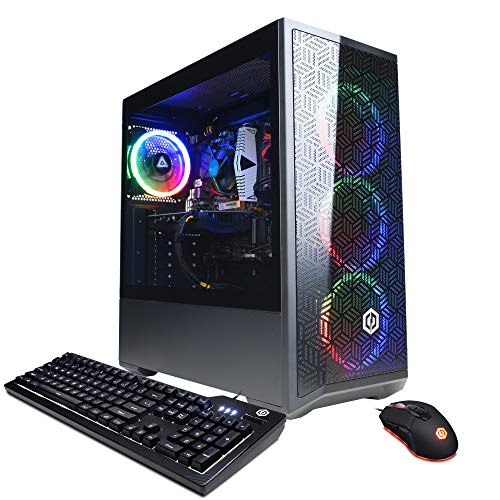
CYBERPOWERPC Gamer Xtreme VR Gaming PC
KTC 32 Inch 2K 120Hz Computer Monitor H32T13

KTC 24 Inch QHD IPS Computer Monitor, 100Hz

KTC 24 Inch 1080P FHD Computer Monitor, 100Hz

KTC 24 Inch Computer Monitor, FHD 144Hz H24B9S

KTC 24 inch QHD 180Hz Gaming Monitor, Fast IPS H24T7

KTC 24 Inch 180Hz/190Hz FHD Gaming Monitor H24F8

ASUS ROG G700 (2025) Gaming Desktop PC
The Horizon Autherium Dragon RGB I9 RTX Gaming PC is built for people who refuse to settle for “good enough.” With an unlocked Core i9 CPU (the kind that can be pushed past stock speeds when cooling holds up), an RTX 5070 OC graphics card, and a 360mm AIO liquid cooler, the spec sheet reads like a wishlist for someone chasing high frame rates in modern titles. The 64GB of DDR RAM and 5TB of combined storage (a fast NVMe SSD paired with a high-capacity HDD) make it easy to keep a massive Steam library, multiple capture tools, and a streaming workflow open at the same time.
Windows 11 Pro comes preinstalled, which adds a layer of security and remote management that home users might overlook but content creators appreciate. Wi-Fi 6E support means the box can sit anywhere on the desk without an Ethernet drop. For anyone who wants a desktop that arrives ready for VR, 4K, and heavy multitasking, this is one of the more ambitious builds in the roundup.
Where It Helps
- Unlocked Core i9 with a 360mm AIO gives the headroom to chase higher sustained clocks under load.
- RTX 5070 OC with 12GB handles modern ray-traced titles at high settings without choking.
- 64GB of RAM leaves plenty of room for game launchers, browsers, and streaming software running side by side.
- 5TB of total storage (fast NVMe plus a large HDD) means you rarely have to juggle what stays installed.
- Windows 11 Pro adds BitLocker and remote desktop, useful for anyone juggling work and play.
Honest Caveats
- A high-spec build like this generates noticeable fan noise under sustained load, so a headset or closed-back setup helps in shared rooms.
- The 360mm AIO needs clearance; smaller cases or cramped shelves can complicate installation.
- Power draw is significant, so it’s worth confirming the outlet you plug into is on a reliable circuit.
Key Specs
Who It Suits Best
This rig fits enthusiasts who want a turnkey high-end machine for 4K gaming, VR, and streaming without piecing a build together themselves.
Where Another Pick Suits Better
Someone building their first PC on a tighter budget will find the CYBERPOWERPC Gamer Xtreme VR a more approachable starting point.
The KTC 24 Inch FHD 1080P 100Hz Computer Monitor is the kind of display that quietly does its job. The 23.8-inch VA panel uses deeper blacks than typical IPS panels, which makes nighttime game scenes feel less washed out. A 100Hz refresh rate (the number of times the image updates per second) keeps motion noticeably smoother than a standard 60Hz office screen, which matters more in twitchy shooters and fast camera pans than people expect.
FreeSync support lines up the display’s refresh with the GPU’s output, reducing the tearing and stutter that show up when frame rates fluctuate. The wide 178-degree viewing angles help when a friend leans over to watch a run, or when the screen ends up on a VESA arm at an angle. For first-timers pairing a modest GPU with a clean 1080p display, this one keeps things simple.
Useful Strengths
- 100Hz refresh rate gives a tangible smoothness bump over 60Hz panels for esports titles.
- VA panel delivers deeper blacks, which makes dark cinematic scenes feel more cinematic.
- FreeSync keeps frame pacing steady, reducing visual tearing when the GPU output varies.
- 178-degree viewing angles keep colors consistent when the monitor tilts or sits off-center.
Trade Offs
- 1080p resolution on a 24-inch screen looks sharp, but anyone wanting extra desktop real estate for editing timelines will feel the limit.
- VA panels sometimes show slight ghosting in very high-contrast transitions, depending on the game.
Right Fit For
Competitive and casual players who want a smooth 1080p panel without overspending will feel right at home.
A Better Fit Elsewhere
Streamers and editors who want extra screen space should look at the KTC 32 Inch 2K 120Hz Computer Monitor H32T13 for room to breathe.
The CYBERPOWERPC Gamer Xtreme VR Gaming PC is what I picture when someone says “I just want a gaming PC that works.” The Intel Core i5-12400F is a proven mid-range chip that handles most modern games without thermal drama, and pairing it with a GeForce RTX 3050 8GB gives entry-level ray tracing and DLSS support on a budget. 16GB of DDR4 RAM covers the daily workflow, while the 500GB NVMe SSD keeps load times short.
The build arrives with Windows 11 Home and Wi-Fi ready to go, so a first-time owner can unbox, plug in, and start downloading within minutes. Owners commonly report the case runs cool and quiet enough for a bedroom setup, which matters when the rig sits a few feet from where you sleep.
A Strong Showing
- Intel Core i5-12400F delivers reliable mid-range gaming performance without overheating.
- RTX 3050 8GB adds ray tracing and DLSS, which extends the useful life of the build.
- 500GB NVMe SSD shortens boot and load times compared to older HDD-based systems.
- Preinstalled Windows 11 Home and onboard Wi-Fi keep setup to a single afternoon.
Things To Consider
- 16GB of RAM is the modern baseline; heavy multitaskers may want to upgrade later.
- 500GB fills up fast with modern installs, so budgeting for a secondary drive is realistic.
- The RTX 3050 targets 1080p gaming; pushing into 1440p at high settings will tax the card.
Key Specs
Made For
First-time PC gamers who want a ready-to-play system with room to grow as their library expands.
Look Elsewhere When
Hardcore 4K enthusiasts should step up to the Horizon Autherium Dragon RGB I9 RTX Gaming PC for headroom they will actually use.
The KTC 32 Inch 2K 120Hz Computer Monitor H32T13 feels like a single-display replacement for a dual-monitor setup. The 32-inch IPS panel with a 2560×1440 resolution gives enough pixels to keep toolbars and chat windows open next to a game without squinting. The 120Hz refresh rate gives cinematic titles a fluid look that 60Hz panels can’t match, especially when paired with a mid-to-high-range GPU.
HDR support brings brighter highlights and deeper shadows to games and movies that support it. The thin bezels (the plastic frame around the screen) make the monitor feel modern, and owners commonly mount it on a VESA arm to free up desk space. For anyone who plays a lot of slow-paced, atmospheric games, the extra screen real estate pays off fast.
Advantages To Know
- 32-inch 1440p panel offers more usable desktop space than 24 or 27 inches at the same resolution.
- 120Hz refresh rate keeps single-player and adventure titles noticeably smoother than 60Hz.
- IPS panel keeps colors accurate from a range of seating positions.
- HDR support adds contrast for compatible movies and games.
Things To Weigh
- A 32-inch screen demands desk depth, so smaller desks can feel crowded.
- 1440p at 120Hz requires a capable GPU; older cards may struggle to push the full frame rate.
Whose Shelf It Belongs On
Single-display gamers and content viewers who want immersion without juggling multiple monitors.
Skip It When
Competitive esports players chasing pure speed should consider the KTC 24 inch QHD 180Hz Gaming Monitor H24T7 instead.
The KTC 24 Inch QHD IPS Computer Monitor, 100Hz is the kind of panel I lean on for hybrid setups where spreadsheets and shooters share the same screen. The 1440p resolution on a 24-inch panel produces a sharper image than 1080p without demanding a giant display. The 100Hz refresh rate and FreeSync/G-Sync compatibility (technologies that match the display’s refresh to the GPU’s output) eliminate the screen tearing that shows up when frame rates bounce around.
The three-sided borderless design makes the monitor feel airy on a desk, and HDR10 support helps in games and movies with a wide brightness range. For someone spending eight hours working and another three gaming, this panel splits the difference well.
Noteworthy Benefits
- 1440p on 24 inches gives crisp text for documents and sharp textures in games.
- 100Hz refresh keeps day-to-day scrolling smoother than a standard 60Hz office display.
- FreeSync and G-Sync compatibility reduces tearing across both AMD and NVIDIA GPUs.
- Borderless three-sided design looks clean in a multi-monitor stack.
Small Caveats
- 24 inches is a tight fit for full video editing timelines or massive spreadsheets.
- HDR10 is a baseline implementation, so the effect is more about subtle brightening than dramatic contrast.
Best Suited To
Hybrid work-and-play users who want sharp text during the day and smooth gaming at night on one screen.
Consider Something Else When
Anyone wanting a larger canvas for design or sim gaming should step up to the KTC 32 Inch 2K 120Hz Computer Monitor H32T13.
The KTC 24 Inch 1080P FHD Computer Monitor, 100Hz is the easygoing sibling in this roundup. It runs at 1920×1080 with a 100Hz refresh rate, which is enough for a clean image and smoother scrolling during long work sessions. Eye-care features (technologies designed to reduce flicker and blue light output) help during evenings when the monitor stays on past sunset.
The combination of HDMI and VGA ports means older laptops and current desktops both plug in without adapters. The 104% sRGB coverage gives colors enough range for casual photo edits, and the 4000:1 contrast ratio adds depth to videos and games. The VESA-compatible mount and tilt adjustment make positioning simple, even in a small home office.
Well-Handled Touches
- 100Hz refresh keeps cursor motion and web scrolling noticeably smoother than a 60Hz display.
- HDMI and VGA ports cover both new PCs and older machines without an adapter.
- Eye-care features reduce fatigue during long evening sessions.
- VESA mount and tilt adjustment make positioning straightforward on a small desk.
Worth Noting
- 1080p resolution is starting to feel dated for heavy multitasking or detailed photo work.
- The panel is tuned for general use rather than color-accurate professional editing.
Perfect Match For
Home office users and casual gamers who want a comfortable, low-fuss panel for everyday tasks.
Swap It Out When
Anyone who wants sharper text and more pixel density should consider the KTC 24 Inch QHD IPS Computer Monitor, 100Hz.
The KTC 24 Inch Computer Monitor, FHD 144Hz H24B9S is the refresh rate sweet spot for competitive play. At 144Hz, motion looks dramatically smoother than 60Hz or 75Hz screens, which matters in titles like Valorant, CS2, and Apex Legends where tracking small targets is everything. The IPS panel keeps colors consistent from edge to edge, so the corner of the screen doesn’t look washed out compared to the center.
Input lag (the delay between the GPU sending a frame and the display showing it) feels low for an IPS panel at this tier, which is what gives competitive players confidence during fast flick shots. Owners commonly pair this monitor with mid-range GPUs that can comfortably push 144 frames per second at 1080p. For a dorm room or small desk where one screen has to do everything, it’s a strong pick.
Positive Takeaways
- 144Hz refresh rate gives a real edge in fast-paced competitive titles.
- IPS panel keeps colors and contrast consistent across the screen.
- 1080p resolution lets mid-range GPUs push high frame rates without struggle.
- Low input lag for the category helps in fast-twitch scenarios.
Things To Keep In Mind
- At 24 inches, 1080p looks clean, but anyone used to 1440p will notice the lower pixel density.
- To benefit from 144Hz fully, the connected GPU has to push high frame rates, which may require lowering detail settings in demanding games.
Who Should Grab It
Competitive FPS and MOBA players who care more about frame rate than resolution density.
Not Your Match When
Single-player enthusiasts chasing cinematic detail will get more from the KTC 32 Inch 2K 120Hz Computer Monitor H32T13.
The KTC 24 inch QHD 180Hz Gaming Monitor, Fast IPS H24T7 is one of those monitors that makes me wish I’d had one in college. The 2560×1440 resolution on a 24-inch screen gives sharper detail than 1080p, which helps in tactical shooters where enemies blend into busy backgrounds. A 180Hz refresh rate (with some headroom up to 185Hz) pairs naturally with a modern mid-to-high-range GPU, and the 1ms response time keeps fast motion crisp.
The 99% sRGB coverage and HDR400 support add a layer of color depth that makes single-player titles look more cinematic. Fast IPS (a newer IPS variant that prioritizes pixel response) keeps colors vibrant without the ghosting some older IPS panels suffer from. For a desk where space is tight but performance matters, this monitor punches well above its size.
Where It Delivers
- 1440p resolution on 24 inches gives sharp detail for both work and play.
- 180Hz refresh rate (up to 185Hz) keeps fast-paced action fluid.
- 1ms response time reduces motion blur in competitive games.
- 99% sRGB and HDR400 make colors look richer for content and games.
Less Ideal Details
- Pushing 1440p at 180Hz requires a serious GPU, so older cards will need settings dialed down.
- 24 inches at 1440p produces very small text in some apps without display scaling, which can take adjustment.
Built With In Mind
Competitive players who also enjoy sharp single-player visuals on a compact screen.
Another Choice May Suit
Anyone wanting more screen for productivity should consider the KTC 32 Inch 2K 120Hz Computer Monitor H32T13 for a roomier workspace.
The KTC 24 Inch 180Hz/190Hz FHD Gaming Monitor H24F8 is what I point budget-conscious competitive players toward. The 23.8-inch Fast IPS panel gives the wide viewing angles of IPS with the snappy response times that competitive games demand. A 180Hz refresh rate (with some models supporting 190Hz) makes motion visibly smoother than 144Hz screens in fast flicks and tracking.
The 133% sRGB color gamut and HDR400 support push colors beyond the basic office-monitor range, which is a nice surprise at this price point. FreeSync compatibility keeps frame pacing stable when the GPU output fluctuates, reducing the visual stutter that breaks immersion. For dorm rooms, starter setups, and budget esports builds, this one stretches the dollar.
Positive Points
- 180Hz (and up to 190Hz) refresh gives a tangible edge in fast-paced games.
- Fast IPS panel balances vibrant colors with quick response times.
- FreeSync keeps frame pacing smooth across a range of GPUs.
- Color gamut exceeds 100% sRGB, adding richness for content and games.
Practical Considerations
- To hit 180Hz consistently, the connected GPU needs to keep up, especially in modern titles.
- 1080p on a 24-inch screen is sharp, but pixel density is lower than the 1440p H24T7 in this same roundup.
The Right Fit
Budget esports players who want maximum refresh rate without paying for higher resolution they don’t need.
Reach For A Different Pick When
Anyone craving sharper detail alongside speed should step up to the KTC 24 inch QHD 180Hz Gaming Monitor H24T7.
The ASUS ROG G700 (2025) Gaming Desktop PC is the rig I’d recommend to a friend who treats their setup like furniture. The dual-glass panel chassis shows off the components inside, and Aura Sync RGB lighting ties the look together with the rest of an ROG ecosystem. Under the hood, the Intel Core Ultra 7 265F and NVIDIA GeForce RTX 5070 GPU pair up for strong 1440p gaming and demanding creative work.
The 1TB M.2 NVMe PCIe 4 SSD keeps load times short, while 32GB of DDR5 RAM gives the system breathing room for streaming, editing, and gaming side by side. Windows 11 Home comes preinstalled, so the box is ready to play the moment it lands. For anyone who wants a polished, ready-to-go desktop with strong modern hardware, the G700 is a thoughtful package.
What It Does Well
- Intel Core Ultra 7 265F and RTX 5070 handle modern games and creative apps with headroom to spare.
- Dual-glass chassis with Aura Sync RGB turns the rig into part of the room’s aesthetic.
- 1TB PCIe 4 SSD keeps load times short across a sizeable library.
- 32GB DDR5 RAM supports gaming, streaming, and editing running concurrently.
Trade-Offs To Consider
- The premium chassis adds to the cost compared to a plain mid-tower with similar internals.
- Glass panels show dust faster than solid side panels, so regular cleaning is part of ownership.
Quick Facts
Who Will Love This
Style-conscious enthusiasts who want strong performance wrapped in a polished, showcase-worthy chassis.
Where A Sibling Pick Shines
Pure spec shoppers chasing maximum cores and storage will find the Horizon Autherium Dragon RGB I9 RTX Gaming PC more aggressive for the dollar.
Choosing The Right Gaming Setup Without Regret
A gaming PC and monitor pair works best when the two pieces speak the same language. Match the monitor’s resolution and refresh rate to what the GPU can actually push, not what the box on the shelf promises. A mid-range RTX 3050 system like the CYBERPOWERPC Gamer Xtreme VR pairs naturally with a 1080p 144Hz display, while a beefier RTX 5070 build wants at least 1440p to stretch its legs.
Refresh Rate Versus Resolution
Refresh rate (measured in Hz) controls how smooth motion looks, while resolution controls how sharp the image is. Competitive players chasing frame rate prioritize Hz; cinematic and creative users prioritizing detail prioritize pixels. Knowing which matters more for the games you actually play makes the choice obvious.
Panel Type And Real Use
IPS panels (a panel technology known for color accuracy and wide viewing angles) give accurate colors and wide viewing angles, which suit mixed-use and content creation. VA panels (a panel type known for high contrast and deeper blacks) deliver deeper blacks for atmospheric games. The trade-off shows up in response time and viewing angles, which is why IPS dominates esports and VA often wins for moody single-player titles.
Connectivity And Future Expansion
Look for HDMI 2.1 or DisplayPort 1.4 (modern video output standards that handle high refresh rates and resolutions) when planning to push 1440p at high refresh. A spare SSD or HDD slot in the desktop makes future storage upgrades painless. VESA mount support on a monitor opens the door to monitor arms when the desk gets crowded.
Key Considerations Across These Picks
Where Shoppers Go Wrong
The most common mistake is buying a high-refresh monitor for a GPU that can’t feed it, or pairing a 4K display with a mid-range graphics card. Another slip is ignoring desk depth: a 32-inch monitor on a small desk ends up too close, which causes eye strain. Measure first, then buy.
What The Higher Tier Buys
Spending up usually buys three things: more cores in the CPU for multitasking, more VRAM in the GPU for higher textures and ray tracing, and quieter cooling that lets the system run harder for longer. Whether that’s worth it depends on how long you keep a system and what games you actually run. For most newcomers, mid-tier hardware covers several years before any bottleneck becomes obvious.
Frequently Asked Questions
What size monitor works best for gaming?
A 24-inch monitor suits competitive games because everything sits within easy view, while 27 to 32 inches works better for immersive single-player titles and productivity. The right size depends on desk depth and how far you sit from the screen.
Do I really need a 144Hz or higher monitor?
A higher refresh rate makes motion visibly smoother, which matters most in competitive shooters and racing games. For slower-paced games and general productivity, a 75Hz or 100Hz panel is a noticeable upgrade over 60Hz without the cost of 144Hz.
How much RAM do I need in a gaming PC in 2026?
16GB is the realistic minimum for modern games, but 32GB gives breathing room for multitasking, streaming, and future titles. 64GB is mostly useful for content creators running multiple heavy apps at once.
Is a prebuilt gaming PC a good choice?
Prebuilts like the CYBERPOWERPC Gamer Xtreme VR or the ASUS ROG G700 save the time and risk of assembling a system yourself. The trade-off is less control over specific parts, which is why comparing the included specs matters.
Do I need G-Sync or FreeSync?
Adaptive sync (G-Sync for NVIDIA and FreeSync for AMD, both technologies that match the display’s refresh to the GPU’s frame output) eliminates screen tearing and reduces stutter when frame rates fluctuate. Most modern monitors support at least one standard, so it’s a worthwhile feature to keep.
Final Take
The right gaming computer and monitor pair comes down to what you actually play, how much desk space you have, and how long you want the system to last. Match the monitor to the GPU, pick the panel type that fits your genre mix, and don’t overspend on a tower if your library leans casual. The picks above give you room to start anywhere on that spectrum.