Picking the right gaming computer laptop gets harder every year as new GPUs, faster displays, and smarter chips reshape what a portable rig can do. I built this roundup for anyone weighing a serious purchase in the next few months, from esports enthusiasts chasing high refresh rates to creators who need both a strong GPU and a color-accurate panel. You’ll find a shortlist below, each pick tied to a specific user profile, plus what to look for before spending a stack of cash.
How The Shortlist Stacks Up

ASUS ROG Strix G16 (2025) Gaming Laptop

Apple 2024 MacBook Pro 16-inch M4 Max

Apple 2021 MacBook Pro 14-inch M1 Pro

Intel Core Ultra 5 Processor 250K Plus
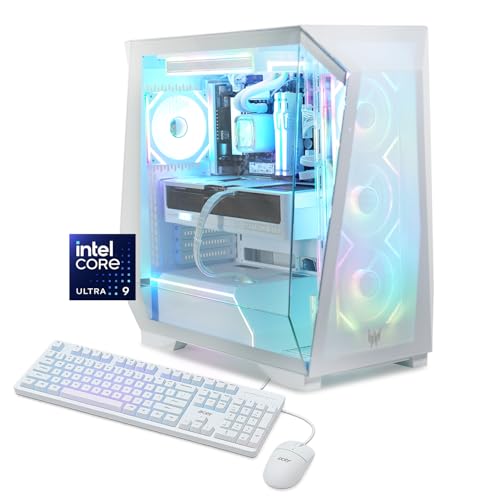
Acer Predator Orion 6000 Gaming Desktop
The Strix G16 sits at the top of the stack for anyone who treats their laptop like a portable battlestation. Inside, an Intel Core Ultra 9 275HX pairs with an NVIDIA GeForce RTX 5080 mobile GPU, backed by 32GB of DDR5 memory, a 1TB PCIe 4.0 SSD, and Wi-Fi 7, which in plain terms means the headroom for high-refresh competitive play and heavy rendering work sits comfortably in one chassis.
The 16-inch ROG Nebula display runs a 2.5K resolution at 240Hz with a 3ms response time, so fast shooters stay sharp and color work has the pixel density to hold up under scrutiny. Compared to the MacBook Pro below, the G16 leans harder into pure gaming thermal design rather than silent operation.
Key Advantages
- The 240Hz panel keeps competitive shooters looking buttery and reduces input lag during long ranked sessions.
- 32GB of DDR5 RAM future-proofs the rig for game modding tools, large modpacks, and parallel creative workflows.
- ROG Intelligent Cooling helps the CPU and GPU sustain boost clocks longer under demanding titles.
- Wi-Fi 7 support means lower-latency wireless play on compatible routers, useful for online ranked ladders.
Things To Consider
- Owners commonly report noticeable fan noise under sustained load, which is normal for this class but worth budgeting earbuds around.
- A 16-inch gaming chassis is heavy; expect shoulder strain on frequent commutes between rooms or offices.
- 1TB of SSD fills up fast with modern installs like Call of Duty and Baldur’s Gate 3, so external storage often comes into play early.
Feature Snapshot
Best Suited To
Competitive gamers, streamers, and creators who want desktop-class horsepower in a portable form factor and don’t mind the extra heft.
Swap It Out When
If silent operation, color accuracy, and macOS tooling matter more than raw frame rates, the Apple 2024 MacBook Pro 16-inch M4 Max is a better fit for your workflow.
Apple’s flagship laptop brings M4 Max silicon to bear on creative pipelines, with a 14-core CPU and 32-core GPU handling 3D scenes and 8K timelines without breaking a sweat. The 16.2-inch Liquid Retina XDR display pushes up to 1600 nits of peak brightness, which simply means HDR content shows true blacks and bright highlights without washing out the surrounding detail.
Gaming on macOS has matured considerably, and this machine handles both Apple Arcade titles and modern ports competently. Where it truly shines, however, is in the same seat you’d park the Strix G16, but with a focus on motion graphics, color grading, and software development rather than marathon ranked sessions.
Real-World Strengths
- 36GB of unified memory feeds the CPU and GPU from a shared pool, cutting stutter in tools that stress both.
- XDR display with extreme dynamic range makes video review and HDR color work noticeably more confident.
- All-day battery life means working through a flight or client meeting without reaching for an outlet.
- The aluminum unibody stays cool and quiet under lighter creative loads compared to gaming-focused rivals.
Worth Noting
- The macOS game library still trails Windows for top-tier competitive shooters and certain live-service titles.
- You may find the heavier 16-inch chassis less comfortable on a lap during long couch sessions.
- 1TB of internal storage fills quickly with high-bitrate ProRes footage, so external Thunderbolt drives tend to enter the setup early.
Right Fit For
Creative pros who split time between video editing, 3D, and code, and who also want a capable gaming laptop for supported titles.
Look Elsewhere When
Hardcore Windows-exclusive gamers who chase every frame in competitive shooters should reach for the ASUS ROG Strix G16 (2025) Gaming Laptop instead.
The 2021 14-inch MacBook Pro with M1 Pro remains a quietly capable machine for anyone who games lightly and works heavily. The 10-core CPU and 16-core GPU handle a healthy chunk of Mac-native titles plus a generous creative workload, all wrapped in the classic aluminum unibody that has held up beautifully over years of daily commute use.
Compared to the 16-inch M4 Max above, this model gives up screen real estate and memory ceiling but gains portability. You may find it the right size for a small desk or a packed backpack, and 16GB of unified memory still serves most photo and editing workflows comfortably.
The Upside
- The 14-inch form factor slips easily into messenger bags and smaller laptop sleeves for daily travel.
- M1 Pro sips power, so battery endurance stays strong even after a few years of use.
- 1TB of storage remains generous for project files and a modest game library.
- Build quality has aged well, with the keyboard and hinge feeling as tight today as the day it shipped.
Trade Offs
- 16GB of unified memory caps the size of 3D scenes and large Lightroom catalogs compared to newer MacBook Pros.
- Esports frame rates on supported Mac titles trail the M4 Max chip by a noticeable margin in demanding scenes.
- You may find the older Liquid Retina XDR a step behind the latest generation in peak HDR brightness.
Made For
Mobile professionals and students who want a refined daily driver for productivity, light gaming, and travel.
A Better Fit Elsewhere
If gaming is your top priority and you want top frame rates today, the Acer Predator Orion 6000 Gaming Desktop handles modern titles with much more headroom, though at the cost of portability.
This Intel Core Ultra 5 250K Plus isn’t a laptop, but it belongs in any honest roundup because desktop rigs still crush most gaming laptops on raw performance per dollar. The chip ships with 18 cores split into 6 P-cores (performance cores for heavy lifting) and 12 E-cores (efficiency cores for background work), boosting up to 5.3GHz under thermal headroom.
It’s built for builders who already have (or want to pick out) a discrete GPU, an 800-series Intel motherboard, and DDR5 memory. If you’ve been eyeing a custom desktop for serious gaming, this CPU is the kind of balanced mid-range pick that lets you spend more of the budget on the graphics card.
What It Does Well
- The 18-core layout streams gameplay, runs voice chat, and handles background updates without choking the main thread.
- PCIe 5.0 support future-proofs the platform for next-gen GPUs and ultra-fast NVMe storage.
- 125W base power gives builders room to tune cooling and chase higher sustained clocks.
- LGA1851 socket keeps the upgrade path open to upcoming Intel generations on compatible boards.
Honest Caveats
- This is a CPU only, so you still need a motherboard, GPU, RAM, storage, and cooling to build a complete system.
- Pairing it with budget cooling tends to throttle performance under long multi-threaded loads.
- Requires an Intel 800-series chipset board, which is an extra cost beyond older platform owners might expect.
Quick Facts
Who Should Grab It
Custom desktop builders and upgraders who want a balanced Intel CPU without paying flagship prices.
Reach For A Different Pick When
If you’d rather skip the assembly and just plug in a finished rig, the Acer Predator Orion 6000 Gaming Desktop ships ready to go with similar core horsepower.
The Predator Orion 6000 is Acer’s high-end tower aimed squarely at gamers who want flagship silicon without assembling anything themselves. An Intel Core Ultra 9 285K pairs with an NVIDIA GeForce RTX 5080, giving you the same GPU tier as the Strix G16 but with a desktop CPU and the cooling headroom to actually push it harder, longer.
You also get 32GB of DDR5, a 1TB Gen 4 SSD, and Wi-Fi 7, all running Windows 11 Home. For most desks, this is the kind of rig you set up once and forget about, because the case, liquid cooling, and tuned thermals quietly handle whatever you install.
Where It Excels
- The RTX 5080 GPU drives high-refresh 4K panels and high-detail 1440p gaming with room to spare.
- Liquid cooling on the CPU keeps noise lower than typical air-cooled towers during long sessions.
- 32GB of DDR5 and a 1TB Gen 4 SSD give modern games and launchers the bandwidth to coexist.
- Tower format leaves room for future storage and GPU upgrades as the platform matures.
Points To Note
- A full tower is stationary, so this isn’t an option for anyone who wants to game on the road.
- Premium Predator cases run large, so apartment dwellers may need to plan desk space in advance.
- Windows 11 Home is the only OS layer preinstalled, so anyone wanting Linux dual-boot needs to set it up themselves.
Whose Shelf It Belongs On
Stationary high-end gamers and creators who want flagship CPU and GPU performance and don’t need portability.
Consider Something Else When
If you need to take your games on the road, the ASUS ROG Strix G16 (2025) Gaming Laptop packs a comparable GPU into a much more portable chassis.
What Actually Matters When Buying A Gaming Computer Laptop
Picking The Right GPU Tier
The GPU does most of the heavy lifting in modern titles, so it should drive your budget before anything else. Mid-range cards handle 1080p high settings comfortably, while flagship RTX 5080-class silicon pushes high-refresh 1440p and even 4K. Match the GPU to your monitor first, not to the brand on the lid.
Display Refresh Rate And Resolution
A 240Hz panel makes competitive shooters feel dramatically smoother than a 60Hz screen, but only if the GPU can push frames to match. If you’re gaming mostly at 1080p or 1440p, prioritize refresh rate over raw pixel count. For HDR content and color work, peak brightness and panel quality become the deciding factors.
Memory, Storage, And Futureproofing
32GB of RAM has become the sweet spot for modern gaming and parallel creative tasks. 1TB of SSD storage is the practical minimum, since modern game installs regularly exceed 100GB. Builders going the desktop route should factor in PCIe 5.0 support for upcoming GPUs and NVMe drives.
Cooling, Noise, And Build
Gaming computer laptops run hot under load, and chassis design dictates how long boost clocks hold up. Heavier chassis generally cool better; thinner ones throttle sooner. If you work in shared spaces, factor in the fan noise profile before committing.
Pitfalls Shoppers Hit And Where The Money Goes
Where Shoppers Go Wrong
A common trap is chasing the highest spec sheet without considering the display, thermals, or keyboard. A laptop with a flagship GPU but a 60Hz screen wastes its potential in competitive titles. Another mistake is underestimating storage needs, since modern games install fast and bloat quickly.
When Paying More Pays Off
Spending up generally buys better cooling, brighter and faster displays, and more RAM. Those three areas deliver real, noticeable wins over a mid-range laptop. For most buyers, the jump from mid-tier to high-tier feels larger than the jump from high-tier to flagship, so the sweet spot depends on which features you actually use day to day.
Frequently Asked Questions
How much RAM do I need for modern gaming?
16GB is the bare minimum in 2026, but 32GB is the comfortable target for new AAA titles and creative tools running alongside your game.
Is a desktop still better than a laptop for gaming?
Generally yes on raw performance and upgradability, but gaming laptops have closed the gap significantly, especially with RTX 5080-class GPUs and high-refresh displays.
What refresh rate should I look for in a gaming laptop?
144Hz is a solid baseline, while 240Hz gives competitive players an edge in shooters. Anything below 120Hz feels dated for fast-paced games.
Are MacBook Pros good for gaming?
Apple Silicon handles a growing library of native and supported Mac games well, especially strategy and indie titles, but the Windows library for competitive shooters is still broader.
Do I need Wi-Fi 7 for online gaming?
Wi-Fi 7 lowers latency on compatible routers, but a wired Ethernet connection or stable Wi-Fi 6 setup performs nearly as well for most online play.
Final Verdict
A gaming computer laptop is really a question of priorities: the Strix G16 for raw frame rates, the MacBook Pro 16-inch for creators who game on the side, the Orion 6000 for stationary power, or a custom desktop built around the Intel Core Ultra 5 for hands-on builders. Match the pick to your most common scenario, and the rest of the decision tends to fall into place. Whichever path fits your life, focus on the GPU, display, and cooling first, since those shape how the machine actually feels every day.