Finding a new gaming computer tower means sorting through a flood of part lists, RGB claims, and conflicting advice. I pulled together nine towers that cover very different needs, from a budget 1080p starter to a 4K powerhouse, plus one accessory that solves a real space problem. Whether you’re upgrading from a laptop or finally leaving console gaming behind, there’s a match below.
How The Shortlist Stacks Up

STORMCRAFT Sirius AI Gaming Desktop (Intel i5 14400F, Arc B570)

Ultra 50 V3 Gaming PC (RTX 5080, Ryzen 7 9800X3D)

CYBERPOWERPC Gamer Master Gaming PC (Ryzen 5 7600, RTX 4060)

EUREKA ERGONOMIC Height Adjustable PC Stand

CyberpowerPC Gamer Xtreme VR (i5-10400F, GTX 1660 Super)
CyberpowerPC Gamer Xtreme VR (GXiVR8060A9)
WIWB Gaming PC Desktop (Ryzen 5 4500, RX 6500 XT)

WIWB Gaming PC Desktop (Ryzen 7 4700LE, RX 6500 XT)
CyberpowerPC Gamer Xtreme VR (i5-9400F, GTX 1660)
A Closer Look At Each Pick
The STORMCRAFT Sirius lands in that sweet spot most people actually need but rarely talk about: 1440p gaming without crossing into 4K territory. The Intel Core i5-14400F (a 10-core, 16-thread chip that boosts to 4.7 GHz) pairs with the Intel Arc B570, a 10GB GDDR6 card built around Intel’s newer Battlemage architecture. Together they handle modern titles at high settings without the heat or noise of flagship parts.
Owners also get 16GB of DDR4 RGB memory and a 1TB NVMe SSD, which keeps load times short and Windows snappy. The case ships with tempered glass and customizable lighting, so it looks at home on a streaming desk. For someone moving up from a console or older prebuilt, this is the kind of tower that quietly handles everything except the most extreme 4K workloads.
What Stands Out
- 10-core CPU with strong multi-threaded performance for streaming and productivity alongside gaming
- Arc B570 GPU delivers solid 1440p frame rates in most current titles
- 1TB NVMe SSD leaves room for a sizeable game library without immediate upgrades
- 16GB DDR4 RGB memory balances aesthetics and responsiveness for everyday multitasking
Worth Noting
- DDR4 memory is a generation behind; DDR5 builds offer more headroom for future titles
- Arc drivers have historically matured through updates, so early-game performance may need tuning
- The chassis airflow depends on the stock fans; in a hot room, owners commonly report wanting more intake
Key Specs
Who It Suits Best
Gamers stepping up from older hardware who want 1440p performance without jumping straight to flagship pricing will find this a balanced fit.
Consider Something Else When
Hardcore 4K enthusiasts chasing maxed-out settings should look at the Ultra 50 V3 instead, since it pairs an RTX 5080 with a Ryzen 7 9800X3D for higher-tier frame rates.
The Ultra 50 V3 is the tower on this list built without meaningful compromise. The Ryzen 7 9800X3D is AMD’s gaming-optimized 8-core chip with 3D V-Cache, and combined with NVIDIA’s RTX 5080 (16GB GDDR7), it handles 4K at high refresh rates in current and upcoming titles. A 2TB Gen4 SSD and 32GB of DDR5-6000 memory round out a build that won’t feel dated soon.
The 850W Gold-rated power supply leaves headroom for the GPU’s transient spikes, and ARGB fans keep the case looking sharp while supporting solid thermal performance. For a creator who games, or anyone who wants one rig that does everything well for years, this is where I’d land. Compared to the STORMCRAFT Sirius above, it’s a clear step up in both CPU cache and GPU generation.
What Earns Its Place
- Ryzen 7 9800X3D with 3D V-Cache is among the fastest gaming CPUs available
- RTX 5080 16GB GDDR7 handles 4K and high-refresh 1440p with ray tracing
- 32GB DDR5-6000 memory gives creators and streamers room to breathe
- 2TB Gen4 SSD covers a large game library and project archives
- 850W Gold PSU handles transient GPU spikes with efficiency to spare
Points To Keep In Mind
- Premium parts mean a heavier chassis; plan desk space and ventilation around it
- Top-tier gaming GPUs pull significant power, so a quality surge protector is sensible
- The feature set goes well beyond what casual 1080p gamers actually need
Right Fit For
Enthusiast gamers and content creators who want 4K gaming, high-refresh 1440p, and serious multitasking horsepower in a single tower.
Look Elsewhere When
Budget-focused shoppers would be happier with the CYBERPOWERPC Gamer Master Gaming PC, which handles 1080p and entry 1440p without the flagship price.
The CYBERPOWERPC Gamer Master sits comfortably between budget starter boxes and flagship builds. The Ryzen 5 7600 is a 6-core, 12-thread CPU on AMD’s current AM5 platform, which means straightforward upgrade paths later. Paired with the RTX 4060 (8GB), it handles 1080p at high settings in modern games and even dips into 1440p when you ease up the details.
16GB of DDR5 and a 500GB NVMe Gen4 SSD cover the basics, while the included keyboard, mouse, and tempered-glass RGB case keep the package complete. Real-world owners often appreciate the connectivity: 6 USB 3.1 ports, Wi-Fi, and 7.1-channel audio make plugging in peripherals painless. Compared to the entry WIWB builds later in this list, you trade some storage capacity for a stronger GPU and a more current platform.
Where It Delivers
- AM5 platform leaves the door open for future CPU upgrades without a motherboard swap
- RTX 4060 8GB supports DLSS 3 for higher frame rates in supported titles
- 16GB DDR5 is the modern baseline for gaming and general multitasking
- Tempered-glass side panel and RGB lighting give it a clean desk presence
Room For Improvement
- 500GB SSD fills up fast with modern titles; adding a secondary drive is common
- Wi-Fi AC is workable but slower than newer Wi-Fi 6 standards
- The stock cooling is fine for stock speeds; heavy overclocks would need an upgrade
Made For
Gamers who want a current-generation platform with room to grow and reliable 1080p-to-entry-1440p performance.
Reach For A Different Pick When
Anyone chasing 4K gaming should consider the Ultra 50 V3 Gaming PC, since its RTX 5080 and Ryzen 7 9800X3D leave the 4060 in the dust.
Not every gaming computer tower solution is a tower. The EUREKA ERGONOMIC PC Stand is a height-adjustable, two-tier rolling cart built specifically to hold full-size ATX cases off the floor. With six manual height settings ranging from about 23 to 33 inches, it tucks the tower under a desk or beside a workstation without dragging it across carpet every time you need to plug in a USB drive.
The steel frame is the practical detail here: it carries the weight of a fully built gaming tower without flexing, and the wheels roll smoothly on hard floors or low-pile rugs. It doubles as a printer stand or a secondary-shelf organizer, which makes it useful beyond gaming setups. Compared to a static shelf, the adjustability solves the awkward problem of hard-to-reach top I/O panels.
Good Reasons To Consider
- Six-gear height adjustment fits under most desks or beside a chair without scraping floors
- Steel frame supports full-size ATX towers, including heavy custom builds
- Two-tier design adds useful storage for cables, peripherals, or a printer
- Smooth-rolling wheels make it easy to move for cleaning or cable swaps
Honest Caveats
- Locking wheels help in a fixed spot; on slick floors the cart may drift
- Manual height adjustment is less convenient than pneumatic desks for daily sit-stand use
Whose Shelf It Belongs On
Anyone whose tower currently lives on the floor, blocking airflow vents and collecting dust, will appreciate the lift this stand provides.
A Better Fit Elsewhere
Shoppers focused purely on the tower itself should consider the STORMCRAFT Sirius AI Gaming Desktop, which is the actual computer, not an accessory.
The CyberpowerPC Gamer Xtreme VR (GXiVR8060A10) is the kind of prebuilt I’d hand to someone building their first gaming setup. The Intel i5-10400F is a 6-core, 12-thread chip that handles esports titles and many AAA games without complaint. The GTX 1660 Super (6GB) targets smooth 1080p performance in popular games, and the package ships with a keyboard and mouse so there’s nothing extra to buy.
With 8GB of DDR4 and a 500GB NVMe SSD, it’s an honest starter rather than a future-proof machine. The Wi-Fi is built in, the front-panel ports are easy to reach, and CyberpowerPC’s lifetime technical support adds a safety net for anyone nervous about their first PC. It is older silicon than the CYBERPOWERPC Gamer Master reviewed above, so think of it as the gentler entry point.
The Value In It
- Plug-and-play package with included peripherals for first-time PC gamers
- GTX 1660 Super handles popular esports and older AAA titles at smooth 1080p
- 500GB NVMe SSD keeps boot and load times noticeably quick
- Lifetime technical support from the manufacturer helps with first-build questions
Trade Offs
- 8GB RAM is the minimum for modern gaming; upgrading to 16GB is a common first tweak
- Older CPU architecture means a shorter runway for future demanding titles
Best Suited To
First-time PC gamers who want something straightforward, complete, and forgiving rather than cutting-edge.
Swap It Out When
Buyers who want more modern internals should consider the WIWB Gaming PC Desktop with the Ryzen 5 4500, which uses a more current platform.
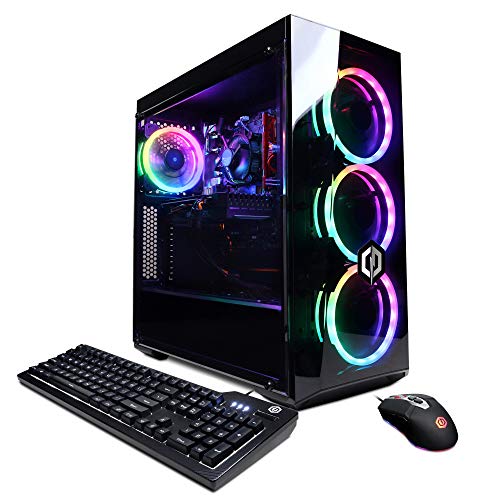
The GXiVR8060A9 variant of the Gamer Xtreme VR shares most of its DNA with the A10 above but is often positioned as a slightly more straightforward mainstream pick. The Intel i5-10400F and GTX 1660 Super combination is the same, paired with 8GB of DDR4 and a 500GB NVMe SSD. The target user is anyone who wants dependable 1080p gaming in titles like Fortnite, Valorant, or Apex Legends without overthinking the spec sheet.
Wi-Fi comes built in, and the case keeps cable management simple enough that first-time builders won’t feel lost. Compared to the STORMCRAFT Sirius earlier in this list, it’s clearly a generation behind, but it’s a more accessible step in for tighter budgets. Owners commonly find that adding a second stick of RAM later is the single biggest quality-of-life upgrade.
Practical Advantages
- Proven GTX 1660 Super handles popular 1080p esports with headroom to spare
- Built-in Wi-Fi keeps the desk setup clean without extra adapters
- NVMe boot drive means fast system response out of the box
- Widely supported platform with a strong community for troubleshooting
Where It May Fall Short
- 8GB RAM will feel tight in newer AAA titles without an upgrade
- CPU generation trails current options, limiting long-term headroom
- Storage tops out at 500GB, so heavy game libraries will need a secondary drive
Perfect Match For
Esports-focused 1080p gamers who want a proven, dependable platform rather than the latest hardware.
Another Choice May Suit
Anyone planning to keep the same rig for several years would do better with the CYBERPOWERPC Gamer Master Gaming PC and its AM5 platform.
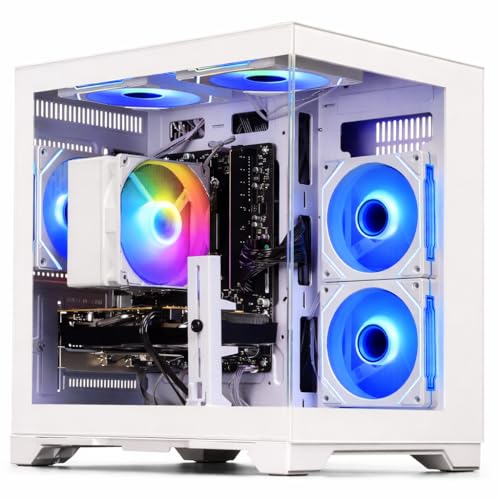
The WIWB Gaming PC with the Ryzen 5 4500 and Radeon RX 6500 XT 4GB is the entry point for anyone whose gaming habits lean heavily toward esports and indie titles. The Ryzen 5 4500 is a 6-core, 12-thread CPU that punches above its class for everyday work, while the RX 6500 XT is a 1080p-focused GPU that runs Fortnite, Valorant, and similar titles at high frame rates without breaking a sweat.
The trade-off is real: this GPU targets 1080p specifically, so anyone hoping for 1440p should step up. But for first-time PC owners or anyone replacing an aging office machine with something that can actually game, the value here is strong. Compared to the CyberpowerPC Gamer Xtreme VR models earlier, it uses newer CPU silicon at a similar tier.
Practical Pluses
- Ryzen 5 4500 handles everyday multitasking alongside casual gaming sessions
- RX 6500 XT is purpose-built for high-refresh 1080p in esports titles
- Compact platform suits smaller desks and shared spaces
- Accessible price point for first-time prebuilt shoppers
A Few Limitations
- 4GB of VRAM limits texture settings in modern AAA releases
- Not built for 1440p or 4K; pushing past 1080p reveals the GPU’s limits
- Stock configuration may need RAM or storage upgrades for heavier users
Who Should Grab It
Casual gamers, students, and first-time PC shoppers focused on 1080p esports will find this an honest starter.
Where Another Pick Suits Better
Creators and streamers who want more cores for multitasking should consider the WIWB Gaming PC with the Ryzen 7 4700LE instead.
The step-up sibling to the WIWB build above trades a little GPU-tier flexibility for a real jump in CPU horsepower. The Ryzen 7 4700LE is an 8-core, 16-thread chip with boost speeds up to 4.2 GHz, which makes a noticeable difference when juggling Discord, browser tabs, OBS streaming, and a game at the same time. The RX 6500 XT 4GB keeps the same 1080p-friendly gaming profile.
For someone who streams lightly, edits the occasional clip, or just refuses to close Chrome tabs while playing, those extra cores pay off. The trade-off is the same 1080p ceiling on the GPU, so anyone chasing higher resolutions should pair this kind of CPU with a stronger graphics card elsewhere in the lineup. Compared to the Ryzen 5 4500 model, this one leans into multitasking over raw pixel pushing.
Notable Gains
- 8-core Ryzen 7 4700LE keeps games smooth while streaming or running background apps
- Higher boost clock improves single-thread responsiveness in lighter titles
- Same dependable 1080p gaming profile as its sibling
- Practical for content creators who multitask heavily
Some Limits To Know
- Same 4GB VRAM cap on the GPU means heavy texture settings are off the table
- Resolution ceiling is firmly 1080p; 1440p would require a stronger GPU
Built With In Mind
Light streamers, students with heavy multitasking habits, and creators who game on the same rig will benefit most from the extra cores.
Not Your Match When
Gamers focused purely on 1440p or higher should look at the STORMCRAFT Sirius AI Gaming Desktop, whose Arc B570 handles higher resolutions more comfortably.
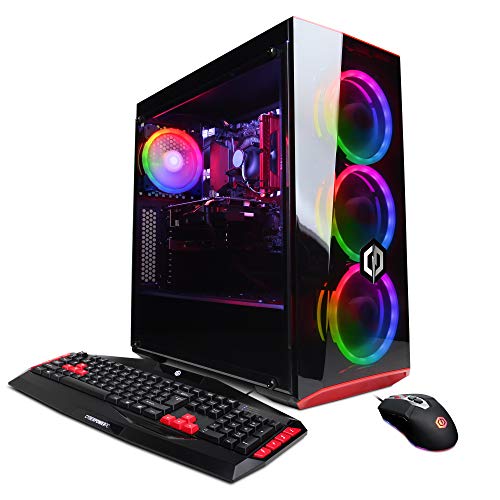
The CyberpowerPC Gamer Xtreme VR (GXiVR8060A7) closes out this list with a configuration that prioritizes storage variety. The Intel i5-9400F is a 6-core chip without hyperthreading (which means 6 cores and 6 threads), and the GTX 1660 6GB handles 1080p gaming comfortably. The real twist is the storage layout: a 120GB SSD for the operating system paired with a 1TB HDD for game libraries.
The dual-drive setup keeps Windows snappy while leaving plenty of room for installs, which is a thoughtful choice for someone who plays a rotating mix of large games. Compared to the WIWB builds reviewed just above, this is a slightly older platform but offers more raw storage out of the box. Owners commonly find that replacing the small boot SSD with a larger NVMe later is the most common first tweak.
Points In Its Favor
- 1TB HDD gives generous storage for large game libraries from day one
- Dedicated boot SSD keeps Windows and launch times responsive
- GTX 1660 6GB is a proven 1080p performer for popular titles
- Wi-Fi built in for clean desk setups
Things To Weigh
- i5-9400F lacks hyperthreading, limiting heavy multitasking performance
- 120GB boot drive is small for modern software; upgrading the SSD is a common move
- Older silicon will age faster than newer AM5 or 14th-gen alternatives
Who Will Love This
Gamers who rotate through large game libraries and want storage room out of the box without adding drives themselves will appreciate the layout.
Skip It When
Streamers and heavy multitaskers should step up to the WIWB Gaming PC with the Ryzen 7 4700LE, whose extra cores handle background workloads more gracefully.
What Matters Most Before Choosing A Gaming Computer Tower
Match The GPU To Your Monitor Resolution
The graphics card dictates what resolution and refresh rate your tower can actually push. For 1080p at 60 to 144 Hz, current entry-level GPUs like the RX 6500 XT or GTX 1660 Super are enough. For 1440p at high refresh, look toward the RTX 4060, Arc B570, or newer. For 4K or high-refresh 1440p with ray tracing, an RTX 5080-class card is the realistic floor.
Don’t Underestimate CPU Cores
Modern games lean on more cores than they used to, and streaming or content creation pushes that further. A 6-core chip handles most gaming today, while 8 to 10 cores give meaningful headroom for streaming, video work, or heavy multitasking. The Ryzen 7 9800X3D in the Ultra 50 V3 is the standout gaming CPU in this list, but even mid-range 6-core parts handle 1080p gaming without stress.
Storage Layout Beats Raw Capacity
SSDs change the feel of a computer more than almost any other part. NVMe drives (fast storage that plugs directly into the motherboard’s PCIe lanes) cut load times dramatically compared to older SATA SSDs or hard drives. A 500GB NVMe boot drive covers Windows and a handful of games, while a secondary SSD or HDD handles the rest of the library. The CyberpowerPC Gamer Xtreme VR (GXiVR8060A7) is a good example of mixing both.
Think About Future Upgrades
Platforms matter as much as parts. AMD’s AM5 socket (used by the CYBERPOWERPC Gamer Master and the Ryzen 7 9800X3D in the Ultra 50 V3) supports multiple CPU generations going forward, while older Intel sockets do not. DDR5 memory is the modern baseline, but DDR4 builds can still serve well for years. Plan upgrades, not just today’s games.
Key Considerations Across These Picks
Where Shoppers Go Wrong
The most common mistake is chasing the largest GPU number without checking the rest of the build. A flagship graphics card bottlenecked by an older CPU (the central processor that feeds instructions to every other component) underperforms and runs hotter than expected. Another trap is ignoring case airflow, which can quietly shorten component life. Finally, shoppers sometimes buy a tower with the right parts but the wrong storage, ending up constantly shuffling games between drives.
Where The Extra Money Goes
Spending more in this category usually buys three things: newer GPU architecture (which improves ray tracing and AI-assisted upscaling), a more efficient CPU platform, and better cooling or power delivery. For someone playing esports at 1080p, those gains may not matter. For anyone targeting 4K, ray-traced AAA games, or serious streaming, the jump from a 4060-class card to an RTX 5080 is meaningful and visible on screen.
Frequently Asked Questions
How Much RAM Do I Really Need For Gaming In 2026?
16GB remains the sweet spot for most modern games, with 32GB offering headroom for streaming and content creation. 8GB is workable today but feels tight in newer AAA titles, so a quick upgrade is common on entry-level builds.
Is A Prebuilt Gaming PC Worth It Over Building My Own?
Prebuilts save time and ship with warranty coverage, tested components, and (often) technical support. Custom builds can save money and let you pick every part, but they require confidence and time. For first-time shoppers, the prebuilt route is usually the lower-stress option.
What Resolution Can I Expect From These Towers?
The WIWB and older CyberpowerPC builds target smooth 1080p in popular titles. The CYBERPOWERPC Gamer Master and STORMCRAFT Sirius stretch into comfortable 1440p territory. The Ultra 50 V3 with its RTX 5080 is the realistic pick for high-refresh 1440p and 4K gaming.
Do I Need A Tower Stand?
A floor-standing tower collects dust and blocks airflow vents. A height-adjustable stand like the EUREKA ERGONOMIC option lifts the case off the ground, makes the front ports easier to reach, and improves cooling. It’s an inexpensive quality-of-life upgrade for any setup.
How Long Should A Gaming PC Tower Last?
Most modern gaming towers stay relevant for four to six years before needing a major refresh. Picking a current platform (like AM5) and a current GPU generation gives the longest runway. Storage and RAM can be upgraded along the way to extend useful life further.
Final Verdict
The right gaming computer tower depends entirely on the games you play and the screen you play them on. Esports-focused 1080p gamers will be happy with the WIWB or older CyberpowerPC Gamer Xtreme models. Mainstream 1440p players should look at the STORMCRAFT Sirius or CYBERPOWERPC Gamer Master. Anyone chasing 4K should be shopping for the Ultra 50 V3. Pick the build that matches your monitor and your patience for upgrades, and the rest tends to fall into place.