Finding a gaming rig that handles modern titles without torching your budget feels harder than it should. I’ve been watching this space long enough to know which components actually move the needle on frame rates, and which spec-sheet padding you can safely ignore. This list is built for folks who want playable 1440p performance, sensible upgradability, and a system that won’t bottleneck the moment a new patch drops. Whether you’re upgrading from an aging console-era tower or building your first serious battlestation, these six picks cover the main shapes a budget gaming desktop can take in 2026.
A Fast Comparison Of The Options

STORMCRAFT Sirius AI Gaming Desktop, Intel i5 14400F, Arc B570

HP OmniDesk Desktop Computer PC, AMD Ryzen 5, 16GB DDR5

GEEKOM NEW IT12 Mini PC, Intel i3-12300HE, 16GB RAM

EUREKA ERGONOMIC PC Stand Height Adjustable Black
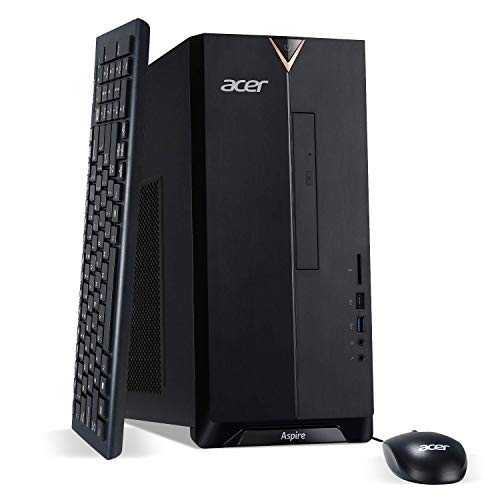
Acer Aspire TC-895-UA91 Desktop, Intel Core i3-10100

HP OmniDesk Desktop Computer PC, AMD Ryzen 5, 32GB DDR5
A Closer Look At Each Pick
Most budget prebuilts cut corners on the GPU and call it a day, which is why this STORMCRAFT stands out. It pairs a 14th-generation Intel Core i5-14400F, a processor with 10 cores and 16 threads that boosts up to 4.7 GHz, with a discrete Intel Arc B570 graphics card carrying 10GB of GDDR6 memory. GDDR6 is the current standard for video memory, and 10GB is enough headroom for 1440p textures in most modern AAA games without choking.
The 1TB NVMe SSD means load times stay snappy, and 16GB of DDR4 RGB memory gives you enough bandwidth for a game plus Discord plus a browser full of tabs. Unlike the GEEKOM mini PC further down this list, this is a full ATX-style tower built for airflow and expansion, so dropping in a bigger GPU down the road stays realistic.
Everyday Perks
- Dedicated 10GB Arc B570 GPU handles 1440p in most esports and many AAA titles, a real step up from integrated graphics.
- 10-core i5-14400F manages streaming and gaming simultaneously without dropping frames on the gameplay feed.
- 1TB NVMe boot drive keeps Windows launch fast and gives you room for a healthy Steam library out of the box.
- Full tower form factor makes future GPU upgrades physically possible, unlike the locked-down mini PCs on this list.
Points To Keep In Mind
- The Arc B570 is Intel’s newer discrete line, and driver maturity has historically lagged behind AMD and NVIDIA equivalents, so early adopters may encounter rough patches.
- 16GB DDR4 rather than DDR5 means you’re on a platform that’s near the end of its upgrade runway for memory speed.
- RGB lighting and high-TDP CPUs draw more power, so owners commonly report the included PSU feels tight if you add a much stronger GPU later.
Feature Snapshot
Built With In Mind
Someone targeting 1440p gaming on a tight prebuilt budget who wants a real GPU rather than relying on integrated graphics.
Where Another Pick Suits Better
The Acer Aspire TC-895-UA91 is a better fit for someone playing only light esports who would rather trade raw GPU power for a lower total cost.
The HP OmniDesk leans into a hybrid identity, half productivity workstation and half casual gaming rig. Inside sits an AMD Ryzen 5 8500G, an 8-core, 12-thread chip that boosts to 5.0 GHz, paired with Radeon 740M integrated graphics. Integrated graphics means the CPU itself draws the picture rather than relying on a separate card, which is fine for older titles and indie games but limiting for modern AAA work.
Where this machine punches above the STORMCRAFT above is memory and storage balance: 16GB of DDR5 runs at a higher bandwidth than DDR4, and 1.5TB of total storage (a 512GB NVMe SSD plus a 1TB hard drive) means your game library and your work files can coexist. Quad-monitor support is genuinely useful for traders, streamers, and anyone running reference docs alongside their main window.
The Good Stuff
- DDR5 platform extends the useful lifespan of the system and outpaces DDR4 in memory-bound productivity tasks.
- Quad-monitor output makes this a genuine multi-display workstation, not just a single-screen tower.
- Wi-Fi 6 and Bluetooth 5.4 cover modern wireless peripherals without needing an adapter.
- Included wireless keyboard and mouse remove a setup hurdle that often gets overlooked in spec sheets.
Trade-Offs To Consider
- Radeon 740M integrated graphics will not keep frame rates comfortable in demanding 1440p AAA titles.
- HDD storage tends to run warm and audibly; owners commonly report the secondary drive being the loudest part of the system under load.
Made For
A buyer splitting time between spreadsheets, browsing, and lighter gaming without pushing heavy 3D rendering or high-refresh competitive play.
Skip It When
You want playable 1440p frame rates in modern AAA games; the STORMCRAFT Sirius is a better match in that scenario.
Gaming PCs usually look like small refrigerators, so the GEEKOM IT12 throws that assumption out the window. It packs an Intel i3-12300HE with 8 cores and 12 threads into a chassis small enough to sit behind a monitor or hide on a shelf. Despite the i3 label, this 12th-gen chip behaves more like an older mid-tier i5 in multi-threaded work, which matters because most games lean on multiple cores now.
For anyone working in a studio apartment, dorm room, or shared living space where a tower tower just isn’t welcome, this hits a real sweet spot. Unlike the HP OmniDesk above, the GEEKOM uses 48EU UHD Graphics with AV1 hardware decoding, which is enough for 4K video playback and older or indie gaming, but you’ll hit limits fast in demanding titles.
Where It Excels
- Sub-compact chassis makes this practical for tiny desks, living room media setups, or travel.
- AV1 hardware decoding handles modern streaming codecs more efficiently than older mini PCs.
- 16GB RAM keeps multitasking responsive for browser-heavy work and office workflows.
- Low power draw means quieter cooling and a smaller electricity footprint than full towers.
Honest Caveats
- 256GB SSD fills up quickly once a few modern games are installed, so external storage is almost a requirement.
- Integrated graphics cap the ceiling for AAA gaming; this is not the pick for anyone chasing high frame rates.
- Mini PCs tend to run warmer under sustained load than towers with more airflow, which can throttle performance during long sessions.
Best Suited To
Apartment dwellers and minimalists who value desk space over raw throughput and play mostly indie or older titles.
Swap It Out When
Gaming performance is the priority over footprint; the Acer Aspire TC-895-UA91 offers more headroom in a similarly compact shell.
Half the battle with a budget gaming tower is keeping it off a dusty carpet and getting it to the right height. The EUREKA ERGONOMIC stand solves both: a 6-gear manual height adjustment runs from about 23 inches up to 33 inches, and the locking wheels let you roll a full-size ATX case out for cable cleanup without dragging it across the floor.
Compared to the GEEKOM mini PC above, this product doesn’t compete on computing power at all; it’s a piece of furniture that makes whatever tower you pair with it more livable. The two-tier design gives you a spot for the case on top and a printer or accessories below, which keeps a cramped desk honest.
Useful Touches
- Six height settings in roughly 2-inch increments let you match the tower to chair and desk height precisely.
- Wheels lock into place, so rolling the rig out for the once-a-month dust session stays low-effort.
- Steel frame handles full-size ATX cases, not just compact towers, which keeps upgrade options open.
- Two-tier shelf opens up storage for a printer, external drives, or a stack of notebooks.
Small Limitations
- Manual height adjustment means you’re turning a crank rather than pressing a button, which can be awkward in shared spaces.
- The black steel finish tends to show dust and scuffs more readily than lighter powder-coat options.
Whose Shelf It Belongs On
Anyone who moves between a desk, couch, and dining-table setup and wants the tower off the floor without a permanent mount.
Not Your Match When
You already have a fixed desk and don’t care about mobility; any tower in this list works fine sitting on the floor or a small shelf in that case.
The Acer Aspire TC-895 is the entry-level tier of the roundup, and it leans hard on its low total cost. A 10th-gen Intel Core i3-10100 with 4 cores handles day-to-day computing and lighter esports titles fine, and 8GB of DDR4 at 2666 MHz covers the basics without drama. A 512GB NVMe M.2 SSD keeps boot times quick, and the DVD writer is one of those legacy ports that’s quietly useful for ripping old media libraries.
Wi-Fi 6 is a nice surprise at this tier, and the USB 3.2 Type-C port up front covers modern phone and accessory hookups. Unlike the STORMCRAFT above, this system ships without a discrete GPU, so frame rates in demanding 3D games will land far below the 60 fps mark.
What Makes Sense
- Low total cost leaves room in the budget for a monitor, peripherals, or a game library.
- Wi-Fi 6 support is uncommon in this price bracket and keeps wireless network speeds future-friendly.
- USB Type-C front port is genuinely useful for modern phones, drives, and headsets.
- Compact tower shell fits under most desks without dominating floor space.
A Few Limitations
- Intel UHD Graphics 630 integrated graphics limits the system to older or lighter titles for any real gaming.
- Only 8GB of RAM feels tight once you open Chrome and Discord together, so owners commonly upgrade memory early.
- 10th-gen i3 is aging hardware, which compresses the window for meaningful CPU upgrades later.
Feature Card
Right Fit For
First-time builders or casual players who want a real desktop for browsing, office work, and lighter esports at modest frame rates.
A Better Fit Elsewhere
Anyone targeting modern AAA gaming at 1440p; the HP OmniDesk with 32GB DDR5 trades GPU grunt for memory bandwidth that helps productivity.
This second HP OmniDesk configuration is essentially the same machine as the earlier 16GB model, but doubled in two places that matter for heavy multitasking: 32GB of DDR5 RAM and a combined 2TB of storage, split between a 1TB NVMe SSD and a 1TB hard drive. Compared to the Acer Aspire above, you’re trading budget headroom for a system that can hold a serious project library and stay responsive while doing it.
The Ryzen 5 8500G and Radeon 740M combination is unchanged, so this isn’t the right pick if your goal is competitive frame rates in modern 3D games. The Wi-Fi 6, Bluetooth 5.4, and quad-monitor support all carry over too, which keeps the workstation story consistent.
Benefits That Matter
- 32GB of DDR5 RAM is generous for video editing, large datasets, and many simultaneous virtual machines.
- 2TB total storage means a full game library plus media files without juggling external drives.
- DDR5 bandwidth keeps the system feeling snappy long after 8GB or 16GB systems start to bog down.
- Quad-monitor support transforms the desk into a true command center.
Things To Weigh
- Same Radeon 740M ceiling as the smaller OmniDesk means gaming frame rates stay modest by GPU-side standards.
- HDD portion adds audible noise during heavy file operations; SSD-only systems run quieter.
Who Should Grab It
Power users running virtual machines, large spreadsheets, or video editing pipelines who want memory and storage headroom in one box.
Reach For A Different Pick When
Gaming is the main goal; the STORMCRAFT Sirius with its dedicated Arc B570 GPU delivers better frame rates in the same budget.
What Matters Most In A Sub-$1000 Gaming Build
A budget gaming rig lives or dies by GPU choice. Integrated graphics handle esports and indie titles fine, but anything labeled “AAA” or with a current-year release needs a discrete card with its own VRAM. The STORMCRAFT with its 10GB Arc B570 shows what that looks like at this price point, and most other configurations here trade GPU power for memory, storage, or footprint savings.
CPU selection matters more than people think. Modern games lean on multiple cores for streaming, background AI, and shader compilation, so a 6-core chip with hyperthreading is the practical floor for comfortable play. The Ryzen 5 8500G in the HP OmniDesk models and the i5-14400F in the STORMCRAFT both clear that bar with room to spare.
Memory speed and capacity shape daily feel. 16GB is the realistic minimum for gaming plus a chat client plus a browser, and DDR5 gives you more headroom than DDR4 over the system’s lifetime. Storage split between a fast NVMe boot drive and a larger HDD for game libraries keeps load times snappy without overspending on a 2TB SSD.
Form factor ties everything together. Mini PCs like the GEEKOM IT12 save space but limit cooling and GPU upgrades. Full towers run cooler and stay upgradeable, which is why I lean toward ATX designs when the desk allows. The EUREKA stand sits in the middle: not a computer, but a tool that makes a full tower easier to live with.
Finally, connectivity gets overlooked. Wi-Fi 6, USB-C front ports, and Bluetooth 5.x are small conveniences that pay off the day you try to plug in a new headset or pair a controller. The HP OmniDesk and Acer Aspire both check those boxes; older budget towers sometimes skip them.
Spotting The Real Trade-Offs
Wrong Turns To Avoid
The most common mistake is paying for a low-spec CPU with a decent GPU, or the reverse. Either imbalance wastes money because one component will throttle the other. Another pitfall is overestimating integrated graphics: a Ryzen 5 8500G sounds powerful, but its Radeon 740M is not a substitute for a real GPU in demanding games. Verify the GPU is discrete if you intend to play anything beyond light esports.
Buyers also tend to ignore storage type. A large HDD feels like a bargain, but game load times suffer noticeably compared to an SSD. Finally, check the PSU wattage if you plan to add a stronger GPU later; underpowered power supplies are the silent killer of budget build upgrade plans.
Where The Extra Money Goes
Stepping up to a $1000 ceiling typically nets you a discrete GPU, more RAM, and faster storage. The HP OmniDesk with 32GB DDR5 shows where extra dollars land if you prioritize multitasking, while the STORMCRAFT shows the same budget aimed at raw gaming throughput. DDR5 and 1TB NVMe drives are the two upgrades that age best, since both reduce bottlenecks for years to come. If your workload is split between gaming and productivity, prioritize memory and storage; pure gamers should put the extra dollars into the GPU tier first.
Frequently Asked Questions
Can I Actually Game At 1440p On A Budget Tower?
Yes, provided the system includes a discrete GPU with at least 8GB of VRAM. The STORMCRAFT Sirius with its 10GB Arc B570 is the clearest example in this list.
Is Integrated Graphics Ever Enough For Gaming?
For older esports titles and indie games, Radeon 740M or UHD-class integrated graphics handle the workload. Anything modern with heavy 3D demands needs a real GPU.
What Is GDDR6 Memory On A Graphics Card?
GDDR6 is a type of video RAM that feeds the GPU texture and frame data quickly. More GDDR6 means higher-resolution textures without stuttering.
Why Pick A Mini PC Over A Tower?
Mini PCs like the GEEKOM IT12 trade GPU power for a much smaller footprint. They make sense for casual gaming, media playback, and tight living spaces.
How Long Should A Budget Gaming Desktop Last?
Most budget rigs stay relevant for three to five years before games demand stronger hardware. Upgrading the GPU or adding RAM can stretch that window further.
Closing Remarks
Your best move is matching the machine to the kind of gaming you actually do, not chasing the highest numbers on a spec sheet. The STORMCRAFT is the right call for someone chasing 1440p frame rates; the HP OmniDesk variants suit heavy multitaskers; the Acer Aspire covers light play on a tight budget. Pick the one that fits your habits, give it good airflow and a clean power strip, and you’ll have a rig that handles whatever 2026 throws at it.