Building a gaming setup that actually keeps up with modern titles used to mean spending serious money on a full tower. Today, the picture has changed: a strong crop of compact mini PCs and mid-tower builds sits comfortably below the $2,000 line, packing serious CPU muscle, fast DDR5 memory, and even respectable integrated graphics for lighter workloads. The catch is that “gaming” covers a wide spectrum, from esports-class framerates at 1080p to demanding single-player titles at higher resolutions.
This list rounds up eight realistic options I think make sense for different kinds of gamers. Whether you want a tiny box that disappears behind a monitor, a quiet productivity rig that moonlights as a game machine, or a full discrete-GPU tower built for heavier titles, there’s a fit here. I paid attention to thermal design, upgradability, and the kind of real-world use each system actually serves.
A Fast Comparison Of The Options

GMKtec Gaming Mini PC Ryzen 7 H 255 32GB DDR5 1TB SSD
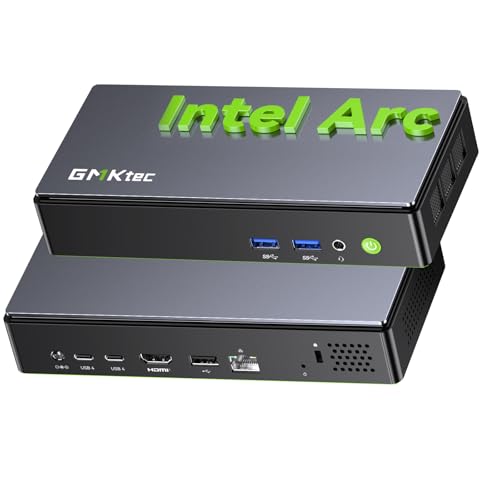
GMKtec K13 Mini PC Intel Ultra 7 256V
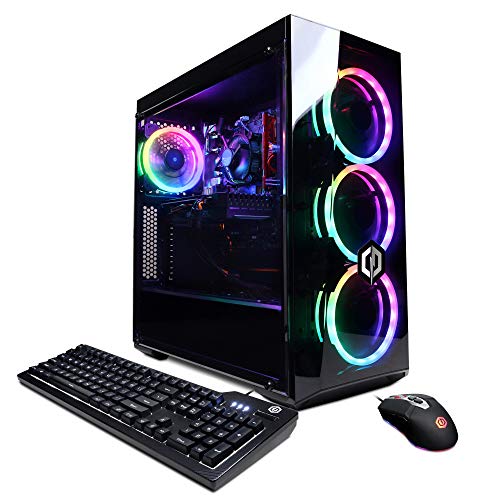
CyberpowerPC Gamer Xtreme VR GXiVR8060A9
GMKtec K11 Mini PC Ryzen 9 8945HS 32GB 2TB

GMKtec K8 Plus Mini PC Ryzen 7 8845HS 32GB

Edifier G2000 32W Gaming Speakers

ASUS ROG G700 (2025) Gaming Desktop RTX 5070

GMKtec M8 Mini PC Ryzen 5 PRO 6650H 16GB
Why These Options Stand Out
GMKtec’s compact Ryzen 7 H 255 build trades tower bulk for desk-friendly size while still packing eight Zen 4 cores and the Radeon 780M iGPU (integrated graphics processor built into the CPU). For anyone who plays competitive shooters, indie titles, or older AAA games at 1080p, the iGPU handles the load without forcing a giant chassis onto the desk. The 32GB of DDR5 and 1TB SSD mean you can install a sizeable library and keep dozens of browser tabs alive in the background.
Compared to the CyberpowerPC tower a few entries below, this one prioritizes space efficiency over discrete graphics. It’s a tidy fit for dorm rooms, shared apartments, or anyone who values a clean workspace over raw pixel-pushing power.
A Strong Showing
- Eight-core Ryzen chip with boost speeds reaching 4.9GHz, which keeps frame pacing steady in CPU-bound scenes
- Radeon 780M iGPU, a meaningful step up from older integrated solutions for esports-class framerates
- 32GB DDR5 across two channels leaves plenty of headroom for multitasking and large mods
- 1TB PCIe SSD cuts down load screens and gives room for a sizeable Steam library
- Tiny footprint means it tucks behind a monitor or sits on a bookshelf
Things To Consider
- No discrete GPU, so the heaviest modern AAA titles at high settings will push the limits of the iGPU
- Compact chassis can run warm under sustained loads, so placement matters for airflow
Key Specs
Right Fit For
Esports players and 1080p gamers who want a near-silent, low-power rig that disappears on the desk and still handles modern competitive titles at high refresh rates.
Consider Something Else When
The ASUS ROG G700 serves better when high-resolution AAA gaming with ray tracing (a lighting technique that simulates realistic reflections and shadows) is the priority and a full discrete GPU is non-negotiable.
The K13 is built around Intel’s Core Ultra 7 256V, a chip that combines high-throughput CPU cores with a serious NPU (neural processing unit, a specialized processor that handles AI workloads faster and more efficiently than a general-purpose CPU). It’s also paired with LPDDR5X memory running at 8533 MT/s (megatransfers per second, a measure of memory bandwidth), which is the kind of bandwidth that matters for content creation tools, AI-assisted workflows, and modern streaming pipelines. If your idea of “gaming” includes broadcasting, recording, and running local AI models alongside a game, this is the box to look at.
Compared to the GMKtec Gaming Mini PC above, the K13 leans harder into productivity and AI tasks. Gaming is still well within reach, but the headline feature is the NPU horsepower for creators.
Advantages To Know
- Intel Core Ultra 7 256V with strong AI accelerator performance for local LLMs (large language models, AI systems that generate text) and creative tools
- SK Hynix LPDDR5X at 8533 MT/s keeps memory bandwidth high, which helps both gaming and creative apps
- Built on TSMC’s N3B process, a modern chip fabrication node that improves efficiency and reduces heat
Points To Note
- Integrated graphics mean heavier AAA titles need careful settings tuning
- LPDDR5X is soldered, so memory upgrades after purchase aren’t an option
Who Will Love This
Streamers, indie devs, and creators who want a compact box that handles both content workflows and moderate gaming without a tower’s footprint.
Look Elsewhere When
The ASUS ROG G700 fits better when discrete GPU power for demanding AAA titles is the main priority.
The CyberpowerPC Gamer Xtreme VR is a traditional mid-tower with a discrete GPU: a GTX 1660 Super with 6GB of VRAM (video memory, dedicated RAM used by the graphics card). That dedicated graphics card is the main differentiator versus the mini PCs earlier in this list. The GTX 1660 Super is older hardware at this point, but it still handles 1080p esports titles and many AAA games at medium settings with relative ease.
The Intel i5-10400F is a 6-core, 12-thread CPU without integrated graphics (the “F” suffix), which is fine because the discrete GPU handles all rendering. Pair that with 8GB of DDR4 and a 500GB NVMe SSD, and you’ve got a working budget gaming desktop that newcomers can plug in and start playing on day one.
Notable Gains
- Dedicated GTX 1660 Super GPU delivers real 1080p gaming performance that integrated graphics can’t match
- Mid-tower chassis leaves room for future upgrades like more RAM or a stronger GPU
- 500GB NVMe SSD keeps boot and load times snappy
- WiFi ready, so getting online is simple without extra adapters
Honest Caveats
- GTX 1660 Super is an older card, so the newest AAA titles at high settings will require compromises
- 8GB of DDR4 is the floor for modern gaming; expect to upgrade for the heaviest titles
- Comes with Windows 10 Home, so a free Windows 11 update or clean install is worth considering
Made For
First-time builders and budget-conscious shoppers who want a plug-and-play tower with a discrete GPU and room to grow into the system over time.
Not Your Match When
The GMKtec K11 Mini PC suits better when compact size and faster DDR5 memory matter more than having a dedicated GPU in a traditional tower.
The K11 sits at the top of GMKtec’s mini PC lineup and it shows. The Ryzen 9 8945HS brings eight cores, sixteen threads, and boost speeds up to 5.4GHz, all while keeping the power envelope between 35W and 70W depending on configuration. That’s a serious amount of compute (raw processing power) for a box this small, and it means even heavy multitasking or CPU-intensive games feel responsive.
With 32GB of dual-channel DDR5 and a 2TB PCIe 4.0 SSD (a fast storage interface that doubles data throughput compared to PCIe 3.0), the K11 also solves one of the common mini PC pain points: storage anxiety. You can install a deep library of modern games without juggling what stays and what goes.
The Practical Payoff
- Ryzen 9 8945HS hits 5.4GHz boost, keeping frame times tight in CPU-bound games
- Dual-channel DDR5 doubles memory bandwidth versus single-channel configurations
- 2TB PCIe 4.0 SSD offers both speed and storage volume for modern game libraries
- 35W-70W TDP (thermal design power, the amount of heat a CPU is expected to produce) range lets the system stay efficient under light loads
Trade Offs
- Integrated graphics mean demanding AAA titles need careful settings to stay smooth
- Smaller chassis means thermal headroom is finite; sustained heavy loads may throttle performance
Best Suited To
Power users who run games alongside streaming, video editing, or heavy browser sessions and want desktop-class compute without the desktop footprint.
Skip It When
The ASUS ROG G700 fits better when dedicated graphics for ray-traced AAA games are the main goal.
The K8 Plus slots into a comfortable middle ground: Ryzen 7 8845HS with a dedicated NPU, paired with 32GB of DDR5 and a 512GB SSD. The NPU is the headline upgrade over the older 8745HS, and it accelerates on-device AI tasks like background blur in video calls, noise suppression in OBS, and Windows Copilot features.
For someone splitting time between work and play, this is a useful middle pick. You get enough CPU and memory to run modern games at 1080p, and the NPU handles the everyday AI tasks that increasingly show up in productivity apps.
Everyday Advantages
- Dedicated NPU accelerates AI features in productivity apps and creative tools
- 32GB dual-channel DDR5 keeps multitasking smooth across browser tabs and apps
- 35-54W TDP range balances performance and efficiency
A Few Limitations
- 512GB storage fills up fast with modern games installed alongside work apps
- Integrated Radeon graphics cap performance on the most demanding AAA titles
Who Should Grab It
Hybrid users who want one machine that handles a workday of video calls and creative tools, then switches to gaming without skipping a beat.
A Better Fit Elsewhere
The GMKtec K11 Mini PC makes more sense when 2TB of storage and Ryzen 9 horsepower matter more than the K8 Plus’s slightly lower price tier.
The Edifier G2000 isn’t a gaming PC: it’s a compact 32W speaker pair designed to sit beside one. With Bluetooth, USB, and 3.5mm AUX inputs, plus RGB lighting and three EQ (equalizer, a tool that adjusts audio frequency balance) modes tuned for game, music, and movie content, it’s the kind of upgrade that genuinely improves a desktop setup without filling it with gear.
Think of this as the audio complement to whichever mini PC or tower you pick from the rest of the list. The 2.75-inch full-range drivers deliver 16W RMS (root mean square, a measure of continuous power output) per channel, and a subwoofer output is included for anyone who wants to add deeper bass later.
Noteworthy Benefits
- Three EQ presets tailored for games, music, and movies give quick tuning without fiddling
- Multiple inputs (Bluetooth, USB, 3.5mm) make it easy to swap between PC, phone, and console
- Subwoofer output lets you expand the system later without replacing the speakers
Practical Considerations
- 2.75-inch drivers can’t replace a dedicated subwoofer for room-shaking bass on their own
- Compact size means soundstage (the perceived width and spatial placement of audio) is narrower than bookshelf speakers
Perfect Match For
Gamers and remote workers who want clean, punchy desktop audio without a bulky setup or complicated software.
Reach For A Different Pick When
Anyone focused purely on the PC itself can skip this entry, since it adds audio rather than compute power.
The ROG G700 is the only proper mid-tower with a current-generation discrete GPU on this list: an RTX 5070 paired with an Intel Core Ultra 7 265F, 32GB of DDR5, and a 1TB NVMe SSD. The dual-glass-panel chassis with Aura Sync RGB (Aura Sync is ASUS’s system for synchronizing lighting effects across compatible components) makes the visual statement loud and clear. This is the build for someone who wants to run demanding AAA games at high settings with ray tracing enabled.
Compared to every mini PC earlier in this list, the trade-off is size: the G700 takes up meaningful desk or floor space. What you get in return is real discrete GPU performance and a case built around upgrade-friendly airflow.
Useful Strengths
- RTX 5070 GPU delivers strong frame rates in modern AAA games with ray tracing support
- Intel Core Ultra 7 265F provides solid CPU performance without integrated graphics overhead
- Mid-tower chassis supports future upgrades like more RAM or additional storage
- Comes with Windows 11 Home preinstalled
Factors To Consider
- Full tower footprint demands dedicated floor or desk space
- Higher power draw compared to mini PCs means more heat and noise under load
Built With In Mind
AAA gamers and enthusiasts who want a discrete-GPU build with current-generation hardware and room to upgrade over the next several years.
Swap It Out When
The GMKtec K11 Mini PC makes more sense when desk space is tight and integrated graphics are enough for the games in question.
The M8 closes out the list with a different angle: a metal-cased mini PC built around the Ryzen 5 PRO 6650H, 16GB of LPDDR5, and 1TB of SSD storage. The 6650H is a slightly older 6-core chip, but the PRO designation hints at business-class security and management features, and the integrated Radeon 660M graphics still handle esports and lighter games competently.
The standout physical feature is the connectivity: dual 2.5G NICs (network interface cards, the hardware that handles wired networking), USB-C 4.0, HDMI 2.1, DisplayPort 2.1, and an Oculink port (a high-bandwidth external connection standard for adding a discrete GPU later). For a tiny box, it’s surprisingly versatile.
Why It Works Well
- Metal case helps with thermal dissipation and gives a premium feel
- Oculink port allows an external GPU (eGPU, a separate graphics card housed outside the main computer) connection for users who want to upgrade later
- Dual 2.5G NICs benefit users with fast home networks or NAS (network-attached storage) setups
- Triple 8K display support makes it a fit for productivity-heavy multi-monitor workstations
Where It Is Less Suited
- Ryzen 5 6650H trails the newer 8845HS and 8945HS chips in single-core speed
- 16GB is the floor for modern gaming; heavier multitasking may want more RAM
Whose Shelf It Belongs On
Minimalists and home-office gamers who want the smallest possible footprint with serious port flexibility and optional GPU expansion down the line.
Where Another Pick Suits Better
The GMKtec Gaming Mini PC (Pick 1) fits better when raw CPU speed and a larger RAM pool matter more than expandability through Oculink.
Picking The Right Specs Without Overpaying
CPU And Core Count
For gaming desktops under 2000, the CPU matters most when games scale across many cores or when you stream while playing. Eight-core Ryzen chips like the H 255 and 8845HS handle modern titles comfortably, while six-core options like the 6650H still serve lighter workloads well. Match the core count to the kinds of games you play and what runs in the background.
Memory Bandwidth And Capacity
DDR5 memory at 5600 MT/s or higher gives headroom for modern games and multitasking. 32GB has become the sweet spot for anyone who keeps browsers, chat apps, and games open simultaneously. 16GB still works for dedicated gaming sessions but can feel tight when streaming or running creative software on the side.
Storage Speed And Space
PCIe 4.0 SSDs cut load times noticeably compared to older SATA drives. 1TB covers a moderate library; 2TB removes the need to micromanage installed games. For mini PCs without expansion bays, choosing the right storage size at purchase is more important than it would be in a full tower.
GPU Choice And Use Case
Integrated Radeon graphics handle esports and lighter AAA games at 1080p with sensible settings. Discrete GPUs like the RTX 5070 or GTX 1660 Super step in when you want ray tracing, higher resolutions, or smoother framerates in demanding titles. Pick based on the heaviest game in your library, not the average.
Key Considerations Across These Picks
Where Shoppers Go Wrong
One common slip-up is buying the fastest CPU on paper and ignoring the GPU situation. Integrated graphics have come a long way, but they still cap how well the heaviest modern games run. Another mistake is underestimating storage: 512GB fills up fast once modern games regularly exceed 100GB each. Checking both ports and expansion options matters too, especially for mini PCs where external upgrades may be the only path forward.
What Separates Premium From Basic
Higher-tier builds bring discrete GPUs, faster SSDs, larger RAM pools, and chassis designed for upgrade-friendly airflow. The jump from integrated to discrete graphics is the single biggest performance step in this price range, which is why the ROG G700 stands apart for AAA-focused gamers. Mini PCs trade that GPU power for size and efficiency, so the right pick depends entirely on which trade-off matches your setup.