Tight budgets used to mean blurry textures and constant lag, but the 2026 lineup of small-footprint PCs proves otherwise. This guide covers ten desktop picks that combine modern CPUs, capable integrated or dedicated graphics, and quiet operation, all without forcing you to overspend. You get a mix of full-size towers with serious GPUs and mini PCs that disappear behind a monitor, so you can match the form factor to your desk and your game library.
Your Options, Compared

The Horizon Autherium Dragon RGB I9 RTX Gaming PC Desktop Computer

GMKtec Gaming Mini PC AMD Ryzen 7 H 255 32GB DDR5 1TB SSD
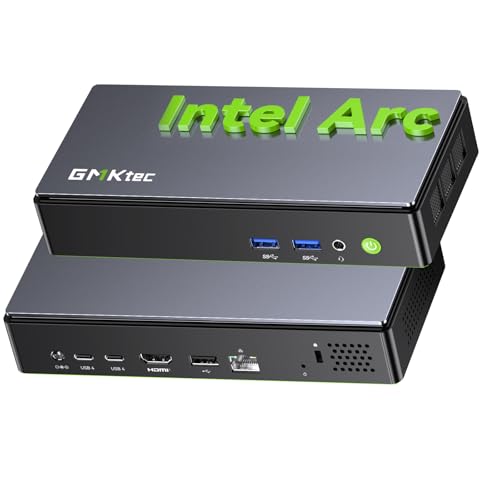
GMKtec K13 Mini PC Intel Ultra 7 256V SK Hynix LPDDR5
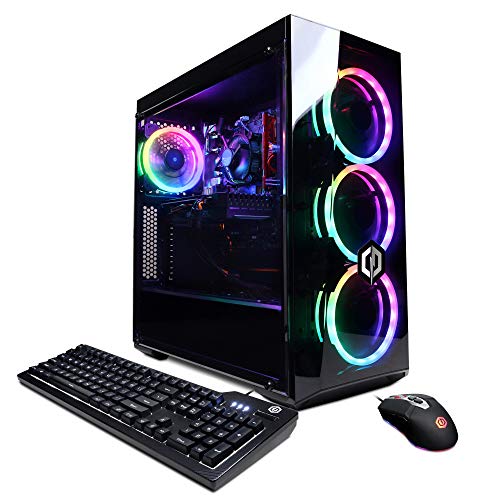
CyberpowerPC Gamer Xtreme VR Gaming PC GXiVR8060A9
GMKtec K11 AMD Ryzen 9 8945HS 32GB DDR5 2TB PCIe 4.0 SSD

GMKtec K8 Plus Gaming Mini PC AMD Ryzen 7 8845HS

ACEMAGIC K1 Gaming Mini PC Ryzen 7 7730U 16GB 512GB

ASUS ROG G700 (2025) Gaming Desktop PC RTX 5070

ACEMAGIC Mini PC AMD Ryzen 7330U 16GB DDR4 256GB

GMKtec M8 Mini PC AMD Ryzen 5 PRO 6650H 16GB LPDDR5
A Deeper Look At The Lineup
This Horizon Autherium tower is the heaviest hitter on the list, pairing an unlocked Core i9 with an overclocked NVIDIA RTX 5070 OC 12GB. The 360mm AIO liquid cooler keeps thermals in check during marathon sessions, while 64GB of RAM ensures background apps and Chrome tabs never slow down your game. Compared to every mini PC ahead of it, this is a true full-size desktop built for sustained, high-fidelity gaming.
Storage is genuinely excessive at 5TB total: a 1TB M.2 NVMe SSD at PCIe speeds for fast loads, plus a 4TB 7200RPM HDD for a sprawling Steam library. Wi-Fi 6E pushes wireless throughput up to 2.4GB/s, and Windows 11 Pro unlocks BitLocker encryption plus remote desktop. The chassis showcases RGB fans behind a tempered-glass panel, fitting for a system that anchors the room visually as much as computationally.
Real-World Strengths
- RTX 5070 OC 12GB graphics card delivers strong 1440p and entry-level 4K frame rates in modern AAA titles.
- 64GB DDR RAM eliminates stutter when streaming, recording, or running Discord alongside a game.
- 1TB NVMe SSD dramatically cuts load times compared to spinning drives alone.
- 5TB combined storage means you rarely have to delete anything to make room for new releases.
- 360mm AIO cooling preserves performance during long sessions, where air coolers often throttle.
Trade-Offs Worth Knowing
- The larger tower footprint demands real desk space, so it is not the cleanest fit for minimalist setups.
- Factory overclocking and a high-TDP CPU push energy draw noticeably higher than mini PC alternatives.
Built With In Mind
Hardcore PC gamers chasing high-refresh 1440p performance and a system that will not bottleneck a flagship GPU.
Look Elsewhere When
Desk space is genuinely limited, in which case the GMKtec K13 Mini PC offers a smaller footprint, though at the cost of raw GPU power.
GMKtec shrinks serious specs into a tiny shell here, leaning on the upgraded Ryzen 7 H 255 from the Hawk Point family, a chip with eight cores and sixteen threads peaking at 4.9GHz. AVX-512 support, a feature that accelerates scientific and ML workloads, is a bonus for tinkerers running local AI experiments alongside games. Integrated Radeon 780M graphics handle esports titles natively without forcing you to add a discrete GPU.
For most living-room and dorm setups, this little box earns its space. The 32GB DDR5 and 1TB SSD configuration gives you snappy boot times and enough memory overhead for Chrome-heavy workflows. By contrast with the budget CyberpowerPC earlier in the lineup, you trade a dedicated GPU for Zen 4 efficiency and a chassis that fits in the palm of your hand.
The Practical Payoff
- Eight-core Zen 4 CPU multitasks across game, voice chat, and browser tabs without breaking a sweat.
- 32GB DDR5 RAM is generous headroom for game modding and creative apps.
- 1TB SSD stores a large library of indie and esports titles at fast load speeds.
- Tiny chassis tucks behind any monitor, freeing desk space for keyboard and mouse movement.
Some Limits To Know
- Integrated Radeon graphics cap AAA performance at moderate settings, so high-refresh 1440p is unrealistic.
- Small enclosures can run warm under sustained load, a common quirk among similar mini PCs.
Whose Desk It Belongs On
Gamers prioritizing esports titles, LAN portability, and a clean desk aesthetic over flagship visuals.
Reach For A Different Pick When
Demanding AAA games at high settings matter more than size, in which case the Horizon Autherium Dragon RGB I9 tower offers a dedicated GPU.
The K13 is the most forward-looking mini PC on this list, running Intel’s Core Ultra 7 256V with a dedicated NPU, which is a neural processing unit designed to handle AI workloads without taxing the main CPU cores. You get 47 TOPS from the NPU and 64 TOPS from the GPU, totals that matter for anyone experimenting with local LLMs or AI-driven productivity tools. The chip is fabricated on TSMC’s N3B process, keeping efficiency strong.
SK Hynix LPDDR5X memory running at 8533 MT/s feeds both the CPU and the iGPU with plenty of bandwidth for modern games. This is the cleanest match if your “gaming” includes AI tinkering or running a local agent that chains tools together. Where the Horizon tower leans on brute GPU force, the K13 leans on smart silicon.
Why It Works Well
- Dedicated NPU offloads AI tasks from the main cores, freeing them up for gaming.
- 8533 MT/s LPDDR5X memory delivers class-leading bandwidth for an integrated GPU.
- Compact chassis fits anywhere, including VESA-mounted behind a monitor.
Points To Keep In Mind
- No dedicated GPU means AAA titles at ultra settings are not realistic, particularly in 2026’s most demanding releases.
- Cutting-edge AI performance demands software that is still maturing across the PC ecosystem.
The Right Fit For
Early adopters and AI-curious users who want a future-proofed platform with serious NPU horsepower.
Consider Something Else When
Plug-and-play 1080p gaming is the priority, in which case the ACEMAGIC K1 Mini PC offers a more straightforward Zen 3 experience.
CyberpowerPC keeps things honest with the Gamer Xtreme VR, an older but still capable budget build. The Intel i5-10400F hits 2.9GHz base clock and pairs with a GeForce GTX 1660 Super 6GB, a card that comfortably handles 1080p esports and older AAA titles. This is the entry point for VR-curious newcomers and parents shopping for a first gaming PC without the sticker shock.
The 8GB of DDR4 RAM and 500GB NVMe SSD keep the system responsive, though you may find 8GB limiting in heavier modern games. Wi-Fi ready means you can drop it onto any home network without buying an adapter. Unlike the GMKtec mini PCs that rely on integrated graphics, this tower ships with a discrete GPU out of the box, which is the core reason it still earns a spot.
What Stands Out
- GTX 1660 Super handles most 1080p titles without breaking a sweat.
- VR-ready out of the box for headset owners running older titles.
- Tower design leaves room for future GPU and RAM upgrades.
Honest Caveats
- 8GB RAM is tight by 2026 standards, so expect to upgrade for modern games.
- Older-gen GTX card lacks ray tracing and DLSS support found in RTX options.
Best Suited To
Entry-level gamers and VR newcomers wanting a dedicated GPU at a modest cost.
Swap It Out When
You want newer AAA visuals and ray tracing, in which case the ASUS ROG G700 (2025) Gaming Desktop PC is a more modern alternative.
The K11 punches above its size with an eight-core Ryzen 9 8945HS, a chip that boosts to 5.4GHz and offers strong multitasking headroom for streamers and content creators. Dual-channel 32GB DDR5 RAM keeps memory bandwidth high, while the 2TB PCIe 4.0 SSD delivers sequential reads that load modern games in seconds. The 35W TDP can scale up to 70W when needed, balancing efficiency and performance.
For users splitting time between gaming and creative work, the K11 hits a sweet spot. Compared with the K13 ahead of it, this K11 leans harder into raw CPU throughput and storage capacity rather than NPU acceleration. It is the better pick if your “gaming” evening doubles as a video-editing or stream-encoding session.
What Earns Its Place
- Eight-core Ryzen 9 with 5.4GHz boost handles demanding games and editing software.
- 2TB PCIe 4.0 SSD stores large project files without external drives.
- 32GB dual-channel DDR5 supports multitasking and creative workflows.
Some Limits To Know
- Integrated graphics limit high-refresh AAA gaming to moderate settings.
- TDP scaling can push fan noise higher under sustained creative workloads.
Key Features At A Glance
Made For
Creators and streamers running gaming plus video work on a single machine.
A Better Fit Elsewhere When
Dedicated GPU power is essential, in which case the Horizon Autherium Dragon RGB I9 tower offers an RTX 5070.
The K8 Plus steps up from its 8745HS predecessor with a dedicated NPU, which gives it AI acceleration the older chip lacked. The Ryzen 7 8845HS still runs eight cores and sixteen threads, peaking at 5.1GHz with a 16MB L3 cache for snappy game logic and editor performance. The 35 to 54W TDP range keeps power draw reasonable even under load.
32GB of DDR5 dual-channel memory gives the integrated GPU plenty of bandwidth to work with, while the 512GB SSD balances cost against capacity. You may find 512GB tight if your library leans toward modern AAA releases, an honest trade-off for the price point. Compared with the K13, the K8 Plus is more conservative on AI silicon but more accessible for general gaming builds.
The Case For It
- Dedicated NPU accelerates on-device AI tasks without burdening the CPU.
- Eight-core Ryzen 7 with 5.1GHz boost delivers strong single-threaded performance.
- DDR5 dual-channel memory feeds the integrated GPU effectively.
Points To Note
- 512GB SSD fills up fast on modern games that routinely exceed 100GB each.
- Integrated Radeon graphics cap visual fidelity compared to dedicated GPU builds.
Who It Suits Best
Gamers focused on indie and older AAA titles who value AI acceleration and compact design.
Consider Something Else When
Storage is non-negotiable, in which case the GMKtec K11 with 2TB SSD is the safer bet.
The K1 runs AMD’s Zen 3 Ryzen 7 7730U, an efficient eight-core chip that boosts to 4.5GHz. Integrated Radeon 680M graphics push performance noticeably past older Ryzen 5 generations, making this a smooth choice for lighter gaming and 4K media playback. Windows 11 Pro comes preinstalled, sparing you the setup step on first boot.
This is the most approachable pick on the list, well suited to a living-room PC, an HTPC tucked behind a TV, or a college dorm desk. Compared with the GMKtec K8 Plus, the K1 trades raw NPU acceleration for a quieter, more efficient profile. For casual gamers, that balance tends to matter more than benchmark numbers.
Noteworthy Benefits
- Zen 3 architecture keeps power draw low for energy-conscious shoppers.
- Radeon 680M iGPU handles esports and indie games at playable frame rates.
- Windows 11 Pro unlocks BitLocker and remote desktop for productivity.
Practical Considerations
- 16GB RAM is enough for most games but limits heavy multitasking.
- Zen 3 lacks the NPU found in newer Ryzen 8000 series chips.
Perfect Match For
Casual gamers and home-theater PC users who value quiet, low-heat operation.
Skip It When
Heavier multitasking and streaming are priorities, in which case the GMKtec K11 with 32GB is a stronger match.
ASUS leans on brand polish here, with a dual-glass panel chassis that showcases the iconic ROG Slash and Fearless Eye logo alongside customizable Aura Sync RGB lighting. Inside, the Intel Core Ultra 7 265F and NVIDIA GeForce RTX 5070 form a balanced next-gen pairing aimed at mainstream high-refresh gaming. The 1TB M.2 NVMe PCIe 4 SSD loads titles quickly, and 32GB DDR5 RAM is comfortable for modern multitasking.
For shoppers who care about build quality and warranty support alongside raw frame rates, the G700 earns attention. Compared with the Horizon Autherium tower earlier in the lineup, the G700 trades the extreme 64GB RAM capacity for a more refined chassis aesthetic and ROG ecosystem integration. It is the more polished choice for a living-room setup where the PC is also furniture.
The Helpful Details
- RTX 5070 graphics card handles modern AAA games with ray tracing and DLSS support.
- 32GB DDR5 RAM supports game streaming and multitasking without slowdown.
- Dual-glass chassis with Aura Sync RGB doubles as a desk centerpiece.
- 1TB PCIe 4 SSD reduces load times compared to SATA or HDD storage.
Some Limits To Know
- Glass panels attract dust and fingerprints, a common ownership annoyance on showcase builds.
- ROG pricing tends to run higher than equivalent non-branded configurations.
Feature Snapshot
Made For
Gamers wanting a polished mid-tower with modern RTX graphics and strong brand backing.
Not Your Match When
Bare-bones value matters more than chassis design, in which case the CyberpowerPC Gamer Xtreme VR saves money with an older GTX card.
ACEMAGIC targets the office-with-some-gaming crowd with this Ryzen 7330U mini PC, a four-core, eight-thread chip that boosts to 4.3GHz while sipping just 28W. That low power draw keeps the system cool and quiet enough for desk-side use during meetings. Triple 4K display support through HDMI and LAN makes it a tidy productivity hub.
The 16GB of DDR4 RAM and 256GB SSD are modest, so you should plan for cloud storage or an external drive if your workload involves large files. Gaming is realistic for older or lighter titles given the integrated graphics, but modern AAA releases are out of reach. Where the K1 ahead of it targets casual play, this model leans harder into office productivity.
Real Benefits
- 28W TDP keeps the system cool and quiet under typical office loads.
- Triple 4K display support suits multi-monitor productivity setups.
- Compact form factor fits tight desk spaces or shelf mounts.
Things To Consider
- 256GB SSD fills quickly with modern applications and Windows updates.
- Integrated graphics limit gaming to light or older titles.
Who Should Grab It
Home office users wanting a quiet productivity machine with light gaming on the side.
A Better Fit Elsewhere When
You want stronger CPU cores for multitasking, in which case the GMKtec K11 with eight cores is the better pick.
The M8 closes the list with a thoughtful design for tinkerers, pairing a Ryzen 5 PRO 6650H with an Oculink port, which lets you attach an external GPU enclosure for a major graphics upgrade later. Dual NIC 2.5G LAN ports make this a flexible choice for home servers or networking enthusiasts. The metal case helps with passive heat dissipation, keeping the unit cool during extended use.
Triple 8K display output via USB-C 4.0, HDMI 2.1, and DisplayPort 2.1 means this little box can anchor a serious multi-monitor workstation. Compared with the K8 Plus, the M8 prioritizes expandability over raw CPU clock speed. It is the most flexible pick if you anticipate adding an eGPU or running multiple high-resolution screens.
Features That Help
- Oculink port enables external GPU upgrades without opening the case.
- Dual 2.5G NIC LAN ports support high-speed networking and NAS setups.
- Metal case aids cooling and durability for long-running workloads.
- Triple 8K display support powers ambitious multi-monitor configurations.
Some Limits To Know
- eGPU enclosures are an added cost that may exceed the mini PC’s price tag.
- Integrated Radeon 660M graphics are modest without an external GPU attached.
Quick Technical Notes
Best Suited To
Tinkerers and power users who want expandability through Oculink and multi-monitor support.
Look Elsewhere When
Out-of-the-box dedicated GPU performance is the goal, in which case the ASUS ROG G700 (2025) Gaming Desktop PC is a more direct fit.
Factors To Weigh Before Choosing Gaming Desktops Under 1200
Match The Form Factor To Your Space
Tower builds like the Horizon Autherium and ASUS ROG G700 demand desk real estate, but they reward you with dedicated GPUs and stronger cooling headroom. Mini PCs such as the GMKtec K13 or ACEMAGIC K1 slip behind a monitor or onto a shelf, which suits dorm rooms and minimalist desks. If your gaming space doubles as a living area, the smaller chassis keeps the room from feeling like a server closet.
CPU Core Count Versus Graphics Priority
Eight-core Ryzen chips in the GMKtec K11 and K8 Plus handle modern multitasking and streaming workloads without flinching, while four-core options like the ACEMAGIC Ryzen 7330U fit lighter use. Integrated Radeon graphics push esports and indie games at playable frame rates, but serious AAA titles still benefit from a dedicated GPU. Match the chip to your actual workload rather than chasing the highest model number.
RAM, Storage, And Upgrade Headroom
16GB DDR4 is fine for older games, while 32GB DDR5 is the comfortable zone for 2026’s heavier titles and creative apps. SSD capacity matters more than most shoppers expect, since modern releases regularly cross the 100GB mark per install. Look for at least 1TB of NVMe storage unless you plan to add drives later.
Cooling, Noise, And Power Draw
Tower systems with 360mm AIO liquid coolers run quieter under sustained load than cramped mini PC enclosures. Lower-TDP chips like the 28W ACEMAGIC option stay nearly silent but throttle faster in demanding scenes. For bedroom or office-adjacent setups, weigh fan noise alongside raw performance.
Key Considerations Across These Picks
Pitfalls Shoppers Hit
Chasing the highest RAM number on a mini PC can mask a weak GPU, which is the actual bottleneck in modern games. Skipping storage capacity leaves you deleting games within months, since 2026 releases trend larger every year. Ignoring the form factor means you may end up with a tower that overwhelms your desk or a mini PC that runs too hot in an enclosed shelf.
When Paying More Pays Off
Higher-tier builds like the Horizon Autherium and ASUS ROG G700 buy you dedicated RTX graphics, ray tracing, and DLSS support, features that meaningfully change how modern games look and run. They also include better cooling and more storage, so the cost reflects durability as much as raw speed. If your library skews toward 2026’s demanding AAA releases rather than esports or indies, the upgrade earns its price.
Frequently Asked Questions
What specs matter most for gaming desktops under 1200?
GPU and CPU pairing matters more than raw RAM numbers, since a balanced system avoids bottlenecks. For 2026 titles, aim for at least 16GB RAM, a six-core CPU, and a dedicated GPU if your library leans toward modern AAA releases.
Are mini PCs good enough for gaming in 2026?
Mini PCs handle esports, indie titles, and older AAA games comfortably thanks to modern integrated Radeon graphics. Demanding 2026 releases at high settings still benefit from a dedicated GPU, so consider a tower if your library skews new.
How much storage do I need for a gaming PC?
At least 1TB NVMe SSD is the practical floor, since many 2026 games exceed 100GB each. Add a secondary HDD or external drive if you maintain a backlog of more than a dozen modern titles.
Should I prioritize ray tracing or frame rate?
Frame rate matters more for competitive play, while ray tracing adds visual fidelity in single-player games. The RTX-equipped towers on this list support both, so you can usually tune settings to suit the moment.
Can these desktops handle VR gaming?
The CyberpowerPC Gamer Xtreme VR is explicitly VR-ready with its GTX 1660 Super, and any RTX-equipped tower here can drive modern VR headsets. Mini PCs without dedicated GPUs generally lack the graphics throughput for smooth VR.
Bottom Line
The right pick depends on what you actually play and where the PC will live. Hardcore gamers chasing flagship visuals will find their match in the Horizon Autherium or ASUS ROG G700, while minimalists and casual players get more value from the GMKtec or ACEMAGIC mini PCs. Pick the form factor that fits your desk, the GPU that fits your library, and the storage that fits your backlog, and the rest tends to fall into place.