A laggy multiplayer match rarely comes from the game itself. It comes from a router buried behind a TV, a crowded Wi-Fi band, and too many devices fighting for bandwidth. A wired switch solves that by giving your PC, console, and streaming box their own dedicated lanes, and modern gaming switches add headroom for 2.5GbE gear without overcomplicating your setup. I pulled together ten options that cover everything from a small desk setup to a packed LAN party rack, mixing simple plug-and-play units with managed PoE switches for gamers who also tinker with cameras, access points, or streaming rigs.
The Choices Worth Comparing

NETGEAR 5-Port Gigabit Ethernet Switch (GS305)

NETGEAR 5-Port Gigabit Ethernet Switch (GS105NA)
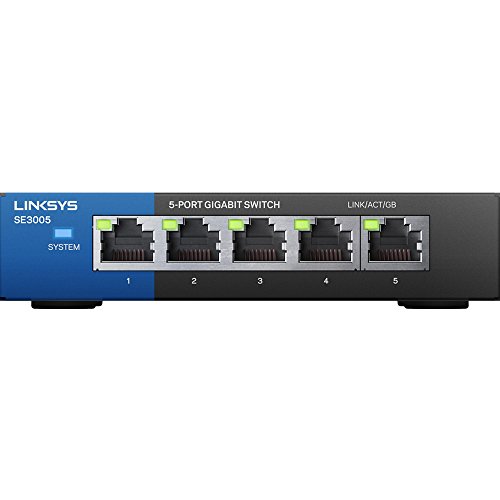
Linksys SE3005 5-Port Gigabit Ethernet Switch (Renewed)

BrosTrend 2.5Gb 8-Port Unmanaged Gaming Switch
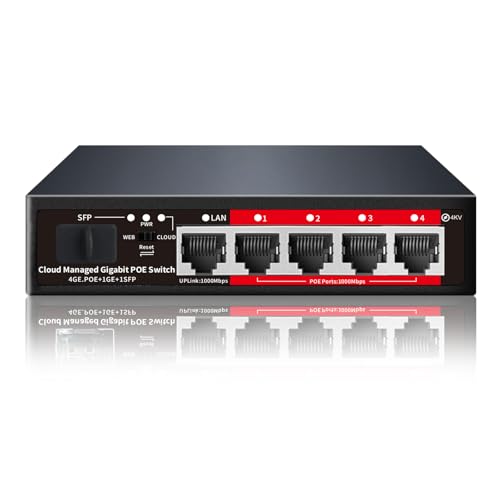
STEAMEMO 5-Port Gigabit PoE+ Managed Switch

STEAMEMO 10-Port Managed PoE Switch (120W)

NETGEAR GS105GE 5-Port Gigabit Switch

BrosTrend 5-Port 2.5Gb Switch

BrosTrend 8-Port 2.5Gb Switch with VLAN

STEAMEMO 16-Port Gigabit PoE Switch (240W)
The Strengths Of Each Pick
The NETGEAR GS305 is the kind of switch you forget is even on your desk. Five auto-negotiating gigabit ports handle a gaming PC, a console, and a streaming box at the same time without breaking a sweat. Because gigabit Ethernet tops out at 1.0Gbps, the GS305 comfortably serves Cat5e runs already snaked through most homes.
Setup is genuinely zero-effort: plug the included adapter into the wall, connect your cables, and traffic starts flowing. The fanless metal housing stays cool and silent during long sessions, which matters more than people expect when a switch lives a few feet from a microphone.
What Helps Most
- Fanless metal chassis keeps the switch dead quiet near a mic or streaming rig.
- Auto-negotiating ports detect the best speed for each device, useful when mixing older consoles with newer hardware.
- True plug-and-play behavior means no software, no browser tabs, no configuration anxiety.
- Works with existing Cat5e or Cat6 cabling, so most setups need zero rewiring.
- Compact footprint fits on a shelf behind a monitor without dominating desk space.
Trade-Offs To Consider
- Speeds cap at 1Gbps, which can bottleneck newer 2.5GbE motherboards.
- No mounting hardware included for wall or under-desk installs.
- LED activity lights stay bright in dim rooms and may distract minimalist setups.
Built With In Mind
Gamers running a single PC plus a console on a modest desk, or anyone wiring a bedroom battlestation for the first time, will get exactly what they need without paying for features they will not touch.
Reach For A Different Pick When
Competitive players pushing 2.5GbE NICs should consider the BrosTrend 2.5Gb 8-Port Unmanaged Gaming Switch for the bandwidth headroom.
The NETGEAR GS105NA sits in the same five-port lane as the GS305, but leans into the ProSafe lineage that has anchored small business racks for years. Gamers who want something that feels more substantial than plastic consumer gear tend to land here. Its metal case absorbs minor desk bumps and shrugs off the heat of a 24/7 always-on install.
For a console-heavy living room, the GS105NA quietly handles a PlayStation, an Xbox, a smart TV, and an older media PC all at once. Like the GS305, it stays plug-and-play with no software needed.
Useful Touches
- Sturdy metal enclosure that handles years of always-on duty.
- Auto-negotiation across all five gigabit connections, ideal for mixed-device households.
- Zero-configuration setup removes the learning curve for first-time builders.
- Compatible with Cat5e and Cat6 runs already in the walls of most homes.
Honest Caveats
- External power brick adds a small wall-wart footprint behind furniture.
- Still capped at gigabit speeds, so 2.5GbE upgrades will not gain any benefit.
- No dedicated uplink port labeling, which can confuse newcomers tracing cables.
The Right Fit
Long-term console players and small-office gamers who prioritize hardware longevity over the newest port speeds will appreciate the no-drama dependability.
Look Elsewhere When
Anyone outfitting a streaming studio or a multi-rig competitive den should look at the STEAMEMO 10-Port Managed PoE Switch instead, which adds VLAN control.
The Linksys SE3005 in Renewed trim earns its place for anyone wiring a first gaming setup on a tight budget. Renewed units go through professional inspection and testing before relisting, which addresses one of the usual hesitations with refurbished gear. You still get a recognizable Linksys five-port gigabit platform that has shipped in homes for years.
For a kid’s room with a Switch dock and a hand-me-down PC, this is the cheapest way to skip Wi-Fi congestion without sacrificing reliability. The trade-off, predictably, shows up in cosmetic condition and packaging.
Useful Highlights
- Lower entry cost than a brand-new unit, leaving room in the budget for better cables.
- Professional refurbishment process lowers the risk of dead-on-arrival hardware.
- Five gigabit ports cover a small console-and-PC setup with room to grow.
Worth Noting
- Cosmetic scratches or scuffs are common on Renewed units, something to expect.
- Warranty terms are shorter than what ships with new hardware from NETGEAR or BrosTrend.
- Stock fluctuates, so the listing may come and go without warning.
Who Will Love This
Parents setting up a first gaming station for a child, or anyone building a budget LAN-party table who does not mind minor cosmetic wear, will find this a practical pick.
Swap It Out When
A buyer who wants a brand-new sealed box and longer warranty should consider the NETGEAR GS305 or BrosTrend 5-Port 2.5Gb Switch instead.
The BrosTrend 8-Port 2.5Gb Switch is where this roundup starts to feel modern. Every port runs at 2.5Gbps, two-and-a-half times the ceiling of the gigabit NETGEAR units reviewed earlier, and the switching capacity reaches 40Gbps across the backplane. For a competitive gamer whose motherboard already ships with a 2.5GbE NIC, this is the switch that finally lets that hardware breathe.
The fanless design keeps it bedroom-quiet, and the plug-and-play approach means there is no firmware maze to navigate. In a household juggling a gaming PC, a PS5, a NAS box, and a streaming encoder, the extra bandwidth pays off the moment two heavy transfers happen at once.
A Few Strong Suits
- Eight 2.5GbE ports let modern multi-gig hardware stretch beyond gigabit ceilings.
- 40Gbps switching capacity keeps multiple heavy streams moving without head-of-line blocking.
- Fanless metal shell stays cool and silent during all-night sessions.
- Plug-and-play operation removes the usual managed-switch configuration overhead.
- Solid choice for LAN parties where several rigs need to push large game installs at once.
Some Limits To Know
- Older devices limited to gigabit will not see any speed improvement over a NETGEAR GS305.
- No VLAN tagging or link aggregation, which limits advanced segmentation.
- Slightly larger footprint than a five-port gigabit switch, so measure before mounting.
Feature Snapshot
Perfect Match For
Competitive FPS players and creators with multi-gig NICs will squeeze real value out of every port, especially when juggling a streaming PC and a console at the same time.
A Better Fit Elsewhere
Someone who needs VLANs and link aggregation should step up to the BrosTrend 8-Port 2.5Gb Switch with VLAN for the same multi-gig speed plus traffic segmentation.
The STEAMEMO 5-Port PoE+ switch pulls double duty for gamers who also dabble in smart-home or security hardware. Power over Ethernet (PoE) means the switch delivers electrical current through the same Ethernet cable that carries data, so access points, IP cameras, and some LED strips run without a separate power brick. The four PoE+ ports share a 52W budget here.
Add the SFP slot for fiber uplink, and the box becomes the center of a hybrid setup where gaming traffic runs over copper while the WAN link rides fiber. The smart-managed layer, controlled through an app, adds VLAN tagging without overwhelming newcomers.
Advantages To Know
- Four PoE+ ports at 52W total simplify powering access points and cameras alongside gaming gear.
- Built-in power supply removes the chunky adapter common to budget PoE switches.
- SFP uplink slot supports fiber backhaul for long runs or noise-sensitive installs.
- App-based management keeps VLAN setup approachable for first-time networkers.
- Overload protection shuts down ports safely if a device draws too much current.
Potential Compromises
- Gaming-only shoppers will not benefit from PoE and may overspend on features they do not need.
- App-based management assumes a phone or computer nearby during initial setup.
- 52W total PoE budget limits how many high-draw devices can run simultaneously.
Key Product Details
Whose Shelf It Belongs On
Gamers who also run a home network with access points or cameras benefit most, since PoE eliminates extra adapters and outlets in one move.
Consider Something Else When
A pure gaming shopper with no PoE hardware should consider the NETGEAR GS305 to avoid paying for unused power delivery.
The STEAMEMO 10-Port Managed PoE switch expands on the smaller 5-port sibling with eight PoE+ ports and a 120W budget, plus two extra gigabit uplinks for stacking or connecting to a router. For a serious streaming studio or a permanent LAN-party rack, this is the right scale. It still ships in a fanless metal case, which keeps the noise profile acceptable for a recording space.
VLAN support lets you wall off streaming gear from gameplay traffic, so a runaway upload never starves the gaming PC. It is the kind of segmentation that, until you experience it, you might not realize you needed.
What Stands Out
- Eight PoE+ ports with 120W total power support a full set of access points and cameras.
- VLAN support isolates streaming traffic from gameplay to prevent bandwidth conflicts.
- Fanless design runs cool and silent, important in a streaming or recording space.
- Two gigabit uplinks provide redundancy or a dedicated link to the main router.
Practical Considerations
- Larger footprint than a five-port switch, so plan rack or shelf space ahead of time.
- Cloud-management app requires a learning curve for gamers new to VLANs.
- More expensive than unmanaged gigabit alternatives with the same port count.
Made For
Creators and competitive gamers who run a permanent LAN setup, broadcast from the same room, and want clean traffic segmentation will see clear value here.
Not Your Match When
A casual console player who just needs a few extra ports should pick the NETGEAR GS105NA for its plug-and-play simplicity.
The NETGEAR GS105GE is the older sibling in the ProSafe family, the kind of switch that quietly lives behind a desk for a decade without complaint. Gamers who have never had a reason to upgrade their network hardware often find one of these waiting in the rack. Five gigabit ports and a metal case are the entire pitch, and that minimalism is the point.
For a setup that already owns Cat5e cabling and just needs ports, the GS105GE is the no-drama choice. It does not promise multi-gig speeds or VLANs, and that is part of its appeal.
Points In Its Favor
- Long-running ProSafe platform with a reputation for years of silent operation.
- Five gigabit ports satisfy a small gaming-and-streaming setup.
- Metal housing handles heat dissipation well in enclosed entertainment centers.
Things To Weigh
- No 2.5GbE support, so newer multi-gig hardware will be capped.
- External power brick adds another wall outlet to the mix.
- No VLAN or management features for traffic segmentation.
Best Suited To
Long-term installers who want a switch they can mount and forget, particularly in living rooms and dens where stability matters more than peak throughput.
Skip It When
Anyone building a new rig with a 2.5GbE motherboard should reach for the BrosTrend 8-Port 2.5Gb Switch with VLAN to match the modern NIC speeds.
The BrosTrend 5-Port 2.5Gb Switch is the compact cousin of the larger 8-port version reviewed earlier. It keeps the same 2.5Gbps-per-port speed in a tighter body aimed at smaller battlestations. The five-port count covers a gaming PC, a console, and a NAS drive without paying for empty ports.
It is the right shape for a shelf next to a monitor arm, where eight-port switches often feel excessive. Switching capacity lands at 25Gbps, more than enough for a five-port device.
Strengths Worth Knowing
- Compact five-port footprint fits crowded desks and entertainment centers.
- 2.5GbE per port matches modern motherboards and PCIe NIC upgrades.
- Fanless housing keeps noise levels low for streaming and content creation.
- Plug-and-play behavior matches the unmanaged gigabit switches for ease of use.
Small Caveats
- Limited to five ports, so expansion requires swapping the unit out entirely.
- No VLAN tagging for traffic segmentation.
- Power adapter brick adds one more outlet to manage.
Right Fit For
Gamers running a primary PC, one console, and a NAS in a tight space will appreciate the size and the speed bump over gigabit at the same time.
Where A Sibling Pick Shines
Anyone who expects to grow beyond five wired devices should consider the BrosTrend 8-Port 2.5Gb Switch with VLAN for extra ports and segmentation features.
The BrosTrend 8-Port 2.5Gb Switch with VLAN is the smartest unit in this roundup for power users. It keeps the same eight 2.5GbE ports and 40Gbps switching capacity as the unmanaged sibling reviewed earlier, but adds static link aggregation (a feature that lets two cables team up for higher throughput to a single device, like a NAS) and VLAN tagging. For someone running multiple gaming rigs, a NAS, and a streaming PC, that combination matters.
Fanless operation and a sturdy enclosure keep it quiet and cool, which is the usual BrosTrend signature. The configuration happens through a small web interface, manageable for anyone who has logged into a router before.
Strong Points
- Static link aggregation doubles throughput to compatible NAS units.
- VLAN tagging isolates gaming, streaming, and guest traffic on the same switch.
- Eight 2.5GbE ports cover a full multi-rig battlestation without gigabit bottlenecks.
- 40Gbps backplane prevents head-of-line blocking during heavy simultaneous transfers.
- Fanless metal chassis keeps the unit quiet in shared rooms.
Less Ideal Details
- Web interface assumes basic networking comfort, so first-timers face a learning curve.
- Higher cost than the unmanaged 8-port 2.5Gb version.
- Configuration depth means more time spent before plugging in cables.
Feature Snapshot
Who Should Grab It
Power users running two or more gaming rigs, a NAS, and a streaming encoder will get the most out of VLANs and link aggregation working together.
Where Another Pick Suits Better
A gamer with only a single PC and one console should pick the BrosTrend 5-Port 2.5Gb Switch to skip the configuration overhead.
The STEAMEMO 16-Port Gigabit PoE switch is the heavyweight in this roundup. Sixteen PoE+ ports share a 240W budget, enough to power a fleet of wireless access points, several IP cameras, and a stack of low-voltage accessories, all while carrying gigabit data. The unit ships ready for either desktop or rack mounting, which makes it the right fit for a full LAN-party rack or a home automation closet.
Smart-managed features include VLAN tagging and cloud management, so the network stays organized even when a dozen devices are plugged in. It is overkill for a two-console living room, but it is exactly right for a creator running a hybrid studio and gaming space.
What Makes Sense
- Sixteen PoE+ ports handle access points, cameras, and accessories from one box.
- 240W total power budget supports higher-draw PoE devices without overload.
- Rack- or desktop-mounting flexibility adapts to crowded equipment closets.
- Smart-managed VLAN support keeps traffic organized at scale.
Some Limits To Know
- Overkill for a typical home gaming setup with only a few wired devices.
- Cloud management setup adds configuration time compared to a basic plug-and-play switch.
- Physical size demands dedicated shelf or rack space, so measure ahead.
Essential Details
Made For
LAN-party organizers, content studios, and smart-home enthusiasts who already know they need many PoE ports will see this as a long-term foundation.
Look Elsewhere When
A gamer with only a few wired devices and no PoE hardware will find the STEAMEMO 5-Port PoE+ Switch a more proportionate fit.
What To Weigh Before Picking Your Switch
Port count is the first decision, and most gaming setups land between five and eight ports once you count the PC, console, streaming box, NAS, and any spare for a guest’s laptop. Anything beyond eight usually signals a permanent rack or studio. Match the port speed to your hardware: gigabit switches handle anything built before the last couple of years, but 2.5GbE motherboards and NAS units need a multi-gig switch to actually move data at their rated speed.
Think about where the switch will sit. A fanless metal case stays quiet, which matters when the switch lives near a microphone or an open bedroom. Plastic cases stay cooler on paper but can warp or yellow over years of 24/7 duty. Wall and rack mounting options are worth checking if your cable run ends behind furniture rather than on a desk.
Consider managed features only when you have a real reason to use them. VLAN tagging isolates streaming uploads from gameplay traffic, and link aggregation teams two cables for higher throughput to a NAS. Most gamers will never touch these, but LAN-party organizers and streamers usually do. PoE support matters only when you plan to power access points or cameras through the same switch.
Cable quality affects results more than people expect. Cat5e cabling handles gigabit comfortably, but 2.5GbE and faster often demand Cat6 or better. Replace old or unknown cables before blaming the switch for slow speeds.
Key Considerations Across These Picks
Common Buying Slip Ups
The most common mistake is buying more ports than needed, which inflates the budget without improving gameplay. A five-port switch covers a typical PC-and-console setup, and unused ports just collect dust. The opposite error is buying a five-port switch and discovering, a week later, that the household grew to seven wired devices. Count your current devices, then add one or two for growth.
Another trap is paying for features that go unused. VLAN tagging, link aggregation, and PoE all sound impressive, but a pure gamer with no NAS and no cameras gains nothing from them. Pick the feature list that matches the gear you already own.
Where The Extra Money Goes
Spending up usually buys three things: faster port speeds, better build materials, and management features. A 2.5GbE switch costs more than a gigabit switch because the underlying silicon handles more bandwidth per port, and the backplane must keep up. Metal enclosures and fanless cooling add to the bill but extend product life and reduce noise.
Management features, including VLAN and cloud apps, justify their cost only when traffic segmentation actually solves a real problem. For a creator juggling gameplay streams and uploads, that segmentation is worth the premium. For a single console setup, it is overhead.
Frequently Asked Questions
Do gaming Ethernet switches really lower ping?
A wired connection removes Wi-Fi interference and congestion from neighbors’ networks, which is usually the actual cause of variable ping. The switch itself does not magically speed up your internet, but it removes a major source of jitter.
Is 2.5GbE worth it over gigabit for gaming?
Gaming traffic rarely exceeds gigabit, but 2.5GbE helps when large game installs, patches, or backups share the same network as gameplay. For households with a NAS or fast SSD-based storage, the extra bandwidth is a real upgrade.
Do managed switches add lag for gaming?
Modern managed switches process VLAN and QoS (Quality of Service) rules in microseconds, far below anything a human can perceive. The configuration overhead affects setup time, not in-game latency.
Can a fanless switch handle heavy gaming loads?
Fanless metal switches dissipate heat through the chassis and handle multi-gig traffic comfortably. They work well in enclosed spaces only when the surrounding airflow stays reasonable, so avoid stacking them under heat-generating gear.
Should a gaming switch support PoE?
PoE matters only when powering access points, cameras, or other low-voltage accessories. A pure gaming setup gains nothing from PoE, so skip the feature unless you already use or plan to add such devices.
Bottom Line
Pick a switch that matches the hardware you already own, not the hardware you might buy next year. A five-port gigabit NETGEAR covers most first-time gaming setups, while a 2.5GbE BrosTrend unit gives multi-gig rigs room to breathe. For studios and LAN-party racks, the STEAMEMO PoE switches add the power and segmentation that complex spaces need. Whatever you choose, a wired connection will change how your games feel the very first night you plug in.