Gaming laptops run hot, and slim chassis don’t help. I see plenty of players wrestling with throttled frame rates, keyboard surfaces warm enough to bake on, and fans that scream like jet engines at full tilt. A solid external cooler takes a real bite out of those temperatures, drops the noise floor under load, and often adds USB ports you were missing. After digging through specs and feature lists, these ten picks cover every angle: oversized turbo fans, sealed pressure chambers, software-driven fan curves, RGB flair, and minimalist workhorses for quieter setups.
Your Options, Compared

llano V12 Gaming Laptop Cooling Pad 5.5 Inch Turbofan (RGB)

llano V12 Laptop Cooling Pad 5.5in Turbofan (No RGB)

llano V12 Ultra Laptop Cooling Pad Smart Software Control

llano V11 Pro Laptop Cooling Pad 4.7 Inch Turbofan

llano V10 Gaming Laptop Cooling Pad 4.72 Inch Turbofan

llano Laptop Cooler Gaming Laptop Cooling Pad 3500RPM
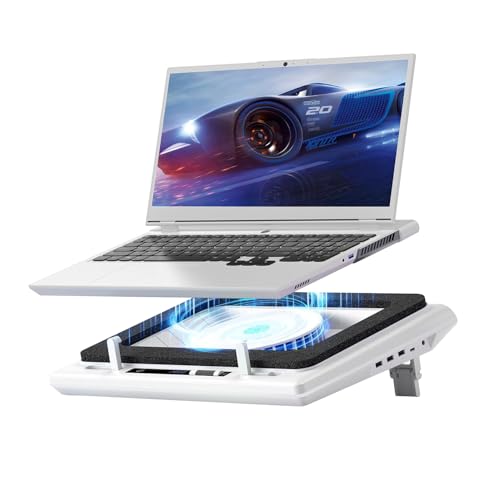
llano V12 Gaming Laptop Cooling Pad Laptop Cooler Stand

IETS GT600 RGB Laptop Cooling Pad 5.5inch Turbo-Fan

llano Gaming Laptop Cooler V12 Laptop Cooling Pad Stand

Heymaster RGB Laptop Cooling Pad LED Touch Screen
Meet The Standout Selections
The llano V12 RGB lands at the top of the llano family, and for good reason. Its 5.5-inch turbofan pairs with a sealed pressure chamber, which is a foam ring that traps airflow so all the cooling force pushes directly through the laptop’s bottom vents instead of spilling sideways. Built for laptops between 15.6 and 19 inches, this is the pick for anyone running a chunky 17-inch gamer or a desktop-replacement monster.
Adjustable fan speed and a three-port USB hub give you real control without crowding your desk. The RGB lighting adds personality for streamers, though you may find the colors a bit much in a darker room. Compared with the non-RGB sibling (Pick 2), this version trades quiet minimalism for visual punch.
Noteworthy Benefits
- The sealed pressure chamber concentrates airflow straight into the laptop’s intake, which is where heat actually leaves the chassis.
- A 5.5-inch turbofan moves serious air, helping prevent thermal throttling (when a CPU or GPU deliberately slows itself to avoid overheating) during long sessions of 4K rendering or AAA gaming.
- Three USB ports let you keep a mouse, keyboard, and headset plugged in without losing a laptop port.
- Adjustable speed settings mean quieter operation for documents and full power for gaming marathons.
Things To Consider
- At max speed, owners commonly report noticeable noise, so a headset helps during competitive matches.
- The foam seal can collect dust over time and may need occasional cleaning to stay effective.
Made For
Anyone pushing a 17 to 19 inch gaming laptop through marathon sessions and who wants RGB flair on the desk.
Where Another Pick Suits Better
Shoppers who hate lights should grab the llano V12 Laptop Cooling Pad 5.5in Turbofan (No RGB) instead, since it skips the LEDs entirely.
This quieter twin of the V12 RGB skips the lighting but keeps the engineering that matters. The same 5.5-inch turbofan and sealed pressure chamber deliver strong cooling, while a touch control panel replaces the tactile buttons for a cleaner surface. Fits 15.6 to 19 inch laptops, so it covers everything from mainstream gamers to workstation-class notebooks.
For anyone working late in a shared room, the lack of RGB keeps the desk professional. The three-port hub still handles accessories, though I’d note touch controls can be less precise than physical buttons when you’re fumbling in the dark.
Useful Highlights
- Same oversized turbofan as the RGB model, so cooling performance carries over fully.
- Touch control panel wipes clean easily and keeps the silhouette minimal.
- No lighting makes it a smart fit for offices, libraries, or shared spaces.
- Sealed chamber design means airflow stays focused on the intake vents rather than bleeding outward.
Trade Offs
- Touch controls offer no tactile feedback, so adjusting speed without looking can take practice.
- Lacks the visual flair that battlestation builders often want.
Right Fit For
Remote workers and gamers who toggle between spreadsheets and matches in the same space.
Not Your Match When
Those wanting app-controlled automation should look at the llano V12 Ultra Laptop Cooling Pad Smart Software Control, which adds software-driven fan curves.
The V12 Ultra is the thinking sibling in this lineup. It runs the same 5.5-inch turbofan and adds Myth.cool software (a temperature-monitoring utility that ships with the cooler), letting you toggle between low, medium, and high cooling modes based on real workload. The app reads system temps and adjusts fan speed automatically, which removes the constant manual tweaking that simpler pads demand.
Three USB 3.0 ports deliver faster accessory speeds than the standard hub on most pads, and three adjustable height stands help with ergonomics over long sessions. RGB lighting returns here for those who want the visual edge.
A Favorable Mix
- Smart software control reacts to workload, so you stop babysitting fan speeds during matches.
- USB 3.0 ports handle external SSDs (solid-state drives) and fast peripherals without bottlenecks.
- Three height settings let you match the screen to eye level, which helps neck comfort during long streams.
Honest Caveats
- Requires software installation, which adds a setup step some shoppers would rather skip.
- Higher feature count means a higher price tag than the basic V12 picks above.
Perfect Match For
Tweakers and streamers who like dashboards, profiles, and letting software handle fan curves.
Skip It When
Minimalists who want zero software should pick the llano V12 Laptop Cooling Pad 5.5in Turbofan (No RGB) for a cleaner setup.
The V11 Pro is a smart middle-ground option. Its 4.7-inch turbofan is smaller than the V12’s five-inch beast, but it suits laptops from 14 to 17.3 inches, which covers most mainstream gaming notebooks and a lot of ultraportables too. The sealed pressure chamber design carries over from the bigger models, helping channel airflow efficiently.
Adjustable speeds, RGB lighting, and a three-port USB hub keep the feature count competitive. If your laptop falls below 15 inches, this is the more sensible pick than stretching for a V12.
Real-World Strengths
- Wide compatibility from 14 to 17.3 inches means it works for both compact and full-size gaming laptops.
- Sealed foam chamber quiets fan noise compared to open-frame pads.
- RGB lighting adds visual flair for setups that double as streaming rigs.
Room For Improvement
- Smaller fan means slightly less aggressive cooling than the V12 lineup.
- Dustproofing helps, but the foam ring still wants occasional cleaning.
Best Suited To
Anyone with a 14 to 17 inch laptop who wants strong cooling without going full desktop-replacement size.
Consider Something Else When
Owners of 18 to 19 inch laptops will get more headroom from the llano V12 Gaming Laptop Cooling Pad 5.5 Inch Turbofan (RGB).
The V10 steps down from the V12 family but brings something the others don’t: a four-port USB hub mixing USB-A and USB-C connections. For docked setups with a headset, mouse, streaming camera, and external drive, that fourth port is the difference between juggling cables and forgetting about them entirely.
The 4.72-inch turbofan spins fast, and three adjustable height stands mean you can tilt the laptop for better typing or stand it up for a more upright viewing angle. Fits 13 to 17.3 inch laptops, which covers ultrabooks through mainstream gaming machines.
Benefits That Matter
- Four-port hub with both USB-C and USB-A is rare in this category.
- Three height settings let you match typing comfort to chair height.
- Wide compatibility from 13 inch ultrabooks to 17.3 inch gaming rigs.
Some Limits To Know
- Smaller fan than V12 models means a step down in peak cooling.
- Button controls work fine but lack the sleek feel of touch panels.
Whose Shelf It Belongs On
Anyone running a full accessory setup, especially streamers with multiple USB devices in play.
Reach For A Different Pick When
Shoppers running 18 to 19 inch laptops should consider the llano V12 Gaming Laptop Cooling Pad 5.5 Inch Turbofan (RGB) for proper fit.
The llano SE version strips the V10 down to essentials. No RGB, no extra ports, no software, just a 3500 RPM turbofan aimed at one job: moving hot air out of your laptop. The pure copper motor inside spins fast and handles the heavy lifting.
For someone who doesn’t want to think about fan curves or color modes, this is refreshing. You may find the lack of height adjustment limits ergonomic setups, but for a flat desk with a monitor riser, that rarely matters.
Practical Advantages
- Pure copper motor delivers strong sustained RPM for serious cooling headroom.
- No extra features means a lower price than the RGB or app-controlled siblings.
- Plug-and-play simplicity suits users who just want the cooling without any fuss.
Points To Keep In Mind
- No USB hub, so you’ll lose a laptop port to power the cooler.
- No RGB means it’s invisible in dark rooms, which is a plus for some and a minus for others.
Who Should Grab It
Anyone who values function over features and wants effective cooling without extras.
Look Elsewhere When
Streamers wanting ports and lights should move up to the llano V10 Gaming Laptop Cooling Pad 4.72 Inch Turbofan.
The earlier llano V12 release focuses on one specific goal: quieter operation. Its 14 cm turbofan (about 5.5 inches) is paired with sealed foam that contains noise inside the chamber rather than letting it spill into your room. Touch-mute buttons sit on the bottom, easy to tap with one finger.
For late-night gaming in a quiet home or a shared office, the noise reduction matters more than flashy specs. The lack of detailed feature data here is the one trade-off, since this listing focuses on the cooling foundation rather than a hub or app layer.
A Strong Showing
- Sealed foam design dampens fan noise noticeably compared to open-frame coolers.
- Touch-mute controls keep the surface clean and easy to wipe down.
- 14 cm turbofan generates enough pressure to push air through sealed laptop vents.
Less Ideal Details
- Less feature detail published compared to the newer V12 versions.
- No RGB may be a downside for battlestation builders, though it helps the noise profile.
Who It Suits Best
Late-night gamers and shared-room setups where fan noise travels.
A Better Fit Elsewhere
Anyone needing software profiles should check the llano V12 Ultra Laptop Cooling Pad Smart Software Control for app control.
The IETS GT600 stands apart as the only non-llano option in this list, and it earns that spot. Its 5.5-inch turbine generates strong static pressure (the force that pushes air through tight spaces rather than just moving it sideways), which is what you want when forcing air past tightly sealed laptop vents. The sealed foam chamber wraps the airflow so it has nowhere to go but into the machine.
A dust filter on the intake side is a genuine quality-of-life upgrade. Owners who run their laptops eight hours a day tend to care about dust buildup, and a washable filter saves internal cleaning later. Fits laptops from 14.1 up to 19.3 inches, which is one of the widest ranges on this list.
Where It Excels
- Dust filter keeps internal laptop fans cleaner during long daily use.
- Industrial-grade turbofan delivers consistent static pressure for stubborn vent designs.
- Three-port USB hub covers standard accessory needs.
- Wide laptop compatibility from 14.1 to 19.3 inches is hard to beat.
Worth Bearing In Mind
- Washable dust filter adds a periodic cleaning step most pads skip.
- Heavier build than the llano entries, which affects portability for travel setups.
Built With In Mind
Power users running oversized rigs for eight-plus hour workdays who want low-maintenance cooling.
Swap It Out When
Travelers wanting lighter builds should consider the llano V11 Pro Laptop Cooling Pad 4.7 Inch Turbofan for a slimmer profile.
Another take on the V12 formula, this listing leans into the visual side of the cooler. The 5.5-inch turbofan handles the heavy lifting, and RGB lighting wraps the design with personality for streamers and content creators. A sealed foam chamber keeps the airflow focused where it belongs.
Compared with Pick 1, the engineering here is essentially the same V12 foundation. The difference is positioning, since this listing reads as the “design-led” choice in the family. For desks that double as backdrop in webcam shots, the RGB earns its keep.
What Works In Its Favor
- RGB lighting doubles as a backdrop accent for streamers and creators on camera.
- Same V12 sealed-chamber cooling delivers consistent thermal performance.
- Adjustable fan speed matches output to the workload in real time.
Practical Considerations
- RGB adds cost without adding cooling, so value-focused shoppers may prefer the non-RGB V12 sibling.
- Limited published details compared with newer V12 listings, since this is an earlier release.
The Right Fit
Streamers and content creators whose setup is part of the on-screen aesthetic.
Another Choice May Suit
Those wanting software control over lighting and fan curves should choose the llano V12 Ultra Laptop Cooling Pad Smart Software Control instead.
The Heymaster pad earns the final spot with the widest laptop compatibility in this roundup: 12 to 21 inches. That covers everything from compact ultrabooks through chunky 17-inch gamers to oversized 21 inch workstation replacements that almost nobody else supports. The 3500 RPM turbofan moves serious air, and an LED touch screen handles speed and lighting adjustments.
Three USB ports, an adjustable stand, and RGB lighting round out the package. The catch is that “fits everything” sometimes means “optimized for nothing specific.” For the right laptop size, it works well; for a standard 15.6 inch notebook, the V12 lineup is a tighter fit.
What Helps Most
- Massive 12 to 21 inch compatibility is unmatched in this list.
- LED touch screen gives precise visual feedback for fan and lighting adjustments.
- Three-port USB hub covers most accessory setups.
Potential Compromises
- Universal fit means the sealed foam won’t hug every laptop model as tightly as a V12.
- Touch panel adds a small layer of complexity versus physical buttons.
Who Will Love This
Owners of oversized or unusually sized laptops, especially anything above 19 inches.
Not Your Match When
Standard 15.6 to 17.3 inch laptop users will get tighter sealing from the llano V12 Gaming Laptop Cooling Pad 5.5 Inch Turbofan (RGB).
What To Weigh Before Picking A Gaming Laptop Cooler
Fan Size And Air Pressure
Turbofan diameter is the headline spec, and bigger generally means more air moved per minute. A 5.5-inch fan (around 14 cm) handles chunky 17-inch gaming rigs, while a 4.7-inch fan covers most 14 to 16 inch laptops without overkill. Static pressure matters just as much as raw airflow, especially with laptops that have thin vent grilles or bottom-mounted intakes that resist easy airflow.
Sealed Chamber Versus Open Frame
Open-frame coolers are cheaper and lighter, but they leak air sideways before it ever reaches your laptop. Sealed pressure chambers use foam or rubber edges to trap the airflow, pushing it directly into the intake vents. The trade-off is a slightly heavier pad and occasional foam cleaning, though for sustained cooling performance the chamber design wins every time on real workloads.
Noise Levels And Fan Curves
Bigger fans push more air but tend to roar at full speed. Look for adjustable speed settings so you can dial down for office work and crank up for matches. App-controlled pads let you set automatic profiles based on CPU/GPU temperature, which removes the constant manual tuning that simpler pads require.
Port Layout And Desk Setup
Every cooler claims one USB port from your laptop. The question is what you get back. Three-port hubs are now standard, but a few pads add USB-C ports or a fourth connection, which matters if you already run a headset, mouse, keyboard, and external drive. RGB lighting doesn’t cool anything, but for streamers it doubles as backdrop styling on camera.
Key Considerations Across These Picks
Common Shopping Slip Ups
The biggest trap is buying a cooler that fits your laptop today, then upgrading to a 19 inch rig next year and finding the pad is suddenly too small. A wide compatibility range (15.6 to 19 inches) covers most future upgrades, and it costs almost nothing extra. The second slip is ignoring where the foam seal actually contacts the laptop bottom, since a poor seal leaks half the airflow sideways. Match the pad’s footprint to your laptop’s vent placement rather than just trusting the listed size range.
What Separates Premium From Basic
Premium pads earn their keep through sealed chambers, app-controlled fan curves, USB 3.0 hubs, and dust filters. Those features translate into real-world benefits like quieter operation during late-night sessions, automated cooling that responds to workload, faster accessory speeds, and less internal laptop cleaning. For a casual user running a 13 inch ultraportable, basic cooling is plenty. For an 18 inch gamer pushing 4K renders, the premium tier pays for itself in thermal headroom and longer component life.
Frequently Asked Questions
Do gaming laptop coolers actually work?
Yes, especially models with sealed pressure chambers and oversized turbofans. They push more air through the laptop’s bottom vents than passive cooling alone, which reduces thermal throttling (when the CPU or GPU slows down to avoid overheating) and keeps frame rates stable during long sessions. The improvement is most noticeable on laptops that already run hot under load.
How big should the fan be?
For most 14 to 17 inch gaming laptops, a 4.7 to 5.5 inch turbofan is the sweet spot. Smaller fans move less air and struggle with thicker chassis, while larger fans add bulk without much extra cooling on mainstream notebooks. If you own a 19 inch desktop-replacement, lean toward the largest fan you can find.
Will a cooler drain my laptop battery faster?
It pulls power from a USB port, which does draw some battery, though most pads sip around 5V/0.4A. In practice, the cooler often saves battery life by letting the laptop’s internal fans spin slower, which can outweigh the draw from the pad itself. For maximum unplugged runtime, run the cooler on a separate USB power source.
Are sealed chambers really better than open frames?
For sustained cooling, yes. Sealed chambers push airflow directly into the laptop’s vents instead of letting it spill sideways. Open-frame pads are lighter and cheaper, but they waste a meaningful share of the airflow, especially under heavy load. The trade-off is a slightly heavier pad and occasional foam cleaning.
Do I need RGB lighting?
Only if your setup doubles as a backdrop for streaming or content creation. RGB adds cost without affecting cooling performance. For a quiet office or shared room, skipping RGB keeps the desk cleaner and often saves enough to step up to a better fan or hub.
The Takeaway
Gaming laptop coolers come down to two questions: how big is your laptop, and how quiet do you need the desk to be. Match the pad’s footprint to your notebook, prioritize a sealed chamber for sustained cooling, and skip features you won’t use. For most 15 to 17 inch gamers, the llano V12 family hits the sweet spot. For oversized rigs or noisy shared rooms, the IETS GT600 or Heymaster pad step in with the range and noise control you need.