A gaming laptop under heavy load turns into a small heater, and that heat quietly kills performance long before anything visibly breaks. I put this list together for anyone whose frame rates start sliding mid-match or whose keyboard deck gets too hot to touch during long renders. The picks below cover internal case fans for builders and external cooling pads for plug-and-play relief, with notes on who each one actually suits.
A Snapshot Of The Selections

ENDORFY Stratus 120 PWM ARGB Case Fan

llano V12 Gaming Laptop Cooling Pad (RGB)

llano V12 Laptop Cooling Pad (No RGB)

llano V12 Ultra Cooling Pad with Software

llano V11 Pro RGB Cooling Pad

llano V10 RGB Cooling Pad

llano Laptop Cooler with 3500RPM Turbofan
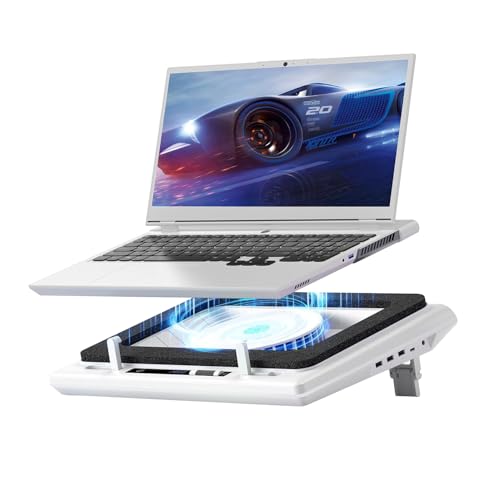
llano V12 Gaming Laptop Cooling Pad

IETS GT600 RGB Laptop Cooling Pad

llano V12 Gaming Laptop Cooler Stand
A Deeper Look At The Lineup
This one sits at the start of the list for a reason: it is a 120 mm case fan, not a laptop cooler, so it is the right pick for anyone building a desktop tower rather than chasing laptop temperatures. The Stratus 120 uses PWM control, which is a standard signal that lets your motherboard ramp the fan up and down based on system load, so it can stay nearly silent during desktop work and spin up only when the GPU pulls hard.
For builders running a hot gaming rig, swapping in two or three of these can make a real dent in case temperatures. The ARGB side of the equation is pure cosmetic, but if your build already runs addressable lighting across fans, RAM, and a strip, this slots in without a separate controller.
Features That Help
- PWM input means automatic speed scaling tied to your system load.
- 120 mm form factor fits standard front, top, and rear mount points in most mid-towers.
- ARGB lighting integrates with motherboard sync software for unified aesthetics.
- Pairs well with a second Stratus 140 for push-pull radiator configurations.
Things To Consider
- Does nothing for laptop heat, so it is the wrong pick if your main pain point is a portable machine.
- ARGB requires a compatible header on the motherboard; older boards need a separate hub.
Who It Suits Best
Desktop builders upgrading airflow in a tower that runs warm under gaming loads.
Where Another Pick Suits Better
Anyone chasing laptop heat should skip this and head straight to the llano V12 Gaming Laptop Cooling Pad (RGB) later in the list.
The V12 with RGB is the loudest of the llano pads on this list, and that is a compliment. Its 5.5-inch turbofan paired with a sealed foam pressure chamber directs airflow straight into the laptop’s intake vents, which is why it handles 15.6 to 19-inch gaming laptops without breaking a sweat. The sealed chamber is the trick: instead of fan air spilling sideways, it gets focused into the chassis.
In a real-world sense, anyone whose 17-inch portable throttles during a long Apex or Warzone session will see CPU and GPU temps drop back into a comfortable range within a couple of minutes. The three-port USB hub also means you do not lose connectivity when the pad occupies one of your laptop’s ports.
Useful Touches
- 5.5-inch turbofan pushes high static pressure, useful for laptops with restrictive vents.
- Sealed foam chamber keeps airflow focused rather than wasted sideways.
- RGB lighting adds flair without pushing the price into premium territory.
- Three-port USB hub replaces the port the pad occupies.
- Adjustable speed lets you tune noise versus cooling per workload.
Honest Caveats
- At full speed the fan is audible, so quiet-room streamers may want to drop it down a notch.
- Physically larger than compact pads; backpack portability takes a hit.
- Owners commonly report dust collecting on the foam seal, so periodic cleaning is wise.
Who Will Love This
Gamers running large 17 to 19-inch rigs who want maximum cooling and do not mind a slightly bigger desk footprint.
Skip It When
You want something quieter and do not care about RGB, in which case the llano V12 Laptop Cooling Pad (No RGB) is the calmer sibling.
Same cooling hardware as the RGB version above, just stripped of lighting and given touch controls instead. For someone whose desk is all matte black and minimal clutter, this version reads as the more grown-up choice. The 5.5-inch turbofan and sealed foam chamber do the actual work, and that part is identical to the RGB sibling.
For remote workers running a 16 or 17-inch performance laptop through long video calls and the occasional CPU-heavy task, the no-RGB pad keeps the desk visually quiet. Touch control on the front edge is also easier to find by feel than a button on the back lip when the laptop is parked.
What Makes Sense
- Touch-sensitive control panel sits on the front edge for easy adjustment.
- Same sealed-fan performance as the RGB V12, so no real cooling sacrifice.
- Lower visual noise on a clean desk setup.
- Three-port hub keeps mouse, headset, and a flash drive connected.
Points To Keep In Mind
- No RGB means no visual feedback when the fan is running, just the sound.
- Touch controls can be sensitive to accidental taps when sliding the laptop on and off.
Made For
Minimalist users with mid to large laptops who care more about cooling than flair.
Reach For A Different Pick When
You want app-controlled fan curves, which is where the llano V12 Ultra earns its keep.
The V12 Ultra is the only pad on this list that links to dedicated control software, and that changes how it feels in daily use. Instead of nudging a physical dial, you pick low, medium, or high profiles and let the software react to load automatically. For anyone who already lives inside system monitoring apps, this kind of automation feels natural.
The fan itself is still a 5.5-inch sealed turbofan, so cooling capacity is in line with the other V12 models here. The extra value is the three height stands, the USB 3.0 hub, and the ability to step away from manual adjustments during a long session.
Why It Works Well
- Software-driven profile switching removes manual fan tweaking mid-game.
- Three height stands give ergonomic flexibility for long typing sessions.
- USB 3.0 hub preserves fast transfer speeds for external drives.
- Compatible with 15.6 to 19-inch laptops, matching the largest gaming chassis.
Trade Offs
- Requires software installation, which adds a small setup step.
- RGB lighting is included, so minimalists may still prefer the no-RGB V12.
The Right Fit
Tinkerers and performance-focused users who want set-and-forget cooling tied to their workload.
Not Your Match When
You need a pure plug-and-play pad with no software, in which case the llano Laptop Cooler with 3500RPM Turbofan is the simpler answer.
Feature Snapshot
The V11 Pro is the smaller sibling in the llano family, sized for 14 to 17.3-inch laptops and built around a 4.7-inch turbofan. That fan is still meaningfully larger than the typical 4-inch blower you find in entry-level pads, so the cooling gap to the V12 line is smaller than the size difference suggests.
For someone with a 14-inch gaming ultraportable or a mid-size workstation laptop, this is a smart middle ground. It fits on a smaller desk, slides into a backpack more easily, and still ships with a 3-port USB hub and adjustable speed.
Strong Points
- 4.7-inch turbofan is still large enough to shift meaningful air through compact laptops.
- Supports 14-inch machines, which most of the larger pads overshoot.
- RGB lighting keeps the desk on-theme for gamers.
- Dustproof design helps keep the internals cleaner over months of use.
Possible Compromises
- Less cooling headroom than the 5.5-inch V12 models under sustained AAA loads.
- RGB adds visual noise for users with a stripped-down aesthetic.
Best Suited To
Owners of mid-size laptops who want genuine turbofan cooling without the bulk of a 19-inch pad.
Consider Something Else When
You regularly run heavy 3D workloads on a 17-inch rig, where the llano V12 Gaming Laptop Cooling Pad (RGB) brings stronger airflow.
The V10 lands in the middle of the llano lineup and leans hard into versatility. The same 4.72-inch turbofan design used in the larger V11 Pro shows up here, but the body is built to host 13 to 17.3-inch laptops. That wide range is rare, since most pads either aim at small ultrabooks or large gaming rigs and skip the middle.
The standout feature is the 4-port USB hub, which mixes USB-C and USB-A. For anyone whose laptop is already short on legacy ports, that single addition can justify the pad on its own, with cooling as a bonus.
Advantages To Know
- 13 to 17.3-inch fit range covers everything from a MacBook Air to a 17-inch MSI.
- 4-port USB hub with USB-C and USB-A expands connectivity, not just restores it.
- Three adjustable stand heights support typing and viewing angles.
- RGB lighting brings personality without dominating the desk.
Worth Bearing In Mind
- Button controls are less elegant than the V12 Ultra’s touch or software options.
- 4.72-inch fan is smaller than the 5.5-inch V12 units, so peak airflow is lower.
Perfect Match For
Households with multiple laptop sizes who want one pad that handles them all.
Swap It Out When
You need the strongest cooling for a 17-inch gaming rig, where the IETS GT600 RGB Laptop Cooling Pad delivers heavier airflow.
This is the stripped-down sibling of the V10, with no RGB lighting and no extended port hub. What remains is a 4.72-inch turbofan and a pure copper motor spinning up to 3500 RPM, which is the practical core of the cooling. For shoppers who do not want lighting gimmicks and do not need extra ports, it keeps the focus on airflow.
In a shared household where the cooler is going to live under a teenager’s hand-me-down laptop, the simpler design pays off in two ways. There are fewer parts to break, and the matte black surface does not look out of place next to a basic workstation monitor.
Useful Highlights
- 3500 RPM turbofan delivers solid cooling for the price tier.
- No RGB means lower visual noise and fewer distractions in shared spaces.
- Pure copper motor supports stable high-RPM operation.
- Plain design pairs easily with any laptop color.
Where It Is Less Suited
- No extra USB ports, so the pad will occupy one of your laptop’s ports full time.
- No lighting, which some buyers may actually want.
Whose Shelf It Belongs On
Anyone who wants straightforward cooling without paying for extras they will not use.
A Better Fit Elsewhere
Port-poor laptop owners get more value from the llano V10 RGB Cooling Pad above, since its 4-port hub covers a real daily need.
Feature Card
The plain V12 sits between the RGB and no-RGB versions reviewed earlier. It keeps the 5.5-inch turbofan and sealed foam chamber that make the line effective, and trims some of the cosmetic features to land at a friendlier everyday price. For someone who games regularly but does not need software profiles, it is the version most people end up actually choosing.
On a daily driver laptop used for both work and evening matches, the V12’s mix of cooling headroom and stable build quality is hard to argue with. You get genuine temperature relief without paying for features that end up unused.
Well-Handled Touches
- 5.5-inch turbofan matches the larger V12 models for cooling headroom.
- Sealed foam chamber keeps airflow focused where the laptop intake needs it.
- Three-port USB hub covers most accessory needs without overcomplicating the layout.
- Adjustable speed lets you trade cooling against noise per session.
Some Limits To Know
- Lacks the software automation of the V12 Ultra for set-and-forget tuning.
- No RGB if you specifically want lighting on the pad.
Built With In Mind
Regular gamers who want strong cooling and a clean experience without chasing the most feature-loaded option.
Look Elsewhere When
Software-controlled fan curves matter to you, in which case the llano V12 Ultra Cooling Pad is the better fit.
The IETS GT600 is the outlier on this list. It uses an industrial-grade turbofan in the same 5.5-inch class as the V12 line, but the brand markets the design language as closer to a server-style turbine than a consumer fan. For anyone whose laptop doubles as a 3D workstation running Blender, Unreal, or long compile passes, that extra thermal headroom is the difference between finishing a render on time and watching clock times balloon.
The fit range runs up to 19.3 inches, which catches the largest portable chassis on the market. A built-in dust filter is a quiet but useful detail; in a home with pets or a wood workshop, the filter keeps the internals from turning into a lint magnet.
Real-World Strengths
- Industrial-grade turbofan supports long, heavy workloads.
- Dust filter keeps internal airflow clean over months of use.
- Sealed foam chamber focuses airflow into the laptop intake.
- Three-port USB hub preserves connectivity.
- 14.1 to 19.3-inch fit range covers nearly every gaming chassis.
Factors To Consider
- At full speed the fan is loud enough that quiet-room streamers will want to throttle back.
- Physically larger than compact pads, so it dominates smaller desks.
Who Should Grab It
Creators and engineers running long 3D or compile workloads on a large gaming laptop.
Another Choice May Suit
If your workloads are lighter and your laptop is mid-size, the llano V11 Pro RGB Cooling Pad is easier to live with day to day.
The V12 stand closes the list with the proven V12 cooling package, the 5.5-inch turbofan and sealed foam chamber, paired with the everyday ergonomics of a laptop stand. Anyone who already uses an external keyboard and mouse will appreciate the typing angle this adds, which doubles as cooling posture.
For shoppers who have been on the fence between a basic stand and a dedicated cooling pad, this stand collapses both into one purchase. The trade-off is the same as any cooling pad: it occupies a USB port, and the fan does add some ambient noise at full speed.
Everyday Advantages
- Combines ergonomic stand with active cooling in one device.
- 5.5-inch turbofan matches the larger V12 models for cooling capacity.
- Sealed foam chamber focuses airflow on intake vents.
- Useful for long typing sessions where the angle matters as much as the temperature.
Potential Drawbacks
- No RGB lighting for setups where lighting ties the desk together.
- Adjustments are limited compared to the software-driven V12 Ultra.
The Right Fit
Remote workers and students who want a single device to handle ergonomics and cooling at the same time.
Consider Something Else When
You specifically want a hub of USB ports plus lighting, where the llano V10 RGB Cooling Pad is the more connected pick.
What To Weigh Before Buying A Cooling Setup
Choosing a cooling solution comes down to three practical questions. First, where does the heat actually build? Laptop users need an external pad with high static pressure, while desktop builders focus on internal case airflow. Second, how big is your laptop? Pads sized for 13 to 17.3 inches handle most mid-size machines, but 18 and 19-inch gaming rigs need explicit support in the spec sheet. Third, how loud is too loud? Turbofans move more air at the cost of higher decibel output, and quieter pads usually need a sealed chamber to focus airflow effectively.
If your laptop throttles within ten minutes of launching a heavy game, you will feel the difference a 5.5-inch turbofan makes compared to a 4-inch blower. If your laptop only runs warm during long renders, a smaller pad may be plenty. Match the pad to your real workload, not the loudest spec on the page.
Key Considerations Across These Picks
Mistakes Worth Dodging
The most common slip is choosing a pad sized for the wrong laptop class. A 13-inch ultrabook user buying a 19-inch pad wastes desk space and cooling power on a machine that never needed it. The flip side is just as real: a 17-inch gaming rig on a 14-inch pad means the fan cannot reach the right intake zones, and the chassis still throttles.
Another trap is assuming every laptop cooler has a working USB passthrough. Some pads skip the hub to save cost, and shoppers discover the missing port only after plugging in. Check the port layout before you commit.
What The Higher Tier Buys
Moving up to a sealed-chamber turbofan buys two things: focused airflow and noise control. A sealed chamber keeps the cooling column pointed at the laptop’s intake vents, so a smaller fan can move the same effective air as a larger open-fan design. The upgrade is most noticeable on long sessions where a budget pad starts losing ground after thirty minutes. Higher-tier pads also tend to include dust filters or sealed foam, which extends the life of both the pad and your laptop’s internals.
Frequently Asked Questions
Do laptop cooling pads actually work?
Yes, the right pad can drop CPU and GPU temperatures by tens of degrees under sustained load. The benefit is largest on gaming and workstation laptops that throttle quickly, and smaller on thin ultrabooks that barely warm up.
How loud are turbofan cooling pads?
At low to medium speeds, most pads stay under typical room noise. At full speed, a 5.5-inch turbofan becomes clearly audible, which is why most pads include a speed dial for quieter tasks.
Will a cooling pad fit any laptop?
Not always. Pads list a size range, and 17-inch gaming laptops often need explicit support up to 19 inches. Smaller pads typically max out around 17.3 inches, so always check the spec before buying.
Do cooling pads use a lot of power?
No. A single USB port supplies all the power most pads need, and the USB hub on premium models means you do not lose a port to the pad itself.
Can I leave a cooling pad running all day?
Yes, for pads designed for continuous use. Periodic cleaning of the foam seal and any dust filter keeps performance consistent over months of daily use.
The Takeaway
If you mostly game on a 17-inch portable and want the simplest path to lower temperatures, the llano V12 Gaming Laptop Cooling Pad hits the sweet spot of cooling power, USB connectivity, and price. Power users who want app-driven curves should pay the small step up for the V12 Ultra. For lighter 14 to 15-inch machines, the V11 Pro or V10 keeps the desk compact without giving up real airflow. Pick the pad that matches the laptop you actually own, and the rest takes care of itself.