A thin gaming laptop sitting flat on a desk traps heat against its rubber feet, and after an hour of frame-pushing gameplay, the keyboard deck turns into a hand-warmer. I’ve spent enough time around hot-running notebooks to know that a solid cooling pad is one of the few upgrades that actually changes how a laptop behaves under load, throttling less, sounding less angry, and lasting longer between cleanings. This roundup focuses on pads built for 15-inch-and-up gaming rigs, with one quiet, fanless riser for people who care more about ergonomics than raw airflow.
A Side-By-Side Look

llano V12 Gaming Laptop Cooling Pad 5.5 Inch Turbofan RGB

llano V12 Laptop Cooling Pad 5.5in Turbofan Touch Control

ISYOKE Laptop Cooling Pad Stand Mesh Riser 10-16 Inch

llano V12 Ultra Laptop Cooling Pad Smart Software RGB

llano V11 Pro Laptop Cooling Pad 4.7 Inch Turbofan RGB

llano V10 Gaming Laptop Cooling Pad 4.72 Inch Turbo 4-Port Hub

llano Laptop Cooler 3500RPM Turbofan Non-RGB
llano V12 Gaming Laptop Cooling Pad Turbofan Stand

IETS GT600 RGB Laptop Cooling Pad 5.5in Turbofan Dust Filter

llano Gaming Laptop Cooler V12 Laptop Cooling Pad Stand
A Breakdown Of The Leading Choices
The flagship llano V12 leans on a 5.5-inch turbofan paired with a sealed foam pressure chamber, and that sealed chamber is the part most shoppers miss when reading the spec sheet. By containing the airflow against the laptop’s underside, the pad forces cool air straight through the intake vents rather than letting it spill sideways. In a dorm room or a shared apartment, that difference shows up in both lower CPU temperatures and a quieter room, since the fan can push less hard for the same effect.
It fits 15.6 to 19-inch notebooks and ships with three adjustable height positions, which is plenty for finding a typing angle that keeps wrists neutral. The three-port USB hub is genuinely useful for anyone running a wired mouse, keyboard, and headset off the same machine.
Useful Highlights
- 5.5-inch turbofan moves a serious volume of air, well above what smaller 4-inch pads manage
- Sealed foam pressure chamber concentrates airflow where the laptop actually breathes
- RGB lighting adds personality for gamers who care about the desk aesthetic
- Adjustable height settings make long sessions easier on the neck
- Three-port USB hub reduces the dongle pile for peripheral-heavy setups
Things To Consider
- A 5.5-inch fan at high speed produces noticeable noise, so the quietest setting may not be enough during summer heat
- RGB and the larger fan draw more power than stripped-down pads, which matters on laptops with limited USB output
- Owners commonly report dust collecting on the foam seal over time, so occasional cleaning keeps the chamber working
At A Glance
Who It Suits Best
Gamers with 17-inch notebooks who push AAA titles at high settings and want noticeable thermal relief without repasting their laptop.
Where Another Pick Suits Better
The IETS GT600 RGB is a stronger fit for anyone with an extra-thick 18 to 19-inch machine that needs even more clearance and pressure under the chassis.
This is the same V12 platform as pick 1, just with the RGB lighting stripped out and the controls moved to a touch panel. For anyone whose desk setup is more “studio apartment” than “gaming battlestation,” that swap matters more than it sounds. No LEDs means less visual clutter on video calls, and the touch panel keeps the front edge clean.
The 5.5-inch turbofan and sealed chamber carry over, so cooling performance should land in the same neighborhood as the RGB version. It still fits 15.6 to 19-inch laptops, which is the sweet spot for most modern gaming notebooks.
The Helpful Details
- Touch controls feel responsive and keep the design minimal
- Same 5.5-inch sealed-chamber cooling as the RGB sibling
- Three-port USB hub for plugging in peripherals
- Adjustable height for ergonomic typing positions
Honest Caveats
- Touch buttons can be finicky in low light or with greasy fingertips, which is a real thing after a snack-heavy gaming session
- The single big fan still produces a low hum at full tilt, so it isn’t truly silent
Quick Facts
Right Fit For
Working gamers who split time between spreadsheets and shooters and don’t want rainbow lights bleeding into their webcam frame.
Look Elsewhere When
The llano V10 is the smarter buy for anyone who values a four-port hub and prefers tactile button controls over touch.
This one breaks the mold on purpose. Where every other pick on this list uses a powered turbofan, the ISYOKE stand is a passive metal riser with a perforated mesh surface. It weighs only about 320 grams, measures 13.4 by 9.4 inches, and lifts the laptop off the desk so existing bottom intake fans can pull air freely. The honest read is that it isn’t going to drop CPU temps by 30 degrees, but it does eliminate the rubber-on-desk problem that traps heat in the first place.
For students, writers, and remote workers who game casually, that compromise is often exactly right. There’s no fan noise, no extra USB draw, and no moving parts to fail.
Positive Takeaways
- Completely silent since there is no fan at all
- Lightweight metal construction slips into a backpack without complaint
- Height adjustment helps posture during long writing or coding sessions
- Fits a wide range of laptops from 10 to 16 inches, which covers ultrabooks and most mainstream notebooks
Things To Weigh
- Passive cooling depends on the laptop’s own fans doing the work, so a thermally weak notebook won’t suddenly run cool
- Smaller footprint means 17-inch gaming rigs won’t fit, ruling out the segment this roundup targets most
- No USB ports means any hub benefit comes from elsewhere
Whose Shelf It Belongs On
Anyone running a 13 to 15-inch ultrabook or thin-and-light laptop who wants better posture and a quieter workspace more than aggressive cooling.
Swap It Out When
The llano V11 Pro is the right call for buyers who want actual fan cooling in a similarly compact footprint for a 14 to 17-inch machine.
The V12 Ultra takes the same 5.5-inch turbofan base as the rest of the V12 family and bolts on something genuinely different: companion software that toggles between low, medium, and high cooling modes based on workload. For people who already run monitoring tools like HWInfo or MSI Afterburner, that automation removes the fiddling. The pad reacts to what the laptop is actually doing, so a quiet web browsing session doesn’t spin the fan up to airplane-turbine levels.
It still fits 15.6 to 19-inch laptops, still has the sealed foam pressure chamber, and still offers RGB lighting for the desk-flair crowd.
What Earns Its Place
- Software-driven fan curves remove the need to manually tweak speed settings
- Three dedicated cooling modes (low, medium, high) match typical usage tiers
- Three USB 3.0 ports handle fast peripherals and external storage
- Three height stand options give finer ergonomic tuning than single-position risers
Trade-Offs To Consider
- Software control requires installation and the occasional driver-style update, which adds friction for plug-and-play shoppers
- Higher-end feature set costs more than the stripped V12 versions
Feature Snapshot
Built With In Mind
Streamers and content creators juggling OBS, a browser, and a game at once who want cooling that responds without babysitting.
Consider Something Else When
The llano V11 Pro is a sensible step down for anyone who doesn’t need software control but still wants RGB and a turbofan.
The V11 Pro steps down to a 4.72-inch turbofan, which sounds like a downgrade until you remember that most 14 to 17.3-inch laptops have intake vents that match that size better than a giant 5.5-inch fan would. A smaller, well-sealed fan often does more useful work than a bigger one that leaks air around the edges. For mid-size gaming notebooks, this pad lands in the sweet spot.
RGB lighting, dustproof construction, and a three-port USB hub round out a feature list that hits the usual gaming-laptop pain points without overreaching.
Practical Advantages
- 4.72-inch turbofan sized appropriately for mainstream gaming laptops
- RGB lighting brings personality to the setup
- Dustproof design helps the pad last longer in carpeted or pet-friendly rooms
- Adjustable speed lets users tune fan output to the workload
- Three-port USB hub for peripherals
Points To Note
- Won’t move as much air as the 5.5-inch V12 models, so 19-inch desktop replacements may run warmer than they’d like
- RGB adds visual flair that some shoppers simply don’t want
Quick Technical Notes
Best Suited To
Gamers with 15 to 17-inch laptops who want meaningful cooling without paying for flagship-tier fan sizes.
A Better Fit Elsewhere
Pick the llano V12 Ultra when the laptop is on the larger side and the budget allows for software-controlled cooling.
Port scarcity is a real problem on modern gaming laptops, especially the thinner 2024 and 2025 models that ship with only two or three USB ports total. The V10 stands out because it offers a four-port USB hub with both USB-C and USB-A connections, which is one more port than most pads in this category bother to include. Add a 4.72-inch turbofan with a copper motor spinning up to around 3500 RPM, and you’ve got a pad built for someone running a mouse, keyboard, headset, and an external SSD all at once.
It also fits a broad 13 to 17.3-inch laptop range, which makes it a flexible choice for households with more than one machine.
Useful Strengths
- Four-port hub with USB-C and USB-A covers nearly any peripheral mix
- 4.72-inch turbofan with a copper motor for stronger sustained airflow
- Three adjustable height stands for ergonomic flexibility
- Button controls are tactile and unambiguous
Some Limits To Know
- Four ports draw more power than smaller hubs, which can strain laptops with weak USB output
- RGB lighting is fixed-on, with limited customization compared to the V12 Ultra’s software-driven approach
Perfect Match For
Peripheral-heavy users with newer thin-and-light gaming laptops who constantly run out of USB ports.
Reach For A Different Pick When
The IETS GT600 RGB is a stronger match for anyone whose priority is aggressive pressure-chamber cooling over port count.
Sometimes the smartest choice is the boring one. This “SE” version of the V10 strips the RGB lighting and the extra USB ports, leaving just a 4.72-inch turbofan with a pure copper motor that spins up to around 3500 RPM. For shoppers who don’t care about lights and just want the laptop to stop thermal throttling, that simplification is the whole point.
It cools the same way the RGB V10 does, it just doesn’t try to be a desk centerpiece.
What Pays Off
- 3500 RPM copper-motor fan delivers solid cooling at a more accessible price
- No RGB means less power draw and no visual clutter
- Simpler design typically translates to a lower price than feature-heavy siblings
- Pairs well with work-focused setups where lighting would feel out of place
Where It May Fall Short
- No extended USB ports means peripheral users still need a separate hub
- Fewer ergonomic adjustments than the multi-height V12 family
Who Should Grab It
Anyone who values cooling performance per dollar and doesn’t care about extras like RGB or extended ports.
Skip It When
The llano V10 is the smarter pick if a four-port hub is genuinely useful for the setup.
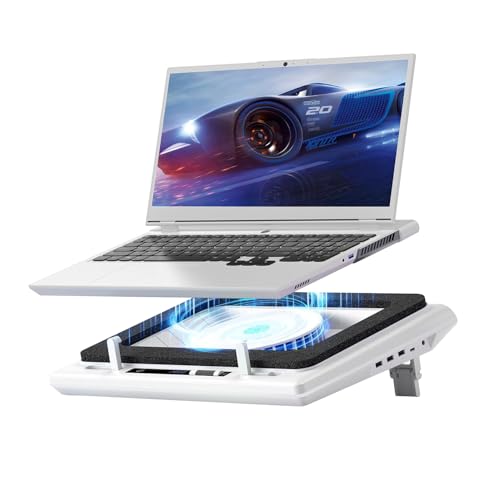
Think of this as the original V12, the version that established the 5.5-inch turbofan and sealed foam formula the rest of the family builds on. The 14 cm fan is large enough to make a real dent in laptop temperatures during long sessions, and the sealed foam around the intake keeps airflow from spilling out uselessly around the edges.
The setup uses a touch-mute button on the bottom edge, which keeps the top surface clean for the laptop to sit on. For mainstream 15 to 17-inch gaming notebooks, it’s the sort of pad that does the job without much fuss.
Practical Pluses
- 14 cm (5.5-inch) turbofan is on the larger side of the category
- Sealed foam directs airflow efficiently into laptop vents
- Touch-mute button simplifies late-night gaming sessions
- Wide compatibility across mainstream gaming laptop sizes
Factors To Consider
- Newer V12 variants add software control or RGB, so this base model lacks those refinements
- Single-fan design may not be enough for sustained 4K rendering workloads on the largest laptops
Made For
Gamers with mainstream 15.6 to 17-inch notebooks who want a no-nonsense V12 platform at a more accessible price than the Ultra version.
Where Another Pick Suits Better
The llano V12 Ultra is the stronger call for shoppers who want software-driven fan modes alongside the same physical design.
The IETS GT600 is the only non-llano pad on this list, and it earns its spot by going hard on the pressure chamber concept. Industrial-grade turbofan plus sealed foam creates what the brand calls 360-degree cooling, meaning the airflow reaches intake vents wherever they sit on the laptop’s underside. For chunky 18 to 19-inch desktop replacements with offset vents, that’s a meaningful advantage.
It fits 14.1 to 19.3-inch laptops, ships with a dust filter to keep the chamber clean over time, and includes a three-port USB hub for peripherals.
A Few Strong Suits
- Industrial-grade turbofan pushes serious airflow at sustained loads
- Sealed foam design reaches vents in non-central positions on the laptop bottom
- Dust filter is rare in this category and extends the pad’s usable life
- Wide 14.1 to 19.3-inch fit covers everything short of a 21-inch desktop replacement
- RGB lighting for desk personalization
Potential Drawbacks
- Pressure chamber design demands a tight seal, so laptops with curved or recessed bottoms may not sit flush
- Higher-end feature set typically carries a higher price than simpler pads
Core Details
Who Will Love This
Owners of large 18 to 19-inch gaming rigs or workstations whose laptop vents sit in awkward positions that standard pads miss.
A Better Fit Elsewhere
The llano V12 RGB covers the same fan size at a friendlier price for shoppers who don’t need the dust filter.
This is the plain-trim version of the V12 platform, aimed squarely at the everyday gamer who just wants the cooling without the extras. It runs the same 5.5-inch (14 cm) turbofan with the sealed foam chamber, fits 15.6 to 19-inch notebooks, and keeps the design understated enough for a living-room desk.
The brand claims quick temperature drops during heavy workloads, which is consistent with the broader V12 family. It also adds enhanced dust protection, useful in homes where pets or carpet dust would otherwise clog the fan blades over time.
Reasons It Performs
- 5.5-inch turbofan with sealed foam pressure chamber for focused cooling
- Enhanced dust protection extends the pad’s working life
- Understated design works in non-gaming spaces
- Broad 15.6 to 19-inch compatibility
Where It Is Less Suited
- Lacks RGB lighting that some gamers prefer on their desk
- No extended USB hub means peripheral-heavy setups need a separate solution
The Right Fit
Everyday gamers who play a few hours most evenings and want solid cooling without paying for flagship-tier features.
Another Choice May Suit
The llano V12 RGB is worth the stretch for anyone who wants lighting and a USB hub in the same package.
How To Pick The Right Cooling Pad For Your Laptop
A cooling pad is one of those categories where the spec sheet can mislead. A bigger fan doesn’t always mean cooler temps, and a smaller fan with a sealed chamber often outperforms a noisy giant that leaks air around the edges. Before choosing, think through three things: how big the laptop actually is, how loud the room needs to be, and how many USB ports the pad should give back.
Fan size matters, but the seal matters more. Look for pads with foam gaskets or sealed chambers rather than open grilles, especially for laptops with centered or offset intake vents. A 4.72-inch fan with a good seal typically beats a 5.5-inch fan with no seal at all. Match the pad’s stated laptop-size range to your actual machine, and remember that 17-inch gaming notebooks usually need at least a 4.7-inch fan to do meaningful work.
Ergonomics deserve a closer look too. Most pads in this roundup offer multiple height positions, and a few extra degrees of typing angle reduces wrist strain over marathon sessions. Port count is the third axis: a four-port hub like the one on the V10 is a quiet lifesaver for thin laptops, while a simple two-port pad is plenty for minimal setups.
Finally, think about noise and dust. Turbofans move air, but they also pull dust into the chamber, so any pad with a dust filter (like the IETS GT600) will look newer after a year of use. If the laptop sits in a bedroom or a shared space, lean toward pads with quieter low-speed modes and skip the RGB-heavy options unless that aesthetic matters.
Things Worth Knowing Before You Buy
Where Shoppers Go Wrong
The biggest mistake is buying a pad sized for a much smaller laptop. A 13-inch pad under a 17-inch gaming notebook loses half its seal, and the fan ends up blowing air into empty space instead of through the vents. Measure the laptop before choosing. Another common miss is ignoring the USB power budget. Some laptops supply only 5V/0.5A through a USB-A port, which is barely enough for a single fan, let alone a four-port hub. If ports feel weak, try a different USB port or a powered hub.
When Paying More Pays Off
Premium pads like the llano V12 Ultra or the IETS GT600 cost more because they add real engineering. Software-driven fan curves respond to actual workload instead of staying at one speed, and sealed foam chambers direct airflow where it counts. For shoppers running long renders or competitive gaming sessions where every frame matters, that extra cooling headroom can be the difference between stable framerates and thermal throttling. For casual use, the cheaper V10 or V11 Pro delivers most of the same benefit at a fraction of the cost.
Frequently Asked Questions
Do gaming laptop cooling pads actually lower temperatures?
Yes, when matched to the right laptop size. A well-sealed pad can drop CPU and GPU temps noticeably during heavy gaming sessions, especially on laptops that throttle when hot.
Can a cooling pad damage a laptop?
A properly designed pad won’t. The risk comes from poor seals that direct dust into the vents or pads that block the bottom intake entirely, so choose one with good reviews and a clear fit range.
Are larger fans always better?
Not necessarily. A 5.5-inch fan with a poor seal often loses to a 4.72-inch fan with a tight foam gasket. Seal quality matters as much as fan size.
Do I need a USB hub on the pad?
Only if the laptop is short on ports. A four-port pad like the V10 is genuinely useful for thin gaming laptops, but a simple two-port pad is fine for setups with wireless peripherals.
Is RGB lighting worth paying extra for?
It depends on the setup. RGB adds personality for streamers and battlestation builders, but adds nothing to cooling performance, so it’s purely an aesthetic choice.
Wrap Up
A good cooling pad is one of the rare upgrades that pays off the moment the laptop starts heating up, no matter how old the machine is. The picks above span the range from silent mesh risers to sealed-chamber turbofans with software control, so the right choice depends on laptop size, room noise tolerance, and how much desk personality matters. Start with the fan size and seal quality, then narrow down by ports and aesthetics.