The right gaming tower depends on what you already know about PCs and what kind of games you want to throw at it. I’ve put together nine picks spanning entry-level ready-to-run desktops, mid-range rigs with real headroom, enthusiast cases for builders who want to pick every part, and a mobile stand for keeping a full-size tower accessible. Most shoppers fall into one of three camps: beginners who want something that works out of the box, hobbyists who want to swap components later, and heavy hitters chasing the highest possible frame rates. This list is organized so each profile can land on a pick that matches.
A Side-By-Side Look

STORMCRAFT Sirius AI Gaming Desktop Intel i5 14400F Arc B570 10GB

Ultra 50 V3 Gaming PC RTX 5080 Ryzen 7 9800X3D
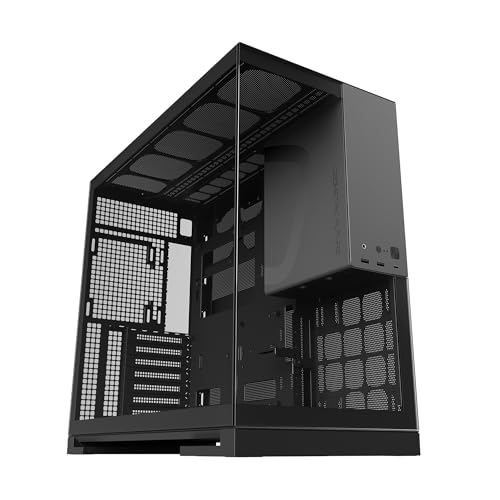
Geometric Future M5 Tempered Glass Mid Tower Black/Grey

EUREKA ERGONOMIC Height Adjustable PC Stand with Wheels

Geometric Future M5 Vent Mesh Mid Tower White

Lenovo Legion Tower 5i Intel Core Ultra 7 265F RTX 5070 Ti
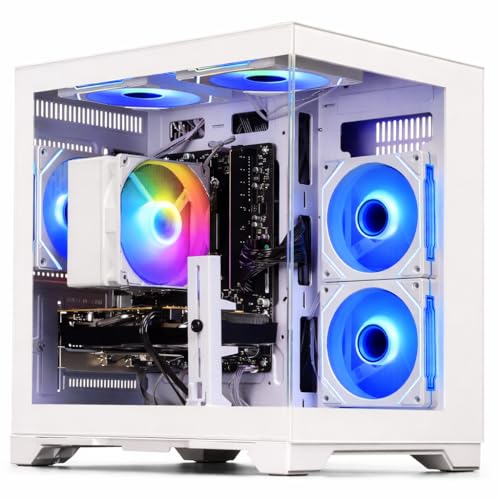
WIWB Gaming PC Ryzen 5 4500 RX 6500XT 4GB

WIWB Gaming PC Ryzen 7 4700LE RX 6500XT 4GB

Geometric Future M5 Tempered Glass Mid Tower with 5 ARGB Fans Black/Grey
Most shoppers stepping into PC gaming want a tower they can plug in, install Steam, and start playing that same evening. The STORMCRAFT Sirius AI Gaming Desktop fits that need without forcing an upgrade conversation on day one. It pairs a 10-core Intel Core i5 14400F (the “F” suffix means no integrated graphics, so the discrete GPU does all the visual work) with an Intel Arc B570 carrying 10GB of GDDR6 VRAM, the dedicated video memory the GPU uses to hold textures and frame data.
The 16GB of DDR4 RGB memory (faster, but older-generation system RAM with color-changing heat spreaders) and a 1TB NVMe SSD (a fast, drive-style SSD that plugs straight into the motherboard) round out a platform that targets smooth 1440p play in most modern titles. For anyone comparing this to a custom build, the trade-off is straightforward: you skip the part-selection rabbit hole in exchange for a fully assembled system with VR support out of the box.
The Practical Payoff
- 10-core CPU with 16 threads handles modern games and background apps without choking during a Discord or browser session.
- 10GB VRAM keeps high-resolution texture packs usable at 1440p for most current releases.
- 1TB NVMe boot drive means fast level loads and plenty of room for a sizeable Steam library.
- Pre-built form factor saves the time cost of sourcing parts, waiting on shipping, and troubleshooting first boot issues.
Things To Consider
- DDR4 memory is fine today but caps future upgrade paths if you eventually want DDR5 speeds.
- Pre-built chassis can limit longer GPU upgrades because proprietary cable layouts and size clearances vary widely.
Key Specs
Who It Suits Best
First-time PC gamers who want a 1440p-ready rig without a build project, or anyone replacing a dying older desktop.
Consider Something Else When
The Ultra 50 V3 Gaming PC RTX 5080 Ryzen 7 9800X3D is the better fit for shoppers chasing 4K frame rates or heavier ray tracing.
The Ultra 50 V3 is the no-compromise pick on this list. Inside sits a Ryzen 7 9800X3D, AMD’s gaming-optimized CPU that uses a vertical cache (extra fast memory stacked on top of the processor) for some of the best frame rates you can get in CPU-bound titles. The RTX 5080 with 16GB of GDDR7 (the latest, fastest video memory standard) pairs with that chip to push modern games at 1440p and 4K with ray tracing (a lighting technique that simulates real-world light behavior, heavily taxing the GPU) enabled.
For shoppers who already know they want top-of-stack silicon, this is the platform to anchor on. It arrives with 32GB of DDR5-6000 memory (current-generation, high-bandwidth system RAM), a 2TB PCIe Gen 4 SSD (the second-fastest NVMe tier currently sold, still excellent for load times), and an 850W Gold-rated power supply (an energy-efficient PSU that wastes less power as heat). For most buyers, the honest read is that this rig is overkill for esports titles but justified the moment you fire up a flagship single-player game with everything turned up.
Reasons It Performs
- Ryzen 7 9800X3D delivers top-tier gaming frame rates without melting power budgets.
- RTX 5080 16GB GDDR7 handles 4K with ray tracing in current releases.
- 32GB DDR5-6000 leaves headroom for heavily modded games or creator workflows.
- 2TB Gen4 SSD means huge install libraries without juggling drive space.
Points To Note
- 850W PSU is adequate today but leaves little headroom for a future GPU upgrade, depending on your final power draw.
- Pre-built enthusiast rigs command a premium over assembling the same parts yourself.
Right Fit For
Enthusiast gamers who want 4K-capable hardware and have no interest in building it themselves.
Skip It When
WIWB Gaming PC Ryzen 5 4500 RX 6500XT 4GB serves shoppers whose gaming habits live entirely in 1080p esports titles.
Most pre-built desktops arrive with their own case, so the empty-chassis category serves a different audience: builders. The Geometric Future M5 Tempered Glass Mid Tower is built for that crowd. It uses 1.2mm steel panels (heavier than the 0.6-0.8mm typical of budget cases, so the structure stays rigid while you move it) and supports E-ATX motherboards, the largest common motherboard standard, which leaves room for top-tier builds.
The toolless side panels snap off without screws, so swapping a CPU cooler or adding storage doesn’t require a full teardown. A front Type-C port sits ready for modern phones and external drives, and dual-chamber internals (splitting the power supply away from the main components for cleaner cable routing and better thermal separation) keep the build looking tidy when viewed through the glass. Compared to the pre-built STORMCRAFT Sirius earlier on this list, this case assumes you already know how to source and install parts.
Noteworthy Benefits
- Tempered glass side panel turns every build into a showcase without sacrificing rigidity.
- 420mm radiator support (top-mount) accommodates high-end AIO liquid coolers (closed-loop, self-contained CPU coolers that pump liquid through a radiator).
- Dual-chamber layout hides cable clutter from the viewing side.
Trade Offs
- No fans are pre-installed, so a custom build needs separate fan purchases to establish baseline cooling.
- Glass panels require extra care during cleaning to avoid streaks and fingerprints on the viewing side.
Best Suited To
Custom builders who want a display-friendly mid tower and already have their parts list ready.
Reach For A Different Pick When
The Geometric Future M5 Vent Mesh Mid Tower White is the smarter call for builders prioritizing cooling over glass aesthetics.
Not every gaming-tower decision is about silicon. Some setups, especially those built around a sit-stand desk, need the tower itself to move with you. The EUREKA ERGONOMIC Height Adjustable PC Stand holds a full-size ATX tower and lets you raise or lower it through six height detents (preset locking positions, 2 inches apart) covering roughly 23 to 33 inches, which covers most standing-desk transitions.
The two-tier design holds a printer or accessories on the lower shelf, and the lockable wheels keep the whole rig stable once you’ve parked it. For shoppers whose tower sits on carpet, the steel frame also lifts intake vents off the floor, which can noticeably improve thermals on dust-prone builds. Compared to a fixed stand, the wheels here are the real reason to consider it.
Points In Its Favor
- Six-gear height adjustment covers full sit-stand desk ranges.
- Lockable wheels let you wheel the tower out for cable access or cleaning without dragging it across the floor.
- Two-tier design doubles as printer or accessory storage.
Honest Caveats
- Wheels can collect dust and hair on carpet, which may require periodic cleaning to keep them rolling smoothly.
- Larger E-ATX towers with oversized side-mounted radiators may not fit; measuring your case depth first saves a return.
Quick Facts
Made For
Standing-desk users who need their full-size tower to follow them between seated and standing heights.
A Better Fit Elsewhere
Anyone who doesn’t already own a full-size tower should start with the STORMCRAFT Sirius AI Gaming Desktop Intel i5 14400F Arc B570 10GB instead.
Hot-running components are the silent tax on gaming towers. The Geometric Future M5 Vent Mesh Panel Tempered Glass Mid Tower is purpose-built for builders who’d rather vent heat than fight it. The mesh front panel pulls in more air than solid-panel designs, which keeps CPU and GPU thermals lower across long sessions. The same 1.2mm steel frame and dual-chamber layout from the standard M5 carry over, so structural rigidity and cable management aren’t sacrificed.
For builds that pair this chassis with the Ultra 50 V3 Gaming PC RTX 5080 Ryzen 7 9800X3D’s component tier (or equivalent), the airflow headroom makes sense. The trade-off is dust: mesh fronts pull in more particulate, so intake filters need monthly cleaning depending on your environment.
Notable Upsides
- Mesh front panel maximizes intake for high-TDP (thermal design power, the maximum heat a component is rated to produce) builds.
- 420mm radiator support covers top-mount AIO coolers and full custom loops (bespoke liquid-cooling setups with separate reservoir, pump, and radiator).
- Type-C front port matches modern peripheral expectations.
Room For Improvement
- Mesh front requires regular dust filter maintenance to keep thermals consistent.
- White finish shows scuffs and dust faster than darker options.
Feature Snapshot
Who Will Love This
Builders running flagship GPUs or heavily overclocked CPUs (CPUs pushed beyond factory-rated speeds for extra performance) who prioritize cooling headroom over display aesthetics.
Not Your Match When
First-time builders wanting pre-installed fans should grab the Geometric Future M5 Tempered Glass Mid Tower with 5 ARGB Fans Black/Grey instead.
The Lenovo Legion Tower 5i sits in the sweet spot between entry-level and enthusiast. An Intel Core Ultra 7 265F processor handles modern titles and productivity without breaking a sweat, while an NVIDIA GeForce RTX 5070 Ti brings ray tracing and DLSS (Nvidia’s AI-driven frame-rate booster that renders fewer pixels and reconstructs the rest, lifting frame rates with minimal image quality loss) to games that benefit. The 32GB of memory and 1TB of storage cover most gaming libraries without forcing drive juggling.
Lenovo’s Legion Coldfront cooling keeps thermals in line during long sessions. For shoppers who want high-refresh 1440p without committing to flagship pricing, this is a balanced mainstream choice. The honest read is that the case is functional rather than flashy; if RGB and tempered glass matter to you, the empty-chassis Geometric Future M5 cases earlier on this list leave room for personality.
Useful Touches
- RTX 5070 Ti handles 1440p with ray tracing comfortably in current releases.
- 32GB of memory covers modern games plus streaming apps running side by side.
- Coldfront cooling is tuned for sustained loads rather than just peak bursts.
Practical Considerations
- Stock chassis prioritizes function over aesthetics and limits custom cooling swaps.
- 1TB of storage fills fast with modern install sizes; budgeting for a secondary drive is realistic.
Perfect Match For
Mainstream gamers who want high-refresh 1440p with ray tracing and prefer a name-brand pre-built.
Look Elsewhere When
Custom builders wanting to spec their own parts should consider the Geometric Future M5 Tempered Glass Mid Tower Black/Grey instead.
Every list needs an honest entry-level option, and the WIWB Gaming PC with the Ryzen 5 4500 and Radeon RX 6500XT 4GB is exactly that. The 6-core, 12-thread CPU (multi-thread means it can run 12 processing tasks in parallel) handles esports and lighter competitive games with consistent frame rates, while the RX 6500XT is designed to push smooth 1080p gameplay in titles like Fortnite, Valorant, and Apex Legends.
The 4GB of VRAM is the trade-off here. It’s enough for 1080p at moderate settings but becomes the bottleneck in heavier modern titles with high-res texture packs. For shoppers playing competitive games or older AAA releases, this rig does the job. Compared to the STORMCRAFT Sirius earlier on this list, this is a step down in raw GPU power but a more honest fit for casual 1080p gaming.
What It Does Well
- Smooth 1080p frame rates in popular competitive and indie titles.
- 6-core CPU covers light multitasking without bogging down.
- Pre-built convenience removes the part-selection hurdle for first-time shoppers.
Small Caveats
- 4GB of VRAM limits texture quality and future-proofing for newer AAA releases.
- RX 6500XT struggles with ray tracing or 1440p in current demanding games.
Who Should Grab It
Shoppers on a strict budget whose gaming revolves around 1080p competitive titles.
Swap It Out When
WIWB Gaming PC Ryzen 7 4700LE RX 6500XT 4GB is the smarter call for shoppers who want extra CPU threads for streaming while gaming.
Same GPU as the entry-level pick, but the WIWB Gaming PC with the Ryzen 7 4700LE brings 8 cores and 16 threads to the table. The 4700LE variant runs up to a 4.2 GHz boost clock (the temporary peak speed a CPU hits when a single core is under heavy load), which gives streaming software and game launchers more breathing room than the 6-core 4500 in the prior pick.
For shoppers who want to broadcast gameplay on Twitch while playing, or who run Discord, browsers, and a game simultaneously, the extra cores matter. The same 4GB VRAM ceiling applies, so 1080p stays the realistic target. Compared to the Ryzen 5 4500 version, this is essentially the same GPU with a meaningfully stronger CPU side, depending on how you use it.
Well-Handled Touches
- 8-core, 16-thread CPU handles game plus OBS plus browser with more headroom.
- Same RX 6500XT ensures consistent 1080p performance in popular esports titles.
- Pre-built platform removes part sourcing for first-time shoppers.
Factors To Consider
- 4GB VRAM still bottlenecks modern AAA games at higher settings.
- For most buyers, this is a CPU upgrade over the Ryzen 5 model; the GPU-side experience doesn’t change.
Built With In Mind
Entry-level streamers and creators who run multiple apps alongside their games at 1080p.
Where Another Pick Suits Better
Lenovo Legion Tower 5i Intel Core Ultra 7 265F RTX 5070 Ti is the better fit when higher resolution or ray tracing enters the picture.
The standard M5 Tempered Glass Mid Tower earlier on this list ships bare, but this variant solves a common first-build problem: cooling fans. Five 140mm ARGB PWM fans (case fans with addressable RGB lighting and PWM speed control, which lets the motherboard adjust fan RPM based on temperature) come pre-installed, meaning a new builder doesn’t need a separate fan purchase to establish airflow and visual flair.
The same 1.2mm steel frame, toolless tempered glass panels, dual-chamber layout, and Type-C front port carry over from the rest of the M5 family. For shoppers who want a finished-looking case right out of the box without sourcing fans piecemeal, this is the convenient path. The trade-off is paying for fans you might want to upgrade later, depending on the GPU and CPU you pair it with.
Real-World Strengths
- Five pre-installed ARGB fans establish lighting and airflow from day one.
- PWM control lets the motherboard ramp fans up under load and quiet them at idle.
- Toolless panels keep upgrade access simple for less experienced builders.
Where It May Fall Short
- Stock fans are adequate but may need replacement for very high-TDP flagship builds.
- Glass panels and dark finish need regular wipe-downs to stay clean.
Whose Shelf It Belongs On
First-time case builders who want a complete cooling and lighting setup without separate fan orders.
Another Choice May Suit
The Geometric Future M5 Vent Mesh Mid Tower White fits better for builders prioritizing maximum intake airflow over a closed-panel aesthetic.
Picking The Right Gaming Tower For Your Setup
Before choosing a gaming tower, start with the games you actually play. Esports and competitive titles lean heavily on CPU single-thread speed and high frame rates, while open-world AAA games with ray tracing push the GPU much harder. The resolution of your monitor matters too: 1080p shoppers can save money with a card like the RX 6500XT, but 1440p and 4K shoppers need the GPU muscle of the RTX 5070 Ti or RTX 5080 tier to actually use that headroom.
Build-versus-buy is the next big decision. Pre-built desktops like the STORMCRAFT Sirius or Lenovo Legion Tower 5i save time and ship with a working system on day one. Custom-built rigs using empty cases like the Geometric Future M5 family let you pick every component but require research, part sourcing, and assembly comfort. For most first-time shoppers, pre-built wins on convenience; for hobbyists, building wins on long-term flexibility.
Cooling capacity scales with component power. A budget CPU and GPU can live comfortably in nearly any mid tower, but flagship silicon produces serious heat that needs airflow or liquid cooling. The Geometric Future M5 Vent Mesh and M5 with five ARGB fans are designed around this, supporting 420mm radiators for high-end AIOs and custom loops. PSU wattage (the maximum sustained power the power supply can deliver to your components) also matters: 850W covers most builds, but a future GPU upgrade may demand more.
Storage is the easiest spec to underestimate. Modern games regularly exceed 100GB each, so a 1TB drive fills faster than expected. Plan for either a larger primary SSD or a secondary drive for your library down the road. Memory is simpler: 16GB is the current minimum, 32GB is the comfortable mainstream target for gaming plus multitasking.
Key Considerations Across These Picks
Mistakes Worth Dodging
The most common slip-up is buying more GPU than your monitor can display. A flagship RTX 5080 paired with a 1080p 60Hz panel wastes the card’s potential; the GPU renders far more frames than the screen can show. Match your tower’s power to your display resolution and refresh rate. Skipping measurement is the other classic mistake: full-size ATX cases don’t all fit the same GPU length, and tower stands like the EUREKA ERGONOMIC need a depth check before ordering.
Where The Extra Money Goes
Stepping up from budget to high-end gaming towers pays for three things: GPU silicon, memory bandwidth, and cooling headroom. The jump from an RX 6500XT to an RTX 5080 isn’t just higher frame rates; it adds ray tracing and AI-driven upscaling (rendering at lower resolution and using AI to reconstruct the final image) that meaningfully change how games look. Faster memory and better cooling let those components sustain peak performance during long sessions instead of thermal-throttling (automatically slowing down to avoid overheating) after 20 minutes.
Frequently Asked Questions
What specs matter most for a gaming tower?
The GPU drives frame rates in most modern games, while the CPU affects minimums and frame pacing. Memory around 16-32GB is the current sweet spot, and an NVMe SSD keeps load times snappy.
Is it cheaper to build or buy a pre-built gaming tower?
Building your own can save money on identical parts, but pre-builts add warranty, support, and assembly time savings. For most first-time shoppers, pre-built wins on convenience; for experienced hobbyists, building wins on long-term flexibility.
How big should the power supply be?
An 850W PSU covers most current gaming builds including RTX 5080 configurations. Plan headroom for a future GPU upgrade, since newer cards tend to draw more power.
Will any of these cases fit an E-ATX motherboard?
The Geometric Future M5 family supports E-ATX boards. Mid towers from other brands may only accept ATX, so always check motherboard form factor before buying a case.
How often should I clean my gaming tower?
Every 3-6 months is typical, with mesh-front cases like the Geometric Future M5 Vent Mesh needing more frequent dust filter cleaning depending on your environment.