Picking a computer for design work is rarely just about the spec sheet. Color accuracy, processor headroom, memory bandwidth, and screen real estate determine whether your workflow feels smooth or constantly fights you. I’ve spent time digging through the options that designers actually consider, and these nine machines cover the range from all-in-one simplicity to compact powerhouse builds.
An Overview Of The Picks

Apple 2024 iMac All-in-One with M4 Chip 24-inch 16GB 512GB (Silver)

GEEKOM IT15 AI Mini PC Intel Ultra 9 285H 32GB DDR5 1TB SSD

HP 24-inch All-in-One Desktop AMD Athlon Silver 8GB 256GB (White)
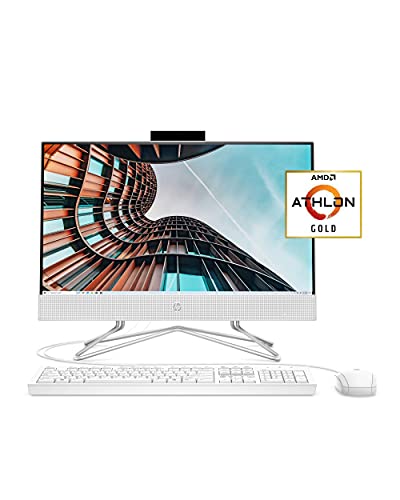
HP 22 All-in-One PC AMD Athlon Gold 4GB 256GB 21.5-inch
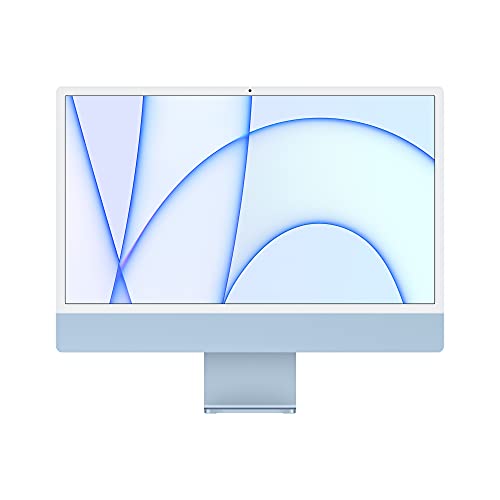
Apple 2021 iMac All-in-One with M1 Chip 24-inch 8GB 256GB (Blue)

HP OmniDesk Desktop AMD Ryzen 5 32GB DDR5 3TB Storage
GEEKOM AX8 Max Silent Mini PC Ryzen 7 8745HS 16GB 1TB SSD
GEEKOM Mini PC IT13 MAX Intel Ultra 9 185H 24GB 500GB

GEEKOM IT13 MAX AI Mini PC 2026 Intel Ultra 9 185H 24GB 500GB
More Details On Our Top Picks
For designers who want one machine on the desk with nothing dangling behind it, this iMac earns its place by combining the M4 chip with a 24-inch Retina display in a single slim enclosure. The 10-core CPU and 10-core GPU (the GPU handles graphics rendering, so more cores usually mean faster previews and exports) handle layered Photoshop files and vector work in Illustrator without forcing the fan to spin up. The 512GB SSD configuration gives you room for active project files without leaning on external drives immediately.
Color reproduction on Retina panels is widely considered among the most accurate you get without a dedicated reference monitor. If you do client-facing color work and value a clean desktop, this is the most integrated option on my list.
Benefits That Matter
- The all-in-one form factor removes cable clutter, leaving only a single power cord and your input devices visible.
- 10-core CPU plus 10-core GPU means faster timeline scrubbing and export times in apps like After Effects and DaVinci Resolve.
- The 24-inch Retina display delivers sharp text rendering and consistent color out of the box, so calibration day one is lighter.
- 16GB unified memory (a shared pool the CPU and GPU draw from simultaneously) helps when juggling large mockups and reference boards.
Things To Consider
- Storage tops out at 512GB in this configuration, so asset-heavy designers will likely need an external SSD or NAS.
- The slim chassis has limited ports compared to tower workstations, which may frustrate anyone running multiple input devices.
- Apple’s accessory ecosystem costs extra if you want a color-matched Magic Trackpad alongside the included peripherals.
Quick Facts
Built With In Mind
Studio-based designers who want color accuracy built in and prefer the cleanest possible desk setup will get the most out of this iMac.
Consider Something Else When
If you need true tower expandability and more storage bays, the HP OmniDesk Desktop is a better fit for asset-heavy production work.
The GEEKOM IT15 stands out for one specific reason: it can drive four displays simultaneously at 8K resolution (7680×4320, far beyond standard 4K), which is genuinely rare at this size. Powered by the Intel Core Ultra 9 285H with 32GB of DDR5 memory (the latest generation of system RAM, offering higher bandwidth than the older DDR4), it’s built for designers who wrap their workspace in multiple reference panels, video walls, or stock-photo grids.
Compare this to the iMac’s single integrated display, and the IT15 makes more sense for trading desk layouts, signage design, or any studio where screen count matters more than aesthetic minimalism.
What Earns Its Place
- Quad-display support at 8K lets you build a panoramic workspace for editing, references, and client communication side by side.
- WiFi 7 (the newest wireless standard, faster and more stable than WiFi 6 in crowded networks) keeps large asset transfers snappy on supported networks.
- The compact chassis fits behind a monitor or in a cable-managed desk well, freeing floor space.
- 32GB DDR5 handles multitab browsers full of design tools plus your primary editing app without slowdowns.
Worth Noting
- There’s no integrated display, so you’ll need to budget for at least one quality monitor to match the system’s capability.
- Mini PCs run hotter under sustained creative loads, so placement matters more than with a tower.
- Internal expansion is limited compared to a full-size desktop like the OmniDesk.
Whose Shelf It Belongs On
Multi-monitor studios, digital signage designers, and anyone building a panoramic reference workspace will benefit most from the IT15’s quad-display muscle.
Skip It When
Designers who want a true all-in-one with the screen built in should look at the Apple 2024 iMac instead.
This HP 24-inch all-in-one takes the opposite approach from the IT15: a calm, tidy machine for designers who mostly work in Canva, social graphics, light Photoshop, or web mockups. The AMD Athlon Silver 3050U is an entry-level processor (fine for basic tasks, slower for heavy rendering), but the 8GB of RAM and 256GB SSD cover everyday productivity without much friction.
The three-sided micro-edge display (very thin bezels around the screen) gives the panel a modern look, and the adjustable tilt stand helps during long sessions. The privacy slide over the camera is a small touch that office-based designers will appreciate.
Key Advantages
- The all-in-one design keeps the desk uncluttered, useful for small home studios.
- 8GB of RAM is enough for light design work, browser-based tools, and video calls at the same time.
- The privacy camera shutter is a thoughtful detail for anyone conscious about being on camera.
Trade Offs
- The Athlon Silver 3050U will struggle with high-resolution image editing and complex vector files.
- 256GB of storage fills up quickly with design assets, so external storage becomes necessary sooner.
- Windows 10 Home is the older OS at this point, which may matter for software compatibility over time.
Right Fit For
Beginners and hobbyist designers who handle simpler projects and want a tidy, no-fuss setup will get on well with this HP.
A Better Fit Elsewhere
Designers needing genuine headroom for layered creative work should step up to the Apple 2021 iMac instead.
The HP 22 sits firmly in budget-territory and makes sense for design students or anyone starting out who wants a clean all-in-one experience. The Athlon Gold 3150U and 4GB of RAM keep things simple, which is honest about what this machine can do. The Full HD IPS display with anti-glare coating is a real highlight at this level, since IPS panels offer wider viewing angles and better color consistency than older TN panels.
The 21.5-inch size means a smaller footprint than the 24-inch HP earlier on this list. For dorm rooms or studio apartments, that matters.
Positive Points
- The Full HD IPS anti-glare screen is sharper than typical budget panels and easier on the eyes.
- Built-in speakers and dual array microphones mean fewer accessories to buy.
- The included wired keyboard and mouse get you working the day it arrives.
Room For Improvement
- 4GB of RAM is tight even for basic Photoshop work and will bottleneck heavier workflows.
- Storage at 256GB fills fast with project files and reference libraries.
- Windows 10 Home limits future-proofing for newer design software over the coming years.
Feature Snapshot
Made For
Design students and first-time users who need a capable starter machine for coursework and personal projects.
Look Elsewhere When
If you anticipate running Photoshop with multiple large files, the HP 24-inch all-in-one offers more usable memory.
The 2021 M1 iMac was the machine that shifted Apple’s all-in-one direction toward the modern design language you see today. With an 8-core CPU and 8-core GPU, it handles everyday design tasks well, even if newer M-series chips have since outpaced it. The 24-inch Retina display remains genuinely pleasant for color-sensitive work.
The blue colorway and matching accessories give it a personality the silver M4 iMac doesn’t quite match. For designers who want character on the desk alongside solid performance, this is a sensible pick.
Strong Points
- The M1 chip has years of real-world use behind it, so software optimization is mature and stable.
- Color-matched accessories integrate seamlessly with the iMac’s design language.
- Continuity features let you hand off work from iPhone or iPad without friction.
Honest Caveats
- 8GB of unified memory is workable but will feel tight on large multi-app workflows.
- 256GB of storage is the minimum these days for design work and fills quickly.
- The M1 chip trails the M4 in newer AI-accelerated features that some creative tools now tap into.
Who It Suits Best
Designers who already use iPhone or iPad and want the tightest possible ecosystem will appreciate this iMac’s Continuity features.
Reach For A Different Pick When
Heavier creative professionals should consider the GEEKOM IT15 for its expandable memory and storage headroom.
The OmniDesk is the most traditional desktop tower on this list, and it leans into that role confidently. The AMD Ryzen 5 with 8 cores (a mid-range processor that punches above its weight for multitasking) and 32GB of DDR5 RAM give you real headroom for working across design tools simultaneously. The combination of a 2TB SSD plus a 1TB HDD adds up to 3TB of total storage, so asset libraries can stay local without immediate cloud or external drive dependence.
Quad-monitor support means designers running extensive timelines, asset bins, or video references benefit from the same multi-display setup the GEEKOM IT15 offers, but with a tower’s easier upgradability.
What Pays Off
- 3TB of combined storage handles large asset libraries and project archives without constant cleanup.
- Quad-monitor support builds out a full production studio layout from one machine.
- Wi-Fi 6 keeps wireless connections stable even in crowded office environments.
- The included wireless keyboard and mouse cut down on desk cable clutter.
Points To Keep In Mind
- The Radeon 740M integrated graphics aren’t a match for dedicated GPUs in heavy 3D or motion work.
- Towers take up more floor or desk space than the iMac or mini PCs on this list.
- Airflow management matters in tight desk setups, since towers generate more heat under load.
Key Product Details
Best Suited To
Asset-heavy designers and small studios who want serious local storage plus multi-monitor capability in a tower form factor.
Swap It Out When
Designers short on space should consider the GEEKOM IT15 mini PC for similar multi-display muscle in a smaller chassis.
The AX8 Max lives up to its “Silent” branding by focusing on a low-noise thermal design, which matters more than most spec sheets admit during long creative sessions. The Ryzen 7 8745HS paired with 16GB of DDR5 memory and a 1TB SSD is a well-rounded combo for design work, particularly in shared spaces where a loud fan becomes a distraction.
Compared to the IT15 earlier on this list, the AX8 trades some peak performance for acoustic comfort. For studios where multiple people work nearby, that tradeoff usually pays off.
Strengths Worth Knowing
- The quiet operation profile makes it ideal for recording voiceovers, video calls, or podcast sessions.
- 16GB DDR5 with a 1TB SSD handles everyday creative work without slowdowns.
- The compact size fits behind a monitor or in a tight desk nook.
Small Caveats
- No dedicated GPU means heavier 3D work is out of reach.
- You’ll still need to source your own monitor to pair with the unit.
Who Should Grab It
Designers working in shared studios, home offices near living spaces, or anyone who records audio alongside their visual work will appreciate the AX8’s silence.
Another Choice May Suit
If maximum multi-display capability matters more than noise levels, the GEEKOM IT15 is the stronger pick.
The IT13 MAX sits in a sweet spot for freelance designers and small studios who want more capability than an entry-level mini PC without going to full tower scale. The Intel Core Ultra 9 185H, with 16 cores and 22 threads (threads are the virtual subdivisions a processor uses to handle multiple tasks at once), gives you headroom for 4K video editing, 3D design work, and serious multitasking. The 24GB of RAM and upgradeable storage mean this machine can grow with your business.
Where the IT15 earlier on this list leans into quad-display setups, the IT13 MAX focuses on per-task performance for creative professionals who need one main canvas with deep app performance behind it.
A Few Highlights
- The 16-core, 22-thread CPU handles multitasking across Photoshop, Illustrator, and a browser full of references without choking.
- 24GB of RAM fits large working files in memory rather than swapping to slower storage.
- Upgradeable storage means the machine adapts as your project archive grows.
- The Intel Arc integrated graphics (the GPU built into the processor) help accelerate compatible creative apps.
A Few Limitations
- You’ll need to bring your own monitor, keyboard, and mouse.
- Compact cases run warmer than towers under sustained load, so placement near a vent helps.
Feature Card
Who Will Love This
Freelance illustrators, brand designers, and motion artists who want creator-grade power in a compact footprint will benefit most.
Where A Sibling Pick Shines
For a quiet shared-office setup, the GEEKOM AX8 Max is the better fit.
This 2026 refresh of the IT13 MAX leans into AI-accelerated workflows, which is increasingly relevant as design tools add features like generative fills, smart upscaling, and content-aware editing that tap into a dedicated NPU (neural processing unit, a chip specialized for AI tasks that runs them faster while using less power). The Core Ultra 9 185H paired with 24GB of LPDDR5 memory (a low-power variant of DDR5, common in compact builds) is built to handle those workloads alongside traditional creative apps.
Designers experimenting with AI-assisted workflows will find the headroom useful. Those who don’t yet use AI tools will still benefit from the underlying CPU and memory strength for traditional tasks.
What Stands Out
- The NPU acceleration speeds up AI features in apps like Photoshop and Illustrator that are increasingly common.
- 24GB LPDDR5 keeps working files and AI models in memory efficiently.
- The compact mini PC form factor keeps desks uncluttered while delivering workstation-class capability.
Things To Weigh
- 500GB of storage fills quickly when juggling local AI model files alongside project assets.
- You’ll need a quality monitor to take advantage of the system’s color and resolution capabilities.
- AI feature value depends on which design apps you actually use day to day.
Feature Rundown
The Right Fit
Designers integrating AI tools into their workflow and wanting a compact machine built for that future will appreciate this IT13 MAX refresh.
Not Your Match When
Designers who don’t yet use AI features may find the standard GEEKOM Mini PC IT13 MAX a more grounded value choice.
What To Weigh Before Buying A Design Computer
Color accuracy tops the list for most designers. Look for IPS or Retina panels (both offer wide viewing angles and consistent color), and plan to calibrate regularly even on displays that ship with good profiles out of the box. An all-in-one like the iMac bakes the display into the machine, while a mini PC or tower requires you to budget separately for a quality monitor.
Processor and memory matter next. The M4 and Core Ultra 9 chips on this list handle layered work and exports comfortably, while the Athlon options stay better suited to simpler tasks. For most designers, 16GB of RAM is the practical floor, and 32GB gives you room to grow.
Storage is the easiest spec to overlook. Design files accumulate quickly, and a 256GB SSD fills up fast. Machines like the HP OmniDesk with multi-terabyte storage or the iMac at 512GB give you more breathing room, but external SSDs or NAS (network-attached storage, a dedicated file server on your network) remain useful supplements for any option here.
Connectivity rounds out the practical picture. Multiple USB ports, Thunderbolt or USB-C, and stable Wi-Fi (Wi-Fi 6 or newer) keep your peripherals and external storage happy. If you run multiple displays, confirm the machine supports your exact monitor count before committing.
Key Considerations Across These Picks
Common Shopping Slip Ups
The most frequent mistake is chasing processor speed while ignoring memory and storage. A fast CPU paired with 4GB of RAM feels slower than a modest CPU with 16GB. The HP 22 illustrates this clearly: it’s inexpensive, but the memory limit shapes what you can actually do with it.
Another trap is overlooking the monitor. Mini PCs and towers on this list all require a separate display, and a cheap monitor undermines a good machine. Designers should treat display quality as part of the total cost rather than an afterthought.
What The Higher Tier Buys
Stepping up from an Athlon-based all-in-one to an M4 iMac or Core Ultra 9 mini PC brings real differences in rendering time, multitasking, and future software compatibility. Higher-tier machines handle larger files, more simultaneous apps, and emerging AI features without slowing down.
The upgrade makes sense for designers earning income from their work, where faster exports and smoother previews translate directly into billable hours saved. For casual or hobbyist use, the entry-level options still get the job done.