Picking a Plex server rig means balancing silent living-room operation, dependable transcoding muscle, and storage that scales as your library grows. I’ve put together nine options that fit common setups: tucked-away mini PCs, dedicated network-attached storage boxes, and rack hardware for people who want their gear off the desk. If you stream to a TV in the next room or push 4K to four devices at once, the right combination of CPU, RAM, and bays makes the difference between buttery playback and constant buffering.
The Picks In Brief

Varghesyla Mini PC Mount for Dell OptiPlex Micro Mount

Varghesyla 2 Pack Mini PC Mount for Dell OptiPlex Micro

UGREEN DXP4800 GT 4-Bay Desktop NAS

UGREEN DXP4800 Plus 4-Bay NAS

Synology DS225+ Private Cloud Media Server

Synology DS218+ 2-Bay Diskless NAS

UGREEN DXP2800 2-Bay NAS
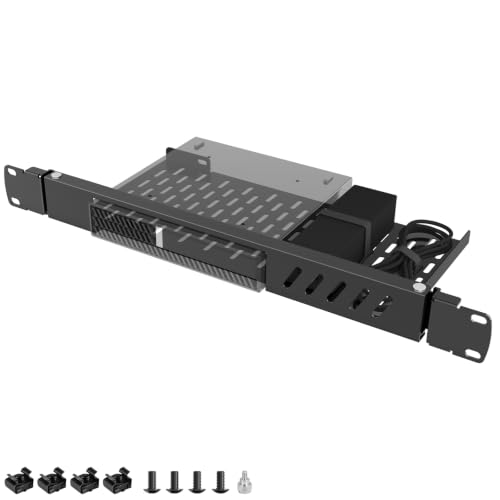
Varghesyla 1U Mini Rack Mount for Dell OptiPlex Micro

Synology DS920+ 4-Bay Diskless NAS
What Each Pick Brings To The Table
This bracket hides a Dell OptiPlex Micro out of sight, which matters when your Plex host lives behind a TV or under a standing desk. The mount covers an unusually long list of MFF chassis, from the older 9020 up through current 7080 and 7090 revisions, so it’s forgiving if your used micro arrived from an office refurbisher.
The real appeal is reclaiming desk depth. Owners commonly attach it to a VESA plate behind a monitor or screw it under a tabletop, keeping airflow around the unit while protecting it from kicks and spills. Plex is light on resources compared to many workloads, so tucking the box away keeps the room tidy without sacrificing the host’s reach on your network.
A Few Highlights
- Broad model coverage spanning roughly two dozen OptiPlex MFF SKUs
- Three mounting modes, including under-desk and VESA, for flexible placement
- Keeps the host ventilated and away from foot traffic in a living room
- Steel construction holds the micro PC securely even with cable weight
Things To Consider
- Single-pack only, so you’ll need extras if you plan to mount a second unit elsewhere
- Cable management relies on the existing ports on the MFF, which some users find limiting
Right Fit For
Anyone running a single OptiPlex Micro Plex host who wants it tucked behind a display or under furniture without sacrificing airflow.
Swap It Out When
The Varghesyla 2 Pack Mini PC Mount for Dell OptiPlex Micro is a smarter pick if you also plan to mount a backup unit or a second micro as a companion NAS.
Identical hardware to the single-bracket option above, but bundled in pairs for people running a primary Plex host and a sibling machine. Plex setups often pair a transcoding box with a separate storage server, so mounting both off the desk keeps the workspace genuinely clean.
The same VESA, wall, and under-desk flexibility applies to each bracket. For a small home lab, that means you can place one micro behind a living-room TV and hide the second under a hallway console, both fed by a single switch. The pack also covers the same wide range of OptiPlex generations.
Advantages To Know
- Two brackets per pack, useful for paired Plex and NAS hosts
- Same flexible mounting styles as the single-bracket version
- Useful for anyone upgrading an existing single-mount setup
Points To Keep In Mind
- If you only need one bracket, the single-pack version avoids the extra spend
- Owners should double-check screw compatibility with their specific OptiPlex revision before mounting
Who It Suits Best
Home-lab builders running a separate transcoding micro and a storage micro who want both off the desk.
Where Another Pick Suits Better
The Varghesyla 1U Mini Rack Mount for Dell OptiPlex Micro is a better answer when both micros belong in a 19-inch rack instead of behind furniture.
The DXP4800 GT trades on raw throughput, pairing an AMD Ryzen Embedded R2514 with two 10GbE network ports. For a Plex household streaming 4K HDR to multiple TVs at once, that second 10GbE lane removes a bottleneck you’d hit on typical 2.5GbE kit. The CPU’s four cores also handle multiple Plex transcodes comfortably.
Two M.2 NVMe slots accept fast cache or storage drives, and the 4K HDMI output turns the box into a living-room playback device if direct-attach is your preference. With Plex pulling media files constantly, the silent operation expected of modern UGREEN enclosures means the unit stays near your TV without complaint.
The Case For It
- Dual 10GbE for headroom on large multi-stream 4K libraries
- Quad-core AMD Ryzen Embedded processor strong on simultaneous transcoding
- Dual NVMe slots for cache acceleration or fast tier storage
- Diskless chassis lets you choose your own HDD capacity
Honest Caveats
- Requires a 10GbE switch or a link-aggregated setup to use the second port fully
- Diskless means budgeting separately for four NAS-rated drives
Quick Facts
Made For
Multi-user households with growing 4K libraries who want streaming headroom and the option to run Docker alongside Plex.
Not Your Match When
The Synology DS225+ is a softer choice for shoppers who’d rather trade raw speed for Synology’s tighter DSM ecosystem.
The Plus variant swaps the dual 10GbE of the GT for a more measured 10GbE-plus-2.5GbE combination, leaning on an Intel Pentium Gold 8505 instead of an AMD chip. For a Plex server that also runs Docker containers or virtual machines, the five-core Intel silicon gives a snappier feel during indexing scans.
DDR5 memory at 8 GB is generous for the price class, and a built-in 128 GB SSD handles the OS image, leaving all four drive bays free for media. Compared with the DXP4800 GT, this unit trades peak throughput for a more balanced mix of CPU grunt, modern RAM, and flexibility for non-Plex side tasks.
What Stands Out
- Intel Pentium Gold 8505 with five cores for mixed Plex and Docker use
- Built-in 128 GB SSD keeps the OS off the spinning disks
- DDR5 RAM offers headroom for future memory upgrades
- 4K HDMI output for direct-attached playback
Worth Noting
- 10GbE is single-port, so simultaneous multi-stream 4K may still bottleneck
- NAS drives are not included, so total cost climbs once you add storage
Who Should Grab It
Curators who want Plex plus side projects like home automation or a small virtual machine, all on one box.
Consider Something Else When
The UGREEN DXP4800 GT is the stronger pick for households running lots of concurrent 4K streams where dual 10GbE matters more than DDR5.
The DS225+ sits at the center of Synology’s polished 2-bay lineup, pairing an Intel processor with DSM, the operating system many Plex admins quietly prefer. The hardware transcoding engine (the dedicated chip that converts video on the fly for incompatible clients) takes pressure off Plex’s software transcoder, which matters for people streaming to phones on the road.
Two drive bays keep capacity modest, but Synology’s snapshots and RAID flexibility make up for the smaller footprint. The DSM app ecosystem also lets you add Synology Photos, Drive, and Hyper Backup without command-line tinkering, so the box doubles as a media server and a household backup hub.
Good Reasons To Consider
- Hardware-accelerated transcoding keeps Plex smooth on remote streams
- DSM software is widely considered mature and well-documented
- Snapshot and RAID options give strong data protection
- Wide app ecosystem for backup, photos, and remote access
Trade Offs
- Two bays cap raw storage compared with 4-bay alternatives
- Diskless, so the total cost includes drives plus a likely RAM upgrade for larger libraries
At A Glance
Whose Shelf It Belongs On
Shoppers who want a polished, app-rich NAS that doubles as Plex host and a backup target for the rest of the household.
Reach For A Different Pick When
The Synology DS920+ is a stronger fit if you need four bays and room to grow into a much larger media collection.
The DS218+ is the older sibling of the DS225+ but still a credible Plex host on a tight budget. Its dual-core processor with AES-NI encryption acceleration (a chip-level feature that speeds up encrypted file transfers) and transcoding engine delivered 4K streaming at a time when most home NAS couldn’t. Two drive bays keep the build simple, and the Btrfs file system supports up to 65,000 system-wide snapshots for easy recovery.
It’s worth noting that the 2 GB of DDR3L is modest for larger Plex databases, so many owners upgrade memory to 6 GB. For a starter Plex build with a few hundred movies, the DS218+ handles day-to-day playback without complaint.
Strengths Worth Knowing
- Hardware transcoding engine for two concurrent 4K streams
- AES-NI acceleration keeps encrypted transfers fast
- Btrfs support with up to 65,000 system-wide snapshots
- Entry-level pricing for a Synology-grade Plex host
Less-Strong Areas
- 2 GB of RAM is limiting for large Plex libraries without an upgrade
- Only two drive bays, so capacity growth requires an external unit
- DDR3L is older and harder to source than DDR4 or DDR5 modules
Best Suited To
First-time Plex curators on a budget who want a proven Synology platform without paying for newer silicon.
Look Elsewhere When
The Synology DS225+ is the smarter pick for fresh builds, with modern hardware transcoding and better DSM support windows.
The DXP2800 keeps things small and modern, fitting an Intel N100 quad-core CPU and 8 GB of DDR5 into a 2-bay chassis. The N100 is a favorite for quiet Plex builds because it draws little power while still managing a single 4K transcode comfortably. Two M.2 NVMe slots add caching or fast storage, and a 2.5GbE port is more than enough for typical home streaming.
Compared with the Synology DS218+ above, the DXP2800 trades a polished software stack for newer silicon and a friendlier price. The 4K HDMI output means the box doubles as a media player, and the compact case fits neatly next to a router.
Positive Takeaways
- Modern Intel N100 quad-core handles Plex plus everyday apps quietly
- 8 GB DDR5 RAM is generous for the entry price point
- 2.5GbE networking covers most home streaming scenarios
- Dual M.2 NVMe slots for cache or tier-one storage
A Few Limitations
- Two bays cap total capacity compared with the 4-bay UGREEN options
- 2.5GbE may bottleneck if you eventually upgrade your switch to 10GbE
- Drives sold separately, so add budget for two NAS-rated HDDs
Feature Snapshot
Perfect Match For
Small households with a focused media library that want quiet operation, modern hardware, and Plex-friendly specs without a steep spend.
A Better Fit Elsewhere
The UGREEN DXP4800 Plus suits households planning to grow into four bays, Docker containers, or a small virtual machine.
Home-lab builders rack-mounting a cluster of OptiPlex Micros will find this 1U shelf a practical addition. The hinged design swings out for cable work, and the included ties help bundle power and Ethernet runs. It’s specifically built for the Dell OptiPlex MFF footprint (1.4″ x 7″ x 7.2″), so a Dell micro slots in cleanly without modification.
For a Plex server alongside other home-lab gear, this keeps the micro out of the living room and alongside your switch and patch panel. Just verify your specific OptiPlex model is on the compatibility list before ordering, because Tower, SFF, and Wyse units won’t fit.
Where It Delivers
- 1U rack shelf designed for standard 19-inch server racks and cabinets
- Hinged design for easier access to rear ports and cabling
- Broad OptiPlex MFF compatibility across many generations
- Included cable ties help keep runs tidy
Where It May Fall Short
- Limited to Dell MFF form factor, so other mini PCs won’t fit
- Doesn’t include fans, so passive cooling relies on the micro’s own vents
Built With In Mind
Home-lab enthusiasts consolidating a Plex host, switch, and NAS into a single 19-inch rack.
Skip It When
The Varghesyla Mini PC Mount for Dell OptiPlex Micro Mount is the simpler answer if your Plex host sits under a desk rather than in a rack.
The DS920+ remains a workhorse for Plex libraries that keep growing. Four bays deliver plenty of room for mirrored media, and two built-in M.2 slots accept NVMe drives for SSD caching without eating into the main pool. With the optional Synology DX517 expansion chassis, you can stretch the same unit to nine drives when collections swell.
The Intel quad-core CPU and 4 GB of DDR4 handle Plex plus Synology’s broader app catalog without complaint. Compared with the 2-bay DS225+ earlier in the list, the DS920+ is the natural answer when you already know your library will outgrow a smaller enclosure.
Standout Benefits
- Four bays with DX517 expansion support for up to nine drives
- Dual M.2 SSD slots for cache acceleration
- DSM software with the full Synology app ecosystem
- 4 GB DDR4 expandable for larger Plex databases
Points To Note
- Disks sold separately, so factor in four NAS drives plus any expansion
- Older platform than the DS225+, though still well-supported
Key Product Details
Who Will Love This
Households and curators with expanding libraries who want Synology polish plus clear expansion paths.
Another Choice May Suit
The Synology DS225+ is the simpler answer for very small libraries where four bays and expansion feel like overkill.
Factors To Weigh When Picking Plex Hardware
The right Plex rig depends less on raw spec sheets and more on how your household actually streams. A single-user setup with one TV and a wired gigabit connection can lean on cheaper hardware. A family pushing three 4K streams over Wi-Fi to tablets needs a CPU with hardware transcoding and a network port that won’t bottleneck.
Drive bays matter more than most shoppers expect. Two bays in a mirrored RAID (a configuration where the same data is written to two drives for redundancy) configuration protect against a single-drive failure but cap your usable space at one drive’s capacity. Four-bay enclosures allow SHR or RAID 5 setups that balance protection and storage, which becomes important once you cross roughly 20 TB.
Networking quietly governs how the system feels day to day. A 2.5GbE or 10GbE port only matters if your switch, router, and client devices support those speeds. Many homes are still wired at gigabit, so spending on a 10GbE NAS without upgrading the rest of the chain won’t change your experience.
RAM and CPU trade off against the apps you want to run alongside Plex. Plex itself is light, but if you also run Sonarr, Radarr, or a small virtual machine, more memory and a faster CPU keep the system responsive during library scans.
Picking The Right Path: Mounts, NAS Boxes, And Growth Room
Common Shopping Slip Ups
The biggest mistake is buying a NAS with too few bays. Storage needs always grow, and migrating a Plex library to a new enclosure later is more painful than picking a roomier box today. The second slip is ignoring network gear: a fast NAS on a slow switch feels identical to a slower NAS, so verify your cables, router, and clients before investing.
When Paying More Pays Off
Higher-tier NAS models like the UGREEN DXP4800 GT or the DS920+ cost more for reasons beyond marketing. Dual 10GbE ports, DDR5 memory, and SSD cache support translate directly into smoother multi-user playback and faster library scans. The upgrade pays off most in households with multiple simultaneous 4K streams, where the cheaper alternatives eventually bottleneck.
Key Considerations Across These Picks
Mistakes Worth Dodging
Overbuying bays you’ll never fill is as common as underbuying. Match enclosure capacity to your current library plus realistic growth over the next two years. Also, watch for “NAS kits” that ship without drives, since those costs add up quickly and sometimes determine whether the build makes sense financially.
Where The Extra Money Goes
Spending more on a NAS typically buys faster networking, stronger CPUs for transcoding, and more modern RAM. The premium is most worthwhile when the box has to juggle multiple apps or several streams at once. For a single-user setup, the cheaper picks often perform identically in daily use.
Frequently Asked Questions
Do I need a NAS or can a mini PC host Plex directly?
A mini PC works fine as a Plex host, especially with a software transcoding setup. The NAS options in this list double as both storage and server, which simplifies wiring and reduces the gear count on your shelf.
How many drive bays are enough for a typical Plex library?
Two mirrored bays work for collections under roughly 8 TB of usable media. Once you pass that point, four bays in SHR or RAID 5 give more flexibility without forcing an external expansion unit.
Is hardware transcoding important?
It matters most when clients request formats the server doesn’t store. Phones on cellular often need transcoded streams, so a CPU with hardware acceleration (Intel Quick Sync or an equivalent feature) keeps playback smooth.
Can I mount a Plex host behind a TV?
Yes, the Varghesyla Mini PC Mount for Dell OptiPlex Micro Mount is built for that exact scenario. Confirm the specific OptiPlex generation fits before mounting, since bracket compatibility varies slightly between revisions.
How loud are these NAS boxes in a living room?
Modern NAS enclosures use large, slow-spinning fans and the noise depends on the drives inside. NAS-rated HDDs typically run quieter than desktop drives, and the SSD-only configurations on some units are effectively silent.
Final Verdict
The right Plex hardware depends on whether your priority is raw speed, software polish, or just hiding the box out of sight. A four-bay NAS like the Synology DS920+ handles the largest libraries, while compact mounts make an OptiPlex-based build disappear into a media cabinet. Match the enclosure to your current library size and your real streaming habits, and you’ll rarely regret the purchase.