A dependable desktop pulls double duty for a lot of households: video calls during the day, homework in the evening, and a casual game when the work is done. The all-in-one category has quietly become the sweet spot for that lifestyle, squeezing monitor and machine into one slim slab that clears cable clutter. What follows is a roundup of ten options I think cover the realistic spectrum, from lightweight homework machines to creator-ready workstations.
The Choices Worth Comparing

Apple 2024 iMac All-in-One Desktop Computer with M4 chip, Pink (AppleCare+ 3 Years)

HP 24-inch All-in-One Desktop Computer, AMD Athlon Silver 3050U, 8 GB RAM, 256 GB SSD (White)
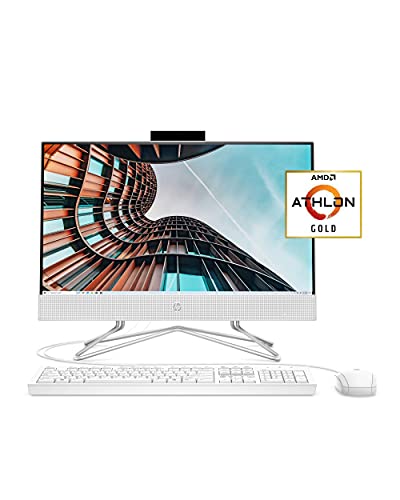
HP 22 All-in-One PC, AMD Athlon Gold 3150U, 4 GB RAM, 256 GB SSD, 21.5-inch Full HD IPS

Dell 23.8″ All-in-One Desktop, FHD Touchscreen, Intel Core Ultra 7, 16GB DDR5, 1TB SSD, Windows 11 PRO

EUREKA ERGONOMIC Height Adjustable PC Stand with Wheels for ATX Cases, Black
Dell 23.8″ All-in-One, FHD Touchscreen, Intel Core Ultra 7, 64GB DDR5, 2TB SSD, Windows 11 PRO
Dell 23.8″ All-in-One, FHD Touchscreen, Intel Core Ultra 7, 32GB DDR5, 1TB SSD, Windows 11 PRO
Dell 23.8″ All-in-One, FHD Touchscreen, Intel Core Ultra 7, 32GB DDR5, 2TB SSD, Windows 11 PRO
Dell 23.8″ All-in-One, FHD Touchscreen, Intel Core Ultra 7, 64GB DDR5, 1TB SSD, Windows 11 PRO
Dell 23.8″ All-in-One, FHD Touchscreen, Intel Core Ultra 7, 64GB DDR5, 4TB SSD, Windows 11 PRO
Meet The Standout Selections
Apple’s M4 iMac keeps the slim, color-matched silhouette that made the line famous, and this Pink finish turns the desktop into a piece of room decor rather than a beige box. The M4 chip pairs a 10-core CPU (the central processor that handles everyday tasks) with a 10-core GPU (the graphics chip that drives the screen and visual work), and for most households that combination simply stops being a bottleneck. The base configuration arrives with 16GB of unified memory and 256GB of SSD storage, which I think suits a writer, student, or family that streams and shops more than it edits video.
Three years of AppleCare+ ship in the box, which is the kind of thing nobody appreciates until a curious toddler drags a toy across the glass. The trade-off is real Apple tax: stepping up to a larger SSD pushes the price fast, and ports are minimal on the slim chassis.
A Strong Showing
- Quiet operation because the M4 sips power, so the fan rarely spins up even during long video calls.
- The 24-inch display carries enough color accuracy for casual photo edits and design school.
- AppleCare+ covers accidental drops and cracked screens, which is genuine peace of mind for busy homes.
- macOS works cleanly with iPhones, so shared files and photos show up without extra apps.
- The pink finish feels intentional rather than gimmicky, and stands out in a sea of gray boxes.
Things To Consider
- 256GB of storage fills up quickly with photo libraries, so external drives may become a near-term accessory.
- The M4 still leans on Apple’s ecosystem, meaning Windows-only software needs workarounds.
Who It Suits Best
Creators, students, and families already invested in the Apple ecosystem who want a colorful, near-silent centerpiece for daily computing.
Consider Something Else When
Heavy multitaskers who live in Windows-only software should look at the Dell 23.8″ All-in-One with 32GB DDR5 RAM instead.
This HP 24-inch model is the kind of machine I would happily hand to a first-time PC owner. The Athlon Silver 3050U is an entry-level AMD chip that handles email, browser tabs, and streaming without complaint, and 8GB of RAM keeps a handful of apps open at the same time. The micro-edge display gives the front a modern look, and the adjustable tilt stand helps when a second household member wants to use the same desk.
Windows 10 Home ships preinstalled, which may nudge you toward an upgrade path down the road. The trade-off is graphics: this is not the machine I would pick for serious photo or video work, though for documents and homework it is honestly all most families need.
Advantages To Know
- The 24-inch panel gives comfortable screen real estate for spreadsheets, schoolwork, and recipe videos.
- 256GB of SSD storage boots quickly, so the kids are not waiting on a spinning hard drive.
- The clean white chassis fits into a kitchen nook or bedroom desk without looking like office equipment.
- Built-in Wi-Fi and speakers mean fewer cables and accessories on the desk.
Trade Offs
- The Athlon Silver chip strains under more than a few browser tabs, so power users will feel the ceiling quickly.
- The integrated webcam is basic, and lighting matters for clean video calls.
- Windows 10 is approaching end-of-support, so a Windows 11 upgrade may be needed in the near future.
Made For
Beginners, casual browsers, and households that need a tidy all-in-one for light homework and streaming.
Look Elsewhere When
Shoppers who want a sharper panel and more responsive performance should consider the HP 22 All-in-One with Full HD IPS display.
Compact desks and dorm rooms are where this 21.5-inch HP earns its keep. The Full HD IPS panel (a screen tech that keeps colors accurate from wide viewing angles) gives better viewing angles than older TN panels, which matters when two people are watching the same recipe or lecture. The Athlon Gold 3150U is a small step up from the entry Silver chip, and the wired keyboard and mouse in the box mean setup is essentially unbox, plug in, and go.
The honest read is that 4GB of RAM feels tight in 2026, especially with Windows 10 Home’s background services. For someone who only opens a browser and one app at a time, it works, but I would not stretch it further than that.
The Practical Payoff
- The smaller 21.5-inch footprint saves real desk space, which is exactly the point.
- The anti-glare display keeps reflections under control in sunlit rooms.
- Wired peripherals ship in the box, so there are no extra accessory runs.
- The HP True Vision camera includes a privacy slide, a small touch that families tend to appreciate.
Room For Improvement
- 4GB of RAM runs out fast with modern browsers, so heavier multitasking will feel sluggish.
- Storage is fixed and not user-upgradable, so an external SSD may be needed eventually.
- The speakers are functional rather than impressive, which is fair for the size class.
Right Fit For
Students and small-space setups where a tidy, compact all-in-one matters more than raw performance.
Skip It When
Anyone running photo editing or large spreadsheets should pick the HP 24-inch All-in-One with 8GB RAM instead.
Dell’s 23.8-inch touchscreen all-in-one is the machine I would build a serious home office around. The Intel Core Ultra 7 Series 3 chip carries a dedicated NPU (neural processing unit) that accelerates on-device AI tasks, which is exactly what the Copilot+ badge signals in Windows 11. Sixteen gigabytes of DDR5 RAM (a faster generation of system memory) and a 1TB PCIe SSD give the system plenty of headroom, and the FHD touchscreen adds a layer of utility for tapping through presentations or sketching ideas.
Wi-Fi 6E and Bluetooth 5.3 keep wireless speeds modern, and the included wireless keyboard and mouse cut down on cable clutter. The catch is that the FHD resolution is starting to look modest on a 23.8-inch panel when rivals push higher pixel counts, so pixel-peepers may want to look elsewhere.
The Case For It
- The NPU handles AI features locally, so features like live captions and background blur do not bog down the main CPU.
- Windows 11 PRO adds BitLocker drive encryption and Remote Desktop, which matters for small business use.
- 1TB of storage holds a serious photo library before anyone needs an external drive.
- The touchscreen adds genuine utility during video calls and casual creative work.
- Wireless peripherals ship in the box, which keeps the setup clean from day one.
Minor Gripes
- The FHD resolution looks soft at 23.8 inches compared to QHD rivals in this price band.
- 16GB of RAM is comfortable now, but heavier creators may wish for 32GB sooner rather than later.
Feature Snapshot
Best Suited To
Home offices and remote professionals who want Copilot+ AI features and PRO-grade Windows security in a single tidy chassis.
Reach For A Different Pick When
Heavy multitaskers running dozens of browser tabs and design apps should step up to the Dell 23.8″ All-in-One with 64GB DDR5 RAM.
Not every computer lives behind a screen, and tower PCs still earn their place in homes that game, render, or run heavy workloads. This EUREKA ERGONOMIC stand gives a full-size ATX case (the standard desktop tower form factor) somewhere to live that is not the floor, where dust bunnies and accidental kicks gather. The 2-tier design fits a printer or peripheral on the lower shelf, and the six-gear manual height adjustment spans roughly 23.25 to 33.25 inches so the tower can sit under most tables or beside a standing desk.
Lockable caster wheels add mobility, which is helpful when the tower needs to reach a different outlet for BIOS updates or component swaps. The steel frame is sturdy, though the assembly is the kind of project I would plan an afternoon around.
What Works In Its Favor
- Six height positions across roughly 10 inches of travel cover most desk clearances.
- The 2-tier layout doubles as a printer shelf or accessory perch.
- Lockable caster wheels let the tower roll out for cleaning or upgrades without lifting.
- Steel construction handles the weight of a fully loaded ATX tower with room to spare.
Softer Spots
- Assembly requires basic tools and patience, so budget extra setup time.
- The stand itself is heavy once loaded, which is the point, but rearranging rooms becomes a two-person job.
Perfect Match For
Tower PC owners who want their machine off the floor and easy to roll out for occasional maintenance.
Not Your Match When
Anyone using an all-in-one like the HP 24-inch or Dell 23.8″ touchscreen should skip this entirely, since those have no tower.
This is the configuration I would point creators toward. The 64GB of DDR5 RAM is the kind of headroom that lets Photoshop, a browser full of references, and a chat client sit open without the system breaking a sweat. Pair that with a 2TB PCIe SSD and the Intel Core Ultra 7’s NPU, and you have an all-in-one that does not feel like an all-in-one in terms of capability.
The touchscreen still runs at FHD, which remains the main visual compromise at this size. For users who lean on color-accurate external monitors anyway, the lower-res internal display is easier to live with.
What Makes Sense
- 64GB of RAM keeps dozens of browser tabs and creative apps open at the same time.
- The 2TB SSD swallows raw photo files and project archives without immediate cleanup.
- The NPU accelerates AI-assisted edits in supported creative software, which saves real time.
- Windows 11 PRO is genuinely useful for freelancers managing client machines.
Points To Note
- The FHD display looks modest given the price tier, so an external 4K monitor becomes a likely add-on.
- Higher configurations like this one push well past entry-level all-in-one budgets.
Core Details
Who Will Love This
Freelance creators, photographers, and side-project power users who want all-in-one simplicity without memory limits.
A Better Fit Elsewhere
Shoppers who do not need 64GB of RAM should save money and grab the Dell 23.8″ All-in-One with 32GB DDR5 instead.
For a lot of families, 32GB of DDR5 RAM is the sweet spot. It covers heavy browsing, school projects, and casual photo edits without the price jump to 64GB. The 1TB PCIe SSD keeps a reasonable photo library on board, and the same Intel Core Ultra 7 Series 3 chip handles Copilot+ features that more and more Windows apps are starting to expect.
The 23.8-inch FHD touchscreen still uses the same modest pixel count as the entry Dell in this line, which is the trade-off for the lower price step. The included wireless keyboard and mouse mean the box arrives ready for daily work.
A Favorable Mix
- 32GB of DDR5 is comfortable for most families and remote workers today.
- Windows 11 PRO adds encryption and remote access for anyone handling work data.
- Wireless peripherals come in the box, which simplifies unboxing day.
- Wi-Fi 6E handles crowded apartment networks without dropping out mid-call.
Honest Caveats
- FHD on 23.8 inches is starting to look soft, especially next to phones and tablets in the home.
- The tower has limited internal expansion, so upgrades often mean external accessories.
Whose Shelf It Belongs On
Family households that need a versatile, future-proof all-in-one for school, work, and casual creative projects.
Where A Sibling Pick Shines
Users who run larger creative libraries should pick the Dell 23.8″ All-in-One with 2TB SSD for the extra room.
Storage is the quiet bottleneck of most home computers, and 2TB inside an all-in-one removes that worry for years. This Dell config keeps the 32GB DDR5 RAM baseline that handles multitasking comfortably, while doubling the SSD capacity from the previous model. For households with growing photo and video libraries, that extra room matters more than people expect.
Everything else mirrors the lower-storage sibling: the same Core Ultra 7 chip, the same FHD touchscreen, the same Windows 11 PRO. If storage is your priority and RAM is fine at 32GB, this lands in a smart spot.
Everyday Wins
- 2TB of SSD space holds years of family photos and videos without cleanup pressure.
- 32GB of RAM covers most productivity and creative workflows in 2026.
- Windows 11 PRO keeps work files protected with BitLocker and remote management.
- Wireless keyboard and mouse ship in the box.
Points To Note
- The display resolution still sits at FHD, so external monitors may be needed for pixel-heavy tasks.
- Higher storage configurations like this one add noticeable cost over the 1TB base.
Right Fit For
Family archivists, hobbyist photographers, and anyone tired of juggling external hard drives for everyday files.
Swap It Out When
Shoppers who do not need 2TB of storage should save money and grab the 1TB Dell 23.8″ All-in-One with 32GB DDR5.
This configuration flips the balance toward RAM and away from storage. With 64GB of DDR5 and a 1TB SSD, it suits small business owners who run virtual machines (software-based emulations of full computers inside a window), databases, or large spreadsheets. Windows 11 PRO adds the BitLocker encryption and Remote Desktop access that small offices expect, and the Core Ultra 7’s NPU handles AI features without slowing the main cores.
The touchscreen remains FHD, which is a soft spot across this line. For an office desk with a dual-monitor arm, the resolution matters less.
Benefits That Matter
- 64GB of DDR5 RAM handles virtual machines, large datasets, and multitasking without slowing down.
- Windows 11 PRO unlocks BitLocker encryption and remote management for business use.
- The Intel Core Ultra 7 NPU accelerates AI features in supported apps.
- Wi-Fi 6E keeps the office on the latest wireless standard for stable video calls.
Practical Considerations
- The 1TB SSD may fill up quickly with archived client files, so external storage or cloud backups should be part of the plan.
- FHD resolution on a 23.8-inch panel looks modest for a workstation in this price tier.
Feature Card
Best Suited To
Small business owners and remote professionals who run demanding software and need extra memory overhead.
Where Another Pick Suits Better
Creative professionals with massive media libraries should consider the Dell 23.8″ All-in-One with 4TB SSD instead.
At the top of this Dell lineup sits a configuration that combines the highest memory tier with the largest storage tier: 64GB of DDR5 RAM and a 4TB PCIe SSD. For households or studios keeping years of video projects, raw photos, and software installs, that combination removes the storage anxiety that tends to creep up after a couple of years.
The trade-off is real cost, and the FHD touchscreen still represents a visual compromise in this price bracket. For users already planning an external 4K monitor, neither drawback matters much.
Points In Its Favor
- 4TB of internal SSD storage swallows large media libraries without leaning on external drives.
- 64GB of DDR5 RAM supports heavy multitasking, virtual machines, and creative apps.
- Windows 11 PRO delivers business-grade security features out of the box.
- The Core Ultra 7 NPU accelerates AI features across supported Windows apps.
Things To Weigh
- This configuration sits at the upper end of the all-in-one price range, so the value depends on real use of the storage and memory.
- The FHD display resolution looks modest for a flagship-tier configuration.
Feature Snapshot
Who Should Grab It
Content creators and small studios who want maximum internal storage and memory in a tidy all-in-one footprint.
Not Your Match When
Casual home users should save money and consider the Dell 23.8″ All-in-One with 32GB DDR5 and 1TB SSD.
What To Weigh Before Picking A Home Or Office Computer
The right desktop depends less on headline specs and more on the daily reality of who sits in front of it. A student in a small apartment has very different needs than a creator juggling 4K timelines.
Screen Size And Desk Real Estate
A 21.5-inch panel like the HP 22 fits a tiny desk, but the trade-off is smaller fonts and more scrolling. The 23.8-inch Dells and the 24-inch HP give spreadsheets and split-screen work more breathing room. I lean toward 23.8 inches for most home offices because it splits the difference between usable workspace and desk footprint, though small-space households may disagree.
Memory And Storage Targets In 2026
Eight gigabytes of RAM is the floor for light Windows use, sixteen is comfortable, and thirty-two covers most households with room to spare. Storage is similar: 256GB fills up fast with photo libraries, so 512GB or more is a smarter starting point. The Dell Copilot+ line spans 16GB to 64GB and 1TB to 4TB, which lets shoppers pay for what they actually need.
Copilot+ And The NPU Question
The NPU in the Intel Core Ultra 7 handles AI tasks locally rather than sending them to the cloud. That matters for features like live captions, background blur in video calls, and on-device assistants. For shoppers who want longevity, an NPU-equipped chip is more future-ready than older silicon.
Operating System And Ecosystem Fit
macOS works beautifully with iPhones but struggles with Windows-only software. Windows 10 machines, like the two HP all-in-ones in this list, may need an upgrade path as support winds down. Windows 11 PRO adds encryption and remote management, which matters for small business use.
Key Considerations Across These Picks
Where Shoppers Go Wrong
The most common slip is buying on RAM alone and forgetting storage, or vice versa. A 16GB machine with 1TB of SSD storage feels great at first, then fills up after two years of family photos. The other classic mistake is chasing the largest panel size without checking that the desk actually fits it. Measure before you commit.
What The Higher Tier Buys
Stepping from the HP 24-inch Athlon to the Dell Core Ultra 7 configurations brings a meaningful jump in responsiveness and AI readiness. The NPU, the DDR5 memory, and the larger SSDs are real upgrades that show up in daily use, not just spec sheets. Pay more when the workload actually demands it, not because a number looks impressive.
Frequently Asked Questions
How much RAM do I really need in a home computer in 2026?
For typical browsing, schoolwork, and streaming, 8GB is the floor and 16GB is comfortable. Households that keep dozens of browser tabs open or run creative apps will be happier with 32GB.
What is an all-in-one computer best for?
All-in-ones consolidate the monitor and computer into a single slim chassis, which clears cable clutter and saves desk space. They are great for shared family computers, home offices, and study rooms where tower PCs feel intrusive.
Is Copilot+ worth the upgrade?
Copilot+ brings a dedicated NPU for on-device AI features, which speeds up tasks like live captions and background blur. It is worth the upgrade for anyone planning to keep the machine for four or more years.
Should I worry about Windows 10 going out of support?
Yes. The two HP models in this list ship with Windows 10 Home, and that operating system’s support lifecycle is winding down. Buyers should plan for an upgrade or pick a Windows 11 machine from the start.
Do I need a separate tower if I have an all-in-one?
No. All-in-ones like the Dell and HP models here put the components behind the screen. A tower stand like the EUREKA ERGONOMIC only matters if you already own a separate desktop tower.
The Takeaway
The best home computer is the one that matches the person sitting in front of it, not the one with the highest numbers on the box. Match the screen size to the desk, the RAM to the workload, and the storage to the photo library. Take a real look at the trade-offs in each review above and pick the configuration that lines up with the way the household actually works.