A good home desktop should fade into the background until you need it, then handle everything from spreadsheet work to streaming without flinching. I sorted through ten options covering gaming builds, all-in-one screens, and tiny office cubes to find the right fit for different households. Whether you’re replacing a tired family PC, setting up a first workspace, or building a small-office command center, the right match comes down to how and where you’ll actually use it.
A Snapshot Of The Selections

STORMCRAFT Sirius AI Gaming Desktop Intel i5 14400F Arc B570

Apple 2024 iMac All-in-One M4 10-Core CPU 10-Core GPU Pink

HP 24-inch All-in-One Athlon Silver 3050U 8GB 256GB
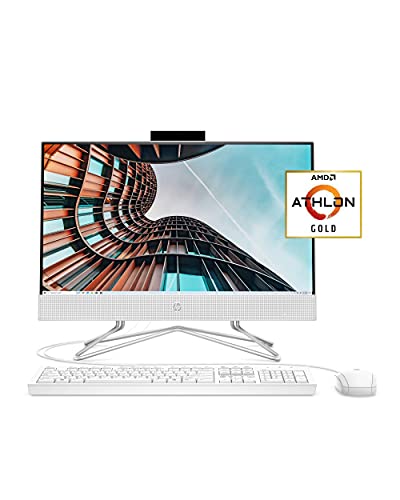
HP 22 All-in-One Athlon Gold 3150U 4GB 256GB 21.5-inch

GMKtec G3S Mini PC Intel N95 8GB DDR4 256GB SSD

GMKtec G10 Mini PC Ryzen 5 3500U 16GB 1TB Triple 4K

GMKtec G11 Mini PC Ryzen Embedded R2514
Apple 2021 iMac M1 24-inch Retina Display Blue

HP OmniDesk Ryzen 5 32GB DDR5 3TB Storage

GMKtec G10 Mini PC Ryzen 5 3500U 1TB SSD Triple 4K
Meet The Standout Selections
The STORMCRAFT Sirius is the only tower in this lineup built specifically for gamers, and it shows from the first glance. Inside, an Intel Core i5-14400F (10 cores, 16 threads, a boost speed around 4.7 GHz) pairs with an Intel Arc B570 graphics card carrying 10GB of GDDR6 video memory. That combination is designed to push modern titles at 1440P resolution, something the all-in-one options ahead simply cannot match.
The chassis includes 16GB of DDR4 RGB memory and a 1TB NVMe solid-state drive, meaning fast game loads and ample storage for a sizable library. Compared to the Apple iMac M4 that comes next, this is a louder, more industrial-feeling box, but it’s also far more capable on the gaming front.
What Pays Off
- 10-core Intel i5-14400F with boost speeds near 4.7 GHz handles modern gaming and streaming at the same time
- Intel Arc B570 with 10GB GDDR6 VRAM is genuinely suited to 1440P play rather than just entry-level 1080P
- 1TB NVMe SSD keeps load times short and lets you install a sizeable game library without juggling files
- RGB-equipped DDR4 memory adds a bit of personality for setups with a windowed case
- VR-ready classification means room to grow into a headset later without buying a new PC
Trade-Offs Worth Knowing
- No monitor, keyboard, or mouse included, so budget for a display and peripherals separately
- Tower form factor eats more floor or desk space than the all-in-one screens ahead
- Arc B570 drivers have matured but still see occasional hiccups in brand-new releases
Quick Facts
Built With These Gamers In Mind
Players who want a real 1440P gaming rig without paying boutique-builder prices will find this hits a sweet spot.
Swap It Out When
Households focused on family homework and streaming would be happier with the HP 24-inch All-in-One Athlon Silver 3050U, which arrives with everything needed in one box.
The 2024 iMac is the most design-forward computer on this list, and the pink finish is genuinely eye-catching without crossing into novelty. Apple’s M4 chip pairs a 10-core CPU with a 10-core GPU on a single piece of silicon, which keeps the machine cool and quiet even under photo editing loads. The all-in-one form factor means a slim screen-and-stand unit with no separate tower to hide.
Configurations vary: you can pick standard or nano-texture glass, 16GB or 24GB of unified memory, and 256GB or 512GB of SSD storage. AppleCare+ extends coverage to three years of accidental damage protection. Compared to the HP 22 All-in-One ahead, this is the same clean aesthetic philosophy, executed at a much higher performance level.
Useful Touches
- 24-inch 4.5K Retina display delivers sharp text and rich color for photo work or video calls
- 10-core CPU and GPU on a single M4 chip keep the chassis silent during everyday use
- Color-matched accessories and slim 11.5mm profile make it a desk statement piece
- Nano-texture glass option reduces glare in sunlit rooms without the typical matte haze
- AppleCare+ tier adds three years of accidental damage coverage and battery service
Some Limits To Know
- 256GB base storage fills quickly with photo libraries, pushing some shoppers toward the 512GB upgrade
- All-in-one design limits internal upgrades; memory is fixed at order time
Whose Desk It Belongs On
Style-conscious creatives and Apple loyalists who want a quiet, elegant hub for editing, browsing, and family tasks will appreciate this iMac.
Pick A Different Pick When
Gamers chasing frame rates should look at the STORMCRAFT Sirius AI Gaming Desktop, which trades aesthetics for raw 3D performance.
HP’s 24-inch all-in-one is the family-room workhorse, pairing an AMD Athlon Silver 3050U processor with 8GB of RAM and a 256GB solid-state drive. The three-sided micro-edge display gives the screen a modern look, while the adjustable tilt stand lets it adapt to a kid doing homework or a parent on a video call. Windows 10 Home is the shipped operating system, and an HD privacy camera with a physical shutter sits above the screen.
The Athlon Silver 3050U is a dual-core chip aimed at everyday tasks, so don’t expect heavy editing, but browsing, email, streaming, and schoolwork all sit comfortably inside its limits. Compared to the GMKtec G3S Mini PC further down, this is a far more kitchen-friendly appliance with nothing extra to plug in.
Useful Strengths
- All-in-one design eliminates cable clutter, ideal for shared family spaces
- Three-sided micro-edge display gives the screen a contemporary, minimal frame
- Built-in HD camera with a slide-switch privacy cover adds peace of mind
- Adjustable tilt stand supports both seated work and standing kitchen-counter use
- 256GB SSD boots Windows and resumes apps noticeably faster than older spinning drives
Practical Considerations
- Athlon Silver 3050U is a dual-core chip that struggles with heavy multitasking or video editing
- 8GB of RAM is comfortable today but limits how many browser tabs a household can keep open
- Cleaning the screen and ventilation grille requires care since the components live behind the panel
Right Fit For
Families who want a single tidy machine for homework, streaming, and video calls without separate speakers or a webcam to buy.
Where A Sibling Pick Shines
Anyone needing serious storage and multitasking headroom should consider the HP OmniDesk Ryzen 5 32GB DDR5 3TB Storage, which trades the integrated screen for raw power.
HP’s 22-inch all-in-one is the most affordable complete computer on this list, aimed at students and first-time users. The Full HD IPS anti-glare panel handles reflections better than older TN screens, which matters when the desk sits near a window. The Athlon Gold 3150U processor and 4GB of RAM keep things moving for basic tasks like email, schoolwork, and streaming.
A wired keyboard and mouse are included in the box, removing the need to buy extras. Compared to the HP 24-inch All-in-One that came before, this model trades screen real estate and RAM for a lower entry price. In my view, it lands as a sensible starting point for a dorm room or a child’s first computer.
Practical Advantages
- 21.5-inch Full HD IPS display with anti-glare coating reduces window reflections
- Wired keyboard and mouse come included, so setup is genuinely out-of-the-box
- Compact 22-inch frame fits tighter desks and dorm rooms
- Built-in HP True Vision HD privacy camera is convenient for school video calls
Things To Weigh Up
- Only 4GB of RAM means Chrome with many tabs open can bog the system down
- Athlon Gold 3150U is fine for basics but noticeably slower than the Ryzen chips later in this list
- Windows 10 Home ships out of the box, which may push some shoppers toward a manual upgrade
Who Will Love This
Students, seniors, and anyone setting up a simple computer for browsing and document work will find this an uncomplicated starting point.
A Better Fit Elsewhere
Remote workers handling larger spreadsheets benefit more from the GMKtec G10 Mini PC Ryzen 5 3500U 16GB 1TB Triple 4K, which offers triple-display support and far more memory.
The GMKtec G3S is the smallest box on this list, and for many readers, that’s the whole appeal. Built around Intel’s 12th-generation N95 chip with a 3.4GHz burst speed, 8GB of DDR4 memory, and a 256GB SSD, it handles office work, light streaming, and dual 4K monitor output without breaking a sweat. The chassis is roughly the size of a paperback book, so it disappears behind a monitor or sits on a crowded shelf.
Three USB 3.2 ports, dual HDMI outputs, Wi-Fi 5, Bluetooth 5.0, and a gigabit Ethernet jack cover the basics. The catch shows up when you compare it to the GMKtec G10 ahead: the N95 is a four-core, four-thread chip that thrives on routine tasks but does not want to run heavy workloads.
What Earns Its Place
- Tiny footprint slips behind a monitor or on a shelf where towers won’t fit
- Dual HDMI outputs support two 4K displays at once, ideal for split-screen productivity
- Fan-assisted cooling keeps the N95 chip comfortable during long workdays
- Three USB 3.2 ports leave room for a mouse, keyboard, and external drive simultaneously
- Gigabit Ethernet and Wi-Fi 5 offer flexible wired or wireless networking
Worth Bearing In Mind
- Intel N95 has only four cores and four threads, so multitasking with many apps can feel tight
- No monitor, keyboard, or mouse included, unlike the HP all-in-ones ahead
- Integrated graphics limit any gaming beyond very light or older titles
Best Suited To
Apartment dwellers and small-office workers who need a tidy second PC for browsing, documents, and dual-monitor setups will appreciate the size.
Not Your Match When
Power users wanting triple-display output and stronger specs should jump to the GMKtec G10 Mini PC Ryzen 5 3500U 16GB 1TB Triple 4K.
The G10 is GMKtec’s mid-range mini PC, pairing AMD’s Ryzen 5 3500U with 16GB of DDR4 memory and a generous 1TB SSD. The Ryzen chip brings four cores, eight threads, and integrated Radeon Vega graphics, which translates to real multitasking and the ability to run triple 4K displays through its HDMI 2.1 and USB-C outputs. It’s marketed for business offices, home setups, and HTPC use, including Proxmox virtualization, which signals strong flexibility for tinkerers.
Compared to the GMKtec G3S covered earlier, the G10 is a clear step up in CPU power and storage. The 2.5G LAN port is a thoughtful touch for users pushing large files over a wired network.
What Stands Out
- Ryzen 5 3500U handles office multitasking, light photo editing, and HTPC playback
- Triple 4K display output through HDMI 2.1 and USB-C supports serious multi-monitor workstations
- 1TB SSD gives ample room for project files, media libraries, and virtual machines
- 2.5G Ethernet port future-proofs wired file transfers on faster home networks
- Compact Nucbox form factor keeps the desk clear while delivering desktop-class performance
Honest Caveats
- Ryzen 5 3500U is a previous-generation mobile chip, so newer workloads may strain it
- Fan noise can rise under sustained CPU load, noticeable in quiet rooms
- No bundled display or peripherals means full setup costs beyond the box itself
Quick Facts
Made For
Home office multitaskers and small business operators who want triple screens, fast storage, and a tiny chassis in one package.
Skip It When
Anyone chasing pure gaming power should pivot to the STORMCRAFT Sirius AI Gaming Desktop, which pairs a dedicated GPU with the same kind of compact ambition.
The GMKtec G11 leans into a different audience: commercial and industrial buyers who need a small computer that runs around the clock. It uses an AMD Ryzen Embedded R2514 processor based on the Zen+ architecture, designed specifically for continuous 24/7 operation. Built-in Radeon graphics add more 3D horsepower than typical mini-PC integrated solutions, which helps in signage and kiosk scenarios.
The emphasis here is durability rather than raw consumer benchmarks. Compared to the G3S reviewed earlier, the G11 is engineered to live behind a digital signage wall or inside an information kiosk, where consumer-grade machines might struggle. For home users, that translates to a quiet, fan-cooled unit that’s well suited to home-server or media-center duties.
Key Advantages
- Rated for continuous 24/7 operation, ideal for home servers, kiosks, and digital signage
- Radeon integrated graphics deliver stronger 3D performance than competing N-class chips
- Zen+ architecture gives the embedded chip better single-thread responsiveness
- Compact metal chassis dissipates heat efficiently under sustained workloads
Less-Strong Areas
- Embedded parts can be harder to source for repairs than mainstream consumer components
- Specialized nature means fewer consumer-grade accessories and guides compared to popular chips
Perfect Match For
Home lab enthusiasts, tinkerers running always-on services, and small-business owners running kiosks will value the 24/7 design.
Reach For A Different Pick When
Households wanting a plug-and-play family PC will find the HP 24-inch All-in-One Athlon Silver 3050U 8GB 256GB a more familiar fit with everything included.
The 2021 iMac with M1 is the older sibling of the M4 model reviewed earlier, and it remains a genuinely attractive option. The 24-inch 4.5K Retina display sits inside an 11.5mm-thin aluminum enclosure, finished here in a deep blue that draws compliments in any room. Apple pairs matching Magic Keyboard and Magic Mouse accessories in the box, so the unboxing experience feels complete.
The M1 chip packs an 8-core CPU and 8-core GPU, with 8GB of unified memory and a 256GB SSD standard. It handles everyday photo editing, video calls, and streaming with ease. The catch: it’s now a generation behind the M4 iMac covered earlier, so shoppers should weigh savings against future software support.
What It Does Well
- Iconic slim aluminum design in a striking blue finish that doubles as décor
- 24-inch 4.5K Retina display renders text and photos with excellent clarity
- M1 chip delivers quiet, cool performance for daily creative tasks
- Color-matched Magic Keyboard and Magic Mouse included in the box
- Tight macOS and iPhone/iPad integration for households already in the Apple ecosystem
Points To Keep In Mind
- M1 trails the M4 in CPU and GPU performance, which matters for heavier workloads
- 256GB base storage can feel tight for media-heavy households
Who Should Grab It
Apple households seeking a stylish, complete package at a lower price than the current generation will find this iMac charming and capable.
Look Elsewhere When
Long-term owners planning to keep the machine for years may prefer the Apple 2024 iMac All-in-One M4 10-Core CPU 10-Core GPU Pink for its newer silicon.
The HP OmniDesk is the most muscle-bound traditional tower on this list. An AMD Ryzen 5 processor with eight cores teams up with Radeon 740M graphics, 32GB of DDR5 memory, and a hybrid 3TB storage setup that combines a 2TB SSD with a 1TB hard drive. The system supports quad monitors, Wi-Fi 6, and ships with a wireless keyboard and mouse. Windows 11 Home comes pre-installed.
This is the desktop for someone who treats the computer as a productivity command center: think traders, content creators, or anyone running a multi-screen workflow. Compared to the HP 24-inch All-in-One earlier, the OmniDesk trades the integrated screen for raw capacity and expandability.
What Works In Its Favor
- 32GB of DDR5 memory is genuinely generous for multitasking and creative apps
- 3TB combined storage (2TB SSD + 1TB HDD) handles media libraries and project files with room to spare
- Quad-monitor support enables serious spreadsheet, trading, or editing workstations
- Wi-Fi 6 and Bluetooth 5.4 cover modern wireless standards
- Wireless keyboard and mouse are included, simplifying setup
Where It May Fall Short
- Tower footprint consumes more desk or floor space than the all-in-one options
- Radeon 740M integrated graphics are solid for productivity but limited for AAA gaming
- No monitor included, so budget for a panel or three (or four)
Right Fit For
Power users running multiple monitors, large datasets, or virtual machines will find this a practical productivity hub.
Consider Something Else When
Anyone chasing AAA gaming frame rates should weigh the STORMCRAFT Sirius AI Gaming Desktop, which pairs a dedicated GPU with similar multitasking capability.
The second GMKtec G10 entry in this roundup offers essentially the same hardware platform as its sibling: Ryzen 5 3500U, 16GB of DDR4 memory, and 1TB of solid-state storage in a tiny Nucbox chassis. Where this listing earns its place is in the HTPC and Proxmox virtualization crowd, where triple 4K output and quiet operation make it a versatile media and lab box. The compact size makes it easy to slot next to a TV or behind a monitor arm.
Compared to the larger GMKtec G3S reviewed earlier, this is the same small footprint but with a more capable AMD processor and triple the storage. In most living rooms and home labs, that’s the right trade.
Real Benefits
- Ryzen 5 3500U delivers smooth playback for 4K streaming and light content creation
- Triple 4K display support turns the unit into a compact productivity or media hub
- 1TB SSD offers plenty of room for media libraries and virtual machines
- Low-power mobile chip keeps electricity costs down during continuous operation
- Nucbox form factor mounts behind monitors or hides beside entertainment centers
Small Limitations
- No dedicated GPU means modern AAA games are off the table
- External monitor, keyboard, and mouse required to complete the setup
Built With Tinkerers In Mind
Home theater PC fans, homelab hobbyists, and anyone wanting a quiet Proxmox node will appreciate the balance of power and size.
Another Choice May Suit
Families wanting one tidy screen-and-stand solution should pivot to the HP 24-inch All-in-One Athlon Silver 3050U 8GB 256GB instead.
What Matters Most Before Choosing Home Computer Desktops
The right pick starts with honest answers about how you’ll actually use the machine. A family computer parked in the kitchen for homework and streaming has different needs than a multi-monitor trading desk or a 24/7 home server.
Processor And Memory Set The Ceiling
The processor (CPU) handles every instruction your computer runs, while memory (RAM) holds the active workspace. Browsers, spreadsheets, and Office apps feel snappy on dual-core chips with 4GB to 8GB of RAM, but heavier workloads like photo editing or running virtual machines need four or more cores and 16GB of RAM or more. The HP OmniDesk with Ryzen 5 and 32GB DDR5 leads this list in raw capacity.
Form Factor Defines Daily Life
All-in-one designs integrate the computer into the screen, saving desk space and reducing cable clutter. They are excellent for shared family rooms and small apartments. Mini PCs sit behind a monitor and offer similar compactness with more flexibility for upgrades. Traditional towers take up more space but allow easier internal expansion. Match the shape to where the machine will actually live.
Storage And Displays Shape Real Workflow
A solid-state drive (SSD) makes a computer feel fast by reading and writing data quickly. Capacities of 256GB suit light users; 1TB or more helps anyone with sizable photo, video, or project libraries. Display support matters too. Dual HDMI outputs cover most split-screen needs, while triple or quad outputs enable true command-center setups for traders and creators.
Real Use Cases To Anchor The Decision
Gamers should prioritize a dedicated GPU like the Intel Arc B570 in the STORMCRAFT Sirius. Families benefit most from the tidy HP all-in-ones. Home-office multitaskers will appreciate triple-display support and 16GB of RAM. Always-on home servers need industrial-grade embedded chips such as the GMKtec G11.
Smart Considerations Before You Decide
Pitfalls Shoppers Hit
The most common mistake is buying on raw specifications without considering the full setup. A barebones mini PC may skip the monitor, keyboard, and mouse, pushing the real cost higher than expected. Another trap is underestimating storage, especially for photo-heavy households. Finally, ignoring the room where the computer will live leads to towers crammed into small desks or all-in-ones fighting window glare.
Where The Extra Money Goes
Spending more typically buys better build quality, faster components, and longer useful life. An M4 iMac outlasts an entry-level all-in-one for creative work by several years. A Ryzen 5 mini PC with 16GB handles multitasking that an N95 chip struggles with. For shoppers who keep computers four or more years, paying for stronger specs and better display quality often pays off in reduced frustration later.
Frequently Asked Questions
How Much RAM Do I Really Need?
For basic browsing, email, and streaming, 8GB is comfortable, while 16GB gives headroom for multitasking and creative apps. Heavy users running virtual machines should aim for 32GB.
Are All-In-One Desktops Easy To Upgrade?
All-in-ones are convenient but limited; most have memory fixed at order time, and storage is often the only user-replaceable component. Anyone planning future upgrades may prefer a mini PC or traditional tower.
Can Mini PCs Handle Gaming?
Mini PCs handle light or older games well, but modern AAA titles benefit from a dedicated GPU. The STORMCRAFT Sirius in this list is built specifically for that purpose.
What Is The Advantage Of An M-Series iMac?
Apple’s M-series chips combine CPU, GPU, and memory on a single piece of silicon, which keeps the chassis silent, cool, and efficient. They integrate tightly with iPhones and iPads for households already in the Apple ecosystem.
Do I Need Wi-Fi 6 Or 2.5G Ethernet?
Wi-Fi 6 improves wireless speed and reliability on modern routers, while 2.5G Ethernet pushes faster wired transfers for users moving large files. Either is useful but not essential for basic home use.
The Takeaway
The best home desktop is the one that fits the room, the workflow, and the household without drawing attention to itself. Style seekers will love either iMac, multitaskers will appreciate the G10 or OmniDesk, and gamers will find their match in the STORMCRAFT Sirius. Match the shape and specs to how you actually use a computer, and the rest takes care of itself.