Setting up a home server used to mean wrestling with a beige tower that sounded like a hairdryer and lived in the closet. Today’s options run quieter, sip less power, and serve everything from Plex libraries to Proxmox clusters without drama. Whether you want a polished NAS appliance that anyone in the family can use or a rack-grade workhorse for virtual machines, the lineup below covers both ends of the spectrum.
The Leading Options At A Glance

PCSP PowerEdge R640 2X Silver 4110 32GB (Renewed)

PCSP DL380 G10 2U 40-Core 256GB (Renewed)
PCSP DL360 Gen10 1U 40-Core 512GB
PCSP DL380 G10 2U 40-Core 768GB (Renewed)

Synology RackStation RS1221+ (Diskless)

Synology DiskStation DS1019+ 5-Bay NAS

Synology DS423+ 4-Bay Desktop NAS

UGREEN DXP4800 GT 4-Bay AMD NAS

Dell PowerEdge R640 32-Core 7.7TB SSD

PowerEdge R640 2X Gold 6134 32GB (Renewed)
Inside Each Recommended Option
Dell’s 14th-generation R640 squeezes dual-socket compute into a slim 1U rack chassis, making it a familiar sight in home labs where rack space matters more than aesthetics. The PCSP rebuild pairs two Xeon Silver 4110 chips for 16 physical cores and 32 threads of capacity, enough headroom to run several virtual machines side by side without choking.
Unlike the larger DL380 options covered below, this unit fits shorter 24-inch racks and shallow server cabinets with room to spare. For homelab tinkerers running Proxmox, ESXi, or a fleet of Docker containers, the dual-CPU layout and H730 RAID controller handle mixed I/O patterns comfortably. Most users find it well-suited to a garage rack or basement closet with basic ventilation.
What Earns Its Place
- Dual Xeon Silver 4110 processors deliver 16 cores and 32 threads for parallel workloads.
- 8-bay 2.5-inch SFF chassis accepts SSD or SAS drives depending on performance goals.
- H730 RAID controller supports hardware-accelerated arrays for data protection.
- Four 1GbE network ports enable link aggregation for higher throughput.
- 1U form factor frees up rack space in compact home setups.
Things To Consider
- Renewed units may show minor cosmetic wear from prior enterprise use.
- Fan noise at full load can be intrusive in a living area.
- Power draw runs higher than a typical desktop NAS under idle.
Who It Suits Best
Homelab hobbyists running multiple VMs or container stacks who already own a short-depth rack.
Consider Something Else When
The Synology DS423+ suits users wanting a quiet desktop appliance more than a rack-mounted compute platform.
The DL380 Gen10 is the Swiss Army knife of HPE’s rack lineup, and this PCSP configuration pushes it into serious home-server territory. Two Xeon Gold 6148 chips add up to 40 cores running at 2.4GHz, which keeps multi-tenant workloads responsive even when several services compete for resources.
Eight 1.2TB 10K SAS drives ship pre-installed, giving roughly 9.6TB of raw spinning capacity for bulk media archives. The P408i-a RAID controller with 2GB of cache handles write-heavy tasks without saturating CPU cycles. For Plex users juggling 4K transcodes alongside backup jobs, the dual 10GbE SFP uplinks remove the network as a bottleneck.
The Upside
- 40 physical cores handle dense virtualization and container workloads without contention.
- Pre-installed SAS drives remove the guesswork from initial storage provisioning.
- Dual 10GbE ports future-proof the network link for faster backbone switches.
Points To Note
- 2U chassis demands more rack depth than the R640 picks.
- Renewed hardware should be tested for capacitor health on arrival.
- Higher core count increases total system cost relative to entry alternatives.
Feature Snapshot
Made For
Power users hosting Plex libraries, game servers, and virtual machines from a single chassis.
Where Another Pick Suits Better
The Dell PowerEdge R640 32-Core 7.7TB SSD fits buyers needing flash-speed storage more than spinning capacity.
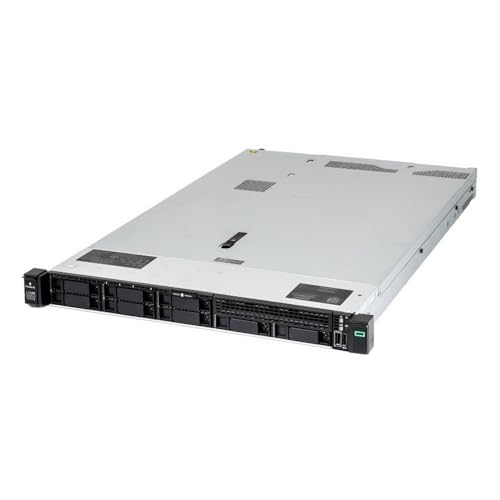
HPE’s DL360 Gen10 is the depth-friendly sibling of the DL380, and PCSP’s build keeps the core count high while shrinking the chassis. The same dual Gold 6148 setup produces 40 cores, but the 1U format opens up installations where the DL380 simply will not fit.
Empty 2.5-inch caddies ship in the box, leaving drive selection to the buyer’s taste. Dual 10GbE SFP ports and a P408i-a controller mirror the larger unit’s networking profile. For renters or apartment dwellers running a half-rack closet, this build avoids landlord concerns about floor weight or noise footprint near a bedroom wall.
Positive Points
- 40-core compute density in a shallow 1U chassis.
- 512GB DDR4 RAM pre-installed for immediate VM deployment.
- Dual 10GbE networking supports modern switch uplinks.
- Empty trays let the shopper choose their own SSD or SAS mix.
Worth Bearing In Mind
- Drives are not included, raising the total project cost.
- 1U cooling can run warmer under sustained multi-core load.
Best Suited To
Shallow-rack owners who need DL380-class compute in a smaller physical envelope.
Not Your Match When
The Synology RackStation RS1221+ serves users wanting plug-and-play software over raw CPU power.
For workloads where memory matters more than cores, this DL380 G10 doubles down on RAM. PCSP outfits the same dual Gold 6148 platform with a generous 768GB of DDR4, which removes the swap-file penalty that often throttles VM-heavy home labs.
Eight 1.2TB SAS drives handle the storage layer, and the dual 10GbE plus quad 1GbE layout matches the 256GB sibling above. Researchers running in-memory databases, developers compiling large projects, or families hosting many simultaneous Jellyfin streams all benefit from the breathing room. The honest read is that anyone running fewer than ten VMs probably does not need this much RAM, so right-sizing matters.
Noteworthy Benefits
- 768GB DDR4 keeps dozens of VMs resident without disk swapping.
- Same proven 40-core Xeon Gold 6148 foundation as earlier picks.
- P408i-a RAID controller with 2GB cache accelerates writes.
Small Caveats
- Premium memory tier inflates the cost versus the 256GB variant.
- Full memory population draws more power at idle than lighter configs.
Who Will Love This
Home-lab operators running memory-hungry VMs like database servers or build agents.
Skip It When
The UGREEN DXP4800 GT 4-Bay AMD NAS covers lighter file-server duties at a friendlier entry point.
Synology’s RS1221+ trades raw compute muscle for a polished software experience that the rest of this list cannot match. DiskStation Manager wraps backups, file sharing, and container apps in a clean web interface, making it approachable for households that do not want to learn Linux storage stacks.
Eight 3.5-inch bays accommodate sizable archives, and the short-depth 2U chassis fits shallow racks common in home installations. Unlike the PCSP rack servers covered above, this unit ships without drives, so storage budgeting happens separately. Synology’s ecosystem also tends to age well through software updates, which is worth knowing for anyone planning a five-year ownership window.
Features That Help
- DSM operating system streamlines backups, snapshots, and remote access.
- Eight bays support large RAID arrays for family photo and video libraries.
- Short-depth 2U design fits compact home racks.
Things To Weigh
- Drives sold separately raise the realistic total cost.
- App ecosystem restricts deep customization compared to a Linux server.
The Right Fit
Small offices and prosumers wanting managed software with rack-friendly hardware.
Look Elsewhere When
The PCSP DL360 Gen10 1U 40-Core 512GB fits shoppers needing 40 cores of compute over a managed NAS.
The DS1019+ represents Synology’s mature desktop NAS formula, balancing capacity, encryption, and quiet operation. Five drive bays hold enough storage for most households without forcing the larger 8-bay footprint of the RS1221+ covered earlier.
An AES-NI hardware encryption engine keeps file transfers secure without choking throughput, and 8GB of DDR3L RAM handles multiple concurrent streams. The quad-core CPU reads and writes encrypted data at over 225 MB/s, fast enough for 4K media streaming to several devices. Most families find the desktop form factor easier to place than a rack unit, especially on a bookshelf or cabinet shelf.
Notable Upsides
- Quad-core CPU with AES-NI maintains speed during encrypted transfers.
- Five bays accommodate mixed drive sizes for flexible capacity planning.
- 8GB DDR3L handles multiple concurrent users without slowdown.
Honest Caveats
- No included drives means separate purchase is required.
- DDR3L memory is older than newer DDR4-equipped models in this list.
Key Specs
Perfect Match For
Home offices managing shared files, Time Machine backups, and media streaming in one box.
A Better Fit Elsewhere
The Synology DS423+ 4-Bay Desktop NAS is a quieter pick for media-centric living rooms.
Synology’s DS423+ targets households that want a NAS but do not want to hear one. The compact desktop shell houses four drive bays and runs cool enough to sit next to a TV cabinet without raising eyebrows.
Sequential throughput hits 226 MB/s read and 224 MB/s write, which covers backups, photo syncing, and surveillance streams. Built-in tools for file management, photo organization, and Synology’s Hyper Backup let owners consolidate services that would otherwise need separate subscriptions. Unlike the rack-bound picks above, this one plugs into a wall outlet and stays out of the way.
Strong Points
- Compact desktop footprint fits living-room furniture without dominating space.
- Sequential speeds around 226 MB/s handle backup jobs quickly.
- Synology’s DSM includes file, photo, and surveillance apps out of the box.
Where It May Fall Short
- Four bays cap long-term expansion compared to 5- or 8-bay siblings.
- Diskless sale means storage drives are an extra purchase.
Whose Shelf It Belongs On
Living-room and small-apartment owners wanting a silent media and backup hub.
Another Choice May Suit
The Synology DiskStation DS1019+ gives shoppers an extra bay when capacity matters more than footprint.
UGREEN’s DXP4800 GT pushes the desktop NAS category toward enthusiast territory with an AMD Ryzen Embedded R2514 at its core. Four cores, eight threads, and boost speeds up to 3.7GHz give this unit the muscle for Docker apps, media transcoding, and multi-user workloads without breaking a sweat.
Dual 10GbE networking is unusual for a four-bay desktop and removes the gigabit bottleneck that frustrates video editors. Two M.2 NVMe slots accept SSD cache for hot data, accelerating reads beyond what spinning disks can deliver. A 4K HDMI output turns the unit into a media-player replacement, which appeals to anyone consolidating streaming boxes and storage in one device.
Positive Takeaways
- AMD Ryzen R2514 CPU delivers strong multi-thread performance for its class.
- Dual 10GbE ports beat most desktop NAS units in network speed.
- M.2 NVMe slots enable SSD caching for frequently accessed files.
- 4K HDMI output supports direct media playback without a separate streamer.
Details To Watch
- Newer UGREEN OS ecosystem is less mature than Synology’s DSM.
- Eight-gigabyte base RAM may require upgrade for heavier Docker use.
Quick Facts
Right Fit For
Content creators and power users who want 10GbE and NVMe cache in a desktop NAS.
Swap It Out When
The Synology RS1221+ suits offices preferring long-proven software over newer hardware features.
Dell’s R640 platform returns with a configuration tuned for SSD-heavy workloads. Thirty-two physical cores drive parallel compute, while 7.7TB of pre-installed SSD storage skips the slow-spinning disks that hold back some older rack servers.
Flash storage accelerates database queries, VM boot times, and cache layers in software-defined storage stacks. For home labs experimenting with vSAN, Ceph, or ZFS mirrored pools, the included drives save a shopping trip and a compatibility headache. Rails ship in the box, which removes one of the common pain points of buying enterprise hardware for a home rack.
The Good Stuff
- 32-core Xeon platform supports dense virtualization and container hosts.
- 7.7TB of SSD storage eliminates spinning-disk bottlenecks.
- Sliding rails included for straightforward rack mounting.
Possible Compromises
- SSD total reduces bulk capacity for media archives.
- Renewed SSD health should be verified early in ownership.
Built With In Mind
Database developers and software-defined storage enthusiasts building low-latency home labs.
Reach For A Different Pick When
The PowerEdge R640 2X Gold 6134 32GB (Renewed) fits shoppers needing higher clock speed on a tighter budget.
This R640 rounds out the list with a clock-speed-forward configuration that trades core count for per-core responsiveness. Dual Gold 6134 chips run at 3.2GHz across 16 cores, a welcome change when single-thread performance drives compile times or database transactions.
Eight empty 2.5-inch trays wait for whatever drives the project requires, and the PERC H730p controller supports RAID modes for data protection. Entry-level home labs running a handful of VMs and a backup target find 32GB of RAM workable, though upgrades become attractive as workloads grow. Compared to the larger DL380 picks above, the 1U footprint keeps the unit approachable for first-time rack owners.
Advantages To Know
- 3.2GHz clock speed benefits single-threaded workloads like compilation.
- Eight SFF trays accept flexible SSD or SAS combinations.
- PERC H730p supports hardware RAID for data redundancy.
Factors To Consider
- 32GB RAM limits simultaneous VM count compared to higher-tier builds.
- No drives included means an extra purchase step.
- Renewed hardware requires a quick burn-in period for peace of mind.
At A Glance
Who Should Grab It
First-time rack owners who want a faster-clocking entry platform for a small VM fleet.
Where A Sibling Pick Shines
The PCSP PowerEdge R640 2X Silver 4110 32GB suits users who prefer more cores at a similar price tier.
Choosing Home Server Hardware That Fits
Form Factor And Physical Footprint
Rack servers deliver dense compute but demand rack space, depth clearance, and ventilation. Desktop NAS units sit on a shelf, run quieter, and trade raw performance for placement flexibility. Shallow-depth 1U chassis like the PCSP DL360 Gen10 40-Core suit renters or apartment dwellers with limited closet depth, while 2U rack units favor households with dedicated server closets.
CPU Cores Versus Clock Speed
Workloads fall into two rough camps: parallel tasks that love many cores (video transcoding, container clusters, database scans), and serial workloads that benefit from higher per-core clocks (compilation, single-user apps, lightweight VMs). The Xeon Gold 6148 picks favor parallelism with 40 cores, while the Xeon Gold 6134 build leans on 3.2GHz clocks for snappier single-thread responses.
Memory Sizing For Virtualization
RAM is the most common bottleneck in home labs, since running several VMs without swap is far smoother than chasing disk cache. Builds ranging from 32GB up to 768GB are available across this list, with most homelab operators finding 128GB a comfortable midpoint. Right-sizing memory at purchase prevents the upgrade cycle that follows a year of growth.
Storage Strategy And Drive Selection
Spinning SAS drives deliver bulk capacity at lower cost, while SSDs accelerate latency-sensitive workloads. Mix-and-match configurations work well: SSD for the OS and active VMs, SAS for media archives and backups. Empty-drive picks like the PowerEdge R640 2X Gold 6134 require separate drive purchases, so factor that into the total project budget before committing.
Software Ecosystem And Management
Synology’s DiskStation Manager streamlines backups, snapshots, and remote access for users who prefer a managed interface. Linux-based platforms such as Proxmox, TrueNAS, or unRAID offer deeper customization but demand more setup time. The honest read is that most households value polished software over raw configuration freedom.
Smart Buying Advice For Home Server Shoppers
Pitfalls Shoppers Hit
Underestimating power draw catches many first-time rack buyers off guard, since dual-socket servers idle at higher wattages than typical desktops. Forgetting to budget for rails, drive caddies, and network cables also derails installations. Renewed hardware should be tested promptly upon arrival, as capacitor wear and SSD health vary across previous enterprise deployments.
Where The Extra Money Goes
Higher-tier configurations buy more memory, faster storage, and stronger networking rather than just brand prestige. The PCSP DL380 G10 2U 40-Core 768GB delivers memory headroom that the 256GB sibling cannot match for database workloads. Stepping up to SSD-equipped builds like the Dell PowerEdge R640 32-Core 7.7TB SSD trades raw capacity for the latency improvements that benefit virtualized storage stacks.
Frequently Asked Questions
How Much RAM Do I Need For A Home Server?
For most households running a Plex library and a few VMs, 32GB is workable but tight. Stepping up to 128GB gives comfortable headroom for mixed workloads, while 256GB and above suits dedicated virtualization or database use.
Are Renewed Enterprise Servers Reliable?
Renewed enterprise hardware can run reliably for years when properly tested on arrival. Buyers commonly report checking capacitor health, fan noise, and drive SMART data before deploying any unit into a production role.
What Is The Difference Between NAS And A Home Server?
A NAS (Network Attached Storage) focuses on file sharing, backups, and media streaming through a managed interface like Synology DSM. A home server typically runs general-purpose operating systems and handles virtualization, containers, and custom applications beyond simple storage.
Do I Need A Rack For A Home Server?
Only rack-mount units require a rack. Desktop NAS enclosures like the Synology DS423+ or UGREEN DXP4800 GT sit on any shelf with adequate ventilation, making them friendlier for living spaces.
Is 10GbE Networking Necessary At Home?
For most households, gigabit Ethernet covers everyday streaming and backups. 10GbE becomes valuable when multiple users edit large media files, run fast backups to SSD arrays, or transfer virtual machine images between servers.
Wrap Up
Home server shopping comes down to honest trade-offs: rack density versus quiet desktop convenience, raw cores versus clock speed, bulk spinning capacity versus SSD speed. Match the form factor to your space, size memory for the workloads you actually run, and pick a software path you will still want to maintain three years from now. The right answer is the one you can live with day after day, not the one with the flashiest spec sheet.