I’ve spent years tracking what makes a recording setup actually work in a spare bedroom, a converted closet, or a corner of the kitchen. The interface is the quiet engine behind every vocal, guitar, and podcast session, and picking the wrong one leaves you fighting latency, weak preamps, and channel-count ceilings just as your creative momentum peaks.
These nine Home Studio Interfaces cover the full spread: tight two-channel desktops for singer-songwriters, multi-input racks for band tracking, and mobile-first units for creators bouncing between locations. Every pick solves a specific problem, and every shortcoming is named honestly so you can match the tool to the way you actually record.
The Lineup, Simplified

Universal Audio Volt 2 USB Audio Interface

Focusrite Scarlett 18i20 3rd Gen USB Audio Interface

SSL SSL2+ 2-In/4-Out USB-C Audio Interface

Arturia MiniFuse 2 USB Audio & MIDI Interface

Focusrite Scarlett 8i6 3rd Gen USB Audio Interface
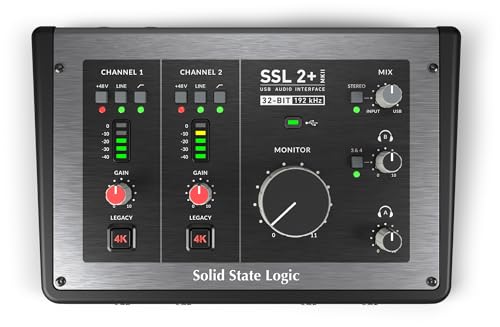
SSL 2 MKII Plus USB-C Audio Interface 2×4

MAONO P1 USB Audio Interface with 70dB Gain

Focusrite Scarlett 18i8 3rd Gen USB Audio Interface

Universal Audio Volt 276 USB Audio Interface
The Details Behind The Selections
The Volt 2 is the interface I’d hand to a singer-songwriter building a first serious setup around a single condenser microphone. It borrows the character of Universal Audio’s classic 610 tube preamp (the kind of preamp found in legendary recording consoles) through a switchable Vintage mode, which adds gentle harmonic warmth without needing extra plug-ins (software effects that run inside your computer). In a quiet bedroom at midnight, that tone-shaping switch does meaningful work on dry vocals.
For most soloists, the two-input layout covers a vocal mic and an acoustic guitar simultaneously, and the included LUNA workstation gives a working bed for tracking right out of the box. Compared to the Focusrite Scarlett 8i6 coming up later, the Volt 2 trades extra I/O for richer preamp flavor in a smaller footprint.
The Practical Payoff
- Vintage mode delivers real analog coloration on every take
- Up to 24-bit / 192 kHz conversion (recording resolution that preserves fine detail) captures vocal nuances faithfully
- Compact metal chassis survives daily transport between rooms
- Included DAW (digital audio workstation) software removes a separate purchase step
- Bus-powered (draws electricity from the computer’s USB port) design keeps the desktop cable-free
Things To Consider
- Only two inputs cap the ceiling for multi-mic sessions
- Owners commonly report the included software bundle has a steeper learning curve than simpler DAWs
Key Specs
Made For
Solo vocalists and songwriters recording one or two sources at a time in a home studio.
Where Another Pick Suits Better
Band sessions needing eight or more simultaneous microphones belong on the Focusrite Scarlett 18i20 3rd Gen instead.
Eight mic preamps with Air mode, eight line inputs, eight line outputs, and built-in talkback (a small microphone used to speak to musicians in the recording room from the control room) make the 18i20 3rd Gen a genuine band-tracking hub. The Air circuit lifts high-end presence on acoustic instruments the way a hardware EQ would, which matters when you’re committing drum overheads and ribbon mics to tape-style mixes.
In a project-studio rack, the 18i20 sits between computer and outboard gear with enough analog real estate to handle a full live take. Where the Universal Audio Volt 2 favors character, this one leans on sheer scale and connectivity.
Notable Gains
- Eight preamps capture a full drum kit with room mics included
- Air mode adds presence and air to vocals and acoustic sources
- 24-bit / 192 kHz converters handle demanding mastering chains
- Dedicated talkback mic streamlines producer-artist communication
- Speaker switching lets you audition mixes on two pairs of monitors
Points To Note
- The 1U rack footprint (a standard equipment-shelf slot measuring about 1.75 inches tall) demands dedicated shelf space
- Driver setup on older operating systems may need manual configuration
- The Air feature introduces coloration that some engineers find inconsistent on already-bright mics
Quick Facts
Best Suited To
Engineers tracking full bands or running hybrid analog-digital workflows in a dedicated project room.
Skip It When
Solo creators recording a single voice should reach for the Arturia MiniFuse 2 to save money and shelf space.
The SSL 2+ carries the same console DNA (the analog circuitry heritage of large-format studio mixing desks) found in SSL’s large-format studio consoles, condensed into a desktop footprint that fits beside a laptop. The Legacy 4K button, inspired by classic SSL console summing, adds a noticeable bump in presence and harmonic edge to whatever source you push through it. For tracking vocals and acoustic instruments, that single button changes the entire vibe of a session.
The 2-in / 4-out layout adds extra outputs compared to the Universal Audio Volt 2, which helps anyone running a subwoofer (a dedicated low-frequency speaker) or alternate monitor pair alongside main speakers.
The Helpful Details
- SSL-designed preamps deliver low-noise gain across dynamic and ribbon mics
- Legacy 4K adds analog-flavored coloration without plug-ins
- USB-C connectivity simplifies modern laptop hookups
- Four line outputs support surround or dual-monitoring setups
Worth Noting
- Only two simultaneous mic inputs limit overdubbing (recording additional parts over an existing track) workflows
- The Legacy 4K effect is subtle on already-processed sources
Whose Shelf It Belongs On
Producers and engineers who want console-grade character on a small-format interface.
A Better Fit Elsewhere
Streamers needing phone integration should look at the MAONO P1, which is purpose-built for mobile workflows.
Bedroom producers running hardware synths and drum machines alongside vocal mics usually need MIDI I/O, which is the protocol that lets electronic instruments and controllers talk to a computer. The MiniFuse 2 folds MIDI in and out alongside two analog inputs, removing the USB-MIDI adapter that plagues many small setups. The housing feels denser than typical plastic interfaces in this size class.
For beatmakers pairing a controller or a Eurorack (a modular synthesizer format) rig with a condenser mic, this is one of the few small units that handles both jobs cleanly.
Everyday Perks
- MIDI in/out keeps hardware synths and controllers wired to one box
- USB-C power and data over a single cable
- Solid build quality from a brand with deep synth heritage
- Compact form factor slips behind a laptop screen
Trade Offs
- Two inputs restrict any session past vocal-plus-instrument
- Headphone amp (the built-in amplifier driving your headphones) is modest for high-impedance studio cans (headphones that demand more power to sound their best)
Feature Snapshot
Right Fit For
Beatmakers and electronic producers combining a mic with hardware synths or controllers.
Look Elsewhere When
Vocal-only creators should consider the SSL 2 MKII Plus for richer mic preamp color.
The Scarlett 8i6 is the middle child of the third-generation Scarlett line, sized for songwriters who want more than a two-channel box without committing to a full rack unit. Two independent headphone outputs with dedicated volume knobs make it genuinely useful for co-writing sessions where a singer and a guitarist each need their own monitor mix.
The Air feature on the Scarlett preamps is a friend to dull ribbon mics and condensers that need a little lift. Compared to the Volt 2, the 8i6 trades preamp flavor for higher channel count and flexible monitoring.
The Good Stuff
- Two independent headphone outs simplify producer-and-artist setups
- 24-bit / 192 kHz conversion across all inputs and outputs
- Air mode adds presence to vocals and acoustic instruments
- Compact chassis fits beside a laptop or on a shallow shelf
Honest Caveats
- No built-in talkback mic for larger sessions
- Plastic chassis picks up scuffs faster than metal alternatives
Feature Rundown
Who It Suits Best
Songwriters, duos, and streamers who want headroom beyond a two-channel interface without rack complexity.
Not Your Match When
Engineers tracking eight simultaneous mics should step up to the Focusrite Scarlett 18i8 3rd Gen.
The MKII Plus refresh refines SSL’s entry-level interface with updated conversion and USB-C connectivity, addressing the most common requests from the original SSL 2+ community. The preamps remain a highlight for anyone recording vocals or acoustic guitar in untreated rooms, where a clean, low-noise front end is the difference between a usable take and a noisy one.
The 2×4 I/O configuration gives extra outputs for routing a subwoofer or a hardware monitor controller without giving up the small-footprint advantage that desktop producers rely on.
Points In Its Favor
- Updated converters improve clarity over the previous generation
- USB-C simplifies modern laptop connections
- Legacy 4K analog enhancement retains SSL’s signature coloration
- 2×4 output routing supports expanded monitoring configurations
Small Caveats
- Two-input ceiling persists for the form factor
- Owners report firmware updates may briefly interrupt driver stability
Built With In Mind
Singers and acoustic-instrument players who prioritize preamp character and clean conversion.
Consider Something Else When
Multi-mic podcasters should consider the Focusrite Scarlett 8i6 3rd Gen for extra channels.
Mobile streamers and podcasters bouncing between a laptop and a phone run into the same wall: most interfaces assume a single computer host. The MAONO P1 uses dual USB ports with MFi certification (Apple’s official approval for iOS hardware accessories) so a creator can route a phone call into a recording session on a Mac or PC, then capture the mix on the mobile device. That dual-host workflow is rare at this size.
The 70dB of clean gain handles demanding dynamic mics like the SM7B without requiring an inline booster, which streamlines any desktop rig where extra hardware clutter kills the workflow.
Noteworthy Benefits
- Up to 70 dB gain drives gain-hungry dynamic mics without extras
- Dual USB ports enable simultaneous computer and phone routing
- Independent mute control per channel helps live streamers
- Loopback (a feature that sends computer audio back into the recording) supports call-in podcast formats
Where It May Fall Short
- Routing software adds a configuration step for less technical creators
- Preamps are optimized for spoken word rather than nuanced vocal tracking
At A Glance
Perfect Match For
Solo streamers and podcasters who record or broadcast across phone and computer in the same session.
Another Choice May Suit
Bedroom producers focused purely on music should pick the Universal Audio Volt 2 for richer vocal tone.
The 18i8 3rd Gen splits the difference between the smaller 8i6 and the larger 18i20, giving eight inputs in a chassis that still feels desktop-friendly. Small ensembles tracking drums, bass, guitar, and a scratch vocal at once find real headroom here without dedicating a full rack unit to the interface.
The third-generation preamps add the Air mode that brightens sources without harshness, and the conversion runs at full 24-bit / 192 kHz across the bus. Where the 8i6 covers songwriters, this unit stretches into band territory.
Everyday Wins
- Eight simultaneous inputs cover small-ensemble tracking
- Air mode adds presence to dull ribbon and dynamic mics
- Solid driver performance across macOS and Windows
- Multiple headphone and monitor outputs simplify dual-engineer setups
Some Limits To Know
- No talkback mic for engineer-to-room communication
- Larger chassis footprint than the 8i6 on a tight desk
Who Should Grab It
Project-studio owners and small-ensemble recordists who need eight inputs in a desktop form factor.
Where A Sibling Pick Shines
Producers wanting full talkback and speaker switching should step up to the Focusrite Scarlett 18i20 3rd Gen.
The Volt 276 is the vocal-tuned cousin of the Volt 2, adding a built-in analog compressor inspired by the legendary 1176 (a hardware compressor long used to control vocal dynamics in pro studios). For podcasters and singers who want consistent vocal levels before any software touches the signal, that onboard compression removes a lot of mix-stage guesswork.
It carries the same Vintage preamp mode as the Volt 2, so character and tone shaping are stacked: warmth from the preamp, control from the compressor. Compared to the Universal Audio Volt 2, this unit trades a clean signal path for an integrated dynamics stage.
Notable Upsides
- Built-in analog compressor shapes vocal dynamics before conversion
- Vintage mode delivers classic preamp character on every take
- Included DAW and UAD plug-in access (UAD is Universal Audio’s ecosystem of studio-quality software processors) extends the production toolset
- Two headphone outputs support collaborative sessions
Things To Weigh
- Onboard compression is fixed-ratio, so engineers wanting precise dynamics control will still reach for plug-ins
- Two mic inputs limit multi-source recording scenarios
The Right Fit
Vocal-first producers, podcasters, and streamers who want preamp character plus built-in dynamics control.
Reach For A Different Pick When
Multi-mic music producers should pick the Focusrite Scarlett 18i8 3rd Gen for expanded channel count.
What Matters Most Before Choosing Home Studio Interfaces
Match The Interface To Your Session, Not The Spec Sheet
The most common regret I see in home studios is buying for tomorrow’s session instead of today’s. A solo vocalist recording one mic and a guitar needs a clean two-input unit with character; a band tracking drums needs eight preamps on day one. Start by counting how many microphones you’ll plug in during your busiest realistic session, then add a small buffer for growth.
Preamps Define The Sound More Than The Specs
Conversion rates and bit depth (the two numbers that describe recording resolution) matter, but preamps shape the actual sonic character of every take. Features like Universal Audio’s Vintage mode, Focusrite’s Air circuit, and SSL’s Legacy 4K all add analog-style coloration that you cannot recover later in software. For vocals and acoustic instruments especially, preamp flavor matters more than a modest bump in sample rate.
Latency And Driver Stability Decide Daily Enjoyment
Latency is the small delay between playing or singing a note and hearing it back through your headphones. Drivers (the background software that lets the interface talk to your computer) and buffer size determine how noticeable that delay becomes. Class-compliant drivers (plug-and-play software that works without manual installation) on both Mac and Windows reduce setup friction, and a unit that handles low-latency monitoring through a hardware knob keeps the workflow responsive during tracking.
Physical I/O Shapes Your Real Workflow
Headphone output count, monitor switching, talkback, and MIDI ports all affect daily use. A unit with two independent headphone amps and a hardware monitor knob solves real session problems without needing extra gear. For hardware synth users, MIDI I/O on the interface removes a separate adapter and simplifies the rig.
Key Considerations Across These Picks
Where Shoppers Go Wrong
Treating channel count as the only priority leads to overkill purchases for solo creators and under-powered setups for bands. The smarter move is matching inputs and outputs to a realistic session plan: vocal-and-guitar, full band, or streaming-with-callers. Buying more interface than needed ties up budget that could go toward microphones or acoustic treatment, where it usually delivers bigger sonic returns.
The Case For Spending Up
Higher-tier interfaces in this category earn their cost through better preamps, lower noise floors (the measure of how much hiss the electronics add to a quiet recording), and workflow features like talkback and speaker switching. For vocalists recording every day, the Universal Audio Volt 276’s onboard compressor is the kind of integrated tool that saves time and improves consistency. For band engineers, the Focusrite Scarlett 18i20’s eight preamps and talkback remove workarounds that smaller units force you to build around.
Frequently Asked Questions
How many inputs do I really need in a home studio interface?
Two inputs work for singer-songwriters tracking one mic plus an instrument. Drums, full bands, and group podcasts typically need six to eight. Most people overbuy here; the safer move is matching your busiest realistic session plus a small buffer.
What is the difference between bit depth and sample rate?
Bit depth controls dynamic range (how loud a recording can get before distorting); sample rate controls frequency response (how much high-frequency detail is captured). For most home recording, 24-bit / 48 kHz is plenty, and 24-bit / 192 kHz gives headroom for professional delivery formats.
Do I need an interface with MIDI for my home studio?
Only if you connect hardware synths, drum machines, or MIDI controllers. Pure vocal and guitar workflows never touch MIDI, and producers working entirely in software usually skip it too. Bedroom producers mixing hardware and software benefit most from a unit with MIDI in and out.
Are bus-powered interfaces reliable for daily use?
Yes, most modern bus-powered units draw stable current from a computer’s USB port and handle daily sessions without issue. Studios recording long band sessions sometimes prefer externally powered units for added stability, but solo creators rarely notice a difference.
What is talkback and when does it matter?
Talkback is a small built-in microphone that lets the producer speak to artists in the recording room from the control room. It matters most in multi-room setups and band-tracking sessions. Solo bedroom producers recording in the same room as the computer rarely need it.
Final Verdict
The right interface depends entirely on how you record, not on what looks impressive in a spec sheet. Solo vocalists should start with the Universal Audio Volt 2 or Volt 276 for preamp character, band recordists need the Focusrite Scarlett 18i20 or 18i8 for headroom, and mobile creators fit the MAONO P1 to their phone-and-computer reality. Match the gear to your actual sessions, and the right pick becomes obvious.