Shopping for a new computer on a budget used to mean settling for lag and bulk. Today’s inexpensive desktop PCs handle documents, streaming, video calls, and even light creative work without emptying your wallet. I’ve sorted through ten compact and full-size machines that deliver solid everyday performance, from Apple’s tiny M4-powered Mac mini to gaming-ready towers like the Skytech Crystal. Each pick fits a specific kind of user, whether you’re working from home, studying, or building a media center.
An Overview Of The Picks

Apple 2024 Mac mini M4 Chip Desktop Computer 16GB 256GB
Apple 2024 Mac mini M4 Chip Desktop Computer 16GB 512GB

GEEKOM IT12 Mini PC Intel i3-12300HE 16GB RAM 256GB SSD
Apple 2024 Mac mini M4 Pro Desktop Computer 24GB 512GB

HP Tower PC Intel i5-12500 8GB RAM 512GB SSD Bundle
HP ProDesk 600 G6 SFF Desktop PC Intel i5-10400F 16GB 256GB

Dell Slim Desktop Intel Core Ultra 5-225 16GB DDR5 512GB SSD

HP 2026 Desktop Computer Intel i5-12500 16GB RAM 1TB SSD
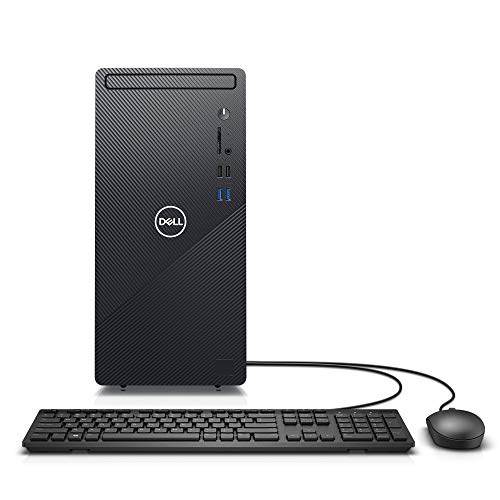
Dell Inspiron 3880 Desktop Computer Intel i5 10th Gen 12GB 512GB SSD

Skytech Crystal Gaming PC AMD Ryzen 7 5700 RTX 5060 32GB 1TB
The Details Behind The Selections
The Mac mini has always been Apple’s stealth desktop, and the M4 generation makes that argument stronger than ever. Inside a five-by-five-inch enclosure sits the M4 chip with a 10-core CPU and 10-core GPU, paired with 16GB of unified memory. Unified memory is shared across the CPU and GPU, which usually means faster handoffs when you’re juggling photos, video calls, and a dozen browser tabs.
For shoppers living in or curious about the Apple ecosystem, the front-and-back port layout is genuinely useful. Plug in a monitor, keyboard, and mouse, and the whole machine disappears behind your display. Compared to the GEEKOM IT12 below, this Mac mini trades Windows flexibility for macOS polish and stronger per-watt performance.
The Practical Payoff
- Five-by-five-inch footprint slides behind any monitor or onto a shelf.
- 16GB unified memory handles dozens of browser tabs without breaking a sweat.
- M4 GPU delivers smooth 4K video playback and light creative work.
- Front-and-back port design keeps cables accessible for daily plug-ins.
- Pairs naturally with iPhone and iPad for handoff and continuity features.
Things To Consider
- 256GB of storage fills up fast with Photos libraries and large projects.
- No dedicated graphics card means heavy 3D work is off the table.
- Display, keyboard, and mouse all require separate purchases.
Who It Suits Best
Home and small-office users who live inside macOS, value a near-silent desktop, and want something smaller than a hardcover book next to their monitor.
Where Another Pick Suits Better
Hardcore gamers and PC software loyalists should reach for the Skytech Crystal Gaming PC instead, since it ships with a dedicated RTX 5060 GPU.
If the base Mac mini felt tight at 256GB, this 512GB sibling removes that pinch without changing the size or shape. The same M4 chip with 10-core CPU and 10-core GPU drives the system, and 16GB of unified memory stays generous for daily tasks. Doubling internal storage matters more than people expect, especially when macOS itself plus a handful of apps can chew through 80GB on day one.
Compared to the first Mac mini on this list, you’re paying extra for breathing room, not raw speed. For families sharing photos and video projects, that headroom pays for itself over the life of the machine. The trade-off is the same: peripherals still aren’t included, and the chassis design hasn’t changed a millimeter.
What Earns Its Place
- 512GB SSD comfortably holds macOS, productivity apps, and a large photo library.
- Identical M4 performance to the 256GB model for video calls and everyday multitasking.
- Tiny chassis stays invisible on crowded desks or under monitors.
- Works smoothly with iPhone and iPad for shared files and notifications.
Worth Noting
- Costs more than the 256GB version for storage alone, with no extra CPU power.
- Display, keyboard, and mouse are still sold separately.
- RAM is not user-upgradable later, so plan accordingly.
Made For
Apple households storing sizable media libraries, side-project creators working in apps like Logic or Final Cut, and anyone who hates juggling external drives.
Consider Something Else When
Budget-focused shoppers on Windows should consider the HP Tower PC Intel i5-12500 8GB RAM 512GB SSD Bundle, which includes peripherals in the box.
The GEEKOM IT12 is for Windows shoppers who want Mac-mini-style compactness without leaving the PC ecosystem. An Intel i3-12300HE processor runs an eight-core, twelve-thread setup, paired with 16GB of RAM and a 256GB SSD. AV1 hardware decoding means streaming high-bitrate video uses less CPU, which translates to quieter fans and cooler cases during long movie nights.
For most desk workers handling spreadsheets, browsers, and Zoom calls, this little box keeps up without complaining. It won’t push triple-A games, and the integrated UHD graphics are best kept to 1080p displays. Stack it next to a small monitor and the entire footprint barely exceeds a paperback book.
Practical Pluses
- Eight-core Intel chip multitasks smoothly across browser, Office, and chat apps.
- AV1 hardware decoding delivers efficient 4K streaming with low heat output.
- 16GB RAM handles heavy browser tab loads without stuttering.
- Quiet enough for living-room or bedroom placement.
Trade Offs
- 256GB SSD fills quickly with modern games or project files.
- Integrated graphics cap serious gaming and 3D modeling.
- Wi-Fi reception depends heavily on placement behind monitors.
Right Fit For
Small-space dwellers, remote employees, and anyone running a Windows-based home office in a corner where a full tower would be too much.
Not Your Match When
Apple fans who already use iPhones and iPads will find the Mac mini M4 a more natural fit, with better cross-device handoff features.
The Mac mini M4 Pro is what happens when Apple decides a tiny desktop can also be a workstation. Inside that familiar five-by-five-inch frame sits the M4 Pro chip, a 12-core CPU and 16-core GPU combination that runs rings around the standard M4 in heavier workloads. The 24GB of unified memory and 512GB SSD make this the most generous base configuration in the mini lineup.
Where the standard M4 mini is fine for general use, this Pro variant opens up sustained video editing, multi-cam timelines, and serious photo batch processing. Compared to the 16GB models above, the extra memory headroom shows up most when running virtual machines or compiling code. For users who already know they’ll push their machine, this is the smarter long-term play.
Real-World Strengths
- 16-core GPU accelerates video rendering, 3D work, and AI-assisted apps.
- 24GB unified memory supports multitasking across heavy creative software.
- Same compact five-by-five-inch footprint as smaller Mac minis.
- 512GB SSD handles large project files without immediate external drive use.
- Strong thermal design keeps the chip cool under sustained loads.
Honest Caveats
- Costs noticeably more than the M4 versions, which may stretch the “inexpensive” label.
- Still requires separate monitor, keyboard, and mouse purchases.
Who Will Love This
Freelance video editors, indie developers, and music producers who want workstation muscle without the footprint of a full-sized Mac Pro tower.
A Better Fit Elsewhere
Casual home users shopping strictly on price will get more everyday value from the Mac mini M4 16GB 256GB pick earlier on this list.
The HP Tower PC arrives with something the Mac mini can’t claim: a complete setup in the box. Intel’s i5-12500 is a six-core processor that handles spreadsheets, research tabs, and Office documents without flinching. The package includes a wired keyboard and mouse plus Wi-Fi and Bluetooth, so the path from box to first login is genuinely short.
For parents setting up a homework station or first-year college students, that bundle value is hard to overstate. Windows 11 Home comes preinstalled, and 8GB of RAM covers school workloads. Power users will want more memory, but most households find 8GB workable for everyday productivity.
Positive Takeaways
- Six-core i5-12500 handles multitasking across Office, browsers, and Zoom.
- 512GB SSD boots Windows 11 quickly and stores plenty of school files.
- Included keyboard, mouse, Wi-Fi, and Bluetooth cut extra purchases.
- Tower form factor leaves room for future memory or storage upgrades.
- Full-size desktop ports handle multiple monitors and USB accessories with ease.
Points To Keep In Mind
- 8GB of RAM feels tight with dozens of browser tabs open at once.
- Tower chassis is larger than mini-PC options like the GEEKOM IT12.
- Integrated graphics limit any serious gaming or 3D work.
Perfect Match For
Students, first-time desktop shoppers, and home offices that want a turnkey Windows experience with everything in the box.
Look Elsewhere When
Apple ecosystem households will prefer the 2024 Mac mini M4 16GB 256GB, which offers better long-term macOS support and quieter operation.
The ProDesk 600 G6 in its small form factor is the kind of machine that quietly does its job for years. The Intel i5-10400F is a six-core, twelve-thread chip running at speeds up to 4.3GHz, with 16GB of DDR4 memory and a 256GB SSD. The “F” suffix means there’s no integrated graphics, so a discrete GPU is required for any display output, and shoppers should confirm that before buying.
For productivity-first users, the older 10th-generation silicon still handles browsers, Office, and remote meetings without complaint. Compared to the newer HP Tower PC reviewed earlier, this ProDesk offers more RAM out of the box but less storage. It’s a sensible office refresh pick for businesses standardizing on familiar hardware.
Useful Strengths
- 16GB of RAM keeps heavy multitasking smooth.
- Small form factor fits under monitors or beside printers without bulk.
- Six-core CPU handles demanding spreadsheet work and reports.
- Business-class chassis typically offers tool-less access for upgrades.
Less Ideal Details
- 10th-gen Intel silicon is several generations behind newer options.
- 256GB SSD may need supplementing for large media collections.
- The “F” chip lacks integrated graphics, requiring a discrete GPU.
Best Suited To
Office productivity setups running accounting software, browser-heavy workflows, or point-of-sale terminals where reliability matters more than cutting-edge specs.
Swap It Out When
Anyone prioritizing modern connectivity and Wi-Fi 6 should step up to the Dell Slim Desktop Intel Core Ultra 5-225, which uses newer Intel silicon.
Dell’s slim desktop leans into the newest Intel hardware available without going overboard on price. The Core Ultra 5-225 is part of Intel’s Series 2 lineup, which pairs CPU cores with a neural processing unit for on-device AI acceleration. 16GB of DDR5 memory and a 512GB SSD round out a setup that should age well over the next few OS cycles.
For multi-monitor home offices, the DisplayPort output supports up to one 4K display or four FHD screens with daisy-chain support on compatible monitors. Wi-Fi 6 and Bluetooth come standard, and a wired keyboard ships in the box. It’s a meaningful step forward from the HP ProDesk 600 G6 in both silicon and wireless speeds.
Noteworthy Benefits
- Intel Core Ultra silicon includes a built-in AI engine for supported apps.
- 16GB DDR5 memory is faster and more efficient than older DDR4 sticks.
- Wi-Fi 6 and Bluetooth deliver strong wireless performance out of the box.
- Daisy-chain DisplayPort support powers multi-monitor setups cleanly.
- 512GB SSD balances fast boot times with plenty of file space.
Soft Spots
- Intel UHD integrated graphics limit demanding creative workloads.
- Slim chassis restricts future GPU upgrades compared to full towers.
Who Should Grab It
Home offices running multiple monitors, productivity users who want newer Intel silicon, and small businesses planning to keep their hardware for several years.
Another Choice May Suit
Gamers wanting real graphics horsepower will be better served by the Skytech Crystal Gaming PC, which pairs an RTX 5060 with a Ryzen 7 CPU.
This HP 2026 desktop focuses on storage capacity without bloating the price. The same six-core Intel i5-12500 used in the earlier HP tower appears here, but with 16GB of RAM and a full 1TB SSD. That’s double the storage of most competing machines on this list, which matters for anyone storing large photo libraries, project archives, or video footage locally.
For households backing up years of photos or running a media server, 1TB changes the math. The 12-thread CPU design keeps multitasking responsive, and the SSD breathes life into older workflows that would crawl on a hard drive. The honest read is that this is the same general-purpose HP package as the earlier tower, just with more room to grow.
Useful Highlights
- 1TB SSD stores enormous photo, music, and document collections.
- 16GB RAM handles heavy multitasking across research tabs and Office apps.
- Six-core i5-12500 boosts up to 4.6GHz for burst-heavy workloads.
- SSD-based storage delivers faster boot and load times than spinning drives.
Factors To Consider
- Tower footprint is bulkier than mini-PC alternatives.
- Integrated graphics exclude serious gaming from the equation.
- Peripherals aren’t bundled, so display and input devices cost extra.
Built With In Mind
File hoarders, family photo archivists, and small-business owners who want plenty of local storage without paying for an external drive setup.
Skip It When
Users needing a tiny desk footprint should pivot to the GEEKOM IT12 Mini PC, which delivers similar office performance in a fraction of the space.
The Dell Inspiron 3880 sticks to the basics and does them well. Inside a familiar black tower sits a 10th-generation Intel i5 processor, 12GB of DDR4 memory, and a 512GB SSD running Windows 10 Pro. That Pro license is a quiet perk for households that need BitLocker encryption, Remote Desktop, or business-grade update controls.
For older family members upgrading from a slow laptop, this machine keeps the learning curve flat. The 10th-gen silicon is older than what’s in the HP and Dell picks above, but still capable for everyday browsing and Office work. Owners commonly report these towers running quietly through years of daily use.
Key Advantages
- Windows 10 Pro unlocks BitLocker and Remote Desktop out of the box.
- 12GB RAM is a step up from the typical 8GB budget configurations.
- 512GB SSD balances speed and storage for family photo collections.
- Familiar tower design is approachable for non-technical household members.
A Few Limitations
- 10th-gen Intel silicon is several generations behind current options.
- Windows 10 Pro reaches end of support on October 14, 2025, so a future OS upgrade is coming.
- No peripherals included, requiring separate keyboard, mouse, and display purchases.
The Right Fit
Budget-focused households, small offices needing Windows Pro features, and shoppers replacing an aging family PC who want straightforward setup.
Reach For A Different Pick When
Shoppers wanting the newest Intel hardware should consider the Dell Slim Desktop Intel Core Ultra 5-225, which ships with modern silicon and Windows 11 Home.
The Skytech Crystal is the only machine on this list with a dedicated GPU, and that fact alone puts it in a different category. An AMD Ryzen 7 5700 clocked at 3.7GHz with a 4.6GHz turbo boost drives eight cores and sixteen threads, paired with an NVIDIA RTX 5060 graphics card. Add 32GB of DDR4 memory, a 1TB NVMe SSD, and a 650W Gold-rated power supply, and the Crystal is a real gaming PC in a clean-looking case.
For gamers running modern titles at 1080p or 1440p, the RTX 5060 delivers ray tracing and DLSS support that integrated graphics can’t touch. Compared to the office-focused machines above, the Crystal costs more but plays an entirely different role. It’s the right pick for esports enthusiasts and creative users running GPU-accelerated apps.
The Upside
- RTX 5060 GPU handles modern games with ray tracing and DLSS support.
- 32GB DDR4 RAM is generous for streaming, gaming, and creative apps.
- 1TB NVMe SSD loads game levels and project files in seconds.
- 650W Gold PSU provides headroom for future component upgrades.
- Wi-Fi included so gamers don’t need a separate adapter.
- Ryzen 7 5700 handles both gaming and productivity multitasking with ease.
Where It Is Less Suited
- Tower footprint dwarfs every mini-PC option on this list.
- Costs noticeably more than productivity-focused alternatives.
- Higher power draw means louder cooling under sustained gaming loads.
Whose Shelf It Belongs On
Esports players, triple-A gamers, and content creators running GPU-accelerated software like Blender or DaVinci Resolve.
Where A Sibling Pick Shines
Casual users who only need browsers and Office will save money with the HP Tower PC Intel i5-12500 8GB RAM 512GB SSD Bundle, which handles daily work without the gaming markup.
Choosing The Right Inexpensive Desktop Pc For Your Needs
Processor Performance And Memory
The CPU, or central processing unit, is the brain of any desktop, and it matters more than any other component for everyday responsiveness. Most inexpensive desktop PCs use either Apple’s M4 silicon or Intel’s Core i5 chips, both of which handle documents, video calls, and dozens of browser tabs comfortably. RAM is the short-term workspace the CPU uses to juggle active apps. 8GB is workable, 16GB is comfortable, and 24GB or more gives creative apps room to breathe.
For shoppers comparing the Mac mini M4 to the HP Tower PC with i5-12500, the M4 generally feels faster in single tasks despite fewer cores, while the i5 wins on traditional multi-threaded workloads. Memory matters more than clock speed once you start running ten or more browser tabs alongside chat apps.
Storage Capacity And Type
SSDs, or solid-state drives, have effectively replaced hard drives in modern desktops, and the difference in speed is dramatic. A 256GB SSD feels restrictive once macOS, Windows, productivity apps, and family photos are installed. 512GB is the comfortable middle ground for most households, and 1TB makes sense for media hoarders or anyone editing video locally.
The HP 2026 desktop with 1TB SSD and the Skytech Crystal with 1TB NVMe both solve the storage question without requiring external drives. NVMe is a faster SSD interface that connects directly to the motherboard for quicker reads and writes.
Form Factor And Connectivity
Mini PCs like the Mac mini and GEEKOM IT12 measure roughly five inches square and work beautifully behind monitors or on crowded desks. Full-size towers like the HP and Dell models offer easier future upgrades and more ports, but they demand more space. Slim desktops like the Dell ECS1250 split the difference, fitting wider monitors while leaving room for a dedicated GPU in some configurations.
Connectivity varies widely: Wi-Fi 6 is the modern wireless standard, Bluetooth handles peripherals, and DisplayPort or HDMI outputs determine how many monitors you can run. For multi-monitor home offices, the Dell Slim Desktop’s DisplayPort daisy-chain support is a quiet but meaningful advantage.
Key Considerations Across These Picks
Common Shopping Slip Ups
The most frequent mistake is choosing a machine based on storage alone, then realizing the RAM is too tight for real workflows. Shoppers also underestimate how much space macOS or Windows takes on day one, which makes 256GB configs feel cramped faster than expected. Another common trap is ignoring the “F” suffix on Intel chips, which means no integrated graphics and requires a discrete GPU that may not be included.
What The Higher Tier Buys
Stepping up to the Mac mini M4 Pro adds a 16-core GPU and 24GB of memory, which directly translates to faster video renders and smoother creative workflows. The Skytech Crystal jumps much further with a dedicated RTX 5060 graphics card, opening the door to actual gaming and GPU-accelerated creative apps. Higher tiers also typically bring newer wireless standards like Wi-Fi 6 and faster DDR5 memory, both of which extend the useful life of the machine by several years.
Frequently Asked Questions
What Is The Best Inexpensive Desktop Pc For Students?
The HP Tower PC Intel i5-12500 8GB RAM 512GB SSD Bundle is a strong match because it ships with a keyboard, mouse, Wi-Fi, and Windows 11 ready to go. Students avoid the extra accessory shopping that bare-bones machines require.
Can Inexpensive Desktop Pcs Handle Video Calls?
Yes, every machine on this list runs Zoom, Teams, and Google Meet comfortably. The six-core Intel chips in the HP and Dell models and Apple’s M4 silicon all include hardware acceleration for video encoding, which keeps video calls smooth without taxing the rest of the system.
How Much RAM Do I Really Need In An Inexpensive Desktop Pc?
For typical browsing, email, and Office work, 8GB works but feels tight with many browser tabs open. 16GB is the sweet spot for most households and is standard in the Mac mini, GEEKOM IT12, HP ProDesk 600 G6, Dell Slim Desktop, HP 2026 desktop, and Skytech Crystal.
Are Mini Pcs Powerful Enough For Daily Use?
Modern mini PCs like the Mac mini M4 and GEEKOM IT12 handle daily productivity, streaming, and even light creative work without complaint. Their limitation shows up in serious gaming or 3D rendering, where a dedicated GPU is required.
Is It Worth Buying A Desktop With Windows 10 Pro In 2026?
Windows 10 Pro reaches end of support on October 14, 2025, which means the Dell Inspiron 3880 will require a free upgrade to Windows 11 or a different OS at some point. Pro features like BitLocker and Remote Desktop still add value for households and small offices that need them.
Final Verdict
The best inexpensive desktop pc for your situation depends on which trade-offs matter most. Mac households get the most from the 2024 Mac mini M4, while Windows loyalists will appreciate the turnkey HP Tower PC bundle or the future-ready Dell Slim Desktop. Gamers and creative users need the dedicated graphics of the Skytech Crystal. Match the machine to your real workflow, and any of these ten picks will deliver years of reliable everyday use.