Gaming on a tight budget used to mean compromise at every corner: blurry screens, choppy frame rates, fans that sounded like a vacuum cleaner. I went looking for laptops that actually deliver playable performance without forcing shoppers to raid the savings account. The six models below cover different angles of the budget gaming space, from dedicated RTX rigs to lean productivity-first machines that can still handle casual play after work.
The Leading Options At A Glance

KAIGERR Gaming Laptop, 1TB NVMe SSD 16GB RAM Laptop Computer with AMD Ryzen 7 5825U
HP OmniBook 5 16 inch Next Gen AI PC, 2K Display, Snapdragon X X1-26-100, 16 GB RAM
HP Victus 15.6″ Full HD 144Hz Gaming Laptop, Intel Core i5-12450H, NVIDIA GeForce RTX 3050, 16GB RAM

Acer Nitro 5 Gaming Laptop, 9th Gen Intel Core i5-9300H, NVIDIA GeForce GTX 1650, 15.6″ Full HD IPS Display
HP OmniBook 3 14 inch Next Gen AI PC, 2K Display, Snapdragon X X1-26-100, 16 GB RAM
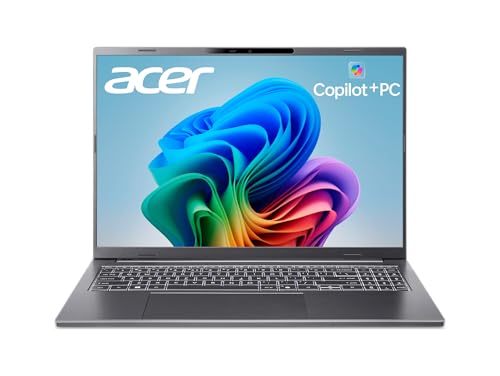
acer Aspire 16 AI Copilot+ PC, 16″ WUXGA 120Hz Multi-Touch Display, Snapdragon X X1-26-100
The KAIGERR lands first because it asks the smallest possible ask of a gaming laptop wallet while still shipping hardware that matters. An AMD Ryzen 7 5825U, an 8-core, 16-thread chip (meaning it can handle up to sixteen background tasks in parallel) that boosts up to 4.5GHz, sits at the heart of the machine, paired with 16GB of RAM and a generous 1TB NVMe SSD. In a home office or dorm scenario, that translates to a snappy system that boots in seconds, juggles dozens of browser tabs, and keeps a few indie or esports titles running smoothly.
The integrated Radeon RX Vega 8 graphics handle casual and older games well, and the 15.6-inch display gives a familiar canvas for both spreadsheets and side-scrollers. Where the HP Victus later in this list leans into discrete graphics, KAIGERR leans into CPU horsepower and storage space, a useful trade for anyone who edits video or runs multiple apps alongside light play.
Everyday Perks
- 1TB NVMe SSD leaves room for a sizable Steam library without a second drive.
- 16GB of RAM means modern games and a Discord chat can coexist without stuttering.
- The 8-core Ryzen 7 keeps compile times and streaming workflows responsive.
- Wi-Fi 6 support delivers steady online play on a crowded home network.
- 15.6-inch form factor stays portable enough for couch or classroom use.
Trade Offs
- Integrated Radeon graphics cap you out of demanding AAA titles on high settings.
- Build and thermals are less refined than the HP Victus, so a cooling pad is wise for long sessions.
- Display refresh rate is unspecified, meaning you should expect a standard 60Hz panel.
Key Specs
Best Suited To
Students and home-office shoppers who want real CPU muscle and tons of storage without paying for a dedicated GPU.
A Better Fit Elsewhere
Pick the HP Victus instead if running modern AAA games at 60+ frames per second is the actual goal, since it ships with a discrete RTX 3050.
The HP OmniBook 5 flips the script entirely: instead of chasing frame rates, it chases stamina. Powered by a Qualcomm Snapdragon X X1-26-100 processor, an ARM-based chip (designed for efficiency over raw throughput), with 16GB of RAM and a 512GB SSD, the system prioritises battery life and silent operation over graphics horsepower. In a commuter scenario, that means leaving the charger brick at home and trusting the laptop to make it through a full day of classes, emails, and a few rounds of casual gaming.
The 2K display on a 16-inch chassis is a generous canvas for reading, streaming, and light creative work. Where the KAIGERR leans CPU-first for traditional gaming, the OmniBook leans into the new generation of ARM-based efficiency, useful for shoppers who treat gaming as a secondary task.
Reasons It Performs
- Snapdragon X efficiency targets long unplugged sessions.
- 16-inch 2K panel gives sharp text and detailed video.
- 16GB RAM handles browser-heavy workflows without choking.
- Glacier Silver finish looks polished in a meeting room.
Points To Keep In Mind
- Adreno GPU and ARM architecture limit compatibility with many traditional PC games.
- Game library access depends on emulated or ARM-native software.
- 512GB storage fills quickly with a mixed media and game collection.
Right Fit For
Frequent travelers and remote workers who mostly game on the side and want a machine that lasts through long days away from outlets.
Look Elsewhere When
Choose the Acer Nitro 5 instead if the priority is playing a wide library of traditional Windows games on a budget.
The HP Victus is the first laptop in this roundup that genuinely behaves like a gaming machine. The combination of a 12th-gen Intel Core i5-12450H processor and an NVIDIA GeForce RTX 3050 discrete GPU (a dedicated graphics chip with its own 6GB of GDDR6 video memory) pushes the system into territory where modern AAA games actually run. The 144Hz Full HD display is the kind of spec you usually see on pricier rigs, and it makes a tangible difference in fast-paced shooters.
Where the KAIGERR earlier in this list relies on integrated graphics, the Victus commits to real gaming credentials. For a shopper whose priority is frame rate and visual fidelity, this is the cleanest fit in the bunch.
What Earns Its Place
- RTX 3050 GPU handles ray-traced lighting and modern AAA settings.
- 144Hz display keeps motion smooth in competitive games.
- 1TB PCIe SSD swallows a sizeable library with quick load times.
- Backlit keyboard helps late-night sessions in dim rooms.
- Wi-Fi 6 keeps online play responsive.
- Windows 11 Pro gives extra management and security features.
Honest Caveats
- Performance Blue chassis shows fingerprint smudges easily.
- RTX 3050 is entry-level for the RTX family, so 4K gaming stays out of reach.
Feature Snapshot
Made For
Gamers who want the most dedicated graphics horsepower in this roundup and care about smooth frame rates in competitive titles.
Consider Something Else When
The Acer Aspire 16 makes more sense if touchscreen input and Wi-Fi 7 connectivity matter more than raw GPU power.
The Acer Nitro 5 AN515-54-5812 has been a fixture in the budget gaming scene for years, and this configuration explains why it stuck around. A 9th-gen Intel Core i5-9300H processor and an NVIDIA GeForce GTX 1650 GPU (an older but still capable dedicated graphics card with 4GB of GDDR5 memory) deliver playable frame rates in esports and many older AAA titles, while the 15.6-inch Full HD IPS panel offers wide viewing angles for couch co-op or shared viewing.
The Nitro’s longevity means a robust aftermarket of accessories, replacement parts, and troubleshooting guides. Compared to the HP Victus, this is an older architecture, but the trade-off is access to a well-documented platform.
The Good Stuff
- GTX 1650 with 4GB GDDR5 handles esports and older titles comfortably.
- IPS display gives consistent colour from wide angles.
- Backlit keyboard supports late-night play.
- Wi-Fi 6 keeps multiplayer connections steady.
- Established platform with abundant community support.
Worth Noting
- 9th-gen Intel chip trails newer processors in efficiency and speed.
- 8GB RAM is the minimum for modern games; 16GB would be more comfortable.
- 256GB SSD fills quickly, so external storage or a drive upgrade is likely.
- GTX 1650 lacks ray-tracing support found on the RTX line.
Who It Suits Best
First-time gaming laptop shoppers who want a proven platform and primarily play esports, indie, or older AAA titles.
Swap It Out When
Pick the HP Victus instead if running newer games with ray tracing on matters, since its RTX 3050 is a clear step up.
The HP OmniBook 3 shrinks the Snapdragon X formula into a 14-inch chassis, which makes it the most portable entry on this list. With the same X1-26-100 processor, 16GB of RAM, and 512GB SSD as its larger sibling, the laptop prioritises efficiency over graphics muscle. For a student carrying it between classes, or a remote worker hopping between cafés, the lighter footprint pays off daily.
The 2K resolution on a 14-inch panel yields a sharper pixel density than larger screens at the same resolution. Compared to the 16-inch OmniBook, this version trades screen real estate for portability, a fair swap for commuters.
The Practical Payoff
- 14-inch form factor slips easily into a backpack or tote.
- Snapdragon X efficiency extends unplugged runtime.
- 2K display delivers crisp text and detailed visuals.
- 16GB RAM keeps multitasking smooth for typical productivity loads.
- Glacier Silver finish looks refined in any setting.
Small Caveats
- Smaller screen means less immersion for gaming and media.
- Adreno integrated graphics restrict traditional PC gaming compatibility.
- 512GB storage runs thin with large media libraries.
Built With In Mind
Students and mobile professionals who want the lightest machine in this roundup and game only casually on the side.
Not Your Match When
Pick the Acer Nitro 5 if a wider library of traditional Windows games matters more than portability.
The Acer Aspire 16 AI Copilot+ PC is the most feature-stacked Snapdragon machine on this list. A WUXGA 120Hz multi-touch display (WUXGA is a 1920×1200 resolution that adds vertical space over standard 1080p) supports finger input and stylus interaction, while the integrated NPU (Neural Processing Unit) rated at 45 TOPS (trillions of operations per second) accelerates on-device AI tasks like background blur and noise suppression. Wi-Fi 7 rounds out the connectivity story, future-proofing the laptop for next-generation routers.
For shoppers splitting time between creative apps, casual play, and productivity, the Aspire 16’s feature density is genuinely useful. The 16GB LPDDR5X memory (faster and more efficient than older DDR4) and 512GB PCIe Gen 4 SSD (a faster storage standard than PCIe Gen 3) keep the system responsive. Compared to the HP OmniBook 5, the Aspire adds touch and Wi-Fi 7.
Standout Benefits
- 120Hz touch display supports pen input for creative workflows.
- Wi-Fi 7 readiness covers upcoming router upgrades.
- 45 TOPS NPU speeds AI-assisted productivity features.
- 16GB LPDDR5X memory improves responsiveness over older RAM types.
- 16-inch WUXGA panel adds vertical workspace over standard 1080p screens.
Potential Drawbacks
- Adreno GPU and ARM architecture limit traditional Windows game compatibility.
- 512GB storage can feel tight without an external drive.
Feature Card
Who Will Love This
Hybrid workers and creatives who want a touchscreen, modern wireless, and AI features in a single 16-inch package.
Where A Sibling Pick Shines
Grab the HP Victus if the priority is running traditional AAA games, since its RTX 3050 GPU offers a real graphics advantage.
## What Matters Most Before Choosing Inexpensive Gaming Laptops### CPU and GPU PairingThe heart of any gaming laptop is the pairing between processor and graphics chip. A strong CPU (central processing unit) keeps the system responsive across tasks, while a dedicated GPU (graphics processing unit) is what actually renders modern games at playable frame rates. Integrated graphics, like the Radeon Vega 8 in the KAIGERR or the Adreno chips in the Snapdragon models, can handle casual and indie titles but struggle with demanding AAA games. The HP Victus and Acer Nitro 5 are the two picks here that pair a discrete GPU with a dedicated CPU for real gaming credentials.### Display Refresh Rate and ResolutionRefresh rate, measured in hertz (Hz), tells you how many times per second the screen updates, and higher numbers mean smoother motion. A 60Hz panel is fine for slow-paced games, but a 144Hz display (like the HP Victus) gives a noticeable edge in fast-paced shooters. Resolution affects sharpness, and 2K or WUXGA panels deliver crisper text and more detailed visuals than standard 1080p screens.### Storage and Memory ConfigurationRAM (random access memory) lets the system juggle multiple apps at once, and 16GB is the comfortable modern baseline. Storage type matters too: NVMe SSDs (solid-state drives that connect directly to the motherboard for faster throughput) load games dramatically faster than older hard drives. The KAIGERR’s 1TB drive is generous, while the 512GB options in the Snapdragon models leave less headroom for large game installs.### Battery Life vs PerformanceTraditional gaming laptops with discrete GPUs tend to drain batteries faster than ARM-based efficiency machines. The Snapdragon X models (HP OmniBook 5, OmniBook 3, Acer Aspire 16) lean toward longer unplugged runtime at the cost of graphics muscle. Choosing between them comes down to whether all-day battery or high frame rates matters more.## Key Considerations Across These Picks### Pitfalls Shoppers HitThe most common mistake in this category is buying a laptop with integrated graphics and expecting modern AAA performance, then wondering why frame rates tank. Always check whether the GPU is discrete or integrated before assuming a laptop can game. Another trap is underestimating storage: AAA titles regularly exceed 50GB each, and a 256GB or 512GB drive fills up fast. Plan for either a generous internal SSD or an external drive.### Why Top Tier Costs MoreThe step from a budget RTX 3050 system to a high-end RTX 4070 or 4080 laptop often doubles or triples the price, and the gains show up in three places: higher frame rates at the same settings, better ray-tracing performance, and larger memory buses for higher-resolution textures. For shoppers playing esports and indie titles, the budget tier delivers plenty. Anyone targeting modern AAA games at high settings will feel the gap quickly and benefit from the upgrade.