A sluggish boot, a full file library, or a game that won’t load fast enough, internal storage defines how a PC actually feels day to day. The right drive turns an aging desktop into a responsive machine, gives a creative workstation room to breathe, and gives gamers the load times they expect. I pulled together ten solid internal storage picks across SATA and NVMe, from a familiar SATA workhorse to newer NVMe options with graphene cooling and 3D NAND TLC memory, so builders and upgraders can match capacity, speed, and form factor to the build they actually have.
A Snapshot Of The Selections

Samsung SSD 870 EVO SATA III 2.5″ 1TB (560MB/s)
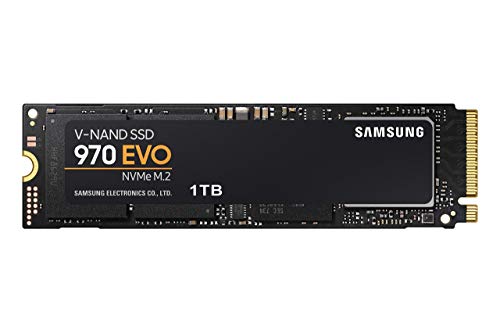
Samsung 970 EVO SSD 1TB M.2 NVMe (V-NAND)

Crucial BX500 240GB SATA 2.5″ SSD (540MB/s)

Ediloca EN600 PRO SSD 256GB NVMe M.2 2280

Ediloca EN600 PRO SSD 512GB NVMe M.2 2280

Ediloca EN600 PRO SSD 1TB NVMe M.2 2280

Ediloca EN600 PRO SSD 2TB NVMe M.2 2280

fanxiang S101 1TB SATA SSD 2.5″ (520MB/s)
fanxiang S101 512GB SATA SSD 2.5″

fanxiang S101 256GB SATA SSD 2.5″
Meet The Standout Selections
The 870 EVO is the SATA drive I’d hand to a friend who just wants their old tower or laptop to feel new again. It uses a SATA III interface (the standard 2.5-inch form factor, the same shape as a laptop hard drive) and pushes read speeds up to 560MB/s, which is essentially the ceiling for the SATA bus. For someone moving off a mechanical hard drive, the jump is dramatic: apps open faster, multi-file folders don’t stall, and the system boots in seconds.
Unlike the NVMe picks further down this list, the 870 EVO doesn’t chase raw bandwidth. It chases maturity and broad compatibility, fitting into just about any laptop or desktop that accepts a 2.5-inch SATA drive. Most owners I read about find installation as simple as sliding the drive into a caddy and cloning their old system over.
Real-World Strengths
- SATA III 2.5-inch form factor fits older laptops and desktops where NVMe slots aren’t available.
- Up to 560MB/s read speed saturates the SATA bus, so it never feels bottlenecked by the interface.
- 1TB capacity covers the operating system, productivity software, and a sizeable game library.
- Broad compatibility means it tends to work in machines from the last decade without BIOS fuss.
- Mature controller and firmware make it a familiar choice for first-time upgraders.
Things To Consider
- SATA bandwidth tops out well below NVMe speeds, so heavy video editing and large game loads won’t feel as snappy as a PCIe Gen3 drive.
- Owners commonly report that sustained writes can dip once the SLC (single-level cell) cache is exhausted during very large file transfers.
Built With In Mind
Anyone refreshing an older laptop or desktop with a SATA bay, especially students, remote workers, and casual gamers who don’t need cutting-edge bandwidth.
A Better Fit Elsewhere
If the build has a free M.2 slot and the workload includes large media files, the Samsung 970 EVO SSD 1TB is the faster NVMe choice.
Where the 870 EVO sits comfortably inside the SATA envelope, the 970 EVO bursts past it. This is an M.2 2280 NVMe drive (the small gumstick-sized card that plugs straight into the motherboard, no cables needed) using Samsung’s V-NAND technology (vertical-stacked flash memory that packs more cells into a tight footprint). Sequential reads are rated up to 3,500MB/s and sequential writes up to 2,500MB/s, which puts it well ahead of the SATA options earlier on this list.
Creators moving large raw photo sets, video editors scrubbing 4K timelines, and gamers who want maps to load before their coffee gets cold will feel the difference immediately. The Phoenix controller and Intelligent TurboWrite buffer help maintain that throughput during real workloads, not just ideal benchmarks.
Standout Benefits
- Up to 3,500MB/s read speed makes it roughly six times faster than the SATA 870 EVO in sequential transfers.
- M.2 2280 form factor keeps cabling minimal and frees up the 2.5-inch bay for additional storage.
- 1TB capacity is enough to host an OS, multiple games, and working project files on the same drive.
- V-NAND design supports solid endurance for sustained creative workloads.
Trade Offs
- Requires an M.2 NVMe-capable slot, so older motherboards without one can’t take advantage of the speed.
- High sustained workloads can push the controller warm; a small heatsink is often recommended for tight cases.
Made For
Power users with modern motherboards who want a single fast drive that handles gaming, content creation, and multitasking without compromise.
Consider Something Else When
For a budget-friendly NVMe upgrade with similar Gen3 throughput, the Ediloca EN600 PRO SSD 1TB is a sensible alternative.
The BX500 is the drive I’d suggest for a lean build where every dollar counts. It’s a 2.5-inch SATA SSD with 3D NAND (a layered flash architecture that stacks cells vertically for denser, more reliable storage) and reads up to 540MB/s. At 240GB, the capacity is modest, but that’s the trade-off that keeps it accessible for anyone building a basic system or reviving an aging PC on a tight budget.
Compare that to the 1TB fanxiang S101 later on this list, and the BX500 trades raw capacity for a smaller price tag. For a fresh Windows install plus a handful of essential programs, 240GB is just enough. Heavy media libraries belong elsewhere.
What Pays Off
- Low entry cost makes it one of the most approachable ways to retire a mechanical hard drive.
- SATA 2.5-inch form factor works in laptops and desktops alike.
- 540MB/s read speed still represents a major jump over spinning-platter storage.
Softer Spots
- 240GB fills up quickly once games, photos, and video projects get involved.
- Endurance ratings tend to be lower than higher-tier SATA drives, so heavy write workloads are best avoided.
- Owners commonly report needing a fresh drive sled or SATA cable for older desktops.
Who It Suits Best
Students, first-time builders, and anyone reviving a legacy machine who needs a small, affordable boot drive.
Skip It When
If more breathing room matters, the fanxiang S101 512GB SATA SSD offers double the capacity in the same form factor.
The 256GB EN600 PRO is the smallest capacity in the Ediloca line, and that suits a particular kind of build. It uses a PCIe 3.0 x4 NVMe interface, which is the same generation and lane count as the faster 970 EVO above, but tops out around 1,400MB/s. For a compact laptop or a small-form-factor PC where space matters, that’s plenty.
It still ships with 3D NAND TLC flash (triple-level cell memory that stores three bits per cell, balancing capacity and endurance) and a graphene cooling sticker to manage thermals. That sticker is a small but useful touch for slim chassis where airflow is tight.
Useful Highlights
- M.2 2280 footprint slips into thin laptops and Mini-ITX boards without crowding other components.
- Graphene cooling sticker helps the drive stay thermally stable under short bursts of heavy activity.
- Up to 1,400MB/s read speed beats any SATA drive for quick boot and app launches.
- SLC cache design accelerates short bursts of write activity for snappier everyday feel.
Worth Noting
- 256GB fills fast once game installs and project folders start piling up.
- Sustained write performance drops once the SLC cache is filled, particularly during large media transfers.
Right Fit For
Compact PC builders and ultrabook upgraders who want NVMe speed without the bulk of a 1TB drive.
Look Elsewhere When
For more room at a similar price tier, the Ediloca EN600 PRO SSD 512GB doubles capacity and pushes higher peak throughput.
Stepping up to 512GB in the EN600 PRO family lifts the peak read speed to around 3,000MB/s. That’s a meaningful jump from the 256GB sibling, and it makes this drive a sweet spot for a lot of mainstream builds. 512GB is enough for the operating system, productivity apps, and a healthy rotation of games without constant reinstalls.
The same PCIe Gen3 x4 interface and graphene cooling sticker carry over, so thermals behave consistently across capacities. For a builder comparing this against the 256GB EN600 PRO above, the real question is whether the larger capacity and extra throughput justify the spend.
Practical Advantages
- Up to 3,000MB/s read speed approaches the upper limit of PCIe Gen3 x4 in real workloads.
- 512GB capacity covers an OS plus a full game library for most casual players.
- 3D NAND TLC flash supports solid write endurance for typical productivity and gaming sessions.
- Graphene cooling sticker keeps thermals steady inside compact cases.
Minor Gripes
- Heavier sustained writes still slow once the SLC cache runs out, as is common for consumer TLC drives.
- No DRAM cache (a small amount of high-speed memory on the drive that speeds up random reads and writes), which can affect random-write performance under heavy multitasking.
Best Suited To
Gamers and home creators who want NVMe speed and enough capacity for a primary game drive without jumping straight to 1TB.
Reach For A Different Pick When
If maximum sequential throughput is the priority, the Samsung 970 EVO SSD 1TB remains the faster Gen3 NVMe option.
The 1TB EN600 PRO is where this product line really settles into its stride. Sequential reads climb to about 3,200MB/s, capacity hits a comfortable terabyte, and the form factor stays the same compact M.2 2280 stick. For most mainstream PC builds, this is the capacity tier that finally stops feeling tight.
Creators running photo libraries, gamers juggling modern AAA installs, and anyone replacing a 1TB hard drive will find the upgrade transformative. Compared to the 512GB sibling, there’s more room to breathe, and the peak speed ticks up another notch.
Everyday Wins
- 1TB capacity handles an OS, productivity suite, and a deep game backlog on one drive.
- Up to 3,200MB/s read speed keeps load times short across modern titles and large project files.
- SLC cache design accelerates short burst writes for typical desktop activity.
- Graphene cooling sticker helps in tighter cases where airflow is limited.
Points To Note
- Endurance and sustained write behavior trail premium TLC drives under constant heavy workloads.
- Owners commonly report that a small motherboard heatsink is a sensible add-on for warm-running builds.
Who Should Grab It
Mainstream PC builders, content creators, and gamers who want a roomy NVMe primary drive without paying for flagship speeds.
Swap It Out When
If the priority is absolute top-tier sequential throughput on a Samsung controller, the Samsung 970 EVO SSD 1TB still pulls ahead.
Two terabytes is the roomy end of this lineup, and it’s the option for someone who treats storage like furniture: once it’s in, they don’t want to think about it. Read speeds hold around 3,200MB/s, the same as the 1TB sibling, so the upgrade is purely about capacity headroom.
Game libraries have grown fast in recent years, with several modern installs crossing 100GB each. A 2TB primary drive means fewer shuffles between installed titles. The PCIe Gen3 x4 interface keeps it broadly compatible with most motherboards from the last several years, and the graphene cooling sticker stays useful as the drive works harder.
The Value In It
- 2TB capacity swallows a deep game library or a sizeable media archive without partition juggling.
- Up to 3,200MB/s read speed keeps load behavior consistent with the smaller EN600 PRO siblings.
- M.2 2280 stick form factor means no extra cables or drive bays.
- 3D NAND TLC flash supports reasonable endurance for mixed workloads.
A Few Limitations
- At 2TB, thermal output under sustained load is higher, and airflow inside the case matters more.
- The price-per-GB advantage over the 1TB variant depends on current pricing tiers, so it’s worth comparing both.
Whose Shelf It Belongs On
Gamers with large modern libraries, media collectors, and creators storing active project files who want to set-and-forget their primary drive.
Where A Sibling Pick Shines
If 2TB feels like overkill, the Ediloca EN600 PRO SSD 1TB delivers most of the same speed at half the capacity.
The S101 1TB is fanxiang’s mainstream SATA option, and it’s a tidy upgrade path for laptops and desktops that need a familiar 2.5-inch drive. Reads hit up to 520MB/s over SATA III 6Gb/s (the current SATA standard, capable of roughly 600MB/s before overhead), which keeps pace with other SATA SSDs on this list. 3D NAND TLC flash supports solid everyday endurance.
For anyone whose laptop only takes SATA drives, this is one of the roomier options without crossing into NVMe territory. Compared to the Samsung 870 EVO above, it lands in a similar role with slightly lower peak read speed.
A Few Highlights
- 1TB capacity is generous for a SATA-only laptop or desktop upgrade.
- Up to 520MB/s read speed makes boot and app launches feel noticeably snappier than a hard drive.
- 3D NAND TLC supports better write longevity than QLC-based budget drives.
- Standard 2.5-inch form factor fits most laptop bays and desktop caddies.
Points To Keep In Mind
- Like all SATA drives, it tops out well below NVMe speeds for sequential workloads.
- Cloning software is often a separate purchase, which first-time upgraders sometimes overlook.
The Right Fit
Laptop and desktop users refreshing older hardware with a roomy SATA SSD and no need for NVMe throughput.
A Better Fit Elsewhere
If the motherboard has an M.2 slot free and faster load times matter, the Ediloca EN600 PRO SSD 1TB NVMe is the roomier speed upgrade.
The 512GB S101 is the middle child of the fanxiang SATA family. Read speeds land around 500MB/s, capacity is enough for an OS and a sensible app collection, and the 2.5-inch form factor works in older hardware that doesn’t accept NVMe. It’s a comfortable pick for general home and office use.
Compared to the 256GB sibling, doubling the capacity is meaningful for anyone who keeps a few games or a photo library locally. The trade-off shows up in cost, not behavior, since both drives use the same TLC NAND.
Positive Points
- 512GB is a comfortable balance between price and capacity for typical home use.
- Up to 500MB/s read speed keeps the everyday experience responsive.
- TLC flash supports more write cycles than cheaper QLC drives.
- 2.5-inch SATA compatibility covers a wide range of older laptops and prebuilt desktops.
Small Caveats
- Not suited for users who want NVMe-class sequential speed.
- Owners commonly report needing a slim 7mm spacer for ultra-thin laptops that take 2.5-inch drives.
Perfect Match For
Students and home office setups replacing an aging hard drive with reliable SATA capacity at a sensible size.
Another Choice May Suit
For an even leaner budget and smaller footprint, the fanxiang S101 256GB SATA SSD handles basic boot-drive needs.
Closing out the list, the 256GB S101 is the smallest SATA option in this roundup. Read speeds reach around 500MB/s, the form factor is the familiar 2.5-inch SATA stick, and 3D NAND TLC handles the basics without fuss. It targets legacy machines where capacity needs are modest.
For someone running a lightweight Linux setup, a media PC, or an older office desktop that just needs to boot quickly, this is a sensible pick. The honest read is that 256GB feels tight for a modern Windows install plus apps, but for a focused single-purpose machine, it works.
What It Does Well
- Compact 256GB capacity fits minimal-boots, kiosks, and single-purpose legacy PCs.
- Up to 500MB/s read speed is a major upgrade over any mechanical hard drive.
- TLC NAND gives better write endurance than budget QLC alternatives.
- Standard SATA III interface means broad compatibility with aging hardware.
Areas To Watch
- 256GB is restrictive for modern Windows installations with regular updates.
- Owners commonly report that heavy write activity triggers slowdowns once the drive fills past 80% capacity.
Who Will Love This
Light users, retro PC enthusiasts, and anyone reviving a legacy system that needs a small, reliable boot drive.
Not Your Match When
For more headroom in the same SATA family, the fanxiang S101 512GB or 1TB versions make sense.
Picking The Right Drive For The Build
Form Factor And Interface First
The form factor and interface (the connector type and protocol the drive speaks to the motherboard) decide more than any spec sheet whether a drive will actually fit. A 2.5-inch SATA drive slides into laptop bays and older desktop caddies. An M.2 2280 NVMe stick plugs directly into a motherboard slot with no cables. Before anything else, check which the system supports. Picking an NVMe drive for a SATA-only laptop, or vice versa, is the most common reason a new drive goes unused.
Capacity And Real Workloads
Raw gigabytes sound simple, but they map to specific scenarios. 240GB to 256GB suits a lean OS-only setup. 512GB handles an operating system plus a modest game library. 1TB is the comfortable mainstream sweet spot. 2TB fits game collectors, video editors, and anyone who hates deleting files. For most home builders, 1TB hits the balance between room to grow and not paying for unused space.
Speed Vs Interface Ceiling
SATA III caps around 550MB/s to 600MB/s in practice, so SATA drives will never go faster regardless of marketing numbers. NVMe drives running over PCIe Gen3 x4 push much higher, and PCIe Gen4 pushes even further. The trade-off is that NVMe drives cost more per gigabyte, and not every workload actually feels the difference. Browsing, office work, and most gaming benefit from NVMe but won’t always demand it. Sustained video editing, large file transfers, and heavy multitasking are where NVMe starts earning its keep.
Endurance And NAND Type
TLC NAND (triple-level cell) is the most common flash type in consumer SSDs today, storing three bits per cell and balancing capacity with reasonable endurance. QLC (quad-level cell, four bits per cell) packs more data per cell but wears faster under heavy writes. For most users TLC is the right call. Heavy write workloads benefit from drives with higher terabytes-written ratings, but those are uncommon in mainstream picks like the ones covered here.
What To Watch Before You Click Buy
Pitfalls Shoppers Hit
The most common mistake is assuming every drive fits every machine. Form factor and interface have to match the motherboard or laptop. Another is underestimating how fast modern operating systems fill a drive: a fresh Windows install eats a sizable chunk on its own. Finally, ignoring cooling in compact cases can cause thermal throttling, where the drive intentionally slows itself to avoid overheating, which quietly kills performance even on a fast NVMe stick.
Where The Extra Money Goes
Higher-tier drives typically bring faster controllers, more on-board DRAM (which speeds up random reads and writes), better thermal designs, and stronger endurance ratings. For a casual home build, those upgrades may not matter much. For creators moving hundreds of gigabytes a day, or gamers who want consistently fast load behavior across long sessions, the extra spend on a flagship drive translates into real, felt gains.